Stored XSS: NonPrivileged User to Anyone Using QR Code
A non-privileged user could inject a stored cross-site scripting payload into page styling fields, which executed when the page was viewed. The impact was initially self-only, but the researcher found that scanning a QR code for the page caused the payload to execute for anyone who scanned it.

sapt.medium.com
Published on sapt.medium.com
Cybersecurity
The full write-up lives on its author's site
It belongs to its author, so we link to it rather than copy it. The other two tabs are our own rewrites, checked against it.
Context
This write-up describes a stored cross-site scripting (XSS) finding on a private Bugcrowd program. The researcher, writing as part of the BUG XS team, reports it as a P2 severity issue reached through a QR code feature. The affected asset is a subdomain of the program, and the report does not name the host or the product.
The feature in question lets a user style a page of the app by adding different features and styles. The page is built from sections such as "Name" and "A little about yourself", and the researcher refers to an "Add Content" action that saves the page.
Setup
The report does not describe any particular account setup, roles, tools or versions. The work was done against a private Bugcrowd program, and the researcher's own account was enough to reach the styling feature. The researcher's own account was enough to reach the styling feature, and the sections accepted free text.
Finding it
Before the walkthrough, the report gives a short definition of stored XSS: it occurs when user input is stored on the target server, for example in a database, a message forum, a visitor log or a comment field, and is later rendered back to other users. The researcher also notes that with HTML5 and related browser technologies a payload can be stored in the victim's browser, such as in an HTML5 database, without ever being sent to the server.
On the subdomain, the researcher opened the page styling feature and looked at the individual sections of the page.
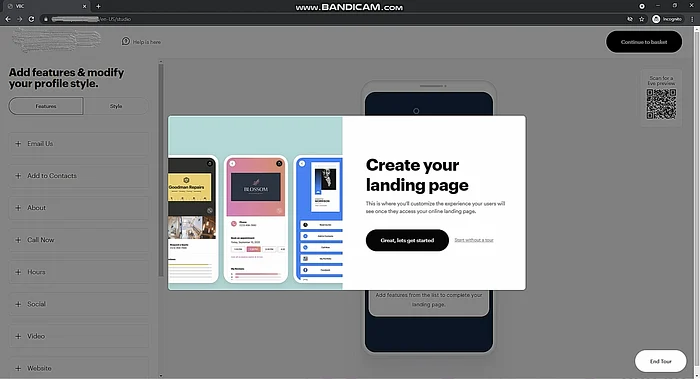
The feature page, where a page of the app is styled by adding different features and styles.
The researcher injected the payload into each section, including "Name" and "A little about yourself".
Exploitation
Step 1: inject the payload into every section
The researcher placed the same payload in each section of the page:
"><img src=x onerror=alert(document.cookie)>
The leading "> closes an attribute value and the tag it sits in, so the following <img> is parsed as a new element rather than as text. The src=x points at a resource that does not exist, which makes the image fail to load, and the onerror handler then runs alert(document.cookie). The alert is only a proof of execution; the handler could carry any script.
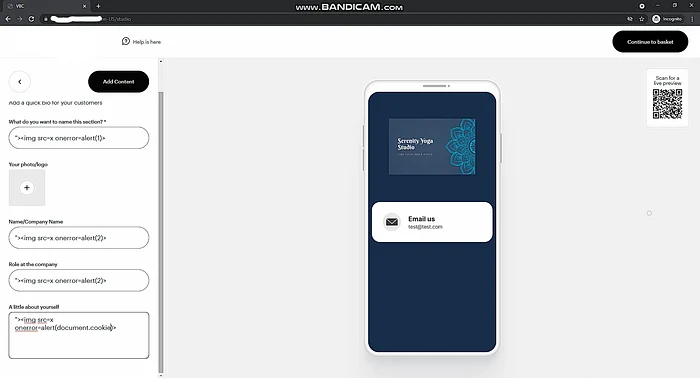
The payload as entered in the page sections.
Step 2: save the page and confirm execution
Clicking "Add Content" produced the XSS pop-up.
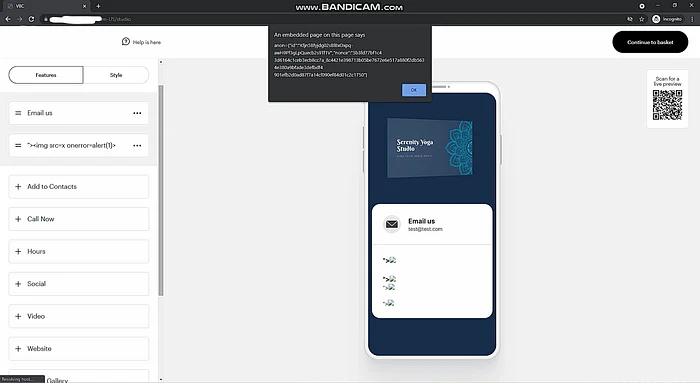
The XSS pop-up after the content was added.
At this point the finding is self-XSS. The researcher points out that the page had no GET parameters and no share feature that could be used to send it to another user, so on its own it is a P5, no-impact, issue.
Step 3: find a delivery path
The researcher then looked for a way to raise the impact, or any method of sending the page to other users. A QR code in the top right corner of the page caught their attention, and they tested it.
Step 4: scan the QR code
Scanning the QR code opened a site, and the stored payload executed there.
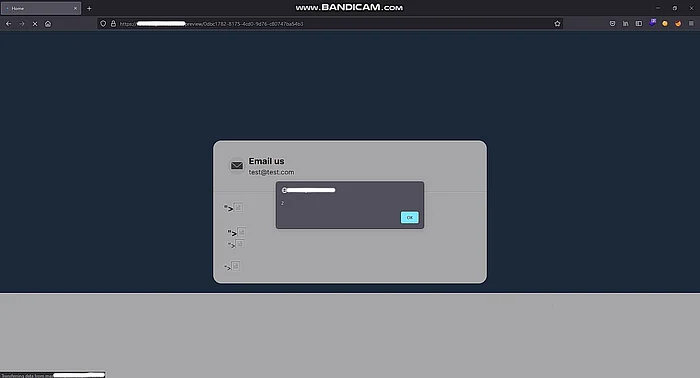
The payload executing after the QR code was scanned.

Because the payload now ran outside the researcher's own editing session, the self-XSS became non-self XSS, and the researcher rates it P2.
Root cause
The payload executed after the content was added, which suggests the stored value is rendered without encoding for its HTML context. The payload's "> breaks out of the surrounding attribute, which suggests the stored value is placed inside an attribute of a generated element rather than as text content, and that no context-aware escaping is applied on output.
The QR code path matters because it turns a page that only its author can reach into one that anyone holding the code can open. The payload executed in the site opened by the QR code, so it ran for the scanner.
Impact
An attacker with an account on the program can store script in a styled page, and it executed in the site opened by the page's QR code. The proof of concept reads document.cookie, so the obvious consequence is access to whatever the cookie exposes in that context, subject to cookie flags such as HttpOnly, which the report does not discuss. Beyond that, script running in the scanned page's origin can act as the victim within that origin.
The impact depends on the QR code being shared with, or reachable by, other users.
Fix
The change that addresses the root cause is to encode stored section content for the context in which it is rendered, so that characters such as ", < and > are output as text and cannot close an attribute or open a new element. Where rich text is genuinely needed, sanitise it on output with an allow-list of elements and attributes, and apply the same treatment to every view that renders the stored page, including the one reached through the QR code. A content security policy that disallows inline event handlers such as onerror would add a second layer, but it is a mitigation, not a substitute for correct output encoding.
Variants to test
- Put the same payload in each field of a multi-section page builder and save, then reload the page and any preview or public view. A positive result is the alert firing on reload rather than only in the editor.
- Look for alternate delivery paths when a stored payload only fires for its author: QR codes, share links, export or print views, embed widgets, email previews and PDF generation. A positive result is the payload executing in a context reached by someone other than the author.
- Try payloads that do not rely on an event handler, such as breaking out of an attribute into a new tag with a
javascript:URL or an<svg>element, to see which contexts are unescaped. A positive result is execution where theonerrorvariant was filtered. - Test the same fields with a payload that reads a value other than the cookie, for example the page's DOM, to confirm the sink is not limited to a single attribute. A positive result is script running with access to the page's origin.
- Check whether the stored content is rendered in an administrative or moderation view. A positive result is the payload firing for a user with more privileges than the author.
What happened, in plain words
A security researcher found a way to make a website store a small piece of JavaScript code and then run it when the page's QR code was scanned. The trick was a QR code: the page had no share feature, but scanning the QR code opened a site where the stored code ran. That turned a harmless, only-affects-me problem into one that could reach other people, which is why the researcher rated it P2.
The finding was made on a private Bugcrowd program, which is a bug bounty program you can only join by invitation. The researcher writes as part of a team called BUG XS. The report does not name the host or the product, only that it was one of the program's subdomains.
Before the details, a few words you will meet constantly:
- A subdomain is a named part of a larger website, like
shop.example.comnext toexample.com. Companies often run many of them, and each can be a separate application. - Stored XSS (cross-site scripting) means a site saves what a user types and later shows it to other people without making it safe. If the saved text contains code, the browser runs that code as if the site itself had written it.
- A payload is simply the piece of text an attacker types in, designed to be interpreted as code rather than as ordinary text.
- A QR code is that square barcode you scan with a phone camera. It usually contains a web address, so scanning it opens a page.
The feature that was tested
The program's subdomain had a feature for styling a page of the app: you add different features and styles, and the page is built from sections such as "Name" and "A little about yourself". There is also an "Add Content" action that saves the page. Think of it like a simple profile or landing-page builder: you fill in boxes, press save, and the site puts your text onto a page.
The feature page, where a page of the app is styled by adding different features and styles.
The researcher injected the payload into each of those sections, including "Name" and "A little about yourself". Anywhere a site saves text and shows it back, there is a chance it forgets to treat that text as plain text, and that is exactly the class of bug being looked for here.
What stored XSS is
The report gives a short definition first. Stored XSS, also called persistent XSS or Type-1 XSS, happens when user input is stored on the target server, for example in a database, a message forum, a visitor log or a comment field, and is later rendered back to other users. The researcher also notes that with HTML5 and related browser technologies, a payload can be stored in the victim's browser, such as in an HTML5 database, without ever being sent to the server.
A useful everyday comparison: a noticeboard where visitors pin notes. If the person who runs the board copies every note onto a fresh sheet without checking it, and one note says "tear down the board", the next person to read it may do exactly that. Stored XSS is the web version: the site keeps your text and hands it to every later visitor, code and all.
Step 1: put the payload in every section
The researcher placed the same payload in each section of the page:
"><img src=x onerror=alert(document.cookie)>
Line by line, in plain words:
">closes whatever attribute value the site has wrapped around your text, and closes the tag that attribute belongs to. In HTML, an attribute is a setting inside a tag, written likename="value". If your text lands inside such a value, a quote character can end it early, and the>ends the tag itself. Everything after that is treated as fresh HTML rather than as text.<img src=x ...>starts a new image element.src=xtells the browser to load an image from a location calledx, which does not exist.onerror=alert(document.cookie)is an event handler: a piece of code the browser runs when something goes wrong. Because the image atxcannot load, the error event fires, and the handler runsalert(document.cookie).alert(...)opens the small pop-up box you have seen on websites.document.cookieis the browser's way of reading the cookies that belong to the current page.
A cookie is a small piece of data a site asks your browser to keep and send back on later requests, commonly used to remember that you are logged in. Reading it in an alert is a common, harmless way to prove that code ran: the pop-up itself does nothing, but it shows the browser executed the attacker's script. The same handler could carry any script instead.
The payload as entered in the page sections.
Step 2: save the page and watch it run
Clicking "Add Content" produced the XSS pop-up.
The XSS pop-up after the content was added.
At this point the finding is self-XSS: the code runs only for the person who typed it. The researcher points out that the page had no GET parameters and no share feature that could be used to send it to another user. A GET parameter is the part of a web address after the question mark, like ?name=value, which a site can use to pass data between pages; if the page had one, the researcher might have been able to craft a link that carried the payload to someone else. With neither parameters nor sharing, the issue on its own is a P5, no-impact, problem. Severity ratings like P2 and P5 come from the bug bounty platform and describe how much damage a bug could do; P5 is the lowest.
Step 3: look for a way to deliver it
The researcher then looked for a way to raise the impact, or any method of sending the page to other users. A QR code in the top right corner of the page caught their attention, and they tested it. The reasoning is simple: if the page can only be opened by its author, the bug is not worth much. If some other feature gives strangers a route to the same page, the stored code suddenly has an audience.
Step 4: scan the QR code
Scanning the QR code opened a site, and the stored payload executed there.
The payload executing after the QR code was scanned.
Because the payload now ran outside the researcher's own editing session, the self-XSS became non-self XSS, and the researcher rates it P2. The report does not describe what the QR code encodes, which host the scanned site is on, or whether the scanned page is the same page or a different view of it.
Why it works
The payload executed after the content was added, which suggests the value is rendered without encoding for its HTML context. Encoding here means turning characters that have a special meaning in HTML, such as ", < and >, into harmless stand-ins so the browser shows them as text instead of acting on them. The payload's "> breaks out of the surrounding attribute, which suggests the stored value is placed inside an attribute of a generated element rather than as text content, and that no context-aware escaping is applied on output. A sink is the place in the code where data finally ends up, such as the point where a value is written into the page.
The QR code path matters because it turns a page that only its author can reach into one that anyone holding the code can open. The payload executed in the site opened by the QR code, so it ran for the scanner. A content security policy is a set of rules a site can send to the browser saying which scripts are allowed to run; it is a safety net, not a fix.
What someone could do with it
An attacker with an account on the program can store script in a styled page, and it executed in the site opened by the page's QR code. The proof of concept reads document.cookie, so the obvious consequence is access to whatever the cookie exposes in that context, subject to cookie flags such as HttpOnly, which the report does not discuss. HttpOnly is a setting that stops JavaScript from reading a cookie, which is why it is a common defence for login cookies. Beyond that, script running in the scanned page's origin can act as the victim within that origin. An origin is the combination of scheme, host and port that browsers use to decide which pages may touch each other's data; code running in an origin can generally do what the user could do there.
The impact depends on the QR code being shared with, or reachable by, other users.
How to fix it
The change that addresses the root cause is to encode stored section content for the context in which it is rendered, so that characters such as ", < and > are output as text and cannot close an attribute or open a new element. Where rich text is genuinely needed, sanitise it on output with an allow-list of elements and attributes, and apply the same treatment to every view that renders the stored page, including the one reached through the QR code. A content security policy that disallows inline event handlers such as onerror would add a second layer, but it is a mitigation, not a substitute for correct output encoding.
Things worth trying next
- Put the same payload in each field of a multi-section page builder and save, then reload the page and any preview or public view. A positive result is the alert firing on reload rather than only in the editor.
- Look for alternate delivery paths when a stored payload only fires for its author: QR codes, share links, export or print views, embed widgets, email previews and PDF generation. A positive result is the payload executing in a context reached by someone other than the author.
- Try payloads that do not rely on an event handler, such as breaking out of an attribute into a new tag with a
javascript:URL or an<svg>element, to see which contexts are unescaped. A positive result is execution where theonerrorvariant was filtered. - Test the same fields with a payload that reads a value other than the cookie, for example the page's DOM, to confirm the sink is not limited to a single attribute. A positive result is script running with access to the page's origin. The DOM is the browser's in-memory model of the page, the tree of elements that the script can read and change.
- Check whether the stored content is rendered in an administrative or moderation view. A positive result is the payload firing for a user with more privileges than the author.
Takeaway
Always when you get Self Stored XSS, try to increase impact with testing other available functionalities.
Glossary
- Attribute: a setting written inside an HTML tag, such as
src="x", which tells the browser something about that element. - Bug bounty program: a scheme where a company invites researchers to report security bugs, sometimes paying a reward.
- Bugcrowd: a platform that runs bug bounty programs for companies.
- Content security policy: rules a site sends to the browser listing which scripts and resources are allowed to run.
- Cookie: a small piece of data a site stores in your browser and receives back on later requests, often used to keep you logged in.
- DOM: the browser's in-memory tree of the page's elements, which scripts can read and modify.
- Encoding (output encoding): converting characters with special meaning in HTML into harmless stand-ins so they display as text.
- Event handler: code attached to an element that runs when something happens, such as
onerrorwhen an image fails to load. - GET parameter: the part of a web address after the question mark that passes data to the page.
- HTML5: the current version of the language web pages are written in, which includes browser-side storage features.
- HttpOnly: a cookie flag that stops JavaScript from reading that cookie.
- Non-self XSS: a cross-site scripting bug that can be triggered in someone other than the person who planted it.
- Origin: the scheme, host and port of a page, used by browsers to decide which pages may access each other's data.
- Payload: the text an attacker enters, crafted to be treated as code by the target.
- P2 / P5: severity ratings used by bug bounty platforms, where P2 is high impact and P5 is the lowest, often no impact.
- QR code: a square barcode that encodes data, usually a web address, and is read by scanning it with a camera.
- Sanitisation: cleaning user-supplied content by removing or neutralising anything dangerous, often using an allow-list of permitted elements and attributes.
- Self-XSS: a cross-site scripting bug that only affects the person who entered the payload.
- Sink: the place in code where data finally lands, such as where a value is written into the page.
- Stored XSS (persistent XSS, Type-1 XSS): cross-site scripting where the payload is saved by the site and later shown to other users.
- Subdomain: a named part of a larger website, such as
shop.example.comunderexample.com.



