Stored XSS 대응, 라이브러리를 고른 이유 — OWASP Java HTML Sanitizer 도입기
An admin-facing feature stored and rendered unvalidated HTML, creating a stored XSS risk if an admin account were compromised. The author replaced blacklist filtering with a parser-based allowlist sanitiser, and testing showed executable vectors were removed while layout was preserved.

Xss Attack
The full write-up lives on its author's site
It belongs to its author, so we link to it rather than copy it. The other two tabs are our own rewrites, checked against it.
Context
The feature in question lets an admin build pages freely with HTML. The stored HTML is saved without validation and rendered to visitors, which is the classic shape of a Stored XSS problem. The article is less about a single payload and more about how to decide, on principle, how much freedom to allow when a product requirement ("let admins decorate pages freely") collides with security.
For a yardstick the author used Saltzer and Schroeder's 1975 paper "The Protection of Information in Computer Systems", which sets out eight security design principles. One of them was applied directly: fail-safe defaults, which became the basis for choosing a whitelist.
Setup
The stored documents are complete HTML documents, all beginning with <!DOCTYPE html>. The content is written by internal operators (admin role) through an HTML editing feature and rendered to visitors.
Before writing any filter, the author surveyed the data actually stored in the database rather than guessing which tags to block. The results:
<script>: 0 occurrenceson*event handlers: 0 occurrencesjavascript:URLs: 0 occurrences<form>,<iframe>,<object>,<base>: 0 occurrences
The tags actually in use were layout, text and image tags such as div, style, span, p, h1, br and img, and the most common attribute was class.
Finding it
The initial instinct was that the registration subject is an internal operator (admin), so perhaps the data could be trusted.
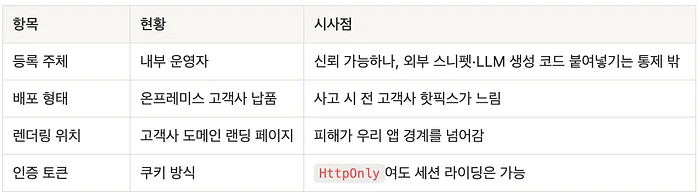
The author rejected that reasoning: if an admin account is taken over, the abuse is real. The conclusion was that a developer must trust the system, not the person. Regardless of whether the operator can be trusted, any data that passes through storage and executes in a visitor's browser has to be checked by the system.
Since the security-relevant part is JavaScript execution, and the survey found no dangerous constructs in real data, the author judged that allowing layout, CSS, images and emphasis while removing JS execution would prevent Stored XSS. That is a guardrail. The remaining question was how to implement it.
Exploitation
The exploitation section of the article is really an analysis of why blacklist filtering fails, followed by the design of the whitelist and the library choice. Each step below is one of the arguments or one of the implementation decisions.
Step 1: notation variants defeat regex filtering
<img src=x OnErRoR=alert(1)> <img src=x/**/onerror=alert(1)> <img src=x onerror=alert(1)>
Code that searches for the string onerror and deletes it treats these three differently, but the browser executes all three identically. Variants can be produced without limit, and a blacklist cannot keep up with that infinity.
Step 2: you end up writing an unstable tokeniser
To remove <script> you first have to decide that it is a tag, and the range the browser accepts as a tag is wider than one might think.
<script/xss>alert(1)</script> <img/src=x/onerror=alert(1)> <img src=x onerror=alert(1) <!-- 닫는 꺾쇠가 없어도 실행된다 -->
Adding cases one by one eventually means writing a tokeniser, but one built only from the cases you thought of, not from the specification. Every missed case becomes a bypass.
Step 3: string deletion creates recombination problems
<scr<script>ipt>alert(1)</script>
If the filter finds <script> and deletes it, <script>alert(1) is left behind.
Step 4: attribute boundaries are hard to judge
If img is allowed, tags carrying an onerror attribute have to be filtered out, which means deciding where an attribute starts and ends.
<img src="x" alt="a > b" onerror=alert(1)>
The > inside the alt value is not the end of the tag, because it is inside quotes. How a single > is treated depends on the state at that point, and that state can only be known by reading the preceding characters in order.
Step 5: legitimate content that writes tags as text cannot be distinguished
When an operator writes guidance such as:
<p>이 필드에는 <script> 태그를 쓸 수 없습니다</p>
a string-based filter deletes script, and the legitimate content breaks. Distinguishing tags from text requires structure.
All four problems share one root: they come from the approach of finding dangerous things and deleting them. That is why the author settled on a whitelist. The full survey of real data became the basis for the list: deciding by "what must be opened" rather than "what must be blocked" handles the unbounded set of edge cases.
Step 6: who does the parsing
Even with a whitelist, three of the four problems remain, because the allow list can only be applied once you can decide what is a tag, where an attribute boundary is, and whether something is a tag or text. The choice was therefore not whether to parse, but whether to parse by the same rules as the browser or by rules of one's own invention. The author went to the HTML5 parsing specification.
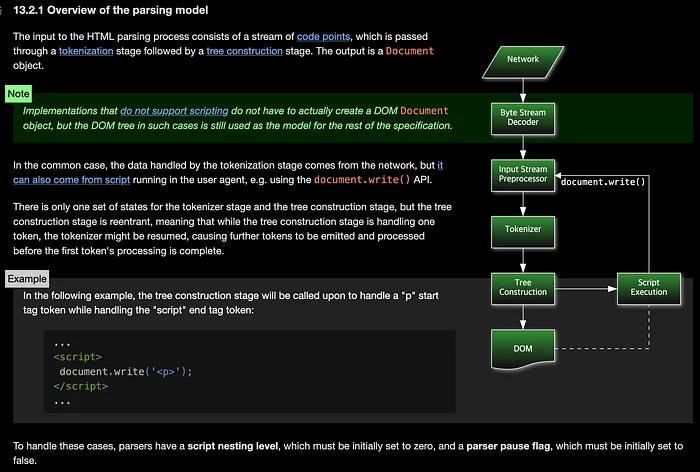
Parsing is an algorithm that passes a character stream through two state machines, a tokeniser and a tree constructor. The hard part is tree construction: the specification does not only define correct HTML, it deterministically specifies which tree must come out of broken input.
<b><i>굵고 기울임</b> 기울임만</i>
That is why browsers render broken HTML identically. And if a parser implements those recovery rules differently in even one place, that difference becomes a bypass: the server judges something safe while the browser builds a different tree.
Implementation effort was a concern, but maintenance mattered more. A bug in a library is disclosed as a CVE and fixed, whereas a self-built implementation stays unknown unless it is continuously maintained. The decision was to use a library.
Step 7: how a parser-based sanitiser works
A parser-based sanitiser is a combination of four parts:
- HTML parser: converts the string into a DOM tree using the HTML5 parsing algorithm.
- Policy table: allowed elements, allowed attributes per element, and conditions on attribute values.
- Tree walker: looks up the policy for each node and removes, unwraps or validates values.
- Serialiser: rewrites the cleaned tree as a string.
The point is not finding and deleting dangerous strings but parsing into a structure and rebuilding it unit by unit. Because the parser normalises notation variants into the same structure, encoding bypasses do not hold. And onerror or onclick are removed because they are not on the allow list. If the HTML standard adds a new event handler, the policy needs no change. This is fail-safe defaults expressed in code.
Step 8: comparing candidates
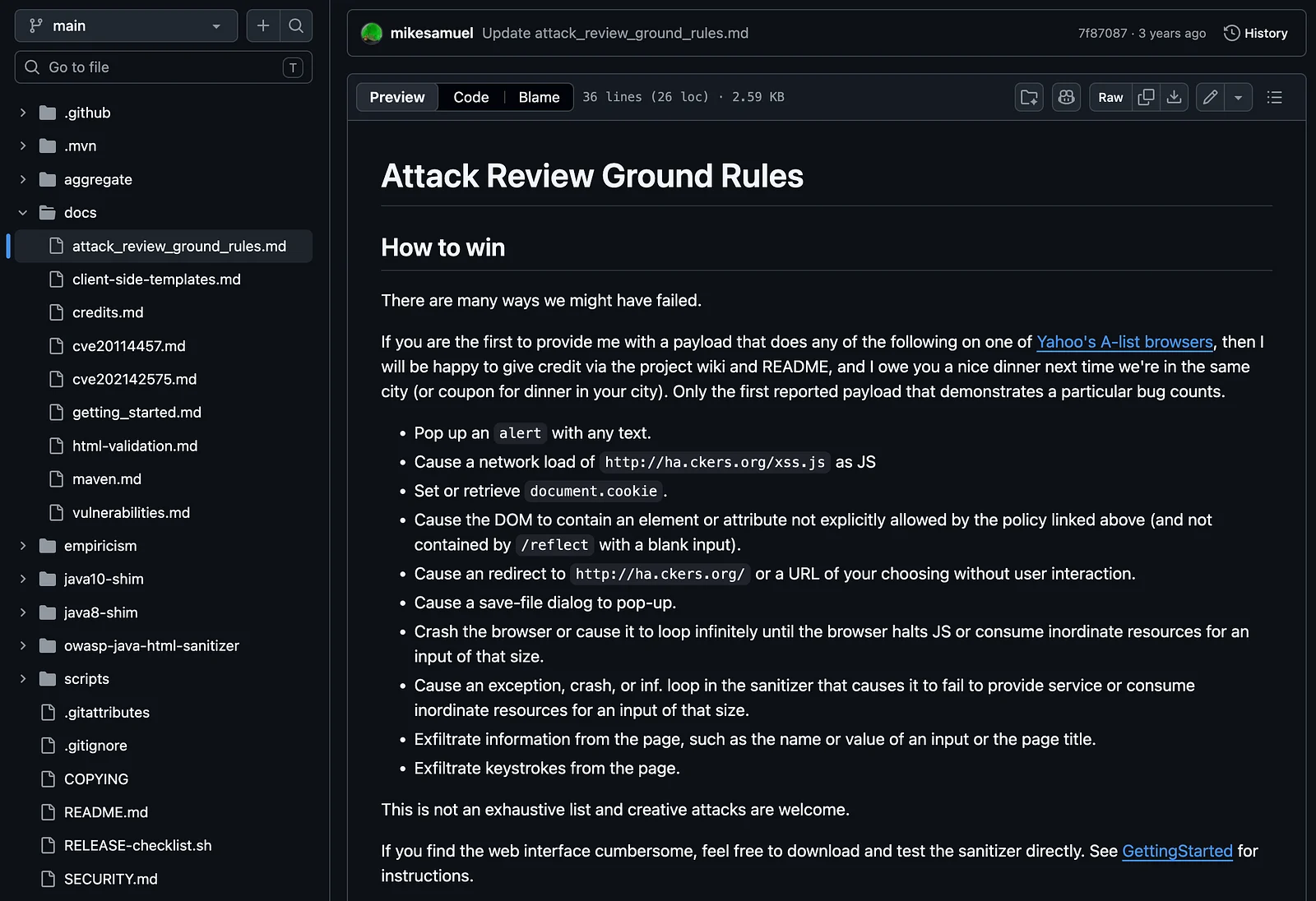
The criteria were "is security sanitisation the design purpose" and "does it cope with our data".
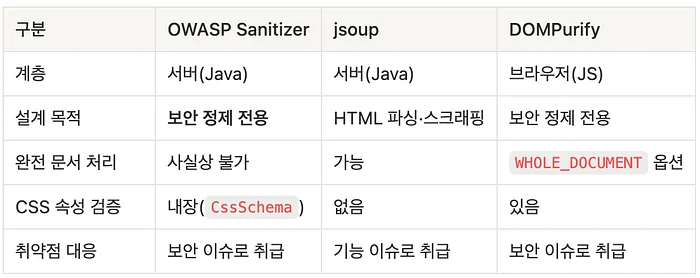
OWASP Java HTML Sanitizer was chosen for these reasons:
- Recognition: an OWASP Foundation project (descended from Google Caja), maintained by the Google AppSec team.
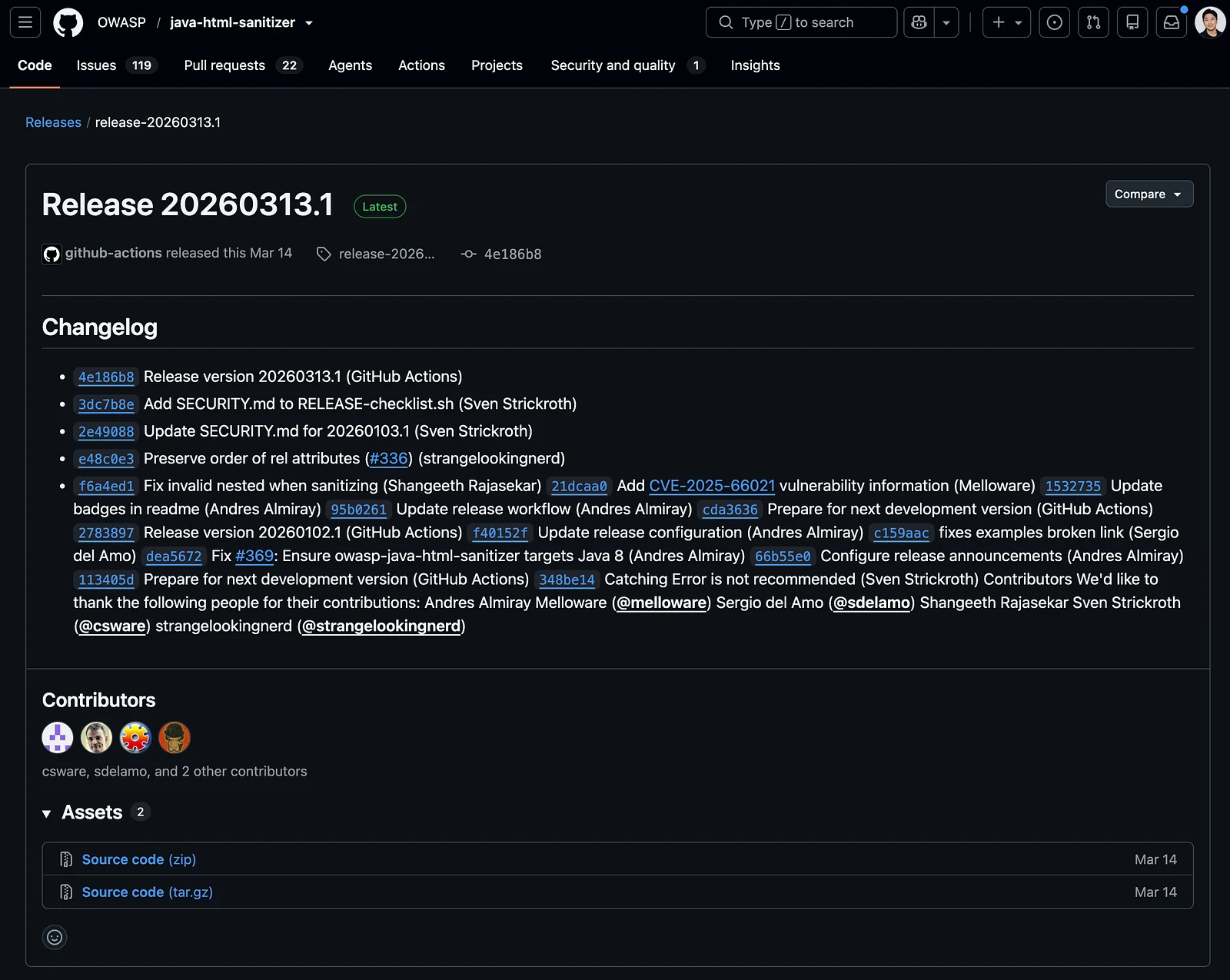
- Maintainability: active enough that a release in March 2026 was confirmed.
- Reliability: it has undergone adversarial security review and runs a vulnerability reporting and disclosure process and a security announcement mailing list.

Step 9: a vulnerability in the chosen library
During research the author found a vulnerability that directly conflicted with the plan.
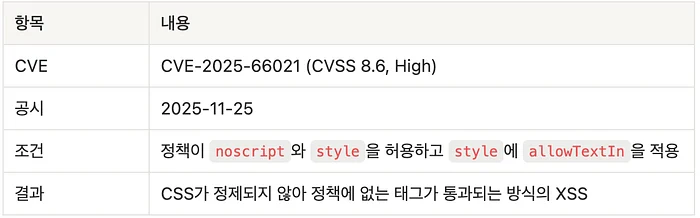
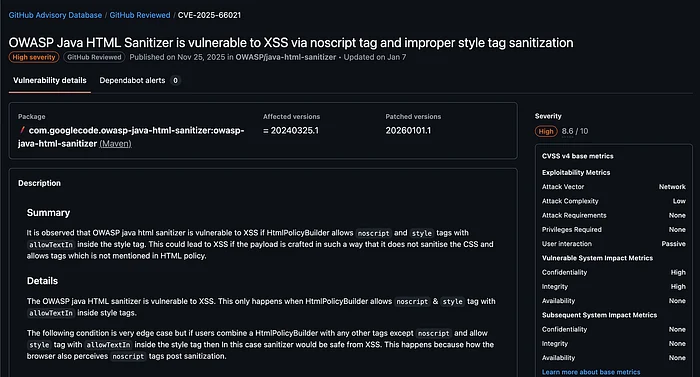
The problem is that allowTextIn("style"), which is essential for keeping CSS alive, is a precondition of this vulnerability. In other words, the validation on the path that lets text inside <style> through was thin. Looking further, there was a history of earlier reports of policies not being applied to SELECT, STYLE and OPTION elements.
Using the PoC in the document as a reference, the response was reduced to three measures:
- Use the patched version (20260102.1) or later.
- Remove
noscriptfrom the whitelist. - Put the CVE reproduction payload into the integration tests and confirm the block directly.
Through this CVE the author confirmed that when a vulnerability is found, reporting, disclosure and patching work, which increased trust in the library. A self-built implementation would have left the same bug unknown to anyone.
Step 10: the policy as implemented
The trade-off criterion was "do not shrink the requirement (CSS freedom), close only the executable attacks". Three trade-offs were made accordingly.

private static final PolicyFactory POLICY = new HtmlPolicyBuilder() .allowElements( "div", "span", "section", "header", "footer", "p", "h1", "h2", "h3", "h4", "h5", "h6", "b", "strong", "ul", "ol", "li", "br", "img", "style", "table", "thead", "tbody", "tfoot", "tr", "td", "th", "caption", "colgroup", "col") .allowAttributes("class").globally() .allowAttributes("src", "alt", "width", "height").onElements("img") .allowAttributes("colspan", "rowspan").onElements("td", "th") .allowAttributes("span").onElements("col", "colgroup") .allowUrlProtocols("https") .allowTextIn("style") .allowStyling() .toFactory();
Allowed elements (allowElements(...)) include every tag that came out of the full survey of real data.
Allowed attributes (allowAttributes("class").globally()) because real usage was class-based styling. Allowing a tag does not automatically allow its attributes, so they must be stated explicitly. onerror is not enumerated, so it is removed.
Allowed URL protocols (allowUrlProtocols("https")) blocks the javascript: and data: schemes at the source while allowing https images.
CSS text (allowTextIn("style")) because even when the style element is allowed, the CSS text inside it is discarded by default. CVE-2025-66021 pointed out that applying allowTextIn with noscript and style allowed lets CSS through unsanitised, so tags not in the policy can pass. noscript was therefore removed from the whitelist.
Inline style validation (allowStyling()) validates inline style attributes against the built-in CssSchema and lets them through. In the integration test, an inline style containing background:url(javascript:...) was cleaned down to only the safe declarations.
Step 11: the integration test with eight attacks
Separate from unit validation of the policy itself, the integration test focused on the "request, store, retrieve" flow. One document in the style of real data was seeded with eight attacks and inserted whole.
Attacks planted:
- a
<script>block - an
onclickevent handler <img onerror><iframe><svg onload>url(javascript:)inside an inline style attributeexpreesion()inside a<style>block- an
<a href="javascript:">script
Results:
- every executable vector was removed
- normal elements were all preserved: the whole
<style>block, the.pintrostructure,class, emoji entities - an unclosed
<p>tag was closed automatically by the sanitiser - a screenshot comparison of rendering before and after sanitisation showed identical layout, colours and card structure
<script>alert('XSS')</script><div class="pintro" onclick="alert('XSS')"> <img src="x" onerror="alert('XSS')" /> <a href="javascript:alert('XSS')">여기 클릭</a><div class="pintro"> <img src="x" /> 여기 클릭
Step 12: a prediction that was wrong
The expectation was that with allowUrlProtocols("https") in place, any address not starting with https would be removed. Measurement showed otherwise.
<img src="https://cdn.example.com/a.png"> <img src="x"> <img src="http://example.com/a.png"> <img src="data:text/html,...">
allowUrlProtocols checks whether the scheme, when one is present, is on the allow list. A relative path such as src="x", which has no scheme at all, is not a subject of the check and simply passes. The real meaning of the policy was not "allow only https" but "allow relative paths and https, block other schemes". Relative paths point at resources on our own server and do not go outside, so there is no problem, but the difference between the policy sentence and the actual behaviour has to be known.
Step 13: a bug that only a whitelist reveals
The process also turned up the fact that when an operator puts code into guidance text, part of it disappears.
<p>List<String> 형태로 반환합니다</p>
Because <String> looks like a tag, the parser recognises it as one, and since it is not on the allow list it is removed. Saltzer and Schroeder also note that
a permission-based approach fails towards refusal when it makes a mistake, so it shows up quickly, whereas an exclusion-based approach fails towards letting things through, so it does not show up during normal use.
In other words, a whitelist catches its bugs and a blacklist does not. The missing text was immediately visible on screen, and it became a new fix ticket. With a blacklist, a single missed variant would have passed silently, and that would have been hard to find.
Root cause
The design mistake was the approach of finding dangerous strings and deleting them. It fails on notation variants, on recombination after deletion, on attribute boundaries, and on legitimate text that contains tag-like content. The feature stored and rendered HTML without validation, so nothing stopped any of this.
A second, subtler root cause is the gap between what a policy says and what it does. allowUrlProtocols("https") reads as "https only", but scheme-less relative paths pass unchecked. The library's own CVE-2025-66021 shows the same pattern at the library level: the path that lets text inside <style> through had thin validation, and with noscript and style allowed, CSS could pass unsanitised and tags outside the policy could get through.
Impact
If an admin account is taken over, the stored HTML can be abused to execute script in visitors' browsers. The author's judgement is that the abuse is real in that case, which is why the system, not the operator, must be trusted. The survey found no dangerous constructs in current data.
Fix
The fix is a parser-based whitelist sanitiser, OWASP Java HTML Sanitizer, configured as shown above: an explicit element list drawn from the data survey, class allowed globally, image attributes allowed on img, table attributes on td/th/col/colgroup, allowUrlProtocols("https"), allowTextIn("style"), allowStyling(), and noscript excluded. The library is used at the patched version 20260102.1 or later, and the CVE reproduction payload is kept in the integration tests to confirm the block.
After deployment:
- input containing attack payloads is sanitised at storage time, so the data in the database itself is safe.
- operator behaviour does not change; pasting a complete document still works because the server normalises it.
Variants to test
- Notation variants of event handlers. Submit
<img src=x OnErRoR=alert(1)>,<img src=x/**/onerror=alert(1)>and<img src=x onerror=alert(1)>. A positive result is any of them executing in the browser after sanitisation. - Tag-like syntax without a closing bracket. Try
<script/xss>alert(1)</script>,<img/src=x/onerror=alert(1)>and<img src=x onerror=alert(1)with no closing>. A positive result is execution despite the malformed shape. - Recombination. Submit
<scr<script>ipt>alert(1)</script>. A positive result is a surviving<script>alert(1)after filtering. - Attribute boundary confusion. Submit
<img src="x" alt="a > b" onerror=alert(1)>. A positive result is theonerrorsurviving because the filter treated the>inside the quoted value as the end of the tag. - Tag written as text. Submit
<p>이 필드에는 <script> 태그를 쓸 수 없습니다</p>. A positive result here is the opposite direction: the text being mangled shows the filter is string-based rather than structural. - Scheme-less URLs. Submit
<img src="x">alongside<img src="http://example.com/a.png">and<img src="data:text/html,...">. A positive result is a relative path passing while the other schemes are blocked, which confirms the policy means "relative and https" rather than "https only". - CSS text path. With
allowTextIn("style")andnoscriptallowed, submit CSS containing tags outside the policy, following CVE-2025-66021. A positive result is a disallowed tag passing through unsanitised CSS. - Inline style with a javascript URL. Submit an inline style containing
background:url(javascript:...). A positive result is the URL surviving; the expected result is only safe declarations remaining. - The eight-attack document. Seed one document with a
<script>block, anonclickhandler,<img onerror>,<iframe>,<svg onload>,url(javascript:)in an inline style,expreesion()in a<style>block and<a href="javascript:">. A positive result is any executable vector surviving, or any normal element (the<style>block,.pintro,class, emoji entities) being lost.
What happened, in plain words
A website had a feature that let its administrators build pages by writing HTML. HTML is the language web pages are written in: the text you type into a page, plus the instructions that say what is a heading, what is a picture, what is bold. The feature saved whatever HTML the admin wrote, without checking it, and then showed that saved HTML to every visitor.
That is a well-known problem called Stored XSS. "Stored" means the dangerous content is saved in the site's database and handed out later to anyone who views the page. "XSS" stands for cross-site scripting: an attacker gets their own instructions (small programs written in a language called JavaScript) into a page that other people trust, so those programs run inside the visitors' browsers. A browser runs JavaScript for the page it is showing, so script that slips into a page can do things on behalf of the visitor: read what is on the page, act as the visitor towards the site, and so on.
The article is not really about one clever attack. It is about a decision: when the product team says "let admins decorate pages however they like" and security says "that is dangerous", how do you decide, on principle, how much freedom to allow? The author wanted a yardstick rather than a gut feeling, and used a 1975 paper by Saltzer and Schroeder, "The Protection of Information in Computer Systems", which lists eight principles for designing secure systems. One of them was applied directly: fail-safe defaults. In plain words: when the system is unsure, it should say no, not yes. That principle is the reason the author chose a whitelist, which we will explain shortly.
Setup: what the feature does and what was in the database
The stored documents are complete HTML documents, all beginning with <!DOCTYPE html>. That line is a small declaration at the top of an HTML file telling the browser which flavour of HTML to expect. The content is written by internal operators (people with the admin role) through an HTML editing feature, and rendered to visitors.
Before writing any filter, the author did something simple and very useful: looked at what was actually stored in the database, instead of guessing which tags to block. A tag is a piece of HTML in angle brackets, like <img> for an image or <p> for a paragraph. The survey found:
<script>: 0 occurrences. A<script>tag is how a page carries JavaScript, so this is the tag an attacker most wants.on*event handlers: 0 occurrences. An event handler is an attribute (an extra setting inside a tag) that says "when the visitor clicks here, run this code". They start withon, for exampleonclickoronerror.javascript:URLs: 0 occurrences. A URL is a web address.javascript:is a special kind of address that, instead of pointing at a page, contains code for the browser to run.<form>,<iframe>,<object>,<base>: 0 occurrences. These are tags for embedded forms, embedded other pages, embedded objects and a base address for links.
The tags actually in use were layout, text and image tags such as div, style, span, p, h1, br and img, and the most common attribute was class. class is just a label attached to an element so that a stylesheet can find it and style it. CSS (Cascading Style Sheets) is the language that says how things look: colours, spacing, fonts.
Finding it: who is the threat?
The first instinct was that the person writing the HTML is an internal operator (admin), so perhaps the data could be trusted.
The author rejected that reasoning. If an admin account is taken over, the abuse is real. An admin account can be taken over. A cookie is a small piece of data the browser stores for a site; a session cookie is what tells the site "this request comes from the person who logged in", so whoever holds it is treated as that person.
The conclusion was that a developer must trust the system, not the person. Regardless of whether the operator can be trusted, any data that passes through storage and executes in a visitor's browser has to be checked by the system.
Since the security-relevant part is JavaScript execution, and the survey found no dangerous constructs in real data, the author judged that allowing layout, CSS, images and emphasis while removing JavaScript execution would prevent Stored XSS. That is a guardrail: a barrier that keeps the traffic inside safe limits. The remaining question was how to build it.
Why the obvious filter fails
The next part of the article is an argument, step by step, about why the obvious approach, a blacklist, does not work. A blacklist means: make a list of bad things and delete them. A whitelist means the opposite: make a list of good things and delete everything else.
Step 1: the same thing can be written many ways
<img src=x OnErRoR=alert(1)> <img src=x/**/onerror=alert(1)> <img src=x onerror=alert(1)>
This block shows three versions of the same attack. Let us read them one by one.
<img src=x OnErRoR=alert(1)>is an image tag.src=xsays the image address isx, which does not exist, so the browser fails to load it.OnErRoR=alert(1)is an event handler: when the image fails to load, runalert(1).alert(1)is the simplest possible JavaScript: it pops up a box with the number 1. In a real attack it would be code that does something harmful.<img src=x/**/onerror=alert(1)>is the same thing with/**/inserted. In JavaScript,/**/is an empty comment, so it changes nothing. The browser still seesonerror.<img src=x onerror=alert(1)>is the same thing again, but the parentheses are written as HTML character references:(is(and)is). The browser decodes them before running the code.
Code that searches for the string onerror and deletes it treats these three differently, but the browser executes all three identically. Variants can be produced without limit, and a blacklist cannot keep up with that infinity.
Step 2: you end up writing a broken HTML reader
To remove <script> you first have to decide that it is a tag, and the range the browser accepts as a tag is wider than one might think.
<script/xss>alert(1)</script> <img/src=x/onerror=alert(1)> <img src=x onerror=alert(1) <!-- 닫는 꺾쇠가 없어도 실행된다 -->
Again, one by one.
<script/xss>alert(1)</script>: the browser is lenient about what comes after the tag name. It still treats this as a script tag and runsalert(1).<img/src=x/onerror=alert(1)>: slashes instead of spaces. The browser still reads the image tag and theonerrorhandler.<img src=x onerror=alert(1): there is no closing>. The browser still accepts it. The Korean comment in the line says exactly that: it runs even without the closing angle bracket.
Adding cases one by one eventually means writing a tokeniser. A tokeniser is the part of a browser that chops a stream of characters into pieces: "this is a tag", "this is an attribute name", "this is text". But it would be a tokeniser built only from the cases you thought of, not from the specification. Every missed case becomes a bypass: a way around the filter.
Step 3: deleting text can glue an attack back together
<scr<script>ipt>alert(1)</script>
If the filter finds <script> and deletes it, the pieces around it join up: <scr plus ipt>alert(1)</script> becomes <script>alert(1)</script>. The filter has created the attack it was trying to remove. This is the recombination problem.
Step 4: where does an attribute end?
If img is allowed, tags carrying an onerror attribute have to be filtered out, which means deciding where an attribute starts and ends.
<img src="x" alt="a > b" onerror=alert(1)>
The > inside the alt value is not the end of the tag, because it is inside quotes. alt is the text shown when an image cannot load. How a single > is treated depends on the state at that point, and that state can only be known by reading the preceding characters in order. A simple search for > gets this wrong.
Step 5: real text that looks like a tag
When an operator writes guidance such as:
<p>이 필드에는 <script> 태그를 쓸 수 없습니다</p>
This is a paragraph telling the reader, in Korean, that the <script> tag cannot be used in this field. < and > are character references for < and >, so the reader sees the literal text <script> rather than a real tag. A string-based filter deletes script, and the legitimate content breaks. Distinguishing tags from text requires structure: you have to know what is inside a tag and what is ordinary text.
All four problems share one root: they come from the approach of finding dangerous things and deleting them. That is why the author settled on a whitelist. The full survey of real data became the basis for the list: deciding by "what must be opened" rather than "what must be blocked" handles the unbounded set of edge cases.
Step 6: who does the parsing?
Even with a whitelist, three of the four problems remain, because the allow list can only be applied once you can decide what is a tag, where an attribute boundary is, and whether something is a tag or text. Parsing means reading the characters and working out the structure. The choice was therefore not whether to parse, but whether to parse by the same rules as the browser or by rules of one's own invention. The author went to the HTML5 parsing specification, the official document that describes exactly how browsers must read HTML.
The picture shows the WHATWG HTML Standard's parsing model: the characters go through tokenisation and then tree construction, and a DOM is produced. The DOM (Document Object Model) is the browser's in-memory tree of the page: a root, with elements as branches, and text as leaves.
Parsing is an algorithm that passes a character stream through two state machines, a tokeniser and a tree constructor. A state machine is a program that is always in one of a fixed set of states and moves between them based on the next input character. The hard part is tree construction: the specification does not only define correct HTML, it deterministically specifies which tree must come out of broken input. Deterministically means: given the same input, every browser must produce exactly the same result.
<b><i>굵고 기울임</b> 기울임만</i>
This is deliberately broken HTML: bold opens, italic opens, bold closes, then italic closes. The Korean text means "bold and italic" then "italic only". Browsers all render it the same way, because the specification says what tree to build from this mess. That is why browsers render broken HTML identically. And if a parser implements those recovery rules differently in even one place, that difference becomes a bypass: the server judges something safe while the browser builds a different tree.
Implementation effort was a concern, but maintenance mattered more. A bug in a library is disclosed as a CVE and fixed. CVE stands for Common Vulnerabilities and Exposures: a public identifier given to a known security flaw so that everyone can refer to the same thing. A self-built implementation stays unknown unless it is continuously maintained. The decision was to use a library.
Step 7: how a parser-based sanitiser works
A sanitiser is a program that cleans HTML. A parser-based sanitiser is a combination of four parts:
- HTML parser: converts the string into a DOM tree using the HTML5 parsing algorithm.
- Policy table: allowed elements, allowed attributes per element, and conditions on attribute values. An element is a tag plus its content, for example a paragraph.
- Tree walker: looks up the policy for each node and removes, unwraps or validates values. Unwrapping means removing the tag but keeping its contents.
- Serialiser: rewrites the cleaned tree as a string.
The point is not finding and deleting dangerous strings but parsing into a structure and rebuilding it unit by unit. Because the parser normalises notation variants into the same structure, encoding bypasses do not hold. And onerror or onclick are removed because they are not on the allow list. If the HTML standard adds a new event handler, the policy needs no change. This is fail-safe defaults expressed in code: the default is refusal, and only what is named gets through.
Step 8: comparing candidates
The criteria were "is security sanitisation the design purpose" and "does it cope with our data".
OWASP Java HTML Sanitizer was chosen for these reasons:
- Recognition: an OWASP Foundation project (descended from Google Caja), maintained by the Google AppSec team. OWASP is a well-known non-profit that publishes open security guidance and projects.
- Maintainability: active enough that a release in March 2026 was confirmed.
- Reliability: it has undergone adversarial security review and runs a vulnerability reporting and disclosure process and a security announcement mailing list. Adversarial review means people whose job is to break it tried to break it.
The picture shows the GitHub release page of OWASP Java HTML Sanitizer and the adversarial security review document.
The picture shows the security review document and the mailing list information on the project's GitHub.
Step 9: a vulnerability in the chosen library
During research the author found a vulnerability that directly conflicted with the plan.
The picture shows the document describing the vulnerability in style, CVE-2025-66021.
The problem is that allowTextIn("style"), which is essential for keeping CSS alive, is a precondition of this vulnerability. In other words, the validation on the path that lets text inside <style> through was thin. Looking further, there was a history of earlier reports of policies not being applied to SELECT, STYLE and OPTION elements.
Using the PoC in the document as a reference, the response was reduced to three measures. A PoC, proof of concept, is a small demonstration that shows the flaw really works.
- Use the patched version (20260102.1) or later.
- Remove
noscriptfrom the whitelist.noscriptis a tag whose content is shown only when the browser has JavaScript turned off. - Put the CVE reproduction payload into the integration tests and confirm the block directly. An integration test is a test that runs several parts of the system together, rather than one function in isolation.
Through this CVE the author confirmed that when a vulnerability is found, reporting, disclosure and patching work, which increased trust in the library. A self-built implementation would have left the same bug unknown to anyone.
Step 10: the policy as implemented
The trade-off criterion was "do not shrink the requirement (CSS freedom), close only the executable attacks". Three trade-offs were made accordingly.
private static final PolicyFactory POLICY = new HtmlPolicyBuilder() .allowElements( "div", "span", "section", "header", "footer", "p", "h1", "h2", "h3", "h4", "h5", "h6", "b", "strong", "ul", "ol", "li", "br", "img", "style", "table", "thead", "tbody", "tfoot", "tr", "td", "th", "caption", "colgroup", "col") .allowAttributes("class").globally() .allowAttributes("src", "alt", "width", "height").onElements("img") .allowAttributes("colspan", "rowspan").onElements("td", "th") .allowAttributes("span").onElements("col", "colgroup") .allowUrlProtocols("https") .allowTextIn("style") .allowStyling() .toFactory();
This is Java, the programming language the site is written in. Read it as a chain of instructions, each one adding a rule to a policy object, which is then frozen with toFactory().
private static final PolicyFactory POLICY = new HtmlPolicyBuilder()starts building the policy.PolicyFactoryis the type of the finished object;POLICYis its name..allowElements(...)lists the tags that are allowed. Everything not in this list is removed..allowAttributes("class").globally()allows theclassattribute on every allowed element..allowAttributes("src", "alt", "width", "height").onElements("img")allows those four attributes only onimg..allowAttributes("colspan", "rowspan").onElements("td", "th")allows those two only on table cells..allowAttributes("span").onElements("col", "colgroup")allowsspanonly on table column elements..allowUrlProtocols("https")restricts URL schemes..allowTextIn("style")keeps the CSS text inside astyleelement..allowStyling()validates inlinestyleattributes..toFactory()finishes the builder and produces the policy.
Allowed elements (allowElements(...)) include every tag that came out of the full survey of real data.
Allowed attributes (allowAttributes("class").globally()) because real usage was class-based styling. Allowing a tag does not automatically allow its attributes, so they must be stated explicitly. onerror is not enumerated, so it is removed.
Allowed URL protocols (allowUrlProtocols("https")) blocks the javascript: and data: schemes at the source while allowing https images. A scheme is the part before the colon in a URL, like https in https://example.com.
CSS text (allowTextIn("style")) because even when the style element is allowed, the CSS text inside it is discarded by default. CVE-2025-66021 pointed out that applying allowTextIn with noscript and style allowed lets CSS through unsanitised, so tags not in the policy can pass. noscript was therefore removed from the whitelist.
Inline style validation (allowStyling()) validates inline style attributes against the built-in CssSchema and lets them through. In the integration test, an inline style containing background:url(javascript:...) was cleaned down to only the safe declarations.
Step 11: the integration test with eight attacks
Separate from unit validation of the policy itself, the integration test focused on the "request, store, retrieve" flow: a request comes in, the data is saved, and later it is read back and shown. One document in the style of real data was seeded with eight attacks and inserted whole.
Attacks planted:
- a
<script>block - an
onclickevent handler <img onerror><iframe><svg onload>url(javascript:)inside an inline style attributeexpreesion()inside a<style>block- an
<a href="javascript:">script
Results:
- every executable vector was removed
- normal elements were all preserved: the whole
<style>block, the.pintrostructure,class, emoji entities - an unclosed
<p>tag was closed automatically by the sanitiser - a screenshot comparison of rendering before and after sanitisation showed identical layout, colours and card structure
<script>alert('XSS')</script><div class="pintro" onclick="alert('XSS')"> <img src="x" onerror="alert('XSS')" /> <a href="javascript:alert('XSS')">여기 클릭</a><div class="pintro"> <img src="x" /> 여기 클릭
This is the test document. Line by line:
<script>alert('XSS')</script>is a script block that would pop up a box saying XSS.<div class="pintro" onclick="alert('XSS')">is a container with a class label and a click handler.<img src="x" onerror="alert('XSS')" />is an image that fails to load and fires the handler.<a href="javascript:alert('XSS')">여기 클릭</a>is a link whose address is code; the Korean text means "click here".<div class="pintro">opens a second container.<img src="x" />is a plain image.여기 클릭is plain text.
After sanitisation, the executable parts are gone and the harmless parts remain.
Step 12: a prediction that was wrong
The expectation was that with allowUrlProtocols("https") in place, any address not starting with https would be removed. Measurement showed otherwise.
<img src="https://cdn.example.com/a.png"> <img src="x"> <img src="http://example.com/a.png"> <img src="data:text/html,...">
Four image tags with four kinds of address:
https://cdn.example.com/a.pnghas thehttpsscheme and is allowed.xhas no scheme at all; it is a relative path, meaning a file on the same site.http://example.com/a.pnghas thehttpscheme, which is not on the allow list.data:text/html,...has thedatascheme, which carries the content inside the address itself.
allowUrlProtocols checks whether the scheme, when one is present, is on the allow list. A relative path such as src="x", which has no scheme at all, is not a subject of the check and simply passes. The real meaning of the policy was not "allow only https" but "allow relative paths and https, block other schemes". Relative paths point at resources on our own server and do not go outside, so there is no problem, but the difference between the policy sentence and the actual behaviour has to be known.
Step 13: a bug that only a whitelist reveals
The process also turned up the fact that when an operator puts code into guidance text, part of it disappears.
<p>List<String> 형태로 반환합니다</p>
This is a paragraph saying, in Korean, that the value is returned in the form List<String>. Because <String> looks like a tag, the parser recognises it as one, and since it is not on the allow list it is removed. The reader sees a sentence with a hole in it.
Saltzer and Schroeder also note that
a permission-based approach fails towards refusal when it makes a mistake, so it shows up quickly, whereas an exclusion-based approach fails towards letting things through, so it does not show up during normal use.
In other words, a whitelist catches its bugs and a blacklist does not. The missing text was immediately visible on screen, and it became a new fix ticket. With a blacklist, a single missed variant would have passed silently, and that would have been hard to find.
Root cause
The design mistake was the approach of finding dangerous strings and deleting them. It fails on notation variants, on recombination after deletion, on attribute boundaries, and on legitimate text that contains tag-like content. The feature stored and rendered HTML without validation, so nothing stopped any of this.
A second, subtler root cause is the gap between what a policy says and what it does. allowUrlProtocols("https") reads as "https only", but scheme-less relative paths pass unchecked. The library's own CVE-2025-66021 shows the same pattern at the library level: the path that lets text inside <style> through had thin validation, and with noscript and style allowed, CSS could pass unsanitised and tags outside the policy could get through.
Impact
If an admin account is taken over, the stored HTML can be abused to execute script in visitors' browsers. The author's judgement is that the abuse is real in that case, which is why the system, not the operator, must be trusted. The survey found no dangerous constructs in current data.
Fix
The fix is a parser-based whitelist sanitiser, OWASP Java HTML Sanitizer, configured as shown above: an explicit element list drawn from the data survey, class allowed globally, image attributes allowed on img, table attributes on td/th/col/colgroup, allowUrlProtocols("https"), allowTextIn("style"), allowStyling(), and noscript excluded. The library is used at the patched version 20260102.1 or later, and the CVE reproduction payload is kept in the integration tests to confirm the block.
After deployment:
- input containing attack payloads is sanitised at storage time, so the data in the database itself is safe.
- operator behaviour does not change; pasting a complete document still works because the server normalises it.
Variants to test
These are the cases worth trying if you want to check a sanitiser of your own. A "positive result" here means the attack succeeded, which is bad news for the filter.
- Notation variants of event handlers. Submit
<img src=x OnErRoR=alert(1)>,<img src=x/**/onerror=alert(1)>and<img src=x onerror=alert(1)>. A positive result is any of them executing in the browser after sanitisation. - Tag-like syntax without a closing bracket. Try
<script/xss>alert(1)</script>,<img/src=x/onerror=alert(1)>and<img src=x onerror=alert(1)with no closing>. A positive result is execution despite the malformed shape. - Recombination. Submit
<scr<script>ipt>alert(1)</script>. A positive result is a surviving<script>alert(1)after filtering. - Attribute boundary confusion. Submit
<img src="x" alt="a > b" onerror=alert(1)>. A positive result is theonerrorsurviving because the filter treated the>inside the quoted value as the end of the tag. - Tag written as text. Submit
<p>이 필드에는 <script> 태그를 쓸 수 없습니다</p>. A positive result here is the opposite direction: the text being mangled shows the filter is string-based rather than structural. - Scheme-less URLs. Submit
<img src="x">alongside<img src="http://example.com/a.png">and<img src="data:text/html,...">. A positive result is a relative path passing while the other schemes are blocked, which confirms the policy means "relative and https" rather than "https only". - CSS text path. With
allowTextIn("style")andnoscriptallowed, submit CSS containing tags outside the policy, following CVE-2025-66021. A positive result is a disallowed tag passing through unsanitised CSS. - Inline style with a javascript URL. Submit an inline style containing
background:url(javascript:...). A positive result is the URL surviving; the expected result is only safe declarations remaining. - The eight-attack document. Seed one document with a
<script>block, anonclickhandler,<img onerror>,<iframe>,<svg onload>,url(javascript:)in an inline style,expreesion()in a<style>block and<a href="javascript:">. A positive result is any executable vector surviving, or any normal element (the<style>block,.pintro,class, emoji entities) being lost.
Glossary
- Admin: a user account with management rights over a site's content.
- Attribute: an extra setting written inside a tag, such as
srcorclass. - Blacklist: a list of things to block; everything not on it is allowed.
- Browser: the program that fetches a page and draws it, and runs its JavaScript.
- Character reference: a code such as
<or(that stands for a character the browser substitutes before reading the page. - Class: a label on an element that a stylesheet uses to style it.
- Cookie: a small piece of data a site stores in the browser; a session cookie identifies a logged-in user.
- CSS: the language that describes how a page looks.
- CVE: a public identifier for a known security vulnerability.
- Data scheme: a URL form that carries the content inside the address itself, written
data:. - Deterministic: producing the same result every time for the same input.
- DOM: the browser's in-memory tree of a page's elements and text.
- Element: a tag together with its content.
- Event handler: an attribute starting with
onthat runs code when something happens, such as a click or a failed image load. - Fail-safe defaults: the design principle that the default answer is refusal, and only what is explicitly allowed gets through.
- HTML: the language web pages are written in.
- HTML5 parsing specification: the official document describing exactly how browsers must turn characters into a page structure.
- HTTPS: the encrypted form of the web's address scheme, written
https:. - Inline style: a
styleattribute on a single element, holding CSS for that element only. - Integration test: a test that exercises several parts of a system together.
- JavaScript: the programming language browsers run inside pages.
javascript:URL: an address whose content is code for the browser to run.- Noscript: a tag whose content is shown only when JavaScript is disabled.
- OWASP: a non-profit organisation that publishes open security guidance and projects.
- Parser: the part of a system that reads characters and works out their structure.
- Policy: the set of rules saying what a sanitiser allows.
- PoC (proof of concept): a small demonstration that a vulnerability really works.
- Relative path: an address with no scheme, pointing at a resource on the same site.
- Sanitiser: a program that cleans HTML by removing what is not allowed.
- Scheme: the part of a URL before the colon, such as
httpsorjavascript. - Serialiser: the part of a sanitiser that turns the cleaned structure back into text.
- Session cookie: a cookie that proves a request comes from a logged-in user.
- State machine: a program that is always in one of a fixed set of states and moves between them based on input.
- Stored XSS: cross-site scripting where the dangerous content is saved on the server and served to later visitors.
- Tag: a piece of HTML in angle brackets, such as
<img>. - Tokeniser: the part of a parser that chops characters into pieces such as tags, attribute names and text.
- Tree constructor: the part of a parser that builds the page structure from those pieces.
- Unwrapping: removing a tag while keeping its contents.
- URL: a web address.
- Whitelist: a list of things to allow; everything not on it is removed.
- XSS (cross-site scripting): getting an attacker's JavaScript to run inside a page that other people trust.



