Stored XSS through the profile name
The profile name field rendered user input as raw HTML and used a denylist that blocked some event handlers but not ontoggle. An attacker could store a details/ontoggle payload that executed automatically for anyone viewing the dashboard or report headers.

medium.com
Published on medium.com
Xss Attack
The full write-up lives on its author's site
It belongs to its author, so we link to it rather than copy it. The other two tabs are our own rewrites, checked against it.
Context
The target is a web application whose profile name field is populated dynamically across the dashboard and inside report headers. The researcher describes the field as rendering prominently in both places, which means any markup accepted there is displayed to anyone who views those components. The write-up does not name the product or the program, and it does not describe the rest of the application beyond the dashboard and report headers.
Setup
The report does not describe accounts, roles, tools or versions. The testing was done against the profile name field of a live application, using a browser to submit payloads and to inspect the resulting DOM and console. No special preconditions are stated beyond the ability to set a profile name.
Finding it
The researcher started from the observation that developers often treat a denylist sanitizer as sufficient protection. Such a filter strips the vectors the developer thought of, such as onerror, onload or onmouseover, and leaves everything else untouched.
While investigating the profile name field, the researcher submitted a harmless HTML probe and found that the name was rendered directly as raw HTML rather than being escaped. That established the injection point. The next question was which event handlers the sanitizer allowed, so the researcher tested a set of them systematically:
| Handler | Result |
|---|---|
onerror |
stripped |
onload |
stripped |
onmouseover |
stripped |
ontoggle |
allowed |
The denylist covered the common handlers but not ontoggle, which is the handler associated with the HTML <details> element.
Exploitation
Step 1: Confirm raw HTML rendering
A harmless HTML probe in the profile name was rendered as markup, not as text. This showed that the field is an HTML injection point and that the only obstacle was the sanitizer.
Step 2: Map the denylist
The researcher's testing showed onerror, onload and onmouseover were stripped, while ontoggle survived the filter. Submitting an ontoggle handler showed it survived the filter.
Step 3: Trigger the handler without user interaction
By using the <details> element with the open attribute, the ontoggle handler fired automatically upon loading, with no click or hover required. The payload used was:
<details open ontoggle=window._x=1>
The payload sets window._x=1 so that execution can be confirmed afterwards.
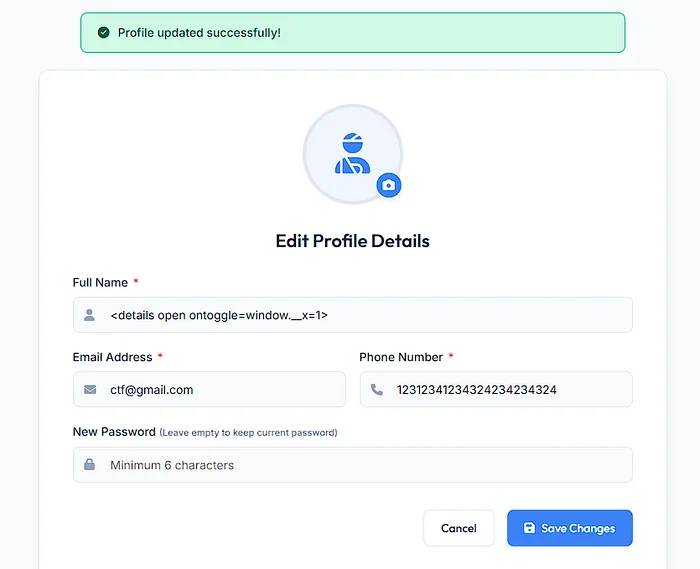
The profile name accepts the details/ontoggle payload.
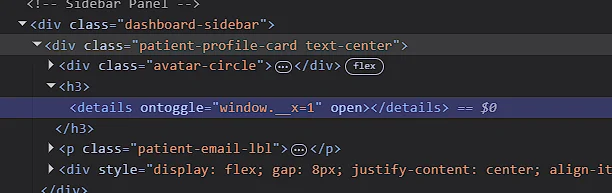
Inspecting the DOM shows a real <details> element rather than escaped text, which confirms the browser parsed the injected markup.
Step 4: Verify execution
When the page loaded, the handler executed. The browser console confirmed it: window._x=1 had been set. The researcher then swapped the payload for a confirm call, which instantly triggered a visible interactive dialog on the screen.
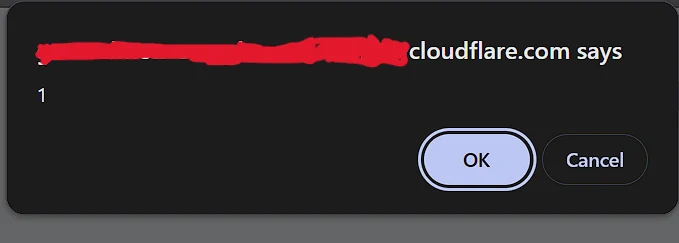
A visible confirm dialog proves the handler executed.
Root cause
The application renders the profile name as raw HTML and relies on a denylist sanitizer to remove dangerous content. A denylist only blocks the specific strings the developer anticipated. Here it removed onerror, onload and onmouseover but not ontoggle, and the <details open> element provides a way to fire that handler automatically on load. Because the name renders in the dashboard and in report headers, the payload executes automatically for anyone viewing those components.
Impact
The profile name renders prominently on the dashboard and inside report headers, so the payload executes automatically for anyone viewing those components. The researcher also describes chaining the issue with underlying report IDOR vulnerabilities: an attacker could manipulate victim sessions, compel users to open specific reports, and execute arbitrary code silently in their context.
Fix
The researcher's position is that denylists are fundamentally broken: blocking a hardcoded list of bad words or tags fails because an attacker only needs to find one allowed handler or creative element that the developer forgot to restrict. The researcher's position is that denylists are fundamentally broken, because an attacker only needs one allowed handler or creative element the developer forgot to restrict.
Variants to test
- Other elements with automatic events. A positive result is the handler running on page load with no user action.
- Handler enumeration against the filter. Submit a broad set of event handlers one at a time and record which survive. A positive result is any handler that is not stripped and that can be triggered.
- Filter bypass through encoding or case. A positive result is a blocked handler reaching the DOM in a form the browser still executes.
- Stored rendering points. A positive result is execution in a context different from the one where the value was entered.
- Chaining with access control flaws. Combine the stored payload with IDOR-style issues that let an attacker direct victims to a specific report or page. A positive result is execution in the victim's session after the attacker only supplies a link or identifier.
What happened, in plain words
A website let people choose a display name for their profile. That name was shown in several places: on a dashboard (a summary page you see after logging in) and at the top of reports. The site tried to keep the name safe by removing certain dangerous pieces of text. The person who found the bug showed that this filter only removed the pieces the developers had thought of, and that one piece they had forgotten was enough to make the browser run code written by the attacker. Because the name is saved and then shown to other people, the code runs for anyone who looks at those pages. This kind of bug is called stored cross-site scripting, or stored XSS.
The write-up does not name the product or the bug bounty program, and it does not describe the rest of the application beyond the dashboard and report headers.
The discovery: why a list of banned words gives false confidence
When people build websites, they often add a filter that removes well-known dangerous pieces of text, such as onerror, onload or onmouseover. The author calls this a denylist: a list of things that are not allowed. A denylist only blocks what the developer thought of. Anything the developer did not think of passes straight through.
To follow the rest of this article you need one idea: a web page is not just text. The browser reads the page as a set of instructions written in a language called HTML. Some parts of HTML are visible words, and some parts are instructions such as "show a picture" or "run this code when something happens". If a website takes text a user typed and puts it into the page without marking it as plain text, the browser cannot tell the difference between the user's words and the site's own instructions. It treats the user's text as instructions too. That is the heart of XSS.
The author was looking at the profile name field. This field is filled in once and then shown automatically in several places: on the dashboard and in the headers of reports. The author first submitted a harmless piece of HTML, just to see what would happen, and found that the name was placed into the page as raw HTML. In other words, the browser was reading the name as instructions, not as plain text. That told the author there was a way in.
The site clearly had a filter that removed some dangerous pieces, so the next question was: which pieces does it remove, and which does it let through? The author tried several event handlers one by one.
An event handler is a small instruction attached to a part of a page that says "when this thing happens, run this code". For example, onload means "when this finishes loading", and onerror means "when something fails to load". The results were:
| Handler | Result |
|---|---|
onerror |
stripped |
onload |
stripped |
onmouseover |
stripped |
ontoggle |
allowed |
"Stripped" means the filter deleted it. "Allowed" means it survived. "Allowed" means it survived. The filter knew the common handlers but not ontoggle, which belongs to a particular HTML element called <details>.
Exploitation
Step 1: Confirm that the name is treated as HTML
The author put a harmless piece of HTML into the profile name and saw it rendered as markup rather than as text. This step matters because it separates two possibilities. If the site had shown the name as plain text, the browser would have displayed the characters and done nothing else, and there would be no bug. Because the browser acted on the markup, the field is an injection point: a place where user input becomes part of the page's instructions. The only thing standing in the way was the filter.
Step 2: Work out what the filter blocks
The author's testing showed onerror, onload and onmouseover were stripped, while ontoggle survived. Then the author sent a name containing ontoggle, and it stayed. This step is about mapping the filter: finding out exactly which pieces it removes so that a piece it does not remove can be used. The author did not guess; each handler was tested on its own.
Step 3: Make the code run without the victim doing anything
Some event handlers only fire when a person does something, such as moving the mouse over an element. That would make an attack unreliable, because the victim might never do it. The author needed a handler that fires by itself.
The <details> element is a standard HTML feature: it creates a small box that can be expanded to show more content and collapsed again, like a fold-out section. The ontoggle handler fires whenever that box opens or closes. Normally a person has to click it. But HTML has an attribute called open that makes the box start out already expanded. With the open attribute, the ontoggle handler fired automatically upon loading, with no click and no hover. The payload was:
<details open ontoggle=window._x=1>
Line by line, in plain words:
<detailsstarts a fold-out box. The browser now expects a list of settings for that box.openis one of those settings. It tells the browser to show the box already expanded.ontoggle=window._x=1is another setting. It tells the browser: when this box opens or closes, run the codewindow._x=1. That code stores the number 1 in a named slot called_xthat belongs to the whole page.>closes the opening tag. The box has no content inside it, which is fine for this test.
The screenshot shows the profile name field accepting the details/ontoggle payload.
Inspecting the page shows a real <details> element in the page structure, not escaped text. "Escaped" means the site would have converted the angle brackets into harmless visible characters, so the browser would show the code as words instead of running it. Here that did not happen, which confirms the browser read the injected markup as instructions.
Step 4: Check that the code really ran
When the page loaded, the handler ran. The browser console confirmed it: window._x=1 had been set. The console is a built-in panel in every browser, usually opened with the developer tools, where the browser reports messages and where you can type commands to inspect the page. Seeing _x set to 1 is proof that the author's code executed inside the page.
A value in a variable is not very convincing to a reader, so the author then replaced the payload with a call to confirm(1). confirm is a built-in browser function that shows a small pop-up box with a message and an OK button. If the pop-up appears, the code definitely ran. It did, immediately, on screen.
The screenshot shows the visible confirm dialog, which proves the handler executed.
Why it matters
- It shows up everywhere. The profile name appears prominently on the dashboard and inside report headers. So the payload runs automatically for anyone who views those parts of the site. The victim does not have to click a link or open a suspicious file; simply looking at a normal page is enough.
- It can be combined with other bugs. The author mentions underlying report IDOR vulnerabilities. IDOR stands for insecure direct object reference: a bug where a site lets you reach someone else's item, such as a specific report, just by changing an identifier in a link, because the site does not check that the item belongs to you. Combined with this stored payload, an attacker could manipulate victim sessions, push users to open particular reports, and run arbitrary code silently in their context. The report does not give further detail on the IDOR issues or on what the executed code could reach.
- Denylists always fail. Blocking a fixed list of bad words or tags is fundamentally broken. An attacker only needs to find one allowed handler or one creative element that the developer forgot to restrict.
Root cause
The site takes the profile name and puts it into the page as raw HTML, and it relies on a denylist to remove dangerous content. A denylist only blocks the exact strings the developer anticipated. Here it removed onerror, onload and onmouseover but not ontoggle, and the <details open> element provides a way to fire that handler automatically on load. Because the name is shown on the dashboard and in report headers, the payload runs automatically for anyone who views those parts of the site.
Fix
The author's position is that denylists are fundamentally broken. The author's position is that denylists are fundamentally broken, because an attacker only needs one allowed handler or creative element the developer forgot to restrict. In everyday terms: instead of trying to guess every dangerous word, treat the name as plain text and show it as plain text, so the browser never reads it as instructions.
Variants to test
Each one describes what to try and what a positive result looks like.
- Other elements with automatic events. A positive result is the handler running on page load with no user action.
- Handler enumeration against the filter. Submit a broad set of event handlers one at a time and record which survive. A positive result is any handler that is not stripped and that can be triggered.
- Filter bypass through encoding or case. A positive result is a blocked handler reaching the page in a form the browser still executes.
- Stored rendering points. A positive result is execution in a context different from the one where the value was entered.
- Chaining with access control flaws. Combine the stored payload with IDOR-style issues that let an attacker direct victims to a specific report or page. A positive result is execution in the victim's session after the attacker only supplies a link or identifier.
Glossary
- XSS (cross-site scripting): a bug where a website lets text from a user be treated by the browser as instructions, so an attacker's code runs inside other people's pages.
- Stored XSS: XSS where the malicious text is saved by the site and shown later to other users, so it runs for everyone who views that page.
- HTML: the language browsers use to describe a page, made of tags such as
<details>that tell the browser what to show and do. - Tag: a piece of HTML written between angle brackets, such as
<details>, that gives the browser an instruction. - Attribute: a setting written inside a tag, such as
openorontoggle, that changes how the element behaves. - Element: a complete piece of HTML, made of a tag and its attributes, such as
<details open ontoggle=...>. - Event handler: code attached to an element that runs when something happens, such as loading, hovering or toggling.
onerror,onload,onmouseover,ontoggle: names of event handlers for "failed to load", "finished loading", "mouse moved over" and "opened or closed" respectively.<details>: an HTML element that creates a fold-out box which can be expanded and collapsed.openattribute: a setting on<details>that makes the box start out expanded.- Sanitizer: code that cleans user input before it is saved or shown, usually by removing or escaping dangerous parts.
- Denylist: a filter that blocks a fixed list of known-bad things; anything not on the list is allowed.
- Escaping: converting special characters such as
<and>into harmless visible text so the browser shows them instead of acting on them. - Raw HTML rendering: putting user input into the page without escaping it, so the browser reads it as instructions.
- Injection point: a place where user input becomes part of the page's instructions.
- DOM: the browser's internal model of the page, which you can inspect with developer tools to see what the browser actually built.
- Browser console: a panel in the browser's developer tools where the browser reports messages and where you can type commands to inspect the page.
window._x=1: code that stores the number 1 in a named slot called_xon the page, used here only to prove that code ran.confirm(1): a built-in browser function that shows a small pop-up box with a message and an OK button.- Payload: the piece of text an attacker submits in order to make the browser do something.
- Dashboard: a summary page shown after logging in.
- Report header: the top part of a report page where the profile name is displayed.
- IDOR (insecure direct object reference): a bug where a site lets you reach someone else's item, such as a specific report, just by changing an identifier in a link, because it does not check that the item belongs to you.
- Session: the state that keeps you logged in while you move between pages; if an attacker's code runs in your session, it acts with your permissions.



