Stored XSS via File Upload: Smuggling JavaScript Inside a “Harmless” PDF
A recruitment portal accepted a structurally valid PDF containing embedded JavaScript in its document catalog, and served it inline without a Content-Disposition attachment header or a restrictive CSP. An attacker could upload such a file as a résumé so that when a victim opened it, the embedded script executed in the application's origin.

Bug Bounty
The full write-up lives on its author's site
It belongs to its author, so we link to it rather than copy it. The other two tabs are our own rewrites, checked against it.
Context
A modern recruitment portal ran a job-application form with a résumé upload field. The field was locked down to "PDF only", and unlike many upload fields, this one enforced the rule properly. The interesting part of this story is not a filter bypass: the file that carried the payload was a structurally valid PDF, and the bug came from what the format itself allows inside a valid document.
The researcher's framing is worth keeping in mind throughout: the filter was watching the wrapper, and nobody was watching what was inside it.
Setup
The report does not describe the account setup, the roles involved, or the tooling beyond what appears in the screenshots. A screenshot shows the upload request and its response in Burp Suite, and standard command-line utilities were used to generate the baseline PDF. The only precondition that matters is the one the portal itself provided: an application form that accepts a résumé as a PDF and stores it for later viewing.
Finding it
The upload field rejected everything that was not a PDF. The researcher tried renamed extensions, double extensions, null bytes and spoofed Content-Type headers. Every non-PDF attempt bounced off the same validation error, with no leniency.
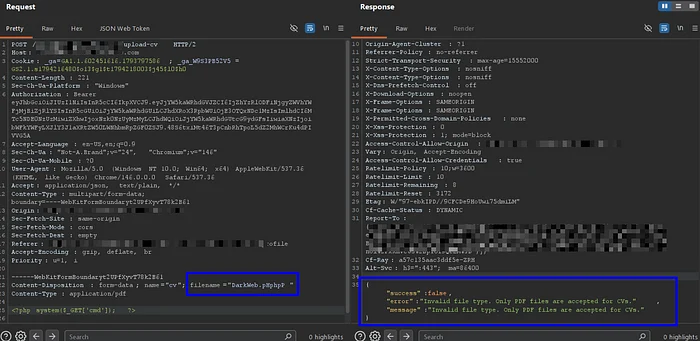
After about five minutes of considering the endpoint a dead end, the pivot was to stop attacking the file-type check and start looking at the format being accepted. A PDF is not an inert container: the specification allows opening-action entries in the document catalogue that point to embedded JavaScript, which runs when the document is opened. That is a built-in feature of the format, not a corruption of it.
So the question changed from "how do I sneak a non-PDF past this filter" to "how do I build a perfectly legal PDF that also executes code when viewed". No spoofing would be required, only the format used as designed.
Exploitation
Step 1: Build a valid carrier document
Rather than reaching for an exploitation framework, the researcher generated a baseline PDF with standard command-line utilities and embedded a minimal proof-of-concept script, app.alert("XSS"), directly into the document's structural catalogue.


The output was a file such as js_injected_test.pdf: visually the same document, passing validation as a completely normal PDF, but wired to execute the embedded script the moment it is opened.
Step 2: Upload it through the normal flow
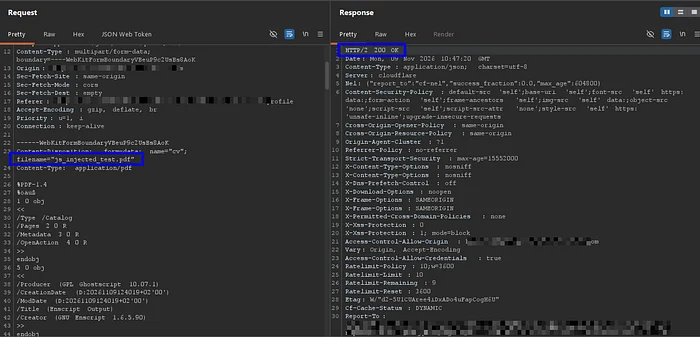
The crafted PDF went through the same upload flow as any applicant's résumé. There was no error, no rejection and no sanitisation step. The server returned a clean 200 OK:
HTTP/1.1 200 OKContent-Type: application/json{ "success":true, "message":"CV uploaded successfully", "cv_path":"accountID_1794221240804_cv.pdf", "filename":"accountID_1794221240804_cv.pdf", "uploadDate":"2026-11-09T10:47:20.820Z"}
The response confirms the upload succeeded and returns a cv_path and filename value. From the server's point of view this was a perfectly valid upload, because it was one: nothing in the validation path looked past whether the file was a well-formed PDF.
Step 3: Open the stored file
Acceptance is only half of the issue; the other half is how the stored file is served and opened. Two missing pieces turned a stored file with an embedded script into a script running in the application's own origin:
- No
Content-Disposition: attachmentheader. Without it, the browser defaults to rendering the file inline instead of forcing a download, so the PDF opened directly in the browser with no save prompt in the way. - No restrictive Content-Security-Policy. Nothing stopped the browser's built-in PDF viewer from executing the document's active content inside the page's own origin.
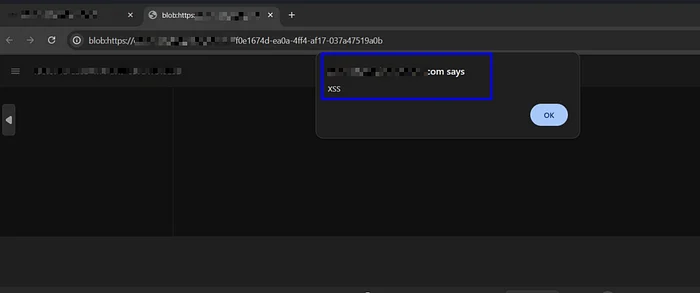
Opening the stored file triggered the payload instantly, and the researcher confirmed a reproducible Stored XSS. The only user interaction required was opening a document the user had every reason to trust.
Root cause
The validation was a whitelist on the file type, and it worked as written: the file really was a PDF. The mistake is that the pipeline treated "valid PDF" as equivalent to "safe content". A PDF can carry opening-action entries in its catalogue that point to embedded JavaScript, so a file can satisfy every structural check and still execute code when rendered.
The execution side is the second half of the cause. Because the stored file was served inline, without Content-Disposition: attachment, and without a restrictive CSP on the file-serving path, the browser's PDF viewer ran the document's active content in the application's own origin rather than in a download or an isolated context.
Impact
An attacker who can submit an application can store a PDF that executes JavaScript in the application's origin when another user opens it. The only interaction needed is opening the file. The report does not describe what the payload could reach once it ran, so the concrete consequences beyond script execution in the origin are not stated. The researcher characterises the finding as confirmed and reproducible Stored XSS.
Fix
The report recommends defence in depth across the asset's lifecycle rather than better extension checks:
- Sanitise PDFs server-side. Strip active content actions and embedded scripts before storage. Extension checks alone are not enough.
- Force the download. Serve uploads with
Content-Disposition: attachmentso the browser never renders them inline. - Isolate uploaded content. Serve user-supplied files from a separate, cookieless static domain, so that if something does execute there is nothing there to steal.
- Apply a strict CSP on the file-serving path as a final line of defence.
The report states that the issue was reported through the program's disclosure process and marked as Resolved on the same day, within 24 hours.
Variants to test
- Other formats with active content. Try SVG, HTML, XHTML and Office documents against upload fields that whitelist them. A positive result is a file that passes validation and executes script when opened from the application's origin.
- PDF actions beyond the opening action. Test other action types the format supports, such as additional actions on pages or annotations. A positive result is execution triggered by an interaction other than simply opening the file.
- Inline rendering without
Content-Disposition. For any upload endpoint, check whether the stored file is served inline. A positive result is a response that renders the file in the browser instead of downloading it. - CSP coverage on the file-serving path. Compare the CSP on the main application with the CSP on the host that serves uploads. A positive result is a missing or permissive policy on the file host while the main application is locked down.
- Cookie scope of the file host. Check whether uploaded files are served from the same origin as the application or from a separate domain. A positive result is same-origin serving, which puts any executed script in reach of the application's session context.
- Sanitisation after storage. Upload a document with active content, then download it again and inspect the catalogue. A positive result is the active content surviving the round trip unchanged.
What happened, in plain words
A company ran a website where people apply for jobs. The site had a box where you upload your CV, and it only accepted PDF files. The person who found this bug tried many tricks to sneak a non-PDF file past that check, and every single one was refused. So instead of fighting the check, they built a completely normal, valid PDF that also contained a tiny piece of JavaScript, a small program that browsers can run. The site accepted it without complaint and stored it. When someone later opened that stored file in their browser, the little program ran inside the job site itself. That is the bug: a file that passes every check but still runs code when opened.
To follow the rest of this article you only need to know a few everyday ideas, and each one is explained where it first appears.
The setup
A recruitment portal is a website where a company posts job openings and people send in their CVs, also called résumés. The feature in question is the upload field on the job-application form: you pick a file from your computer, press a button, and the site keeps the file so a recruiter can look at it later.
The site had a rule: only PDF files. A PDF is the common document format used for CVs, invoices and manuals. It is designed to look the same on every computer, which is why people trust it.
A screenshot shows the upload request and response in a tool called Burp Suite. Think of Burp as a pause button and notebook for web traffic: it sits between your browser and the website, lets you see the exact message your browser sends, and lets you change it and send it again. They also used standard command-line utilities, which are small programs you run by typing a command in a text window, to build the PDF.
The report does not describe how the account was set up or which roles were involved. The only thing that matters is what the site itself offered: a form that accepts a PDF and stores it for later viewing.
Finding it
The upload field refused everything that was not a PDF. The tester tried the classic tricks:
- renaming a file so it ends in
.pdfeven though it is something else, - double extensions, where a name ends in something like
.php.pdfto confuse the check, - null bytes, an invisible character that some programs treat as the end of a name, so a check and a later step can disagree about what the file is called,
- spoofed
Content-Typeheaders. A header is a small label sent along with a web request.Content-Typeis the label that says what kind of file is being sent, for exampleapplication/pdf. Spoofing means writing a false label.
Every non-PDF attempt hit the same validation error. Validation means the site checking that what you sent is allowed. This check was strict, with no leniency.
After about five minutes of treating the upload field as a dead end, the tester changed the question. Instead of asking how to sneak a non-PDF past the check, they asked what a PDF is allowed to contain.
This is the key idea of the whole story. A PDF is not just a picture of a page. The PDF format has a built-in feature: a document can carry an opening action, an instruction that says "when this file is opened, do this". That instruction can point to JavaScript embedded in the file. JavaScript is the programming language that web pages use to make things happen in your browser, like showing a pop-up or reading data on the page. So a PDF can be a perfectly legal PDF and still carry a small program that runs when it is opened. That is not a corruption of the format; it is a feature of the format.
So the question became: how do I build a perfectly legal PDF that also runs code when viewed? No spoofing needed, just the format used exactly as designed.
Building the proof of concept
A proof of concept is a small, safe demonstration that proves a bug is real, without doing any damage. Here the demonstration was a pop-up box triggered by the embedded script.
Step 1: Build a valid carrier document
Rather than using a complex exploitation framework, a toolkit for building attacks, the tester used a simple approach: generate a normal PDF with standard command-line utilities, then embed a minimal script, app.alert("XSS"), directly into the document's structural catalogue.
The catalogue is the part of a PDF that describes the document as a whole, a bit like the table of contents and the cover page combined. Putting the instruction there means the PDF viewer reads it as soon as it opens the file.
The result was a file such as js_injected_test.pdf. Visually it was the same document as before. It passed validation as a completely normal PDF. But it was wired to run the embedded script the moment it was opened.
Step 2: Upload it through the normal flow
The crafted PDF went through the same upload flow as any applicant's résumé. There was no error, no rejection and no sanitisation step. Sanitisation means cleaning a file before storing it, for example removing anything active from it. The server returned a clean 200 OK:
HTTP/1.1 200 OKContent-Type: application/json{ "success":true, "message":"CV uploaded successfully", "cv_path":"accountID_1794221240804_cv.pdf", "filename":"accountID_1794221240804_cv.pdf", "uploadDate":"2026-11-09T10:47:20.820Z"}
Line by line, in plain words:
HTTP/1.1 200 OKis the server's answer. HTTP is the language browsers and websites use to talk.200 OKmeans "done, no problem".Content-Type: application/jsonsays the answer is formatted as JSON, a simple text format for structured data, like a labelled list."success":truesays the upload worked."message":"CV uploaded successfully"is a human-readable confirmation."cv_path"and"filename"give the name under which the file was stored on the server, so it can be found again later."uploadDate"records when it was stored.
From the server's point of view this was a perfectly valid upload, because it was one. Nothing in the validation path looked past whether the file was a well-formed PDF.
Step 3: Open the stored file
Getting the file accepted is only half of the issue. The other half is how the stored file is served and opened. Two missing pieces turned a stored file with an embedded script into a script running in the application's own origin.
Origin is a word for the combination of scheme, host and port, roughly "which site this is". When a script runs in the application's own origin, the browser treats it as part of the site itself, so it can do what the site can do. That is what makes this dangerous.
- No
Content-Disposition: attachmentheader.Content-Dispositionis a header that tells the browser whether to show a file in the browser window or save it to disk.attachmentmeans "download it". Without it, the browser defaults to rendering the file inline, meaning it shows it right there in the tab, so the PDF opened directly in the browser with no save prompt in the way. - No restrictive Content-Security-Policy. A Content-Security-Policy, or CSP, is a set of rules a site sends to the browser saying what is allowed to run on its pages. A restrictive policy would have blocked the PDF's active content. Here nothing stopped the browser's built-in PDF viewer from running the document's active content inside the page's own origin.
Opening the stored file triggered the payload instantly. The tester confirmed a reproducible Stored XSS. Stored means the harmful content is saved on the server and served to whoever opens it later, as opposed to reflected, where it only bounces back in one response. XSS stands for cross-site scripting: a way of getting your own script to run in someone else's site. The only user interaction required was opening a document the user had every reason to trust.
Why it worked
The validation was a whitelist on the file type, and it worked as written: the file really was a PDF. A whitelist is a list of what is allowed, as opposed to a blacklist, a list of what is forbidden. The mistake is that the pipeline treated "valid PDF" as equivalent to "safe content". A PDF can carry opening-action entries in its catalogue that point to embedded JavaScript, so a file can satisfy every structural check and still run code when rendered.
The execution side is the second half of the cause. Because the stored file was served inline, without Content-Disposition: attachment, and without a restrictive CSP on the file-serving path, the browser's PDF viewer ran the document's active content in the application's own origin rather than in a download or an isolated context.
What it could have meant
An attacker who can submit an application can store a PDF that runs JavaScript in the application's origin when another user opens it. The only interaction needed is opening the file. The report does not describe what the payload could reach once it ran, so the concrete consequences beyond script execution in the origin are not stated. The tester characterises the finding as confirmed and reproducible Stored XSS.
How to fix it
The report recommends defence in depth across the asset's lifecycle rather than better extension checks. Defence in depth means several layers of protection, so that one mistake does not open the door on its own.
- Sanitise PDFs server-side. Strip active content actions and embedded scripts before storage. Extension checks alone are not enough.
- Force the download. Serve uploads with
Content-Disposition: attachmentso the browser never renders them inline. - Isolate uploaded content. Serve user-supplied files from a separate, cookieless static domain, so that if something does execute there is nothing there to steal. A cookie is a small piece of data a site stores in your browser to remember who you are, which is why a cookieless domain has nothing worth stealing.
- Apply a strict CSP on the file-serving path as a final line of defence.
The report states that the issue was reported through the program's disclosure process and marked as Resolved on the same day, within 24 hours.
Other places to look
- Other formats with active content. Try SVG, HTML, XHTML and Office documents against upload fields that whitelist them. A positive result is a file that passes validation and runs script when opened from the application's origin.
- PDF actions beyond the opening action. Test other action types the format supports, such as additional actions on pages or annotations. A positive result is execution triggered by an interaction other than simply opening the file.
- Inline rendering without
Content-Disposition. For any upload endpoint, check whether the stored file is served inline. A positive result is a response that renders the file in the browser instead of downloading it. - CSP coverage on the file-serving path. Compare the CSP on the main application with the CSP on the host that serves uploads. A positive result is a missing or permissive policy on the file host while the main application is locked down.
- Cookie scope of the file host. Check whether uploaded files are served from the same origin as the application or from a separate domain. A positive result is same-origin serving, which puts any executed script in reach of the application's session context.
- Sanitisation after storage. Upload a document with active content, then download it again and inspect the catalogue. A positive result is the active content surviving the round trip unchanged.
Glossary
- API: a defined way for one program to talk to another, like a service counter where you make a request and get a structured answer.
- Burp Suite: a tool that sits between your browser and a website so you can see, pause, change and resend web requests.
- Catalogue (PDF): the part of a PDF that describes the whole document, including instructions for what happens when it is opened.
- Command-line utilities: small programs you run by typing a command in a text window.
- Content-Disposition: a header that tells the browser whether to show a file in the browser or save it to disk;
attachmentmeans download. - Content-Security-Policy (CSP): rules a site sends to the browser saying what is allowed to run on its pages.
- Content-Type: a header that labels what kind of file or data is being sent, for example
application/pdf. - Cookie: a small piece of data a site stores in your browser to remember who you are.
- Cross-site scripting (XSS): getting your own script to run in someone else's website.
- Defence in depth: using several layers of protection so one mistake does not open the door on its own.
- Double extension: a file name with two extensions, like
.php.pdf, used to confuse file-type checks. - Header: a small label sent along with a web request or response, carrying information about it.
- HTTP: the language browsers and websites use to talk to each other.
- Inline rendering: showing a file directly in the browser tab instead of downloading it.
- JavaScript: the programming language web pages use to make things happen in your browser.
- JSON: a simple text format for structured data, like a labelled list.
- Null byte: an invisible character some programs treat as the end of a name, which can make two steps disagree about a file's name.
- Opening action: an instruction inside a PDF that says what to do when the file is opened.
- Origin: the combination of scheme, host and port that identifies which site something belongs to.
- PDF: a common document format designed to look the same on every computer.
- Proof of concept: a small, safe demonstration that proves a bug is real.
- Recruitment portal: a website where companies post jobs and people send in CVs.
- Résumé / CV: a document listing your work experience and skills, sent when applying for a job.
- Sanitisation: cleaning a file or input before storing or using it, for example removing anything active.
- Spoofing: writing a false label or value to make something look like something else.
- Stored XSS: XSS where the harmful content is saved on the server and served to whoever opens it later.
- Validation: a site checking that what you sent is allowed.
- Whitelist: a list of what is allowed, as opposed to a blacklist, a list of what is forbidden.



