Stories from the Shell: Episode One
An SSH service on a non-standard port was vulnerable to username enumeration, allowing the discovery of valid usernames. One of those accounts had a trivial password, giving low-privileged access, which was then escalated to root via a known kernel exploit.

medium.com
Published on medium.com
Today I want to welcome you to a new series of posts I’m putting together, ‘Stories from the Shell’. These posts will detail some of the more interesting hacks I’ve managed to pull off over the course of my penetration testing career.
The full write-up lives on its author's site
It belongs to its author, so we link to it rather than copy it. The other two tabs are our own rewrites, checked against it.
Context
This is the first post in a series called 'Stories from the Shell', which covers interesting hacks pulled off over the course of a penetration testing career. The engagement described here was an external network assessment for a large airline company. The target was the company's externally reachable estate, and the goal was to find a way in from the internet.
Setup
The work started with a standard vulnerability scanner run, which produced a couple of medium risk issues but nothing that looked serious. The next step was an nmap scan with the vulscan script, using an exploitdb database, against a list of external IP addresses. The command used was:
sudo nmap -Pn — randomize-hosts -vv -T4 -n — host-timeout=4h — script vulscan — script-args vulscandb=exploitdb.csv — defeat-rst-ratelimit — open -sTUV -O -iL external-ips.txt -oA nmap-full -p T:1–65535,U:7,9,17,19,49,53,67–69,80,88,111,120,123,135–139,158,161–162,177,427,443,445,497,500,514–515,518,520,593,623,626,631,996–999,1022–1023,1025–1030,1433–1434,1645–1646,1701,1718–1719,1812–1813,1900,2000,2048–2049,2222–2223,3283,3456,3703,4444,4500,5000,5060,5353,5632,9200,10000,17185,20031,30718,31337,32768–32769,32771,32815,33281,49152–49154,49156,49181–49182,49185–49186,49188,49190–49194,49200–49201,65024
The scan skips host discovery (-Pn), randomises host order, uses aggressive timing (-T4), disables DNS resolution (-n), sets a four hour host timeout, runs the vulscan script against the exploitdb database, tries to defeat RST rate limiting, reports only open ports, and runs TCP connect and UDP scans with OS detection. TCP covers the full range 1 to 65535; UDP covers a curated list of common service ports. Output is written in all formats to the nmap-full prefix.
Finding it
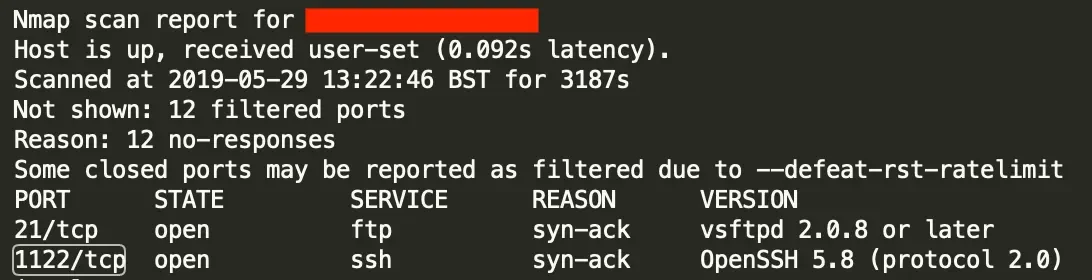
Looking through the results, one line stood out: SSH running on port 1122. SSH on a non-standard port is worth a closer look, and the immediate question was whether it was vulnerable to the informational username enumeration issue tracked as CVE-2018-15473.
Exploitation
Step 1: enumerate valid usernames
A public exploit for CVE-2018-15473 is available on GitHub:
https://github.com/Rhynorater/CVE-2018-15473-Exploit/blob/master/sshUsernameEnumExploit.py

The exploit was run against the service with a 13,000 line wordlist of SSH usernames found online. The run was left going overnight, and the next morning it produced a list of 59 valid usernames.
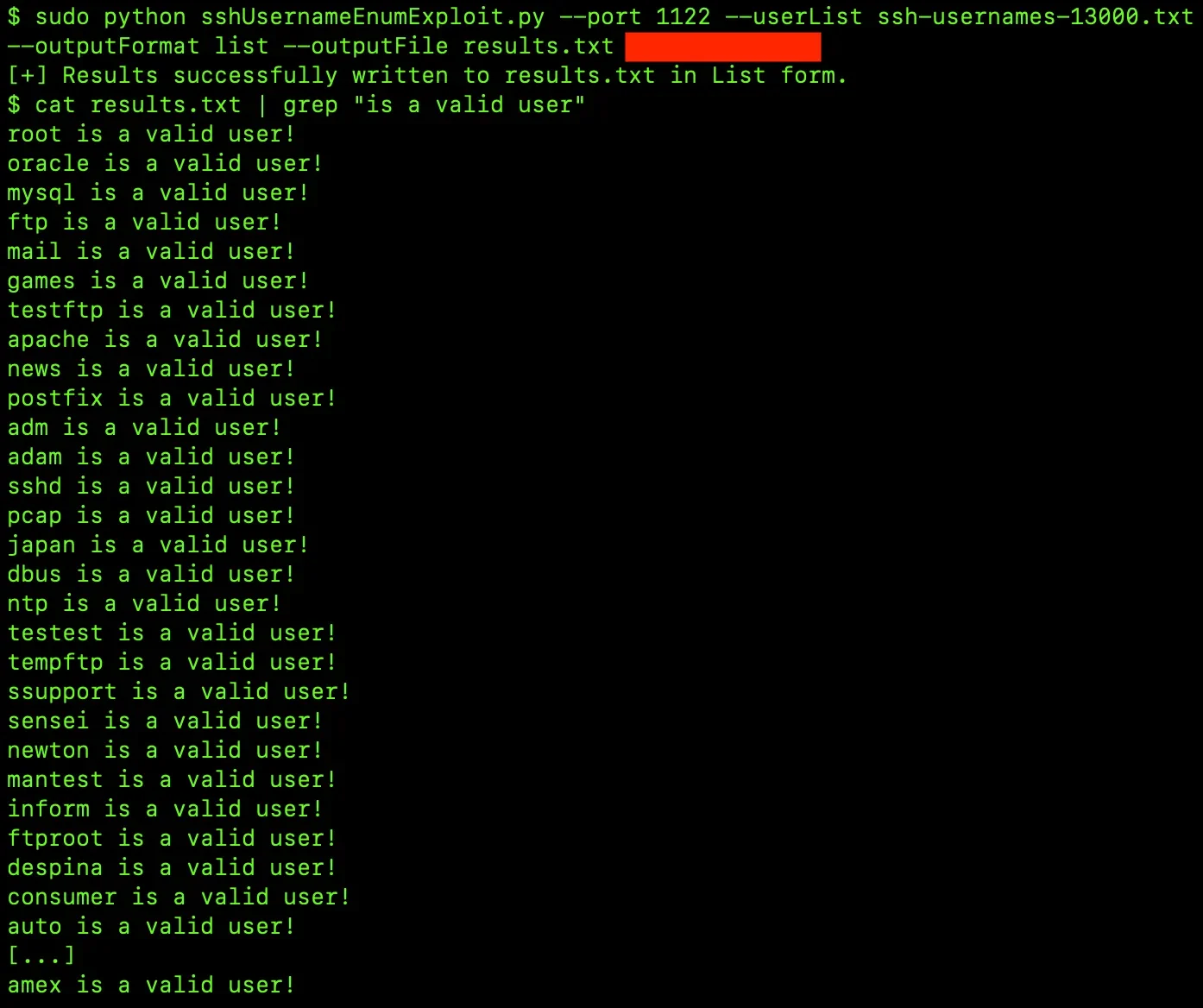
A little cutting reduced the output to a clean list of valid usernames.
Step 2: password guessing with hydra
The expectation was that a password list would be needed at this point. Instead, hydra's -e nsr option was tried, which tries the username as the password, an empty password, and the reversed username for each account. The author notes that feeding the SSH username list into hydra would also have been possible.

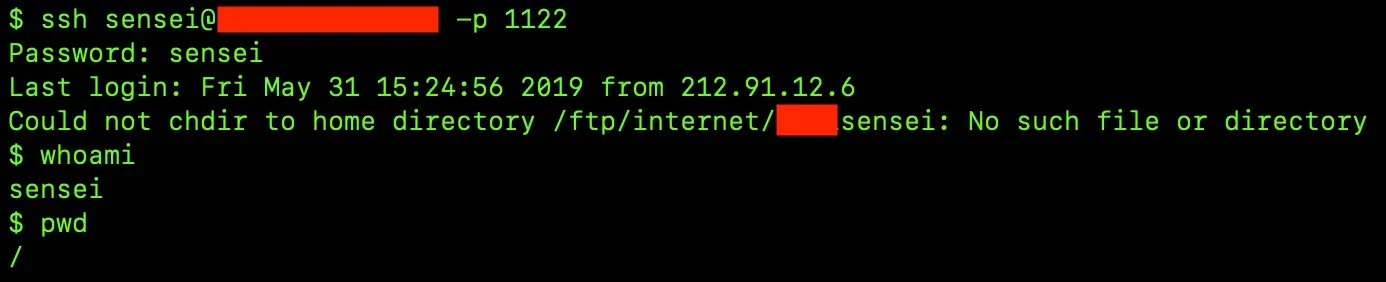
This worked, giving low privileged access to the machine.
Step 3: privilege escalation
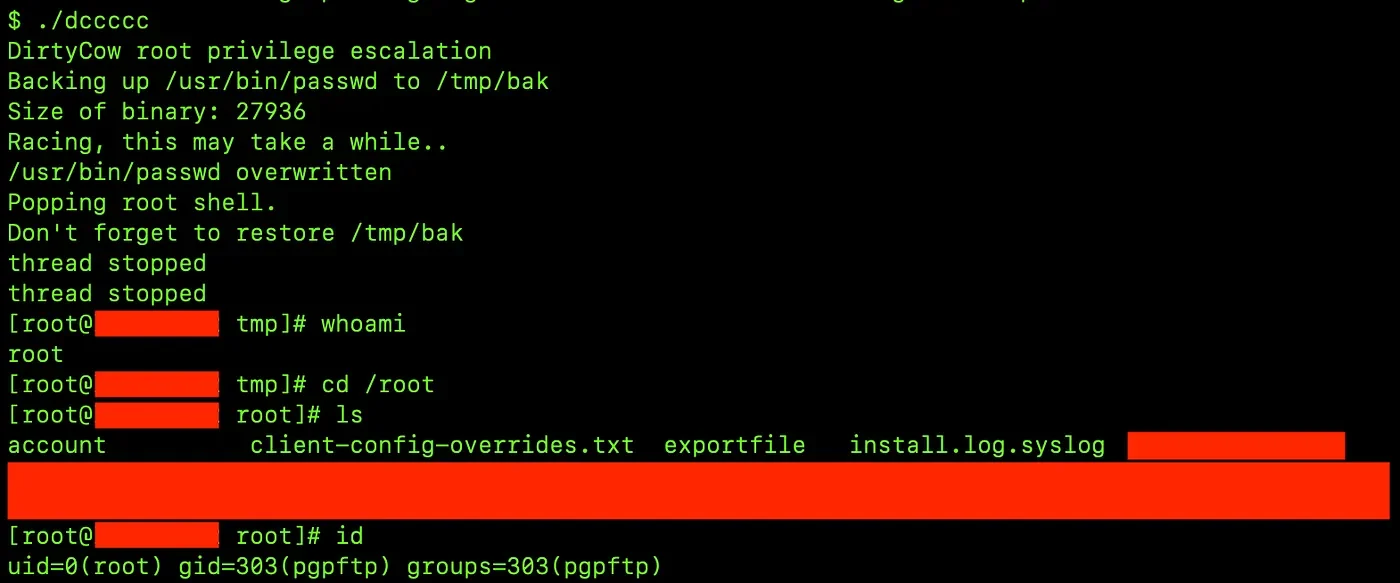
A few hours were spent trying various privilege escalation techniques. Eventually a Dirty Cow exploit was found that worked on RHEL.
Root cause
The report does not analyse the server configuration in detail. What it shows is a chain: an SSH service exposed on port 1122 that leaked which usernames exist through CVE-2018-15473, combined with accounts whose passwords were guessable with hydra's -e nsr candidates, and a host kernel vulnerable to Dirty Cow. Each of these is individually a known weakness; together they turned an informational enumeration issue into full compromise.
Impact
The initial foothold was low privileged access, later escalated with a Dirty Cow exploit. The host turned out to be a test FTP server, but inside the root .ssh folder were keys to the production FTP server and to a number of other machines. All of those were left exposed to the public internet and were out of scope, which the company had done to ensure PCI compliance. The keys therefore gave a route from the in-scope test server to machines outside scope.
Fix
The report does not describe any remediation carried out by the company. The weaknesses it exposes point to the obvious measures: patch the SSH daemon against CVE-2018-15473, enforce password policy so that usernames, empty strings and reversed usernames cannot be used as passwords, patch the kernel against Dirty Cow, and keep private keys for production systems off test hosts that are reachable from the internet.
Variants to test
- Scan for SSH on non-standard ports. A positive result is an SSH banner on a port other than 22, which is worth testing for username enumeration.
- Run the CVE-2018-15473 exploit with a large username wordlist. A positive result is a set of usernames the service treats as valid.
- Try hydra's
-e nsragainst the valid usernames. A positive result is a successful login using the username, an empty password or the reversed username. - Check kernel versions on any host reached for known local privilege escalation bugs such as Dirty Cow. A positive result is a working exploit that raises privileges.
- Look in
.sshdirectories on low-value or test hosts for keys to higher-value systems. A positive result is a key that authenticates to another host, especially one outside the original scope.
What happened, in plain words
A security tester was hired by a large airline to try to break into the company's computers from the outside, the way a real attacker on the internet would. This kind of job is called a penetration test, or pentest: the company gives permission and a list of machines it owns, and the tester tries to find weaknesses before criminals do.
Over a few steps the tester found a login service on an unusual door number, worked out which usernames existed on it, guessed the passwords with hydra's simple username-based candidates, and then used a known flaw in the machine's operating system to escalate privileges. The machine turned out to be a test server, but sitting inside it were keys that opened the company's real production server and several other machines. That is the whole story: small weaknesses, chained one after another, ending somewhere much more important than where it started.
The setting
The target was the airline's "externally reachable estate": every machine the company owns that can be contacted from the open internet. Think of it as the outside of a building: the front doors, the delivery entrances, the windows facing the street. The tester's goal was simply to get in from the street.
A few terms that come up constantly below:
- IP address: the numeric address of a machine on a network, like a postal address for computers. A company with many servers has many of them.
- Port: a numbered door on a single machine. One computer can run many services at once, and each listens on its own port number. Web pages normally arrive on port 80 or 443, and remote login over SSH normally arrives on port 22.
- Service: a program on a machine that answers requests on a port, for example a web server or a login server.
- SSH: Secure Shell, a way to log in to another computer over the network and get a command line on it. It is the standard tool for administering servers remotely.
Step 1: the first, ordinary scan
The work began with a standard vulnerability scanner. A scanner is an automated program that knocks on every door it is given and compares what answers against a catalogue of known weaknesses, much like a building inspector walking round with a checklist. It found a couple of medium risk issues, but nothing that looked serious.
Because the automated checklist came up short, the tester moved to a more manual tool: nmap. Nmap is a port scanner. You give it a list of addresses and it reports which doors are open and what is listening behind them. It can also run extra scripts against what it finds, and one of those scripts, vulscan, cross-references the detected software versions against a database of known exploits (here, the ExploitDB catalogue).
The command used was:
sudo nmap -Pn — randomize-hosts -vv -T4 -n — host-timeout=4h — script vulscan — script-args vulscandb=exploitdb.csv — defeat-rst-ratelimit — open -sTUV -O -iL external-ips.txt -oA nmap-full -p T:1–65535,U:7,9,17,19,49,53,67–69,80,88,111,120,123,135–139,158,161–162,177,427,443,445,497,500,514–515,518,520,593,623,626,631,996–999,1022–1023,1025–1030,1433–1434,1645–1646,1701,1718–1719,1812–1813,1900,2000,2048–2049,2222–2223,3283,3456,3703,4444,4500,5000,5060,5353,5632,9200,10000,17185,20031,30718,31337,32768–32769,32771,32815,33281,49152–49154,49156,49181–49182,49185–49186,49188,49190–49194,49200–49201,65024
Line by line, in plain words:
sudoruns the command with administrator rights, which nmap needs for some of its lower level probing.nmapis the scanner itself.-Pntells it not to bother checking first whether a host is alive; it just assumes every address is up and scans it. Many firewalls silently drop the "are you there?" probe, so skipping it avoids false negatives.— randomize-hostsshuffles the order in which addresses are scanned, so the traffic does not look like a neat sequential sweep.-vvmeans very verbose: print plenty of progress detail.-T4is a timing setting, on a scale where higher is faster and noisier. Four is aggressive but not reckless.-nturns off reverse DNS lookups, so nmap does not waste time turning IP addresses into hostnames.— host-timeout=4hgives each host up to four hours before nmap gives up on it.— script vulscanruns the vulscan script.— script-args vulscandb=exploitdb.csvpoints that script at the ExploitDB database file it should compare findings against.— defeat-rst-ratelimittries to work around rate limiting that some systems apply by sending reset packets, which would otherwise slow the scan down.— openreports only ports that are actually open, hiding the closed and filtered ones.-sTUVselects the scan types:-sTis a TCP connect scan,-sUis a UDP scan, and-Vadds version detection, so nmap tries to say which software and version is behind each open port.-Oasks for operating system detection.-iL external-ips.txtreads the list of target addresses from that file.-oA nmap-fullsaves the output in all of nmap's formats, usingnmap-fullas the base filename.-plists the ports to scan.T:1–65535means every TCP port from 1 to 65535, the entire range.U:followed by a list means a hand-picked set of UDP ports, the ones commonly used by well-known services.
In everyday terms: rather than trusting the automated inspector, the tester walked round the whole building personally, trying every door on every wall, and asked each door what was behind it.
Step 2: something odd in the results
Looking through the results, one line stood out: SSH running on port 1122.
Why does that matter? SSH normally lives on port 22. When an administrator moves it to a different number, it is often a deliberate attempt to hide it: the thinking is that attackers only look at the standard doors. To a tester, an SSH service on an unusual port is a signal that somebody wanted this door kept quiet, which makes it worth a closer look. The immediate question was whether this particular SSH server was vulnerable to a known weakness tracked as CVE-2018-15473.
A CVE is a public catalogue number for a specific, documented security flaw. Think of it as a case number that lets everyone in the world refer to the same bug unambiguously. CVE-2018-15473 is an informational issue: it does not let anyone log in, but it lets an attacker work out which usernames exist on the server. That sounds harmless, and on its own it is. It becomes useful the moment you want to guess passwords, because you no longer waste time on accounts that do not exist.
Step 3: finding out which usernames exist
A public exploit for CVE-2018-15473 is available on GitHub:
https://github.com/Rhynorater/CVE-2018-15473-Exploit/blob/master/sshUsernameEnumExploit.py
This is a link to a small Python program that someone published so others can test their own servers. "Exploit" here means code that takes advantage of a specific flaw; "enumeration" means listing things out one by one, in this case usernames.
The exploit was run against the service with a 13,000 line wordlist of SSH usernames found online. A wordlist is simply a long text file with one candidate per line: common names, default accounts, and so on. The tool tries each candidate and, because of the flaw, the server's replies differ slightly depending on whether the username exists. That tiny difference is enough to sort real accounts from imaginary ones.
The run was left going overnight, and the next morning it produced a list of 59 valid usernames.
A little cutting reduced the output to a clean list of valid usernames. cut is a standard command line utility that picks out a chosen column or field from each line of text, so a messy report becomes a tidy one-name-per-line file that other tools can consume.
Why do this at all? Because the next step, guessing passwords, only works if you know which accounts to aim at. This is the difference between trying every key on a keyring against a lock and first finding out which locks actually exist.
Step 4: guessing the passwords
The expectation was that a password list would be needed at this point: a big file of common passwords, tried one after another. Instead, the tester tried hydra's -e nsr option.
Hydra is a tool that automates login attempts against a service, trying combinations of usernames and passwords from lists. The -e nsr option tells it to also try three extra candidates for every username: n for the username itself used as the password, s for an empty password, and r for the username spelled backwards. The author notes that feeding the SSH username list into hydra would also have been possible, which is just a reminder that the two steps can be chained directly.
This worked, giving low privileged access to the machine. "Low privileged" means the tester got a normal user account, not an administrator: enough to look around, not enough to change the system. It is the difference between getting a visitor badge and getting the keys to the building.
Why try such a simple trick? Because people are predictable. When forced to pick a password, a surprising number choose their own username, leave the field empty, or type the username backwards. Trying those three costs almost nothing and occasionally pays immediately.
Step 5: becoming the administrator
A few hours were spent trying various privilege escalation techniques. Privilege escalation means turning a normal account into an administrator-level one on the same machine, usually by exploiting a bug in the operating system rather than by guessing another password.
Eventually a Dirty Cow exploit was found that worked on RHEL. Dirty Cow is the nickname of a well-known flaw in the Linux kernel, the core of the operating system. It is a race condition: two parts of the system act at the same moment and the timing lets one of them write to memory it should only be able to read. RHEL, Red Hat Enterprise Linux, is a common commercial Linux distribution, and the exploit used here was one that worked against it.
Why does this step matter so much? Because the low privileged account was only a foothold. The kernel bug is what turns a foothold into control of the whole machine.
What it all added up to
The report does not analyse the server configuration in detail. What it shows is a chain: an SSH service exposed on port 1122 that leaked which usernames exist through CVE-2018-15473, combined with accounts whose passwords were guessable with hydra's -e nsr candidates, and a host kernel vulnerable to Dirty Cow. Each of these is individually a known weakness; together they turned an informational enumeration issue into full compromise.
That is the lesson worth taking away. None of the three weaknesses would have been dramatic on its own. A username leak is a shrug. A weak password is a scolding. An unpatched kernel is a to-do item. Stacked in order, they let an outsider escalate from a normal account on a test server.
The host turned out to be a test FTP server. FTP is an old protocol for transferring files between computers; a test FTP server is a low-value machine used for trying things out, the sort of system nobody worries about. But inside the root .ssh folder were keys to the production FTP server and to a number of other machines.
An SSH key is a pair of files used instead of a password to log in: a private key kept secret on the machine you log in from, and a public key placed on the machine you log in to. Anyone holding the private key can log in without knowing any password at all. Finding private keys on a server is like finding a ring of master keys in a cleaner's cupboard: the cupboard itself is unimportant, the keys are not.
All of those other machines were left exposed to the public internet and were out of scope, which the company had done to ensure their PCI compliance. Scope is the agreed list of systems a tester is allowed to touch; anything outside it is off limits, even if it is reachable. PCI compliance refers to the payment card industry's security standard, a set of rules for handling card data, and the report says the company's arrangement was intended to satisfy it. The keys therefore gave a route from the in-scope test server to machines the tester was not allowed to touch.
The report does not describe any remediation carried out by the company. The weaknesses it exposes point to the obvious measures: patch the SSH daemon against CVE-2018-15473, enforce password policy so that usernames, empty strings and reversed usernames cannot be used as passwords, patch the kernel against Dirty Cow, and keep private keys for production systems off test hosts that are reachable from the internet.
Things worth trying elsewhere
These are the same checks, written so that someone starting out can follow the reasoning:
- Scan for SSH on non-standard ports. A positive result is an SSH banner on a port other than 22, which is worth testing for username enumeration.
- Run the CVE-2018-15473 exploit with a large username wordlist. A positive result is a set of usernames the service treats as valid.
- Try hydra's
-e nsragainst the valid usernames. A positive result is a successful login using the username, an empty password or the reversed username. - Check kernel versions on any host reached for known local privilege escalation bugs such as Dirty Cow. A positive result is a working exploit that raises privileges.
- Look in
.sshdirectories on low-value or test hosts for keys to higher-value systems. A positive result is a key that authenticates to another host, especially one outside the original scope.
Glossary
- CVE: a public catalogue number for one specific, documented security flaw, so that everyone can refer to the same bug.
- Dirty Cow: the nickname of a Linux kernel flaw that lets a normal user gain administrator rights by exploiting a timing problem in memory handling.
- Exploit: code or a technique that takes advantage of a specific weakness.
- External estate: all the machines a company owns that can be reached from the open internet.
- FTP: File Transfer Protocol, an older protocol for moving files between computers.
- Hydra: a tool that automates login attempts against a service using lists of usernames and passwords.
- IP address: the numeric address of a machine on a network.
- Kernel: the core part of an operating system that sits between programs and the hardware.
- Low privileged access: a normal user account, without administrator rights.
- Nmap: a port scanner that reports which ports on a machine are open and what software is listening behind them.
- Out of scope: outside the agreed list of systems a tester is permitted to test.
- PCI compliance: a security standard for organisations that handle payment card data.
- Penetration test: an authorised attempt to break into systems in order to find weaknesses before criminals do.
- Port: a numbered door on a machine through which one service is reachable.
- Privilege escalation: turning a normal account into an administrator-level one on the same machine.
- RHEL: Red Hat Enterprise Linux, a commercial Linux distribution.
- Scope: the agreed list of systems a tester is allowed to touch.
- Service: a program on a machine that answers requests on a port.
- SSH: Secure Shell, a protocol for logging in to another computer over the network and getting a command line on it.
- SSH key: a pair of files, one private and one public, used to log in without a password.
- Username enumeration: working out which usernames exist on a system by observing small differences in its replies.
- Vulnerability scanner: an automated tool that checks systems against a catalogue of known weaknesses.
- Vulscan: an nmap script that cross-references detected software versions against a database of known exploits.
- Wordlist: a text file with one candidate per line, used as input for guessing usernames or passwords.



