Story About OTP Bypass To Stored XSS

{{media:0}}
The full write-up lives on its author's site
It belongs to its author, so we link to it rather than copy it. The other two tabs are our own rewrites, checked against it.
Context
This write-up covers a chain of two bugs found on a private bug bounty program: an OTP verification bypass that allowed account creation without a valid code, followed by a stored XSS that turned a self-XSS into account takeover through an invitation feature. The researcher, PJ Borah (@PJBorah1), does not name the target, referring to it only as www.xyz.com (also written www.xyz.xom in the post). The program was a private program with responsive disclosure.
The product is a web application with a registration flow that requires email OTP verification, a user dashboard that lets a user add custom HTML as a "Custom Embed", and an invitation feature that lets a user invite other users to their dashboard.
Setup
The researcher used Burp Suite to intercept and modify requests. The browser in the captured request was Firefox 68.0 on Linux (X11; Linux x86_64; rv:68.0). The researcher had at least two accounts: the main account used to build the dashboard and send the invitation, and a second email address used as the invited victim.
Finding it
During registration, the application asked for an OTP sent to email. The OTP was a 4 digit number. The researcher noticed that the OTP looked like 1234, and that only the last two digits (34) changed when requesting a new OTP repeatedly. This made the OTP predictable and vulnerable to brute force.
Separately, on the user dashboard, the researcher found a Custom Embed feature that accepted HTML. The first payload tried was an SVG onload payload, which did not execute because the input only accepted HTML. A second payload using an HTML button with an onclick handler executed. At that point it was self-XSS only. The researcher then found the invitation feature, which let them invite another user to their dashboard, turning the self-XSS into stored XSS against the invited victim.
Exploitation
Step 1: Capture the OTP verification request
The researcher filled in the registration form, received the OTP by email, and then entered 0000 randomly in the OTP field. Burp was already set up to intercept. Clicking next captured the following request:
POST /v1/email?change=false&code=0000 HTTP/1.1
Host: xyz.com
User-Agent: Mozilla/5.0 (X11; Linux x86_64; rv:68.0) Gecko/20100101 Firefox/68.0
Accept: application/json, text/plain, */*
Accept-Language: en-US,en;q=0.5
The code parameter carries the OTP value. The change=false parameter is part of the request as captured.
Step 2: Observe the failure response
Forwarding the request returned:
HTTP/1.1 401 Unauthorized
Content-Security-Policy: frame-ancestors ‘none’
Content-Type: application/json; charset=utf-8
Content-Length: 42
Date: Fri, 22 May 2020 19:20:04 GMT

{“err”:”Incorrect code”,”ECODE”:”USR_014"}
The server rejected the wrong code with a 401 and an error body. The researcher noted the 401 but did not stop there.
Step 3: Manipulate the response
The bypass was done by manipulating the response in Burp. The response was changed to:
HTTP/1.1 200 OK
Content-Security-Policy: frame-ancestors ‘none’
Content-Type: application/json; charset=utf-8
Content-Length: 42
Date: Fri, 22 May 2020 19:20:04 GMT

{}
The status was changed from 401 to 200 and the error body was replaced with an empty JSON object. With that, the researcher was logged in without any verification, bypassing the OTP.
Step 4: Test the Custom Embed for XSS
On the user dashboard, the Custom Embed feature accepted HTML. The first payload tried was:
“><svg/onload=alert(1);>
This did not execute. The researcher concluded the input only accepted HTML. The next payload was:
<button onclick=”window.alert(1)”>click</button>
This executed. The button hid the payload, and clicking the "Click" button triggered the XSS.

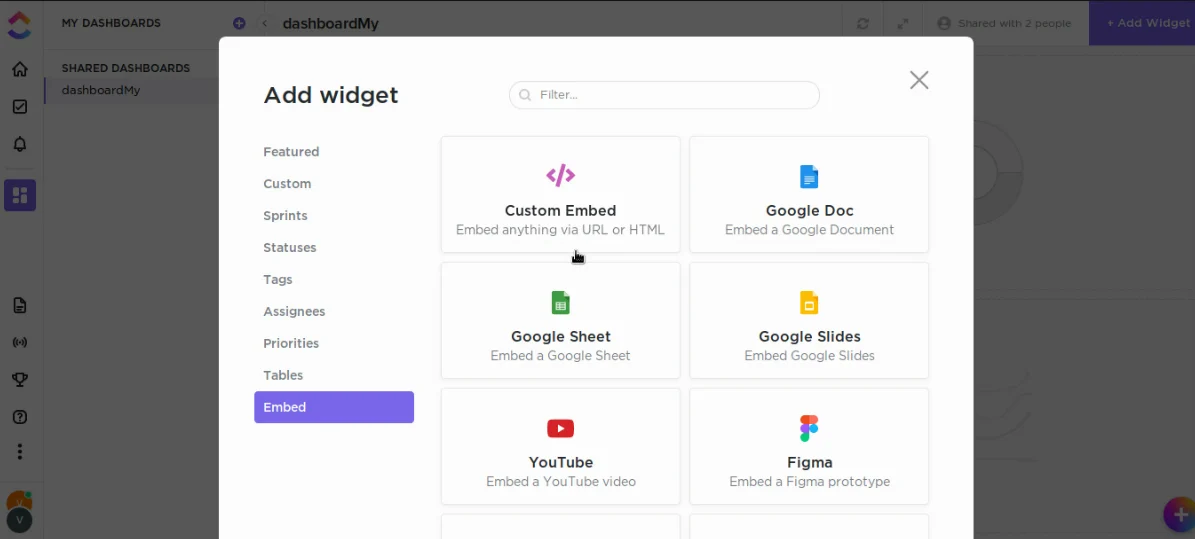
Image-1 shows the Custom Embed input on the dashboard where the HTML is added.

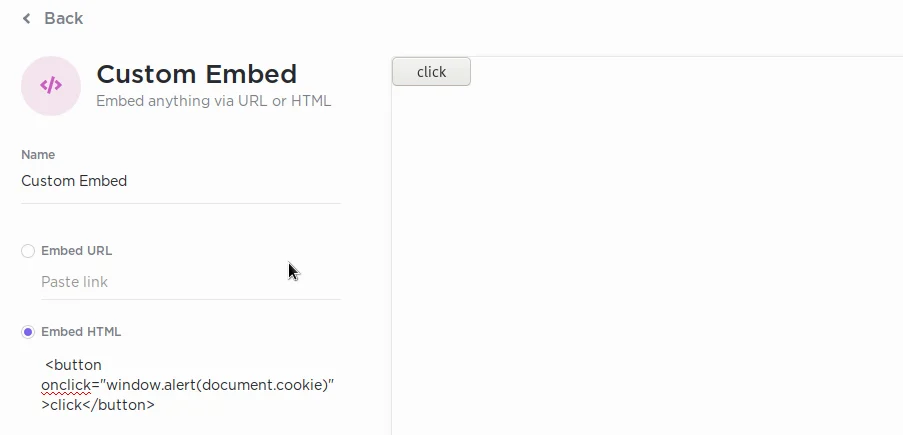
Image 2 shows the rendered button containing the payload.

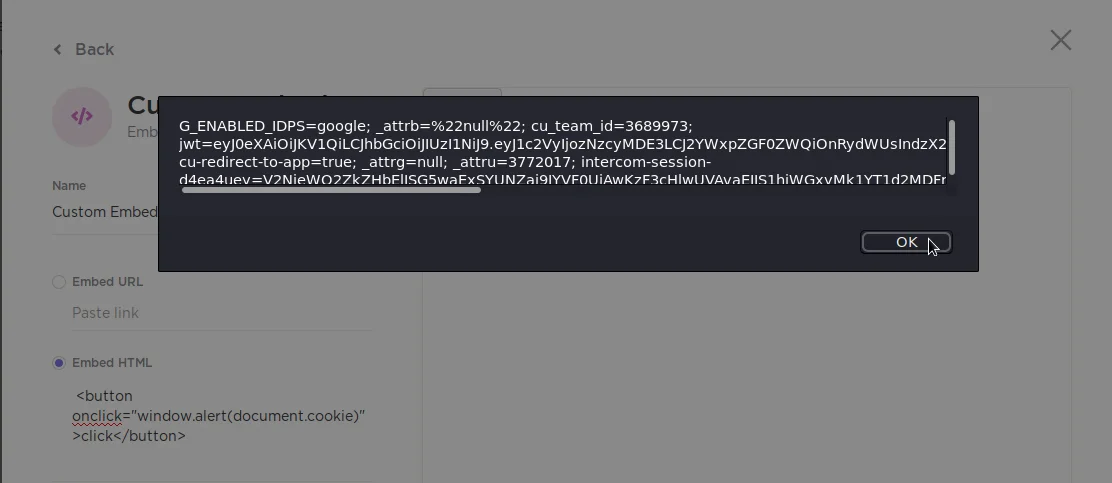
Image 3 shows the XSS executing after the button is clicked.
Step 5: Turn self-XSS into stored XSS via invitation
The researcher then found the invitation feature, which lets a user invite any user to their dashboard. The researcher added a second email address and sent an invitation to their own dashboard.

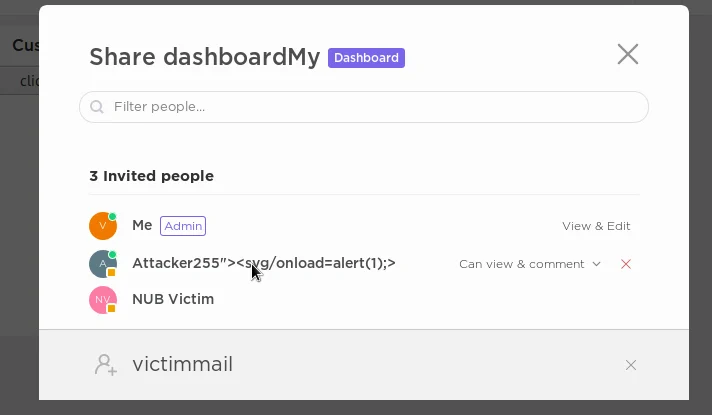
Image 4 shows the invitation form where the second email address is added and the invitation is sent.
When the victim clicked the "CLICK" button, the payload executed in the victim's browser. The researcher states this allowed takeover of any account by stealing the cookie.

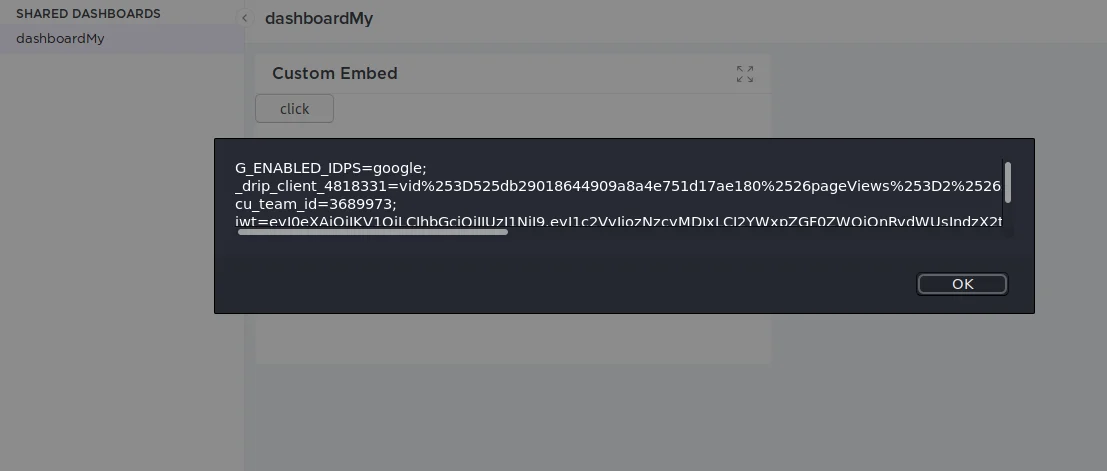
Image 5 (Victim Browser) shows the payload executing in the victim's browser.
Root cause
The report does not explain why manipulating the response worked; it only shows that changing the 401 to a 200 with an empty body resulted in a logged-in state. By changing the 401 to a 200 and replacing the error body with {}, the client treated the verification as successful. The OTP itself was also weak: a 4 digit code where only the last two digits changed on re-request, making it brute-forceable.
The stored XSS occurred because the Custom Embed feature accepted an HTML button with an onclick handler, and the invitation feature showed that content to the invited user. The first SVG payload failed, but an HTML button with an onclick handler was accepted and executed.
Impact
An attacker could create an account without a valid OTP by manipulating the response, and could execute stored XSS against any user invited to their dashboard.
Fix
The report does not state what was changed. The fixes that should be applied are: verify the OTP on the server side and do not rely on the client response status or body; use a longer, unpredictable OTP and rate-limit verification attempts; sanitise or escape HTML in the Custom Embed feature and disallow event handler attributes; and ensure invited users do not render untrusted stored content.
Variants to test
- Change the response status from 401 to 200 and replace the body with
{}on other OTP or verification endpoints. A positive result is being logged in without a valid code. - Request a new OTP repeatedly and compare the codes. A positive result is a predictable pattern, such as only the last two digits changing.
- Submit HTML payloads with event handlers such as
<button onclick="window.alert(1)">click</button>in fields that accept HTML. A positive result is the payload executing when the element is clicked. - Test invitation or sharing features that render stored content to other users. A positive result is the payload executing in the invited user's browser.
- Try SVG payloads such as
"><svg/onload=alert(1);>in HTML-accepting fields. A positive result is execution on load, though this may be blocked if only HTML is accepted.
What happened, in plain words
A security researcher found two problems in a website and chained them together. The first problem was in the sign-up process: the site sent a four-digit code to your email to prove the email was yours, and the site could be tricked into accepting a wrong code. The second problem was in a feature that let users put their own HTML (the language web pages are written in) into their dashboard. That HTML could contain a small script that runs in the browser of anyone who views it. On its own, that only affects the person who typed it, which is not very useful to an attacker. But the site also had an invitation feature: you could invite another person to look at your dashboard. So the attacker put the script in their dashboard, invited the victim, and when the victim clicked a button, the script ran in the victim's browser. The researcher states this allowed takeover of any account by stealing the cookie.
The researcher, PJ Borah (@PJBorah1), published this on 23 May 2020. The target is a private bug bounty program, so the site is only called www.xyz.com (the post also writes it once as www.xyz.xom). A bug bounty program is an arrangement where a company pays people to find and report security problems in its systems instead of attacking it. "Private" means only invited researchers can take part, and "responsive disclosure" means the company works with the researcher on when and how the details become public.
The product is a normal web application with three relevant parts:
- A registration flow that asks for an email code (called an OTP) before the account is usable.
- A user dashboard where a user can add custom HTML through a feature called "Custom Embed".
- An invitation feature that lets a user invite other users to their dashboard.

The tools and the setup
The researcher used Burp Suite. Burp is a program that sits between your browser and a website and lets you look at, pause and change the messages going in both directions. Think of it as a postal worker who opens every letter you send and every reply you get, and who will happily rewrite a letter before delivering it if you ask.
Two ideas matter for the rest of this article:
- A request is the message your browser sends to a server, for example "here is my code, please check it".
- A response is the message the server sends back, for example "that code is wrong".
Burp can pause a request before it leaves your computer (this is called intercepting), and it can also pause a response before your browser sees it. That second ability is the heart of the first bug.
The browser in the captured request was Firefox 68.0 on Linux. The researcher had at least two email addresses: one for the main account, used to build the dashboard and send the invitation, and a second one used as the invited victim.
Finding it
The weak code
During registration the site asked for an OTP sent by email. OTP stands for one-time password: a short code that is supposed to be valid once and only for a short time, so that knowing a password alone is not enough to get in. This OTP was four digits long. The researcher noticed it looked like 1234, and that when requesting a new OTP again and again, only the last two digits (34) changed. That makes the code predictable, and a predictable short code can be guessed by trying many values, which is called brute force.
The HTML feature
Separately, on the user dashboard, the researcher found the Custom Embed feature, which accepted HTML. HTML is the language that describes what a page contains: headings, buttons, images, links. Browsers also understand small pieces of JavaScript (the programming language of the browser) attached to HTML elements, for example "when this button is clicked, run this code". If a site lets a user store HTML and later shows that HTML to other people without cleaning it, the user can store code that runs in other people's browsers. That class of bug is called cross-site scripting, or XSS. When the malicious content is saved on the server and shown to everyone who views it, it is called stored XSS.
The first payload (the piece of text you send to try to trigger a bug) was an SVG onload payload. SVG is a format for drawing vector graphics, and onload means "when this thing finishes loading, run this code". It did not execute, because the input only accepted HTML. A second payload using an HTML button with an onclick handler did execute. At that point it was self-XSS only: the code ran in the researcher's own browser, which is not an attack on anyone else. The researcher then found the invitation feature, which let them invite another user to their dashboard, turning the self-XSS into stored XSS against the invited victim.
Exploitation
Step 1: Capture the OTP verification request
The researcher filled in the registration form, received the OTP by email, and then entered 0000 randomly in the OTP field. The point of entering a deliberately wrong code is to see exactly what the site sends and what it answers when the code is wrong, because that is the moment you can interfere. Burp was already set up to intercept. Clicking next captured the following request:
POST /v1/email?change=false&code=0000 HTTP/1.1
Host: xyz.com
User-Agent: Mozilla/5.0 (X11; Linux x86_64; rv:68.0) Gecko/20100101 Firefox/68.0
Accept: application/json, text/plain, */*
Accept-Language: en-US,en;q=0.5
Line by line:
POST /v1/email?change=false&code=0000 HTTP/1.1is the first line of the request.POSTis the method, meaning "I am sending data to the server"./v1/emailis the address of the feature being called. Everything after the?is the query string, a set of name and value pairs sent along with the address.change=falseis one such pair.code=0000is the other, and it carries the OTP value the user typed.HTTP/1.1is the version of the protocol used to talk to the server.Host: xyz.comtells the server which site the request is for. One server can host many sites, so this line says which one is meant.User-Agent: Mozilla/5.0 (X11; Linux x86_64; rv:68.0) Gecko/20100101 Firefox/68.0identifies the browser and operating system. Here it says Firefox 68.0 on 64-bit Linux.Accept: application/json, text/plain, */*says which response formats the browser can handle. JSON is a simple text format for structured data, made of names and values in curly braces.Accept-Language: en-US,en;q=0.5says the browser prefers English (United States), then generic English.
Step 2: Observe the failure response
Forwarding the request (letting it continue to the server) returned:
HTTP/1.1 401 Unauthorized
Content-Security-Policy: frame-ancestors ‘none’
Content-Type: application/json; charset=utf-8
Content-Length: 42
Date: Fri, 22 May 2020 19:20:04 GMT

{“err”:”Incorrect code”,”ECODE”:”USR_014"}
Line by line:
HTTP/1.1 401 Unauthorizedis the status line.401is a status code, a three-digit number where the first digit groups the meaning.4xxmeans the client did something the server does not accept, and401specifically means "you are not authorised".Content-Security-Policy: frame-ancestors ‘none’is a security header that tells the browser this page may not be embedded inside a frame on another site. A frame is a window inside a window on a web page.Content-Type: application/json; charset=utf-8says the body is JSON text encoded in UTF-8, a common way of representing characters.Content-Length: 42says the body is 42 bytes long.Date: Fri, 22 May 2020 19:20:04 GMTis when the server produced the response.- The blank line separates the headers from the body.
{“err”:”Incorrect code”,”ECODE”:”USR_014"}is the body: a JSON object saying the code was incorrect, with an internal error codeUSR_014.
The server rejected the wrong code with a 401 and an error body. The researcher noted the 401 but did not stop there.
Step 3: Manipulate the response
The bypass was done by manipulating the response in Burp. Instead of letting the browser receive the server's real answer, the researcher rewrote it to:
HTTP/1.1 200 OK
Content-Security-Policy: frame-ancestors ‘none’
Content-Type: application/json; charset=utf-8
Content-Length: 42
Date: Fri, 22 May 2020 19:20:04 GMT

{}
Line by line:
HTTP/1.1 200 OKis the rewritten status line.200is the code for "everything went fine".- The headers are unchanged from the real response.
{}is an empty JSON object: valid JSON, containing nothing.
The status was changed from 401 to 200 and the error body was replaced with an empty JSON object. With that, the researcher was logged in without any verification, bypassing the OTP.
The report does not explain why the manipulated response resulted in a logged-in state. When the browser saw 200 and {}, it believed the code had been accepted and moved on to the logged-in state. The server had never actually agreed. This is a general lesson: any check that only happens in the browser can be rewritten by the person using the browser, because the browser is under their control.
Step 4: Test the Custom Embed for XSS
On the user dashboard, the Custom Embed feature accepted HTML. The first payload tried was:
“><svg/onload=alert(1);>
This is a classic XSS test. It starts with ">, which tries to close an HTML attribute and a tag early, then inserts an <svg> element with an onload handler. alert(1) is a JavaScript function that shows a pop-up box with the number 1; it is the standard harmless way to prove that code ran. This did not execute. The researcher concluded the input only accepted HTML. The next payload was:
<button onclick=”window.alert(1)”>click</button>
Line by line:
<buttonstarts a button element.onclick=”window.alert(1)”is an event handler attribute: when the button is clicked, run the JavaScriptwindow.alert(1), which shows the pop-up.>click</button>is the text shown on the button, then the closing tag.
This executed. The button hid the payload, and clicking the "Click" button triggered the XSS.
Image-1 shows the Custom Embed input on the dashboard where the HTML is added.
Image 2 shows the rendered button containing the payload.
Image 3 shows the XSS executing after the button is clicked.
Step 5: Turn self-XSS into stored XSS via invitation
The researcher then found the invitation feature, which lets a user invite any user to their dashboard. The researcher added a second email address and sent an invitation to their own dashboard.
Image 4 shows the invitation form where the second email address is added and the invitation is sent.
When the victim clicked the "CLICK" button, the payload executed in the victim's browser.
A cookie is a small piece of data a site stores in your browser so it can recognise you on the next request. After you log in, the site typically gives your browser a session cookie, which acts like a wristband at an event: show it and you are let in without showing your password again. If someone else gets a copy of that cookie, they can present it to the site and be treated as you. That is why stealing a cookie leads to account takeover.
Image 5 (Victim Browser) shows the payload executing in the victim's browser.
Root cause
The report does not explain the cause of the OTP bypass; it only shows that changing the response to 200 with an empty body resulted in a logged-in state. By changing the 401 to a 200 and replacing the error body with {}, the client treated the verification as successful. The OTP itself was also weak: a 4 digit code where only the last two digits changed on re-request, making it brute-forceable.
The stored XSS occurred because the Custom Embed feature accepted an HTML button with an onclick handler, and the invitation feature showed that content to the invited user. Sanitising means cleaning input so that only safe parts are kept and anything that can run code is removed or neutralised. The first SVG payload failed, but an HTML button with an onclick handler was accepted and executed.
Impact
An attacker could create an account without a valid OTP by manipulating the response, and could execute stored XSS against any user invited to their dashboard.
Fix
The fixes that should be applied are: verify the OTP on the server side and do not rely on the client response status or body; use a longer, unpredictable OTP and rate-limit verification attempts; sanitise or escape HTML in the Custom Embed feature and disallow event handler attributes; and ensure invited users do not render untrusted stored content.
Variants to test
- Change the response status from 401 to 200 and replace the body with
{}on other OTP or verification endpoints. A positive result is being logged in without a valid code. - Request a new OTP repeatedly and compare the codes. A positive result is a predictable pattern, such as only the last two digits changing.
- Submit HTML payloads with event handlers such as
<button onclick="window.alert(1)">click</button>in fields that accept HTML. A positive result is the payload executing when the element is clicked. - Test invitation or sharing features that render stored content to other users. A positive result is the payload executing in the invited user's browser.
- Try SVG payloads such as
"><svg/onload=alert(1);>in HTML-accepting fields. A positive result is execution on load, though this may be blocked if only HTML is accepted.
Glossary
- API: a defined way for one program to talk to another, usually a set of addresses and data formats.
- Brute force: trying many possible values until one works.
- Burp Suite: a tool that sits between browser and server and lets you inspect and change the messages.
- Cookie: a small piece of data stored by a site in your browser, often used to recognise a logged-in user.
- Cross-site scripting (XSS): a bug where a site lets attacker-supplied code run in another user's browser.
- Custom Embed: the dashboard feature in this report that accepted HTML.
- Event handler: an HTML attribute such as
onclickoronloadthat runs code when something happens. - HTML: the language that describes the content and structure of a web page.
- HTTP: the protocol browsers and servers use to exchange requests and responses.
- Intercept: to pause a message in transit so it can be read or changed.
- JavaScript: the programming language that runs in browsers.
- JSON: a text format for structured data, made of names and values in curly braces.
- OTP (one-time password): a short code valid once, used as an extra check during login or sign-up.
- Payload: the piece of input you send to try to trigger a bug.
- Query string: the part of a URL after
?, carrying name and value pairs. - Request: the message a browser sends to a server.
- Response: the message a server sends back to a browser.
- Sanitising: cleaning input so that only safe parts are kept and anything that can run code is removed.
- Self-XSS: XSS that only runs in the browser of the person who entered the payload.
- Session: the period during which a site remembers you as logged in, usually via a cookie.
- Status code: a three-digit number in a response saying how the request went, such as 200 for success or 401 for unauthorised.
- Stored XSS: XSS where the malicious content is saved on the server and shown to other users.
- SVG: a format for drawing vector graphics, which browsers can embed in HTML.
- User-Agent: a request header identifying the browser and operating system.
- UTF-8: a common way of encoding characters as bytes.



