Story of a really cool SSRF bug.
A proxy endpoint accepted a user-supplied URL and fetched it server-side without restriction, allowing the attacker to reach the cloud metadata service. The attacker could read instance metadata and retrieve AWS security credentials.
 Published on vedanttekale20.medium.com
Hello all! My name is Vedant, also known as Vegeta(on twitter).
The full write-up lives on its author's site
It belongs to its author, so we link to it rather than copy it. The other two tabs are our own rewrites, checked against it.
Context
The target was a web application that the author describes as a social media platform with lots of functionalities. In the write-up it is referred to only as www.target.com. The interesting feature, from a security point of view, was a proxy endpoint that takes a URL in a query parameter and fetches it server side:
GET /proxy/proxy.php?url=some_URL
That is the whole of the feature as the report describes it: a PHP script under /proxy/ that accepts a url parameter. The report does not describe what the proxy is meant to be used for in the application, only that it exists and that it was found while crawling.
Setup
The author tested the main web application directly rather than doing reconnaissance first, because the target had many functionalities. The tools used were Burp Suite, with the target added to scope and the spider running, and the Burp Collaborator for out-of-band detection. No accounts, roles or versions are mentioned in the report.
Finding it
The author spent about two hours manually testing functionalities for XSS, IDORs, SQLi, rate limit attacks and business logic errors, without success, and was close to giving up on the target. At that point the spider that had been left running had crawled a lot of pages and collected a lot of new parameters. Searching through those parameters for interesting ones led, after about five minutes, to the request shown above.
A parameter that makes the server fetch an arbitrary URL is a direct candidate for server-side request forgery, so the next step was to confirm that the server actually made the request.
Exploitation
Step 1: confirm server-side fetching with Collaborator
The author generated a Burp Collaborator payload and put it into the url= parameter, then sent the request. The Collaborator received a callback with both a DNS request and an HTTP request. That confirms the server resolves and connects to a host controlled by the attacker, which is the basic SSRF primitive.
Step 2: try localhost and local files
Next the author tried to reach [redacted] and the /etc/passwd file through the same parameter. Neither returned anything in the response. The report does not say whether these attempts failed because of filtering, because nothing was listening, or for another reason.
Step 3: identify where the requests come from
The author took the IP address observed in the Burp Collaborator interaction and ran Whois and dig against it. The result showed that the IP belonged to the target company's AWS instance. That told the author the proxy was running on AWS infrastructure, which makes the EC2 instance metadata service worth trying.
Step 4: reach the metadata service
The link-local address [redacted] is used in Amazon EC2 and other cloud platforms to distribute metadata to cloud instances. The author requested the metadata root through the proxy:
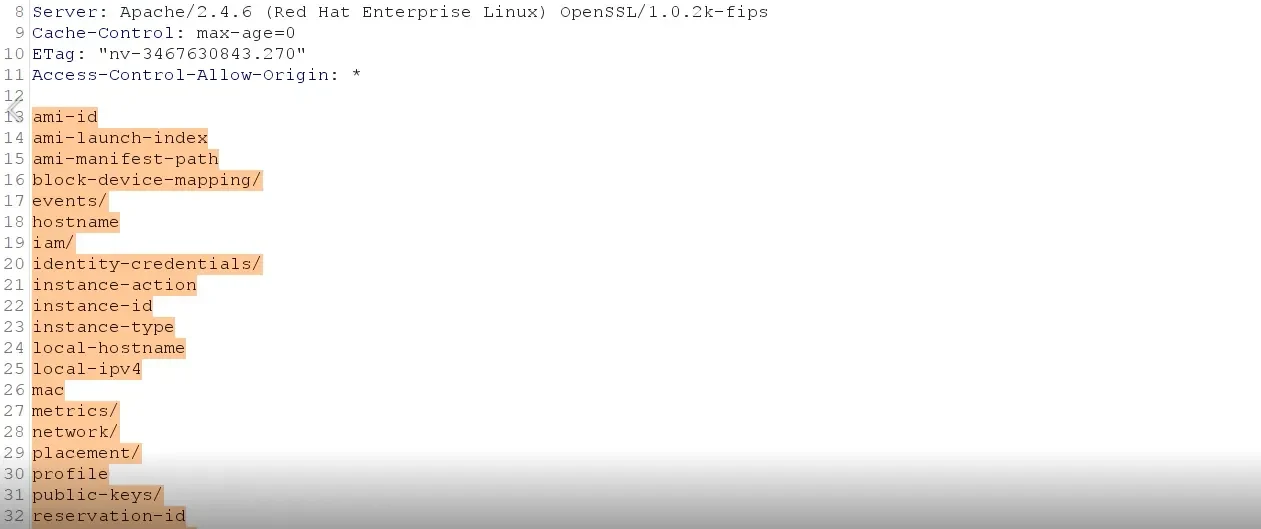
GET /proxy/proxy.php?url=http://[redacted]/latest/meta-data
The response returned metadata from the instance.
Step 5: retrieve the instance credentials
To demonstrate impact, the author then requested the path that serves the instance's identity credentials:
GET /proxy/proxy.php?url=http://[redacted]/latest/meta-data/identity-credentials/ec2/security-credentials/ec2-instance/
The AWS secret access key came back in the response.

Root cause
The proxy script accepts a user-supplied URL in the url parameter and performs the request server side without restricting where it may go. Because the request originates from the application server, it can reach addresses the attacker cannot reach directly, including the link-local metadata endpoint. The attempts against [redacted] and /etc/passwd returned nothing, which suggests some restriction or environmental difference existed, but the metadata endpoint was still reachable, so whatever was in place did not cover [redacted].
Impact
A party who can reach the proxy endpoint can make the server issue requests to destinations of their choosing and read the responses. In this case that included the EC2 instance metadata service, and specifically the identity credentials path, which returned the AWS secret access key. With instance credentials an attacker could act against AWS resources with the permissions attached to that instance role. The report does not enumerate those permissions, so the practical blast radius beyond credential disclosure is not stated. The author notes that the company ran a responsible disclosure programme and no bounty was paid.
Fix
The report says the company fixed the vulnerability within two days of receiving the write-up. A robust fix would be to restrict the proxy to an allowlist of permitted destinations, resolve hostnames and reject private, loopback and link-local ranges including [redacted], and, where the platform supports it, enforce IMDSv2 so that metadata requests require a session token that a simple GET proxy cannot supply.
Variants to test
- Other cloud metadata endpoints. Try the equivalent metadata addresses for other providers through any URL-fetching parameter. A positive result is metadata content such as instance identity, user data or credentials in the response.
- Redirect-based bypass. Point the parameter at a URL you control that redirects to
[redacted]. A positive result is metadata returned even when the direct address is blocked. - DNS rebinding. Use a hostname that resolves first to an allowed address and then to a link-local or internal address. A positive result is a response from the internal target.
- Alternate encodings of the address. Try decimal, octal or IPv6 representations of
[redacted]and of internal ranges. A positive result is the same metadata or internal content coming back. - Scheme and protocol handling. Try
file://,gopher://anddict://where the client library supports them. A positive result is local file content or interaction with an internal service. - Internal service discovery. Use the confirmed SSRF to probe common internal ports and paths. A positive result is a response that differs from the error returned for closed ports.
What happened, in plain words
A security researcher found a feature on a company's website that let the website's own server go and fetch any web address he typed in. He used it to make the server fetch a special internal address that only machines inside Amazon's cloud can reach, and that address handed back secret login credentials for the company's cloud account. He reported it, the company fixed it within two days, and no money was paid because the company ran a responsible disclosure programme rather than a paid bug bounty.
This article walks through the same story for someone who has never done security testing before. Every technical term is explained the first time it appears, and every request is shown exactly as it was sent, followed by a plain-language explanation of what it means.
The target
The target was a web application that the author describes as a social media platform with lots of functionalities. In the write-up it is referred to only as www.target.com, which is a stand-in name: the real company is not named.
A social media platform is a website where people create profiles, post content, follow each other and interact. "Lots of functionalities" means many separate features: a login, a feed, a search box, image uploads, settings pages, and so on. Each feature is a small program on the server that reacts to what you do in your browser.
The interesting feature, from a security point of view, was a proxy endpoint. A proxy is a middleman. Instead of your browser fetching a web page directly, it asks the proxy to fetch the page for you and hand back the result. In everyday terms, it is like asking a friend to go to the shop for you: your friend goes, buys the item and brings it back, and you never leave the house. Here the "friend" is the company's web server, and the item is whatever web address you supply.
The proxy took a web address in a query parameter and fetched it on the server side:
GET /proxy/proxy.php?url=some_URL
Line by line:
GETis the type of request. It is the one your browser sends when you simply open a page or click a link. It means "give me this thing"./proxy/proxy.phpis the path on the website./proxy/is a folder, andproxy.phpis a small program written in a language called PHP that runs on the server. When the server receives this request, it runs that program.?marks the start of the query string, the part of a web address that carries extra information.url=some_URLis a parameter: a named value. The name isurland the value issome_URL. The program reads whatever is after the equals sign and treats it as a web address to fetch.
That is the whole of the feature as the report describes it: a PHP script under /proxy/ that accepts a url parameter. The report does not describe what the proxy is meant to be used for in the application, only that it exists and that it was found while crawling.
Setting up
The author tested the main web application directly rather than doing reconnaissance first, because the target had many functionalities. Reconnaissance (recon) is the early phase of security testing where you map out a target: which servers exist, which subdomains, which technologies. Skipping it and going straight at the main site is a choice, not a rule; it just means starting with the features a normal user sees.
The tools used were Burp Suite, with the target added to scope and the spider running, and the Burp Collaborator for out-of-band detection.
- Burp Suite is a program that sits between your browser and the website, like a recording device on the wire. Every request your browser sends and every response the site returns passes through it, and you can read, edit and replay them. Security testers use it because a browser hides most of what is going on.
- Scope is the list of targets you are allowed to test. Adding a site to scope tells Burp to focus on it and not wander onto other sites.
- The spider is an automatic crawler built into Burp. It starts from a page, follows every link it finds, and keeps going, building a map of the site. It is like a robot walking through a building opening every door it can see and writing down what is behind it.
- Burp Collaborator is a service that gives you a unique, throwaway address (a hostname) that you can put into a request. If the target server ever tries to contact that address, the Collaborator records it and tells you. This is called out-of-band detection: you learn about the server's behaviour through a channel other than the normal response. It is useful because sometimes the server does something (like make a request) but the response you get back says nothing about it.
No accounts, roles or versions are mentioned in the report.
Finding it
The author spent about two hours manually testing functionalities for XSS, IDORs, SQLi, rate limit attacks and business logic errors, without success, and was close to giving up on the target.
- XSS (cross-site scripting) is when a site takes something a user typed and puts it into a page without cleaning it, so that text can run as code in another visitor's browser. The everyday comparison: a noticeboard where someone pins a note that, when read, makes the reader do something.
- IDOR (insecure direct object reference) is when a site identifies your data by a simple number or name in the address, and changing that number lets you see someone else's data. Like a hotel where your room key is just the room number written on it, so you can write a different number.
- SQLi (SQL injection) is when input from a user is pasted into a database command without being separated properly, so the user can change the command. A database is the program that stores the site's data; SQL is the language used to ask it questions.
- Rate limit attacks are attempts to send too many requests too fast, for example to guess passwords or overwhelm a feature. A rate limit is a cap on how often you may do something.
- Business logic errors are flaws in the rules of a feature rather than in its code: for example, a shop that lets you apply the same discount code twice.
None of these worked. At that point the spider that had been left running had crawled a lot of pages and collected a lot of new parameters. Searching through those parameters for interesting ones led, after about five minutes, to the request shown above.
Why look at parameters? Because a parameter is a place where the site accepts input from you, and input is where things go wrong. A parameter named url is especially interesting: it suggests the server will treat your input as a web address and go and fetch it. A parameter that makes the server fetch an arbitrary URL is a direct candidate for server-side request forgery, so the next step was to confirm that the server actually made the request.
SSRF (server-side request forgery) is the vulnerability class at the heart of this story. Normally, when you type a web address, your browser fetches it, and the server you are attacking never sees the request. With SSRF, you trick the server into making the request for you. The everyday comparison: you are not allowed into a building, but you can hand a note to the receptionist and ask them to deliver it to a room inside. The receptionist has access you do not, so the note reaches places you could never go yourself. That is why SSRF matters: the server sits inside the company's network and can reach internal machines that the internet cannot.
Exploitation
Step 1: confirm server-side fetching with Collaborator
The author generated a Burp Collaborator payload and put it into the url= parameter, then sent the request. The Collaborator received a callback with both a DNS request and an HTTP request.
- A payload here simply means the value you put into the parameter, crafted for a purpose.
- DNS is the internet's phone book: it turns a name like
example.cominto a numeric address. A DNS request is the server asking "where does this name live?" - An HTTP request is the actual page fetch that follows once the name is resolved.
Getting both means the server did two things: it looked up the name, and then it connected and asked for a page. That confirms the server resolves and connects to a host controlled by the attacker, which is the basic SSRF primitive. In plain terms: the receptionist really did walk to the address on the note and knock on the door.
Step 2: try localhost and local files
Next the author tried to reach [redacted] and the /etc/passwd file through the same parameter. Neither returned anything in the response.
[redacted]is the loopback address: the address a machine uses to talk to itself. "Localhost" means "this same computer". If the proxy could reach it, the author could talk to services running on the server that are not exposed to the internet./etc/passwdis a file on Linux systems that lists user accounts. It is a classic target because reading it proves you can read files on the server.
The report does not say whether these attempts failed because of filtering, because nothing was listening, or for another reason. Either way, the author did not stop here.
Step 3: identify where the requests come from
The author took the IP address observed in the Burp Collaborator interaction and ran Whois and dig against it.
- An IP address is the numeric address of a machine on a network, like a postal address for computers.
- Whois is a lookup service that tells you who a block of IP addresses is registered to. It is like a public property register for internet addresses.
- dig is a command-line tool for asking DNS questions, for example which name belongs to an address.
The result showed that the IP belonged to the target company's AWS instance.
- AWS (Amazon Web Services) is Amazon's cloud platform: instead of buying physical servers, companies rent virtual ones from Amazon.
- An instance is one of those rented virtual servers. It is a computer, but it lives in Amazon's data centre rather than in an office.
That told the author the proxy was running on AWS infrastructure, which makes the EC2 instance metadata service worth trying. EC2 is the name of AWS's service for renting those virtual servers.
Step 4: reach the metadata service
The link-local address [redacted] is used in Amazon EC2 and other cloud platforms to distribute metadata to cloud instances.
- Link-local means an address that is only valid on the local network segment, not on the public internet. It is like an internal extension number that only works inside the building.
- Metadata here means information about the instance itself: its identity, its configuration, and, importantly, temporary credentials. The cloud platform puts this behind a special internal address so that the instance can ask "who am I and what am I allowed to do?" without needing a password stored on disk.
The author requested the metadata root through the proxy:
GET /proxy/proxy.php?url=http://[redacted]/latest/meta-data
Line by line:
GET /proxy/proxy.php?url=is the same proxy request as before: we are asking the proxy program to fetch something for us.http://[redacted]is the address we want it to fetch. Because the proxy runs on the AWS instance, this address means "the metadata service on this same machine's local network"./latest/meta-datais the path that lists what metadata is available. It is like opening the index of a filing cabinet rather than a specific folder.
The response returned metadata from the instance.
The screenshot shows the request and the response from the metadata service. In other words, the receptionist walked to the internal extension and read out the index of the filing cabinet.
Step 5: retrieve the instance credentials
To demonstrate impact, the author then requested the path that serves the instance's identity credentials:
GET /proxy/proxy.php?url=http://[redacted]/latest/meta-data/identity-credentials/ec2/security-credentials/ec2-instance/
Line by line:
- The first part is unchanged: the proxy fetches whatever follows
url=. http://[redacted]is again the internal metadata address./latest/meta-data/identity-credentials/ec2/security-credentials/ec2-instance/is a deeper path inside the metadata service. Each segment narrows down to a specific folder, and this one leads to the credentials that identify the instance to AWS.
Credentials are the proof of identity a program uses to log in to another service, like a username and password, or in this case an access key and a secret access key. An access key is a bit like a username, and the secret access key is like the password that goes with it.
The AWS secret access key came back in the response.
The screenshot is captioned "SSRF to AWS-metadata access". The response contained the AWS secret access key.
Why it worked
The proxy script accepts a user-supplied URL in the url parameter and performs the request server side without restricting where it may go. Because the request originates from the application server, it can reach addresses the attacker cannot reach directly, including the link-local metadata endpoint.
- An allowlist is a list of things that are permitted, with everything else refused. The opposite, a blocklist, lists things that are forbidden and allows everything else. Allowlists are generally safer because it is hard to think of every bad address in advance.
- Private ranges are IP address blocks reserved for internal networks, not reachable from the public internet.
The attempts against [redacted] and /etc/passwd returned nothing, which suggests some restriction or environmental difference existed, but the metadata endpoint was still reachable, so whatever was in place did not cover [redacted].
What the impact was
A party who can reach the proxy endpoint can make the server issue requests to destinations of their choosing and read the responses. Unauthenticated means without logging in: no account, no password, just the request.
In this case that included the EC2 instance metadata service, and specifically the identity credentials path, which returned the AWS secret access key. With instance credentials an attacker could act against AWS resources with the permissions attached to that instance role. A role in AWS is a set of permissions attached to something, in this case the instance, saying which cloud resources it may use and how. The report does not enumerate those permissions, so the practical blast radius beyond credential disclosure is not stated.
The author notes that the company ran a responsible disclosure programme and no bounty was paid. Responsible disclosure means a company accepts reports of security problems and asks researchers to report them privately so they can be fixed before they are made public. A bug bounty is a programme that pays researchers for such reports; this company had the former but not the latter.
How it was fixed
The report says the company fixed the vulnerability within two days of receiving the write-up.
A robust fix would be to restrict the proxy to an allowlist of permitted destinations, resolve hostnames and reject private, loopback and link-local ranges including [redacted], and, where the platform supports it, enforce IMDSv2 so that metadata requests require a session token that a simple GET proxy cannot supply.
- IMDSv2 is the second version of the instance metadata service. The first version answered a simple GET request, which is exactly what a proxy does. The second version requires the caller to first ask for a session token and then present it, which a plain proxy that only forwards a URL cannot do.
- A session token is a short-lived value issued by a service that proves you completed an earlier step. It is like a cloakroom ticket: you get it when you hand in your coat, and you need it to get the coat back.
Other things worth trying
These are variations on the same idea, useful when the direct attempt is blocked. Each one lists what a positive result looks like.
- Other cloud metadata endpoints. Try the equivalent metadata addresses for other providers through any URL-fetching parameter. A positive result is metadata content such as instance identity, user data or credentials in the response.
- Redirect-based bypass. Point the parameter at a URL you control that redirects to
[redacted]. A redirect is a server telling your browser "the thing you want is over there, go ask that address instead". A positive result is metadata returned even when the direct address is blocked. - DNS rebinding. Use a hostname that resolves first to an allowed address and then to a link-local or internal address. DNS rebinding abuses the fact that a name can point to different addresses at different moments, so a check done at one moment can be bypassed at the next. A positive result is a response from the internal target.
- Alternate encodings of the address. Try decimal, octal or IPv6 representations of
[redacted]and of internal ranges. The same address can be written in several ways, and a filter that only recognises one spelling can be walked past. A positive result is the same metadata or internal content coming back. - Scheme and protocol handling. Try
file://,gopher://anddict://where the client library supports them. A scheme is the part before://in a URL that says how to talk to the destination:httpfor web pages,filefor local files, and so on. A positive result is local file content or interaction with an internal service. - Internal service discovery. Use the confirmed SSRF to probe common internal ports and paths. A port is a numbered door on a machine, each one leading to a different service. A positive result is a response that differs from the error returned for closed ports.
Glossary
- Access key: the identifier part of a cloud credential, roughly like a username; it is paired with a secret access key.
- Allowlist: a list of things that are permitted, with everything else refused.
- AWS: Amazon Web Services, Amazon's cloud platform where companies rent virtual servers and other resources.
- Blocklist: a list of things that are forbidden, with everything else allowed.
- Bug bounty: a programme that pays researchers for reporting security problems.
- Burp Collaborator: a service that gives you a unique address and records any contact made to it, used to detect server-side requests you cannot see in the response.
- Burp Suite: a program that sits between your browser and a website so you can read, edit and replay requests and responses.
- Business logic error: a flaw in the rules of a feature rather than in its code.
- Credentials: the proof of identity a program uses to log in to another service, such as an access key and secret access key.
- DNS: the internet's name-to-address lookup system.
- DNS rebinding: abusing a hostname that resolves to different addresses at different moments to bypass a check.
- dig: a command-line tool for asking DNS questions.
- EC2: AWS's service for renting virtual servers.
- GET: the request type a browser sends when opening a page or clicking a link; it means "give me this thing".
- HTTP request: a request for a web resource, sent over the HTTP protocol.
- IDOR: insecure direct object reference, where changing an identifier in a request lets you reach someone else's data.
- IMDSv2: the second version of the cloud instance metadata service, which requires a session token before answering.
- Instance: one rented virtual server in a cloud platform.
- IP address: the numeric address of a machine on a network.
- Link-local: an address valid only on the local network segment, not on the public internet.
- Loopback address:
[redacted], the address a machine uses to talk to itself; also called localhost. - Metadata (cloud): information about a cloud instance, including its identity and temporary credentials, served from a special internal address.
- Out-of-band detection: learning about a server's behaviour through a channel other than the normal response.
- Parameter: a named value in a request, such as
url=some_URL. - Payload: the value you put into a parameter, crafted for a purpose.
- PHP: a programming language commonly used for server-side web scripts.
- Port: a numbered door on a machine, each leading to a different service.
- Private range: IP address blocks reserved for internal networks and not reachable from the public internet.
- Proxy: a middleman that fetches something on your behalf and returns the result.
- Query string: the part of a web address after
?that carries extra information. - Rate limit: a cap on how often an action may be performed.
- Reconnaissance: the early phase of testing where you map out a target's servers, names and technologies.
- Redirect: a server telling the client to go and ask a different address instead.
- Responsible disclosure programme: a scheme where a company accepts private reports of security problems so they can be fixed before publication.
- Role (AWS): a set of permissions attached to a resource, saying what it may do.
- Scheme: the part of a URL before
://that says how to talk to the destination, such ashttporfile. - Scope: the list of targets a tester is allowed to test.
- Secret access key: the password-like part of a cloud credential, paired with an access key.
- Session token: a short-lived value issued by a service that proves an earlier step was completed.
- Spider: an automatic crawler that follows links to map a website.
- SQL: the language used to ask a database questions.
- SQLi: SQL injection, where user input changes a database command.
- SSRF: server-side request forgery, tricking a server into making a request on your behalf to a destination you cannot reach directly.
- Unauthenticated: without logging in.
- Whois: a lookup service that shows who a block of IP addresses is registered to.
- XSS: cross-site scripting, where input from one user runs as code in another user's browser.




