Story Of My First Bounty by a Low Hanging Fruit! | by Liferacer
A target site could be embedded in a third-party page through an iframe, so an attacker could trick a logged-in user into clicking buttons or links they did not intend to click. The author reports this as a clickjacking issue and received a bounty for it.

medium.com
Published on medium.com
Cybersecurity
The full write-up lives on its author's site
It belongs to its author, so we link to it rather than copy it. The other two tabs are our own rewrites, checked against it.
Context
This is a first write-up from Hemanth Reddy (Liferacer333), a security researcher and bug bounty hunter from India, published on Medium in September 2021. It describes two findings, both clickjacking, made on two separate responsible disclosure programmes. The first target is referred to only as target.com; the second organisation is not named at all. The report does not describe the product or feature behind either domain beyond calling it a responsible disclosure programme, so the only thing known about the affected surface is that a page on the domain could be framed by a third-party site.
Clickjacking, as the author quotes from Wikipedia, is a user interface redress attack: a malicious technique of tricking a user into clicking on something different from what the user perceives, potentially revealing confidential information or allowing others to take control of their computer while clicking on seemingly innocuous objects, including web pages.
Setup
The report lists no accounts, roles, versions or specific tooling configuration. The researcher was working against a responsible disclosure programme, which he calls target.com, and was hunting alone. The only tools mentioned are three online clickjacking testers, listed later in the article:
- Quickjack by samy kamkar, at
samy.pl/quickjack/quickjack.html - clickjacker.io, described as a tool to make a clickjacking PoC, take a screenshot and share a link, testing HTTPS, HTTP and intranet targets
- an online attacker tools page at
online.attacker-site.com/html5/ClickjackingTester/
No proof-of-concept HTML, headers or HTTP responses are reproduced in the report.
Finding it
The researcher began with reconnaissance, specifically looking for SSRF. He found none. He then tried SQL injection, XSS, IDOR and business logic vulnerabilities, and again found nothing, which left him frustrated after a couple of hours.
He then changed approach and decided to try low hanging fruit: password reset issues, and SPF and DMARC related vulnerabilities. During this pass he found a clickjacking vulnerability on target.com. The report does not say which page or endpoint was frameable, nor how he first noticed it.
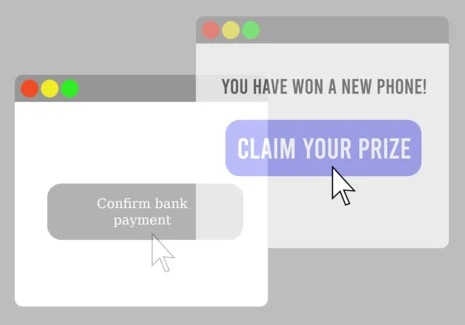
The image is captioned "Clickjacking" and sits directly under the question "What is Clickjacking Vulnerability?", introducing the quoted definition.
Exploitation
It states that a clickjacking vulnerability was found on the target domain and that the finding was submitted to the programme. The mechanics it does explain are conceptual:
- The vulnerable site permits a third-party website to embed it in an iframe.
- Because of that permission, an attacker-controlled page can load the legitimate site inside a frame and overlay or position it so that the user's clicks land on the legitimate site's controls rather than on what the user believes he or she is clicking.
- The user is thereby tricked into performing actions on the legitimate site.
The report does not include the framing page, the request that returned the frameable response, or the response headers that were missing. The three online testers listed are offered as a way to check for the issue rather than as a record of what was run here.
Result of the first submission
The report gives a timeline for the first finding and a bounty of $100 USD.
| Stage | Date |
|---|---|
| Submitted | 23 Oct 2020 |
| Accepted | 25 Oct 2020 |
| Bounty received | 10 Dec 2020 |
Bounty: 1 was $100 USD.
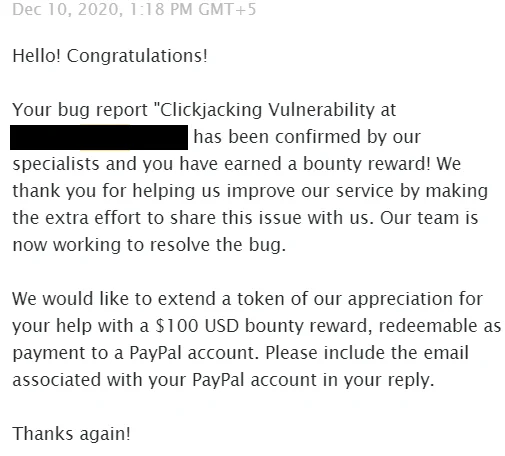
The image is captioned "message from the target organization" and appears immediately after the list of online clickjacking testers, before the bounty and timeline details.
Second finding
The researcher's second bounty came from the same class of bug: clickjacking, again. This one was paid by a second organisation and was €75, paid in BTC. The report gives no separate timeline for the second submission and does not describe the second target.
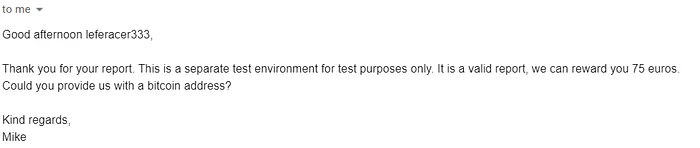
The image is captioned "message from the 2nd organization" and sits next to the second bounty details.
Root cause
The report attributes clickjacking to one underlying cause: the site allows a third-party website to embed it using an iframe. In other words, the response for the frameable page does not instruct the browser to refuse framing.
Impact
The impact section is written generically rather than tied to a specific action on either target. Users can be tricked into performing all sorts of unintended actions, such as typing in a password, clicking a "Delete my account" button, liking a post, deleting a post, or commenting on a blog. In the author's words, all the actions that a normal user can do on a legitimate website can be done using clickjacking.
The report does not identify which of these actions were actually reachable on target.com or on the second organisation's site, so the practical severity on each target is not established in the text.
Fix
The report frames the fix as removing the permission that lets a third party embed the site in an iframe. This is done by setting HTTP headers that direct the browser not to allow the target website to be iframed, configured on the server as two response headers:
X-Frame-OptionsContent-Security-Policy
Variants to test
The report's own lesson is that many hunters skip low hanging fruit and jump straight to high severity bugs, so trying the simple ones is worth it. Concrete things to try, based on the classes the author names:
- Password reset flows. The author lists password reset issues among low hanging fruit but gives no detail.
- SPF and DMARC configuration. Also named only as a category, with no specific record or lookup.
- Use the listed testers. Quickjack, clickjacker.io and the online attacker tools clickjacking tester are the three tools the author points readers to for checking whether a page can be framed.
The closing advice is about temperament as much as technique: have patience, do not get frustrated when nothing turns up, and keep learning and focusing.
What happened, in plain words
A security researcher from India, Hemanth Reddy (who goes by Liferacer333 online), spent a few hours testing a company's website for security problems. The company had invited people to report such problems, which is what a responsible disclosure programme is: a company says "if you find a flaw in our site, tell us privately instead of using it, and we may pay you".
He first looked for complicated bugs and found nothing. Then he tried simple, well-known weaknesses that many testers skip, and found one: the site could be loaded inside another website's frame. That trick is called clickjacking. He reported it, and the report's timeline shows a bounty of $100 USD. A second company had the same flaw, and paid him €75 in Bitcoin.
This article walks through what he did, explains every term from scratch, and shows the tools he points readers to. It is meant for someone who has never done security testing before and only knows how to use a browser.
The background: who is writing and where
The author introduces himself as a security researcher and bug bounty hunter. A bug bounty hunter is someone who looks for security flaws in websites and software, usually with the permission of the owner, and gets paid for valid reports. A bug bounty is the payment itself. A responsible disclosure programme is the arrangement that makes this legal and welcome: the company publishes rules saying which of its systems you may test and how to report what you find, and in return you agree not to misuse the flaw or tell the world before it is fixed.
He calls the first target target.com. That is a placeholder name, not the real domain. The second organisation is not named at all. The report never says what product or feature sits behind either domain, only that both were run as responsible disclosure programmes. So the one thing we know about the affected surface is that some page on the domain could be displayed inside a frame on another site.
What clickjacking is
Before the story, the author defines the bug. He quotes Wikipedia:
According to Wikipedia: “ Clickjacking (classified as a user interface redress attack or UI redressing) is a malicious technique of tricking a user into clicking on something different from what the user perceives, thus potentially revealing confidential information or allowing others to take control of their computer while clicking on seemingly innocuous objects, including web pages.”
In everyday terms: imagine a shop counter where someone has placed a transparent sheet over the real buttons. You think you are pressing "Cancel", but your finger lands on "Pay". Clickjacking does that in a browser. The attacker builds a page that loads the real website invisibly underneath or over the top of decoy content, so your clicks land on the real site's buttons while you believe you are clicking something harmless.
The image is captioned "Clickjacking" and sits right under the question "What is Clickjacking Vulnerability?", introducing the quoted definition.
Two related terms appear in that quote. User interface redress (or UI redressing) simply means dressing up the interface so it looks like one thing while behaving as another. Confidential information means private data, such as your account details or messages.
The impact: what an attacker could achieve
The author explains the consequences in general terms rather than tying them to a specific button on either target. Users can be tricked into all sorts of unintended actions: typing in a password, clicking a "Delete my account" button, liking a post, deleting a post, or commenting on a blog. In his words, all the actions that a normal user can do on a legitimate website can be done using clickjacking.
That is the key idea for a beginner: clickjacking does not break the site's login or steal a password directly. It borrows your already-logged-in session. You are signed in, the attacker's page frames the real site, and your click is redirected to an action you did not intend.
The report does not say which of those actions were actually reachable on target.com or on the second organisation's site, so how serious it was in practice on each target is not established in the text.
The fix: telling the browser not to frame the page
The author explains the root cause: the site allows a third-party website to embed it using an iframe. An iframe is an HTML element that lets one web page display another page inside a rectangular window, like a picture-in-picture. It is a normal, useful feature (embedded videos and maps use it), but it also lets an attacker place your site inside theirs.
To fix it, the server must send instructions to the browser saying "do not let other sites frame this page". These instructions are HTTP headers: small lines of metadata that a web server sends alongside the page content, before the page itself. The browser reads them and obeys. The report names two response headers that do this job:
X-Frame-OptionsContent-Security-Policy
X-Frame-Options is the older, simpler header: it tells the browser whether the page may be framed at all. Content-Security-Policy is a broader header that can restrict many things, including which origins are allowed to frame the page. The report does not say which of the two was missing on either target, only that the fix lies in these response headers, and it does not say whether either organisation applied them or what changed after the reports were accepted.
How he found it
Step 1: reconnaissance for SSRF
He started with the recon phase. Reconnaissance (recon) is the information-gathering stage: looking at what the site exposes, what pages exist, what technologies it uses, before trying to break anything. Think of it as walking around a building and noting the doors and windows before testing any of them.
He was specifically interested in SSRF, which stands for Server-Side Request Forgery. In plain words: the attacker makes the company's own server send a request to a destination of the attacker's choosing. A simple comparison is tricking a receptionist into making a phone call on your behalf to a number you are not allowed to dial yourself. He found no SSRF.
Step 2: the usual suspects
He then tried several other common bug classes:
- SQL injection (SQLi): putting database commands into a form field so the site's database runs them. Imagine writing extra instructions on a form and the clerk following them as if they came from the manager.
- XSS (Cross-Site Scripting): getting your own JavaScript to run inside another user's browser on the target site. JavaScript is the programming language browsers run to make pages interactive.
- IDOR (Insecure Direct Object Reference): changing an identifier in a URL or request to reach someone else's data, for example changing
?id=123to?id=124and seeing another user's record. - Business logic vulnerabilities: flaws in the intended workflow rather than in the code, such as applying a discount twice or skipping a payment step.
He found nothing in any of these, and after a couple of hours he was frustrated.
Step 3: low hanging fruit
He changed approach and decided to try low hanging fruit: the simple, well-known weaknesses that are quick to check. The phrase comes from picking fruit from the lowest branches first, because it takes the least effort. He names three categories:
- Password reset issues: flaws in the "forgot my password" flow, such as reset links that never expire or that can be guessed.
- SPF: Sender Policy Framework, a DNS record that lists which mail servers are allowed to send email for a domain. DNS is the internet's address book, translating names like
example.cominto the numeric addresses computers use. - DMARC: a policy record that tells receiving mail servers what to do with email that fails SPF or DKIM checks, and where to send reports. Together, SPF and DMARC make it harder for someone to send email that pretends to come from your domain.
During this pass he found the clickjacking vulnerability on target.com.
Exploitation: how the trick works
It states that a clickjacking vulnerability was found on the target domain and that the finding was submitted to the programme. The mechanics it explains are conceptual:
- The vulnerable site permits a third-party website to embed it in an iframe.
- Because of that permission, an attacker-controlled page can load the legitimate site inside a frame and overlay or position it so that the user's clicks land on the legitimate site's controls rather than on what the user believes he or she is clicking.
- The user is thereby tricked into performing actions on the legitimate site.
To picture step 2: the attacker's page might show a big "Play game" button, and place the real site's "Delete account" button exactly underneath it, made invisible. You click what looks like Play; the browser sends the click to the invisible button.
The report does not include the framing page, the request that returned the frameable response, or the response headers that were missing. No proof-of-concept HTML, headers or HTTP responses are reproduced in the report.
Tools he points readers to
The report lists three online clickjacking testers. These are offered as a way to check for the issue, not as a record of what was run on these particular targets. All three work on the same principle: you give them a URL, and they try to load that page inside a frame and tell you whether the browser allowed it.
- Quickjack by samy kamkar, at
samy.pl/quickjack/quickjack.html - clickjacker.io, described as a tool to make a clickjacking PoC, take a screenshot and share a link, testing HTTPS, HTTP and intranet targets
- online.attacker-site.com/html5/ClickjackingTester/, an online attacker tools page
A PoC (proof of concept) is a small demonstration that proves a flaw is real, usually the minimum needed to show the effect. HTTPS is the encrypted version of HTTP, the protocol browsers use to fetch pages; HTTP is the unencrypted version. An intranet is a private network inside an organisation, not reachable from the public internet.
The image is captioned "message from the target organization" and appears immediately after the list of online clickjacking testers, before the bounty and timeline details.
The first result
The first finding was accepted and paid. The timeline was:
| Stage | Date |
|---|---|
| Submitted | 23 Oct 2020 |
| Accepted | 25 Oct 2020 |
| Bounty received | 10 Dec 2020 |
Bounty: 1 was $100 USD. Notice the gap between acceptance and payment: two days to accept, then about six weeks before the money arrived.
The second finding
The researcher's second bounty came from the same class of bug: clickjacking, again. This one was paid by a second organisation and was €75, paid in BTC. BTC is Bitcoin, a cryptocurrency; the report gives no other detail about the payment method. The report gives no separate timeline for the second submission and does not describe the second target.
The image is captioned "message from the 2nd organization" and sits next to the second bounty details.
Why this matters: the lesson
The author's own lesson is that many hunters skip low hanging fruit and jump straight to high severity bugs, so trying the simple ones is worth it. He notes that most bug bounty hunters leave these simple bugs behind and jump straight to high severity issues, then find nothing and end up frustrated. Hunting the simple ones is worth a try.
Concrete things a beginner can try, based on the classes he names:
- Password reset flows. The author lists password reset issues among low hanging fruit but gives no detail.
- SPF and DMARC configuration. Also named only as a category, with no specific record or lookup.
- Use the listed testers. Quickjack, clickjacker.io and the online attacker tools clickjacking tester are the three tools the author points readers to for checking whether a page can be framed.
His closing advice is about temperament as much as technique: have patience, do not get frustrated when nothing turns up, and keep learning and focusing. Patience is the key.
Glossary
- Bug bounty: a payment made by an organisation to someone who reports a valid security flaw in its systems.
- Bug bounty hunter: a person who looks for security flaws, usually with the owner's permission, and reports them for a reward.
- Responsible disclosure programme: a published arrangement in which an organisation invites security reports, sets rules for testing, and handles the findings privately.
- Reconnaissance (recon): the information-gathering stage before testing, looking at what a site exposes and how it is built.
- SSRF (Server-Side Request Forgery): a flaw where an attacker makes the target's own server send a request to a destination of the attacker's choosing.
- SQL injection (SQLi): a flaw where attacker-supplied input is interpreted as database commands.
- XSS (Cross-Site Scripting): a flaw where an attacker's JavaScript runs inside another user's browser on the target site.
- JavaScript: the programming language browsers run to make pages interactive.
- IDOR (Insecure Direct Object Reference): a flaw where changing an identifier in a request gives access to another user's data.
- Business logic vulnerability: a flaw in the intended workflow rather than in the code, such as skipping a payment step.
- Low hanging fruit: simple, well-known weaknesses that are quick to check, named after fruit picked from the lowest branches.
- SPF (Sender Policy Framework): a DNS record listing which mail servers may send email for a domain.
- DMARC: a policy record telling receiving mail servers what to do with email that fails SPF or DKIM checks, and where to send reports.
- DNS: the internet's address book, translating names into numeric addresses.
- Clickjacking: a trick where a page is framed invisibly so a user's clicks land on controls they did not intend to press.
- User interface redress (UI redressing): dressing up an interface so it looks like one thing while behaving as another.
- Iframe: an HTML element that displays one web page inside another.
- HTTP header: a line of metadata a web server sends with a page, which the browser reads and obeys.
X-Frame-Options: an HTTP response header that tells the browser whether the page may be framed.Content-Security-Policy: an HTTP response header that restricts many browser behaviours, including which origins may frame the page.- PoC (proof of concept): a small demonstration that proves a flaw is real.
- HTTP: the protocol browsers use to fetch pages, unencrypted.
- HTTPS: the encrypted version of HTTP.
- Intranet: a private network inside an organisation, not reachable from the public internet.
- BTC: Bitcoin, a cryptocurrency.
- Authenticated: logged in, so the page shows your account.


