StyleSmuggler (CVE-2026-75650): Magento unauthenticated RCE, exploited in the wild
Magento and Adobe Commerce could be tricked into treating attacker-written content as executable template code, allowing unauthenticated remote code execution. Attackers used this to install implants and web shells on storefront servers.
 Published on breachlinelabs.medium.com
Cybersecurity
The full write-up lives on its author's site
It belongs to its author, so we link to it rather than copy it. The other two tabs are our own rewrites, checked against it.
Context
StyleSmuggler is the name Sansec gave to CVE-2026-75650, an unauthenticated remote code execution flaw in Magento Open Source and Adobe Commerce. Adobe classifies it as Improper Neutralization of Special Elements Used in a Template Engine (CWE-1336): the template engine can be tricked into treating attacker-controlled content as executable code. The CVSS score is 10.0 and no login is required.
The feature at the centre of the chain is Magento's email templating. Magento renders transactional emails from templates, and one of those templates is the "Payment Transaction Failed Reminder". Rendering that template is the moment the poisoned content is executed. Nobody has to open the email, and the attack can succeed even when email delivery fails.
This is not a theoretical advisory. Attackers began exploiting the bug in the wild on 4 September 2026, three days before Adobe shipped a Priority 1 hotfix.
Setup
There is no account, role or special tooling to set up: the chain is unauthenticated. Sansec reproduced the full chain on clean Magento Open Source 2.4.7, 2.4.8 and 2.4.9.
Affected trains, per the report:
| Product | Affected versions |
|---|---|
| Adobe Commerce | 2.4.4 through 2.4.9, including the 2026-aug builds |
| Magento Open Source | the same branches |
| Adobe Commerce B2B | 1.3.3 through 1.5.3 |
The attacker needs a file Magento writes, for example a failure report or another writable artefact. The first confirmed victim was already on the July and August 2026 security updates with a clean patch-status check, so being current was not enough.
Finding it
The report does not describe how the flaw was originally discovered. What it documents is the shape of the chain once found: attacker-controlled content reaches the template engine through a file Magento writes, and the payload abuses styles properties in a way that slips past existing safeguards on the template path. The injection point is a file the application itself produces, not an incoming request.
The image sits at the top of the write-up, under the subtitle describing the template chain, the post-RCE activity and the actions for security leads.
Exploitation
StyleSmuggler is a two-stage chain.
Step 1: Inject
The attacker poisons a file Magento writes, for example a failure report or another writable artefact. The payload abuses styles properties in a way that slips past existing safeguards on the template path. The report does not publish the exact payload or the exact file path used.
Step 2: Execute
The attacker triggers Magento's standard "Payment Transaction Failed Reminder" email. While Magento renders that template, it executes the poisoned code. Code runs during template rendering, so no recipient interaction is needed and failed email delivery does not stop the attack.
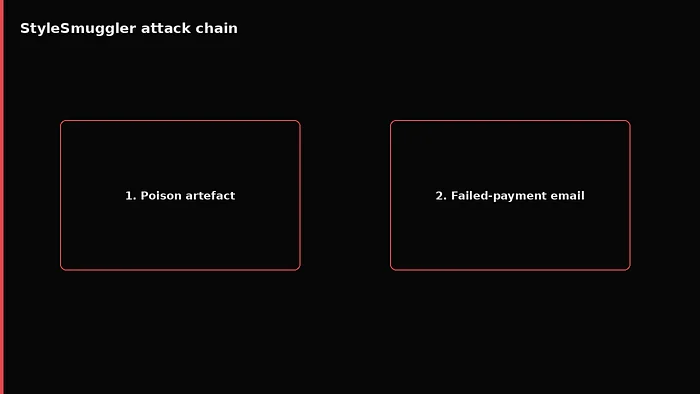
A burst of failed-payment reminders can be a signal that someone is triggering the template, but silence does not prove you were missed.
Timeline
Sansec puts first confirmed exploitation at 22:20 UTC on 4 September 2026. Adobe published APSB26-146 and hotfix VULN-39341 at 20:20 UTC on 7 September, a three-day window in which a clean, patched-looking store could still be taken with no login.
- 4 Sep 22:20 UTC: first confirmed StyleSmuggler exploitation
- 5 Sep: Sansec reproduces the chain on clean 2.4.7, 2.4.8 and 2.4.9; Shield rules start blocking
- 6-7 Sep: implants rename themselves (fc-cache, then chronyd); a second actor drops a PHP web shell
- 7 Sep 20:20 UTC: Adobe ships APSB26-146 and VULN-39341 (CVSS 10.0, Priority 1)
What attackers did after RCE
Once the chain lands, operators iterate quickly.
One campaign drops a Rust implant disguised as a Linux background process: early builds as [kworker/u:8:0], later as fc-cache or chronyd. Persistence often lands in cron. Command and control moved toward UDP port 123 traffic shaped like NTP, with hostnames that look like time-sync infrastructure. Before beaconing, the implant learns the store's public IP from common IP-echo services.
A second, unrelated operator used the same RCE to drop a small PHP web shell under the product image cache, gated behind a custom header so casual probes get a 404. That actor also sent GraphQL reconnaissance with PHP in a Store header to learn whether pub/media was writable before committing the shell.
Root cause
The flaw is CWE-1336: Magento's template engine can be tricked into treating attacker-controlled content as executable code. The injection path runs through a file Magento writes, and the payload uses styles properties to get past the safeguards that already existed on the template path. The report does not name the specific code path or the exact safeguard that was bypassed.
Existing defences did not stop it: the payload abuses styles properties in a way that slips past existing safeguards on the template path. Second, patch status was not a defence: the first known victim was on the July and August 2026 updates with a clean patch-status check.
Impact
The result is arbitrary code execution as the Magento process. Scope is changed, so the blast can reach beyond the vulnerable component. Adobe's bulletin APSB26-146 states that authentication is not required and that Adobe is aware of exploitation in the wild.
In practice, the post-exploitation artefacts show what that means: disguised Rust implants with cron persistence and NTP-shaped egress, and in a separate campaign a PHP web shell under the product image cache. Patching closes the hole but does not remove an implant installed during the unpatched window.
For organisations whose product is a storefront, or who sell into merchants on Magento or Adobe Commerce, the report frames this as a diligence and continuity event rather than a patch ticket:
- Unauthenticated RCE on a customer-facing stack freezes renewals and questionnaires until current proof can be shown.
- "We applied last month's Adobe bulletin" was not a defence; the July and August updates were already on the first known victim.
- Post-exploitation left real artefacts: disguised processes, cron entries, NTP-shaped egress and PHP under media. Scanner coverage without adversarial follow-through misses that class of evidence.
- Checkout and order paths sit next to the failed-payment email machinery the exploit abuses, which is exactly the surface buyers ask about when they want proof around payment and data access.
Fix
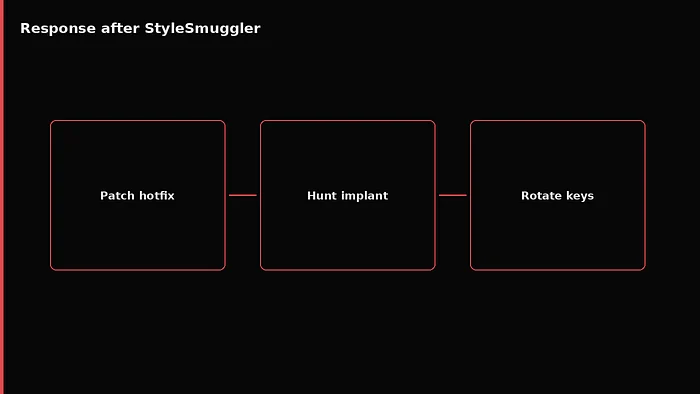
Adobe shipped APSB26-146 and hotfix VULN-39341 on 7 September 2026. Applying the hotfix is necessary but not sufficient. Adobe recommends rotating the Magento encryption key and every credential that key protected: admin passwords, integration tokens, OAuth secrets, payment gateway keys, database credentials, SSH and deploy keys, and third-party extension API keys. Rotate those at the source, not only inside Magento.
The report's recommended actions for the week:
- Confirm whether you run Magento Open Source, Adobe Commerce or Adobe Commerce B2B in the affected trains.
- Apply Adobe hotfix VULN-39341 for CVE-2026-75650 and verify it is installed (check
magento-patchesstatus for 39341). - Assume compromise until scanned. Hunt for Sansec's indicators: kworker / fc-cache / chronyd disguises, suspicious cron, PHP under
pub/media. - Rotate the encryption key and every dependent credential at the source if there is any chance you were hit between 4 and 7 September, or if you remain unpatched.
- Treat GraphQL exposure and writable media paths as part of the same incident narrative, not separate tickets.
- File the patch date, scan results and rotation evidence into your diligence pack so the next questionnaire does not rest on a stale PDF.
- Writable artefacts on the template path. Identify files the application writes that later feed template rendering, such as failure reports. A positive result is a file whose content you can influence and which is subsequently consumed by the template engine.
- Styles-property payloads. Try payloads that abuse styles properties against the template path. A positive result is content that survives the existing safeguards and is treated as executable during rendering.
- Template-triggered execution. Trigger the "Payment Transaction Failed Reminder" email and watch for execution during rendering rather than on delivery. A positive result is code running with no recipient interaction and regardless of mail delivery success.
- Failed-payment reminder bursts. Monitor for unusual volumes of failed-payment reminders. A burst is a signal worth investigating, though its absence proves nothing.
- Process disguises. Look for processes named
[kworker/u:8:0],fc-cacheorchronydthat do not match the host's expected workload. A positive result is a process with one of those names behaving unlike the legitimate daemon. - Cron persistence. Audit cron entries for anything added around the exploitation window. A positive result is an entry that launches a disguised binary or fetches remote content.
- NTP-shaped egress. Inspect outbound UDP port 123 traffic and DNS for hostnames resembling time-sync infrastructure. A positive result is beaconing to such a destination from a web host that has no business syncing time that way.
- IP-echo lookups before beaconing. Check logs for requests to common IP-echo services from the Magento host. A positive result is a lookup shortly before outbound traffic to an unfamiliar destination.
- PHP under the media cache. Search
pub/media, particularly the product image cache, for PHP files. A positive result is a PHP file that returns 404 without a specific custom header and executes with it. - GraphQL Store-header probing. Review GraphQL requests that carry PHP in a Store header. A positive result is reconnaissance traffic testing whether
pub/mediais writable, followed by a shell drop. - Patch verification. Run
magento-patchesstatus for 39341 on every instance. A positive result is any instance in the affected trains that does not show the hotfix as installed. - Credential rotation evidence. Confirm that the encryption key and every dependent credential were rotated at the source. A positive result is a credential still valid at the source after the incident window.
What happened, in plain words
On 4 September 2026, attackers started breaking into online shops built on Magento and Adobe Commerce. These are two names for essentially the same software: a popular system for running an online store, handling products, carts, checkout and customer accounts. Adobe Commerce and Magento Open Source are the two names used in the report, and Adobe Commerce B2B is a separate affected product.
The break-in did not need a username or password. In security language, an attack that works without logging in is called unauthenticated. That is what makes this one so serious: anyone on the internet could reach the shop and use the flaw.
The flaw is tracked as CVE-2026-75650. A CVE is a public catalogue number for a known security bug, so people around the world can refer to the same issue. The security firm Sansec, which studies online shop attacks, gave it the nickname StyleSmuggler. The bug is scored CVSS 10.0. CVSS is a scoring system from 0 to 10 for how severe a bug is; 10.0 is the maximum.
Three days after the attacks began, on 7 September 2026, Adobe released a fix. A fix like this is called a hotfix: a small, targeted patch you apply to your existing installation rather than a full upgrade. Adobe marked it Priority 1.
The image sits at the top of the write-up, under the subtitle that describes the template chain, what attackers did after breaking in, and what security leads should do that week.
What broke
Adobe classifies the bug as Improper Neutralization of Special Elements Used in a Template Engine, with the catalogue code CWE-1336. CWE is a catalogue of weakness types, the way CVE is a catalogue of individual bugs. "Improper neutralization" is jargon for "the software failed to defuse something dangerous".
To follow that, you need to know what a template engine is. A template is a piece of text with blanks in it. A shop's order confirmation email, for example, is a template: a fixed message with blanks for the customer's name, the order number and the total. The template engine is the part of the software that fills in those blanks and produces the finished message. Filling in the blanks is called rendering.
Normally the blanks are treated as plain text. The bug is that Magento's template engine can be tricked into treating content an attacker controls as instructions to run, rather than as text to display. A rough everyday comparison: imagine a form letter where someone writes "ignore the rest of this letter and read out my own paragraph instead" into the name field, and the person reading the letter actually does it. The letter was supposed to be fixed text; the filled-in blank took over.
When software runs attacker-supplied instructions, that is called remote code execution, or RCE. "Remote" means the attacker is somewhere else on the internet, not sitting at the machine. "Code execution" means their instructions run on your server, the computer that hosts your shop. The code runs with the permissions of the Magento process, meaning the software's own user account on that server.
The report also says the scope is changed. In CVSS scoring, scope describes whether a bug can affect only the vulnerable component or also things beyond it. Changed scope means the damage can reach past the template engine itself, to other parts of the server.
Adobe's security bulletin for this issue is numbered APSB26-146. A bulletin is the official notice Adobe publishes about a security problem and its fix. It states that authentication is not required and that Adobe is aware the bug is being exploited in the wild. "Exploited in the wild" means real attackers are using it against real systems, not just researchers in a lab.
Which versions are affected:
| Product | Affected versions |
|---|---|
| Adobe Commerce | 2.4.4 through 2.4.9, including the 2026-aug builds |
| Magento Open Source | the same branches |
| Adobe Commerce B2B | 1.3.3 through 1.5.3 |
A version is a numbered release of software, like 2.4.7. A branch is a line of releases that share a base, so "the same branches" means Magento Open Source versions 2.4.4 to 2.4.9 as well. The "2026-aug builds" are builds released in August 2026.
Sansec reproduced the full attack, with no login, on clean installations of Magento Open Source 2.4.7, 2.4.8 and 2.4.9. "Clean" means freshly installed, with no modifications. Reproducing an attack means carrying it out yourself to confirm it really works.
The first confirmed victim had already installed the July and August 2026 security updates, and a patch-status check showed everything up to date. A patch-status check is a routine inspection that lists which security fixes are installed. Being current was not enough, because at that moment no fix for this bug existed yet. A bug that is being attacked before a fix exists is called a 0-day (or zero-day).
How the exploit works
StyleSmuggler is a two-stage chain. A chain in security means several steps that only cause damage when combined, like a sequence of doors each opened by the previous one.
Step 1: Inject
The attacker poisons a file that Magento writes, for example a failure report or another writable artefact. "Writable" means the software has permission to create and change that file on the server. An "artefact" here is simply a file the application produces as a side effect of doing its job. A failure report is a record the shop writes when something goes wrong.
The payload, meaning the malicious content the attacker wants executed, abuses styles properties in a way that slips past existing safeguards on the template path. "Styles properties" refers to style-related settings that the template handling processes. "Safeguards" are the protective checks already built into the software. "The template path" is the route by which content travels into the template engine. The report does not publish the exact payload or the exact file path used.
Why this step matters: the attacker is not sending an obviously hostile web request. They are getting their content into a file the shop itself creates. The attacker is not sending an obviously hostile web request; they get their content into a file the shop itself creates.
Step 2: Execute
The attacker then triggers Magento's standard "Payment Transaction Failed Reminder" email. This is a standard Magento email template. While Magento renders that template, it executes the poisoned code.
Two consequences follow, and both matter:
- Nobody has to open the email. The code runs while the message is being put together, before it is ever sent.
- The attack can succeed even when email delivery fails. If the mail server is down or the message bounces, the rendering has already happened.
A burst of failed-payment reminders can be a signal that someone is triggering the template over and over. But silence does not prove you were missed.
Timeline
Sansec puts first confirmed exploitation at 22:20 UTC on 4 September 2026. UTC is Coordinated Universal Time, the common clock reference used in technical reporting so that times are unambiguous across time zones. Adobe published APSB26-146 and hotfix VULN-39341 at 20:20 UTC on 7 September. That is a three-day window in which a clean, patched-looking store could still be taken over with no login.
- 4 Sep 22:20 UTC: first confirmed StyleSmuggler exploitation
- 5 Sep: Sansec reproduces the chain on clean 2.4.7, 2.4.8 and 2.4.9; Shield rules start blocking
- 6-7 Sep: implants rename themselves (fc-cache, then chronyd); a second actor drops a PHP web shell
- 7 Sep 20:20 UTC: Adobe ships APSB26-146 and VULN-39341 (CVSS 10.0, Priority 1)
A few terms from that list. "Shield rules" are blocking rules in a protective product (Sansec's Shield) that recognise and stop this attack. An implant is malicious software an attacker leaves behind on a compromised server so they can keep coming back. PHP is a programming language widely used for websites, including Magento. A web shell is a small PHP script that gives an attacker a way to run commands on the server. An actor (or threat actor) is a person or group carrying out attacks.
What attackers did after RCE
Once the chain lands, operators iterate quickly. "Lands" means the attack succeeds. "Operators" are the people running the campaign.
One campaign drops a Rust implant disguised as a Linux background process. Rust is a programming language often used for fast, low-level tools. Linux is the operating system most web servers run. A background process is a program running on the server without a visible window, the way system housekeeping tasks do. Early builds of the implant used the process name [kworker/u:8:0], later fc-cache or chronyd. Those names are deliberate disguises, chosen to look like ordinary Linux background processes. An administrator glancing at a process list would see familiar names.
Persistence often lands in cron. Persistence means arranging to survive a reboot. Cron is Linux's built-in scheduler: a list of commands the system runs automatically at set times. Adding an entry there means the implant restarts itself.
Command and control moved toward UDP port 123 traffic shaped like NTP, with hostnames that look like time-sync infrastructure. Command and control (C2) is the channel through which an attacker's implant receives instructions and sends back results. UDP is one of the two main ways computers send data over a network (the other is TCP); it is fast and connectionless. A port is a numbered doorway on a computer, and port 123 is the standard doorway for NTP, the Network Time Protocol that computers use to keep their clocks correct. By sending their traffic to port 123 and using hostnames that look like time servers, attackers hope it blends in with ordinary clock-sync traffic. A hostname is a human-readable name for a server, like a website address.
Before beaconing, the implant learns the store's public IP from common IP-echo services. Beaconing is the implant periodically calling home to say "I am alive and here is what I found". A public IP is the numeric address by which the server is known on the internet. An IP-echo service is a simple website that replies with the address it saw the request come from, useful for discovering your own public address.
A second, unrelated operator used the same RCE to drop a small PHP web shell under the product image cache, gated behind a custom header so casual probes get a 404. The product image cache is a folder where the shop stores resized copies of product photos so pages load faster. A custom header is an extra line of information sent with a web request, beyond the address and the usual details. Gating means the shell only responds when that header is present. A 404 is the standard "page not found" response. So anyone who stumbles on the file sees a harmless 404, while the attacker, sending the right header, gets the shell.
That actor also sent GraphQL reconnaissance with PHP in a Store header to learn whether pub/media was writable before committing the shell. GraphQL is a way for programs to ask a server for exactly the data they want, commonly used by modern shops and their apps. Reconnaissance means probing a target to learn about it before attacking. pub/media is the folder in a Magento installation where uploaded files such as product images live. The attacker sent GraphQL reconnaissance with PHP in a Store header. The attacker wanted to know whether they could write files into that folder before uploading the shell.
Patching closes the hole. It does not remove an implant installed during the unpatched window. This is the single most important sentence in the report for anyone who runs a shop: installing the fix stops new break-ins, but anything already placed on the server stays there.
Adobe recommends rotating the Magento encryption key and every credential that key protected: admin passwords, integration tokens, OAuth secrets, payment gateway keys, database credentials, SSH and deploy keys, and third-party extension API keys. Rotate those at the source, not only inside Magento.
Some definitions. An encryption key is a long secret value the software uses to scramble and unscramble protected data, such as stored passwords and sessions. A credential is any secret that proves identity: a password, a key, a token. Rotating a credential means replacing it with a new one and retiring the old. An integration token is a secret string that lets another system talk to the shop without a password. OAuth secrets are the matching secrets used by the OAuth login standard. A payment gateway key lets the shop talk to the payment provider. Database credentials are the username and password for the database that stores products, orders and customers. SSH keys are cryptographic keys used to log in to servers securely; deploy keys are similar keys used by deployment tools. Third-party extension API keys are secrets for add-on modules that connect to outside services. An API (application programming interface) is a way for one piece of software to talk to another, like a service counter where you make a specific request and get a specific answer.
"At the source" means changing the secret in the system that actually owns it, for example at the payment provider or on the database server, not just typing a new value into Magento's settings screen. If you only change it inside Magento, the old secret may still be valid elsewhere, and an attacker who copied it can keep using it.
Why this matters for funded UK SaaS and ecommerce
If your product is a storefront, or you sell into merchants on Magento or Adobe Commerce, StyleSmuggler is a diligence and continuity event, not just a patch ticket. Diligence here means the checks investors and buyers perform before putting money in or signing a contract. Continuity means keeping the business running and trusted through a scare. SaaS stands for software as a service: software you use over the internet rather than install yourself.
- Unauthenticated RCE on a customer-facing stack freezes renewals and questionnaires until you can show current proof. A stack is the combination of software layers that make up a system. A questionnaire is the security form customers and investors send you to fill in.
- "We applied last month's Adobe bulletin" was not a defence. The July and August updates were already on the first known victim.
- Post-exploitation left real artefacts: disguised processes, cron entries, NTP-shaped egress, and PHP under media. Post-exploitation is what an attacker does after getting in. Egress is outbound network traffic leaving your server. Scanner coverage means automated tools checking for known bad signs; the report's point is that scanners alone miss this kind of evidence without someone actively hunting for it.
- Checkout and order paths sit next to the failed-payment email machinery the exploit abuses. That is exactly the surface buyers ask about when they want proof around payment and data access. Checkout is the part of the shop where a customer pays. Surface means the parts of a system exposed to the outside world.
What you should do this week
- Confirm whether you run Magento Open Source, Adobe Commerce or Adobe Commerce B2B in the affected trains. "Trains" means the version lines listed in the table above.
- Apply Adobe hotfix VULN-39341 for CVE-2026-75650 and verify it is installed. The report suggests checking
magento-patchesstatus for 39341.magento-patchesis a tool that lists which Magento security patches are present; you are looking for 39341 in that list. - Assume compromise until scanned. Hunt for Sansec's indicators: kworker / fc-cache / chronyd disguises, suspicious cron, PHP under
pub/media. An indicator (indicator of compromise, or IOC) is a specific sign that an intrusion happened, such as a strange process name or an unexpected scheduled task. - Rotate the encryption key and every dependent credential at the source if there is any chance you were hit between 4 and 7 September, or if you remain unpatched.
- Treat GraphQL exposure and writable media paths as part of the same incident narrative, not separate tickets. In other words, if an attacker could reach GraphQL and could write into the media folder, consider those parts of one story rather than unrelated chores.
- File the patch date, scan results and rotation evidence into your diligence pack so the next questionnaire does not rest on a stale PDF. A diligence pack is the folder of evidence you hand to buyers or investors.
An estate means all the installations an organisation runs.
- Writable artefacts on the template path. Identify files the application writes that later feed template rendering, such as failure reports. A positive result is a file whose content you can influence and which is subsequently consumed by the template engine.
- Styles-property payloads. Try payloads that abuse styles properties against the template path. A positive result is content that survives the existing safeguards and is treated as executable during rendering.
- Template-triggered execution. Trigger the "Payment Transaction Failed Reminder" email and watch for execution during rendering rather than on delivery. A positive result is code running with no recipient interaction and regardless of mail delivery success.
- Failed-payment reminder bursts. Monitor for unusual volumes of failed-payment reminders. A burst is a signal worth investigating, though its absence proves nothing.
- Process disguises. Look for processes named
[kworker/u:8:0],fc-cacheorchronydthat do not match the host's expected workload. A positive result is a process with one of those names behaving unlike the legitimate daemon. A daemon is a background program that runs continuously to provide a service. - Cron persistence. Audit cron entries for anything added around the exploitation window. A positive result is an entry that launches a disguised binary or fetches remote content. A binary is a compiled program file.
- NTP-shaped egress. Inspect outbound UDP port 123 traffic and DNS for hostnames resembling time-sync infrastructure. A positive result is beaconing to such a destination from a web host that has no business syncing time that way. DNS is the internet's address book, translating names like example.com into numeric addresses.
- IP-echo lookups before beaconing. Check logs for requests to common IP-echo services from the Magento host. A positive result is a lookup shortly before outbound traffic to an unfamiliar destination. A log is a record of events a system keeps.
- PHP under the media cache. Search
pub/media, particularly the product image cache, for PHP files. A positive result is a PHP file that returns 404 without a specific custom header and executes with it. - GraphQL Store-header probing. Review GraphQL requests that carry PHP in a Store header. A positive result is reconnaissance traffic testing whether
pub/mediais writable, followed by a shell drop. - Patch verification. Run
magento-patchesstatus for 39341 on every instance. A positive result is any instance in the affected trains that does not show the hotfix as installed. An instance is one running copy of the software. - Credential rotation evidence. Confirm that the encryption key and every dependent credential were rotated at the source. A positive result is a credential still valid at the source after the incident window.
Glossary
- 0-day (zero-day): a security bug being attacked before a fix exists.
- 404: the standard web response meaning "page not found".
- Actor (threat actor): a person or group carrying out attacks.
- Adobe Commerce: Adobe's paid version of the Magento online shop platform.
- Adobe Commerce B2B: the version of Adobe Commerce with business-to-business features.
- API (application programming interface): a way for one piece of software to talk to another.
- APSB26-146: Adobe's security bulletin for this issue.
- Artefact: a file the application produces as a side effect of doing its job.
- Background process: a program running on a server without a visible window.
- Beaconing: an implant periodically contacting its operator to report in.
- Binary: a compiled program file.
- Branch: a line of software releases sharing a base version.
- Bulletin: an official notice about a security problem and its fix.
- Chain: several attack steps that only cause damage when combined.
- Checkout: the part of a shop where a customer pays.
- Chronyd: the standard Linux time-synchronisation service, used here as a disguise.
- Clean installation: freshly installed software with no modifications.
- Command and control (C2): the channel through which an implant receives instructions and sends results.
- Credential: any secret that proves identity, such as a password, key or token.
- Cron: Linux's built-in scheduler for running commands automatically at set times.
- Custom header: an extra line of information sent with a web request.
- CVE: a public catalogue number for a known security bug.
- CVSS: a scoring system from 0 to 10 for how severe a bug is.
- CWE: a catalogue of weakness types.
- CWE-1336: the weakness type for improper neutralisation of special elements used in a template engine.
- Daemon: a background program that runs continuously to provide a service.
- Database credentials: the username and password for the database storing products, orders and customers.
- Deploy key: a cryptographic key used by deployment tools to access a server or repository.
- Diligence: the checks investors and buyers perform before committing money or signing a contract.
- Diligence pack: the folder of evidence handed to buyers or investors.
- DNS: the internet's address book, translating names into numeric addresses.
- Egress: outbound network traffic leaving your server.
- Encryption key: a long secret value used to scramble and unscramble protected data.
- Estate: all the installations an organisation runs.
- Exploited in the wild: real attackers are using the bug against real systems.
- Failure report: a record the shop writes when something goes wrong, such as a failed payment.
- fc-cache: a Linux font-cache utility, used here as a disguise.
- GraphQL: a way for programs to ask a server for exactly the data they want.
- Gating: making something respond only when a specific condition, such as a header, is met.
- Hostname: a human-readable name for a server.
- Hotfix: a small, targeted patch applied to an existing installation.
- Implant: malicious software left on a compromised server so the attacker can keep coming back.
- Indicator (of compromise): a specific sign that an intrusion happened.
- Instance: one running copy of the software.
- Integration token: a secret string letting another system talk to the shop without a password.
- IP-echo service: a simple website that replies with the address it saw the request come from.
- kworker: a normal Linux kernel worker process, used here as a disguise.
- Linux: the operating system most web servers run.
- Log: a record of events a system keeps.
- Magento Open Source: the free version of the Magento online shop platform.
- magento-patches: a tool that lists which Magento security patches are installed.
- NTP (Network Time Protocol): the protocol computers use to keep their clocks correct; its standard port is 123.
- OAuth secret: a secret used by the OAuth login standard.
- Operator: a person running an attack campaign.
- Patch-status check: a routine inspection listing which security fixes are installed.
- Payload: the malicious content an attacker wants executed.
- Payment gateway key: a secret letting the shop talk to the payment provider.
- Persistence: arranging for malicious software to survive a reboot.
- PHP: a programming language widely used for websites, including Magento.
- Port: a numbered doorway on a computer for network traffic.
- Post-exploitation: what an attacker does after getting in.
- Priority 1: Adobe's most urgent severity category for a fix.
- Process: a running program on a computer.
- Product image cache: a folder where the shop stores resized copies of product photos.
- Public IP: the numeric address by which a server is known on the internet.
- pub/media: the folder in a Magento installation where uploaded files such as product images live.
- Reconnaissance: probing a target to learn about it before attacking.
- Remote code execution (RCE): attacker-supplied instructions running on someone else's server over the internet.
- Rendering: the template engine filling in the blanks and producing the finished message.
- Reproducing: carrying out an attack yourself to confirm it really works.
- Rotating: replacing a credential with a new one and retiring the old.
- Rust: a programming language often used for fast, low-level tools.
- SaaS (software as a service): software used over the internet rather than installed yourself.
- Safeguards: protective checks already built into the software.
- Sansec: the security firm that named the bug StyleSmuggler and reproduced the chain.
- Scope (changed): in CVSS, whether a bug can affect only the vulnerable component or also things beyond it.
- Shield rules: blocking rules in Sansec's Shield product that recognise and stop this attack.
- SSH key: a cryptographic key used to log in to servers securely.
- Stack: the combination of software layers that make up a system.
- Styles properties: style-related settings processed on the template path, abused by the payload.
- Surface: the parts of a system exposed to the outside world.
- Template: a piece of text with blanks that software fills in.
- Template engine: the part of the software that fills in a template's blanks.
- Template path: the route by which content travels into the template engine.
- Third-party extension API key: a secret for an add-on module that connects to an outside service.
- Trains: version lines of a product, such as 2.4.4 through 2.4.9.
- UDP: one of the two main ways computers send data over a network; fast and connectionless.
- Unauthenticated: working without logging in.
- UTC (Coordinated Universal Time): the common clock reference used in technical reporting.
- Version: a numbered release of software.
- VULN-39341: the identifier of Adobe's hotfix for this bug.
- WAF (web application firewall): a filter in front of a website that blocks suspicious traffic.
- Web shell: a small script giving an attacker a way to run commands on a server through the browser.
- Writable: the software has permission to create and change a file on the server.




