Super Calculator: Calculate Your Way In
A calculator application evaluated user input as a Jinja2 template, allowing server-side template injection. An attacker could reach Python's built-in functions and execute system commands to read a flag file.

medium.com
Published on medium.com
Red Team
The full write-up lives on its author's site
It belongs to its author, so we link to it rather than copy it. The other two tabs are our own rewrites, checked against it.
Context
Super Calculator presents itself as a simple arithmetic tool: you give it an expression, it gives you a result. Behind that interface, the application builds a template from whatever the user submits and renders it server-side. That design decision turns a calculator into a Server-Side Template Injection (SSTI) surface, and the goal of this exercise is to identify and exploit the flaw to uncover what is hidden behind the calculator.
The write-up walks through the whole chain: spotting that input is evaluated rather than echoed, confirming which template engine is in use, and then reaching Python's built-in functions to run a system command.
Setup
No accounts, roles, tools or versions are described. The testing is done directly against the calculator's input field, and the only precondition is that the application accepts user-supplied expressions and renders them as templates.
Finding it
Step 1: Spotting unusual behaviour
The first probe is the classic arithmetic expression wrapped in double braces:
The application returns 49 instead of displaying the text as-is. That is the first clear sign that user input is being treated as a template and evaluated server-side, rather than handled as plain text.
Step 2: Confirming the template engine
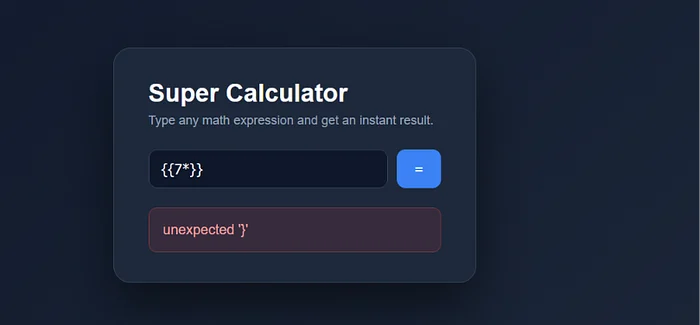
A malformed expression narrows down the engine. Submitting:
causes the application to return:
unexpected '}'
This error message is characteristic of a Jinja2-based template engine choking on a syntax error while parsing the injected expression. It confirms that user input is being evaluated by Jinja2 server-side rather than treated as plain text, a strong indicator of an SSTI vulnerability.
Exploitation
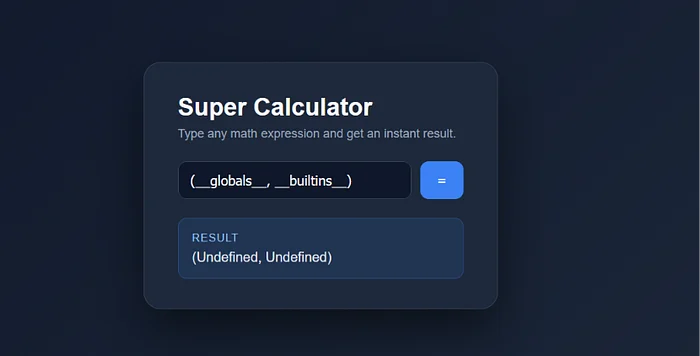
Step 3: Reaching globals and built-ins
Because the input is fully evaluated as a Jinja2 expression, it is possible to reach the global namespace and Python's built-in functions through a chain of special attributes. That reveals whether the template environment exposes sensitive functionality such as system command execution.
The payload used is:
self.__init__.__globals__.__builtins__.__import__('os').popen('cat flag.txt').read()
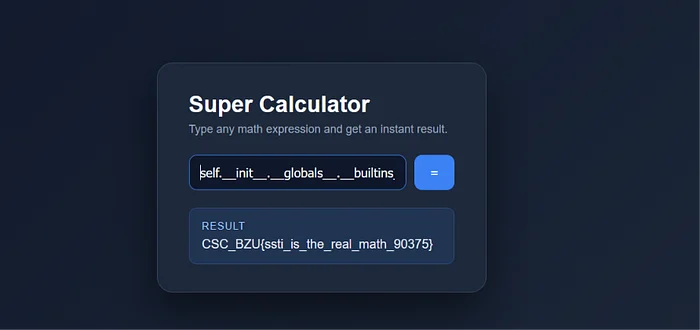
Each part of the chain has a specific job:
| Part | Function |
|---|---|
self.__init__.__globals__ |
Reaches the global scope of the current object |
__builtins__ |
Accesses Python's built-in functions |
__import__('os') |
Dynamically imports the os module |
popen('cat flag.txt').read() |
Executes a system command and reads its output |
The payload chains special attributes to import the os module and run cat flag.txt, reading its output.
Root cause
The input is evaluated as Jinja2 template syntax instead of being passed through as data, as the unsafe example shows. The malformed-expression error is characteristic of a Jinja2 engine parsing the injected expression. The report does not describe any input filtering or sandboxing that would have stopped the chain.
Impact
The payload aims to execute system commands on the server and read files such as flag.txt. The report demonstrates command execution and file read; it does not discuss what else the environment exposes or which users could reach the feature.
Fix
Never concatenate user input into a template. Treat it as data instead.
Unsafe:
template = Template("Result: {{ " + user_input + " }}")return template.render()
Safe:
from flask import render_templatereturn render_template("calculator.html", result=user_input)
With the safe pattern, the user's input is displayed as data instead of being evaluated as a Jinja2 template.

Variants to test
- Arithmetic probe on any reflected input. Submit
{{7*7}}wherever a value is echoed back. A response of49rather than the literal string means the input reached a template engine. - Malformed-expression probe. Submit
{{7*}}and read the error. A Jinja2-style parse error such asunexpected '}'identifies the engine and confirms server-side evaluation. - Alternative object chains. If
selfis unavailable in the context, try other starting points that reach__globals__and__builtins__, and check whether the response contains command output rather than an error. - Sandbox checks. Where a sandbox is present, test whether the import chain is blocked; a positive result is any response that returns the output of the command instead of a security error.
- Blind confirmation. If output is not reflected, use a command whose effect is observable elsewhere (for example a delay) and treat a measurable change in response time as confirmation.
What happened, in plain words
A website called Super Calculator offers a very simple service: you type a sum such as 2+2, and it shows you the answer. Underneath, the site does not just print back what you typed. It takes your text, drops it into a template, and lets a program on the server fill that template in before sending the page back to your browser. That habit, letting user text become part of a template, is what exposes the calculator to template injection.
The class of bug here is called Server-Side Template Injection, usually shortened to SSTI. To understand it, imagine a restaurant. You write your order on a card and hand it to the kitchen. Normally the kitchen reads the card and cooks what it says. Now imagine the kitchen also follows any instruction written on the card, so if you write "give me a burger and also open the safe", someone opens the safe. A template engine is the kitchen: it is supposed to fill in blanks, but if it treats your text as instructions, it will follow them.
The write-up goes through the whole chain in order: first spotting that the input is being evaluated rather than echoed, then confirming which template engine is in use, and finally reaching Python's built-in functions to run a system command. The goal of the exercise is to uncover what is hidden behind the calculator.
Background you need first
A few ideas come up again and again below, so here they are from zero.
- Server and client. Your browser is the client. The server is the computer that holds the website and does the work. When you press a button, your browser sends a request to the server and the server sends a page back.
- Template. A template is a page with blanks in it. A shopping site might have a template that says "Hello, NAME" and the server fills in your name before sending the page. The tool that fills the blanks is called a template engine.
- Jinja2. Jinja2 is a popular template engine used by Python web applications. In Jinja2, anything between double curly braces, like
{{ ... }}, is not shown to the visitor as text. It is treated as an instruction and worked out by the server first. So{{7*7}}becomes49before the page leaves the server. - Python. Python is a programming language. The server in this story runs Python, and Jinja2 is a Python library, which is why the payload later reaches Python features.
- Expression. An expression is a piece of code that produces a value, such as
7*7. The server works it out and uses the result. - Payload. The payload is the text an attacker sends on purpose to trigger the bug. Here it is whatever is typed into the calculator.
- Command execution. Running a command means asking the operating system (the software that manages the server) to do something, such as list files or print a file's contents. If a website lets a visitor run commands, the visitor can often read files the website was never meant to show.
Setup
No accounts, roles, tools or versions are described. The testing is done directly against the calculator's input field, and the only precondition is that the application accepts user-supplied expressions and renders them as templates. In plain terms: you only need a browser, the calculator page, and its input box.
Finding it
Step 1: Spotting unusual behaviour
The first probe is the classic arithmetic expression wrapped in double braces:
Line by line: the two opening braces {{ and the two closing braces }} are Jinja2's way of marking "work this out on the server". Inside them, 7*7 is ordinary multiplication. If the site were treating your text as plain text, the page would show the literal characters {{7*7}} back to you.
The application returns 49 instead of displaying the text as-is. That is the first clear sign that user input is being treated as a template and evaluated server-side, rather than handled as plain text. This step is done first because it is the cheapest possible test: one short string tells you whether the site is merely echoing you or actually running your text.
Step 2: Confirming the template engine
Knowing that something evaluates your input is not the same as knowing what it is. A malformed expression narrows down the engine. Submitting:
Here 7* is incomplete: a multiplication sign with nothing after it. Any engine that tries to work this out will hit a syntax error, and the wording of that error is a fingerprint of the engine.
The application returns:
unexpected '}'
This error message is characteristic of a Jinja2-based template engine choking on a syntax error while parsing the injected expression. It confirms that user input is being evaluated by Jinja2 server-side rather than treated as plain text, a strong indicator of an SSTI vulnerability. The reason for this step is that the next stage depends on the engine: the chain of attributes used below is specific to Jinja2 and Python.
Exploitation
Step 3: Reaching globals and built-ins
Because the input is fully evaluated as a Jinja2 expression, it is possible to reach the global namespace and Python's built-in functions through a chain of special attributes. That reveals whether the template environment exposes sensitive functionality such as system command execution.
Two words in that sentence need unpacking. The global namespace is the shared storage area a running Python program keeps its names and objects in; from there you can reach the program's other parts. Built-in functions are the tools Python always has available, including one that can load extra modules and one that can run operating system commands.
The payload used is:
self.__init__.__globals__.__builtins__.__import__('os').popen('cat flag.txt').read()
Each part of the chain has a specific job:
| Part | Function |
|---|---|
self.__init__.__globals__ |
Reaches the global scope of the current object |
__builtins__ |
Accesses Python's built-in functions |
__import__('os') |
Dynamically imports the os module |
popen('cat flag.txt').read() |
Executes a system command and reads its output |
Read the payload from left to right as a walk through the program. self is the current object the template is working with. __init__ is the function that set that object up. __globals__ is the shared storage that function can see, which is how you climb from one small object out to the wider program. __builtins__ is the set of tools Python always provides. __import__('os') loads the os module, a standard Python module for talking to the operating system. popen('cat flag.txt') runs the shell command cat flag.txt, where cat prints a file's contents. .read() takes that printed output and hands it back as text, which the template then displays on the page.
The payload chains special attributes to import the os module and run cat flag.txt, reading its output.
Root cause
The input is evaluated as Jinja2 template syntax instead of being passed through as data, as the unsafe example shows. Concatenate simply means gluing strings together: the site takes your text and sticks it straight into the template before rendering. The malformed-expression error is characteristic of a Jinja2 engine parsing the injected expression. The report does not describe any input filtering or sandboxing that would have stopped the chain.
Impact
The payload aims to execute system commands on the server and read files such as flag.txt. Privileges here means the permissions the website's own process has; commands run with those same permissions. The report demonstrates command execution and file read; it does not discuss what else the environment exposes or which users could reach the feature.
Fix
Never concatenate user input into a template. Treat it as data instead.
Unsafe:
template = Template("Result: {{ " + user_input + " }}")return template.render()
Line by line: the first line builds a template string by gluing user_input between Result: {{ and }}. Whatever the visitor typed becomes part of the template itself. The second line renders that template, which means the server now evaluates the visitor's text as Jinja2 code. This is exactly the pattern that produced the bug.
Safe:
from flask import render_templatereturn render_template("calculator.html", result=user_input)
Line by line: the first line imports render_template from Flask, a Python web framework. The second line renders a fixed template file, calculator.html, and passes the visitor's text in as a value named result. The template decides where to show result, and the text is displayed as data instead of being evaluated as a Jinja2 template.
Variants to test
- Arithmetic probe on any reflected input. Submit
{{7*7}}wherever a value is echoed back. A response of49rather than the literal string means the input reached a template engine. - Malformed-expression probe. Submit
{{7*}}and read the error. A Jinja2-style parse error such asunexpected '}'identifies the engine and confirms server-side evaluation. - Alternative object chains. If
selfis unavailable in the context, try other starting points that reach__globals__and__builtins__, and check whether the response contains command output rather than an error. - Sandbox checks. Where a sandbox is present, test whether the import chain is blocked; a positive result is any response that returns the output of the command instead of a security error. A sandbox is a restricted environment meant to stop code from reaching the rest of the system.
- Blind confirmation. If output is not reflected, use a command whose effect is observable elsewhere (for example a delay) and treat a measurable change in response time as confirmation. Blind here means you cannot see the result on the page, so you look for a side effect instead.
Glossary
- SSTI (Server-Side Template Injection): a bug where user input is placed into a template and evaluated by the server as template code instead of being shown as plain text.
- Template: a page with blanks that a program fills in before sending it to the browser.
- Template engine: the software that fills in a template's blanks and works out any expressions inside it.
- Jinja2: a template engine used by Python web applications, where text inside
{{ }}is evaluated on the server. - Python: a programming language; the server in this story runs Python, and Jinja2 is a Python library.
- Expression: a piece of code that produces a value, such as
7*7. - Payload: the text an attacker sends deliberately to trigger a bug.
- Server: the computer that holds a website and does the processing behind it.
- Client: the browser on the visitor's computer that sends requests to the server.
- Global namespace: the shared storage area a running Python program keeps its names and objects in.
- Built-in functions: the tools Python always provides, including ways to load modules and run commands.
- Module: a bundle of extra code that can be loaded into a Python program, such as
os. osmodule: a standard Python module for interacting with the operating system.- Command execution: making the operating system run a command, such as printing a file.
cat: a shell command that prints the contents of a file.- Concatenate: to glue strings together end to end.
- Render: to process a template and produce the final page.
- Flask: a Python web framework;
render_templatecomes from it. - Sandbox: a restricted environment meant to stop code from reaching the rest of the system.
- Privileges: the permissions a running program has, which any command it runs inherits.
- Blind: a situation where the result of a payload is not shown on the page, so you look for a side effect instead.




