Tampering with arbitrary packages in @types scope of npm
The pull request management bot for Definitely Typed only checked permissions on the first 100 files of a pull request, so an attacker could bypass package-based permission checks by submitting a pull request with more than 100 files. This allowed merging a malicious pull request and tampering with arbitrary packages under the @types scope of npm.

blog.ryotak.net
Published on blog.ryotak.net
2021-08-08 1580 字 Definitely Typed Vulnerability TypeScript Supply Chain
The full write-up lives on its author's site
It belongs to its author, so we link to it rather than copy it. The other two tabs are our own rewrites, checked against it.
Context
Definitely Typed is a project, supported by Microsoft, that maintains a large number of TypeScript type definition packages to complement npm packages that do not ship their own types. Those packages live in the @types scope on npm and are downloaded about 3.7 billion times per month in total. Projects such as VSCode, Angular and TypeScript itself depend on them.
The repository DefinitelyTyped/DefinitelyTyped is managed by many people, including the TypeScript maintainers. Alongside the repository maintainers there is a second concept: package maintainers. A package maintainer has permission to manage only a single type definition package, such as @types/node, and is specified inside each package. If a user holds package maintainer permission for the target package, they can approve pull requests that contain only changes to that package, without any Definitely Typed maintainer permission. Additional requirements apply: the changed file must be a valid type definition and a test for the change must have been added.
Merging is driven by a bot, @typescript-bot, whose source lives in DefinitelyTyped/dt-mergebot. Normal GitHub users without any permission on the repository use the bot's commands to merge pull requests. The bot behaves as follows:
- Fetch changed files for a pull request.
- Check which type definition package has the changed files.
- Send a review request to the package maintainer specified in the type definition package.
- If the package maintainer approved the change, the author of the pull request is given permission to merge.
- When the pull request author sends the comment
Ready to merge, typescript-bot merges the pull request.
Definitely Typed is not in the scope of the safe harbour for Microsoft's bug bounty programme; the author confirmed this with the Japan Microsoft Security Response Center. The findings below were reported as potential vulnerabilities using publicly available information, without actually exploiting or demonstrating them.
Setup
The investigation needed no special accounts or tooling beyond reading public source code. The author had previously reported a Homebrew vulnerability and had seen how difficult it is to parse pull requests correctly, which is what prompted a look at a bot that makes permission decisions from pull request contents. Because a package maintainer permission is easy to obtain by adding a type definition, the question was whether package-based permission management could be bypassed with a specially crafted pull request.
Finding it
While discussing with @lambdasawa which systems would have significant impact if compromised, the two arrived at Definitely Typed. After confirming how widely it is used, the author looked at DefinitelyTyped/DefinitelyTyped and noticed that ordinary GitHub users were using @typescript-bot commands to merge pull requests. That led to reading the source of dt-mergebot.
In the project overview the author found the image below, which illustrates the package maintainer concept.
Reading the code, the file-fetching logic looked safe at first because it takes changed files from the API. But one snippet stood out:
const { nodes, totalCount } = prInfo.files!;
if (nodes!.length < totalCount) console.warn(`  *** Note: ${totalCount - nodes!.length} files were not seen by this query!`);
It compares totalCount, returned by the API, with the number of files actually returned, and calls console.warn when fewer files came back than the API says exist. A warning is not a stop condition.
Checking how the files are fetched revealed the GraphQL query:
query PR($pr_number: Int!) {
    repository(owner: "DefinitelyTyped", name: "DefinitelyTyped") {
      id
      pullRequest(number: $pr_number) {
        [...]
        files(first: 100) {
          totalCount
          nodes {
            path
            additions
            deletions
          }
        }
        [...]
      }
   }
}
The files(first: 100) argument means the bot only ever fetched the first 100 files when calculating the permissions required to merge. For a pull request touching 101 or more files, the 101st and subsequent files were never subject to the permission check. The console.warn fired, but processing continued, so the permission check was broken and package-based permission management could be bypassed.
A public example supports the reasoning: a pull request that edited two packages (codemirror and react-codemirror) was recognised by typescript-bot as editing only codemirror.
Exploitation
The author did not demonstrate the issue and reported it as a potential vulnerability, using the following assumptions as an attack procedure.
Step 1: pick a target library
Find a library on npm that does not have a type definition. Alternatively, create your own library.
Step 2: write a type definition
Create a type definition for that library.
Step 3: get it merged
Send a pull request to the DefinitelyTyped repository adding the type definition and wait for it to be merged. When adding a type definition you can specify yourself as the maintainer for it; this is what is commonly done when adding a new type definition to Definitely Typed and does not require social engineering.
Step 4: pad the directory
Once that pull request has merged, create a new pull request that adds 100 files to the directory containing the type definition you added in step 3.
Step 5: add the malicious change
Make changes to the file you want to tamper with on the same pull request. The bot only inspects the first 100 files, so files beyond that are not subject to the permission check.
Step 6: approve your own pull request
After typescript-bot has checked the pull request, permission to approve it is granted to you, so you approve the pull request yourself.
Step 7: trigger the merge
Add Ready to merge as a comment.
Step 8: result
The pull request is merged and the targeted file has been modified.
The author emailed a summary of these steps to Definitely Typed members. The vulnerability was fixed in commit [redacted].
The regression
After the fix, the author asked the Definitely Typed members for permission to publish an article and, while re-reading the code to write it, found a regression. Commit [redacted] made dt-mergebot fetch all modified files by paginating the GitHub API. Fetching everything sounds sufficient, but the GitHub API has a pitfall: as documented, when retrieving the list of modified files for a pull request it returns a maximum of 3000 files. Pagination cannot get past that ceiling; the client receives only the first 3000 files.
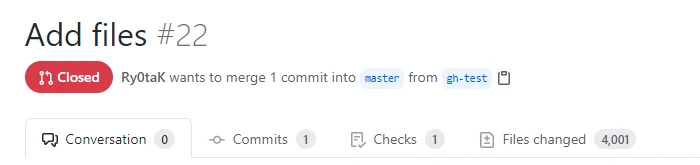
For a pull request like the one in the image above, GraphQL returns a response like this:

The totalCount parameter returned by the GraphQL API also has an upper limit of 3000. By sending a pull request that modified 3001 or more files to DefinitelyTyped/DefinitelyTyped, permission checks could again be bypassed and arbitrary modifications made to the repository.
This was fixed in commit [redacted], and dt-mergebot now marks pull requests containing 500 or more modified files as suspicious.
The symbolic link issue
Looking at other parts of Definitely Typed produced a third finding. types-publisher, the tool that handles publishing packages after dt-mergebot processes a pull request, copies the files in the target package into the output directory. Symbolic links were not taken into account during that copy, so it was possible to publish unintended files from the system.
The reachable set was limited, because the following processing runs before the copy and only files that can be parsed as TypeScript get through:
const src = createSourceFile(resolvedFilename, readFileAndThrowOnBOM(resolvedFilename, fs));
if (resolvedFilename.endsWith(".d.ts")) {
  types.set(resolvedFilename, src);
} else {
  tests.set(resolvedFilename, src);
}
This was also reported by email, and the team fixed it by disallowing symbolic links in commit [redacted].
Root cause
The permission decision is derived from a list of changed files that is silently truncated. In the first version the truncation came from the query itself: files(first: 100) fetched a single page, and the only reaction to a shortfall against totalCount was console.warn, which does not stop subsequent processing. In the regression the truncation came from the API: both the file list and totalCount are capped at 3000, so a check that compares the two can no longer detect that anything is missing. In both cases the permission check was based on an incomplete list of changed files. The symbolic link issue is separate: symbolic links were not taken into account during the copy, and only the TypeScript parse step limited what could be published.
Impact
An attacker able to get a type definition merged, which is a normal contribution and requires no social engineering, could then merge a pull request containing changes to files the bot never inspected. That results in tampering with arbitrary packages under the @types scope of npm, and in arbitrary modifications to the DefinitelyTyped/DefinitelyTyped repository. Given the download volume of @types packages and their use by VSCode, Angular and TypeScript itself, the effect reaches the wider TypeScript supply chain. The symbolic link issue could publish unintended files from the system, limited to files that parse as TypeScript.
Fix
The first vulnerability was fixed in commit [redacted]. The regression was fixed in commit [redacted], with dt-mergebot now marking pull requests that contain 500 or more modified files as suspicious. The symbolic link issue was fixed in commit [redacted] by disallowing symbolic links.
Timeline
| Date (JST) | Event |
|---|---|
| April 26, 2021 | Found first vulnerability |
| April 27, 2021 | Reported first vulnerability |
| April 28, 2021 | Fixed first vulnerability |
| May 7, 2021 | Regression occurred |
| June 4, 2021 | Noticed the regression and reported it |
| June 14, 2021 | Fixed the regression |
| June 22, 2021 | Found a vulnerability in symbolic link handling |
| July 7, 2021 | Fixed the symbolic link vulnerability |
| August 8, 2021 | Published this article |
Variants to test
- Pagination limits on any review bot. Look for bots that fetch pull request files through the GitHub API and make permission or approval decisions from them. A positive result is a pull request with more files than the API ceiling (3000 for the files endpoint) where the bot's decision reflects only the files it received.
- Single-page queries with a warning instead of an abort. Search for GraphQL queries using
files(first: N)where a shortfall againsttotalCountonly logs. A positive result is a pull request with N+1 files where the extra file is not attributed to any package. - Capped counters. Check whether the code compares a returned count against a
totalCountthat is itself capped. A positive result is a comparison that stays equal even though files are missing. - Copy routines that follow symbolic links. In publishing or packaging tools, submit a package containing a symlink. A positive result is a published artefact containing content from outside the package directory, subject to any parsing filter such as the TypeScript check here.
- Self-assigned maintainership. Where a contribution grants the contributor maintainer rights over the contributed path, combine that with any truncation bug to approve your own change. A positive result is a merged pull request whose out-of-scope changes were never reviewed by anyone else.
What happened, in plain words
Definitely Typed is a project, supported by Microsoft, that keeps a very large collection of TypeScript type definition packages. These are small helper packages that describe what shape the data in other npm packages has, so that a TypeScript program can check your code before it runs. They are published on npm under the @types scope, and together they are downloaded about 3.7 billion times per month. Big projects such as VSCode, Angular and TypeScript itself depend on them.
A bot called @typescript-bot does much of the merging work on the Definitely Typed repository. Ordinary GitHub users, who have no permission on the repository at all, type commands at this bot to get their pull requests merged. The bot decides whether a change is allowed by looking at which files the pull request touches and who is allowed to approve those files.
The author found that the bot only ever looked at part of a pull request's file list. If a pull request touched more files than the bot looked at, the extra files were never checked, and the bot still went ahead and merged. That meant someone could slip a change into a package they were not allowed to touch, resulting in tampering with arbitrary packages under the @types scope. The author reported this as a potential vulnerability without actually exploiting it, and it was fixed. A second, similar problem appeared later after a fix, and a third, separate problem was found in the tool that publishes the packages.
Background: what all these words mean
Before the details, a few ideas from zero.
- npm is the main online shop and delivery service for JavaScript and TypeScript code. Developers install packages from it with a command, and the package is downloaded onto their computer.
- A package is a bundle of code with a name and a version, published to npm so others can install it.
- A scope is a prefix on a package name that groups packages together.
@types/nodeis a package callednodeinside the@typesscope. The@typesscope is where type definition packages live. - TypeScript is a language built on top of JavaScript that lets you label what type each value is (a number, a piece of text, an object with certain fields). A type definition is a file that describes those types for a package that was written in plain JavaScript and does not carry its own descriptions. It is like a label on a jar telling you what is inside, written by someone other than the person who filled the jar.
- GitHub is a website where code projects are stored and where people propose changes. A repository is one project's storage on GitHub.
- A pull request (often shortened to PR) is a proposal to change files in a repository. You make your edits on your own copy, then ask the project to pull them in. Other people can look at the proposed changes, comment, and approve or reject them.
- A bot is a program that acts like a user account on GitHub. It reads comments and pull requests and does things automatically, such as merging.
- An API (application programming interface) is a way for one program to ask another program for information over the internet. Think of it as a waiter: you do not walk into the kitchen, you tell the waiter what you want and the waiter brings it back in a fixed format. GitHub has an API that lets programs ask questions such as "which files does this pull request change?".
- GraphQL is one particular style of API. Instead of many fixed addresses for different questions, you send one query describing exactly the fields you want back, and the server returns just those fields.
- A commit is a saved snapshot of changes in a repository, with an identifier (a long string of letters and numbers) so you can point at exactly that version.
- A symbolic link (symlink) is a file that is really a signpost pointing at another file elsewhere on the computer. Opening the link opens the target.
- A supply chain attack is when someone tampering with a piece of software that other software depends on, so the harm spreads to everyone who installs it. It is like tampering with a ingredient supplier rather than a single restaurant.
The project and its two kinds of maintainer
Definitely Typed is managed by many people, including the TypeScript maintainers. Alongside the repository maintainers there is a second concept: package maintainers. A package maintainer has permission to manage only a single type definition package, such as @types/node, and is named inside that package. If a user holds package maintainer permission for the target package, they can approve pull requests that contain only changes to that package, without any Definitely Typed maintainer permission. Extra requirements apply: the changed file must be a valid type definition, and a test for the change must have been added.
The project overview contained an image illustrating this package maintainer concept.
The bot's behaviour, as read from its source code, is:
- Fetch changed files for a pull request.
- Check which type definition package has the changed files.
- Send a review request to the package maintainer specified in the type definition package.
- If the package maintainer approved the change, the author of the pull request is given permission to merge.
- When the pull request author sends the comment
Ready to merge, typescript-bot merges the pull request.
Step 1 is the important one. Everything after it depends on the list of changed files being complete. If that list is short, the bot is making a decision about a pull request it has not fully seen.
Why the author looked here
While discussing with @lambdasawa which systems would have a significant impact if compromised, the two arrived at Definitely Typed. After confirming how widely it is used, the author looked at DefinitelyTyped/DefinitelyTyped and noticed that ordinary GitHub users were using @typescript-bot commands to merge pull requests. That led to reading the source of dt-mergebot.
The author had previously reported a Homebrew vulnerability and had seen how difficult it is to parse pull requests correctly. Parsing means reading the proposed changes and working out exactly what they do, which is harder than it sounds because a pull request can contain many files, renames and odd cases. A bot that makes permission decisions from that parse is therefore worth a close look. Because a package maintainer permission is easy to obtain by adding a type definition, the question was whether package-based permission management could be bypassed with a specially crafted pull request.
Definitely Typed is not in the scope of the safe harbour for Microsoft's bug bounty programme; the author confirmed this with the Japan Microsoft Security Response Center. The findings were reported as potential vulnerabilities using publicly available information, without actually exploiting or demonstrating them.
Finding the first problem
Reading the code, the file-fetching logic looked safe at first because it takes changed files from the API rather than trusting anything the pull request author wrote. But one snippet stood out:
const { nodes, totalCount } = prInfo.files!;
if (nodes!.length < totalCount) console.warn(`  *** Note: ${totalCount - nodes!.length} files were not seen by this query!`);
Line by line:
const { nodes, totalCount } = prInfo.files!;takes two things out of the API response stored inprInfo.files.nodesis the list of files that actually came back.totalCountis the number the API says exist in total. The!tells TypeScript "trust me, this is not empty".if (nodes!.length < totalCount)asks: did we receive fewer files than the API says exist? If so, something is missing.console.warn(...)prints a warning message to the console, including how many files were not seen.
The problem is the reaction. A warning is not a stop condition. The program prints a note and carries on as if nothing were wrong. It is like a security guard who notices that a bag was not checked, writes it in a notebook, and waves the person through anyway.
Checking how the files are fetched revealed the GraphQL query:
query PR($pr_number: Int!) {
    repository(owner: "DefinitelyTyped", name: "DefinitelyTyped") {
      id
      pullRequest(number: $pr_number) {
        [...]
        files(first: 100) {
          totalCount
          nodes {
            path
            additions
            deletions
          }
        }
        [...]
      }
   }
}
Line by line:
query PR($pr_number: Int!) {declares a query namedPRthat takes one input, a pull request number, which must be a whole number.repository(owner: "DefinitelyTyped", name: "DefinitelyTyped")picks the repository to look at.pullRequest(number: $pr_number)picks the pull request inside it.files(first: 100)asks for the files changed by that pull request, but only the first 100 of them. This is the key line.totalCountasks for the total number of changed files, as counted by GitHub.nodes { path additions deletions }asks for, for each returned file, its path and how many lines were added and deleted.- The
[...]marks parts of the query left out of the article.
The files(first: 100) argument means the bot only ever fetched the first 100 files when calculating the permissions required to merge. For a pull request touching 101 or more files, the 101st and subsequent files were never subject to the permission check. The console.warn fired, but processing continued, so the permission check was broken and package-based permission management could be bypassed.
A public example supports the reasoning: a pull request that edited two packages (codemirror and react-codemirror) was recognised by typescript-bot as editing only codemirror.
How it could have been abused
The author did not demonstrate the issue and reported it as a potential vulnerability, using the following assumptions as an attack procedure. Each step is listed with the reason behind it.
Step 1: pick a target library
Find a library on npm that does not have a type definition. Alternatively, create your own library. The reason: you need a package where you can plausibly become the maintainer, and a library without types is a natural gap to fill.
Step 2: write a type definition
Create a type definition for that library. This is normal, useful work, which is why it does not look suspicious.
Step 3: get it merged
Send a pull request to the DefinitelyTyped repository adding the type definition and wait for it to be merged. When adding a type definition you can specify yourself as the maintainer for it; this is what is commonly done when adding a new type definition to Definitely Typed and does not require social engineering. Social engineering means tricking a person into doing something, for example by pretending to be someone else. Here no trickery is needed: the normal process hands you the maintainer role for the package you contributed.
Step 4: pad the directory
Once that pull request has merged, create a new pull request that adds 100 files to the directory containing the type definition you added in step 3. The reason: the bot only reads the first 100 files, so files beyond that are not checked.
Step 5: add the malicious change
Make changes to the file you want to tamper with on the same pull request. Because the bot only inspects the first 100 files, this change falls outside the permission check.
Step 6: approve your own pull request
After typescript-bot has checked the pull request, permission to approve it is granted to you, so you approve the pull request yourself. After typescript-bot has checked the pull request, permission to approve it is granted to you.
Step 7: trigger the merge
Add Ready to merge as a comment. This is the bot's normal trigger for merging.
Step 8: result
The pull request is merged and the targeted file has been modified.
The author emailed a summary of these steps to Definitely Typed members. The vulnerability was fixed in commit [redacted].
The regression
After the fix, the author asked the Definitely Typed members for permission to publish an article and, while re-reading the code to write it, found a regression. A regression is when a fix, or a later change, brings back a problem that was thought to be solved.
Commit [redacted] made dt-mergebot fetch all modified files by paginating the GitHub API. Pagination means asking for results in pages, like reading a long list a hundred entries at a time until you reach the end. Fetching everything sounds sufficient, but the GitHub API has a pitfall: as documented, when retrieving the list of modified files for a pull request it returns a maximum of 3000 files. Pagination cannot get past that ceiling; the client receives only the first 3000 files.
The image shows a pull request that contains a lot of modified files, the kind of pull request that runs into the ceiling.
For a pull request like the one in the image above, GraphQL returns a response like this:
The image shows the GraphQL response for that large pull request.
The totalCount parameter returned by the GraphQL API also has an upper limit of 3000. By sending a pull request that modified 3001 or more files to DefinitelyTyped/DefinitelyTyped, permission checks could again be bypassed and arbitrary modifications made to the repository.
This was fixed in commit [redacted], and dt-mergebot now marks pull requests containing 500 or more modified files as suspicious.
The symbolic link issue
Looking at other parts of Definitely Typed produced a third finding. types-publisher, the tool that handles publishing packages after dt-mergebot processes a pull request, copies the files in the target package into the output directory. Symbolic links were not taken into account during that copy, so it was possible to publish unintended files from the system.
The reachable set was limited, because the following processing runs before the copy and only files that can be parsed as TypeScript get through:
const src = createSourceFile(resolvedFilename, readFileAndThrowOnBOM(resolvedFilename, fs));
if (resolvedFilename.endsWith(".d.ts")) {
  types.set(resolvedFilename, src);
} else {
  tests.set(resolvedFilename, src);
}
Line by line:
const src = createSourceFile(resolvedFilename, readFileAndThrowOnBOM(resolvedFilename, fs));reads the file and parses it as TypeScript source. If the file is not valid TypeScript, this step fails, so the file never reaches the copy.if (resolvedFilename.endsWith(".d.ts"))checks whether the file name ends in.d.ts, the usual ending for a type definition file.types.set(resolvedFilename, src);stores it in the collection of type definitions.else { tests.set(resolvedFilename, src); }otherwise stores it in the collection of tests.
Because of this filter, only files that parse as TypeScript could be published through the symlink route.
This was also reported by email, and the team fixed it by disallowing symbolic links in commit [redacted].
Why it worked
The permission decision is derived from a list of changed files that is silently truncated. In the first version the truncation came from the query itself: files(first: 100) fetched a single page, and the only reaction to a shortfall against totalCount was console.warn, which does not stop subsequent processing. In the regression the truncation came from the API: both the file list and totalCount are capped at 3000, so a check that compares the two can no longer detect that anything is missing. In both cases the permission check was based on an incomplete list of changed files. The symbolic link issue is a separate design gap: a copy routine that follows links can pull in files from outside the package directory, and only the TypeScript parse step limited what could be published.
What the impact was
An attacker able to get a type definition merged, which is a normal contribution and requires no social engineering, could then merge a pull request containing changes to files the bot never inspected. That results in tampering with arbitrary packages under the @types scope of npm, and in arbitrary modifications to the DefinitelyTyped/DefinitelyTyped repository. Given the download volume of @types packages and their use by VSCode, Angular and TypeScript itself, the effect reaches the wider TypeScript supply chain. The symbolic link issue could publish unintended files from the system, limited to files that parse as TypeScript.
The fixes
The first vulnerability was fixed in commit [redacted]. The regression was fixed in commit [redacted], with dt-mergebot now marking pull requests that contain 500 or more modified files as suspicious. The symbolic link issue was fixed in commit [redacted] by disallowing symbolic links.
Timeline
| Date (JST) | Event |
|---|---|
| April 26, 2021 | Found first vulnerability |
| April 27, 2021 | Reported first vulnerability |
| April 28, 2021 | Fixed first vulnerability |
| May 7, 2021 | Regression occurred |
| June 4, 2021 | Noticed the regression and reported it |
| June 14, 2021 | Fixed the regression |
| June 22, 2021 | Found a vulnerability in symbolic link handling |
| July 7, 2021 | Fixed the symbolic link vulnerability |
| August 8, 2021 | Published this article |
Things to look for elsewhere
- Pagination limits on any review bot. Look for bots that fetch pull request files through the GitHub API and make permission or approval decisions from them. A positive result is a pull request with more files than the API ceiling (3000 for the files endpoint) where the bot's decision reflects only the files it received.
- Single-page queries with a warning instead of an abort. Search for GraphQL queries using
files(first: N)where a shortfall againsttotalCountonly logs. A positive result is a pull request with N+1 files where the extra file is not attributed to any package. - Capped counters. Check whether the code compares a returned count against a
totalCountthat is itself capped. A positive result is a comparison that stays equal even though files are missing. - Copy routines that follow symbolic links. In publishing or packaging tools, submit a package containing a symlink. A positive result is a published artefact containing content from outside the package directory, subject to any parsing filter such as the TypeScript check here.
- Self-assigned maintainership. Where a contribution grants the contributor maintainer rights over the contributed path, combine that with any truncation bug to approve your own change. A positive result is a merged pull request whose out-of-scope changes were never reviewed by anyone else.
Glossary
- API: a way for one program to ask another program for information over the internet, in a fixed format.
- Bot: a program that acts like a user account on GitHub and does things automatically, such as merging pull requests.
- Commit: a saved snapshot of changes in a repository, identified by a long string of letters and numbers.
- GraphQL: a style of API where you send one query describing exactly the fields you want back.
- npm: the main online service for publishing and installing JavaScript and TypeScript packages.
- Package: a bundle of code with a name and a version, published to npm.
- Package maintainer: a user allowed to manage one specific type definition package, named inside that package.
- Pagination: asking for results in pages, one batch at a time, until the end is reached.
- Pull request (PR): a proposal to change files in a repository, which others can review and approve.
- Regression: when a fix, or a later change, brings back a problem that was thought to be solved.
- Repository: one project's storage on GitHub.
- Scope: a prefix on a package name that groups packages together, such as
@types. - Social engineering: tricking a person into doing something, for example by pretending to be someone else.
- Supply chain attack: tampering with software that other software depends on, so the harm spreads to everyone who installs it.
- Symbolic link (symlink): a file that is really a signpost pointing at another file elsewhere on the computer.
- Type definition: a file describing the types of values in a package that does not carry its own descriptions.
- TypeScript: a language built on top of JavaScript that lets you label what type each value is.
- Vulnerability: a weakness in software that someone could use to make it behave in a way its authors did not intend.

