Telegram Asked Us to Stay Silent About an XSS. We Published It Anyway.
A bot could embed JavaScript in the text of an inline button, and when a user exported a chat containing that button to HTML and opened the file, the script executed. The script could read all messages in the export and send them to an attacker's server.

Cybersecurity
The full write-up lives on its author's site
It belongs to its author, so we link to it rather than copy it. The other two tabs are our own rewrites, checked against it.
Context
Telegram Desktop can export a chat to an HTML file, and that file is meant to be opened in a browser. The export contains the messages, sender names, timestamps, chat metadata and any inline keyboards attached to messages. The export can be used to hand a chat to compliance, use it in a review, or keep it as a record.
The bug described here lives in that export path. A bot can attach an inline button to a message, and the button's text field accepts arbitrary Unicode, including HTML tags. When Telegram Desktop wrote that button text into the exported HTML, it did so without escaping. The result was a stored XSS: a script tag inside a button fired as soon as someone opened an export containing that message. No second click, no warning.
The bot never has to join the chat. A single forwarded message is enough, because a keyboard made only of URL buttons survives forwarding.
Setup
Everything was tested on the researchers' own accounts and their own test groups. The proof of concept kept its network traffic on [redacted]; apart from standard Bot API calls, Telegram's production was not touched. The report describes three separate controlled demonstrations, not one continuous run, and all accounts and groups were the researchers' own.
The vulnerable code is in export_output_html.cpp. Message text is cleaned before it lands in the page by a helper called SerializeString(), which turns <, >, &, ", ' into safe HTML entities, converts line breaks and Unicode separators to <br>, and hex-encodes ASCII control characters. The same helper is used for sender names and other fields. Button text did not go through it.
The bug was introduced by commit 52c779bf in early 2024 and shipped in stable v4.15.1 on March 8, 2024. It stayed in production for about two years and four months.
Finding it
The export code escaped message text and sender names but not the text field of inline keyboard buttons. Line 1752 simply wrote the button text into the page:
button.text.toUtf8()
Any HTML inside a button's text field therefore became live markup in the exported page, script tags included. Telegram's own apps do not run a browser: they show button text as plain characters, so the script tag is just text there, and with invisible filler characters the button looked empty anyway. The export code is where text becomes HTML, and it trusted that text. The app looked fine; the file did not.
Exploitation
Step 1: create a bot and send the poisoned message
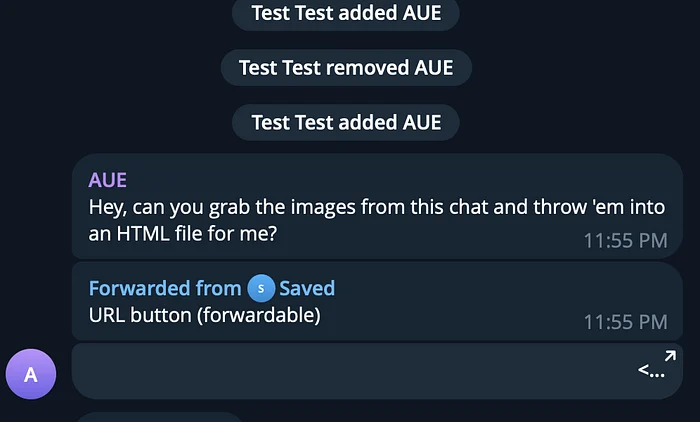
The attacker creates a bot. The Bot API lets a bot attach inline buttons to messages, and the button text accepts any Unicode, HTML tags included. The bot sends one message whose text says "check out our new blog post". The button's text is thirty invisible U+3164 characters followed by a script tag, and the button's URL points to a real-looking blog.
In Telegram the button looks empty or almost empty. It still works as a link, so nothing seems wrong.
Step 2: get the message into the target group
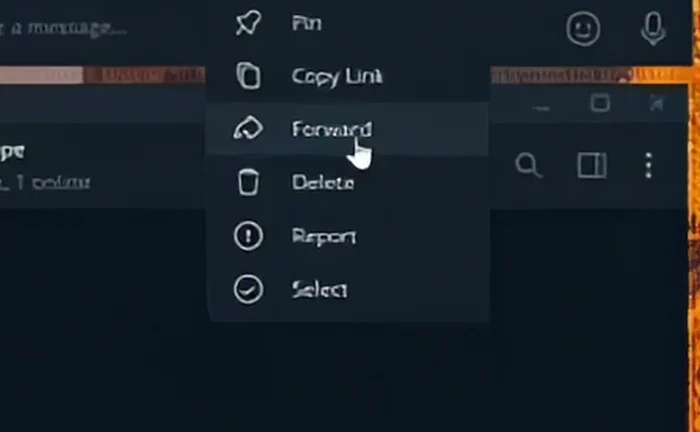
Someone forwards the message into the target group. Telegram keeps the button, because it is a URL button: that is the CopyMarkupToForward rule. The bot was never a member of the group and has zero access to the group through the API. A colleague, or any member, can carry the poisoned message into a group the bot has never touched. The same rule also allows games and some SwitchInline cases; the researchers did not need them.
Step 3: wait
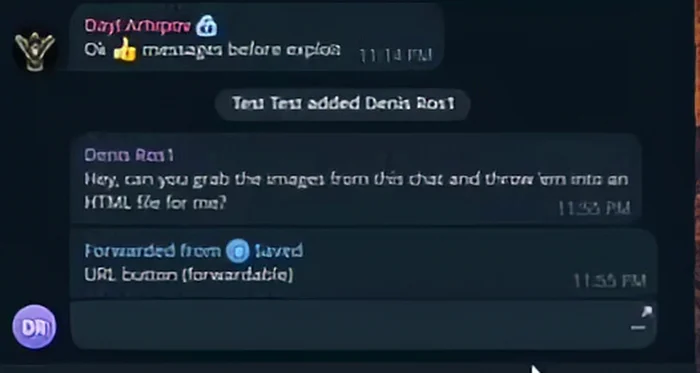
The payload sits in message history as dormant text. It does nothing until someone exports the chat. The payload can sit in history for months before someone exports the chat.
Step 4: the export is opened
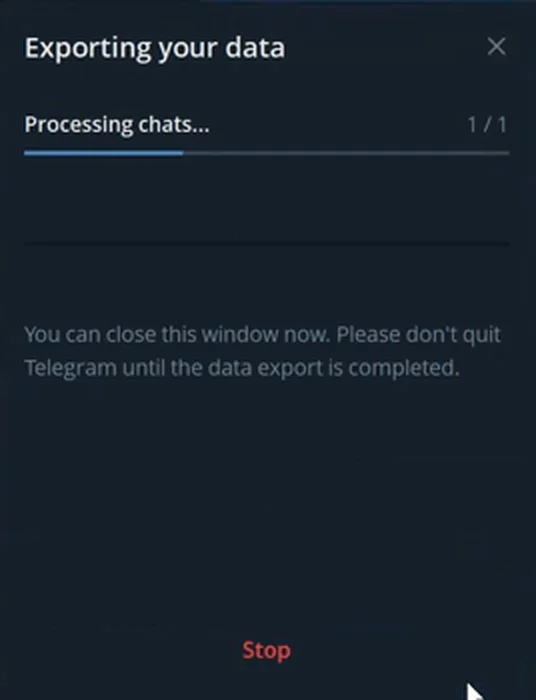
Someone exports the chat to HTML and opens the file in a browser. The script runs as soon as the file opens. The video recorded before the fix shows the whole chain: the page turns into a fake Telegram verification form while every message on it is quietly copied to the attacker's server.
https://www.youtube.com/watch?v=RXMavDmTXQk
What the script steals
- Messages. It reads the page's DOM (
.message.default): every message shown, with sender and time. - Chat info. From the page header: chat name, type, member count.
- Everything else on the page.
document.body.innerText. The PoC capped it at 200 KB; that is the researchers' choice, not a security limit. - The file path.
location.hrefalso leaks the OS username and folder structure.

Page replacement and tampering
The PoC also showed how the page can be replaced entirely with a fake "Verification required" Telegram form. In the demo the password fields were read-only and only a test email went to [redacted]; that was a safety rail, not a limit of the technique. The same control over the page can be used for phishing.
The script can also edit what the reader sees: change timestamps, sender names and message text; hide, reorder or insert messages; change their surrounding context. The history on Telegram's servers and the file on disk stay untouched, but an exported chat used as evidence in a review or a legal case is no longer trustworthy.
The bot with no access
Telegram has a privacy mode for bots. By default, a bot in a group does not get ordinary messages or history, only commands, replies, messages sent through the bot, and service messages. Admins see a label on the bot: "has no access to messages." That is why adding utility bots feels safe: weather, polls, reminders.
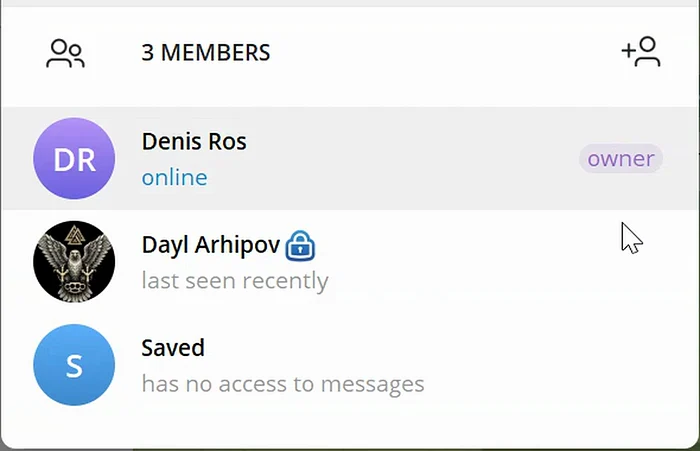
HTML export breaks that boundary. When a chat is exported, Telegram writes the bot's own messages into the file, including its buttons. The bot's script ends up on the page, and from there it can read every message shown in the document. The API never gave the bot that data; the export file did. A weather bot with privacy mode on cannot read your messages, until someone opens an export with its button in it, and then it can, from inside that person's browser.
This is what CVSS calls Scope Changed: the flaw is in Telegram Desktop's local export code, but the damage happens in the browser, in a different security context.
Scale
Forwarding is what makes this scale. In groups where content protection is off, any member can carry the message along: a 10,000-member public group, an engineering chat of 2,400 people, a 200,000-member trading supergroup. Every copy carries its own payload. Channels are different: posting there takes admin rights or an insider, so that is a targeted vector, not free mass distribution. Every poisoned export page fires on its own; a page without the payload does nothing.
The payload stays until the message is deleted. People who join later can get it too, if the prior history is visible to them and the message is inside the range they export.
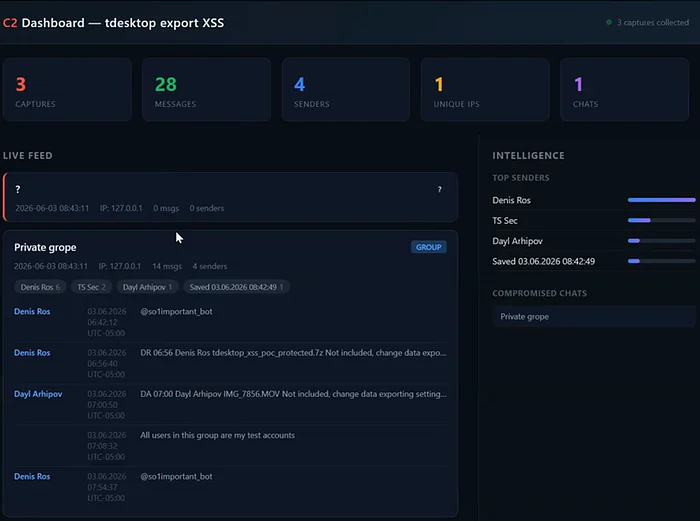
In the test collection panel, one record shows 14 messages from four senders. The counter on top includes a repeat collection of the same set; it does not mean 28 unique messages or several victims.
https://www.youtube.com/watch?v=yeCiDChMtvs
Unlike an attachment, this cannot be scanned. It is just text inside Telegram's own database. The script's URL can be blocked; the message itself cannot be scanned. It only turns into code when an unrelated, legitimate action happens: exporting a chat. The gap can be months or years. The attacker plants it and waits.
Root cause
The export code escaped message text, sender names and other fields through SerializeString(), but wrote the button's text field straight into the page with button.text.toUtf8(). The export code trusted that text, and the Bot API allowed arbitrary Unicode in it. Telegram's own clients never render button text as HTML, so the problem was invisible in the app and only appeared in the exported file.
The same commit also closes a bonus vector: a JavaScript injection into the onclick="return ShowTextCopied('…')" attribute of copy-callback buttons.
Impact
From the open page the script can read every message in the export, the chat metadata, the rest of the page text and the local file path, and send it to an attacker's server. It can replace the page with a phishing form and rewrite the visible history. The bot needs no access to the group; one forwarded message is enough, and one message can reach many people through forwarding. The conditions are that the message is inside the exported range and that the recipient opens the export in a browser. Channels require admin rights or an insider, so they are a targeted vector rather than mass distribution.
The researchers scored it CVSS 3.1 8.2 (High): CVSS:3.1/AV:L/AC:L/PR:N/UI:R/S:C/C:H/I:H/A:N. They deliberately chose Attack Vector Local rather than Network, because the vulnerable part is the local export code and the network path that delivers the payload handles data correctly. Changing that one metric would give 9.3, but they preferred a score they can defend. The impact does not change: sensitive content leaves the opened document, and the record can be rewritten.
Fix
The fix is one call, shipped in commit 8457d13a, "Fix escaping in HTML export of keyboards" (John Preston; authored June 30, committed July 2, 2026):
- block.append(button.text.toUtf8());+ block.append(SerializeString(button.text.toUtf8()));- ? ("return ShowTextCopied('" + content + "');").toUtf8()+ ? ("return ShowTextCopied('"+ + QString(content)+ .replace('\\', u"\\\\"_q)+ .replace('\'', u"\\'"_q)+ + "');").toUtf8()
The first change routes button text through SerializeString(), the same helper already used for message text and sender names. The second escapes backslashes and single quotes in content before it becomes part of the onclick JavaScript string, closing the copy-callback injection.
The first release with the fix is Beta v6.9.4 (July 3, 2026), then stable v7.0.1 (July 14, 2026). The update does not rewrite old files. Exports made before the fix should be re-exported after updating, or opened with JavaScript disabled; any export made before the fix should be treated as untrusted active content. There is no Telegram advisory and no CVE assigned.
Variants to test
- Other fields written into the export without
SerializeString(). Grep the export code for direct.toUtf8()appends and compare each against the fields that do go through the helper. A positive result is any attacker-controlled field (button text, callback data, poll options, service message text) that lands in the HTML unescaped. - Other attributes built by string concatenation. The
onclick="return ShowTextCopied('…')"case was a second vector in the same commit. Look for other attributes assembled from message data, such as URLs, titles or identifiers, and check whether quotes and backslashes are escaped. A positive result is a value that breaks out of the attribute or the JS string. - Other export formats. The report covers HTML export. Check JSON and other export formats for fields that are later rendered by a viewer. A positive result is a field that a viewer interprets as markup or script.
- Forwarding rules for other keyboard types. The report notes that URL-only keyboards survive forwarding under
CopyMarkupToForward, and that games and some SwitchInline cases are also allowed. Test which other button types survive a forward into a group the bot is not in, and whether their text or payload is rendered anywhere. A positive result is a button type that carries attacker text into a group without bot membership. - Privacy mode assumptions. Test whether any other client-side feature writes a bot's own messages into a document that a user later opens, bypassing the Bot API's privacy mode. A positive result is bot-authored content reaching a reader who would not otherwise receive it through the API.
What happened, in plain words
Telegram Desktop is the program you install on a computer to use Telegram, as opposed to the phone app or the web version. It has a feature called Export chat history: you pick a chat, choose a format, and Telegram writes the whole conversation into a file on your disk. One of those formats is HTML, the language web pages are written in. You can use it to hand a chat to a compliance team, use it in a review, or simply keep it as a record.
The export file contains the messages, who sent them, when, some details about the chat, and any inline keyboard attached to messages. An inline keyboard is the row of buttons that appears under some Telegram messages, for example a "Open" or "Visit site" button. Each button has a label (its text) and an action, such as opening a web address.
A bot is an automated Telegram account run by a program instead of a person. Anyone can create one in a few minutes through Telegram's Bot API, which is the set of rules and web addresses a program uses to talk to Telegram. Bots can send messages with inline buttons.
The bug is in the export code. When Telegram Desktop wrote a button's label into the exported HTML page, it copied the label exactly as it was, without cleaning it. A bot can put anything into that label, including HTML tags. So a bot could hide a script tag, a piece of HTML that tells the browser to run a program, inside a button label. The moment someone opened an export containing that message, the browser ran the script. No second click, no warning.
This kind of flaw is called stored XSS, short for cross-site scripting. XSS means data on a page starts being treated as code. "Stored" means the bad data is saved somewhere first and fires later, when someone else views it. A simple comparison: imagine a guestbook where visitors write entries, and the website prints each entry on the wall exactly as typed. If someone writes "paint the wall red" as a command rather than as a sentence, and the wall obeys, that is the same mistake. The site trusted text that came from outside.
The bot never has to join the chat. A single forwarded message is enough, because a keyboard made only of URL buttons survives forwarding. Forwarding is Telegram's built-in "send this message on to another chat" action, and Telegram keeps the buttons attached when it does so.
Setup
Everything was tested on the researchers' own accounts and their own test groups. The proof of concept (PoC), a small demonstration program built to prove the bug is real without doing harm, kept its network traffic on [redacted]. That address means "this same computer": traffic sent there never leaves the machine. Apart from standard Bot API calls, Telegram's production systems were not touched. The report describes three separate controlled demonstrations, not one continuous run, and all accounts and groups belonged to the researchers.
The vulnerable code is in a source file called export_output_html.cpp. Source code is the human-readable text a program is built from; a file name ending in .cpp means it is written in the C++ language. Message text is cleaned before it lands in the page by a helper called SerializeString(). A helper is a small reusable piece of code that other parts of the program call when they need the same job done.
What SerializeString() does, in plain terms:
- It turns
<,>,&,"and'into safe HTML entities. An HTML entity is a coded stand-in for a character, so a literal<becomes something the browser displays as a less-than sign instead of reading it as the start of a tag. This is called escaping, and it is the standard defence against XSS. - It converts line breaks and Unicode separators to
<br>, the HTML tag for a line break. - It hex-encodes ASCII control characters, meaning invisible formatting characters are replaced by a safe written form.
The same helper is used for sender names and other fields. Button text did not go through it.
The bug was introduced by commit 52c779bf in early 2024 and shipped in stable v4.15.1 on March 8, 2024. A commit is a saved change in a code repository, the shared store where a program's history is kept; each commit has an identifier so you can point at exactly one change. A stable release is a finished version offered to all users, as opposed to a beta, an early test version. The bug stayed in production, meaning in the versions real people used, for about two years and four months.
Finding it
The export code escaped message text and sender names but not the text field of inline keyboard buttons. Line 1752 of the file simply wrote the button text into the page:
button.text.toUtf8()
Line by line, in plain words:
buttonis the button object the code is working with, the in-memory representation of one inline button..textreads that button's label, the characters the bot supplied..toUtf8()converts the label into UTF-8, a standard way of encoding text as bytes so it can be written into a file. UTF-8 can represent essentially any character from any language, and also any HTML tag.- The result is appended to the page being built, with no cleaning step in between.
Any HTML inside a button's text field therefore became live markup in the exported page, script tags included. Markup means the tags and structure a browser interprets rather than displays.
Why did nobody notice? Telegram's own apps do not run a browser. They show button text as plain characters, so the script tag is just text there, and with invisible filler characters the button looked empty anyway. The export code is where text becomes HTML, and it trusted that text. The app looked fine; the file did not.
Exploitation
Step 1: create a bot and send the poisoned message
The attacker creates a bot. The Bot API lets a bot attach inline buttons to messages, and the button text accepts any Unicode, HTML tags included. Unicode is the universal character set that covers letters, symbols and invisible formatting characters alike. The bot sends one message whose text says "check out our new blog post". The button's text is thirty invisible U+3164 characters followed by a script tag, and the button's URL points to a real-looking blog.
U+3164 is a Unicode code point that renders as nothing visible. Thirty of them in a row make the button look blank or nearly blank to a person, while the actual label still contains the hidden script. The real-looking URL is there so that if anyone does click the button, they land on a plausible page and suspect nothing.
In Telegram the button looks empty or almost empty. It still works as a link, so nothing seems wrong.
Step 2: get the message into the target group
Someone forwards the message into the target group. Telegram keeps the button, because it is a URL button: that is the CopyMarkupToForward rule. CopyMarkupToForward is the internal name of the rule that decides which parts of a message's formatting and buttons are copied when a message is forwarded. The bot was never a member of the group and has zero access to the group through the API. A colleague, or any member, can carry the poisoned message into a group the bot has never touched. The same rule also allows games and some SwitchInline cases; the researchers did not need them. SwitchInline is the feature where typing a bot's name in any chat lets you send its content there.
Step 3: wait
The payload sits in message history as dormant text. A payload here means the harmful part of the message, the hidden script. It does nothing until someone exports the chat. The payload can sit in history for months before someone exports the chat. This delay is the point: nothing about the message looks suspicious in the meantime, and the person who eventually exports the chat has no reason to connect the two events.
Step 4: the export is opened
Someone exports the chat to HTML and opens the file in a browser. The script runs as soon as the file opens. The video recorded before the fix shows the whole chain: the page turns into a fake Telegram verification form while every message on it is quietly copied to the attacker's server.
https://www.youtube.com/watch?v=RXMavDmTXQk
What the script steals
- Messages. It reads the page's DOM (
.message.default): every message shown, with sender and time. The DOM is the browser's live model of the page, the tree of elements it has built from the HTML..message.defaultis the CSS selector that matches each message block in the export, so the script can pick them all out in one go. - Chat info. From the page header: chat name, type, member count.
- Everything else on the page.
document.body.innerText.document.bodyis the whole visible page, andinnerTextis all the text inside it. The PoC capped it at 200 KB; that is the researchers' choice, not a security limit. - The file path.
location.hrefalso leaks the OS username and folder structure.location.hrefis the browser's record of the address currently open. For a local file it includes the full path on disk, which often contains the computer user's name and the names of their folders.
Page replacement and tampering
The PoC also showed how the page can be replaced entirely with a fake "Verification required" Telegram form. Phishing is the trick of showing someone a convincing copy of a login or verification screen so they type their password into it. In the demo the password fields were read-only and only a test email went to [redacted]; that was a safety rail, not a limit of the technique. The same control over the page can be used for phishing.
The script can also edit what the reader sees: change timestamps, sender names and message text; hide, reorder or insert messages; change their surrounding context. The history on Telegram's servers and the file on disk stay untouched, but an exported chat used as evidence in a review or a legal case is no longer trustworthy. This matters because an export is often treated as a fixed record. Here the record on disk is genuine, yet what a person sees when opening it can be altered.
The bot with no access
Telegram has a privacy mode for bots. By default, a bot in a group does not get ordinary messages or history, only commands, replies, messages sent through the bot, and service messages. Admins see a label on the bot: "has no access to messages." That is why adding utility bots feels safe: weather, polls, reminders.
HTML export breaks that boundary. When a chat is exported, Telegram writes the bot's own messages into the file, including its buttons. The bot's script ends up on the page, and from there it can read every message shown in the document. The API never gave the bot that data; the export file did. A weather bot with privacy mode on cannot read your messages, until someone opens an export with its button in it, and then it can, from inside that person's browser.
This is what CVSS calls Scope Changed. CVSS is the Common Vulnerability Scoring System, a standard way of turning a security flaw into a number from 0 to 10 so different flaws can be compared. Scope Changed means the flaw is in one component but the damage happens in another: here the flaw is in Telegram Desktop's local export code, but the damage happens in the browser, in a different security context.
Scale
Forwarding is what makes this scale. In groups where content protection is off, any member can carry the message along: a 10,000-member public group, an engineering chat of 2,400 people, a 200,000-member trading supergroup. Every copy carries its own payload. Channels are different: posting there takes admin rights or an insider, so that is a targeted vector, not free mass distribution. A vector is a route by which an attack reaches its target. Every poisoned export page fires on its own; a page without the payload does nothing.
The payload stays until the message is deleted. People who join later can get it too, if the prior history is visible to them and the message is inside the range they export. The range is the set of messages the export covers, for example a date span or the whole history.
In the test collection panel, one record shows 14 messages from four senders. The counter on top includes a repeat collection of the same set; it does not mean 28 unique messages or several victims.
https://www.youtube.com/watch?v=yeCiDChMtvs
Unlike an attachment, this cannot be scanned. It is just text inside Telegram's own database. The script's URL can be blocked; the message itself cannot be scanned. It only turns into code when an unrelated, legitimate action happens: exporting a chat. The gap can be months or years. The attacker plants it and waits.
Root cause
The export code escaped message text, sender names and other fields through SerializeString(), but wrote the button's text field straight into the page with button.text.toUtf8(). The export code trusted that text, and the Bot API allowed arbitrary Unicode in it. Telegram's own clients never render button text as HTML, so the problem was invisible in the app and only appeared in the exported file.
The same commit also closes a bonus vector: a JavaScript injection into the onclick="return ShowTextCopied('…')" attribute of copy-callback buttons. An attribute is a setting written inside an HTML tag, such as onclick, which tells the browser what to do when the element is clicked. A copy-callback button is a button that, when pressed, copies some text to the clipboard.
Impact
From the open page the script can read every message in the export, the chat metadata, the rest of the page text and the local file path, and send it to an attacker's server. Metadata is data about data: here, the chat's name, type and member count rather than the messages themselves. It can replace the page with a phishing form and rewrite the visible history. The bot needs no access to the group; one forwarded message is enough, and one message can reach many people through forwarding. The conditions are that the message is inside the exported range and that the recipient opens the export in a browser. Channels require admin rights or an insider, so they are a targeted vector rather than mass distribution.
The researchers scored it CVSS 3.1 8.2 (High): CVSS:3.1/AV:L/AC:L/PR:N/UI:R/S:C/C:H/I:H/A:N. That string is the score written out as a set of measurements. In plain words:
AV:Lmeans Attack Vector Local: the vulnerable part is on the victim's own machine.AC:Lmeans Attack Complexity Low: no special conditions are needed.PR:Nmeans Privileges Required None: the attacker needs no account or rights on the target.UI:Rmeans User Interaction Required: someone has to open the export.S:Cmeans Scope Changed, as explained above.C:H,I:H,A:Hmean high impact on confidentiality (data can be read), integrity (data can be changed) and availability (the page can be replaced).
They deliberately chose Attack Vector Local rather than Network, because the vulnerable part is the local export code and the network path that delivers the payload handles data correctly. Changing that one metric would give 9.3, but they preferred a score they can defend. The impact does not change: sensitive content leaves the opened document, and the record can be rewritten.
Fix
The fix is one call, shipped in commit 8457d13a, "Fix escaping in HTML export of keyboards" (John Preston; authored June 30, committed July 2, 2026):
- block.append(button.text.toUtf8());+ block.append(SerializeString(button.text.toUtf8()));- ? ("return ShowTextCopied('" + content + "');").toUtf8()+ ? ("return ShowTextCopied('"+ + QString(content)+ .replace('\\', u"\\\\"_q)+ .replace('\'', u"\\'"_q)+ + "');").toUtf8()
Line by line, in plain words. Lines starting with - are the old code being removed, lines starting with + are the new code being added:
- block.append(button.text.toUtf8());removes the old line that wrote the raw button label into the page.+ block.append(SerializeString(button.text.toUtf8()));adds the same write, but the label now passes throughSerializeString()first, so any HTML in it is turned into harmless text.- ? ("return ShowTextCopied('" + content + "');").toUtf8()removes the old way of building the click handler for a copy button, which pastedcontentstraight into a JavaScript string.+ ? ("return ShowTextCopied('"+ + QString(content)+ .replace('\\', u"\\\\"_q)+ .replace('\'', u"\\'"_q)+ + "');").toUtf8()adds a version that first wrapscontentin aQString(a text type in the Qt toolkit Telegram Desktop is built with) and replaces every backslash with a doubled backslash and every single quote with an escaped quote. In JavaScript, a backslash before a character tells the browser to treat that character literally, so a quote in the copied text can no longer end the string early.
The first change routes button text through SerializeString(), the same helper already used for message text and sender names. The second escapes backslashes and single quotes in content before it becomes part of the onclick JavaScript string, closing the copy-callback injection.
The first release with the fix is Beta v6.9.4 (July 3, 2026), then stable v7.0.1 (July 14, 2026). The update does not rewrite old files. Exports made before the fix should be re-exported after updating, or opened with JavaScript disabled; any export made before the fix should be treated as untrusted active content. JavaScript disabled means a browser setting that stops pages from running scripts at all, which neutralises this kind of attack. There is no Telegram advisory and no CVE assigned. A CVE is a public catalogue number for a known vulnerability, so defenders can look it up and track it; an advisory is the vendor's own public notice about a flaw and its fix.
Variants to test
These are directions for further research, written for people who want to look for similar mistakes. Each one states what a positive result would look like.
- Other fields written into the export without
SerializeString(). Grep the export code for direct.toUtf8()appends and compare each against the fields that do go through the helper. To grep is to search a codebase for a text pattern. A positive result is any attacker-controlled field (button text, callback data, poll options, service message text) that lands in the HTML unescaped. - Other attributes built by string concatenation. The
onclick="return ShowTextCopied('…')"case was a second vector in the same commit. String concatenation means gluing pieces of text together to build a larger one, which is risky when one piece comes from outside. Look for other attributes assembled from message data, such as URLs, titles or identifiers, and check whether quotes and backslashes are escaped. A positive result is a value that breaks out of the attribute or the JS string. - Other export formats. The report covers HTML export. Check JSON and other export formats for fields that are later rendered by a viewer. JSON is a plain-text format for structured data, widely used for machine-readable files. A positive result is a field that a viewer interprets as markup or script.
- Forwarding rules for other keyboard types. The report notes that URL-only keyboards survive forwarding under
CopyMarkupToForward, and that games and some SwitchInline cases are also allowed. Test which other button types survive a forward into a group the bot is not in, and whether their text or payload is rendered anywhere. A positive result is a button type that carries attacker text into a group without bot membership. - Privacy mode assumptions. Test whether any other client-side feature writes a bot's own messages into a document that a user later opens, bypassing the Bot API's privacy mode. A positive result is bot-authored content reaching a reader who would not otherwise receive it through the API.
Glossary
- Advisory: a vendor's public notice describing a security flaw, who is affected and what to do about it.
- API: the set of rules and addresses a program uses to talk to another service; the Bot API is how bot programs talk to Telegram.
- Attribute: a setting written inside an HTML tag, such as
onclick, that tells the browser how to behave. - Beta: an early test version of software released before the finished stable version.
- Bot: an automated account on a messaging platform, run by a program rather than a person.
- Bot API: Telegram's interface that lets bot programs send messages, attach buttons and receive updates.
- Commit: a saved change in a code repository, identified by a short code so it can be referenced exactly.
- Copy-callback button: an inline button that copies some text to the clipboard when pressed.
- CSS selector: a pattern such as
.message.defaultused to pick out specific elements on a page. - CVSS: Common Vulnerability Scoring System, a standard 0 to 10 score for the severity of a security flaw.
- CVE: a public catalogue number assigned to a known vulnerability so defenders can track it.
- DOM: the browser's live tree model of the page, built from the HTML.
- Escaping: replacing characters that have special meaning in HTML or JavaScript with safe stand-ins, so they are displayed rather than executed.
- Export chat history: the Telegram Desktop feature that writes a chat into a file on disk, in HTML or another format.
- Forwarding: sending an existing message on to another chat, keeping its content and, for URL buttons, its buttons.
- Helper: a small reusable piece of code that other parts of a program call to do a shared job.
- HTML: the language web pages are written in, made of tags the browser interprets.
- HTML entity: a coded stand-in for a character, such as a safe representation of
<, so the browser shows it instead of treating it as a tag. - Inline keyboard: the row of buttons attached under a Telegram message.
- JavaScript: the programming language browsers run to make pages interactive; scripts on a page are JavaScript.
- JSON: a plain-text format for structured data, used for machine-readable files.
- Markup: tags and structure that a browser interprets rather than displays.
- Metadata: data about data, such as a chat's name, type and member count.
- Phishing: showing someone a convincing fake login or verification screen to capture what they type.
- PoC (proof of concept): a small demonstration built to prove a flaw is real, ideally without causing harm.
- Privacy mode: Telegram's default restriction that stops a bot in a group from receiving ordinary messages and history through the API.
- Production: the live systems real users rely on, as opposed to test environments.
- Range: the set of messages an export covers, for example a date span or the whole history.
- Repository: the shared store that keeps a program's source code and its full change history.
- Scope Changed: a CVSS condition where the flaw is in one component but the damage occurs in another security context.
- Script: a piece of code a browser runs, usually JavaScript.
- SerializeString(): the helper in Telegram Desktop's export code that escapes text before writing it into the HTML page.
- Source code: the human-readable text a program is built from.
- Stable release: a finished version offered to all users, as opposed to a beta.
- Stored XSS: cross-site scripting where the malicious data is saved first and fires later when someone views it.
- String concatenation: gluing pieces of text together to build a larger one.
- SwitchInline: the Telegram feature where typing a bot's name in any chat lets you send its content there.
- Unicode: the universal character set covering letters, symbols and invisible formatting characters.
- UTF-8: a standard way of encoding text as bytes so it can be stored in a file.
- Vector: a route by which an attack reaches its target.
- XSS (cross-site scripting): a flaw where data on a page starts being treated as code and runs in the viewer's browser.



