The API Docs Page That Ran My JavaScript: Stored XSS in vitepress-openapi
The vitepress-openapi library rendered OpenAPI description fields as Markdown with raw HTML enabled and inserted the result into the page without sanitisation. An attacker who could control a description field could run JavaScript in the browser of anyone viewing the generated documentation.

Open Source
The full write-up lives on its author's site
It belongs to its author, so we link to it rather than copy it. The other two tabs are our own rewrites, checked against it.
Context: what the target, product and feature are, and what the feature normally does
vitepress-openapi is an npm library that turns OpenAPI specs into documentation pages inside VitePress sites. It gets about 42,000 downloads a week. Its job is to take the structured data of an OpenAPI document (info blocks, operations, parameters, responses, security schemes, schema properties, examples, tags) and render it as readable documentation, including the Markdown that OpenAPI allows in description fields.
The feature at the centre of this bug is exactly that Markdown rendering: a description string from the spec is converted to HTML and placed on the page. In a normal, benign spec that means bold text, links and code snippets appear formatted in the docs. In a hostile spec it meant JavaScript ran in the browser of everyone who opened the docs.
The advisory is GHSA-2527-wvp8-x7r8, published and crediting the researcher (Jeg4nX19). A CVE was requested through GitHub but, as of the write-up, is not assigned, so the author does not claim one. Severity is Moderate, CVSS 3.1 6.1 (AV:N/AC:L/PR:N/UI:R/S:U/C:L/I:L/A:N), CWE-79.
Setup: accounts, roles, tools, versions and preconditions
The work was done entirely on the researcher's own machine: no live websites and no other people's data were touched.
The proof of concept used the real published package rather than a reimplementation, installed into an empty folder:
mkdir poc && cd poc && npm init -ynpm i [redacted] vue@3 @vue/server-renderer@3
That installs the vulnerable version (0.2.15), Vue 3 and the Vue server renderer. The browser proof used headless Chromium. The patch review later reused the same setup with 0.2.16.
No accounts or roles are involved: the precondition is simply that a documentation site renders an OpenAPI spec whose description fields the site owner does not fully control.
Finding it: what the researcher noticed and why it looked wrong
The researcher had been working through a family of bugs in API documentation tools, starting with a published advisory for @orpc/openapi (CVE-2026-33331) where spec data went into the page without escaping, and had already found the same kind of mistake in a couple of Swagger UI wrappers. The remaining wrappers either loaded the spec from a URL or escaped properly, so the search stalled on reading the same safe code repeatedly.
The question was reframed: instead of asking who pastes the spec into a script tag, ask who takes Markdown from the spec, turns it into HTML, and puts that HTML on the page without cleaning it.
The reasoning behind Markdown being the interesting part: OpenAPI lets you write description fields in Markdown, and renderers convert that Markdown to HTML. The popular JavaScript Markdown library markdown-it has an option html: true; when it is on, raw HTML in the input passes through untouched, so <img src=x onerror=alert(1)> comes out as a real image tag with a real event handler. markdown-it's own security documentation states that with html: true and untrusted input you need a separate sanitizer.
That produced a three-part search for every doc renderer:
grep -rnE "html:\s*true" src/
# 2. Where does the HTML go into the page?grep -rnE "v-html|innerHTML|set:html|dangerouslySetInnerHTML|\{@html" src/# 3. Is there a sanitizer anywhere?grep -E "dompurify|sanitize-html|\"xss\"" package.json
A match on the first, a match on the second and nothing on the third means it is time to read closely. vitepress-openapi matched on all three.
Exploitation: step by step
Step 1a: the Markdown engine
In src/composables/useMarkdown.ts the engine is created with raw HTML enabled:
let md = markdownit({ html: true, breaks: true,})
function render(content: string) { return md.render(content || '')}
Raw HTML is on, and render() returns whatever came in, now as HTML.
Step 1b: the component that shows descriptions
In src/components/Common/OAMarkdown.vue:
<template> <div v-hydratable-html="render(props.content)" :class="cn('OAMarkdown oa-doc', props.class)" /></template>
The result of render() goes into v-hydratable-html, which is not a built-in Vue directive, so its behaviour had to be checked.
Step 1c: the custom directive
In src/lib/utils/vHydratableHtml.ts:
export const vHydratableHtml = { getSSRProps: ({ value }) => ({ innerHTML: value }), beforeMount(el, { value }) { writeHtml(el, value) }, updated(el, { value }) { writeHtml(el, value) }, }
function writeHtml(el, html) { el.innerHTML = html}
So it is v-html under a different name. It sets innerHTML on the server (so the HTML is baked into the generated page) and on the client (when the page loads or changes).
Step 1d: no sanitizer anywhere
The runtime dependencies in package.json were:
@lucide/vue, @vueuse/core, class-variance-authority, clsx,markdown-it-link-attributes, reka-ui
No DOMPurify, no sanitise-html, no xss. A grep of the source for hand-written cleaning (replace(, escape, sanitize) near the Markdown code found nothing. The full chain is:
OpenAPI description -> markdown-it (html: true) -> v-hydratable-html -> innerHTML
with nothing in between.
Step 2: how much of the spec reaches this
One vulnerable field is a bug; many vulnerable fields means anyone using the library is affected. A grep for every place OAMarkdown gets its content:
grep -rn "OAMarkdown" src/components | grep -v "^src/components/Common/OAMarkdown.vue"
returned eight different spec fields:
info.description(OAInfoContent.vue)- operation
description(OAOperationContent.vue) - parameter
description(OAParameter.vue) - response
description(OAResponse.vue) - security scheme
description(OASecurityContent.vue) - schema property
description(OASchemaUI.vue) - example
description(OASchemaTabs.vue) - tag / path-group
description(OAPathsGroup.vue)
Any one of those containing HTML would do it.
Why it is stored XSS
VitePress builds pages ahead of time. The server-side render step (getSSRProps: innerHTML) means the payload is written into the static HTML files that are deployed. Every visitor gets it; no special link is needed, they just open the docs.
Step 4: proving it with the real library
The rule followed here: never prove a library bug with your own reimplementation, because a maintainer can reasonably say that is not how their code runs. The real published package was installed as shown in the setup, then the real OAMarkdown component was imported and server-rendered with a payload as the description:
import { createSSRApp, h } from 'vue'import { renderToString } from '@vue/server-renderer'import { OAMarkdown } from 'vitepress-openapi/vue'
// the value of an OpenAPI `description` fieldconst payload = `Normal text. <img src=x onerror="document.title='PWNED-XSS'">`const app = createSSRApp({ render: () => h(OAMarkdown, { content: payload }) })console.log(await renderToString(app))
That proves the payload comes out unescaped. Showing up in the output is not the same as running, so the second step was a real browser: the output was wrapped in a page whose title was SAFE-ORIGINAL-TITLE, opened in headless Chromium, and the live DOM dumped:
chromium --headless --no-sandbox --dump-dom file://$PWD/served-page.html \ | grep -E '<title>|onerror'
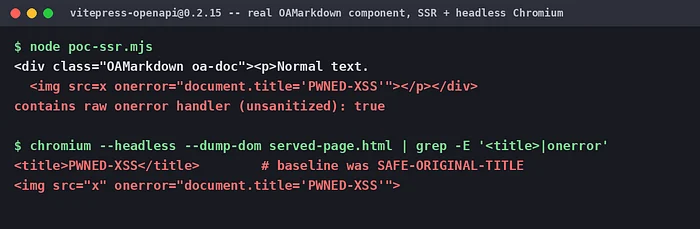
The title changed from SAFE-ORIGINAL-TITLE to PWNED-XSS. The onerror handler ran. A real attacker would steal tokens or show a fake login form instead of changing the title.
Root cause: the mistake in the code or design, and why existing defences did not stop it
Markdown was rendered with markdown-it configured with html: true, so raw HTML in any description field passed through untouched. The rendered string was then written to the DOM with innerHTML, both during server-side rendering (via getSSRProps) and on the client (via beforeMount and updated). No sanitizer was present: not in the runtime dependencies, and not as hand-written escaping near the Markdown code. The custom directive name v-hydratable-html obscured the fact that it is v-html under a different name.
Because VitePress pre-builds pages, the server-side innerHTML write bakes the payload into the deployed static HTML, which is what makes it stored XSS rather than a reflected one.
Impact: what an attacker could do, to whom, under which conditions
The impact is stored XSS on any docs site that renders a spec it does not fully control. The researcher is explicit about the limits: if you only render a spec your own team wrote by hand, the risk is low, because you would be attacking yourself. The realistic exposure is in setups where the spec is not fully trusted:
- API portals and catalogs that render specs from partners, customers or other teams.
- Build pipelines that download the spec from an upstream URL; if that upstream spec is compromised, the attacker's script ends up on your docs site.
- Specs generated from other data, where
descriptiontext comes from code comments, a database or user content.
In all of these the library promises to display the spec as documentation, and a description field should not be able to take over the page. The same reasoning sits behind other accepted advisories in this family (fumadocs, zudoku, docusaurus-openapi-docs, oRPC).
Reporting it
Finding the right channel
The repo's Security, then Advisories page had no "Report a vulnerability" button, so private vulnerability reporting (PVR) was off. The researcher had been here before: on an earlier report a public GitHub issue asking a maintainer to turn on PVR led to nothing for weeks, and the repo was eventually archived.
The maintainer, Enzo Notario, had a public email address on his GitHub profile and was clearly active (he had pushed code that day), so a private email with a complete, self-contained report was sent.
What went into the report
- Summary: a few sentences anyone can understand.
- Root cause: the three files above, with exact paths and code.
- Reachability: the eight-field list.
- Threat model: when it matters and when it does not.
- PoC: the script, the output, the Chromium proof, and copy-paste steps to reproduce from scratch.
- Severity: CVSS 3.1 6.1 Moderate, CWE-79.
- Fix options: set
html: false; or sanitise the output ofrender()with DOMPurify, sanitise-html or js-xss; or allow raw HTML only behind a documented opt-in. - Credit request: Jeg4nX19, plus a request to publish an advisory and a CVE.
The goal of a report is that the maintainer can understand it in two minutes and reproduce it in five.
Fix: what was changed
Enzo replied quickly and shipped vitepress-openapi 0.2.16:
- added the
xss(js-xss) sanitizer, on by default, for all Markdown-rendered HTML; - added a
markdown.sanitizeoption for people who really need raw HTML and accept the risk; - escaped the operation-link
href, method and title as well; - turned on private vulnerability reporting for the repo;
- published GHSA-2527-wvp8-x7r8 crediting the researcher, and requested a CVE through GitHub.
Then he asked the researcher to check the fix.
Trying to break the fix
A maintainer asking you to attack their patch is the best kind of invitation. The same setup was used (real package, now 0.2.16, real OAMarkdown, server render, then a real browser) across three rounds.
Round 1: the classics
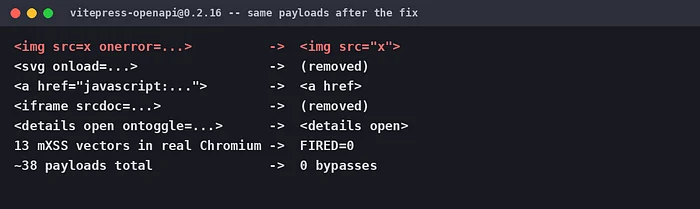
<img src=x onerror=...>became<img src="x">(handler removed)<svg onload=...>was removed<script>...</script>was removed<iframe srcdoc=...>was removed<details open ontoggle=...>became<details open>- mixed case like
<IMG OnErRoR=...>was also cleaned
Normal formatting such as **bold**, <b> and <code> still worked, so the fix did not break legitimate content.
Round 2: sneaky URLs
javascript:links with tabs, newlines, leading spaces, null bytes,:entities and mixed case: thehrefwas emptiedvbscript:anddata:text/htmllinks: shown as plain text<img src=javascript:...>:srcemptiedstyle="background:url(javascript:...)": style removed<form action=javascript:...>: action removed
Round 3: mutation XSS
Some payloads look harmless to a sanitizer working on a string, then change shape when the browser parses them. This is mutation XSS (mXSS), and it has beaten real sanitizers before. Thirteen mXSS vectors were tried: <math>/<mtext>/<mglyph> namespace confusion, <noscript> and <template> context breaks, annotation-xml encoding="text/html", <svg><foreignObject>, <xmp>, <title> and <style> breakouts, and more.
For each one the string output was not trusted. It was rendered with the real component, set as innerHTML in real Chromium, and a canary (window.__x) was planted that would flip if any JavaScript ran.
The result
About 38 payloads, 0 bypasses.
The whole 0.2.16 source was also grepped for any other place raw HTML reaches the page. There were only two:
- the Markdown path, now sanitised, with the sanitizer wrapping the final output, so it also covers link plugins and user-added Markdown plugins;
- the Shiki code highlighter, which escapes code before turning it into HTML.
Two payloads were flagged as dangerous by a quick regex, and both were checked:
- a
[x](javascript:...)link that rendered as plain visible text, not a real link; - an SVG inside an
<img src="data:...">, which is inert, because browsers do not run scripts in SVGs loaded through<img>.
Both were false positives, and were written down as false positives rather than claimed as a bypass. The researcher told Enzo the fix holds.
Variants to test: concrete things to try on other targets
- Grep for
html: truein any Markdown renderer. A match in a project that renders content you do not fully control is the starting point. Positive result: the option is enabled and the input path is reachable from spec or user data. - Grep for HTML sinks:
v-html,innerHTML,set:html,dangerouslySetInnerHTML,{@html. Positive result: a sink fed by the Markdown output, especially one wrapped in a custom directive with an innocuous name. - Check
package.jsonfor a sanitizer (dompurify,sanitize-html,xss). Positive result: no sanitizer dependency, and no hand-writtenreplace(,escapeorsanitizenear the Markdown code. - Count the reachable fields. Grep for the component that renders descriptions and list every spec field that feeds it. Positive result: multiple fields, which strengthens the report.
- Server-render the real component with a payload. Positive result: the payload appears unescaped in the output.
- Load the output in a real browser and check execution. Positive result: the handler runs, for example the page title changes.
- After a fix, retry the classic vectors, URL-scheme tricks and mXSS vectors with a canary. Positive result: the canary flips, meaning a real bypass; anything that merely looks dangerous in the string but does not execute is a false positive and should be reported as such.
- Look for other raw-HTML paths in the patched source. Positive result: a sink outside the sanitised Markdown path, such as a highlighter that does not escape its input.
Takeaways
- Custom directives deserve a second look:
v-hydratable-htmlsounds fancy, but it isinnerHTML. html: truewithout a sanitizer is a red flag in anything that renders content you do not fully control.- Count the reachable fields; eight sinks make a stronger report than one.
- Prove it with the real package, then prove it runs in a real browser.
- Be honest about who is affected; "low risk if you write your own spec" belongs in the report.
- When there is no private reporting, a polite private email works.
- If the maintainer asks you to test the fix, do it properly, and report false positives as false positives.
- An advisory is not a CVE; a published, credited GHSA is what exists until the CVE number shows up.

For maintainers of Markdown or doc renderers
- If you render Markdown from content you do not fully control, use
html: false, or sanitise the final HTML (DOMPurify, sanitise-html or js-xss). - Sanitise the final output, after every plugin has run, not just the raw input.
- Make "allow raw HTML" an explicit opt-in, and document the risk.
- Treat the OpenAPI spec as untrusted input.
- Turn on GitHub private vulnerability reporting.
Thanks go to Enzo Notario for a fast, thorough fix, for publishing the advisory with credit, for turning on private reporting, and for inviting the researcher to test the patch.
What happened, in plain words
A small piece of software called vitepress-openapi is used to build documentation websites for APIs. An API is the part of a service that other programs talk to, and its documentation is the page that explains what it does and how to call it. This library takes a written description of an API and turns it into a tidy web page. It is downloaded about 42,000 times a week, so a lot of documentation sites use it.
The library had a flaw: if the written description of the API contained a piece of HTML (the language web pages are made of) that included a small script, that script would run in the browser of every person who opened the documentation page. A script that runs in someone else's browser when they did not intend it to is called cross-site scripting, or XSS. Because the script is saved into the documentation page itself and served to every visitor, this particular kind is called stored XSS.
The researcher who found it, Jeg4nX19, proved the problem on his own computer, reported it privately to the maintainer, and the maintainer fixed it the next day. The fix was published as version 0.2.16 and as a public security advisory, GHSA-2527-wvp8-x7r8. The maintainer then asked the researcher to try to break the fix, and the researcher spent three rounds trying and found no way through.
This article walks through the whole story in the order it happened: how the target was chosen, how the bug was traced, how it was proved, how it was reported, and how the fix was attacked.
The short version
- Package:
vitepress-openapi(npm) - Affected:
< 0.2.16 - Fixed: 0.2.16
- Bug: OpenAPI
descriptionfields were rendered as Markdown with raw HTML allowed, then written to the page withinnerHTML. There was no sanitizer. - Impact: stored XSS on any docs site that renders a spec it doesn't fully control
- Severity: Moderate, CVSS 3.1 6.1 (
AV:N/AC:L/PR:N/UI:R/S:U/C:L/I:L/A:N), CWE-79 - Advisory: GHSA-2527-wvp8-x7r8, published and crediting the researcher. A CVE has been requested but isn't assigned yet, so no CVE is being claimed.
A few of those words need unpacking for a reader who has never done security work.
npm is the main shop where JavaScript programmers download reusable pieces of code, called packages. vitepress-openapi is one of those packages.
OpenAPI is a standard way of writing down what an API does, in a structured text file. Think of it as a form with fixed boxes: one box for the title, one for the description, one for each operation the API offers, and so on. The file is called a spec, short for specification.
Markdown is a simple way of writing formatted text using plain characters. You write **bold** and it appears as bold. You write a line starting with # and it becomes a heading. It is popular because it is readable even before it is turned into a web page.
HTML is the language browsers use to build pages. A piece of HTML like <b>hello</b> tells the browser to show the word hello in bold. HTML can also carry small programs, and that is where the trouble starts.
A sanitizer is a filter that takes a piece of HTML and removes anything dangerous from it, keeping only the harmless formatting. Think of it as a security check at the door of a building: everyone gets in, but weapons are taken away first.
CVSS is a scoring system for how serious a security flaw is. The score runs from 0 to 10, and 6.1 is labelled Moderate. The string in brackets is the breakdown of how that score was reached, and the glossary at the end explains each part.
CWE-79 is the catalogue number for cross-site scripting in a widely used list of weakness types. It is like a library classification: it says which shelf this bug belongs on.
A CVE is a globally unique identifier given to a publicly known security flaw, so that everyone can refer to the same thing by the same name. A GHSA is GitHub's own advisory identifier. They are related but not the same, and the article comes back to that point at the end.
If you use vitepress-openapi, update to 0.2.16 or later.
Step 0: Why documentation renderers were the target
A renderer is the part of a program that takes written content and turns it into what you see on screen. A documentation renderer takes the API spec and turns it into a readable page.
The researcher had been working through a family of bugs in API documentation tools. It started with a published advisory for @orpc/openapi (CVE-2026-33331), where data from the spec went into the page without being escaped. Escaping means converting characters that have a special meaning in HTML into harmless stand-ins, so that they are displayed as text instead of being interpreted as instructions. If you do not escape, a < typed by a user is treated by the browser as the start of an HTML tag.
The researcher had already found the same kind of mistake in a couple of Swagger UI wrappers. Swagger UI is another popular tool for showing API documentation, and a wrapper is a package that adapts it for a particular framework.
But the wrappers ran out. The rest either loaded the spec from a URL or escaped properly, and the researcher was reading the same safe code over and over. So the question changed. Instead of asking who pastes the spec into a script tag, the new question was:
Who takes Markdown from the spec, turns it into HTML, and puts that HTML on the page without cleaning it?
That reframing matters. The first question looks for the most obvious mistake, and most projects have already fixed it. The second question looks for a subtler one: a project that does the conversion correctly but forgets the cleaning step afterwards.
Why Markdown is the interesting part
OpenAPI lets you write description fields in Markdown. Documentation renderers convert that Markdown to HTML so it looks nice.
The most popular Markdown library in JavaScript, markdown-it, has an option called html: true. When it is on, any raw HTML in the input passes through untouched. So <img src=x onerror=alert(1)> comes out the other side as a real image tag with a real event handler.
That example deserves a slow read, because it is the shape of the whole bug. <img src=x onerror=alert(1)> is an HTML instruction to show an image. The src=x part says the image is at a location called x, which does not exist. The onerror=alert(1) part says: if loading the image fails, run this small piece of JavaScript, which here just shows a pop-up box with the number 1. Because x never exists, the failure always happens, and the script always runs. It is a deliberately broken image whose only purpose is to trigger code.
markdown-it's own security docs say it plainly: if you turn on html: true and the input isn't trusted, you need a separate sanitizer.
That gave a simple three-part search for every doc renderer:
grep -rnE "html:\s*true" src/
This is a command for searching through source code. grep is the search tool. The -r means search recursively, that is, look inside every folder under the starting point. The -n means print the line number of each match. The -E means use extended regular expressions, a pattern language for describing text. The pattern html:\s*true means the word html, then a colon, then any amount of whitespace, then the word true. So the command asks: does any file under src/ turn on the raw HTML option? A match means the project allows raw HTML through its Markdown.
# 2. Where does the HTML go into the page?grep -rnE "v-html|innerHTML|set:html|dangerouslySetInnerHTML|\{@html" src/# 3. Is there a sanitizer anywhere?grep -E "dompurify|sanitize-html|\"xss\"" package.json
This block contains two searches. The first looks for the places where HTML gets written into a page. The vertical bars mean or, so it matches any of v-html, innerHTML, set:html, dangerouslySetInnerHTML or {@html. These are all names used by different web frameworks for the same dangerous operation: put this string into the page as HTML. The second search looks in package.json, the file that lists a project's dependencies, for any of three well-known sanitizer packages: dompurify, sanitize-html or xss. If one of them is listed, the project probably cleans its HTML somewhere.
A match on 1, a match on 2 and nothing on 3 means it's time to read closely. In other words: the project allows raw HTML, it writes HTML into the page, and it has no filter. That combination is the bug.
vitepress-openapi matched on all three.
Step 1: Following the data from spec to page
The researcher traced the path from the spec to the browser one file at a time. The idea is to follow a single piece of text, the description, from the moment it is read out of the spec to the moment it appears on screen, and check at each stop whether anything cleans it.
1a. The Markdown engine (src/composables/useMarkdown.ts)
let md = markdownit({ html: true, breaks: true,})
This line creates the Markdown converter and stores it in a variable called md. The html: true setting is the one that matters: it tells the converter to let raw HTML through. The breaks: true setting is a formatting preference about how line breaks are treated and is not part of the bug.
function render(content: string) { return md.render(content || '')}
This defines a small function called render that takes some text and hands it to the converter. The content || '' part means: use the content, or if it is empty or missing, use an empty string instead. The function returns whatever the converter produces. Raw HTML is on, and render() returns whatever came in, now as HTML.
1b. The component that shows descriptions (src/components/Common/OAMarkdown.vue)
<template> <div v-hydratable-html="render(props.content)" :class="cn('OAMarkdown oa-doc', props.class)" /></template>
This is a template, the part of a web component that describes what should appear on the page. It creates a div, a generic box on the page. The interesting attribute is v-hydratable-html="render(props.content)": it takes the description text, passes it through the render function from the previous file, and hands the result to something called v-hydratable-html. The :class part just sets styling and is not relevant to the bug.
The result of render() goes into something called v-hydratable-html. That isn't a built-in Vue directive, so the researcher needed to see what it does. A directive is a special instruction you attach to an element in a framework like Vue, the JavaScript framework this library is built on. If it is not one of the standard ones, it is custom code written by the library author, and custom code is exactly where surprises live.
1c. The custom directive (src/lib/utils/vHydratableHtml.ts)
export const vHydratableHtml = { getSSRProps: ({ value }) => ({ innerHTML: value }), beforeMount(el, { value }) { writeHtml(el, value) }, updated(el, { value }) { writeHtml(el, value) }, }
This defines the custom directive. It has three parts, each of which fires at a different moment. getSSRProps runs on the server while the page is being built, and it returns innerHTML: value, meaning the value should be placed into the page as HTML. beforeMount runs in the browser just before the element appears, and it calls writeHtml. updated runs in the browser whenever the value changes, and it also calls writeHtml. So the same write happens on the server and again in the browser.
function writeHtml(el, html) { el.innerHTML = html}
This is the actual write. el is the element on the page, and innerHTML is the browser property that means: treat this string as HTML and build it into the page. Setting innerHTML is the single most direct way to put HTML into a page, and it does no cleaning whatsoever.
So it's v-html under a different name. v-html is Vue's built-in directive for exactly this operation, and it is well known to be dangerous with untrusted input. The custom name v-hydratable-html hides that fact. It sets innerHTML on the server (so the HTML is baked into the generated page) and on the client (when the page loads or changes).
1d. Is there a sanitizer anywhere?
The researcher checked package.json. The runtime dependencies were:
@lucide/vue, @vueuse/core, class-variance-authority, clsx,markdown-it-link-attributes, reka-ui
This is the list of other packages the library needs in order to work. Each name is a separate piece of software. None of them is a sanitizer. No DOMPurify, no sanitise-html, no xss. The researcher also grepped the source for any hand-written cleaning (replace(, escape, sanitize) near the Markdown code. Nothing. A hand-written filter would have shown up as a call to replace (swap dangerous characters for safe ones), escape (convert special characters to harmless text) or a function with sanitize in its name.
The full chain is:
OpenAPI description -> markdown-it (html: true) -> v-hydratable-html -> innerHTML
with nothing in between. Read the arrows as steps in a journey. The description leaves the spec, goes into the Markdown converter with raw HTML enabled, comes out as HTML, is handed to the custom directive, and is written into the page. At no point does anything check whether the HTML is safe.
Step 2: How much of the spec reaches this?
One vulnerable field is a bug. Many vulnerable fields means anyone using the library is affected. This is a matter of how convincing the report will be: a maintainer can dismiss a single obscure field as an edge case, but eight fields is a pattern.
The researcher grepped for every place OAMarkdown gets its content:
grep -rn "OAMarkdown" src/components | grep -v "^src/components/Common/OAMarkdown.vue"
This searches the components folder for every mention of OAMarkdown. The second half, after the vertical bar, is a second search applied to the results of the first: grep -v means show everything except matches, and the pattern is the path of the component's own file. So the command lists every place that uses the component, excluding the component's own definition. Those are the places that feed it content.
Eight different spec fields fed into it:
info.description(OAInfoContent.vue)- operation
description(OAOperationContent.vue) - parameter
description(OAParameter.vue) - response
description(OAResponse.vue) - security scheme
description(OASecurityContent.vue) - schema property
description(OASchemaUI.vue) - example
description(OASchemaTabs.vue) - tag / path-group
description(OAPathsGroup.vue)
Each line names a field in the spec and the file that displays it. The info block is the general description of the API. An operation is one action the API offers. A parameter is an input you pass to an operation. A response is what comes back. A security scheme describes how you log in. A schema property describes one field of a data structure. An example is a sample value. A tag or path group is a way of grouping operations together. Any one of those containing HTML would do it.
Why "stored" XSS
VitePress builds pages ahead of time. That means the documentation site is not assembled fresh each time someone visits; it is assembled once, when the site is built, and the finished pages are saved as files. The server-side render step (getSSRProps: innerHTML) means the payload gets written into the static HTML files that are deployed. Every visitor gets it. No special link is needed. They just open the docs.
This is the difference between stored and reflected XSS. In reflected XSS, the attacker has to trick a victim into clicking a specially crafted link, and the script runs only for that one victim. In stored XSS, the script is saved on the server and served to everyone who visits, like a contaminated product on a shop shelf rather than a prank played on one customer.
Step 3: Who is actually at risk?
The researcher always writes this part honestly, because overselling is the quickest way to lose a maintainer's trust. A maintainer who feels a report exaggerates the danger will treat the whole report with suspicion.
If you only render a spec your own team wrote by hand, the risk is low. You'd be attacking yourself.
But documentation renderers are commonly used in setups where the spec is not fully trusted:
- API portals and catalogs that render specs from partners, customers or other teams.
- Build pipelines that download the spec from an upstream URL. If that upstream spec gets compromised, the attacker's script ends up on your docs site.
- Specs generated from other data, where
descriptiontext comes from code comments, a database or user content.
A build pipeline is an automated process that assembles and publishes a website. An upstream URL is a source outside your control that you fetch data from. In all of these cases, the library promises to display the spec as documentation. A description field shouldn't be able to take over the page. That's the same reasoning behind other accepted advisories in this family (fumadocs, zudoku, docusaurus-openapi-docs, oRPC).
Step 4: Proving it with the real library, not a copy
The rule followed here: never prove a library bug with your own reimplementation. If the researcher copies the code into his own test, the maintainer can reasonably say "that isn't how our code runs." The proof has to use the actual package that people download, so there is nothing to argue about.
So the real published package was installed in an empty folder:
mkdir poc && cd poc && npm init -ynpm i [redacted] vue@3 @vue/server-renderer@3
This is a sequence of commands run in a terminal. mkdir poc creates a new folder called poc, short for proof of concept. cd poc moves into that folder. npm init -y creates a basic project file with all the default answers, so no questions are asked. npm i installs packages, and the three listed are [redacted] (the vulnerable version), vue@3 (the framework it runs on) and @vue/server-renderer@3 (the piece that builds pages on the server). The @ symbol pins an exact version, which matters because the proof has to be against the version that has the bug.
Then the real OAMarkdown component was imported and server-rendered with a payload as the description:
import { createSSRApp, h } from 'vue'import { renderToString } from '@vue/server-renderer'import { OAMarkdown } from 'vitepress-openapi/vue'
These three lines bring in the pieces needed. createSSRApp and h come from Vue: the first creates an application that can be rendered on the server, the second builds an element in code. renderToString comes from the server renderer and turns an application into a string of HTML. OAMarkdown is the actual component from the actual library, the same one the documentation site uses.
// the value of an OpenAPI `description` fieldconst payload = `Normal text. <img src=x onerror="document.title='PWNED-XSS'">`const app = createSSRApp({ render: () => h(OAMarkdown, { content: payload }) })console.log(await renderToString(app))
Line by line: the comment says this is the value of a description field in a spec. The payload variable holds the hostile description. It starts with the harmless words Normal text. and then contains the broken image trick, except this time the script sets the page title to PWNED-XSS instead of showing a pop-up. Setting the title is a quiet, unmistakable signal: if the title changes, code ran. The app line builds a small application whose only content is the real OAMarkdown component, fed the payload. The last line renders that application to a string and prints it.
That proves the payload comes out unescaped. But showing up in the output isn't the same as running, so step two was a real browser. A string containing HTML is only a promise; the browser is what decides whether the promise is kept. The output was wrapped in a page whose title was SAFE-ORIGINAL-TITLE, opened in headless Chromium, and the live DOM dumped:
chromium --headless --no-sandbox --dump-dom file://$PWD/served-page.html \ | grep -E '<title>|onerror'
chromium is the browser. --headless means run it without showing a window, which is how automated tests use a browser. --no-sandbox disables a security isolation feature that gets in the way in some test environments. --dump-dom means print the finished page after the browser has processed it, rather than showing it. file://$PWD/served-page.html points at a local file, where $PWD is the current folder. The vertical bar passes the output to grep, which keeps only the lines containing <title> or onerror, so the two things that matter are easy to spot.
The title changed from SAFE-ORIGINAL-TITLE to PWNED-XSS. The onerror handler ran. A real attacker would steal tokens or show a fake login form instead of changing the title.
A token here means a small piece of data that proves you are logged in, like a wristband at an event. If a script can read it, the attacker can use it to act as you. A fake login form is the other classic move: show the real-looking login box, collect the password, and use it later.
All of this happened on the researcher's own machine. No live websites, no other people's data.
Step 5: Reporting it
Finding the right channel
The repo's Security → Advisories page had no "Report a vulnerability" button, so private vulnerability reporting (PVR) was off. PVR is a GitHub feature that lets a stranger send a security report privately to a maintainer, instead of posting it publicly where attackers could read it before a fix exists.
The researcher had been here before. On an earlier report he opened a public GitHub issue asking a maintainer to turn on PVR, and then nothing happened for weeks. The repo was eventually archived. An archived repository is one the owner has frozen, so nobody can change it any more.
The maintainer, Enzo Notario, had a public email address on his GitHub profile and was clearly active (he'd pushed code that day). So a private email was sent with a complete, self-contained report. Self-contained means the reader needs nothing else to understand it: no links to follow, no context to look up.
What went into the report
- Summary: a few sentences anyone can understand.
- Root cause: the three files above, with exact paths and code.
- Reachability: the eight-field list.
- Threat model: when it matters and when it doesn't.
- PoC: the script, the output, the Chromium proof, and copy-paste steps to reproduce from scratch.
- Severity: CVSS 3.1 6.1 Moderate, CWE-79.
- Fix options: set
html: false; or sanitise the output ofrender()with DOMPurify, sanitise-html or js-xss; or allow raw HTML only behind a documented opt-in. - Credit request: Jeg4nX19, plus a request to publish an advisory and a CVE.
A threat model is a short, honest description of who could be harmed and under what conditions. Reachability is the question of how easily an attacker can get their data to the vulnerable code. The fix options are three ways to close the hole: turn off raw HTML entirely, filter the output, or keep raw HTML but make it a deliberate choice that the site owner has to switch on and is warned about.
The goal of a report is that the maintainer can understand it in two minutes and reproduce it in five.
Step 6: The fix arrived the next day
Enzo replied quickly and shipped vitepress-openapi 0.2.16:
- added the
xss(js-xss) sanitizer, on by default, for all Markdown-rendered HTML, - added a
markdown.sanitizeoption for people who really need raw HTML and accept the risk, - escaped the operation-link
href, method and title as well, - turned on private vulnerability reporting for the repo,
- published GHSA-2527-wvp8-x7r8 crediting the researcher, and requested a CVE through GitHub.
Then he asked the researcher to check the fix.
Step 7: Trying to break the fix
A maintainer asking you to attack their patch is the best kind of invitation. A patch is a change made to fix a problem, and testing it is the only way to know whether it actually works. The same setup was used (real package, now 0.2.16, real OAMarkdown, server render, then a real browser) across three rounds.
Round 1: the classics
The classics are the payloads that have worked for years, the ones every filter is expected to stop.
<img src=x onerror=...>became<img src="x">(handler removed)<svg onload=...>was removed<script>...</script>was removed<iframe srcdoc=...>was removed<details open ontoggle=...>became<details open>- mixed case like
<IMG OnErRoR=...>was also cleaned
Each line shows a payload and what the fix did to it. The first is the broken image trick from before, and the fix kept the image but removed the handler, so nothing runs. An svg is a way of drawing shapes in HTML, and onload is a handler that fires when it loads. A script tag is the direct way to include code. An iframe is a page inside a page, and srcdoc lets you supply its content. A details element is a collapsible box, and ontoggle fires when it opens. Mixed case is a classic trick because some filters match exact spellings and miss OnErRoR when they only look for onerror.
Normal formatting like **bold**, <b> and <code> still worked, so the fix didn't break legitimate content either. That matters: a fix that breaks the product is not a good fix.
Round 2: sneaky URLs
A URL is a web address. Some URLs start with a scheme, the part before the colon, that tells the browser what kind of thing it is. javascript: is a scheme that means run the rest as code, and it is a favourite way around filters.
javascript:links with tabs, newlines, leading spaces, null bytes,:entities and mixed case: thehrefwas emptiedvbscript:anddata:text/htmllinks: shown as plain text<img src=javascript:...>:srcemptiedstyle="background:url(javascript:...)": style removed<form action=javascript:...>: action removed
href is the address a link points to. src is the address of an image or other resource. style is inline styling. action is where a form sends its data. The tricks listed are ways of disguising the word javascript so a filter does not recognise it: a tab or newline in the middle, a leading space, a null byte (an invisible character), : which is the HTML code for a colon, and different capitalisation. The fix handled all of them by emptying the attribute or removing it.
Round 3: mutation XSS (the hard one)
Some payloads look harmless to a sanitizer working on a string, then change shape when the browser parses them. This is called mutation XSS (mXSS), and it has beaten real sanitizers before. The comparison is a document that passes a visual check but contains a hidden fold that reveals a different message when opened. The filter sees one thing; the browser builds another.
Thirteen mXSS vectors were tried: <math>/<mtext>/<mglyph> namespace confusion, <noscript> and <template> context breaks, annotation-xml encoding="text/html", <svg><foreignObject>, <xmp>, <title> and <style> breakouts, and more. A vector is one specific attempt. Namespace confusion means mixing two vocabularies of HTML in a way that makes the browser reinterpret the content. Context breaks mean putting content inside an element that changes how the content is read. A breakout means escaping from a context that was supposed to contain you.
For each one the string output was not trusted. It was rendered with the real component, set as innerHTML in real Chromium, and a canary (window.__x) was planted that would flip if any JavaScript ran. A canary is a tripwire: a harmless marker that changes if something happens, so you can tell for certain whether code ran, rather than guessing from how the text looks.
The result
About 38 payloads, 0 bypasses.
The whole 0.2.16 source was also grepped for any other place raw HTML reaches the page. There were only two:
- the Markdown path, now sanitised, with the sanitizer wrapping the final output, so it also covers link plugins and user-added Markdown plugins;
- the Shiki code highlighter, which escapes code before turning it into HTML.
A plugin is an add-on that changes how Markdown is processed. Wrapping the final output means the filter runs last, after every plugin has done its work, so a plugin cannot sneak something past it. Shiki is a tool for colouring code samples, and it escapes its input, so code shown in the docs is displayed as text rather than run.
Two payloads were flagged as dangerous by a quick regex, and both were checked. A regex is a pattern for matching text, and a quick one can produce false alarms.
- a
[x](javascript:...)link that rendered as plain visible text, not a real link; - an SVG inside an
<img src="data:...">, which is inert, because browsers don't run scripts in SVGs loaded through<img>.
Both were false positives, and were written down as false positives rather than claimed as a bypass. The researcher told Enzo the fix holds. Claiming "I bypassed your fix" when you haven't is a great way to lose a maintainer's trust permanently.
Variants to test: concrete things to try on other targets
- Grep for
html: truein any Markdown renderer. A match in a project that renders content you do not fully control is the starting point. Positive result: the option is enabled and the input path is reachable from spec or user data. - Grep for HTML sinks:
v-html,innerHTML,set:html,dangerouslySetInnerHTML,{@html. Positive result: a sink fed by the Markdown output, especially one wrapped in a custom directive with an innocuous name. A sink is a place where data ends up somewhere it can do harm, like a drain. - Check
package.jsonfor a sanitizer (dompurify,sanitize-html,xss). Positive result: no sanitizer dependency, and no hand-writtenreplace(,escapeorsanitizenear the Markdown code. - Count the reachable fields. Grep for the component that renders descriptions and list every spec field that feeds it. Positive result: multiple fields, which strengthens the report.
- Server-render the real component with a payload. Positive result: the payload appears unescaped in the output.
- Load the output in a real browser and check execution. Positive result: the handler runs, for example the page title changes.
- After a fix, retry the classic vectors, URL-scheme tricks and mXSS vectors with a canary. Positive result: the canary flips, meaning a real bypass; anything that merely looks dangerous in the string but does not execute is a false positive and should be reported as such.
- Look for other raw-HTML paths in the patched source. Positive result: a sink outside the sanitised Markdown path, such as a highlighter that does not escape its input.
Takeaways
- Custom directives deserve a second look.
v-hydratable-htmlsounds fancy. It'sinnerHTML. html: truewithout a sanitizer is a red flag in anything that renders content you don't fully control.- Count the reachable fields. Eight sinks make a stronger report than one.
- Prove it with the real package, then prove it runs in a real browser.
- Be honest about who's affected. "Low risk if you write your own spec" belongs in the report.
- When there's no private reporting, a polite private email works.
- If the maintainer asks you to test the fix, do it properly, and report false positives as false positives.
- An advisory isn't a CVE. There is a published, credited GHSA. When the CVE number shows up, the post will be updated.
For maintainers of Markdown or doc renderers
- If you render Markdown from content you don't fully control, use
html: false, or sanitise the final HTML (DOMPurify, sanitise-html or js-xss). - Sanitise the final output, after every plugin has run, not just the raw input.
- Make "allow raw HTML" an explicit opt-in, and document the risk.
- Treat the OpenAPI spec as untrusted input.
- Turn on GitHub private vulnerability reporting.
Thanks
Big thanks to Enzo Notario for a fast, thorough fix, for publishing the advisory with credit, for turning on private reporting, and for inviting the researcher to test the patch. That's how disclosure is supposed to go.
Glossary
- API: the part of a service that other programs talk to, with a defined set of requests and responses.
- OpenAPI: a standard format for describing an API in a structured file, called a spec.
- Spec: the OpenAPI file that describes an API.
- Markdown: a simple way of writing formatted text with plain characters, such as
**bold**. - HTML: the language browsers use to build pages, including tags that can carry scripts.
- JavaScript: the programming language browsers run, and the language the bug allowed to execute.
- Renderer: the part of a program that turns written content into what appears on screen.
- npm: the main package registry for JavaScript, where reusable code is downloaded from.
- Package: a reusable piece of software published for others to install.
- Dependency: another package that a project needs in order to work.
package.json: the file listing a project's dependencies and settings.- Vue: the JavaScript framework this library is built on.
- VitePress: a tool for building documentation websites, which pre-builds pages ahead of time.
- Component: a reusable piece of a web page, such as the one that displays descriptions.
- Directive: a special instruction attached to an element in a framework like Vue.
v-html: Vue's built-in directive that writes a string into the page as HTML, without cleaning it.innerHTML: the browser property that builds a string into the page as HTML.- Sink: a place where data ends up somewhere it can do harm, such as
innerHTML. - Sanitizer: a filter that removes dangerous parts of HTML and keeps the harmless formatting.
- DOMPurify, sanitise-html, js-xss (
xss): three well-known sanitizer packages. - Escaping: converting characters with special meaning into harmless stand-ins so they display as text.
- XSS (cross-site scripting): a flaw that lets an attacker's script run in someone else's browser.
- Stored XSS: XSS where the script is saved on the server and served to every visitor.
- Reflected XSS: XSS where the script runs only for a victim who follows a crafted link.
- Payload: the hostile piece of input an attacker supplies.
- Event handler: an attribute such as
onerrororonloadthat runs code when something happens. - mXSS (mutation XSS): a payload that looks harmless as a string but changes shape when the browser parses it.
- Vector: one specific attempt or technique used in a test.
- Canary: a harmless marker planted to reveal whether code ran.
- False positive: something that looks dangerous but does not actually do harm.
- Bypass: a way of getting past a fix.
- PoC (proof of concept): a working demonstration that the bug is real.
- SSR (server-side rendering): building the page on the server before sending it to the browser.
- Headless browser: a browser run without a visible window, used for automated testing.
- DOM: the browser's live model of the page after it has processed the HTML.
grep: a command-line tool for searching text, with options such as-r(recursive),-n(line numbers) and-E(extended patterns).- Regex: a pattern language for matching text.
- PVR (private vulnerability reporting): a GitHub feature for receiving security reports privately.
- Advisory: a public notice describing a security flaw and its fix.
- GHSA: GitHub's identifier for a security advisory.
- CVE: a globally unique identifier for a publicly known security flaw.
- CVSS: a scoring system for the severity of a security flaw, from 0 to 10.
- CWE-79: the catalogue entry for cross-site scripting in a widely used list of weakness types.
- Threat model: a short description of who could be harmed and under what conditions.
- Reachability: how easily an attacker can get their data to the vulnerable code.
- Patch: a change made to fix a problem.
- Token: a small piece of data that proves you are logged in, which a script could steal.
- Plugin: an add-on that changes how Markdown is processed.
- Shiki: a tool for colouring code samples in documentation.
href,src,action,style: HTML attributes holding a link address, a resource address, a form destination and inline styling respectively.javascript:scheme: a URL scheme that tells the browser to run the rest as code.



