The Bug Was Already Fixed. So Why Was I Still Finding It?
Hardcoded credentials were found inside Angular JavaScript bundles served to unauthenticated users, allowing anyone to read them. The author found three such credentials, each reported as a duplicate of an already resolved report, suggesting the same development mistake kept recurring.

medium.com
Published on medium.com
Cybersecurity
The full write-up lives on its author's site
It belongs to its author, so we link to it rather than copy it. The other two tabs are our own rewrites, checked against it.
Context
This is a story about a vulnerability disclosure program (VDP) on HackerOne, not a paid bug bounty program. The researcher had been spending most of their time on VDPs to learn how to find vulnerabilities without thinking about the size of a payout. The target was a web application with the usual frontend routes, including pages such as /login and /register. Those endpoints are ordinary and were not the problem. The application served Angular JavaScript bundles to the browser, and the bundles are where the issue lived.
The write-up does not name the program, the application, the organisation or the specific bundles. It also does not give the credential values, the bundle filenames, the request and response pairs, or the report identifiers. What it does give is the pattern: authentication material hardcoded inside frontend JavaScript that the browser receives without authenticating first.
Setup
There were no special accounts, roles or tools described. The application served its frontend routes and its JavaScript bundles without asking the browser to authenticate. The only precondition that matters is that the browser can load the bundle, which is the normal condition for any public frontend.
The researcher's stated habit, picked up from people they follow on X (Twitter), was to pay attention to JavaScript files. That habit is what produced the finding.
Finding it
The frontend routes themselves were unremarkable. What caught the researcher's attention was the JavaScript being loaded by the application. They started going through the Angular bundles and found a hardcoded credential inside the frontend code.
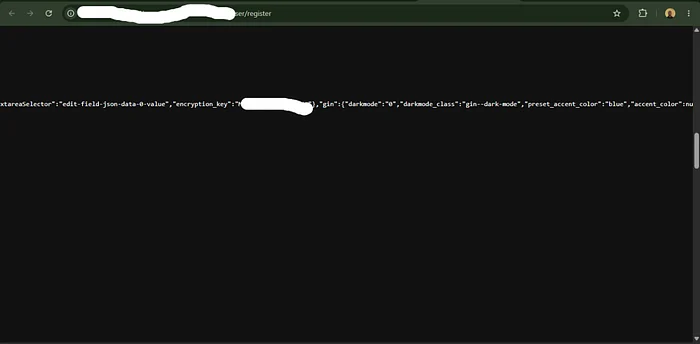
The application was not asking for authentication before serving the bundle. The browser simply received the JavaScript, and the credential was sitting inside it. The researcher spent some time making sure they understood what they had found and whether the credential was actually sensitive before submitting the report.
The report came back as a duplicate. That is not unusual: someone had already found it. The researcher then checked the report they had been marked against and noticed that it had already been triaged and resolved.
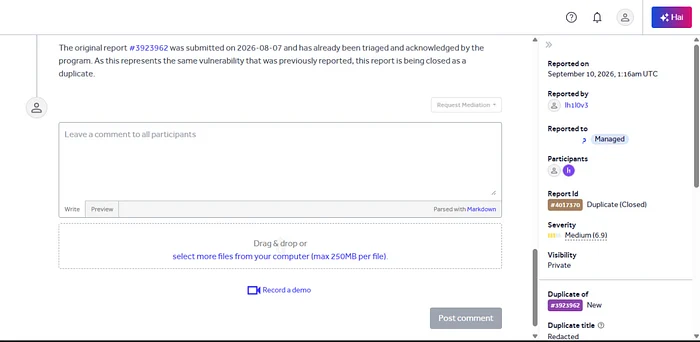
That raised the obvious question: how had the same thing just been found again? The researcher did not know what had happened behind the scenes and listed several possible explanations without picking one:
- the original report covered one occurrence and this was another;
- multiple applications used the same implementation;
- an older JavaScript bundle was still being served somewhere.
With no way to choose between them, they moved on.
Exploitation
There is no exploitation sequence in the usual sense here. The researcher did not craft a request, inject a payload or chain anything. The steps were discovery and reporting, repeated three times.
Step 1: read the first Angular bundle
The researcher browsed the application, noted the ordinary frontend routes, and then examined the JavaScript the application loaded. Inside the Angular bundles they found a hardcoded credential. The bundle was delivered to an unauthenticated browser, so the credential was readable by anyone who loaded the page and opened the code.
They verified that the credential was sensitive before reporting. The report was closed as a duplicate, and the report it was marked against had already been triaged and resolved.
Step 2: read a second Angular bundle
Later, while testing another part of the same program, the researcher looked through another Angular bundle and found another hardcoded credential. The conditions were the same: the value sat in frontend JavaScript delivered to the browser without authentication. The researcher was explicit that the problem was not the existence of /login or /register, which are normal endpoints, but that sensitive authentication material had made its way into code an unauthenticated user could receive.
They reported it. It was a duplicate, and again the report it was marked against had already been triaged and resolved.
Step 3: read a third Angular bundle
A third instance followed: another Angular frontend, another JavaScript bundle, another hardcoded credential, same program, same general pattern. The researcher reported it already expecting the outcome. It was a duplicate, and once again the report it was marked against had already been triaged and resolved.
At that point the individual credentials stopped being the interesting part. Three duplicates are not a victory to claim. What mattered was that the same security pattern could be observed repeatedly after similar reports had gone through triage and resolution.
Root cause
The mistake is straightforward: a credential that should have stayed server-side was placed in frontend code. The browser has to receive the code, and once it does, the person controlling the browser can inspect it. Bundling and minification make the code harder to read but do not make client-side code a safe place for secrets. A server-side secret can remain behind an authentication boundary; a secret shipped to an unauthenticated browser has already crossed that boundary.
The more interesting question is why the pattern survived resolution. The researcher draws a distinction between fixing the exact thing that was reported and fixing the reason it was possible. A developer can find the reported credential, remove it, deploy the change and close the report. That is a valid fix for that particular credential. But the same development pattern can exist elsewhere: another bundle with another credential, another application that copied the same configuration, a generated frontend artifact still containing an older value, or a different deployment still serving the vulnerable version. The original report can be genuinely resolved while another occurrence of the same underlying problem remains.
The researcher is careful to say this is a hypothesis about what might have happened, not a claim about this program. They had no access to the remediation process and did not know what the original report contained, what changes were made, what was deployed or what verification took place. The write-up does not identify the specific coding mistake beyond the presence of a hardcoded credential in the bundle, so any deeper root cause is likely but unconfirmed.
Impact
Anyone who loads the application receives the bundle, and anyone who receives the bundle can read the credential inside it. The researcher does not state what the credential granted access to, so the concrete blast radius is not established in the write-up. The general point stands: authentication material delivered to an unauthenticated client is no longer secret from the person running that client, regardless of how well the rest of the application is built. The login page can look fine, the API can have proper authentication and the frontend can be heavily minified, and the credential is still exposed.
Because all three reports were duplicates, no individual finding was accepted as new. The value of the exercise is the pattern, not a specific exploit.
Fix
It describes what should happen instead. Removing a credential after someone discovers it is a much later control than preventing the credential from reaching the frontend at all. The controls the researcher suggests, with the caveat that the right one depends on the application, are:
- secret scanning in the development pipeline;
- checking generated frontend bundles as part of CI/CD;
- a clearer separation in the application's configuration between values that belong on the client and values that must remain server-side.
Beyond the code change, the researcher argues that vulnerability management does not end with changing a line of code. There is still deployment, verification and checking for other occurrences, and ideally some effort to understand why the vulnerability existed in the first place.
Variants to test
These are the questions the researcher now asks when looking through frontend code, turned into things to try elsewhere. Each one is a way to look for the same pattern rather than a new class of bug.
- Read the bundles on every frontend you test. Load the application unauthenticated, list the JavaScript it pulls in, and search the Angular, React or other bundles for credential-like strings. A positive result is a credential-like value sitting in an Angular bundle the browser received without authentication.
- Check whether the same configuration is reused across applications. If one application has a hardcoded value, look at sibling applications in the same program for the same value or the same shape of value. A positive result would be the same configuration reused across several applications.
- Look for other bundles built from the same source. Enumerate the bundles the application serves and compare them. A positive result would be another bundle built from the same source that also contains a credential.
- Check whether older artifacts are still served. Look for bundle paths that are still reachable and still contain values that were supposedly removed. A positive result would be an older bundle still reachable and still containing a value that was supposedly removed.
- Check whether the application consistently puts sensitive values on the client. Look beyond one credential for a habit: configuration objects, environment files or constants shipped to the browser that contain values that belong on the server. A positive result would be a habit of shipping sensitive values to the client rather than a single mistake.
- Re-test after a report is resolved. When a report you filed, or one you can see, is closed as resolved, revisit the same area and the surrounding areas. A positive result would be the same pattern still observable from the outside after resolution.
What happened, in plain words
This is a story about a person learning to hunt for security bugs. They were not chasing money. They spent most of their time on something called a vulnerability disclosure program, or VDP. A VDP is a scheme run by a company, often through a platform such as HackerOne, where anyone can report a security problem they find. There is usually no payment. The researcher chose VDPs on purpose, because they wanted to learn how to find bugs without worrying about how much a report might be worth.
One habit they picked up from people they follow on X (Twitter) was to pay attention to JavaScript files. JavaScript is the programming language that runs inside your web browser. When you open a modern website, your browser downloads one or more JavaScript files and runs them to make the page work: menus open, forms validate, content loads. Those files are sent to your computer, which means you can read them. That simple fact is the heart of this whole story.
The researcher was testing a web application in a VDP on HackerOne. The application had the usual pages you would expect, including /login and /register. Those pages are completely normal and were not the problem. What caught the researcher's eye was the JavaScript the application was loading. They started reading through the Angular bundles and found a hardcoded credential inside the frontend code.
A few words need explaining before we go further.
- Angular is a toolkit that developers use to build web applications. It produces JavaScript files, called bundles, that the browser downloads.
- A bundle is many source files squashed together into one big file, often made hard to read on purpose. Think of it as a book with all the chapters glued into one volume and the page numbers scrambled. It is still a book, and you can still read it.
- A credential is a secret that proves who you are or lets you in, such as a password, an API key or a token. Think of it as the key to a building.
- Hardcoded means the secret was typed directly into the code by a developer, instead of being kept somewhere safe and looked up at run time. Think of writing your house key's shape into a public notice board instead of keeping the key in your pocket.
- The frontend is everything that runs in your browser. The backend (or server side) is everything that runs on the company's computers, which you cannot see.
The application was not asking anyone to log in before sending the bundle. The browser simply received the JavaScript, and the credential was sitting inside it. Anyone who opened the page received the JavaScript, and could inspect the credential inside it.
Before reporting, the researcher spent some time making sure they understood what they had found and whether the credential was actually sensitive. That is a sensible step: not every long string in a JavaScript file is a secret. Some are public identifiers that are meant to be visible.
The report came back as a duplicate. A duplicate means someone else had already reported the same issue, so the new report is closed and linked to the earlier one. That is not unusual.
The researcher then checked the report they had been marked against and noticed something that made the situation more interesting. The earlier report had already been triaged and resolved. Triaged means the company's security team had looked at it, confirmed it was real and sorted it. Resolved means they had closed it, which the researcher assumes means fixed.
That raised an obvious question: how had the researcher just found the same thing again?
They did not know what had happened behind the scenes. They listed a few possible explanations without picking one:
- the original report covered one occurrence and this was another;
- multiple applications used the same implementation;
- an older JavaScript bundle was still being served somewhere.
With no way to choose between them, they moved on.
A little later, while testing another part of the same program, they looked through another Angular bundle and found another hardcoded credential. The situation looked familiar. The value was sitting in frontend JavaScript delivered to the browser without authentication. Again, the problem was not that the application had a /login or /register page. Those are normal. The problem was that sensitive authentication material had made its way into code that an unauthenticated user could receive.
They reported it. Duplicate. They checked again: the report it was marked against had already been triaged and resolved.
At this point the first report started to look different. One duplicate could easily be a missed occurrence. That happens. But finding another instance of the same pattern in the same program, only to discover that the report it was considered a duplicate of had already been resolved, made the researcher pay more attention.
Then they found a third one. Another Angular frontend. Another JavaScript bundle. Another hardcoded credential. Same program. Same general pattern. They reported it, already knowing what the response might be. Duplicate. Once again, the report they were marked against had already been triaged and resolved.
That was when they stopped thinking about the individual credentials. The interesting part was not that they had found three credentials. They were duplicates, so there was no victory to claim. What interested them was that they could repeatedly observe the same security pattern after similar reports had already gone through the program's triage and resolution process.
It left them with a question they could not answer from the outside: what does "resolved" actually mean?
Fixing the report vs fixing the problem
When a security report is closed as resolved, the natural assumption is that the vulnerability has been fixed. That is what you want the process to accomplish.
But there is a difference between fixing the exact thing that was reported and fixing the reason that thing was possible in the first place.
Suppose someone reports a hardcoded credential in a frontend JavaScript bundle. The developer finds the credential, removes it, deploys the change, and the report is resolved. That is a valid fix for that particular credential.
But what happens if the same development pattern exists somewhere else? There could be another bundle with another credential. Another application could have copied the same configuration. A generated frontend artifact could still contain an older value. A different deployment could still be serving the vulnerable version.
The original report can be genuinely resolved while another occurrence of the same underlying problem remains.
A useful comparison is a leaking pipe. Fixing the report is like mopping up the puddle. Fixing the problem is like repairing the pipe. Both matter, but only one stops the next puddle.
The researcher is careful here. They do not know if that is what happened in this program. They had no access to the remediation process, and it would be wrong to claim they did. But the experience showed them why there is an important difference between resolving an individual vulnerability and eliminating the condition that keeps producing it.
The frontend is where this gets uncomfortable
There is a basic property of frontend applications that is easy to forget when you are working on the backend: the browser has to receive the code.
Once the browser receives the code, the person controlling the browser can inspect it. It does not matter whether the application is written in Angular, React or something else. It does not matter whether the JavaScript has been bundled or minified. Those things can make the code harder to read, but they do not turn client-side code into a secure place for secrets.
Minification is the process of shrinking code by removing spaces, shortening names and squeezing everything onto fewer lines. It is like writing a letter in tiny handwriting with no punctuation. It is harder to read, but it is not encrypted, and anyone patient enough can still read it.
This is why putting a credential into a frontend bundle is fundamentally different from putting it somewhere on the server. A server-side secret can remain behind an authentication boundary. A secret shipped to an unauthenticated browser has already crossed that boundary.
An authentication boundary is the line between "people who have proved who they are" and "everyone else". A secret on the server sits behind that line. A secret in a JavaScript file sits on the public side of it, because the file was handed to anyone who asked for the page.
The application might still work exactly as the developers intended. The login page might look fine. The API might have proper authentication. The frontend might even be heavily minified. But if the browser receives a credential, the credential is no longer secret from the person running that browser.
An API, by the way, is the part of a website that the frontend talks to in order to fetch data or perform actions. Think of the frontend as the waiter and the API as the kitchen: you tell the waiter what you want, and the kitchen prepares it. Proper authentication on the API is good, but it does not help if the key to the kitchen was printed on the menu.
That is the part the researcher kept coming back to when looking at these findings.
Why were there still credentials?
The obvious question after the first duplicate was whether the original report had simply been missed during remediation. Remediation means the work of actually fixing the problem.
But after the second and third findings, the researcher became more interested in the possibility of a broader pattern.
If a credential can make its way into one frontend bundle, what prevents another credential from making its way into another? If developers know that secrets should not be exposed in client-side code, why does the mistake still happen? And if a report about the problem has already been resolved, what checks exist to make sure the same mistake does not exist somewhere else?
Those questions are much more interesting to the researcher than the individual credentials. This is also where vulnerability research starts becoming useful beyond simply finding vulnerabilities.
A bug hunter can identify the exposed credential and demonstrate the impact. An AppSec team has to think about why the credential reached production in the first place. AppSec stands for application security: the people inside a company whose job is to keep their software safe.
Maybe there should be secret scanning in the development pipeline. Secret scanning means automatically searching code for things that look like passwords or keys before the code is shipped. The development pipeline is the chain of steps code goes through from a developer's laptop to the live website.
Maybe generated frontend bundles should be checked as part of CI/CD. CI/CD stands for continuous integration and continuous delivery: the automated system that builds and deploys software. Checking the bundles there means catching the problem at the factory gate rather than after the parcel has been delivered.
Maybe the application's configuration needs a clearer separation between values that belong on the client and values that must remain server-side. Configuration is the settings that tell an application how to behave. Some settings are fine for visitors to see; others are not. Keeping them in clearly separate places makes the mistake less likely.
The specific control will depend on the application. The important thing is that removing a credential after someone discovers it is a much later control than preventing the credential from reaching the frontend at all.
Duplicates are usually the end of the story
For a researcher, a duplicate usually means you move on. Someone else found it first. There is not much more to do. That is exactly what the researcher did with the first one.
But after finding the same pattern three times, they started looking at duplicates differently. The individual reports did not give them a new vulnerability to claim. They gave them a pattern to think about.
The first one made them wonder whether something had been missed. The second made them question whether the issue existed more broadly. The third made them realise that the more interesting story was not the credentials themselves. It was the gap between what had apparently been resolved and what was still observable from the outside.
That is an important distinction in security work. A vulnerability report is usually focused on a specific weakness. That is necessary, because someone needs to reproduce the problem, understand the impact and fix it. But sometimes several reports can point toward something bigger.
Three hardcoded credentials in three frontend bundles are three findings. Three hardcoded credentials appearing through the same kind of development mistake are also evidence of a pattern. The second perspective is much more valuable if your goal is to prevent the next vulnerability rather than simply close the current one.
I don't know what happened behind the scenes
There is an easy trap with stories like this. It is tempting to look at a resolved report and say that the company did not actually fix the vulnerability. The researcher cannot say that.
They were not involved in the remediation. They do not know what the original report contained, what changes were made, what was deployed, or what verification took place. All they know is what they could observe while testing the application.
They found a credential in an Angular JavaScript bundle. The report was marked as a duplicate. The report they were marked against had already been triaged and resolved. Then they encountered the same pattern again. And again.
That is enough to raise the question, but not enough to invent an answer. And honestly, the researcher thinks that is more interesting. Because the lesson is not that one particular program failed to fix three bugs. The lesson is that vulnerability management does not end with changing a line of code. There is still deployment. There is still verification. There is still checking for other occurrences. And, ideally, there is some effort to understand why the vulnerability existed in the first place.
The next time I find one
These three reports changed what the researcher pays attention to when looking through frontend code. If they find a hardcoded credential now, they are obviously interested in the credential itself. But they are also interested in how it got there.
Is it an isolated mistake? Is the same configuration being used across several applications? Are there other bundles built from the same source? Is the application consistently putting sensitive values on the client?
Those questions can reveal more than the original finding. The three reports were duplicates, and that is probably the least exciting way to end a bug bounty story. But the researcher thinks they taught something more useful than three individual findings would have.
A report can be resolved. The code can be changed. The ticket can be closed. And yet the same underlying mistake can still exist somewhere else. That is why the researcher does not think the most important question is always whether a vulnerability was fixed. Sometimes the better question is whether the reason it existed was fixed too.
Glossary
- Angular: a toolkit developers use to build web applications; it produces JavaScript files that the browser downloads and runs.
- API: the part of a website that the frontend talks to in order to fetch data or perform actions; think of the waiter taking your order to the kitchen.
- AppSec (application security): the people inside a company whose job is to keep their software safe.
- Authentication boundary: the line between people who have proved who they are and everyone else; a secret on the server sits behind it, a secret in a browser file sits in front of it.
- Backend (server side): everything that runs on the company's computers, which visitors cannot see.
- Bundle: many source files squashed together into one large JavaScript file, often made hard to read on purpose.
- Bug bounty: a scheme where a company pays researchers for reporting security problems.
- CI/CD (continuous integration and continuous delivery): the automated system that builds and deploys software.
- Client side: the same as frontend; code that runs in the visitor's browser.
- Configuration: the settings that tell an application how to behave.
- Credential: a secret that proves who you are or lets you in, such as a password, an API key or a token.
- Duplicate: a report closed because someone else already reported the same issue; it is linked to the earlier report.
- Frontend: everything that runs in the visitor's browser.
- Hardcoded: a value typed directly into the code by a developer instead of being kept somewhere safe and looked up at run time.
- HackerOne: a platform where companies run vulnerability disclosure programs and bug bounties.
- JavaScript: the programming language that runs inside web browsers and makes pages interactive.
- Minification: shrinking code by removing spaces, shortening names and squeezing it onto fewer lines; it makes code harder to read but does not encrypt it.
- Remediation: the work of actually fixing a security problem.
- Resolved: a report status meaning the company has closed it as fixed.
- Secret scanning: automatically searching code for things that look like passwords or keys before the code is shipped.
- Token: a piece of data, often a long string, that stands in for a login or grants access to something.
- Triaged: a report status meaning the company's security team has looked at it, confirmed it is real and sorted it.
- VDP (vulnerability disclosure program): a scheme where anyone can report a security problem to a company, which promises to look at it, usually without payment.
- Vulnerability: a weakness in software that someone could use to do something the developers did not intend.



