The Codebase Told Me It Was Sensitive. They Shipped It Publicly A
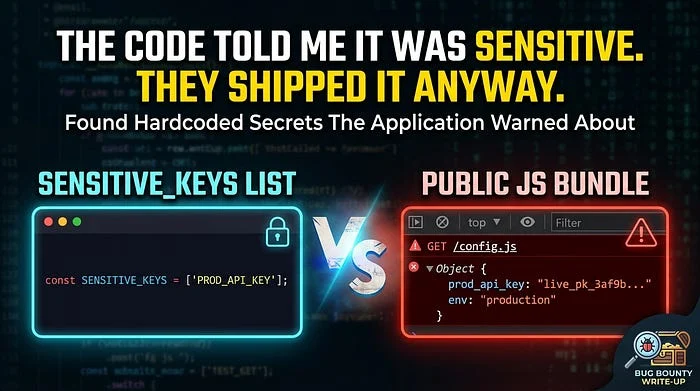
A public JavaScript config file exposed a production API key for an internal warehouse system plus monitoring tokens, all reachable without authentication. The same bundle also listed that key's field name in a SENSITIVE_KEYS list, showing the developers knew it was sensitive.
 Published on medium.com
Bug Bounty
The full write-up lives on its author's site
It belongs to its author, so we link to it rather than copy it. The other two tabs are our own rewrites, checked against it.
Context
This is a short write-up about a hardcoded-secret finding in a public JavaScript bundle. The target is described only as an application whose compiled JavaScript bundle is served to every visitor's browser, and whose public config file is reachable without authentication. The report does not name the program, the host, or the product beyond that. The leaked values belonged to an internal warehouse-management system and to monitoring/telemetry tooling, and the config carried an explicit env = 'production' flag.
The interesting part is not the leak itself but the evidence the researcher used to argue that the leak mattered: the application's own bundle already classified the leaked field as sensitive. The report was ultimately closed as a duplicate.
Setup
No accounts, roles, tooling versions or special preconditions are described. The only precondition is the one that matters: the config file is served publicly, with no authentication, as part of the assets any visitor's browser already loads. The researcher reviewed the compiled JavaScript bundle by hand.
Finding it
While reviewing the app's compiled JavaScript bundle, the researcher found a section that explicitly listed the field name of the same API key under a SENSITIVE_KEYS list. That list is internal logic the developers wrote to flag which configuration values should be treated carefully, presumably for logging redaction, masking in error reports, or something similar.
A few files over, that exact value was sitting in plaintext in a public config file, reachable with no authentication. The codebase therefore contained both a statement that the value is sensitive and, a few files over, the value itself in a public config file.
Exploitation
Step 1: Fetch the public config file
The config file is served with no authentication at all. The report describes the retrieval as nothing more than an unauthenticated GET request to a JS file that any visitor's browser already loads. The exact URL is not given in the report.
Step 2: Read the hardcoded values
The file contained a set of hardcoded values:
- A production API key for an internal warehouse-management system.
- A couple of monitoring/telemetry tokens.
- An explicit
env = 'production'flag, confirming that none of the values was a staging placeholder.
Step 3: Check how the application itself classifies the values
Reviewing the compiled bundle, the researcher found a SENSITIVE_KEYS list that classified the same API key's field name as sensitive. The report does not reproduce the list or the surrounding code.
Step 4: Report the contradiction
The report was submitted with the developers' own classification as the argument for sensitivity. It closed as a duplicate: someone else had already reported the same issue, with no dispute about severity or scope, just a race that the researcher lost by minutes.
Root cause
A build-time configuration value that the codebase itself marks as sensitive was shipped in plaintext in a publicly served JavaScript file. The developers had written down that the field matters, in a list intended for redaction or masking, but the deployment did not honour that classification: the value was emitted into the bundle that every visitor downloads. The report does not describe any build step, secret-injection mechanism or review process that should have caught it, so the precise reason the value ended up in the bundle is not stated.
Impact
The exposed values were a production API key for an internal warehouse-management system, plus monitoring/telemetry tokens, all reachable without authentication by anyone who loads the page. It frames the impact in terms of the contradiction: the developers' own code says the value is sensitive, and the shipped build exposes it anyway.
Fix
The implied fix is to stop shipping sensitive configuration values in the public bundle: keep them out of client-side code and inject them server-side, so that the classification in SENSITIVE_KEYS matches what is actually deployed.
Variants to test
- Grep the bundle for sensitivity lists, masking logic and redaction configuration, then check whether any field named there also appears in plaintext in the same or a neighbouring file. A positive result is a field name in a
SENSITIVE_KEYS-style list whose value is readable in a public asset. - Look for environment flags such as
env = 'production'next to hardcoded credentials. A positive result confirms the value is not a staging placeholder and strengthens the report. - Check logging and error-handling configuration for fields the app intends to mask, then search the shipped assets for those fields unmasked. A positive result is the same contradiction: the code says mask it, the build does not.
- Check feature flags that gate what gets logged or exposed, and see whether the public build enables paths the code treats as sensitive. A positive result is a flag whose enabled state in production exposes data the code otherwise guards.
- On high-traffic programs, submit early: the report notes that being right is not the bottleneck, being first is, and this finding closed as a duplicate for exactly that reason.
What happened, in plain words
A security researcher was looking at a website the way any ordinary visitor's browser does: by downloading the files the page needs in order to work. One of those files, a JavaScript file, is a piece of program code that runs inside your browser. It was available to anyone, with no login required.
Inside that file were some secret values written directly into the code: a production API key for an internal warehouse-management system, a couple of monitoring/telemetry tokens, and a flag saying env = 'production', which means the values were meant for the live system, not a test setup.
On its own, that is a common finding, and such reports are often closed quickly. What made this one interesting is a second detail: elsewhere in the same bundle, the developers had written a list called SENSITIVE_KEYS that named that very API key's field as something to treat carefully. So the application's own code said "this value is sensitive", while the shipped file handed the value to every visitor in plain text.
The report was still closed as a duplicate, because someone else had reported the same issue first. The lesson the author draws is a technique: when you find a secret in a public file, check whether the application's own code already classifies that value as sensitive, and lead with that contradiction.
Background concepts, from zero
Before walking through the steps, here are the ideas you need. None of them requires any prior security knowledge.
- A web page and its files. When you open a website, your browser does not only receive the text and pictures you see. It also downloads program files, mainly JavaScript, that make the page interactive. These files are called assets, and they are sent to every visitor's browser. Anyone can save them and read them.
- JavaScript. The programming language that runs inside your browser. It is delivered as text, so a person can read it, even though it is often compressed or minified (whitespace removed and names shortened) to make it smaller.
- A bundle. A single large JavaScript file produced by combining many smaller source files. Developers ship a bundle because it is faster to download one file than dozens.
- An API. Short for Application Programming Interface. In this context it means a service that one program talks to over the network, usually to fetch or change data. Think of it as a counter at a shop: you hand over a request, the counter hands back an answer. An API key is like a membership card you show at that counter so the service knows who is asking.
- A token. A short string of characters that acts like a temporary password or pass. A monitoring or telemetry token is one used by software that reports health and usage information back to a service.
- Authentication. Proving who you are, usually by logging in. A file served without authentication is one anyone can fetch, logged in or not, just by knowing its address.
- A GET request. The simplest kind of request a browser makes: "please give me this thing at this address". When you type a web address and press Enter, your browser sends a GET request.
- Hardcoded. Written directly into the program's text, rather than stored somewhere separate and looked up at run time. A hardcoded secret is a password or key typed into the code itself.
- Plaintext. Readable as-is, not encrypted or scrambled. If a value is in plaintext in a file, anyone who opens the file can read it.
- A config file. A file holding settings, such as addresses, feature switches and credentials, that the program reads when it starts.
env. Short for environment. A setting that says which version of a system is running, for example a test environment or the live production environment.- Production. The real, live system that actual users and staff depend on, as opposed to a staging or test copy.
- A staging placeholder. A fake or temporary value used while testing, which is harmless if it leaks. Seeing
env = 'production'next to a value tells you it is not one of those. - Sensitive data exposure. The security category for a situation where information that should be kept private is reachable by people who should not have it.
- Broken access control. The category for a situation where something is reachable by someone who should have been stopped, for example a file that should require a login but does not.
- Redaction and masking. Hiding part of a value before it is written to a log or shown in an error message, so that the full secret does not end up somewhere less protected. For example, showing only the last four characters of a card number.
- A duplicate. A bug report that describes an issue someone else has already reported. Bug bounty platforms close the later report as a duplicate, and it usually earns nothing.
- A bug bounty program. A scheme run by an organisation that pays people for reporting security problems in its systems, under agreed rules.
The setup
The report describes no special accounts, roles, tool versions or preconditions. The only thing that mattered is that the config file was served publicly, with no authentication, as part of the assets every visitor's browser already loads. The researcher reviewed the compiled JavaScript bundle.
Why this matters for a beginner: you do not need special access to repeat this kind of check. If your browser can download a file, you can read it.
Finding it
While reviewing the app's compiled JavaScript bundle, the researcher found a section that explicitly listed the field name of the same API key under a SENSITIVE_KEYS list. That list is internal logic the developers wrote to flag which configuration values should be treated carefully, presumably for logging redaction, masking in error reports, or something similar.
A few files over, that exact value was sitting in plaintext in a public config file, reachable with no authentication. So the codebase said the value was sensitive, while a public config file a few files over handed the value to every visitor in plain text.
Why this step was taken: the researcher was not only looking for secrets. They were also looking for the application's own opinion about which values are secrets. That opinion is what turns a routine finding into a convincing one.
Exploitation
Step 1: Fetch the public config file
The config file is served with no authentication at all. The report describes the retrieval as nothing more than an unauthenticated GET request to a JS file that any visitor's browser already loads. The exact URL is not given in the report.
In everyday terms: you open the site, your browser asks the server for the JavaScript file, the server hands it over without asking who you are. The researcher did the same thing, then read the file.
Why this step was taken: the goal was to see what the browser is given for free. Anything the browser receives, a visitor can keep and inspect.
Step 2: Read the hardcoded values
The file contained a set of hardcoded values:
- A production API key for an internal warehouse-management system.
- A couple of monitoring/telemetry tokens.
- An explicit
env = 'production'flag, confirming that none of the values was a staging placeholder.
Why this step was taken: finding a string that looks like a key is not enough. You need to know what it is for and whether it is live. The env = 'production' flag answers the second question: this is the real system, not a test copy.
Step 3: Check how the application itself classifies the values
Reviewing the compiled bundle, the researcher found a SENSITIVE_KEYS list that classified the same API key's field name as sensitive. The report does not reproduce the list or the surrounding code.
Why this step was taken: normally, when you report a leaked key, you have to argue that it is dangerous. Here the application's own code makes that argument. A list named SENSITIVE_KEYS is the developers saying, in their own words, "these values must be handled carefully". Finding the same value in a public file shows the shipped build contradicting that instruction.
Step 4: Report the contradiction
The report was submitted with the developers' own classification as the argument for sensitivity. It closed as a duplicate: someone else had already reported the same issue, with no dispute about severity or scope, just a race that the researcher lost by minutes.
Why this step was taken: a report is more persuasive when it leads with evidence the vendor cannot easily dismiss. Here the evidence came from the vendor's own code. The outcome, a duplicate, had nothing to do with the quality of the argument: on busy programs, many people look at the same public files, and the first report wins.
Root cause
A build-time configuration value that the codebase itself marks as sensitive was shipped in plaintext in a publicly served JavaScript file. The developers had written down that the field matters, in a list intended for redaction or masking, but the deployment did not honour that classification: the value was emitted into the bundle that every visitor downloads.
In everyday terms: the team wrote a note saying "do not show this to anyone", then printed the note and the secret on the same public poster. The report does not describe any build step, secret-injection mechanism or review process that should have caught it, so the precise reason the value ended up in the bundle is not stated.
Impact
The exposed values were a production API key for an internal warehouse-management system, plus monitoring/telemetry tokens, all reachable without authentication by anyone who loads the page. The report does not describe what the key authorises, what data or actions the warehouse system exposes, or whether the key was rotated. It frames the impact in terms of the contradiction: the developers' own code says the value is sensitive, and the shipped build exposes it anyway.
For a beginner, the important part is the shape of the argument, not a list of things an attacker could do. It points at the mismatch between what the code says and what the code ships.
Fix
The implied fix is to stop shipping sensitive configuration values in the public bundle: keep them out of client-side code and inject them server-side, so that the classification in SENSITIVE_KEYS matches what is actually deployed.
In everyday terms: anything the browser downloads is public, so secrets must not be in it. The server should hold the secret and use it on the visitor's behalf, without ever sending it to the browser.
Variants to test
These are the same checks the author suggests, written so you can try them yourself once you are comfortable opening a JavaScript file.
- Grep the bundle for sensitivity lists, masking logic and redaction configuration, then check whether any field named there also appears in plaintext in the same or a neighbouring file. A positive result is a field name in a
SENSITIVE_KEYS-style list whose value is readable in a public asset. - Look for environment flags such as
env = 'production'next to hardcoded credentials. A positive result confirms the value is not a staging placeholder and strengthens the report. - Check logging and error-handling configuration for fields the app intends to mask, then search the shipped assets for those fields unmasked. A positive result is the same contradiction: the code says mask it, the build does not.
- Check feature flags that gate what gets logged or exposed, and see whether the public build enables paths the code treats as sensitive. A positive result is a flag whose enabled state in production exposes data the code otherwise guards.
- On high-traffic programs, submit early: the report notes that being right is not the bottleneck, being first is, and this finding closed as a duplicate for exactly that reason.
Glossary
- API: a service one program talks to over a network to fetch or change data; an API key is the credential it presents.
- API key: a string that identifies and authorises a program when it calls an API.
- Asset: any file a website sends to the browser, such as JavaScript, images or stylesheets.
- Authentication: proving who you are, usually by logging in; a file served without authentication is open to anyone.
- Broken access control: a security category for things being reachable by people who should have been stopped.
- Bundle: one large JavaScript file built by combining many source files for faster delivery.
- Config file: a file of settings, such as addresses, switches and credentials, read by a program.
- Duplicate: a bug report describing an issue someone else already reported; usually closed without reward.
env: a setting naming which version of a system is running, such as test or production.- Feature flag: a switch in the code that turns a feature or behaviour on or off.
- GET request: the basic browser request asking a server for a resource at an address.
- Hardcoded: written directly into the program's text rather than stored separately.
- JavaScript: the programming language that runs in the browser and is delivered as readable text.
- Masking: hiding part of a value before it is displayed or logged.
- Minified: JavaScript with whitespace removed and names shortened to reduce file size; still readable by a person.
- Monitoring/telemetry token: a credential used by software that reports health and usage data to a service.
- Production: the real, live system used by actual users, as opposed to a test copy.
- Redaction: removing or hiding sensitive parts of a value before it is written to a log or error message.
- Sensitive data exposure: a security category for private information being reachable by people who should not have it.
SENSITIVE_KEYS: a list in the application's code naming configuration fields the developers consider sensitive.- Staging placeholder: a fake or temporary value used in testing, harmless if it leaks.
- Token: a string acting like a temporary password or pass, used by software to identify itself.
- Warehouse-management system: internal software used to run a warehouse's stock and operations.



