The GraphQL Ghost
GitLab's GraphQL API layer had improper input validation that let unauthenticated attackers abuse a specific directive to rewrite the state of public repositories. An attacker could delete projects, ban maintainers, or forge merge records so malicious commits appeared reviewed.

medium.com
Published on medium.com
Gitlab
The full write-up lives on its author's site
It belongs to its author, so we link to it rather than copy it. The other two tabs are our own rewrites, checked against it.
Context
GitLab ships a GraphQL API, reachable at /api/graphql, that exposes repository and project operations to clients. CVE-2026-19478 is a code injection vulnerability in that GraphQL API layer, rated CVSS 9.4, caused by improper input validation. The vulnerable surface is a specific GraphQL directive, notably @gl_introduced, which an unauthenticated attacker can abuse to rewrite the state of publicly accessible repositories. No user interaction and no complex configuration are required.
The author frames the disclosure as a case study in how quickly new vulnerabilities get operationalised: within minutes of GitLab pushing an out-of-band critical patch, security researchers and honeypot networks observed active in-the-wild exploitation.

Setup
The relevant precondition is a self-managed, internet-facing GitLab instance running an affected branch. GitLab.com and GitLab Dedicated environments had already been patched at the time of writing. The detection work below assumes web server access logs (the examples use gitlab_access.log) and either a home SOC or an enterprise SIEM such as an ELK stack or Wazuh. No accounts or special roles are needed on the attacker side, because the request is unauthenticated.
Finding it
The author does not describe a personal discovery process. The write-up is a dissection of the public CVE and a detection exercise: the vulnerability is identified as improper input validation in the GraphQL API layer, and the exploitable primitive is the @gl_introduced directive reachable without authentication. The reasoning that matters for defenders is that the patch diff itself is the map: reverse-engineering it to identify the vulnerable GraphQL directive took attackers mere minutes, and AI-enabled threat actors are increasingly automating the analysis of patch commits and the generation of working exploit payloads before most organisations have read the advisory.
Exploitation
Step 1: send an unauthenticated GraphQL request carrying the directive
The indicator to hunt for is a request to /api/graphql that includes the @gl_introduced string. The report does not reproduce a full exploit request body; the only concrete artefact given is the indicator string and the endpoint. The primary indicator of compromise to hunt for is exactly that: an unauthenticated request targeting /api/graphql containing @gl_introduced.
Step 2: abuse the resulting state change
Through that request the attacker can perform three classes of action against publicly accessible repositories:
- Wipe repositories: delete entire projects and their history outright.
- Manipulate maintainers: ban legitimate project maintainers, locking down administrative access.
- Forge merge records: make a malicious code commit look as though it was thoroughly reviewed and approved by a trusted team member.
The third is described as arguably the most critical threat to the software supply chain: automated CI/CD pipelines will build the forged commit, audit logs will record it as legitimate, and downstream users will deploy it.
Step 3: detect the activity with a Sigma rule
For defenders who could not patch immediately, the author provides a Sigma rule to flag exploitation attempts in web server logs:
title: GitLab GraphQL CVE-2026-19478 Exploitation Attempt
id: 5a2c2b3e-1f8a-4d9a-9e11-2c6f1a7b8c9d
status: experimental
description: Detects unauthenticated GraphQL requests targeting the vulnerable @gl_introduced directive in GitLab.
author: SOC Engineering
logsource:
  category: webserver
detection:
  selection_url:
    cs-uri-stem: '/api/graphql'
  selection_payload:
    cs-uri-query|contains: '@gl_introduced'
  condition: selection_url and selection_payload
falsepositives:
  - Legitimate internal use of the directive (requires baseline tuning against known developer IPs)
level: high
tags:
  - attack.initial_access
  - attack.t1190
The rule matches on the URI stem /api/graphql together with a query string containing @gl_introduced, and is rated high. The stated false positive is legitimate internal use of the directive, which requires baseline tuning against known developer IPs.
Step 4: triage the logs with Python
Manually grep-ing through gitlab_access.log does not scale when time is short, so the author provides a lightweight triage script that parses the log and alerts on successful HTTP 200 responses matching the exploit pattern:
import re
import argparse
from pathlib import Path

def triage_gitlab_logs(log_path: str):
    """
    Parses GitLab access logs for CVE-2026-19478 exploit attempts.
    Targeting the @gl_introduced directive in /api/graphql requests.
    """

    target_pattern = re.compile(r'/api/graphql.*@gl_introduced')
    log_file = Path(log_path)

    if not log_file.exists():
        print(f"[-] Error: Log file {log_path} not found.")
        return

    print(f"[*] Scanning {log_path} for CVE-2026-19478 indicators...")

    with open(log_file, "r") as file:
        for line_num, line in enumerate(file, 1):
            if target_pattern.search(line):

                if "HTTP/1.1\" 200" in line or "HTTP/2.0\" 200" in line:
                    print(f"[!] CRITICAL: Successful request found on line {line_num}")
                    print(f"    Payload: {line.strip()}")

if __name__ == "__main__":
    parser = argparse.ArgumentParser(description="GitLab CVE-2026-19478 Log Triage")
    parser.add_argument("-l", "--log", required=True, help="Path to gitlab_access.log")
    args = parser.parse_args()

    triage_gitlab_logs(args.log)
The script compiles the regex /api/graphql.*@gl_introduced, checks that the log file exists, then walks it line by line. A line matching the pattern is only reported as critical if it also contains HTTP/1.1" 200 or HTTP/2.0" 200, so the output distinguishes successful exploitation from mere probing. It is run with -l / --log pointing at the access log.

Root cause
The report attributes the flaw to improper input validation in GitLab's GraphQL API layer, which turns the @gl_introduced directive into a code injection primitive reachable without authentication. Why the directive was accepted from unauthenticated callers, and why existing defences did not stop the state changes, is not detailed in the report. The author's emphasis is on the operational gap rather than the code path: the patch diff was enough for attackers to locate the directive within minutes, so the window between patch publication and working exploit was extremely short.
Impact
An unauthenticated attacker can act on publicly accessible repositories of an affected, internet-facing self-managed instance. The stated consequences are deletion of entire projects and their history, banning of legitimate maintainers to lock down administrative access, and forging of merge records so that a malicious commit appears reviewed and approved by a trusted team member. The supply-chain consequence is the one the author stresses: CI/CD pipelines build the forged commit, audit logs attest to its legitimacy, and downstream users deploy it. GitLab.com and GitLab Dedicated were already patched, so the exposure is limited to self-managed deployments that had not applied the out-of-band fix.
Fix
GitLab released an out-of-band critical patch, and the author's guidance is that patching is priority zero for anyone on an affected branch. Where immediate patching is not possible, the stated mitigation is to restrict unauthenticated access to /api/graphql, or to temporarily move all public repositories to private until the patch can be deployed. On the detection side, deploy the Sigma rule and the triage script above, and tune the rule's false positives against known developer IPs that legitimately use the directive.
Variants to test
- Other directives on the same endpoint. Send unauthenticated requests to
/api/graphqlthat use directives other than@gl_introduced. A positive result is a state change (repository, membership or merge metadata) performed without authentication. - Directive in different request positions. Place the directive in the query string, in a JSON body and in persisted-query parameters. A positive result is any position where the server processes it, which also tells you which log field your detection must cover.
- Anonymous versus authenticated comparison. Replay the same request with and without a session. If the unauthenticated request succeeds where it should be rejected, the authorisation check is missing rather than merely weak.
- Merge-record forgery check. After a suspected probe, inspect merge request metadata for approvals attributed to maintainers who did not act. A positive result is an approval or review record with no corresponding user action in the audit trail.
- Detection coverage test. Run the Sigma rule and the Python script against a log containing a known probe with a non-200 status and a known success with 200. A positive result is the rule firing on both and the script flagging only the 200, confirming the success filter works before you rely on it in an incident.
What happened, in plain words
GitLab is a website and a piece of software that teams use to store their code, track changes to it, and review each other's work before it goes live. You can use it in two ways: as the hosted service at GitLab.com, or by installing it on your own server, which is called a self-managed instance. Many companies run their own copy so their code never leaves their building.
GitLab also offers an API. An API is a way for one computer program to talk to another without a human clicking buttons. Think of a restaurant: the menu is the API, the kitchen is the server, and the waiter carries your order back and forth. A program sends a request to a specific address, and the server sends back an answer. GitLab's API lives at the address /api/graphql.
GraphQL is a particular style of API. Instead of many separate addresses for many separate things, GraphQL has one address and the program describes exactly what it wants in the request. A directive is a small instruction written inside a GraphQL request that starts with an @ sign, a bit like a sticky note attached to part of the order saying "handle this bit differently". GitLab has a directive called @gl_introduced.
CVE-2026-19478 is the official name of a security flaw found in GitLab's GraphQL API. CVE stands for Common Vulnerabilities and Exposures: it is a catalogue number, so that everyone in the world is talking about the same bug. The flaw is a code injection vulnerability, which means the program accepts input from a stranger and treats part of that input as if it were an instruction from its own developers. The everyday comparison is a form at a hotel reception where, instead of writing your name, you write "give this guest the master key", and the receptionist obediently does it. The report rates the flaw CVSS 9.4. CVSS is a scoring system from 0 to 10 for how serious a vulnerability is, and 9.4 is near the top.
The report says the cause is improper input validation. Validation means checking that what someone sends you makes sense and is allowed before you act on it. Improper validation means that check was missing or too loose.
The most alarming part is the speed. GitLab published an out-of-band critical patch, meaning an emergency fix released outside the normal schedule. Within minutes, security researchers and honeypot networks saw the flaw being actively exploited. A honeypot is a decoy server set up to look interesting so that attackers hit it and get recorded. Exploited means someone actually used the flaw, not just read about it.
Who is affected, and what you need to follow along
The report is aimed at people running a self-managed GitLab instance that is internet-facing, meaning anyone on the internet can reach it, and that is on an affected branch. GitLab.com and GitLab Dedicated, the hosted offerings, had already been patched when the article was written, so the danger is for companies running their own copy that had not yet applied the emergency fix.
To do the detection work described below you need the web server's access log. An access log is a plain text file where the web server writes one line every time somebody asks it for something: who asked, for what, and what answer they got. The examples use a file called gitlab_access.log. You also need somewhere to search those logs: the report mentions a home SOC, meaning a small security operations centre run by one person or a small team, or an enterprise SIEM such as an ELK stack or Wazuh. A SIEM is software that collects logs from many machines and lets you search and alert on them.
On the attacker's side, no account and no special role is needed, because the request is unauthenticated. Unauthenticated means the request carries no proof of who is sending it: no login, no password, no session. It is the difference between a letter with a return address and one dropped anonymously in the box.
How the flaw was found
The report does not describe a personal discovery story. It is a dissection of a public CVE plus a detection exercise. The flaw is identified as improper input validation in the GraphQL API layer, and the part an attacker can actually use is the @gl_introduced directive, reachable without logging in.
The lesson for defenders is about the patch itself. When a company fixes a bug, it publishes the changed code, and that change is called a patch diff. A diff shows exactly which lines were removed and which were added, which is effectively a map pointing at the broken part. The report says reverse-engineering the patch diff to identify the vulnerable GraphQL directive took attackers mere minutes. It also says AI-enabled threat actors are increasingly automating the analysis of patch commits and the generation of working exploit payloads before most organisations have read the advisory. A payload is the actual content of the malicious request. An advisory is the notice a vendor publishes telling customers what is wrong and what to do.
What an attacker can do with one request
The indicator to hunt for is a request to /api/graphql that includes the @gl_introduced string. HTTP is the language browsers and servers use to exchange pages and data; a request is one message from client to server. The report does not reproduce a full exploit request body. The only concrete artefact it gives is the endpoint and the indicator string, and that is exactly what defenders should hunt for: an unauthenticated request targeting /api/graphql containing @gl_introduced.
Through that one request, the attacker can do three kinds of damage to publicly accessible repositories. A repository is the folder where a project's code and its entire change history live.
- Wipe repositories. Delete entire projects and their history outright. The comparison is someone walking into a library and burning the shelves, not just the books.
- Manipulate maintainers. Ban legitimate project maintainers, locking down administrative access. A maintainer is a trusted person with rights to manage the project. Banning them is like changing the locks on the building manager's office so the real manager cannot get in.
- Forge merge records. Make a malicious code commit look as though it was thoroughly reviewed and approved by a trusted team member. A commit is one saved change to the code, and a merge record is the note saying that change was checked and accepted.
The third is described as arguably the most critical threat to the software supply chain. The supply chain is the chain of people and machines that turn code into software that other people install. Automated CI/CD pipelines will build the forged commit. CI/CD means continuous integration and continuous delivery: robots that automatically test and ship code whenever it changes. Audit logs will record it as legitimate, and downstream users will deploy it. Downstream users are the customers or other teams who receive the finished software.
Step 1: spotting the attempt in your logs
If you could not patch immediately, you need to know whether your server was probed or actually compromised. The report provides a Sigma rule for that. Sigma is a shared format for writing detection rules, so the same rule can be translated to many different log systems. Think of it as a recipe written in a standard way so any kitchen can cook it.
title: GitLab GraphQL CVE-2026-19478 Exploitation Attempt
id: 5a2c2b3e-1f8a-4d9a-9e11-2c6f1a7b8c9d
status: experimental
description: Detects unauthenticated GraphQL requests targeting the vulnerable @gl_introduced directive in GitLab.
author: SOC Engineering
logsource:
  category: webserver
detection:
  selection_url:
    cs-uri-stem: '/api/graphql'
  selection_payload:
    cs-uri-query|contains: '@gl_introduced'
  condition: selection_url and selection_payload
falsepositives:
  - Legitimate internal use of the directive (requires baseline tuning against known developer IPs)
level: high
tags:
  - attack.initial_access
  - attack.t1190
Line by line:
title:is the human-readable name of the rule. It says what the rule is looking for: an attempt to exploit this CVE.id:is a unique identifier so the rule can be tracked and referenced without ambiguity, like a serial number.status: experimentalmeans the rule is new and not yet proven in production. It is a warning label for whoever deploys it.description:explains in one sentence what the rule detects: unauthenticated GraphQL requests that target the vulnerable directive.author:records who wrote the rule, here a team called SOC Engineering.logsource:tells the translation tool what kind of logs this rule applies to.category: webservermeans web server access logs.detection:is the actual logic. It defines two named selections and then a condition that combines them.selection_url:looks at the URI stem, which is the path part of the address without the query string. It must equal/api/graphql.selection_payload:looks at the URI query, the part of the address after the question mark. The|containsmodifier means "does this field contain this text anywhere", and the text is@gl_introduced.condition: selection_url and selection_payloadmeans both must be true at the same time. A request to some other address that happens to mention the directive will not fire, and neither will a request to/api/graphqlwithout the directive.falsepositives:lists known innocent reasons the rule might fire. Here it is legitimate internal use of the directive, which requires baseline tuning against known developer IPs. Baseline tuning means learning what normal looks like for your own team, so you can exclude your own developers' addresses.level: highis the severity the rule assigns to a match.tags:attach the rule to known attacker techniques.attack.initial_accessis the stage where an attacker first gets a foothold, andattack.t1190is the catalogue entry for exploiting a public-facing application.
Step 2: reading the logs automatically with Python
When time is short, manually grep-ing through gitlab_access.log is not scalable. grep is a command-line tool that searches text for a pattern, and doing it by hand across a large log is slow and easy to get wrong. So the report provides a lightweight Python triage script. Python is a programming language that is easy to read even if you have never programmed. Triage here means sorting the noise from the real incidents.
import re
import argparse
from pathlib import Path

def triage_gitlab_logs(log_path: str):
    """
    Parses GitLab access logs for CVE-2026-19478 exploit attempts.
    Targeting the @gl_introduced directive in /api/graphql requests.
    """

    target_pattern = re.compile(r'/api/graphql.*@gl_introduced')
    log_file = Path(log_path)

    if not log_file.exists():
        print(f"[-] Error: Log file {log_path} not found.")
        return

    print(f"[*] Scanning {log_path} for CVE-2026-19478 indicators...")

    with open(log_file, "r") as file:
        for line_num, line in enumerate(file, 1):
            if target_pattern.search(line):

                if "HTTP/1.1\" 200" in line or "HTTP/2.0\" 200" in line:
                    print(f"[!] CRITICAL: Successful request found on line {line_num}")
                    print(f"    Payload: {line.strip()}")

if __name__ == "__main__":
    parser = argparse.ArgumentParser(description="GitLab CVE-2026-19478 Log Triage")
    parser.add_argument("-l", "--log", required=True, help="Path to gitlab_access.log")
    args = parser.parse_args()

    triage_gitlab_logs(args.log)
Line by line:
import reloads Python's regular expression module. A regular expression, or regex, is a pattern language for describing text, so you can say "this followed by anything followed by that" instead of listing every possible line.import argparseloads the module that reads options typed on the command line.from pathlib import Pathloads a helper for working with file paths in a way that works on different operating systems.def triage_gitlab_logs(log_path: str):defines a function, a named block of instructions, that takes one input: the path to the log file.- The triple-quoted text is a docstring, a comment for humans explaining what the function does. It says it parses GitLab access logs for exploit attempts against the directive in
/api/graphqlrequests. target_pattern = re.compile(r'/api/graphql.*@gl_introduced')builds the search pattern once, so it can be reused for every line. Therbefore the quotes means the text is taken literally. The pattern means: the text/api/graphql, then.*meaning any characters at all, then@gl_introduced.log_file = Path(log_path)turns the path you typed into a file object the script can check and open.if not log_file.exists():checks whether the file is actually there. If it is not, the next line prints an error andreturnstops the function, so the script does not crash halfway through.print(f"[*] Scanning {log_path} for CVE-2026-19478 indicators...")tells the user the scan has started. The[*]is just a visual marker.with open(log_file, "r") as file:opens the file for reading. Thewithform closes the file automatically when the block ends, even if something goes wrong.for line_num, line in enumerate(file, 1):walks the file one line at a time, giving each line a number starting at 1. The line number matters because it tells you where to look in the file.if target_pattern.search(line):asks whether this line contains the pattern. If not, the loop moves on to the next line.if "HTTP/1.1\" 200" in line or "HTTP/2.0\" 200" in line:is the second filter. HTTP status codes are three-digit numbers in the server's answer: 200 means success, 404 means not found, 403 means forbidden. This check only reports lines where the server answered with a success, in either HTTP/1.1 or HTTP/2.0. That is how the script separates a real exploitation from a mere probe that was rejected.print(f"[!] CRITICAL: Successful request found on line {line_num}")announces a match, with the line number so you can open the file and look.print(f" Payload: {line.strip()}")prints the matching line itself, with surrounding whitespace removed bystrip().if __name__ == "__main__":means the block below only runs when the file is executed directly, not when it is imported by another script.parser = argparse.ArgumentParser(...)sets up command-line option handling with a description.parser.add_argument("-l", "--log", required=True, ...)defines one option, available as-lor--log, which is mandatory and takes the path to the access log.args = parser.parse_args()reads what the user actually typed.triage_gitlab_logs(args.log)calls the function with that path.
You run it by pointing -l or --log at the access log. The output distinguishes successful exploitation from mere probing, because only a line with a 200 answer is reported as critical.
Why the flaw existed
The report attributes the flaw to improper input validation in GitLab's GraphQL API layer, which turns the @gl_introduced directive into a code injection primitive reachable without authentication. A primitive, in security writing, is the basic capability an attacker gains, the raw tool they can then use in different ways. Why the directive was accepted from unauthenticated callers, and why existing defences did not stop the state changes, is not detailed in the report. The author's emphasis is on the operational gap rather than the code path: the patch diff was enough for attackers to locate the directive within minutes, so the window between patch publication and working exploit was extremely short.
What the damage amounts to
An unauthenticated attacker can act on publicly accessible repositories of an affected, internet-facing self-managed instance. The stated consequences are deletion of entire projects and their history, banning of legitimate maintainers to lock down administrative access, and forging of merge records so that a malicious commit appears reviewed and approved by a trusted team member. The supply-chain consequence is the one the author stresses: CI/CD pipelines build the forged commit, audit logs attest to its legitimacy, and downstream users deploy it. GitLab.com and GitLab Dedicated were already patched, so the exposure is limited to self-managed deployments that had not applied the out-of-band fix.
What to do about it
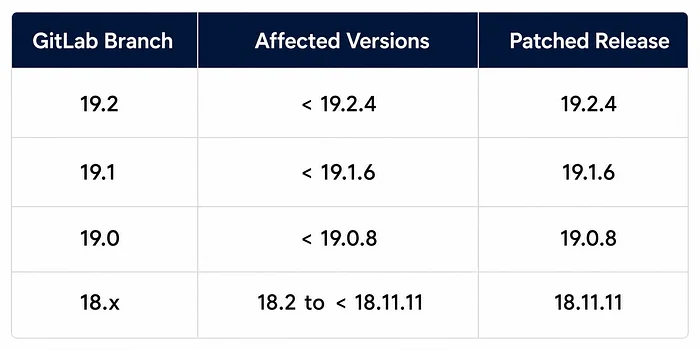
GitLab released an out-of-band critical patch, and the author's guidance is that patching is priority zero for anyone on an affected branch. If you are running any of the affected branches, patching is priority zero:
Where immediate patching is not possible, the stated mitigation is to restrict unauthenticated access to /api/graphql, or to temporarily move all public repositories to private until the patch can be deployed. Restricting unauthenticated access means the endpoint no longer answers strangers, only logged-in users. On the detection side, deploy the Sigma rule and the triage script above, and tune the rule's false positives against known developer IPs that legitimately use the directive.
Things worth testing on your own setup
- Other directives on the same endpoint. Send unauthenticated requests to
/api/graphqlthat use directives other than@gl_introduced. A positive result is a state change, in a repository, in membership or in merge metadata, performed without authentication. - Directive in different request positions. Place the directive in the query string, in a JSON body and in persisted-query parameters. A positive result is any position where the server processes it, which also tells you which log field your detection must cover.
- Anonymous versus authenticated comparison. Replay the same request with and without a session. A session is the server's memory of you being logged in, usually identified by a cookie, a small piece of data your browser stores and sends back with each request. If the unauthenticated request succeeds where it should be rejected, the authorisation check is missing rather than merely weak.
- Merge-record forgery check. After a suspected probe, inspect merge request metadata for approvals attributed to maintainers who did not act. A positive result is an approval or review record with no corresponding user action in the audit trail.
- Detection coverage test. Run the Sigma rule and the Python script against a log containing a known probe with a non-200 status and a known success with 200. A positive result is the rule firing on both and the script flagging only the 200, confirming the success filter works before you rely on it in an incident.
Glossary
- API: a way for one program to ask another program to do something, without a human clicking.
- Access log: a text file where a web server records every request it received and how it answered.
- Advisory: a public notice from a vendor explaining a security problem and what customers should do.
- Audit log: a record of who did what and when, kept so actions can be checked later.
- Authentication: proving who you are, usually by logging in.
- Authorisation: deciding whether the person you have identified is allowed to do this particular thing.
- Baseline tuning: learning what normal activity looks like on your own systems so you can exclude it from alerts.
- Branch: a version line of a piece of software.
- CI/CD: automation that tests and ships code whenever it changes.
- Code injection: a flaw where input from a stranger is treated as an instruction by the program.
- Commit: one saved change to a code repository.
- Cookie: a small piece of data a website stores in your browser and gets back on later requests, often used to remember that you are logged in.
- CVE: a catalogue number for a publicly known security flaw, so everyone refers to the same bug.
- CVSS: a 0 to 10 score for how serious a vulnerability is.
- Directive: a small instruction inside a GraphQL request, written with an
@sign, that changes how part of the request is handled. - Docstring: a comment in Python code written for humans, describing what a function does.
- Downstream users: the people or teams who receive and install the finished software.
- Endpoint: a specific address on a server that accepts requests.
- Exploit: actually using a vulnerability to cause harm.
- False positive: an alert that fires on innocent activity.
- Function: a named block of instructions in a program.
- GraphQL: a style of API where the client describes exactly what data it wants in one request.
- grep: a command-line tool that searches text for a pattern.
- Honeypot: a decoy server set up to attract attackers and record what they do.
- HTTP: the language browsers and servers use to exchange requests and answers.
- HTTP status code: the three-digit number in a server's answer, such as 200 for success or 403 for forbidden.
- Improper input validation: failing to check that incoming data is sensible and allowed before acting on it.
- Indicator of compromise (IoC): a sign in logs or systems that an attack happened or was attempted.
- Internet-facing: reachable by anyone on the internet.
- Maintainer: a trusted person with rights to manage a project.
- Merge record: the note saying a code change was reviewed and accepted.
- Out-of-band patch: an emergency fix released outside the normal schedule.
- Patch diff: the published list of lines changed by a fix, which shows where the bug was.
- Payload: the actual content of a malicious request.
- Primitive: the basic capability an attacker gains from a flaw.
- Python: a programming language that is easy to read.
- Regex (regular expression): a pattern language for describing text to search for.
- Repository: the folder holding a project's code and its full change history.
- Reverse-engineering: working out how something works by studying it, here by reading the patch.
- Self-managed instance: a copy of software a company installs and runs on its own servers.
- Session: the server's memory that you are logged in, usually carried by a cookie.
- SIEM: software that collects logs from many machines and lets you search and alert on them.
- Sigma rule: a detection rule written in a shared format that can be translated to many log systems.
- SOC: security operations centre, the team or room where security alerts are watched.
- Supply chain: the chain of people and machines that turn code into software others install.
- Triage: sorting a pile of alerts into noise and real incidents.
- Unauthenticated: sent without any proof of who the sender is.
- Validation: checking that incoming data is sensible and allowed.
- Vulnerability: a weakness in software that someone can use to cause harm.

