The Premium Feature That Was Only One API Request Away
A restaurant platform's API endpoint for updating enabled integration platforms did not check the caller's subscription tier, so a user on a lower plan could enable the premium Google Integration by adding its platform ID to the request. The attacker gained access to a paid feature without paying for it.
 Published on medium.com
Bug Bounty
The full write-up lives on its author's site
It belongs to its author, so we link to it rather than copy it. The other two tabs are our own rewrites, checked against it.
Context
The target was a public bug bounty program whose application manages restaurant integrations and sells access to features through subscription tiers. Some features are reserved for paid plans. One of them is Google Integration, which the application offers only to customers on the Standard plan. Users on lower tiers cannot reach or configure the integration through the interface.
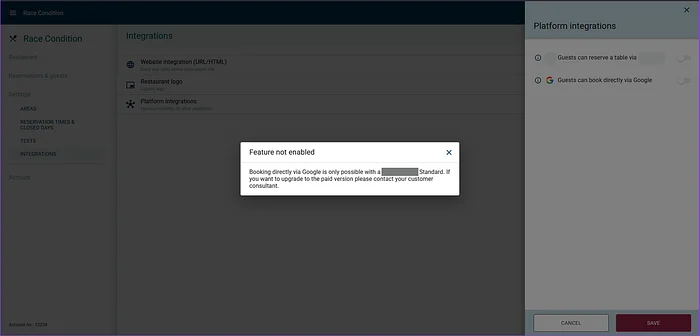
The screenshot shows the Standard plan as the tier that carries the Google Integration feature. The question the researcher set out to answer was not whether the button is hidden, but whether the backend actually checks the subscription when the integration is configured.
Setup
The work was a security assessment of the public program. The researcher used a browser and Burp to inspect and replay requests. No account details, roles, versions or other preconditions are described in the report beyond the existence of a restaurant subscribed to a plan below Standard, which is the state the restriction is meant to cover.
Finding it
The starting point was the client-side JavaScript that handles the integrations page. Reading it showed how the frontend talks to the API that manages restaurant integrations, which gave a way to test whether the subscription limit is enforced by the backend or only hidden by the interface.
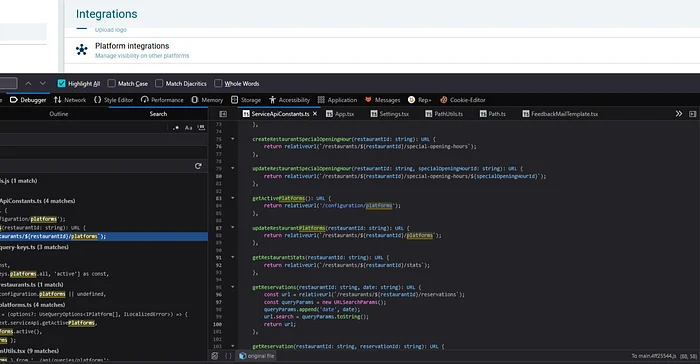
Tracing the relevant code surfaced two endpoints:
- One that returns the list of available integration platforms together with their identifiers. Those identifiers are what the application needs when configuring a restaurant's integrations.
- One named
UpdateRestaurantPlatforms, which updates the restaurant's enabled platforms. It does not just read data: it accepts an array of platform IDs and applies them to the restaurant.

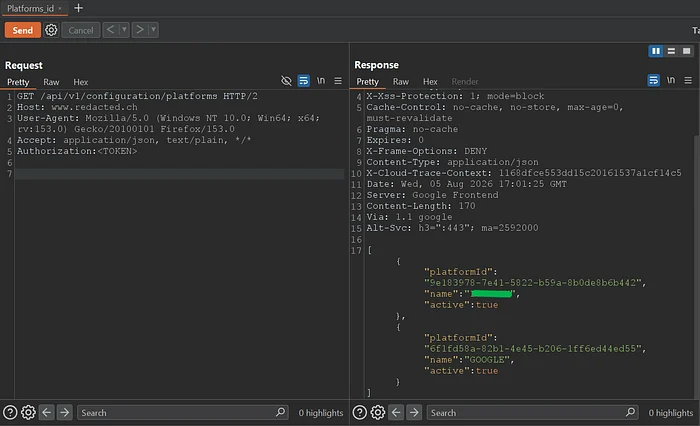
The Burp request above relates to the first endpoint, which returns the platform list and the IDs. The second endpoint is the interesting one, because it is a write operation driven entirely by an array supplied by the client.

Exploitation
Step 1: collect the platform identifiers
The first endpoint returns the available integration platforms and their identifiers, including the identifier for Google Integration, the premium platform.
Step 2: replay the update with the premium ID
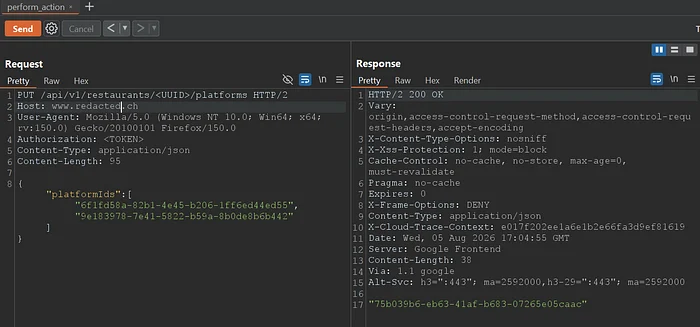
With that identifier known, the request to UpdateRestaurantPlatforms was modified so that the Google Integration platform ID was included in the platformIds array.
Step 3: observe the result
The server accepted the request and enabled Google Integration straight away, even though the restaurant was on a plan that should not have access to the feature.
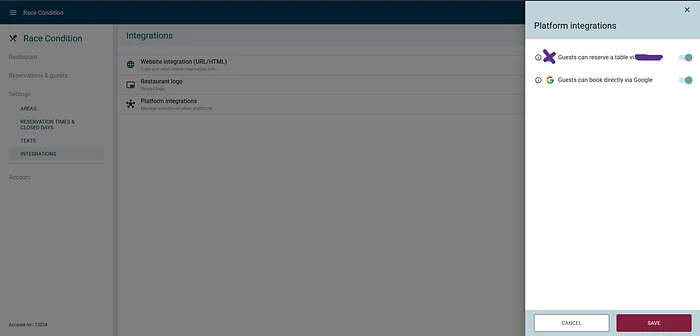
The server accepted the request and enabled Google Integration straight away.
Root cause
The UpdateRestaurantPlatforms endpoint trusted the platformIds array from the client and applied it without checking that the restaurant's subscription entitles it to each platform in the array. The plan restriction existed only in the interface, which never offered the premium platform to lower tiers. Because the platform IDs are handed out by the read endpoint, a user on any tier can learn the premium ID and submit it directly. The report does not show how the backend enforces the restriction; the behaviour is consistent with the plan check not being applied on the write path.
Impact
A user on a subscription tier below Standard can enable Google Integration on their restaurant without paying for the plan, by sending one modified request. The report describes the effect as immediate: the integration is enabled as soon as the request is accepted. The finding is a business logic and authorisation flaw rather than a classic injection issue.
Fix
The report does not say what the program changed. The fix it argues for is server-side enforcement: every API endpoint should verify that the authenticated user is entitled to perform the requested action, and in this case the update endpoint should reject any platform ID that the restaurant's plan does not include, regardless of what the client sends.
Variants to test
- Other premium features behind a plan gate. Find the write endpoint for each gated feature and submit the premium option directly. A positive result is a successful response that enables the feature on a lower-tier account.
- Identifier enumeration on read endpoints. Look for endpoints that list platforms, modules or add-ons with their IDs. A positive result is a list that includes identifiers the interface never shows to your tier.
- Array-based update endpoints. Any endpoint that accepts an array of IDs and applies them is worth replaying with IDs outside your entitlement. A positive result is the server applying the full array without filtering.
- UI-disabled versus API-enforced checks. For each control that is greyed out or hidden, replay the underlying request. A positive result is the action completing when the interface would not allow it.
- JavaScript review for hidden endpoints. Read the client-side code for API paths, parameter names and object identifiers. A positive result is an endpoint or parameter that the interface never exposes but the backend accepts.
What happened, in plain words
A security researcher was testing a public bug bounty program. A bug bounty program is a scheme where a company invites outside people to look for security problems in its systems and report them, often for a reward. The application he was testing helps restaurants manage their integrations. An integration is a connection between the restaurant's account and another service, so that the two systems can share information automatically. The application sells access to features through subscription tiers, which are levels of paid plans: the more you pay, the more features you get.
One of the paid features is Google Integration, and the application offers it only to customers on the Standard plan. Customers on lower plans cannot see or set up this integration in the application's interface. The interface is the part of the application you see and click in your browser: the buttons, menus and pages.
The researcher's question was simple and important: is the restriction real, or is it only a hidden button? In other words, does the server, the computer that stores the data and answers the application's requests, actually check the subscription when the integration is set up? Or does the interface merely hide the option while the server would happily accept it from anyone who asks in the right way?
The screenshot shows the Standard plan as the tier that includes Google Integration. That is the feature the researcher wanted to reach without paying for it.
To answer the question, he did not try to break passwords or guess logins. He read the code that his own browser downloads and runs, found the addresses the application uses to talk to its server, and then sent one of those requests himself with a small change. The server accepted the change and switched on the premium feature for a restaurant that was not entitled to it. That is the whole finding: a paid feature that was only one modified request away.
Background you need first
Before walking through the steps, here are the ideas the report relies on, explained from zero.
The frontend and the backend. Every web application has two halves. The frontend is what runs in your browser: the pages, the buttons, the JavaScript. JavaScript is the programming language that browsers run, and it is what makes a page interactive. The backend is the software on the company's server that stores data and decides what to do with it. The frontend asks the backend for things, and the backend answers. A useful comparison: the frontend is the waiter who takes your order, and the backend is the kitchen that actually cooks it. Hiding a dish from the menu does not stop the kitchen from cooking it if someone orders it directly.
APIs and API requests. An API (Application Programming Interface) is the set of addresses and rules that let one piece of software ask another to do something. When the integrations page loads, the frontend sends API requests to the backend: "give me the list of platforms", "save these settings". Each request goes to an endpoint, which is a specific address on the server, like a counter in a shop that handles one kind of business. A request has a method (roughly, the verb: read something, or change something), a URL (the address), and often a body (the data being sent, such as a list of IDs).
IDs. An ID is a short identifier, usually a number or a code, that the system uses internally to refer to a thing. You never type it yourself; the application uses it behind the scenes. If you know the ID of a premium feature, you can refer to that feature directly in a request, even if no button for it exists on your screen.
Burp. Burp is a tool used by security testers. It sits between your browser and the server, so you can see every request the browser sends and every answer it gets back. You can also edit a request and send it again, which is called replaying it. This is how the researcher changed the request by hand instead of relying on the interface.
Authorisation and business logic flaws. Authentication is proving who you are, for example by logging in. Authorisation is what you are allowed to do once you are known. A business logic flaw is a mistake in the rules of the application itself, such as letting someone use a paid feature without paying, rather than a technical bug like a broken password check. The finding here is exactly that kind of flaw: the server did not check whether the restaurant's plan allowed the feature.
Entitlement. Entitlement means the right to use something, based on what you have paid for or been granted. The report's core point is that the server accepted the premium platform ID from a lower-tier restaurant.
Setup
The work was a security assessment of the public bug bounty program. The researcher used a browser and Burp to inspect and replay requests. The report does not describe account details, roles, software versions or other preconditions, beyond the existence of a restaurant subscribed to a plan below Standard, which is exactly the situation the restriction is meant to cover.
Finding it
The starting point was the client-side JavaScript that handles the integrations page. Client-side means code that runs in your browser, as opposed to server-side code that runs on the company's machine. Reading it showed how the frontend talks to the API that manages restaurant integrations. That gave the researcher a way to test whether the subscription limit is enforced by the backend or only hidden by the interface.
The screenshot shows the JavaScript being analysed. The point of reading it is that the browser must be told which addresses to call, so those addresses are written in the code the browser downloads. Anyone can read that code: in most browsers you can open the developer tools and look at the files the page loaded.
Tracing the relevant code surfaced two endpoints:
- One that returns the list of available integration platforms together with their identifiers. Those identifiers are what the application needs when configuring a restaurant's integrations.
- One named
UpdateRestaurantPlatforms, which updates the restaurant's enabled platforms. It does not just read data: it accepts an array of platform IDs and applies them to the restaurant. An array is simply an ordered list of values, here a list of IDs.
The difference between the two matters. The first endpoint only reads information. The second one changes something on the server, and it takes its instructions from a list supplied by the client, meaning the browser. Whenever a server accepts a list from the client and acts on it, the question to ask is whether it checks every item in that list against what the user is allowed to do.
The Burp request above relates to the first endpoint, which returns the platform list and the IDs. In plain terms: the browser asked "which integration platforms exist, and what are their internal IDs?", and the server answered with the list. That answer is useful to the researcher because it contains the ID of the premium platform, which the interface never shows to a lower tier.
The second endpoint is the interesting one, because it is a write operation driven entirely by an array supplied by the client. A write operation is any request that changes stored data, as opposed to a read that only fetches it.
The screenshot shows the second endpoint, the one that updates the restaurant's enabled platforms. Notice what it accepts: a list of platform IDs. The server's job should be to check each ID in that list against the restaurant's plan before saving anything.
Exploitation
Step 1: collect the platform identifiers
The first endpoint returns the available integration platforms and their identifiers, including the identifier for Google Integration, the premium platform. The read endpoint exposes the platform IDs, including the premium one, which the interface does not offer to lower tiers.
Step 2: replay the update with the premium ID
With that identifier known, the request to UpdateRestaurantPlatforms was modified so that the Google Integration platform ID was included in the platformIds array. platformIds is the name of the field in the request that carries the list of IDs. The researcher modified the request sent to the second endpoint and added the Google Integration platform ID to the list.
This is the whole attack. There is no clever code and no trick against the login: just one extra value in a list that the server trusts.
Step 3: observe the result
The server accepted the request and enabled Google Integration straight away, even though the restaurant was on a plan that should not have access to the feature.
The server accepted the request and enabled Google Integration straight away. That last detail is the proof of the flaw: a correct server would have answered with a refusal, saying the plan does not include this platform. Instead it saved the change as if the request were perfectly normal.
Root cause
The UpdateRestaurantPlatforms endpoint trusted the platformIds array from the client and applied it without checking that the restaurant's subscription entitles it to each platform in the array. The plan restriction existed only in the interface, which never offered the premium platform to lower tiers. Because the platform IDs are handed out by the read endpoint, a user on any tier can learn the premium ID and submit it directly.
The behaviour is consistent with an authorisation check that was never implemented on the write path. In everyday terms: the restaurant's menu did not list the expensive dish, but the kitchen cooked it anyway when someone read the ingredients list and ordered it by its internal code.
Impact
A user on a subscription tier below Standard can enable Google Integration on their restaurant without paying for the plan, by sending one modified request. The report describes the effect as immediate: the integration is enabled as soon as the request is accepted. The finding is a business logic and authorisation flaw rather than a classic injection issue. Injection means a bug where untrusted input is interpreted as commands by the system, for example database code hidden inside a form field; nothing like that is involved here. The flaw applies to any restaurant whose plan should exclude the feature.
Fix
The report does not say what the program changed. The fix it argues for is server-side enforcement: every API endpoint should verify that the authenticated user is entitled to perform the requested action. In this case the update endpoint should reject any platform ID that the restaurant's plan does not include, regardless of what the client sends. The interface can keep hiding the option, but hiding is a convenience, not a security control.
Variants to test
These are the general lessons the researcher draws, phrased as things to try on other applications.
- Other premium features behind a plan gate. Find the write endpoint for each gated feature and submit the premium option directly. A positive result is a successful response that enables the feature on a lower-tier account.
- Identifier enumeration on read endpoints. Look for endpoints that list platforms, modules or add-ons with their IDs. Enumeration here means collecting the full list of internal identifiers. A positive result is a list that includes identifiers the interface never shows to your tier.
- Array-based update endpoints. Any endpoint that accepts an array of IDs and applies them is worth replaying with IDs outside your entitlement. A positive result is the server applying the full array without filtering.
- UI-disabled versus API-enforced checks. For each control that is greyed out or hidden, replay the underlying request. A positive result is the action completing when the interface would not allow it.
- JavaScript review for hidden endpoints. Read the client-side code for API paths, parameter names and object identifiers. A positive result is an endpoint or parameter that the interface never exposes but the backend accepts.
The researcher's own summary of the lessons is worth keeping in mind: never trust the frontend, because anything sent by the client can be modified or replayed; always enforce authorisation on the server; inspect JavaScript carefully, because client-side code often reveals hidden endpoints, object identifiers and application logic; compare UI restrictions with API behaviour; and think beyond traditional vulnerabilities, since many impactful bug bounty findings come from business logic and authorisation flaws rather than classic injection bugs.
Glossary
- API (Application Programming Interface): the set of addresses and rules that let one piece of software ask another to do something.
- API request: a single message sent to an API endpoint, with a method, a URL and often a body of data.
- Array: an ordered list of values, such as a list of platform IDs.
- Authentication: proving who you are, for example by logging in.
- Authorisation: what you are allowed to do once you are known.
- Backend: the software on the company's server that stores data and decides what to do with requests.
- Bug bounty program: a scheme where a company invites outside people to find and report security problems, often for a reward.
- Burp: a tool that sits between browser and server so requests can be inspected, edited and replayed.
- Business logic flaw: a mistake in the application's own rules, such as allowing a paid feature without payment, rather than a technical bug.
- Client-side: code that runs in your browser, as opposed to on the server.
- Endpoint: a specific address on the server that handles one kind of request.
- Entitlement: the right to use something, based on what you have paid for or been granted.
- Enumeration: collecting a full list of items, here internal identifiers, by asking the system for them.
- Frontend: the part of the application that runs in your browser: pages, buttons and JavaScript.
- ID: a short internal identifier, usually a number or code, used by the system to refer to a thing.
- Injection: a bug where untrusted input is interpreted as commands by the system, for example database code hidden in a form field.
- Integration: a connection between the restaurant's account and another service so the two can share information automatically.
- JavaScript: the programming language browsers run to make pages interactive.
- Method: the verb of an API request, roughly whether it reads data or changes it.
- Replay: sending a captured request again, usually after editing it.
- Server: the computer that stores the data and answers the application's requests.
- Server-side: code that runs on the company's server, as opposed to in your browser.
- Subscription tier: a level of paid plan that determines which features a customer can use.
- Write operation: a request that changes stored data, as opposed to a read that only fetches it.

