The User Was Removed. The Access Wasn’t.
An API endpoint returned private page metadata and member details to any authenticated user holding a page ID, without checking whether that user still had access to the page. A user removed from a page could keep querying the endpoint and see current member information and permission changes.

medium.com
Published on medium.com
Cybersecurity
The full write-up lives on its author's site
It belongs to its author, so we link to it rather than copy it. The other two tabs are our own rewrites, checked against it.
Context
This is a write-up about a Broken Access Control vulnerability found in a web application's API. The feature in question is a private Page, which belongs to a parent Notebook and has a membership list with per-user permission levels. The application exposes an API endpoint that returns a Page's information, including its metadata and its members.
The expected behaviour is simple: once a user loses access to a private Page, the API should no longer return that Page's private information to them. The endpoint did not behave that way.
Setup
The testing was done with a browser, Burp Suite, and the requests generated by the frontend. The researcher used a valid JWT from a test account they controlled, plus additional test accounts under their control to exercise the access-control behaviour. An administrator account was used to remove users from the Page and from the parent Notebook, and to change membership and permissions.
No specific product, host, version or framework is named in the report.
Finding it
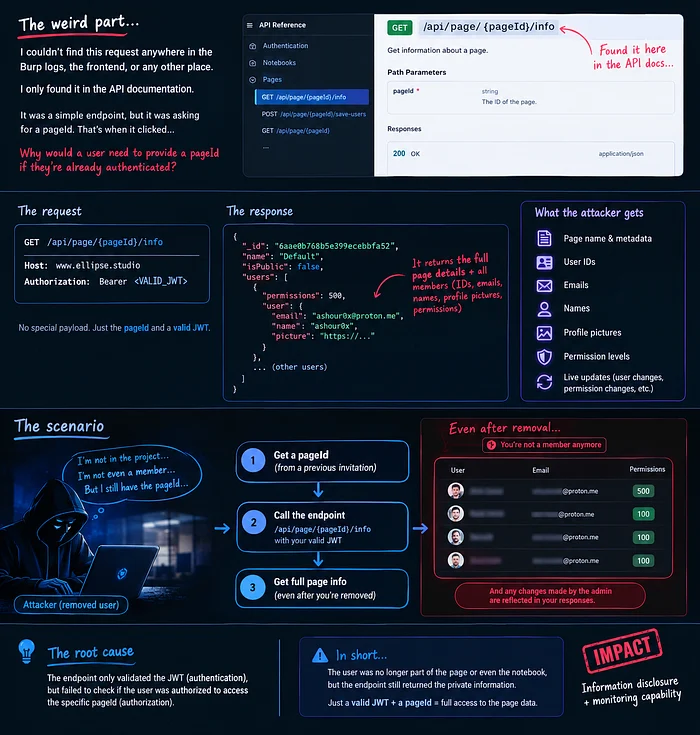
The starting point was the application's API documentation rather than the frontend. While exploring the documentation, the researcher came across an endpoint they did not recognise:
GET /api/page/{pageId}/info
They could not place it. Searching their Burp history for the endpoint returned nothing, and they could not find any frontend action that triggered it. The endpoint was documented, but it could not be connected to anything observed in the application.
That gap is what made it worth testing: a documented endpoint with no visible caller is still reachable by anyone who can send a request to it.
Exploitation
Step 1: Send the request with a valid JWT
The endpoint was tested directly with a valid JWT from a test account the researcher controlled. The request was:
GET /api/page/<PAGE_ID>/info HTTP/2Host: <TARGET_HOST>Authorization: Bearer <VALID_JWT>
The request needs two things: a valid bearer token, which authenticates the caller, and a pageId, which selects the resource. The token was not the obstacle. The missing piece was a Page ID.
Step 2: Obtain a Page ID legitimately
The researcher explored the application and its project structure. A Page ID was available through the Page's legitimate URL and through requests made while the user had access. This gave a Page ID obtained through normal, authorised use, which is what the later tests needed.
Step 3: Read a private Page as a member
Using a Page ID from a private Page the researcher was authorised to access, the request was sent. The response contained much more than a Page name. It included private Page metadata and a list of members, with fields such as:
- User IDs
- Email addresses and names
- Profile-picture URLs
- Permission levels
- Page information, including whether it was public
A simplified, redacted example of the response:
The response exposed information about multiple members, not just the Page owner. At this point the data exposure was real but still within what a member could legitimately see. The open question was whether the endpoint would respect access revocation.
Step 4: Remove the user from the Page and repeat the request
Using test accounts under the researcher's control, the access-control behaviour was tested. First, the Page ID was obtained while the test user had legitimate access. Then the administrator removed that user from the Page. The same API request was repeated with the same valid JWT and the previously obtained Page ID.
The endpoint still returned 200 OK and disclosed the Page information.
Step 5: Remove the user from the parent Notebook as well
The user was then removed from the parent Notebook as well. The endpoint continued returning the private Page information.
This is what changed the significance of the finding. The question was no longer whether a user could see information while they were a member. The endpoint continued providing that information after the user's access had been revoked.
Step 6: Change membership and permissions, then query again
The researcher also tested whether the response was limited to information the removed user had already seen. Using the administrator account, they changed the Page's membership and permissions, then requested the endpoint again.
The response reflected the updated information. A former member could therefore repeatedly query the endpoint and observe changes to the Page's members and their permission levels, even after being removed.
Root cause
The issue comes down to the difference between authentication and authorization. The endpoint accepted a valid JWT, but it did not adequately enforce whether the authenticated user was still authorised to access the specific Page ID in the request.
A valid token tells the application who is making the request. It does not automatically grant access to every resource. The endpoint accepted a valid JWT but did not adequately enforce whether the authenticated user was still authorised for the specific Page ID. The report does not show the server-side code, so the exact check that was missing is not stated.
Impact
A user who was removed from a private Page, and even from the parent Notebook, could keep querying the endpoint with the Page ID they had obtained while they still had access. Depending on the information returned, this could expose member identities, contact information, profile pictures, and access levels to someone who was no longer authorised to view the Page.
Because the response reflected later changes, a former member could also observe changes to the Page's members and their permission levels over time. The researcher tested with Page IDs obtained during a period of legitimate access.
Fix
The report does not describe a fix or a vendor response. The behaviour that should be enforced is the one the researcher states as expected: once a user loses access to a private Page, the API should no longer return that Page's private information to them. In practice that means the endpoint must check, on every request, that the authenticated user is currently authorised for the Page ID being requested, including after removal from the Page and from the parent Notebook, rather than relying on the token alone.
Variants to test
- Documented endpoints with no visible caller. Diff the API documentation against your Burp history and look for endpoints the frontend never triggers. A positive result is a documented route that responds to a direct request with a valid token.
- Object-level checks after revocation. For any endpoint that takes an object ID, obtain the ID while authorised, have an administrator remove your access, then replay the request. A positive result is a
200 OKwith the object's data instead of a403or404. - Parent and child resources. Repeat the revocation test at each level of the hierarchy, for example removing the user from the parent container as well as the child object. A positive result is the child endpoint still returning data after removal from the parent.
- Staleness of the response. After revocation, change the object's membership and permissions as an administrator and query again. A positive result is a response that reflects the new state, showing live data rather than a cached copy of what the user saw before.
- Field-level over-exposure. Even where access is legitimate, check whether the response includes more than the UI needs, such as member email addresses, profile-picture URLs and numeric permission levels. A positive result is sensitive fields returned to a low-privilege member.
What happened, in plain words
A security researcher was testing a website and found a hidden door in its API. The API is the part of a website that the page in your browser talks to behind the scenes: your browser asks it for data, and it answers with data, usually in a machine-friendly format rather than a pretty web page. Think of the website as a restaurant dining room and the API as the kitchen hatch: the dining room is what customers see, but the food actually comes through the hatch.
The door the researcher found was a documented way to ask the API for information about a "Page". A Page here is a private workspace inside the application, something like a shared folder or a private group. Each Page belongs to a larger container called a Notebook, and each Page has a list of members, each with a permission level saying what they are allowed to do.
The expected behaviour is simple: once someone is removed from a private Page, the API should stop giving them that Page's private information. It did not. Even after the researcher's test user was removed from the Page, and then removed from the parent Notebook as well, the same request kept coming back with the Page's details: member names, email addresses, profile pictures and permission levels. The researcher could even change the membership afterwards and watch the response update, meaning a removed user could keep spying on the Page's membership over time.
This kind of flaw is called Broken Access Control. "Access control" is the set of rules deciding who is allowed to see or do what. "Broken" means those rules were not enforced where they should have been. The endpoint checked that the caller had a valid login token, but it did not check whether that caller was still allowed to see the specific Page they were asking about.

The rest of this article walks through the same steps the researcher took, explaining each concept from scratch.
The setup: what tools were used and why
The testing was done with a browser, Burp Suite, and the requests generated by the frontend. The frontend is the part of the application you see and click on in your browser. Burp Suite is a tool that sits between your browser and the website and lets you read, pause and replay the requests your browser sends. Think of it as a recording device on the kitchen hatch: it shows you exactly what your browser ordered and what the kitchen sent back.
The researcher used a valid JWT from a test account they controlled. A JWT, short for JSON Web Token, is a small piece of text that a website gives you after you log in. It works like a wristband at an event: the staff check the wristband to know you are a paying guest, without asking for your name and password every time. The browser sends this token with each request so the server knows who is asking.
The researcher also had additional test accounts under their control, and an administrator account. An administrator is a user with extra powers, such as removing people from a Page or changing their permissions. Having several accounts you control is how you test access rules safely: you can be the member one minute and the admin the next.
No specific product, host, version or framework is named in the report, so we cannot say which application this was.
Finding the endpoint
The starting point was the application's API documentation rather than the frontend. API documentation is a page, often meant for developers, that lists the available endpoints. An endpoint is a specific address in the API that does one job, like a particular counter in a bank. The documentation tells you what each endpoint expects and what it returns.
While exploring the documentation, the researcher came across an endpoint they did not recognise:
GET /api/page/{pageId}/info
Let us unpack that line. GET is the type of request used when you only want to read something, not change it. /api/page/{pageId}/info is the address being requested. The curly braces around pageId mean "put a real Page ID here". A Page ID is a unique identifier for one particular Page, like a house number. So the whole line means: "give me the information about the Page whose ID I put in the address".
They could not place it. Searching their Burp history for the endpoint returned nothing, and they could not find any frontend action that triggered it. Burp history is the log of every request the browser made while the researcher clicked around the application. If the endpoint never appears there, it means no button or page in the visible application ever calls it.
The endpoint was documented, but it could not be connected to anything observed in the application. That gap is what made it worth testing: a documented endpoint with no visible caller is still reachable by anyone who can send a request to it. In other words, just because the dining room never orders a dish does not mean the kitchen will not make it if you ask through the hatch.
Step 1: Send the request with a valid JWT
The endpoint was tested directly with a valid JWT from a test account the researcher controlled. The request was:
GET /api/page/<PAGE_ID>/info HTTP/2Host: <TARGET_HOST>Authorization: Bearer <VALID_JWT>
Line by line, in plain words:
GET /api/page/<PAGE_ID>/info HTTP/2is the request line.GETmeans "read only". The address is the endpoint from the documentation, with<PAGE_ID>standing in for a real Page ID.HTTP/2is simply the version of the language the browser and server use to talk; it is a technical detail you do not need to worry about.Host: <TARGET_HOST>tells the server which website the request is for. One server can host many websites, so this line says which one you mean, like writing the department name on an envelope sent to a large building.Authorization: Bearer <VALID_JWT>is the line that carries the login token.Bearermeans "the person holding this token is the one making the request", just like the event wristband.<VALID_JWT>is the actual token text, which is secret and must never be shared.
The request needs two things: a valid bearer token, which authenticates the caller, and a pageId, which selects the resource. To authenticate means to prove who you are. To select a resource means to point at the specific thing you want, here one Page. The token was not the obstacle, because the researcher had a real one. The missing piece was a Page ID.
Step 2: Obtain a Page ID legitimately
The researcher explored the application and its project structure. A Page ID was available through the Page's legitimate URL and through requests made while the user had access. A URL is the address you see in your browser's address bar. Many web applications put identifiers in the URL, so a Page's address often contains its ID in plain sight.
This gave a Page ID obtained through normal, authorised use, which is what the later tests needed. Starting from a legitimate ID matters: the point was not to guess someone else's Page, but to see whether the API would keep serving a Page to someone whose access had been taken away.
Step 3: Read a private Page as a member
Using a Page ID from a private Page the researcher was authorised to access, the request was sent. At this stage everything was still legitimate: the researcher was a member, so seeing the Page's information was expected.
The response contained much more than a Page name. It included private Page metadata and a list of members, with fields such as:
- User IDs
- Email addresses and names
- Profile-picture URLs
- Permission levels
- Page information, including whether it was public
Metadata means data about the data: here, details describing the Page itself, such as its name and whether it is public. A field is one named piece of information inside a response, like one labelled box on a form. A permission level is a number or label saying what a member may do; a higher number generally means more rights.
A simplified, redacted example of the response:
Line by line, in plain words:
- The outer curly braces
{and}wrap the whole response. This format is called JSON, short for JavaScript Object Notation. It is a way of writing data as labelled boxes inside boxes, and it is what most APIs use to answer. "_id": "<REDACTED_PAGE_ID>"is the Page's unique identifier. The value has been replaced with a placeholder so the real ID is not published."name": "Private Project Page"is the Page's name."isPublic": falsesays the Page is not public.falseis a yes/no value meaning no."createdBy"is a box describing the person who created the Page. Inside it,"permissions": 500is that person's permission level, and the nested"user"box holds theiremail,nameandpicture(a link to their profile picture)."users"is a list, shown by the square brackets[and]. Each entry in the list is one member, with theirpermissionsand a nesteduserbox holding their email, name and picture. Here there are two members: one with permission level 500 and one with 100."notebook": "<REDACTED_NOTEBOOK_ID>"is the ID of the parent Notebook, the larger container this Page belongs to."userPermissions": { "permissions": 500 }describes the permission level of the person making the request, that is, the researcher.
The response exposed information about multiple members, not just the Page owner. At this point the data exposure was real but still within what a member could legitimately see. The open question was whether the endpoint would respect access revocation. Revocation means taking access away, for example when an administrator removes someone from a Page.
Step 4: Remove the user from the Page and repeat the request
Using test accounts under the researcher's control, the access-control behaviour was tested. The plan was simple:
- Obtain the Page ID while the test user had legitimate access.
- Have the administrator remove that user from the Page.
- Repeat the same API request with the same valid JWT and the previously obtained Page ID.
The endpoint still returned 200 OK and disclosed the Page information. 200 OK is the standard code a server sends to mean "the request succeeded". When a server refuses because you are not allowed, it normally sends a different code, such as 403 Forbidden ("I know who you are, but you may not do this") or 404 Not Found ("there is nothing here for you"). Getting 200 OK after removal is the sign that the rule was not enforced.
Step 5: Remove the user from the parent Notebook as well
The user was then removed from the parent Notebook as well. If a Page is like a shared folder, the Notebook is the cabinet the folder sits in. Removing someone from the cabinet should certainly remove their access to the folder inside it.
The endpoint continued returning the private Page information. This is what changed the significance of the finding. The question was no longer whether a user could see information while they were a member. The endpoint continued providing that information after the user's access had been revoked.
Step 6: Change membership and permissions, then query again
The researcher also tested whether the response was limited to information the removed user had already seen. Perhaps the server was simply repeating an old answer it had stored earlier, like a photocopy made before the removal. To check, the researcher used the administrator account to change the Page's membership and permissions, then requested the endpoint again.
The response reflected the updated information. A former member could therefore repeatedly query the endpoint and observe changes to the Page's members and their permission levels, even after being removed. That makes the flaw more than a one-off leak: the response reflected later changes to the Page.
Why the endpoint was vulnerable
The issue comes down to the difference between authentication and authorization. These two words sound alike but mean different things:
- Authentication answers "who are you?". Showing your passport at an airport is authentication.
- Authorization answers "what are you allowed to do here?". A boarding pass for one flight is authorization for that flight only, even if your passport is perfectly valid.
The endpoint accepted a valid JWT, but it did not adequately enforce whether the authenticated user was still authorised to access the specific Page ID in the request. A valid token tells the application who is making the request. It does not automatically grant access to every resource. The endpoint accepted a valid JWT but did not adequately enforce whether the authenticated user was still authorised for the specific Page ID. The report does not show the server-side code, so the exact check that was missing is not stated.
Impact
A user who was removed from a private Page, and even from the parent Notebook, could keep querying the endpoint with the Page ID they had obtained while they still had access. Depending on the information returned, this could expose member identities, contact information, profile pictures, and access levels to someone who was no longer authorised to view the Page.
Because the response reflected later changes, a former member could also observe changes to the Page's members and their permission levels over time. The researcher tested with Page IDs obtained during a period of legitimate access.
Fix
The report does not describe a fix or a vendor response. The behaviour that should be enforced is the one the researcher states as expected: once a user loses access to a private Page, the API should no longer return that Page's private information to them. In practice that means the endpoint must check, on every request, that the authenticated user is currently authorised for the Page ID being requested, including after removal from the Page and from the parent Notebook, rather than relying on the token alone.
Variants to test
If you ever want to look for similar problems, here are the same ideas written as things to try. Each one names what a positive result looks like, so you know when you have found something.
- Documented endpoints with no visible caller. Compare the API documentation against your Burp history and look for endpoints the frontend never triggers. A positive result is a documented route that responds to a direct request with a valid token.
- Object-level checks after revocation. For any endpoint that takes an object ID, obtain the ID while authorised, have an administrator remove your access, then replay the request. A positive result is a
200 OKwith the object's data instead of a403or404. - Parent and child resources. Repeat the revocation test at each level of the hierarchy, for example removing the user from the parent container as well as the child object. A positive result is the child endpoint still returning data after removal from the parent.
- Staleness of the response. After revocation, change the object's membership and permissions as an administrator and query again. A positive result is a response that reflects the new state, showing live data rather than a cached copy of what the user saw before.
- Field-level over-exposure. Even where access is legitimate, check whether the response includes more than the UI needs, such as member email addresses, profile-picture URLs and numeric permission levels. A positive result is sensitive fields returned to a low-privilege member.
Glossary
- Access control: the rules that decide who may see or do what in an application.
- Administrator: a user with extra powers, such as removing members or changing permissions.
- API: the part of a website that your browser talks to behind the scenes to fetch and send data.
- API documentation: a page listing the available endpoints and what they expect and return.
- Authentication: proving who you are, for example by logging in.
- Authorization: deciding what an authenticated user is allowed to do or see.
- Bearer token: a token where whoever holds it is treated as the caller, like an event wristband.
- Broken Access Control: a flaw where access rules are missing or not enforced, so people can reach things they should not.
- Burp history: the log in Burp Suite of every request the browser made.
- Burp Suite: a tool that sits between your browser and a website so you can read, pause and replay requests.
- Endpoint: a specific address in an API that performs one job.
- Field: one named piece of information inside a response.
- Frontend: the part of an application you see and click on in the browser.
- GET: the request type used to read something without changing it.
- HTTP/2: a version of the language browsers and servers use to communicate.
- JSON: a text format for writing data as labelled boxes inside boxes, commonly used by APIs.
- JWT (JSON Web Token): a small piece of text issued at login that the browser sends with requests to identify the user.
- Metadata: data describing other data, such as a Page's name and whether it is public.
- Notebook: the parent container that a Page belongs to.
- Page: a private workspace inside the application with its own membership list.
- Page ID: the unique identifier for one particular Page.
- Permission level: a number or label saying what a member is allowed to do.
- Resource: the specific thing a request points at, such as one Page.
- Revocation: taking access away, for example removing a user from a Page.
- 200 OK: the server code meaning the request succeeded.
- 403 Forbidden: the server code meaning you are identified but not allowed.
- 404 Not Found: the server code meaning there is nothing at that address for you.
- URL: the address shown in your browser's address bar.
- User ID: the unique identifier for one user account.

