Two XSS Bugs, One Portal: A Responsible Disclosure Story
A web portal stored user-supplied address values and echoed a URL parameter without output encoding, allowing script injection. An attacker could run JavaScript in a victim's session, potentially hijacking sessions or acting as the user.

medium.com
Published on medium.com
Xss
The full write-up lives on its author's site
It belongs to its author, so we link to it rather than copy it. The other two tabs are our own rewrites, checked against it.
Context
The target was a web portal whose name the author withholds. The portal let users save an address in their profile, and that saved value was displayed on later pages. The author found two Cross-Site Scripting (XSS) vulnerabilities in it: one stored, in the address field, and one reflected, in a URL parameter called parent. Both were reported to the owners and both have since been patched. The payloads shown are generic proof-of-concept examples, and no user data was exposed in the write-up.
XSS in general happens when an application puts untrusted input into a page without proper encoding, so the browser cannot tell the site's own code from the attacker's input and runs the attacker's JavaScript in the site's origin. The three main types are stored XSS (the payload is saved on the server and runs for everyone who views it), reflected XSS (the payload is part of a request such as a URL and is echoed straight back in the response) and DOM-based XSS (the flaw is in client-side JavaScript that handles input unsafely). This report covers the first two.
Setup
The report does not describe accounts, roles, tools or versions. The only precondition it makes explicit is that the portal allowed a user to save an address in their profile, and that the saved value was rendered on later pages.
Finding it
The value a user saved was stored in the database and then displayed on later pages without output encoding.
The second issue was in a URL parameter named parent, whose value was placed directly into the response page without sanitisation.
Exploitation
Step 1: confirm stored XSS in the address field
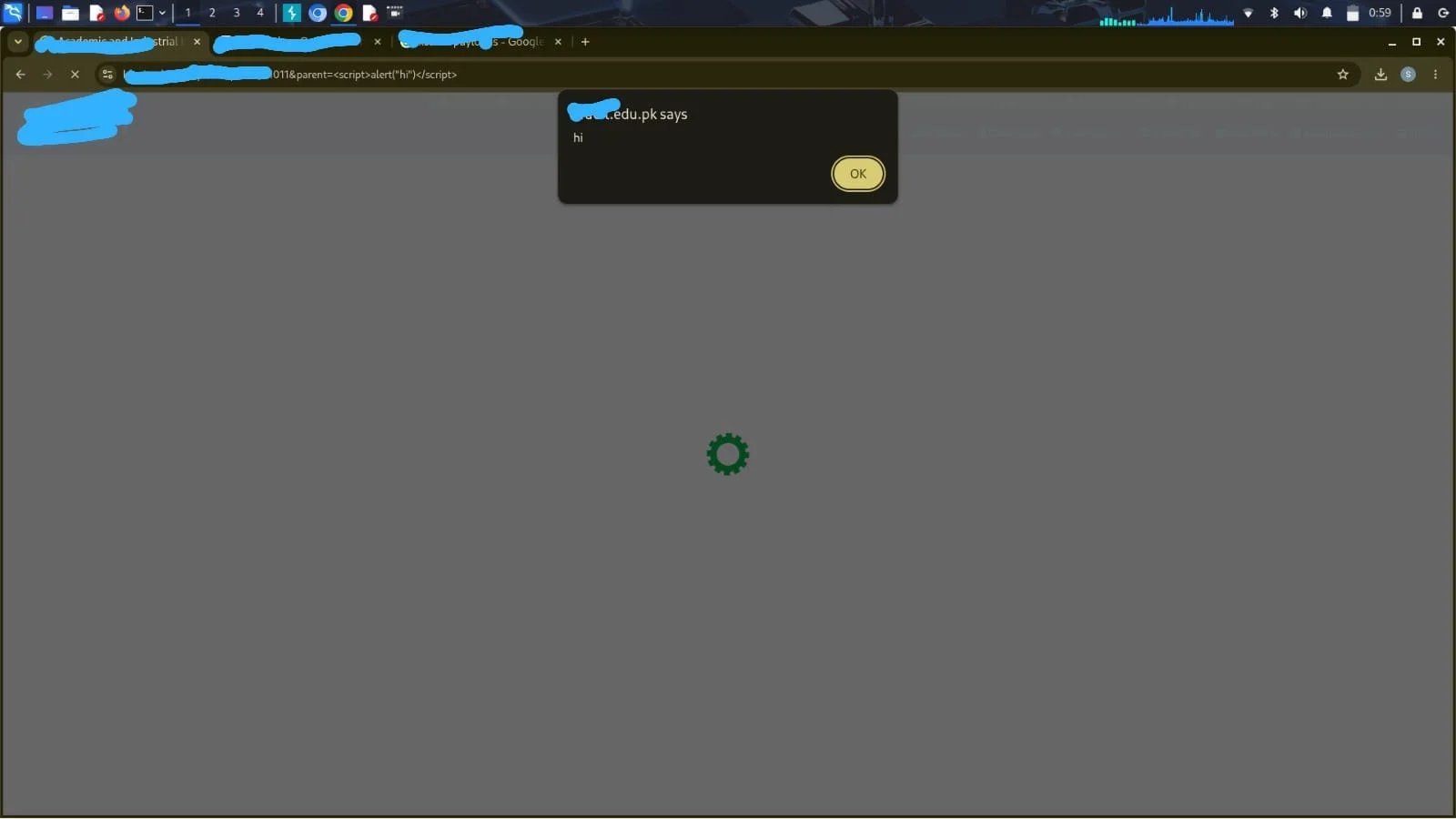
The author used harmless proof-of-concept payloads that only show an alert box. The first was the simplest form of script injection:
<script>alert(document.domain)</script>

Because many applications block this one, the author also tried event-handler payloads. The SVG variant:
<svg onload="alert(document.domain)">
And the image variant:
<img src=x onerror="alert(document.domain)">
The mechanics of each:
<img src=x onerror=...>: the image sourcexis invalid, so loading fails and theonerrorevent handler runs the JavaScript.<svg onload=...>: the browser parses the SVG element and fires theonloadevent as soon as it renders.<script>...</script>: the simplest form, executed directly by the browser. Many apps block this one, which is why attackers also try event handlers like the two above.
Using alert(document.domain) rather than alert(1) proves the script runs in the target's origin, not in a sandbox. Because the value is stored, the payload runs every time the page is viewed, including by other users or staff members, and the victim does not need to click anything special.
Step 2: confirm reflected XSS in the parent parameter
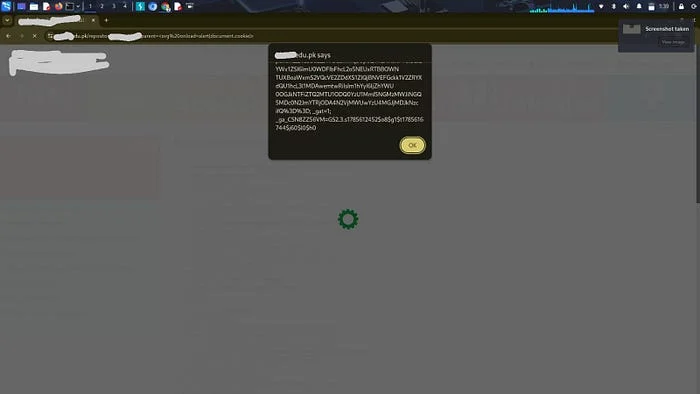
The same generic payload types confirmed the second issue. The example URL was:
https://[target-portal]/page?parent=<svg onload=alert(document.domain)>
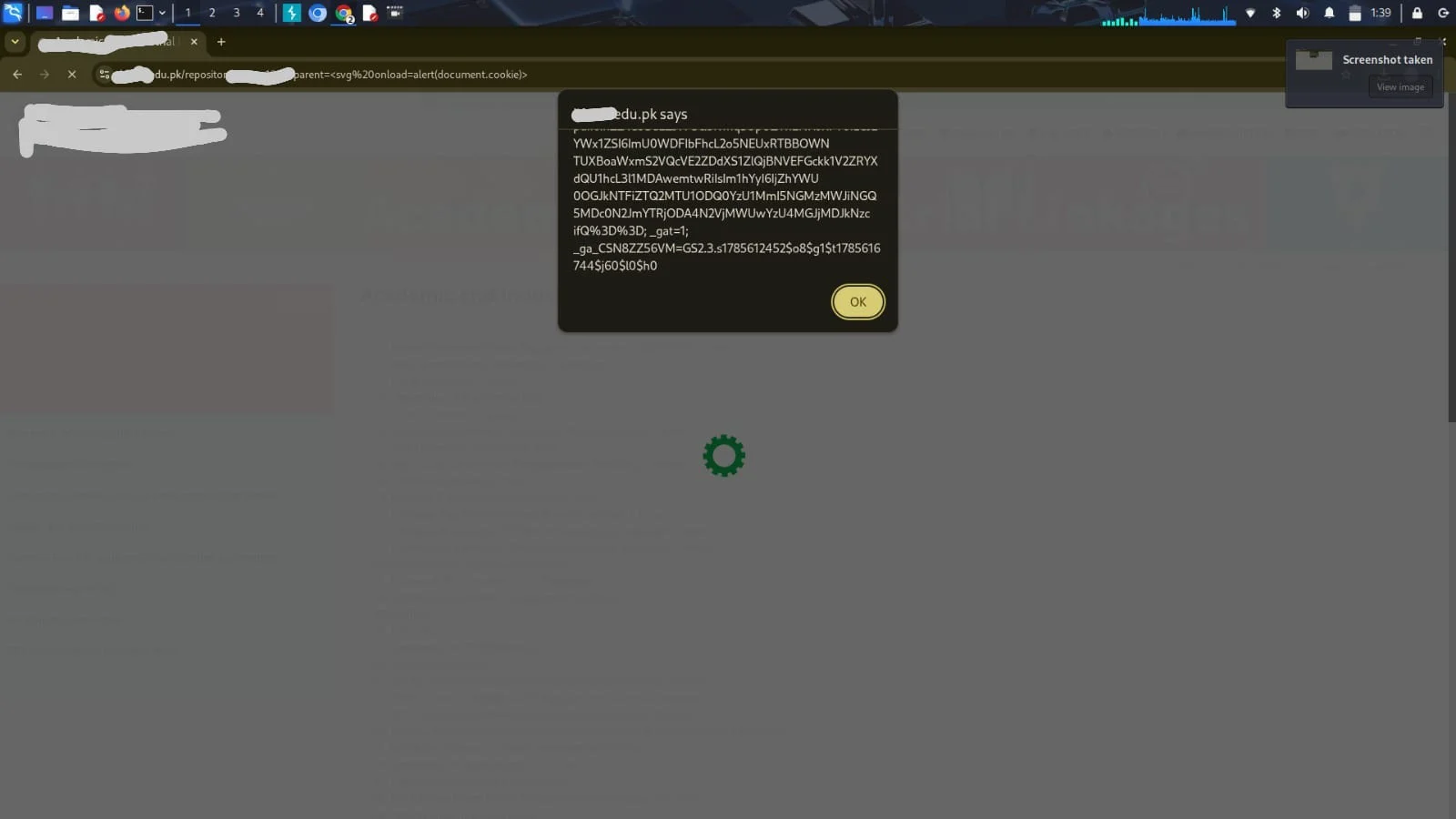
The parent value was placed directly into the response page without sanitisation. This one needs user interaction: an attacker has to send the link to a victim by email, chat or social media and get them to open it, so it relies on social engineering. It is still a real risk, especially against privileged users, because the script then runs in the victim's session.
Root cause
The author lists three causes:
- User input was not encoded on output.
- Input validation was weak or missing; an address field has no need for
<or>. - No Content Security Policy (CSP) was in place to limit inline scripts and event handlers.
In other words, the application trusted user input in both the stored and the reflected path.
Impact
If exploited by a malicious actor, the author says these bugs could lead to:
- Session hijacking, if cookies are missing the
HttpOnlyflag. - Performing actions on behalf of a logged-in user.
- Phishing through fake content injected into the trusted page.
- Targeting of administrators who view user-submitted data.
The stored bug runs for every viewer of the affected page without interaction; the reflected bug requires the victim to open a crafted link.
Fix
The author's recommendations, which are the fix guidance rather than a description of the patch actually applied:
- Encode output by context: HTML entity encoding for HTML, attribute encoding for attributes, and JavaScript or URL encoding where needed.
- Validate input, allowing only the characters a field really needs.
- Deploy a strict CSP that blocks inline scripts and inline event handlers.
- Set
HttpOnlyandSecureflags on session cookies. - Use frameworks with auto-escaping and avoid dangerous sinks like
innerHTML. - Sanitise rich content with a trusted library such as DOMPurify if HTML input is truly required.
The report says both vulnerabilities have been patched, and the disclosure timeline is given only as placeholders ([Date] for discovery, report, acknowledgement and confirmed fixes).
Variants to test
- Every field that is saved and re-displayed. Submit the three payloads above into profile fields, comments and any other persisted input. A positive result is an alert showing the target's domain when the saved value is rendered on a later page.
- Less obvious URL parameters. The
parentparameter was easy to miss, so enumerate parameters beyond the visible form fields and inject the same payloads. A positive result is the payload executing when the crafted URL is opened. - Event handlers when
<script>is blocked. If the script tag is filtered, tryonerrorandonloadvariants as the author did. A positive result is execution through the handler rather than the tag. - Origin proof. Use
alert(document.domain)instead ofalert(1)so a successful execution demonstrates the script runs in the target's origin rather than a sandbox.
What happened, in plain words
A security researcher tested a website (a "web portal") and found two bugs of the same family, called Cross-Site Scripting, or XSS for short. One bug was hidden in a field where users save their address. The other was hidden in a part of a web address (a URL) that most people would never think to look at. The researcher reported both bugs responsibly to the owners, and both have now been patched.
This article walks through the whole story from zero. You do not need any security background. You need to know how to use a browser, and that is about it. Every technical word is explained the first time it appears, and there is a glossary at the end.
A quick word on what a "portal" is here: a website where people log in and manage their own information, such as a profile with their name and address. Think of it like a members' area of a club website. You sign in, you fill in your details, and the site shows them back to you on later pages.
What is XSS, in everyday terms?
When you type something into a website, the site usually shows it back to you somewhere: your name in the corner of the page, your address on a profile page, your comment under an article. To do that, the site takes your text and places it inside the page it sends to your browser.
A web page is not just text. It is a set of instructions written in a language called HTML, and the browser reads those instructions and draws the page. Some of those instructions can also tell the browser to run small programs, written in a language called JavaScript. That is how pages do things like open menus or check a form before you submit it.
The danger is this: if a site takes text from a user and drops it into the page without marking it clearly as "this is just text, do not treat it as instructions", the browser cannot tell the difference. If the text happens to look like an instruction, the browser will follow it. An attacker who can get their own instruction into the page can make the browser run their JavaScript as if the website itself had written it.
That is XSS: making a website run someone else's JavaScript inside its own pages.
There are three main types:
- Stored XSS: the malicious text is saved on the server (for example in a database) and runs for everyone who later views the page where it appears.
- Reflected XSS: the malicious text is part of a request (such as a URL) and is echoed straight back in the response, so it only runs for the person who opens that particular link.
- DOM-based XSS: the flaw lives in the JavaScript that runs in the browser itself, which handles input unsafely.
This story covers the first two.
Finding 1: a saved address that runs code
The portal let users save an address in their profile. That value was stored in the database and displayed on later pages without output encoding.
"Output encoding" means converting special characters into a safe form before putting them on a page. For example, the character < is the start of an HTML instruction. If a site encodes it, it becomes something the browser displays as a literal < sign instead of treating it as the beginning of an instruction. Without that step, whatever the user typed goes into the page as-is, instructions and all.
To confirm the issue, the researcher used harmless proof-of-concept payloads that only show an alert box. A "payload" is simply the piece of text an attacker feeds in to test or exploit a bug. "Proof of concept" means a minimal demonstration that proves the bug is real without doing any damage. An alert box is the small pop-up a browser shows when JavaScript calls alert(); it is the gentlest possible way to prove that code ran.
The first payload was the simplest form of script injection:
<script>alert(document.domain)</script>
Line by line:
<script>tells the browser "everything until the closing tag is a program, run it".alert(document.domain)is the program.document.domainmeans "the name of the website this page belongs to", andalert(...)shows that name in a pop-up.</script>marks the end of the program.
Many applications block this particular payload, because <script> is the most obvious thing to filter. So the researcher also tried payloads that use event handlers. An "event handler" is an instruction that says "when this thing happens, run this code". Browsers fire events all the time: a page finishes loading, an image fails to load, a mouse hovers over a button. Each of those can have a handler attached.
The SVG variant:
<svg onload="alert(document.domain)">
Line by line:
<svgstarts an SVG element. SVG is a format for drawing shapes and graphics on a web page.onload="..."is the event handler: "when this element has finished loading, run the code in the quotes".alert(document.domain)is that code, showing the site's own domain name in a pop-up.
And the image variant:
<img src=x onerror="alert(document.domain)">
Line by line:
<imgstarts an image element.src=xtells the browser to load the image from a location calledx. That is not a real location, so the load will fail.onerror="..."is the event handler for failure: "when loading this image goes wrong, run the code in the quotes".alert(document.domain)is that code.
How each one works, in plain words:
<img src=x onerror=...>: the image sourcexis invalid, so loading fails and theonerrorevent handler runs the JavaScript. The browser is trying to be helpful by reporting the failure, and the attacker has attached code to that report.<svg onload=...>: the browser parses the SVG element and fires theonloadevent as soon as it renders. The drawing is ready, so the handler runs.<script>...</script>: the simplest form, executed directly by the browser. Many apps block this one, which is why attackers also try event handlers like the two above.
Why alert(document.domain) and not just alert(1)? Because it proves something specific. A "domain" is the name of a website, the part you type in the address bar, like example.com. If the pop-up shows the target site's domain, the script ran in the target's origin. "Origin" is the browser's notion of which site a piece of code belongs to: the combination of protocol, domain and port. Code from one origin is not supposed to be able to read data from another. Showing the domain proves the code is running inside the real site, not in some isolated test page (a "sandbox").
Why this is serious: because the payload is stored, it runs every time the page is viewed, including by other users or staff members. The victim does not need to click anything special. They just open the page where the address is shown, and the code runs.
Finding 2: a URL parameter called parent
The second issue was in a URL parameter named parent. Its value was placed directly into the response page without sanitisation.
A "URL parameter" is the part of a web address after a question mark. In example.com/search?q=shoes, the parameter is called q and its value is shoes. Websites use these to pass information around: what you searched for, which page you are on, which item you clicked. "Sanitisation" means cleaning input so that anything dangerous is removed or neutralised before it is used.
The same generic payload types confirmed the issue. The example URL was:
https://[target-portal]/page?parent=<svg onload=alert(document.domain)>
Line by line:
https://is the protocol, the set of rules for talking to the site securely.[target-portal]stands in for the site's real name, which the researcher keeps private./pageis the path, the particular page on the site.?parent=starts the parameter calledparentand gives it a value.<svg onload="alert(document.domain)">is the value: the same SVG payload as before, placed where a normal value like a number or a word would go.
The site placed the value of parent directly into the response page without sanitisation. The payload was never stored anywhere; it travelled in the link and was echoed back once.
Why this is serious: if an attacker sends such a link to a victim (by email, chat, or social media) and the victim opens it, the script runs in their session. It needs user interaction, so it relies on social engineering, the trick of persuading someone to do something. But it is still a real risk, especially against privileged users, because the script then runs with their access.
Why these bugs matter: impact
If exploited by a malicious actor, these bugs could lead to:
- Session hijacking (if cookies are missing the
HttpOnlyflag). - Performing actions on behalf of a logged-in user.
- Phishing through fake content injected into the trusted page.
- Targeting of administrators who view user-submitted data.
Some of those terms need unpacking.
A "session" is how a website remembers that you are logged in. When you sign in, the server gives your browser a small piece of data, usually called a cookie, and the browser sends it back with every request. It works like a wristband at an event: you show it once at the door, and after that staff recognise you without asking for your ID again. "Session hijacking" means someone else getting hold of that wristband and being treated as you.
The HttpOnly flag is a setting on a cookie that tells the browser "never let JavaScript read this". Without it, a script running on the page can read the cookie and send it elsewhere. With it, the script cannot see the cookie even though the browser still sends it to the site normally.
"Phishing" is tricking someone into trusting something fake. Here the fake content would sit inside the real, trusted page, which makes it far more convincing than a fake site with a strange address.
The stored bug runs for every viewer of the affected page without interaction. The reflected bug requires the victim to open a crafted link.
Why it happened: root cause
The researcher lists three causes:
- User input was not encoded on output.
- Input validation was weak or missing; an address field has no need for
<or>. - No Content Security Policy (CSP) was in place to limit inline scripts and event handlers.
"Input validation" means checking what a user submits and rejecting anything the field does not need. "Inline" means code written directly inside the page rather than loaded from a separate file. A Content Security Policy is a set of rules a site sends to the browser saying which scripts are allowed to run. It is like a guest list at the door: even if someone slips an instruction into the page, the browser refuses to run it because it is not on the list.
In other words, the application trusted user input in both the stored and the reflected path.
How to fix it
The researcher's recommendations, which are guidance rather than a description of the patch actually applied:
- Encode output by context. Use HTML entity encoding for HTML, attribute encoding for attributes, and JavaScript or URL encoding where needed. "Context" means the place the value lands: text between tags, a value inside an attribute, a piece of a script. Each place has its own safe way of writing special characters.
- Validate input. Allow only the characters a field really needs. An address field does not need angle brackets.
- Deploy a strict CSP that blocks inline scripts and inline event handlers.
- Set
HttpOnlyandSecureflags on session cookies. TheSecureflag means the cookie is only sent over an encrypted connection. - Use frameworks with auto-escaping and avoid dangerous sinks like
innerHTML. A "framework" is a toolkit developers build sites with. "Auto-escaping" means it encodes output for you by default. A "sink" is a place in code where data ends up being turned into page content;innerHTMLis one such place, and it treats its input as HTML rather than plain text. - Sanitise rich content with a trusted library such as DOMPurify if HTML input is truly required. A "library" is ready-made code you can reuse. DOMPurify is one that cleans HTML.
The report states that both vulnerabilities have been patched. The disclosure timeline is given only as placeholders ([Date] for discovery, report, acknowledgement and confirmed fixes).
Other places to look: variants to test
- Every field that is saved and re-displayed. Submit the three payloads above into profile fields, comments and any other persisted input. A positive result is an alert showing the target's domain when the saved value is rendered on a later page.
- Less obvious URL parameters. The
parentparameter was easy to miss, so enumerate parameters beyond the visible form fields and inject the same payloads. A positive result is the payload executing when the crafted URL is opened. - Event handlers when
<script>is blocked. If the script tag is filtered, tryonerrorandonloadvariants as the researcher did. A positive result is execution through the handler rather than the tag. - Origin proof. Use
alert(document.domain)instead ofalert(1)so a successful execution demonstrates the script runs in the target's origin rather than a sandbox.
Lessons for anyone starting out
- Test every input, not just the obvious forms. The
parentparameter was easy to miss. - Try multiple payload types. If
<script>is blocked, event handlers likeonerrorandonloadmay still work. - Write clear, polite reports with reproduction steps. They get faster fixes.
- Wait for confirmation before publishing anything.
Both vulnerabilities came from one basic mistake: trusting user input. The fix is simple, but only if it is applied everywhere.
Glossary
- XSS (Cross-Site Scripting): a bug where a site lets someone else's JavaScript run inside its own pages.
- Stored XSS: XSS where the malicious text is saved on the server and runs for everyone who views the page.
- Reflected XSS: XSS where the malicious text travels in a request such as a URL and is echoed back in the response.
- DOM-based XSS: XSS caused by JavaScript in the browser handling input unsafely.
- HTML: the language web pages are written in; the browser reads it and draws the page.
- JavaScript: the programming language browsers run inside pages.
- Payload: the piece of text used to test or exploit a bug.
- Proof of concept: a minimal, harmless demonstration that a bug is real.
- Alert box: the small pop-up a browser shows when JavaScript calls
alert(). - Output encoding: converting special characters into a safe form before putting them on a page.
- Input validation: checking what a user submits and rejecting anything the field does not need.
- Sanitisation: cleaning input so anything dangerous is removed or neutralised.
- Event handler: an instruction that runs code when something happens, such as a page or image loading.
- SVG: a format for drawing shapes and graphics on a web page.
- Domain: the name of a website, the part you type in the address bar.
- Origin: the browser's notion of which site code belongs to, made of protocol, domain and port.
- Sandbox: an isolated environment where code cannot affect the real site.
- URL parameter: the part of a web address after a question mark, made of a name and a value.
- Session: how a site remembers that you are logged in.
- Cookie: a small piece of data the browser stores and sends back to a site, often used for sessions.
- Session hijacking: someone else getting hold of your session and being treated as you.
- HttpOnly: a cookie flag that stops JavaScript from reading the cookie.
- Secure: a cookie flag that only sends the cookie over an encrypted connection.
- Phishing: tricking someone into trusting something fake.
- Social engineering: persuading a person to do something that helps an attack.
- CSP (Content Security Policy): rules a site sends to the browser saying which scripts may run.
- Inline script: code written directly inside a page rather than loaded from a separate file.
- Framework: a toolkit developers build sites with.
- Auto-escaping: a framework encoding output for you by default.
- Sink: a place in code where data becomes page content, such as
innerHTML. - Library: ready-made code you can reuse.
- DOMPurify: a library that cleans HTML.
- Disclosure: telling the owners of a site about a bug, ideally privately and responsibly.



