Unauthenticated Access to Dinas Pendidikan Provinsi Jawa Barat Exposes 7,481 Visitor Records
An administrative dashboard and its backend API for a government guest book application were accessible without any authentication, allowing anyone to retrieve visitor records. The exposed data included national identity numbers, names, addresses, phone numbers, emails, and vaccination history for 7,481 visitors.
 Published on medium.com
Cybersecurity
The full write-up lives on its author's site
It belongs to its author, so we link to it rather than copy it. The other two tabs are our own rewrites, checked against it.
Context
The target was a Guest Book application belonging to the West Java Provincial Education Office (Dinas Pendidikan Provinsi Jawa Barat) in Indonesia. A guest book is a routine feature: visitors sign in, and the collected entries are stored and later reviewed by staff through an administrative dashboard. In this case the dashboard lived at /admin and was reachable directly from the internet.
The data behind that dashboard was not trivial. Each visitor record held a mix of identity and contact details, plus health information collected during visits. The application therefore combined an administrative interface with a backend API that served personal data, and the security of the whole thing depended on that API enforcing access control on its own.
Setup
No accounts, roles or special tooling are described. The researcher worked from the public internet with a browser, using Developer Tools to inspect the requests the dashboard made to its backend. No credentials were obtained or used at any point, which is the core of the finding: the precondition for reaching the data was simply being able to load the page.
Finding it
The starting point was a simple exploration of the government application. Loading the /admin page returned the administrative dashboard directly. There was no login page and no authentication prompt of any kind.
An exposed admin page can be a frontend configuration problem, for example a route that renders but whose data calls fail. To tell the difference, the researcher opened Developer Tools and watched the requests the dashboard sent to the backend.
Those requests carried no Authorization header and no session cookies. The server nevertheless answered with a successful response. That combination, an unauthenticated request and a successful data response, showed the problem was in the backend rather than in the routing of the frontend.
Exploitation
Step 1: Reach the administrative dashboard
Requesting /admin on the application returned the dashboard with no login page and no authentication prompt. This established that the administrative interface itself was publicly reachable.
Step 2: Inspect the backend requests
With Developer Tools open, the researcher observed the dashboard fetching visitor records from a backend API. The requests contained no Authorization header and no session cookies.
Step 3: Confirm the unauthenticated response
The server returned a successful response to those unauthenticated requests. The researcher gives this simplified example of the response body:
{ "status": 200, "message": "Sukses GET Guest", "data": { "count": 7481, "rows": [...] }}
The status field is 200 and the message reads Sukses GET Guest, so the API answered the request as a normal successful read. The data.count value of 7481 is the number of visitor records the endpoint was prepared to return, with the records themselves in data.rows.
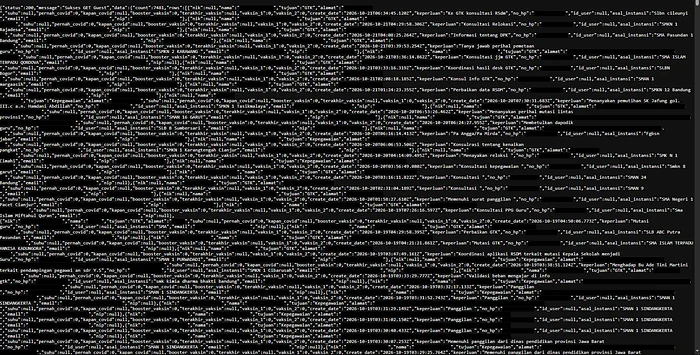
The screenshot shows the unauthenticated response returning the visitor count of 7,481 records.
Step 4: Examine the exposed fields
The number of records was not the main concern. The records contained sensitive personal data. The exposed fields included:
- National Identity Numbers (NIK)
- Full names
- Home addresses
- Phone numbers
- Email addresses
- Employee Identification Numbers (NIP)
- Institution names
- Visit purposes
- Body temperature records
- COVID-19 vaccination history
This confirmed that the issue was not only an exposed admin dashboard: the backend was also serving sensitive visitor information to unauthenticated callers.
Step 5: Stop at the export feature
The dashboard also offered an Excel export feature with date filters. Because the researcher did not want to access more data than necessary, bulk exports were deliberately not tested. The testing stayed at the level needed to verify the issue.
Root cause
The backend API that served visitor records did not enforce authentication or authorisation on its own. The data endpoint answered requests that carried no Authorization header and no session cookies, so any client that could reach the API could read the records.
The researcher classifies this as a Broken Access Control vulnerability, accompanied by missing authentication controls on administrative resources. The API did not check the caller itself.
Impact
The endpoint exposed 7,481 visitor records without any valid credentials. The records combined NIK, phone numbers, addresses and other personal details, and the researcher notes that such a combination could potentially be used for identity theft, fraud, or targeted social engineering.
The researcher estimated a CVSS 3.1 score of 7.5 (High). The exposure applied to anyone who could reach the application, since no credentials were needed. The Excel export with date filters was present but was not exercised, so the report does not quantify what a bulk export would have returned.
Fix
The vulnerability was eventually fixed after the disclosure process and follow-up. The report does not describe the specific change made. The lesson the researcher draws is that protecting an administrative page is not enough: every backend API handling sensitive information needs to enforce authentication and authorisation independently.
Responsible disclosure
Testing was kept as simple and limited as possible. Only the initial records needed to verify the issue were inspected. No data was modified, deleted, or downloaded in bulk, and personal information in the screenshots was masked.
On October 12, 2026, the report was submitted to CSIRT Jabarprov through its official reporting channel. After the disclosure process and subsequent follow-up, the vulnerability was fixed. The article was written after the fix, and no personal information or complete visitor records are shared in it.
Variants to test
- Direct API access without the dashboard. Take the data endpoint a dashboard calls and request it with cookies and
Authorizationheaders stripped. A positive result is a 200 response containing records, as happened here. - Admin routes reachable without a session. Request administrative paths such as
/adminin a fresh browser profile. A positive result is a rendered dashboard rather than a login page or redirect. - Export endpoints with filters. Where a dashboard offers export with date filters, check whether the export endpoint enforces the same checks as the listing endpoint. A positive result is an export generated for an unauthenticated request. In this report the export was deliberately left untested.
- Other verbs on the same endpoint. If a read endpoint is unauthenticated, check whether write methods on the same resource are equally open. A positive result is a successful state-changing response without credentials. The report does not say whether this was tested.
- Sibling applications on the same platform. Government sites often share a template or backend across offices. A positive result is the same unauthenticated data response on another instance.
What happened, in plain words
A government website in West Java, Indonesia, runs a guest book. Visitors sign in when they arrive, and the entries they leave are stored so that staff can review them later. Staff do that review through an administrative dashboard, a private-looking page meant for the office's own employees.
That dashboard was reachable by anyone on the internet. There was no login page, no password prompt, nothing. Behind the dashboard sat a backend service that handed over the visitor records, and it did so without asking who was calling. The result was that 7,481 visitor records, including identity numbers, phone numbers, home addresses and health information, could be read by anyone who could load the page.
The researcher who found it reported it to the provincial computer security response team, and the problem was fixed. This article walks through what was done, in the order it was done, and explains each idea from scratch.
The target: a guest book and its dashboard
The application belongs to the West Java Provincial Education Office (Dinas Pendidikan Provinsi Jawa Barat). A guest book is an ordinary feature: a visitor arrives, signs in, and the entry is saved. Staff later open an administrative dashboard to look through those entries.
In this case the dashboard lived at the path /admin. A path is the part of a web address after the site name, the way a folder is a location inside a building. Typing the site address followed by /admin took you straight to the dashboard.
The records behind that dashboard were not trivial. Each one mixed identity and contact details with health information collected during the visit. So the application had two parts: a dashboard that people see in the browser, and a backend service that supplies the data. The security of the whole thing depended on that backend service checking who was asking.
Setup: a browser and Developer Tools
No accounts, roles or special tools are described. The researcher worked from the public internet with an ordinary browser and used the browser's Developer Tools to watch the requests the dashboard made.
Developer Tools is a panel built into every modern browser. You open it with a keyboard shortcut or a menu item, and one of its tabs lists every request the page sends and every response it receives. It is the browser's own window into the conversation between the page and the server, and it needs no installation.
No credentials were obtained or used at any point. That is the heart of the finding: the only precondition for reaching the data was being able to load the page.
Finding it
The starting point was a simple exploration of the government application. Loading /admin returned the administrative dashboard directly. There was no login page and no authentication prompt of any kind.
An exposed admin page can be a frontend configuration problem. The frontend is the part of the application that runs in your browser: the layout, the buttons, the tables. It is possible for a page to render while the data calls behind it fail, which would mean the page is visible but empty and the real protection is still in place. To tell the difference, the researcher opened Developer Tools and watched the requests the dashboard sent to the backend.
Those requests carried no Authorization header and no session cookies. The server nevertheless answered with a successful response. That combination, an unauthenticated request and a successful data response, showed the problem was in the backend rather than in how the frontend was routed.
Two terms are worth unpacking here.
A header is a small labelled line that travels with every request and response, carrying metadata rather than content. Think of the label on a parcel: it does not contain the parcel's contents, but it tells the courier who sent it and how to handle it. An Authorization header is the label a client attaches to say who it is, usually carrying a token or credentials.
A cookie is a small piece of data a website asks your browser to store and send back with later requests. It is how a site remembers that you logged in: after you sign in, the server sets a session cookie, and your browser presents it on every following request. A session is the server's memory of your logged-in visit, and the cookie is the ticket that points to that memory. No cookie means the server has no way to recognise you as a logged-in user.
Exploitation
Step 1: Reach the administrative dashboard
Requesting /admin on the application returned the dashboard with no login page and no authentication prompt. This established that the administrative interface itself was publicly reachable.
Why this step matters: before looking at data, you confirm that the door is open. If /admin had redirected to a login page, the story would have ended there.
Step 2: Inspect the backend requests
With Developer Tools open, the researcher observed the dashboard fetching visitor records from a backend API. The requests contained no Authorization header and no session cookies.
An API is the part of a website that answers requests for data rather than for pages. When the dashboard needs the list of visitors, it does not get a finished web page; it asks the API a question and receives the answer as structured data, which the page then draws on screen. A useful comparison is a restaurant: the dashboard is the dining room you sit in, and the API is the kitchen that prepares what you ordered. You never walk into the kitchen yourself, but the dining room depends on it entirely.
This step is about separating two possibilities. Either the dashboard is protected and only the page shell is visible, or the data service behind it is answering anyone. Watching the requests shows which one is true, because you can see exactly what the browser sent and what came back.
Step 3: Confirm the unauthenticated response
The server returned a successful response to those unauthenticated requests. The researcher gives this simplified example of the response body:
{ "status": 200, "message": "Sukses GET Guest", "data": { "count": 7481, "rows": [...] }}
Line by line:
- The outer braces
{and}wrap one object, a collection of labelled values. This format is called JSON, and it is how APIs commonly send data back. "status": 200is a field namedstatusholding the number 200. In HTTP, the protocol browsers and servers speak, 200 is the code for success. It is the server saying the request was understood and answered normally."message": "Sukses GET Guest"is a human-readable note.Suksesis Indonesian for success, andGET Guestdescribes the operation: a read of guest data.GETis the HTTP method used to retrieve something, as opposed to sending or changing it."data": { ... }is the field that holds the actual payload, the records themselves."count": 7481says how many records the endpoint was prepared to return."rows": [...]is where the records sit. The[...]is shorthand for a list whose contents were left out of this simplified example.
The status field is 200 and the message reads Sukses GET Guest, so the API answered the request as a normal successful read. The data.count value of 7481 is the number of visitor records the endpoint was prepared to return, with the records themselves in data.rows.
The screenshot shows the unauthenticated response returning the visitor count of 7,481 records.
Step 4: Examine the exposed fields
The number of records was not the main concern. The records contained sensitive personal data. The exposed fields included:
- National Identity Numbers (NIK)
- Full names
- Home addresses
- Phone numbers
- Email addresses
- Employee Identification Numbers (NIP)
- Institution names
- Visit purposes
- Body temperature records
- COVID-19 vaccination history
A field is one named piece of information inside a record, the way a form has a box for name and a box for address. A National Identity Number (NIK) is Indonesia's national identity number, a unique identifier tied to a person. An Employee Identification Number (NIP) is the equivalent identifier for government employees. Together these fields describe who a person is, where they live, how to reach them, and something about their health.
This confirmed that the issue was not only an exposed admin dashboard: the backend was also serving sensitive visitor information to unauthenticated callers. An unauthenticated caller is simply anyone making a request without proving who they are, which in practice means anyone at all.
Step 5: Stop at the export feature
The dashboard also offered an Excel export feature with date filters. Because the researcher did not want to access more data than necessary, bulk exports were deliberately not tested. The testing stayed at the level needed to verify the issue.
An export feature turns the records into a spreadsheet file you can download, and date filters let you choose a range of dates to include. It is a natural next step for an attacker, because it collects everything in one file. Leaving it alone is a deliberate choice: once the problem is proven, taking more data adds risk without adding proof. This restraint is part of responsible testing.
Root cause
The backend API that served visitor records did not enforce authentication or authorisation on its own. The data endpoint answered requests that carried no Authorization header and no session cookies, so any client that could reach the API could read the records.
Authentication is the check that you are who you claim to be, like a bouncer comparing your face to your ID. Authorisation is the check that you are allowed to do what you are trying to do, like the same bouncer checking whether your ticket covers the VIP room. They are separate questions, and an application needs both.
The researcher classifies this as a Broken Access Control vulnerability, accompanied by missing authentication controls on administrative resources. Access control is the set of rules deciding who may reach what. When those rules are missing or not applied, the result is broken access control. The API did not check the caller itself.
A comparison: a building might put a lock on the front door but leave the loading bay open. Anyone who walks around the back gets in without a key. Here the admin page was the front door and the API was the loading bay.
Impact
The endpoint exposed 7,481 visitor records without any valid credentials. The records combined NIK, phone numbers, addresses and other personal details, and the researcher notes that such a combination could potentially be used for identity theft, fraud, or targeted social engineering.
Social engineering means manipulating a person into doing something, such as revealing information or clicking a link, by using details that make the approach convincing. Knowing someone's full name, address, phone number and workplace makes a fake message far more believable.
The researcher estimated a CVSS 3.1 score of 7.5 (High). CVSS is a standard scoring system for the severity of a security flaw; 3.1 is the version of the system used, and the score runs from 0 to 10, with 7.5 sitting in the High band. The exposure applied to anyone who could reach the application, since no credentials were needed. The Excel export with date filters was present but was not exercised, so the report does not quantify what a bulk export would have returned.
Fix
The vulnerability was eventually fixed after the disclosure process and follow-up. The report does not describe the specific change made. The lesson the researcher draws is that protecting an administrative page is not enough: every backend API handling sensitive information needs to enforce authentication and authorisation independently.
In plain terms, the lock has to be on the kitchen, not only on the dining room door. If the data service checks every caller for itself, it does not matter whether someone finds the dashboard or calls the API directly.
Responsible disclosure
Responsible disclosure is the practice of telling the owner of a system about a flaw privately, giving them time to fix it, and only then publishing what you learned. It is the difference between reporting a broken window to the shopkeeper and announcing it to the street.
Testing was kept as simple and limited as possible. Only the initial records needed to verify the issue were inspected. No data was modified, deleted, or downloaded in bulk, and personal information in the screenshots was masked.
On October 12, 2026, the report was submitted to CSIRT Jabarprov through its official reporting channel. CSIRT stands for Computer Security Incident Response Team, a group that receives and handles security reports for an organisation. After the disclosure process and subsequent follow-up, the vulnerability was fixed. The article was written after the fix, and no personal information or complete visitor records are shared in it.
Variants to test
These are the same checks applied more widely, useful once you understand the pattern above.
- Direct API access without the dashboard. Take the data endpoint a dashboard calls and request it with cookies and
Authorizationheaders stripped. A positive result is a 200 response containing records, as happened here. - Admin routes reachable without a session. Request administrative paths such as
/adminin a fresh browser profile. A positive result is a rendered dashboard rather than a login page or redirect. - Export endpoints with filters. Where a dashboard offers export with date filters, check whether the export endpoint enforces the same checks as the listing endpoint. A positive result is an export generated for an unauthenticated request. In this report the export was deliberately left untested.
- Other verbs on the same endpoint. If a read endpoint is unauthenticated, check whether write methods on the same resource are equally open. A positive result is a successful state-changing response without credentials. The report does not say whether this was tested.
- Sibling applications on the same platform. Government sites often share a template or backend across offices. A positive result is the same unauthenticated data response on another instance.
Glossary
- API: the part of a website that answers requests for data rather than for pages, and supplies what the visible page displays.
- Authentication: the check that a caller is who they claim to be.
- Authorisation: the check that a caller is allowed to do what they are attempting.
- Authorization header: a labelled line sent with a request that carries proof of identity, such as a token.
- Backend: the server-side part of an application that stores and serves data, as opposed to the frontend you see.
- Broken Access Control: a flaw where the rules deciding who may reach what are missing or not enforced.
- Cookie: a small piece of data a site asks your browser to store and send back with later requests, often used to remember a login.
- Credentials: information used to prove identity, such as a username and password.
- CSIRT: Computer Security Incident Response Team, a group that receives and handles security reports.
- CVSS 3.1: a standard scoring system, version 3.1, for rating the severity of a security flaw from 0 to 10.
- Developer Tools: a panel built into browsers that shows the requests and responses a page exchanges with servers.
- Endpoint: a specific address on a server that answers a particular kind of request.
- Export: a feature that turns stored records into a downloadable file, such as a spreadsheet.
- Field: one named piece of information inside a record.
- Frontend: the part of an application that runs in your browser.
- GET: the HTTP method used to retrieve something without changing it.
- Header: a small labelled line travelling with a request or response that carries metadata rather than content.
- HTTP: the protocol browsers and servers use to exchange requests and responses.
- JSON: a text format for structured data, built from labelled values and lists.
- NIK: Indonesia's national identity number, a unique identifier tied to a person.
- NIP: an employee identification number for government employees.
- Path: the part of a web address after the site name, such as
/admin. - Responsible disclosure: reporting a flaw privately to its owner, allowing time to fix it, then publishing.
- Session: a server's memory of a logged-in visit, pointed to by a session cookie.
- Social engineering: manipulating a person into acting or revealing information by using convincing personal details.
- Status 200: the HTTP response code meaning the request succeeded.
- Unauthenticated: made without proving who you are.
- Vulnerability: a weakness in a system that can be used to cause harm or gain unauthorised access.

