Unauthenticated API Access Exposed User PII: How a Simple OPTIONS Request Led to a Broken Access Control Finding
A user-list API endpoint returned paginated user records, including email addresses, full names and department details, to a requester who was not logged in. An unauthenticated attacker could therefore harvest personal information about users without any credentials.
 Published on medium.com
Bug Bounty
The full write-up lives on its author's site
It belongs to its author, so we link to it rather than copy it. The other two tabs are our own rewrites, checked against it.
Context
This write-up comes from testing a web application in an authorised environment. The application had a login page, and its frontend and API were served from different origins:
Frontend:
https://frontend.example.com
API:
https://api.example.com
Because the browser treats these as different origins, it may perform a CORS preflight before sending the actual login request. The login endpoint was:
/api/users/auth/login/
The user-list endpoint, which became the subject of the finding, was:
/api/users/
Setup
The researcher used Burp Suite to capture the login flow and inspect the requests. The testing was done in an authorised environment. The report does not name the program, the application, or any software versions.
Finding it
The starting point was the login page. After capturing the login flow in Burp Suite, one request stood out:
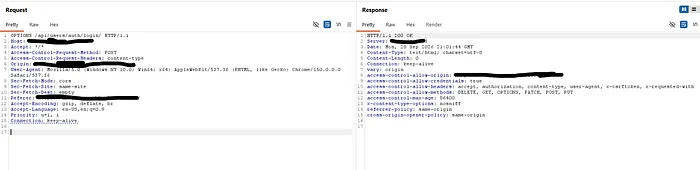
OPTIONS /api/users/auth/login/ HTTP/1.1Host: api.example.comAccept: */*Access-Control-Request-Method: POSTAccess-Control-Request-Headers: content-typeOrigin: https://fd.example.com
At first the researcher did not fully understand why the browser was sending an OPTIONS request before the actual login request, so the next step was to investigate it.
The OPTIONS request is a CORS preflight. The browser sends something like:
OPTIONS /api/users/auth/login/
Origin: https://frontend.example.comAccess-Control-Request-Method: POSTAccess-Control-Request-Headers: content-type
In plain terms, the browser is asking the API: I am coming from this origin, I want to send a POST request with this header, are you allowing me to do that? The server can answer with CORS headers such as:
Access-Control-Allow-Origin: https://frontend.example.comAccess-Control-Allow-Credentials: trueAccess-Control-Allow-Methods: POST
If the browser is satisfied with that response, it proceeds with the actual request. The preflight itself was not the vulnerability; it was the clue that led to the API structure.
Exploitation
Step 1: Move from the login path to the API structure
Instead of focusing only on the login request, the researcher looked at the API structure. After understanding the application logic flow, the idea was to try manipulating the path. The request sent was:
GET /api/users/ HTTP/1.1Host: api.example.com
The server responded:
HTTP/1.1 200 OKContent-Type: application/json
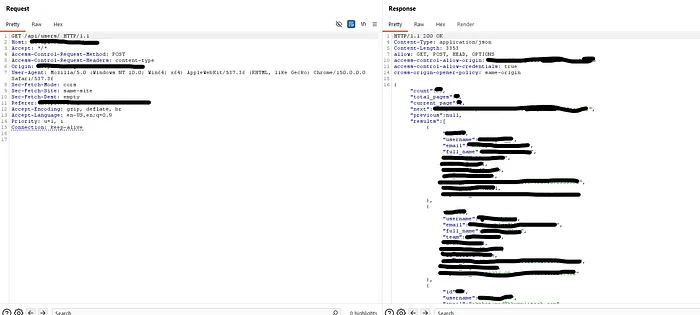
The response contained a paginated list of users. For example, it returned fields such as:
{ "userid": 00, "username": "example_user", "email": "[redacted]", "full_name": "Example User", "department": "HR", "date_joined": "...", }
Step 2: Repeat the request while logged out
The important test was to request the endpoint while logged out of the platform: no authenticated session, no login, no user credentials. The request was again:
GET /api/users/
The server still returned the user data. That changed the nature of the finding. It was no longer simply a discovered API endpoint; it became an unauthenticated requester accessing an API function that contains user information.
The two resources involved are completely different:
| Resource | Path |
|---|---|
| Login endpoint | /api/users/auth/login/ |
| User-list endpoint | /api/users/ |
The first request was related to CORS preflight. The second request accessed a user-list API.
Step 3: Assess what the response exposed
The response was not just an identifier:
{ "id": 99}
It included username, email, full name, department, registration date and last login information. Depending on the application's intended privacy model, these fields can constitute personal or sensitive information. OWASP identifies unauthorised exposure of sensitive information as a consequence or category associated with access-control failures, including CWE-200.
In this particular case, though, the first and strongest problem is not necessarily that the API returned too many fields. The bigger problem is that an unauthenticated user could access the endpoint at all.
Root cause
The actual security issue was that the user-list function did not appear to enforce the authentication and authorisation boundary that should have protected the data. The report does not describe the server-side code, so the precise implementation mistake is not stated; what is clear is that the endpoint answered anonymous requests with user data.
The researcher frames the lesson around status codes. A 200 OK is not automatically a vulnerability, and a 401 Unauthorized is not automatically secure. The question that matters is whether the server enforces the application's intended authorisation policy. The expected behaviour would be:
Expected:
Anonymous → 401Normal user → limited dataAdmin → full user list
If instead the behaviour is:
Anonymous → 200 + full user list
then there is an authorisation problem.
Impact
An unauthenticated requester, with no session, no login and no credentials, could retrieve a paginated list of users containing username, email, full name, department, registration date and last login information.
Fix
Based on the finding, the user-list function should enforce the authentication and authorisation boundary that protects the data, so that anonymous requests are rejected and each authenticated role only receives the data it is entitled to.
Variants to test
- Sibling paths of an observed endpoint. When a preflight or login request reveals a path such as
/api/users/auth/login/, try trimming the path to its parent, for exampleGET /api/users/. - Repeat every interesting request without a session. Send the same request with no cookies or tokens.
- Compare roles against the expected policy. Check anonymous, normal user and admin separately.
- Inspect preflight requests for hidden API structure. CORS preflight
OPTIONSrequests can reveal endpoints and methods that the UI does not obviously call. - Check the fields returned, not just the status. A
200with a small object may still contain PII.
What happened, in plain words
A security researcher was testing a website that had given permission for this kind of testing. While watching the traffic between the browser and the site, he noticed a request that looked odd, asked himself why the browser was sending it, and followed that question. It led him away from the login page to a different part of the site's API, and that part returned a list of users, including personal details, to a request made while logged out.
This article walks through the same steps slowly, for someone who has never done security testing. Every request shown is copied exactly as it appeared. Where a term is new, it is explained the first time it comes up, and there is a glossary at the end.
The pieces you need to know first
Before the steps make sense, here are a few ideas in everyday language.
A web application is a program you use through a browser. You see pages and buttons; behind them, a server does the real work.
Frontend and backend. The frontend is the part that runs in your browser: the pages, the forms, the buttons. The backend (also called the server, or the API) is the part that holds the data and answers questions. Think of a restaurant: the frontend is the menu and the waiter, the backend is the kitchen. You never walk into the kitchen yourself; you ask the waiter, and the waiter asks the kitchen.
An API is the set of addresses the frontend uses to ask the backend for things. Each address is called an endpoint. An endpoint is like a specific counter in a large office: one counter for logging in, another for fetching your profile, another for listing users. The frontend sends a request to an endpoint, and the endpoint sends back a response.
HTTP requests and methods. A request is a message the browser sends to a server. It has a method, which says what kind of action it is. The two you will see here are GET (please give me something) and POST (here is some data, please process it). There is also OPTIONS, explained below.
Headers. A request carries small labelled lines called headers, which give extra information: who is asking, what kind of data they want, and so on. They are like the notes on the outside of an envelope.
A session, a cookie and a token. When you log in, the server needs a way to recognise you on your next request, because HTTP itself has no memory. It gives your browser a small piece of data, usually stored as a cookie or a token, which the browser sends back with every later request. Think of a cloakroom ticket: the attendant gives you a ticket when you hand in your coat, and the ticket is what proves the coat is yours. If a request arrives with no ticket, the server should treat it as a stranger.
Authentication and authorisation. Authentication is proving who you are (logging in). Authorisation is deciding what you are allowed to do once you are known. A stranger should be stopped at authentication; a logged-in normal user should be stopped at authorisation from seeing an admin's data.
Broken access control is the name for the class of bug where the server fails to apply those rules: it lets someone reach something they should not. It is not a flaw in the lock's design; it is a door that was simply left unlocked.
PII stands for personally identifiable information: data that can identify a real person, such as a name, an email address or a department.
Origins and CORS. A browser treats a web address as having an origin, which is the combination of protocol, host and port. https://frontend.example.com and https://api.example.com are different origins even though they look similar. By default a browser refuses to let a page from one origin read responses from another, a rule called the same-origin policy. CORS (Cross-Origin Resource Sharing) is the controlled exception: the server can say, in its response, which other origins are allowed to talk to it. Before sending certain cross-origin requests, the browser first asks permission with a small OPTIONS request called a preflight. It is like phoning a restaurant before arriving with a large group: are you open, can we come, will you accept us?
Burp Suite is a tool that sits between your browser and the internet and records every request and response, so you can read them and replay them. Think of it as a recording device for the conversation between browser and server.
The setup
The testing happened in an authorised environment, meaning the owner of the application had agreed to it. The application had a login page. Its frontend and its API were served from different origins:
Frontend:
https://frontend.example.com
API:
https://api.example.com
Because the browser sees these as two different origins, it may perform a CORS preflight before sending the actual login request. The login endpoint was:
/api/users/auth/login/
The endpoint that later became the subject of the finding, the user list, was:
/api/users/
Notice how the two paths sit next to each other. The login path is a longer address that starts with the user-list path.
Finding it
The researcher opened Burp Suite, captured the login flow, and looked through the requests. One request stood out:
OPTIONS /api/users/auth/login/ HTTP/1.1Host: api.example.comAccept: */*Access-Control-Request-Method: POSTAccess-Control-Request-Headers: content-typeOrigin: https://fd.example.com
Line by line, in plain words:
OPTIONS /api/users/auth/login/ HTTP/1.1says: this is anOPTIONSrequest, aimed at the login endpoint, using version 1.1 of the HTTP protocol.OPTIONSdoes not ask for data; it asks what is allowed.Host: api.example.comnames the server being asked.Accept: */*says the browser will accept a response in any format.Access-Control-Request-Method: POSTsays: if you let me through, I intend to send aPOSTrequest.Access-Control-Request-Headers: content-typesays: that request will carry acontent-typeheader, which describes the format of the data being sent.Origin: https://fd.example.comsays which page is asking. This is the browser declaring where it is calling from.
At first the researcher did not fully understand why the browser was sending an OPTIONS request before the actual login request, so he started investigating. That question, why is the browser sending this, is the whole method here: a request you cannot explain is a thread worth pulling.
What that OPTIONS request actually is
Seeing OPTIONS /api/users/auth/login/ can be confusing if you are new. The researcher first wondered whether OPTIONS was somehow part of the login itself. It is not. It is a CORS preflight.
The browser sends something like:
OPTIONS /api/users/auth/login/
Origin: https://frontend.example.comAccess-Control-Request-Method: POSTAccess-Control-Request-Headers: content-type
In simple language, the browser is asking the API: I am coming from this origin, I want to send a POST request with this header, are you allowing me to do that? The server can answer with CORS headers such as:
Access-Control-Allow-Origin: https://frontend.example.comAccess-Control-Allow-Credentials: trueAccess-Control-Allow-Methods: POST
Those three response headers mean:
Access-Control-Allow-Originnames the origin that is permitted to read the response.Access-Control-Allow-Credentials: truesays the real request may carry the user's credentials, such as cookies.Access-Control-Allow-Methods: POSTsays which methods are permitted.
If the browser is satisfied with that answer, it goes ahead with the actual request. The preflight itself was not the vulnerability. It was the clue: it showed the shape of the API and gave the researcher a path to explore.
Step 1: From the login path to the API structure
Instead of focusing only on the login request, the researcher looked at the API structure. After understanding how the application's logic flowed, the idea was to try manipulating the path, that is, editing the address in the request to see what else the server would answer. The request sent was:
GET /api/users/ HTTP/1.1Host: api.example.com
Line by line:
GET /api/users/ HTTP/1.1asks the server to give back whatever lives at/api/users/. The path has been shortened: the login endpoint was/api/users/auth/login/, and this request stops at/api/users/, the parent of that path. It is like noticing a door labelled Room 12A and trying the door labelled Room 12.Host: api.example.comnames the server.
And the server responded:
HTTP/1.1 200 OKContent-Type: application/json
HTTP/1.1 200 OKis the status line.200means the request succeeded.Content-Type: application/jsonsays the body is in JSON, a text format for structured data that both humans and programs can read.
The response contained a paginated list of users, meaning the users were returned in pages, a batch at a time rather than all at once. For example, it returned fields such as:
{ "userid": 00, "username": "example_user", "email": "[redacted]", "full_name": "Example User", "department": "HR", "date_joined": "...", }
In plain words, each entry in the list is one person, described by labelled fields: an internal user id, a username, an email address, a full name, a department and a joining date. This is exactly the kind of data a company keeps about its staff, and it is the kind of data that should not be public.
Step 2: The important test, am I logged out?
The crucial question was whether this endpoint cared who was asking. So the researcher requested it while logged out of the platform: no authenticated session, no login, no user credentials. The request was again:
GET /api/users/
This is the same request as before, but sent with no cloakroom ticket: no cookie, no token, nothing that identifies a user. The server still returned the user data.
That changed the nature of the finding. It was no longer simply a case of having discovered an API endpoint. It became a case of an unauthenticated requester, someone with no identity at all, being able to access an API function that contains user information.
The two resources involved are completely different:
| Resource | Path |
|---|---|
| Login endpoint | /api/users/auth/login/ |
| User-list endpoint | /api/users/ |
The first request was related to CORS preflight. The second request accessed a user-list API. Keeping these apart matters, because it is easy to confuse the thing that led you to a door with the door itself.
Step 3: What the response actually exposed
The response was not just an identifier:
{ "id": 99}
The response was not just an identifier. What came back instead included username, email, full name, department, registration date and last login information. Depending on the application's intended privacy model, these fields can constitute personal or sensitive information. OWASP, a well-known non-profit that documents application security risks, identifies unauthorised exposure of sensitive information as a consequence or category associated with access-control failures, including CWE-200, a catalogue entry for exposure of sensitive information to an unauthorised party.
In this particular case, though, the first and strongest problem is not necessarily that the API returned too many fields. The bigger problem is that an unauthenticated user could access the endpoint at all. Returning fewer fields would not fix a door that should have been locked.
Why it happened
The actual security issue was that the user-list function did not appear to enforce the authentication and authorisation boundary that should have protected the data. In other words, the check that should have asked who are you and are you allowed to see this did not appear to be applied on this endpoint. The report does not describe the server-side code, so the precise implementation mistake is not stated; what is clear is that the endpoint answered anonymous requests with user data.
The researcher frames the lesson around status codes. A 200 OK is not automatically a vulnerability, and a 401 Unauthorized is not automatically secure. A status code is just the server's short reply about how the request went; it says nothing on its own about whether the right person made the request. The question that matters is whether the server enforces the application's intended authorisation policy. The expected behaviour would be:
Expected:
Anonymous → 401Normal user → limited dataAdmin → full user list
Read that as a rulebook: a stranger gets 401, which means you are not allowed in; a normal logged-in user gets a limited view; an administrator gets the full list. If instead the behaviour is:
Anonymous → 200 + full user list
then there is an authorisation problem.
What the impact was
An unauthenticated requester, with no session, no login and no credentials, could retrieve a paginated list of users containing username, email, full name, department, registration date and last login information. The exposure applies to the users present in that list. The report does not state how many users were returned or whether the endpoint was reachable without any other precondition.
What the fix would be
Based on the finding, the user-list function should enforce the authentication and authorisation boundary that protects the data, so that anonymous requests are rejected and each authenticated role only receives the data it is entitled to.
Things worth trying yourself
These are the general lessons drawn from the finding, written as things to test on an application you are authorised to test.
- Sibling paths of an observed endpoint. When a preflight or login request reveals a path such as
/api/users/auth/login/, try trimming the path to its parent, for exampleGET /api/users/. A positive result is a200with a JSON body containing records rather than an authentication error. - Repeat every interesting request without a session. Send the same request with no cookies or tokens. A positive result is the same data coming back as when authenticated.
- Compare roles against the expected policy. Check anonymous, normal user and admin separately. A positive result is anonymous receiving the same data as an admin, or a normal user receiving more than the limited set.
- Inspect preflight requests for hidden API structure. CORS preflight
OPTIONSrequests can reveal endpoints and methods that the UI does not obviously call. A positive result is a path or method that responds with data when requested directly. - Check the fields returned, not just the status. A
200with a small object may still contain PII. A positive result is fields such as email, full name, department or login information in a response to an unauthenticated request.
Glossary
- API: the set of addresses a frontend uses to ask a backend for data or actions.
- Authentication: proving who you are, usually by logging in.
- Authorisation: the rules about what a known user is allowed to see or do.
- Broken access control: a bug where the server fails to apply those rules and lets someone reach data or actions they should not.
- Burp Suite: a tool that records and lets you replay the requests and responses between a browser and a server.
- Cookie: a small piece of data a server asks the browser to store and send back on later requests, often used to recognise a logged-in user.
- CORS (Cross-Origin Resource Sharing): the mechanism by which a server tells the browser which other origins may read its responses.
- CWE-200: a catalogue entry describing exposure of sensitive information to someone not authorised to see it.
- Endpoint: one specific address in an API, such as
/api/users/. - Frontend: the part of an application that runs in the browser.
- GET: an HTTP method meaning please give me something.
- Header: a labelled line in a request or response carrying extra information.
- HTTP: the protocol browsers and servers use to exchange requests and responses.
- JSON: a text format for structured data, made of labelled fields and values.
- OPTIONS: an HTTP method that asks what is allowed at an address rather than asking for data.
- Origin: the combination of protocol, host and port that a browser uses to decide whether two addresses are the same site.
- OWASP: a non-profit that documents common application security risks.
- Paginated: returned in pages, a batch at a time rather than all at once.
- PII (personally identifiable information): data that can identify a real person, such as a name or email address.
- POST: an HTTP method meaning here is some data, please process it.
- Preflight: the small
OPTIONSrequest a browser sends first to ask permission for a cross-origin request. - Request: a message a browser sends to a server.
- Response: the message a server sends back.
- Same-origin policy: the browser rule that stops a page from one origin reading responses from another unless allowed.
- Session: the server's memory of a logged-in user across several requests.
- Status code: the short number in a response saying how the request went, such as
200or401. - Token: a piece of data, similar in role to a cookie, that proves a request comes from a logged-in user.
200 OK: the status code meaning the request succeeded.401 Unauthorized: the status code meaning the request was not allowed because the requester is not authenticated.

