Unauthenticated S3 Write Access to Remote Code Execution: Anatomy of a Cloud Misconfiguration
The application's S3 bucket, which also served as the live webroot, allowed unauthenticated write access. An attacker could upload a PHP web shell and execute commands on the host, leading to remote code execution.

Engagement type: Authorized penetration test (training lab environment) Classification: Public / Educational
The full write-up lives on its author's site
It belongs to its author, so we link to it rather than copy it. The other two tabs are our own rewrites, checked against it.
Context
This is a write-up of an authorised penetration test carried out against a single externally facing Linux host in a HackTheBox training lab. The target simulates the web presence of a fictional concert ticketing company called "The Toppers": a static concert-ticket booking page with non-functional booking logic, backed by cloud object storage that is compatible with AWS S3.
The feature at the centre of the report is the storage layer. The bucket does not merely hold static assets: it is the live webroot for the public site, so files placed in it are served, and interpreted, by the web server. The report describes the finding as a critical-severity vulnerability, an S3 bucket with unauthenticated write access that allowed an external, unauthenticated actor to upload arbitrary files into the production web directory and obtain remote code execution (RCE) on the host.
The report frames this as a practical demonstration of a well documented class of cloud misconfiguration, and argues that cloud storage permissions must be treated with the same rigour as traditional server access controls.
Setup
- Target: a single Linux host at
[redacted]. - Authorisation: testing was conducted exclusively inside an isolated HackTheBox lab environment under the platform's terms of use. No production systems were involved.
- Starting knowledge: black-box. No credentials or internal documentation were provided at the start.
- Goal: identify and responsibly chain vulnerabilities to determine maximum achievable impact. Flag capture was used as the lab's proof-of-impact marker.
- Methodology: network and service reconnaissance, web application enumeration, subdomain and virtual host discovery, cloud service interaction and configuration review, exploitation and privilege verification, then post-exploitation impact confirmation.
Tools used across the engagement include curl with verbose output, the AWS CLI (configured with arbitrary placeholder credentials), and a locally hosted reverse shell payload. The report does not give versions for any of them.
Finding it
Network reconnaissance
An initial service scan was performed to fingerprint the attack surface.

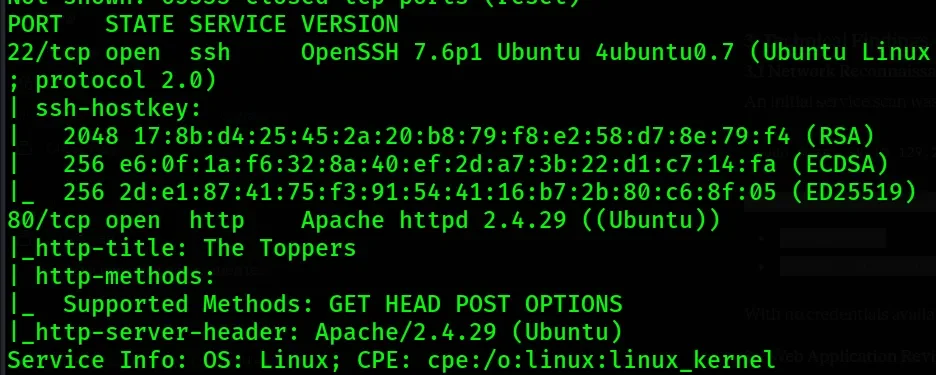
Two services were exposed:
- Port 22, SSH
- Port 80, HTTP (Apache)
Web application review
With no credentials available for SSH, the web service was chosen as the primary entry point. An initial request was made with curl and verbose output enabled, to inspect server headers and raw response behaviour before opening a browser.
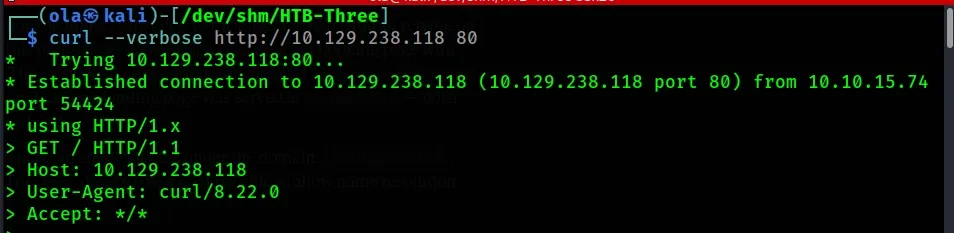
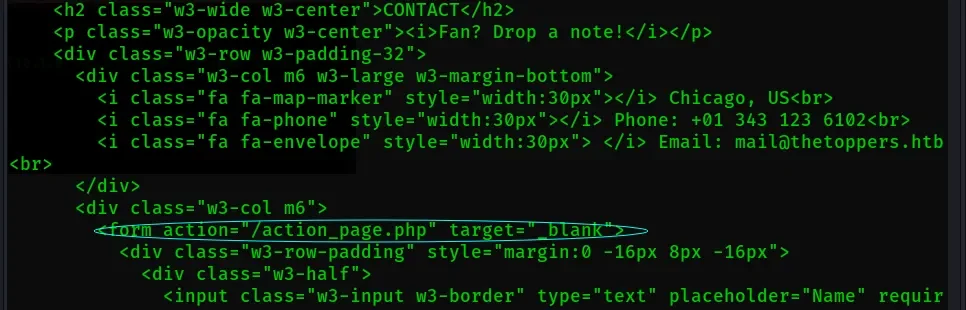
The response returned the full HTTP headers alongside the page's HTML source. That confirmed the server identification and allowed the markup to be inspected inline without browser developer tools. The page was a static concert-ticket booking page with non-functional booking logic. The embedded form submitted to /action_page.php, and navigation confirmed the landing page was served at /index.php, both consistent with a PHP backend.
The contact section referenced an email address under the domain thetoppers.htb, which did not resolve yet. The domain was added to the local hosts file so that name resolution would work during testing.

Virtual host enumeration
Because the site used a custom domain, the host was assessed for additional virtual hosts sharing the same IP. This is a common configuration in which one server differentiates applications by the HTTP Host header.
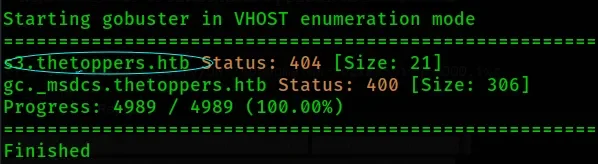
The enumeration disclosed a previously unknown subdomain, s3.thetoppers.htb, which was not linked from anywhere on the public site. The report classifies this as information disclosure through infrastructure naming conventions, with low to medium severity and an impact of information disclosure and attack surface expansion.

The new subdomain was added to the local hosts file to allow name resolution during testing.
After adding the subdomain to the hosts file, browsing to it returned the following.

The response signature is characteristic of an S3-compatible object storage service, in this case a LocalStack-emulated AWS S3 endpoint.
Exploitation
Step 1: Query the storage service
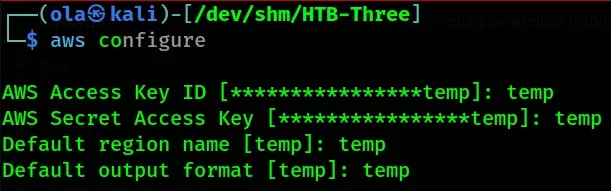
The AWS CLI was configured with arbitrary placeholder credentials, because the endpoint did not enforce authentication. The storage service was then queried directly.
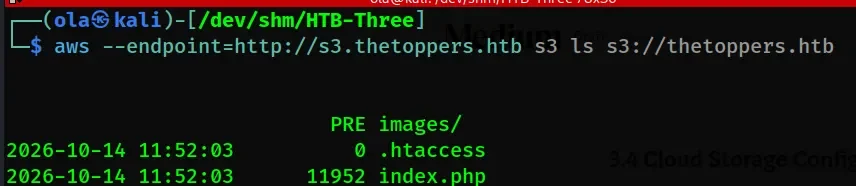
Result: the bucket contents, index.php, .htaccess and an images/ directory, matched exactly the files served by the public website. This confirmed that the production webroot was being served directly from the S3 bucket and, critically, that the bucket accepted unauthenticated write operations.
The report calls this the core vulnerability: a storage layer intended for static assets was both world-writable and directly executable by the web server, collapsing the separation between data storage and code execution that should exist in any secure architecture.
Step 2: Upload a web shell
To validate impact, a minimal PHP web shell was constructed.

This file was uploaded directly to the bucket.

The file was uploaded directly to the bucket. Because the bucket was synced live to the public web root, the shell became immediately accessible and executable.

Result: the server returned output confirming command execution in the context of the web service user, validating unauthenticated remote code execution.
Step 3: Stage a reverse shell
To move from a one-shot web shell to a stable interactive session, a reverse shell was staged. The report describes four parts: an attacker-side listener, a payload written to shell.sh, local hosting of that payload, and triggering it through the existing web shell.
Attacker-side listener:

Payload (shell.sh):

Payload delivery, hosted locally:

Triggered via the existing web shell:

Result: an interactive shell was established on the target, confirming full remote command execution capability and completing the attack chain from unauthenticated network access to host compromise.
Step 4: Verify impact
Access to a sensitive file at a fixed system path was used as the lab's confirmation of successful compromise.
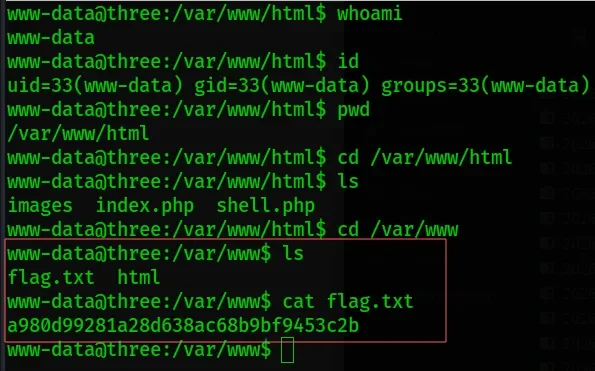
In a real engagement, this step stands in for confirming access to sensitive application data, configuration files or credentials, demonstrating that the vulnerability chain leads to genuine data exposure and not just theoretical code execution.
Root cause
The bucket that served the public website accepted unauthenticated writes. The web server treated that same bucket as its document root and executed PHP files placed in it. Any file an anonymous actor could upload was therefore both reachable over HTTP and interpreted as code.
The report's risk analysis describes the conditions plainly: attack complexity low, with no authentication bypass or advanced tooling required; privileges required none; user interaction none; impact full remote code execution and complete compromise of the web host; exploitability trivial once the misconfiguration was identified.
Two design decisions combined to make this possible. First, the bucket accepted unauthenticated writes. Second, storage and execution were not separated: content synced from object storage shared a path with interpretable code such as .php, .jsp or .asp. The report also notes that the internal storage endpoint was discoverable through a predictable subdomain naming pattern.
Impact
An unauthenticated external actor could upload arbitrary files into the production web directory and have them executed by the web server. In this lab that produced command execution as the web service user, then an interactive shell, then access to a sensitive file at a fixed system path. The report is explicit that the last step stands in for reading sensitive application data, configuration files or credentials, so the demonstrated impact is full host compromise and the potential for genuine data exposure.
The report places the finding in the wider context of real-world incidents where organisations suffered data breaches because of improperly scoped S3 bucket permissions, including publicly writable buckets, missing authentication on internal storage APIs, and buckets serving as direct application code repositories.
Fix
The report gives recommendations rather than describing changes made to the lab. They are:
- Enforce least-privilege bucket policies. Buckets backing production applications should never allow public or unauthenticated write access. Write access should be restricted to specific IAM roles tied to the deployment pipeline.
- Separate storage from execution. Static assets served from object storage should be isolated from any directory the web server treats as executable. User-uploaded or dynamically synced content should never share a path with interpretable code.
- Avoid exposing internal infrastructure via guessable subdomains. Internal endpoints such as storage APIs, admin panels and staging environments should not be discoverable through predictable naming patterns, and should sit behind network-level access controls rather than obscurity alone.
- Implement WAF rules to detect and block uploads of script files to object storage endpoints exposed to the internet.
- Audit cloud storage configurations regularly with automated tools such as AWS Config, Scout Suite and Prowler, to catch public-write misconfigurations before they reach production.
Variants to test
The same chain generalises to other targets. Each item below is a concrete thing to try, with the signal that tells you it worked.
- Enumerate virtual hosts on a shared IP. When a site uses a custom domain, probe for sibling names, especially infrastructure-style ones such as
s3.,storage.,assets.oradmin.. A positive result is a host that answers differently from the main site and is not linked from any public page. - Fingerprint the storage endpoint. Request the discovered host and look for the response signature of an S3-compatible service. A positive result is a service banner or error document characteristic of object storage rather than the web application.
- Test anonymous read and write with placeholder credentials. Configure the AWS CLI with arbitrary values and list the bucket. A positive result is a listing that matches files served by the public site, which shows the bucket is the webroot. Then attempt an upload; success without valid credentials confirms unauthenticated write.
- Check whether uploaded files are executed. Upload a harmless interpreter-specific file into the bucket and request it over HTTP. A positive result is the server executing it rather than returning it as static content, which turns write access into code execution.
- Look for live sync between bucket and webroot. Compare bucket contents with the files the site serves. An exact match, including directories such as
images/, indicates the bucket is synced to the document root, so anything uploaded becomes immediately reachable. - Escalate from one-shot execution to an interactive session. Use the confirmed execution primitive to fetch and run a staged payload while a listener is waiting. A positive result is an interactive shell in the context of the web service user.
- Confirm real data exposure. Read a sensitive file at a known system path. A positive result shows the chain reaches genuine data rather than only theoretical code execution.
What happened, in plain words
A security tester was given permission to attack a practice computer in a training lab called HackTheBox. The computer pretended to belong to a small concert ticketing company called "The Toppers". The tester found that the company's website was stored in a cloud storage bucket, and that this bucket accepted unauthenticated write operations. Because the website executed PHP files placed in the bucket, the tester could upload a small PHP program and make the server run it. That gave the tester control of the machine.
The report calls this a critical-severity vulnerability. In plain terms: the front door of the website was also the place where anyone could leave a package, and the website would open and run whatever was inside.
This is a beginner's version of that report. It explains every idea from scratch, follows the same steps in the same order, and shows the same commands the tester used. If you can use a browser and a computer, you can follow it.
1. Scope and rules of engagement
Before any testing, the report sets out the boundaries. This matters in real security work: you only attack what you are allowed to attack.
- Target: one Linux computer at
[redacted]. An IP address is like a street address for a computer on a network. Linux is an operating system, the software that runs a computer, similar in role to Windows or macOS. - Authorisation: the testing happened only inside an isolated HackTheBox lab, under the platform's terms of use. No real company systems were touched. "Isolated" means the lab is a closed playground, cut off from the rest of the internet.
- Starting knowledge: black-box. This means the tester began with no passwords and no internal documents, like a stranger who only knows the address of a building.
- Goal: find weaknesses and chain them together to see how much damage is possible. In the lab, capturing a "flag" (a hidden text string placed on the machine) was used as proof that the tester really got in.
2. Methodology
The tester followed a standard order of work, the same way a burglar might first walk around a building, then try windows, then doors:
- Network and service reconnaissance: find out which doors (services) the computer has open.
- Web application enumeration: look closely at the website.
- Subdomain and virtual host discovery: look for other websites hiding on the same computer.
- Cloud service interaction and configuration review: examine the storage service and its settings.
- Exploitation and privilege verification: use the weakness and check what access it gives.
- Post-exploitation impact confirmation: prove that real data could be reached.
3. Technical findings
3.1 Network reconnaissance
A service scan was run first. A service scan is an automated check that asks a computer, port by port, "is anything listening here, and what is it?" A port is a numbered channel on a computer, like a numbered door on a building. Different services listen on different doors.
Result: two services were exposed:
- Port 22, SSH
- Port 80, HTTP (Apache)
SSH (Secure Shell) is a way to log in to a computer remotely through a text terminal, and it normally needs a username and password or a key. HTTP is the protocol your browser uses to fetch web pages. Apache is a popular web server program, the software that hands out web pages when a browser asks for them. With no SSH password available, the tester chose the web service as the way in.
3.2 Web application review
The tester sent a request with curl and verbose output turned on. curl is a command-line tool that fetches a web address and prints the response, a bit like a browser but without the pictures. "Verbose" means it also prints the technical details of the conversation, such as the response headers. Headers are small pieces of information a server sends alongside a page, such as which software it runs.
The response included the full HTTP headers and the page's HTML source. HTML is the code that describes a web page's structure. Seeing the source directly let the tester read the page's markup without opening browser developer tools.
The page was a static concert-ticket booking page whose booking logic did not actually work. "Static" means the page is a fixed file, not generated fresh for each visitor. Two details stood out:
- The embedded form submitted to
/action_page.php. - The landing page was served at
/index.php.
Both file names end in .php. PHP is a programming language commonly used for websites, and a .php file is not just displayed by the server: the server runs it as a program. This told the tester the site was built on PHP.
The contact section mentioned an email address under the domain thetoppers.htb. A domain is a human-friendly name for a computer, like a street name instead of a set of coordinates. At this point the name did not resolve, meaning the tester's computer could not turn it into an IP address. To fix that, the tester added the domain to the local hosts file. The hosts file is a small list on your own computer that maps names to IP addresses, checked before the normal internet lookup. Adding an entry there is like writing a name and address in your personal phone book so you can call without asking directory enquiries.
3.3 Virtual host enumeration
Because the site used a custom domain, the tester checked whether the same computer was hosting other websites. This is common: one server can host many sites and decide which one to show based on the HTTP Host header. The Host header is the part of a web request that says which site name the visitor is asking for, like telling a receptionist which company you want inside a shared office building.
The enumeration found a subdomain that was not linked from anywhere on the public site: s3.thetoppers.htb. A subdomain is a name placed in front of a domain, such as s3. before thetoppers.htb. The report calls this information disclosure through infrastructure naming conventions: the name itself leaked that a storage service existed, and it was easy to guess. It rates this low to medium severity, with the impact being information disclosure and a larger attack surface. Attack surface means all the ways an attacker could try to get in.
The new subdomain was added to the local hosts file to allow name resolution during testing.
After adding the subdomain to the hosts file, the tester opened it in a browser and got this response.
The response signature is characteristic of an S3-compatible object storage service, in this case a LocalStack-emulated AWS S3 endpoint.
Unpacking that: S3 is Amazon's cloud storage service, where files are kept in containers called buckets, much like folders in a filing cabinet. "S3-compatible" means other software imitates the same interface, so the same tools work. LocalStack is software that imitates AWS services on a local machine for practice. An endpoint is the address where a service answers. The response looked like an S3 service rather than a normal web page, which told the tester what they had found.
3.4 Cloud storage configuration assessment
The tester used the AWS CLI to talk to the storage service directly. A CLI (command-line interface) is a way of operating a program by typing commands instead of clicking buttons. The AWS CLI is Amazon's command-line tool for its cloud services. It was configured with arbitrary placeholder credentials, because the endpoint did not enforce authentication. Credentials are the username and password (or keys) that prove who you are. Authentication is the process of checking that proof. Placeholder credentials are fake values, like writing "test" on a visitor form: if the service accepts them, it is not really checking anyone.
Result: the bucket contents, index.php, .htaccess and an images/ directory, matched exactly the files served by the public website. This confirmed that the production webroot was being served directly from the S3 bucket and, critically, that the bucket accepted unauthenticated write operations.
The webroot is the folder on a web server that holds the files the site serves. .htaccess is a configuration file used by Apache to control how a folder behaves. The exact match meant the bucket was not a separate backup: it was the live website folder. And the bucket accepted writes from anyone, with no login.
The report calls this the core vulnerability: a storage layer meant for static assets was both world-writable and directly executable by the web server. That collapses the separation between "data storage" and "code execution" that should exist in any secure design. A useful comparison: it is like a company's public leaflet rack being the same machine that prints and runs the company's internal programs.
3.5 Exploitation
To prove the impact, the tester built a minimal PHP web shell. A web shell is a small script placed on a server that lets an attacker run commands on it through the browser or a simple request. It is a remote control for the machine.
This file was uploaded directly to the bucket.
The file was uploaded straight into the bucket. Because the bucket was synced live to the public webroot, the shell was immediately reachable and executable.
Result: the server returned output confirming command execution in the context of the web service user, validating unauthenticated remote code execution.
Remote code execution (RCE) means an attacker can make a distant computer run their own code. "In the context of the web service user" means the commands ran with the permissions of the account the web server uses, not as a full administrator. Even so, that is a serious compromise.
3.6 Post-exploitation: interactive access
A web shell is one-shot: you send a command, you get a reply. To get a stable, interactive session, the tester staged a reverse shell. A reverse shell is a connection where the victim machine calls back to the attacker's machine and hands over a command prompt. It is "reverse" because the victim machine starts the connection back to the attacker, rather than the attacker connecting in. A listener is the attacker's program waiting for that call back, like leaving a phone off the hook and waiting for the target to ring.
The report describes four parts.
Attacker-side listener:
Payload (shell.sh):
Payload delivery, hosted locally:
Triggered via the existing web shell:
Result: an interactive shell was established on the target, confirming full remote command execution capability and completing the attack chain from unauthenticated network access to host compromise.
A payload is the code that does the actual work once it reaches the target. A shell is a text interface for running commands. Hosting the payload locally means the tester ran a small web server on their own machine so the target could download the file.
3.7 Impact verification
To confirm real compromise, the tester read a sensitive file at a fixed system path. A system path is the exact location of a file on the computer, like a full postal address for a document.
In a real engagement, this step stands in for confirming access to sensitive application data, configuration files or credentials, demonstrating that the vulnerability chain leads to genuine data exposure and not just theoretical code execution.
In other words, in a real job this step would be where you show you can read private customer data, settings files or passwords, proving the problem is real and not just a technical curiosity.
4. Risk analysis
The report summarises the risk in plain terms:
- Attack complexity: low. No authentication bypass or advanced tooling was required.
- Privileges required: none. The attacker needed no account.
- User interaction: none. No employee had to click anything.
- Impact: full remote code execution and complete compromise of the web host.
- Exploitability: trivial once the misconfiguration was identified.
The report places this in the wider context of real-world incidents where organisations suffered data breaches because of improperly scoped S3 bucket permissions, including publicly writable buckets, missing authentication on internal storage APIs, and buckets serving as direct application code repositories. An API (application programming interface) is a way for programs to talk to each other, like a service counter where one program makes a request and another answers.
5. Recommendations
The report gives fixes rather than describing changes made to the lab:
- Enforce least-privilege bucket policies. Buckets behind production applications should never allow public or unauthenticated write access. Write access should be restricted to specific IAM roles tied to the deployment pipeline. Least privilege means giving each person or program only the access it truly needs. IAM (Identity and Access Management) is the system that defines who is allowed to do what. A deployment pipeline is the automated process that ships new code to production.
- Separate storage from execution. Static assets served from object storage should be isolated from any directory the web server treats as executable. Uploaded or synced content should never share a path with interpretable code such as
.php,.jspor.asp. - Avoid exposing internal infrastructure via guessable subdomains. Internal endpoints such as storage APIs, admin panels and staging environments should not be discoverable through predictable naming patterns, and should sit behind network-level access controls rather than obscurity alone. Obscurity means relying on something being hard to guess as your only protection.
- Implement WAF rules. A WAF (Web Application Firewall) is a filter that inspects web traffic and blocks malicious requests, such as uploads of script files to internet-facing storage endpoints.
- Audit cloud storage configurations regularly with automated tools such as AWS Config, Scout Suite and Prowler, to catch public-write misconfigurations before they reach production. An audit is a systematic check of settings against a standard.
Variants to test
The same chain can be tried on other targets. Each item is a concrete step, with the signal that tells you it worked.
- Enumerate virtual hosts on a shared IP. When a site uses a custom domain, probe for sibling names, especially infrastructure-style ones such as
s3.,storage.,assets.oradmin.. A positive result is a host that answers differently from the main site and is not linked from any public page. - Fingerprint the storage endpoint. Request the discovered host and look for the response signature of an S3-compatible service. A positive result is a service banner or error document characteristic of object storage rather than the web application.
- Test anonymous read and write with placeholder credentials. Configure the AWS CLI with arbitrary values and list the bucket. A positive result is a listing that matches files served by the public site, showing the bucket is the webroot. Then attempt an upload; success without valid credentials confirms unauthenticated write.
- Check whether uploaded files are executed. Upload a harmless interpreter-specific file into the bucket and request it over HTTP. A positive result is the server executing it rather than returning it as static content, which turns write access into code execution.
- Look for live sync between bucket and webroot. Compare bucket contents with the files the site serves. An exact match, including directories such as
images/, indicates the bucket is synced to the document root, so anything uploaded becomes immediately reachable. - Escalate from one-shot execution to an interactive session. Use the confirmed execution primitive to fetch and run a staged payload while a listener is waiting. A positive result is an interactive shell in the context of the web service user.
- Confirm real data exposure. Read a sensitive file at a known system path. A positive result shows the chain reaches genuine data rather than only theoretical code execution.
Glossary
- API (application programming interface): a way for programs to talk to each other, like a service counter where one program makes a request and another answers.
- Apache: a popular web server program that hands out web pages when a browser asks for them.
- Attack surface: all the ways an attacker could try to get in.
- Authentication: the process of checking that someone is who they claim to be.
- AWS CLI: Amazon's command-line tool for operating its cloud services by typing commands.
- Black-box: testing with no prior knowledge, passwords or internal documents.
- Bucket: a container for files in cloud object storage, like a folder in a filing cabinet.
- CLI (command-line interface): operating a program by typing commands instead of clicking buttons.
- Credentials: the username and password or keys that prove who you are.
- Critical severity: the highest level of risk in a report, meaning the weakness can lead to full compromise.
- curl: a command-line tool that fetches a web address and prints the response.
- Deployment pipeline: the automated process that ships new code to production.
- Domain: a human-friendly name for a computer, like a street name instead of coordinates.
- Endpoint: the address where a service answers.
- Flag: a hidden text string placed on a lab machine, used as proof that the tester got in.
- Header: small pieces of information a server sends alongside a page, such as which software it runs.
- Host header: the part of a web request that says which site name the visitor is asking for.
- Hosts file: a small list on your own computer that maps names to IP addresses, checked before the normal internet lookup.
- HTML: the code that describes a web page's structure.
- HTTP: the protocol your browser uses to fetch web pages.
- IAM (Identity and Access Management): the system that defines who is allowed to do what.
- Information disclosure: leaking information that was not meant to be public.
- IP address: a numeric address for a computer on a network.
- Least privilege: giving each person or program only the access it truly needs.
- Listener: the attacker's program waiting for the victim machine to call back.
- LocalStack: software that imitates AWS services on a local machine for practice.
- Linux: an operating system, the software that runs a computer.
- Obscurity: relying on something being hard to guess as your only protection.
- Payload: the code that does the actual work once it reaches the target.
- PHP: a programming language commonly used for websites; the server runs
.phpfiles as programs. - Port: a numbered channel on a computer, like a numbered door on a building.
- Remote code execution (RCE): making a distant computer run your own code.
- Reverse shell: a connection where the victim machine calls back to the attacker and hands over a command prompt.
- S3: Amazon's cloud storage service, where files are kept in buckets.
- Service scan: an automated check that asks a computer, port by port, what is listening.
- Shell: a text interface for running commands.
- SSH (Secure Shell): a way to log in to a computer remotely through a text terminal.
- Static: a fixed file, not generated fresh for each visitor.
- Subdomain: a name placed in front of a domain, such as
s3.beforethetoppers.htb. - System path: the exact location of a file on a computer.
- Virtual host: one of several websites hosted on the same server, chosen by the site name in the request.
- WAF (Web Application Firewall): a filter that inspects web traffic and blocks malicious requests.
- Web shell: a small script placed on a server that lets an attacker run commands on it.
- Webroot: the folder on a web server that holds the files the site serves.



