Unauthorized Google Maps API Key Usage Cases, and Why You Need to Care
Google Maps API keys without proper restrictions can be used by anyone to make requests, consuming the owner's quota and potentially causing financial damage or denial of service. The author also found a case where a client-side feature acted as a signing oracle for a client-id protected API, allowing arbitrary signed requests.

ozguralp.medium.com
Published on ozguralp.medium.com
Bug Bounty
The full write-up lives on its author's site
It belongs to its author, so we link to it rather than copy it. The other two tabs are our own rewrites, checked against it.
Context
Google Maps API is a paid service that lets applications embed maps and search the Google Maps database from within their own products. The author notes that some of these services were free in early 2018, but the usage plan changed after that date: since then developers need an API key or a client-id solution for every API they consume.
API keys are public by design and do not expose customer data confidentiality or integrity, but they ship without any usage restriction by default. Developers have to configure the controls themselves, and the article lists three:
- HTTP Referrers: restricts use to the referrer headers defined on the key. Wildcards can cover multiple domains or paths, such as
**.example.com/*. The author warns that careless wildcards are bypassable: a key restricted with**example.com*can be used fromozguralpexample.com, and one restricted with*example.com**can be used fromexample.com.ozguralp.com. - IP Addresses: suited to a single application, for example server-to-server integrations.
- Android/iOS Apps: for keys consumed from mobile applications.
The client-id mechanism is stronger than a plain API key because every request carries an additional signature parameter generated on the application's back end with a private URL Signing Secret, which makes unauthorised use nearly impossible. A 2024 note in the article records that Google deprecated the client-id mechanism and no longer accepts new customers for it.
Setup
The article describes no account, role or tooling setup for the reader. The work was done against private programs on bug bounty platforms, and the author's own tooling is a Python script, gmapsapiscanner, published on GitHub. The script checks every Maps API endpoint against a supplied API key and generates PoC code for the ones that answer. It deliberately skips the JavaScript Maps API, because the full requests there are generated by JavaScript and cannot be reproduced from a Python script; the script includes instructions for checking that API manually. The author describes the script as beta, not yet tested by a large community, and asks for reports of bugs and false positives.
Finding it
The starting observation is that an unrestricted key is usable by anyone who can read it. The impact section frames two outcomes: consumption of the company's monthly quota, or over-billing through unauthorised usage when no API budget limits are set; and a denial of service against the service itself when a maximum bill control exists in the Google account. The author rates the second as low risk when maps only appear in peripheral parts of an application, such as a "Contact Us" page, but serious when maps are the core business, citing ride finding and tracking at Uber and hotel search at Booking.
While examining the restrictions in the Google Cloud Platform Console, the author noticed that a key can be shared across other Google services, including critical ones such as BigQuery, Cloud, Compute Engine and StackDriver. The article presents this as a new discovery whose real-world impact was still being analysed, with a possible follow-up post once enough data exists.
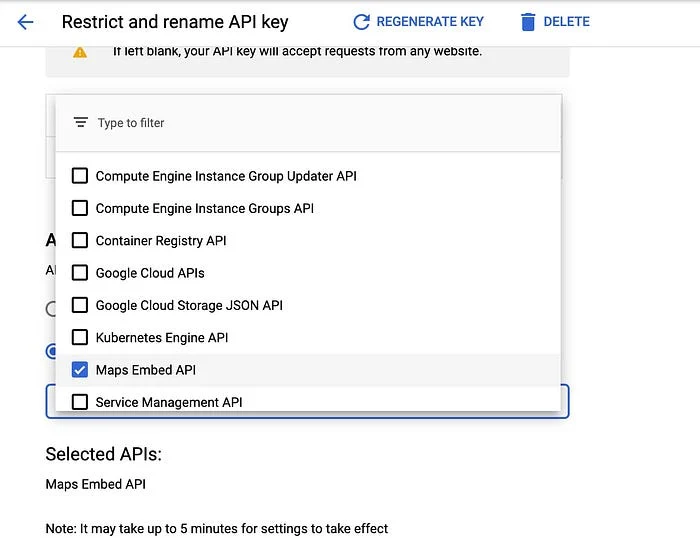
The screenshot shows different API services being shared within one key.
Exploitation
Step 1: a client-id endpoint that signs arbitrary URLs
On one of Synack's private programs, the application made a request to the back end at google-signature.json with a parameter requestUrl whose value was:
/maps/api/streetview?size=400x400&location=40,40&client=<redacted>
The response returned a Google Maps API URL carrying a signed signature parameter. The requestUrl value selects the Maps API path and its parameters, here a Street View image of 400x400 at location 40,40 for the given client id; the back end signs it with the URL Signing Secret and hands back the signed URL.
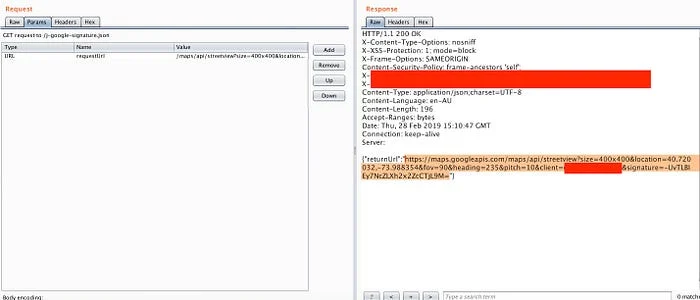
The screenshot shows the functionality being used as a signature generator.
Step 2: abuse the signing service
Because the feature takes its input from the client side, it can be used as a signing oracle: an attacker can have any API and any location signed and then use the resulting signed URL on their own system. The author reports that this was accepted for around $200.
Root cause
The design flaw is that the signing step, which exists precisely to bind requests to the legitimate application, is exposed to client-controlled input. The private URL Signing Secret stays on the server, but the server will sign whatever requestUrl it is given, so the signature no longer proves that the request originated from the application. For plain API keys, the root cause is the absence of the HTTP referrer, IP or app restrictions, which do not come by default and must be configured by the developer.
Impact
With an unrestricted key, a malicious user can consume the company's monthly quota or run up bills beyond it when no API budget limits are configured, and can cause a service-specific denial of service when a maximum bill control exists. The severity depends on how central maps are to the product. With a signing endpoint like the one above, the attacker can use the paid service from their own systems for any API and location they choose. The author also notes that a key shared with other Google services such as BigQuery, Cloud, Compute Engine and StackDriver widens the exposure, though the impact of that sharing was still under analysis.
A 2022 note at the top of the article adds an important caveat: most bug bounty platforms treat this vulnerability type as informational or low impact, so the platform or program should be checked for acceptance before reporting.
Fix
The article gives three remediations, which can be applied together or separately:
- Apply IP, referrer or app restriction controls on the key.
- Consider the client-id authentication solution with signatures instead of API keys.
- Disable APIs that are not used, to lower the exploitable surface.
Variants to test
-
Unrestricted key in client-side code. Extract the key from a page's JavaScript and call a Maps API endpoint with it. A positive result is a valid response from the Maps API.
-
Wildcard referrer bypass. If the key is restricted with a wildcard such as
**example.com*or*example.com**, send requests with a referrer ofozguralpexample.comorexample.com.ozguralp.comrespectively. A positive result is a valid response from a domain the owner did not intend to authorise. -
Signing endpoint as an oracle. Look for endpoints that take a URL or path parameter and return a signed Maps URL, as with
google-signature.jsonandrequestUrl. A positive result is a signed URL for an API and location you supplied, usable from your own system. -
Key shared across Google services. Test the same key against non-Maps Google APIs. A positive result is authorisation for a service the key was not meant to cover.
-
Other map providers. The author notes that Synack also accepts this class of issue for Bing, Baidu and Mapbox.
What happened, in plain words
Imagine a company buys a subscription to a map service, the way you might buy a monthly pass for a gym. The pass lets the company put maps inside its own website or phone app: show a location, look up an address, display a street-level photo. The company pays for what it uses, and the map provider hands it a long string of letters and numbers called an API key. That key is like a membership card: whoever shows it gets served, and the bill goes to the company that owns it.
The problem in this article is that these membership cards are often handed out with no rules attached. By default the map provider does not check who is using the card, from where, or for what. So anyone who can read the key can use the company's paid subscription for free. The company pays; the stranger gets the maps.
There is a second, more subtle problem. Some companies use a stronger setup where every request must carry a signature, a kind of tamper-proof stamp that only the company's own server can produce. That sounds safe, until the server is willing to stamp anything a visitor asks it to stamp. Then the stamp stops proving anything, and the stranger can get the company's paid service stamped for their own use.
The author reported these situations through bug bounty programmes and wrote a small tool to check for unrestricted keys automatically. The article also explains how to fix the problem and what each bug bounty platform tends to pay for it.
Background: what an API and an API key are
An API (Application Programming Interface) is a way for one piece of software to ask another piece of software to do something. A simple comparison: a restaurant menu. You do not walk into the kitchen and cook; you pick an item from the menu, the kitchen prepares it, and it comes back to you. An API is that menu. The map service's menu includes things like "give me a map image of this spot" or "turn this address into coordinates".
Google Maps API is a paid service that lets applications embed maps and search the Google Maps database from within their own products. The author notes that some of these services were free in early 2018, but the usage plan changed after that date: since then developers need an API key or a client-id solution for every API they consume.
An API key is the string that identifies which paying customer is making the request. It is not a password in the usual sense. It is meant to be visible in the page, because the visitor's browser has to send it along with every map request. The author is explicit that API keys are public by design and do not expose customer data confidentiality or integrity. In other words, leaking the key does not reveal private customer information and does not let anyone change it. What it does expose is the company's wallet.
The three restrictions, and why they matter
API keys ship without any usage restriction by default. Developers have to configure the controls themselves. The article lists three:
- HTTP Referrers: restricts use to the referrer headers defined on the key. Wildcards can cover multiple domains or paths, such as
**.example.com/*. - IP Addresses: suited to a single application, for example server-to-server integrations.
- Android/iOS Apps: for keys consumed from mobile applications.
Let us unpack each one, because the words hide simple ideas.
A referrer header is a small note the browser attaches to a request saying "I came here from this page". If you click a link on news.example that takes you to shop.example, the request to shop.example carries a note saying it came from news.example. The referrer restriction says: only serve requests whose note says they came from my own site. It is like a bouncer who only lets in people who can name the party host.
An IP address is the numeric address of a computer on the internet, roughly like a postal address. An IP restriction says: only serve requests coming from this specific address. That works well when the key is used by one server talking to another server, because that server has a stable address. It works badly for a website, because visitors come from all over.
An app restriction ties the key to a specific Android or iOS application, so the key only works when used from inside that app.
A wildcard is a stand-in character, usually *, meaning "anything here". It lets one rule cover many names. The author warns that careless wildcards are bypassable. A key restricted with **example.com* can be used from ozguralpexample.com, and one restricted with *example.com** can be used from example.com.ozguralp.com. The reason is that the pattern matches the text, not the ownership of the domain. If the rule only checks that the string contains example.com, then a domain that merely contains those letters, but belongs to someone else, passes the check. It is like a guest list that says "anyone whose name contains Bob", which lets in a stranger called Bobsmith.
The client-id and signature mechanism
The client-id mechanism is stronger than a plain API key because every request carries an additional signature parameter generated on the application's back end with a private URL Signing Secret, which makes unauthorised use nearly impossible.
A client id is a different kind of identifier, used with a paid Google Maps plan. The important difference is the signature. Think of a wax seal on an envelope. Anyone can write a letter, but only the person holding the seal can stamp it, and the recipient trusts the letter because of the stamp. Here the "seal" is a secret string called the URL Signing Secret, kept only on the company's server. The server takes the request details, combines them with the secret, and produces a short code, the signature. The map service checks the code and, if it matches, serves the request. A stranger without the secret cannot produce a valid code, so they cannot use the paid service.
A 2024 note in the article records that Google deprecated the client-id mechanism and no longer accepts new customers for it. Deprecated means the provider has stopped supporting it and will eventually switch it off, even though old customers may still be running.
Setup: what you need to follow along
The article describes no account, role or tooling setup for the reader. The work was done against private programs on bug bounty platforms, and the author's own tooling is a Python script, gmapsapiscanner, published on GitHub. The script checks every Maps API endpoint against a supplied API key and generates PoC code for the ones that answer. It deliberately skips the JavaScript Maps API, because the full requests there are generated by JavaScript and cannot be reproduced from a Python script; the script includes instructions for checking that API manually. The author describes the script as beta, not yet tested by a large community, and asks for reports of bugs and false positives.
A few terms here. A bug bounty platform is a website where companies list their systems and offer money to anyone who finds a security problem in them. A private program is one where only invited researchers can take part, rather than the whole public. Python is a programming language often used for small utility scripts. JavaScript is the language that runs inside web pages in your browser, and it is what builds many map requests on the fly. A PoC, short for proof of concept, is a small demonstration that proves a problem is real, for example a snippet that shows the key working. Beta means early, unfinished software. A false positive is a warning that turns out to be wrong.
Finding it: how an unrestricted key gets used
The starting observation is that an unrestricted key is usable by anyone who can read it, and keys are embedded in client-side code. Client-side code means the code that runs in the visitor's browser, as opposed to code on the company's server. Anything in client-side code can be read by anyone who opens the page and looks. It is like writing your locker combination on the outside of the locker.
The impact section frames two outcomes. First, consumption of the company's monthly quota, or over-billing through unauthorised usage when no API budget limits are set. A quota is an allowance: a set number of requests per month that the plan includes. Once the allowance is used up, either requests stop working or the company is charged extra. Second, a denial of service against the service itself when a maximum bill control exists in the Google account. A denial of service means making a service unavailable to the people who need it, not by breaking it, but by exhausting its allowance. If the company has set a hard cap on spending, an attacker can burn through the cap and the maps stop working for real customers.
The author rates the second as low risk when maps only appear in peripheral parts of an application, such as a "Contact Us" page, but serious when maps are the core business, citing ride finding and tracking at Uber and hotel search at Booking. The reasoning is simple: if the map is decoration, an outage is annoying; if the map is the product, an outage stops the business.
While examining the restrictions in the Google Cloud Platform Console, the author noticed that a key can be shared across other Google services, including critical ones such as BigQuery, Cloud, Compute Engine and StackDriver. The article presents this as a new discovery whose real-world impact was still being analysed, with a possible follow-up post once enough data exists.
Google Cloud Platform Console is the web dashboard where a company manages its Google cloud services. BigQuery is Google's data analysis service, Compute Engine is its virtual server service, and StackDriver is its monitoring service. The point is that one key, if it is allowed to, can unlock several different services, not just maps. That is like one office badge that opens the front door, the server room and the safe.
The screenshot shows different API services being shared within one key.
Exploitation
Step 1: a client-id endpoint that signs arbitrary URLs
On one of Synack's private programs, the application made a request to the back end at google-signature.json with a parameter requestUrl whose value was:
/maps/api/streetview?size=400x400&location=40,40&client=<redacted>
Let us read this line piece by piece, because every part has a job.
/maps/api/streetviewis the path on the map service that returns a Street View image, the kind of photo you get when you drop the little yellow figure onto a road in Google Maps.size=400x400asks for an image 400 pixels wide and 400 pixels tall. A pixel is one tiny dot of colour on a screen.location=40,40gives the coordinates of the spot to photograph. Coordinates are the latitude and longitude numbers that pin down a place on Earth.client=<redacted>identifies the paying customer, the client id. The actual value is hidden here because it is sensitive.- The
?separates the path from the parameters, and the&separates parameters from each other. A parameter is a named value passed along with a request, like a form field.
The response returned a Google Maps API URL carrying a signed signature parameter. The requestUrl value selects the Maps API path and its parameters, here a Street View image of 400x400 at location 40,40 for the given client id; the back end signs it with the URL Signing Secret and hands back the signed URL.
In plain words: the company's server had a little helper feature. You tell it what map request you want, and it replies with the same request plus a valid wax seal. The helper was meant to serve the company's own website. But nothing stopped a visitor from asking the helper to seal a request of their own choosing.
The screenshot shows the functionality being used as a signature generator.
Step 2: abuse the signing service
Because the feature takes its input from the client side, it can be used as a signing oracle: an attacker can have any API and any location signed and then use the resulting signed URL on their own system. The author reports that this was accepted for around $200.
A signing oracle is a service that will answer a question you are not supposed to be able to ask. The word oracle comes from the idea of a being that knows everything and answers any question put to it. Here the server knows the secret and will stamp anything, so the attacker effectively borrows the secret without ever seeing it. They can then use the paid map service from their own computer, for any place and any map feature, and the bill lands on the company.
Root cause
The design flaw is that the signing step, which exists precisely to bind requests to the legitimate application, is exposed to client-controlled input. The private URL Signing Secret stays on the server, but the server will sign whatever requestUrl it is given, so the signature no longer proves that the request originated from the application. For plain API keys, the root cause is the absence of the HTTP referrer, IP or app restrictions, which do not come by default and must be configured by the developer.
Root cause means the underlying reason the problem exists, as opposed to the symptom you happen to see. Fixing the symptom, for example blocking one particular request, leaves the cause in place. Fixing the cause, for example refusing to sign requests that did not come from your own pages, removes the whole class of problem.
Impact
With an unrestricted key, a malicious user can consume the company's monthly quota or run up bills beyond it when no API budget limits are configured, and can cause a service-specific denial of service when a maximum bill control exists. The severity depends on how central maps are to the product. With a signing endpoint like the one above, the attacker can use the paid service from their own systems for any API and location they choose. The author also notes that a key shared with other Google services such as BigQuery, Cloud, Compute Engine and StackDriver widens the exposure, though the impact of that sharing was still under analysis.
Severity is how serious a problem is judged to be, usually on a scale from low to critical. It depends on what an attacker can actually do and how much it costs the victim.
A 2022 note at the top of the article adds an important caveat: most bug bounty platforms treat this vulnerability type as informational or low impact, so the platform or program should be checked for acceptance before reporting. Informational means the platform records the report but does not consider it a real security bug worth paying for. This matters if you are thinking of reporting one yourself: check the programme's rules first, so you do not spend time on a report that will be closed without reward.
Fix
The article gives three remediations, which can be applied together or separately:
- Apply IP, referrer or app restriction controls on the key.
- Consider the client-id authentication solution with signatures instead of API keys.
- Disable APIs that are not used, to lower the exploitable surface.
A remediation is a fix. Exploitable surface means the total set of things an attacker could possibly abuse. Turning off services you do not use is like removing doors from a building you never enter: there is nothing left to try.
Validated means checked against a list of allowed values. If the helper only signs requests that match a known, expected pattern, a stranger cannot get arbitrary requests stamped.
Variants to test
-
Unrestricted key in client-side code. Extract the key from a page's JavaScript and call a Maps API endpoint with it. A positive result is a valid response from the Maps API. A map tile is one square image that makes up part of a map. Geocode means turning a written address into coordinates.
REQUEST_DENIEDis the error message the service returns when it refuses a request. -
Wildcard referrer bypass. If the key is restricted with a wildcard such as
**example.com*or*example.com**, send requests with a referrer ofozguralpexample.comorexample.com.ozguralp.comrespectively. A positive result is a valid response from a domain the owner did not intend to authorise. -
Signing endpoint as an oracle. Look for endpoints that take a URL or path parameter and return a signed Maps URL, as with
google-signature.jsonandrequestUrl. A positive result is a signed URL for an API and location you supplied, usable from your own system. -
Key shared across Google services. Test the same key against non-Maps Google APIs. A positive result is authorisation for a service the key was not meant to cover.
-
Other map providers. The author notes that Synack also accepts this class of issue for Bing, Baidu and Mapbox.
Glossary
- API: a way for one piece of software to ask another to do something, like a menu of available actions.
- API key: a long string that identifies which paying customer is making a request; public by design, but it should be restricted.
- App restriction: a rule tying a key to a specific mobile application.
- Beta: early, unfinished software.
- BigQuery: Google's data analysis service.
- Bug bounty platform: a website where companies offer money for reports of security problems in their systems.
- Client id: an identifier used with a paid Google Maps plan, paired with a signature instead of a plain key.
- Client-side code: code that runs in the visitor's browser and can be read by anyone.
- Compute Engine: Google's virtual server service.
- Coordinates: latitude and longitude numbers that pin down a place on Earth.
- Denial of service: making a service unavailable to the people who need it, for example by exhausting its allowance.
- Deprecated: no longer supported by the provider and eventually to be switched off.
- Exploitable surface: the total set of things an attacker could possibly abuse.
- False positive: a warning that turns out to be wrong.
- Geocode: turning a written address into coordinates.
- Google Cloud Platform Console: the web dashboard where a company manages its Google cloud services.
- HTTP referrer header: a note the browser attaches to a request saying which page the request came from.
- Informational: a report the platform records but does not treat as a real security bug worth paying for.
- IP address: the numeric address of a computer on the internet.
- JavaScript: the programming language that runs inside web pages in the browser.
- Map tile: one square image that makes up part of a map.
- Parameter: a named value passed along with a request, like a form field.
- Pixel: one tiny dot of colour on a screen.
- PoC (proof of concept): a small demonstration that proves a problem is real.
- Private program: a bug bounty programme open only to invited researchers.
- Python: a programming language often used for small utility scripts.
- Quota: a set allowance of requests per month included in a plan.
- Remediation: a fix.
- Root cause: the underlying reason a problem exists, as opposed to the symptom you happen to see.
- Severity: how serious a problem is judged to be.
- Signature: a short code produced with a secret, proving a request came from the legitimate application.
- Signing oracle: a service that will stamp or sign anything you ask it to, even though it should not.
- StackDriver: Google's monitoring service.
- URL Signing Secret: the private string kept on the server that is used to produce signatures.
- Validated: checked against a list of allowed values.
- Wildcard: a stand-in character, usually
*, meaning "anything here".



