Union based SQLI writeup
A union-based SQL injection in a URL parameter allowed the attacker to extract database version, schema, and table data. The attacker could retrieve sensitive information from the database.
 Published on medium.com
This is my first blogpost writeup and I am very excited to share this. Few days ago I’ve tested a private site, I used the site name like “site.com”.
The full write-up lives on its author's site
It belongs to its author, so we link to it rather than copy it. The other two tabs are our own rewrites, checked against it.
Context
This is a first write-up from a test against a private company site, referred to throughout as site.com. The company provides services via an IP address, and the researcher did not know the full details of the service. The testing was done in the site's user panel, following the researcher's normal routine.
Before the SQL injection work described here, the researcher found clickjacking, open redirection and XSS in the same user panel. Those were reported by mail. When the researcher asked about the update process, the company replied:
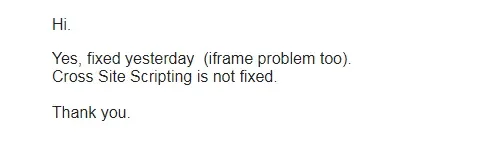
When asked about a bounty, the company replied:

The company would not accept any bug for a bounty unless it was SQL injection. By that point the earlier issues had already been fixed, and the researcher was on vacation without a PC, so no SQL injection testing could be done at the time. The researcher kept thinking there had to be a point where SQL injection was possible.
Setup
No accounts, roles, versions or specific tooling versions are given. The only tool named is auckentix, used for finding parameters. The researcher notes a general dislike of tools but acknowledges they sometimes help. The target is a private site, and the site name is replaced with site.com in the write-up.
Finding it
After returning to work, the researcher started finding all endpoints. Many parameters were searched, and none were vulnerable. Eventually one parameter was found that was vulnerable to union based injection, but no vulnerable column could be found in it. In the meantime a second parameter was found:
https://site.com/ress/xx-list/os-detail?os=xxxxxxxxx
This parameter was also SQL injection vulnerable. The researcher then applied their SQL injection learning tricks to it.
Exploitation
Step 1: Fix the query and count columns
The first step was to fix the query in a normal process, trying union based injection. The report shows the following sequence of URLs:
The ' closes the string in the original query, and -- + comments out the rest. order by 1 succeeded, order by 15 produced an error, and order by 11 succeeded, which places the column count at 11. The earlier endpoint had 14 columns but no vulnerable column.
Step 2: Find the vulnerable columns
With 11 columns established, the researcher used a union select with each position wrapped in parentheses:
This produced the vulnerable point. The vulnerable columns were 2, 3, 4 and 8.
Step 3: Print database, version, OS, port and more
With the vulnerable columns known, the researcher printed database information on the front page:
The Concat call sits in column 2 and combines a hex encoded HTML fragment ([redacted] opens a red, size 4 font tag), the string Injected by dipu, and then a series of values separated by the hex encoded <br> (0x3c62723e): @@version, database(), user(), @@VERSION_COMPILE_OS, @@HAVE_OPENSSL and @@PORT. The remaining columns 3 to 11 are filled with plain numbers to keep the union aligned.
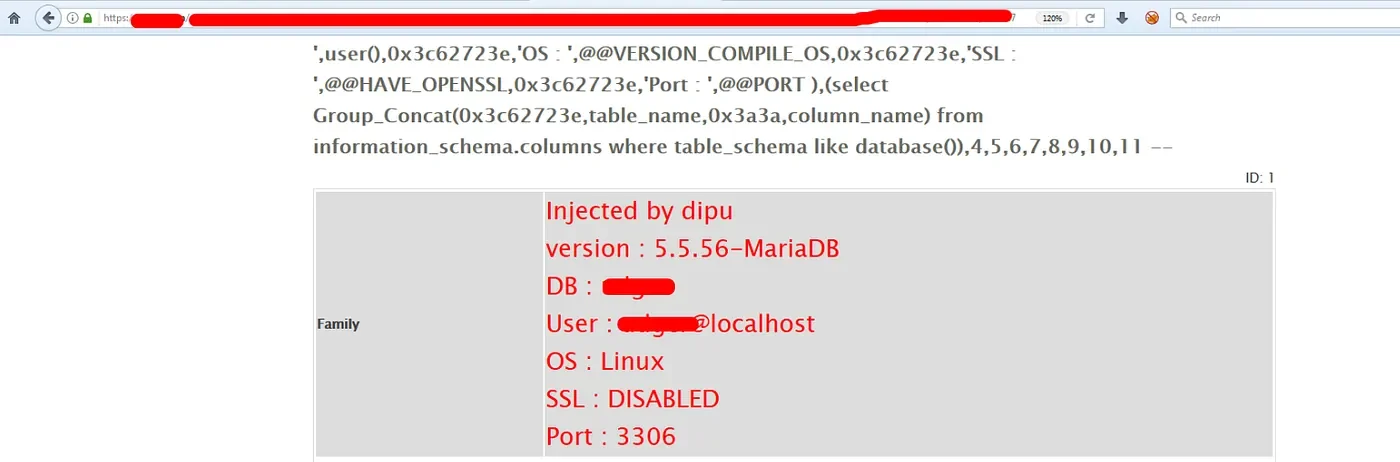
Step 4: Print the table schema
The next query adds a subquery in column 3 to list table names:
The subquery uses Group_Concat over information_schema.tables, with the hex encoded <br> as a separator, and filters on table_schema. The tables schema was printed.
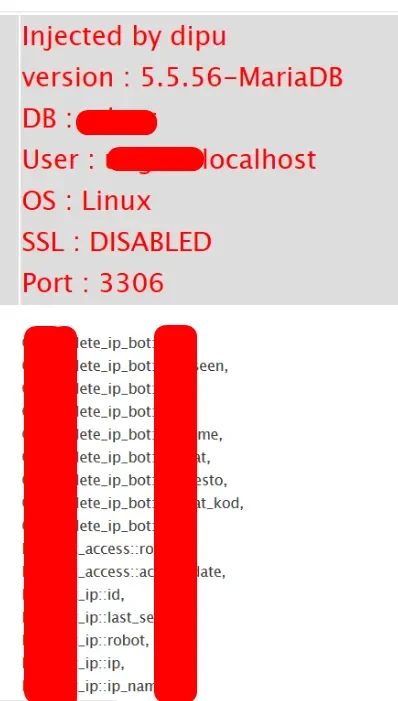
Step 5: Print table and column names, and bypass the equals sign
The next query extends the subquery to include column names:
Here the subquery reads information_schema.columns, concatenating the <br> separator, the table name, the hex encoded :: (0x3a3a) and the column name, filtered by table_schema=database().
The researcher hit a problem printing the full table via this union select query. The problem was the = sign in:
(select Group_Concat(0x3c62723e,table_name,0x3a3a,column_name) from information_schema.columns where table_schema=database())
The bypass was to change = to like:
(select Group_Concat(0x3c62723e,table_name,0x3a3a,column_name) from information_schema.columns where table_schema like database())
With that change the full table was printed.
Step 6: Dump the data
The researcher then tried to dump the data. The dios payloads did not work: zen, makman and sharik all failed. The workaround was to encode the query and print the whole table with columns. The researcher describes the result as everything being there.
The full query with the encoded dios payload is shown as:
https://site.com/xxxx/xxx-list/os-detail?os=-xxxxx'Union Select 1,Concat([redacted],’Injected by dipu’,0x3c62723e,’ version : ‘,@@version,0x3c62723e,’ DB : ‘,database(),0x3c62723e,’User : ‘,user(),0x3c62723e,’OS : ‘,@@VERSION_COMPILE_OS,0x3c62723e,’SSL : ‘,@@HAVE_OPENSSL,0x3c62723e,’Port : ‘,@@PORT ),3,4,5,6,7,8,%28%53%65%6c%65%63%74%20%65%78%70%6f%72%74%5f%73%65%74%28%35%2c%40%3a%3d%30%2c%28%73%65%6c%65%63%74%20%63%6f%75%6e%74%28%2a%29%66%72%6f%6d%28%69%6e%66%6f%72%6d%61%74%69%6f%6e%5f%73%63%68%65%6d%61%2e%63%6f%6c%75%6d%6e%73%29%77%68%65%72%65%40%3a%3d%65%78%70%6f%72%74%5f%73%65%74%28%35%2c%65%78%70%6f%72%74%5f%73%65%74%28%35%2c%40%2c%74%61%62%6c%65%5f%6e%61%6d%65%2c%30%78%33%63%36%63%36%39%33%65%2c%32%29%2c%63%6f%6c%75%6d%6e%5f%6e%61%6d%65%2c%30%78%61%33%61%2c%32%29%29%2c%40%2c%32%29%29,10,11 -- +
The encoded section in column 9 is the URL encoded form of an export_set based query that walks information_schema.columns and accumulates table and column names into a user variable. The rest of the query keeps the same banner in column 2 and the same filler columns.
Step 7: Report and response
The researcher reported the finding. The company replied quickly, turned off the site and said:
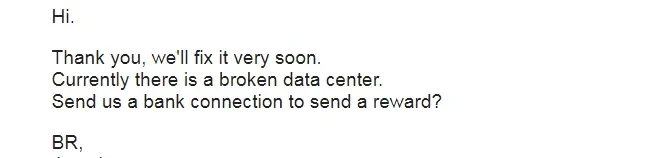
Root cause
The os parameter is concatenated into a SQL query without parameterisation, so a single quote closes the string and the rest of the statement can be rewritten. The report does not show the server side code, so the exact construction is not stated. The fact that order by and union select both worked, and that the output was reflected on the front page, indicates the query results are rendered back to the user. The = to like change suggests some filtering or parsing issue around the equals character in the injected subquery, though the report does not describe the filter itself.
Impact
Through the union based injection the researcher could read the database version, current database name, current user, compile OS, OpenSSL availability and port, then enumerate table and column names from information_schema, and finally dump the full table contents. The researcher describes the dumped data as everything being there. The report does not list which records or which personal data were exposed. The impact is limited to what the database user behind the connection is permitted to read.
Fix
The company's response was to turn off the site. The appropriate fix would be to use parameterised queries or prepared statements for the os parameter so that user input is never concatenated into SQL, and to apply least privilege to the database account used by the application.
Variants to test
- Try
order bywith increasing numbers on any parameter that looks like it feeds a query, watching for the point where the response changes from normal to an error. A positive result is a clean boundary that gives the column count. - Try a parenthesised union select such as
UNION(SELECT(1),(2),(3),...)with the discovered column count. A positive result is one or more numbers reflected in the page, identifying the vulnerable columns. - Try replacing
=withlikeininformation_schemasubqueries when the equals form fails. A positive result is the subquery returning table or column names where the equals form returned nothing. - Try
Group_Concatwith a hex encoded separator overinformation_schema.tablesandinformation_schema.columns. A positive result is a readable list of table and column names in the response. - Try an
export_setbased dump when standard dump payloads fail. A positive result is the full table content appearing in the response.
What happened, in plain words
A security researcher tested a private company website, which is called site.com throughout the write-up. The company offers services through an IP address, and the researcher did not know the full details of what those services were. The testing happened in the site's user panel, which is the area of a website you reach after logging in, where you manage your own account and data.
Before the work described here, the researcher had already found three other kinds of bug in that same user panel: clickjacking, open redirection and XSS. Those were reported by email. When the researcher asked the company about its update process, the company replied:
When the researcher then asked about a bounty (a reward paid for reporting a bug), the company replied:
The company made it clear it would not pay a bounty for any bug unless that bug was SQL injection. By then the earlier issues had already been fixed, and the researcher was on holiday without a computer, so no SQL injection testing could be done at that moment. The researcher kept thinking there had to be some place where SQL injection was possible.
This article walks through that hunt from the beginning, explaining each idea as it comes up, so that someone who has only ever used a browser can follow it.
The ideas you need before we start
A website is usually two programs talking to each other. One runs in your browser and draws the page. The other runs on a server somewhere and holds the real information: your account, your orders, the list of products. When you click something, your browser sends a request to the server, the server looks things up, and it sends back an answer that your browser displays.
A database is the part of the server that stores information in an organised way, like a very large set of spreadsheets. Each spreadsheet is called a table. Each table has named columns (for example name, email, order_id) and any number of rows (one row per person or per order).
To get information out of a database, the server sends it a question written in a language called SQL. A typical question looks like SELECT name FROM users WHERE id = 5. That means: from the table called users, give me the name column, but only for the row whose id is 5.
SQL injection is what happens when a website builds that SQL question by gluing together text you typed, without checking it. Imagine a form that asks for your order number and then builds the question SELECT * FROM orders WHERE id = <what you typed>. If you type 5, the question is fine. If you type something clever, you can change the shape of the question itself, and the database will answer a different question than the one the programmer intended. It is like a librarian who takes your written request slip and reads it out loud word for word: if you write extra instructions on the slip, the librarian follows them too.
A parameter is the part of a web address that carries a value. In https://site.com/shop?item=42, the parameter is item and its value is 42. The bit after the ? is how a page is told what to show. Parameters are the usual place where typed input reaches a database, which is why they are the usual place to look for SQL injection.
An endpoint is simply one specific address on a site that does one specific job, for example the address that returns a list of operating systems. A site has many endpoints, and finding them all is the first job of any test.
Setup
The write-up does not give accounts, roles, software versions or tool versions. The only tool named is auckentix, used for finding parameters. The researcher says they generally dislike using tools but admits they sometimes help. The target is a private site, and its real name is replaced with site.com throughout.
Finding it
After coming back from holiday, the researcher started finding all the endpoints on the site. Many parameters were tried, and none of them were vulnerable. Eventually one parameter was found that was vulnerable to union based injection, but no vulnerable column could be found in it.
Two terms there need unpacking. A union in SQL means "stick the results of a second question onto the results of the first". A union based injection is when you use that feature to make the database return your own values alongside the site's normal ones. A column is one of the named slots in a table, and when a query returns rows, each row has one value per column. To make a union work, your injected question must return exactly the same number of columns as the original one, in the same order. A vulnerable column is a column whose value actually gets printed on the page: if you put a marker in column 3 and the page shows your marker, column 3 is a place where you can read data back out.
So the first parameter was injectable, but nothing the researcher put into it came back on the page, which makes it much harder to use. In the meantime a second parameter was found:
https://site.com/ress/xx-list/os-detail?os=xxxxxxxxx
This parameter was also vulnerable to SQL injection. The researcher then applied all their SQL injection learning tricks to it.
Exploitation
Step 1: Fix the query and count columns
The first job is to make the database's question syntactically valid again after you have broken it. In SQL, text values are wrapped in single quotes, like 'hello'. If the site builds WHERE os = '<your input>' and you type a single quote, the quote you typed closes the string early, and everything after it is read as SQL rather than as text. That usually breaks the query, so you add a comment marker to tell the database to ignore the rest of the original question. In MySQL, -- (two dashes followed by a space) starts a comment, and the + in a URL is how a space is written in an address bar.
The report shows this sequence of addresses:
Line by line:
- The first address ends the value with
'and comments out the remainder with--+. The note(query fixed)means the researcher got the query back into a valid state. order by 1asks the database to sort the results by column number 1. If that column exists, the page works. The note(ok)means it did.order by 15asks it to sort by column 15. If the query only returns fewer columns than that, the database complains. The note(error)means it did complain, so there are fewer than 15 columns.order by 11asks for column 11, and the note(ok)means it worked.
Put together, 11 works and 15 does not, so the query returns 11 columns. This is the standard way to count columns: keep raising the number until the page breaks, then step back to the last number that worked. The earlier endpoint had 14 columns but no vulnerable column, which is why it was set aside.
Step 2: Find the vulnerable columns
Knowing there are 11 columns, the researcher sent a union select with each position wrapped in its own parentheses:
What this does: UNION appends a second result set to the first. SELECT(1),(2),...(11) produces one row containing the numbers 1 to 11, one per column, so the two result sets line up. If the page then displays some of those numbers, you know exactly which columns are printed back to you.
This produced the vulnerable point. The vulnerable columns were 2, 3, 4 and 8, meaning those four positions are shown on the page and can be used to carry data out.
Step 3: Print database, version, OS, port and more
With the vulnerable columns known, the researcher printed database information straight onto the page:
Line by line:
Union Selectstarts the injected row.- The first position is the plain number
1, a filler so the columns stay aligned. - The second position is a
Concat(...)call.Concatglues several pieces of text into one string. The first piece,[redacted], is a hex encoded piece of HTML that opens a red, size 4 font tag, so the output is easy to spot on the page. Then comes the literal textInjected by dipu, then0x3c62723e, which is the hex encoding of<br>, the HTML tag for a line break. Hex is just another way of writing characters: the database converts it back to text for you. - After the first line break come labelled values, each separated by another
<br>:@@version(the database server's version),database()(the name of the database currently in use),user()(the database account the website is logged in as),@@VERSION_COMPILE_OS(the operating system the database was built for),@@HAVE_OPENSSL(whether the database supports OpenSSL, a common encryption library) and@@PORT(the network port the database listens on). - The remaining positions
3,4,5,6,7,8,9,10,11are plain numbers, again just to keep the union aligned with the 11 columns of the original query.
Step 4: Print the table schema
The next query adds a subquery in column 3 to list table names:
Line by line:
- The banner in column 2 is unchanged from the previous step.
- Column 3 now holds a subquery, a question inside a question.
information_schemais a built-in catalogue that every MySQL database keeps about itself: it lists the tables, the columns, and who is allowed to read what.information_schema.tablesis the part of that catalogue listing every table. Group_Concat(0x3c62723e,table_name)collects all the table names into one long string, putting a<br>between each one so they appear on separate lines.where table_schemafilters that list to the current database's tables.- Columns 4 to 11 are fillers as before.
The tables schema was printed.
Step 5: Print table and column names, and bypass the equals sign
The next query extends the subquery to include column names:
Line by line:
- The banner in column 2 is the same as before.
- The subquery now reads
information_schema.columns, the part of the catalogue that lists every column of every table. Group_Concatglues together, for each column, a<br>, the table name,0x3a3a(the hex encoding of::, used as a visual separator) and the column name. The result is a readable list likeusers::email.where table_schema=database()limits the list to the current database.- Columns 4 to 11 are fillers.
The researcher hit a problem printing the full table with this union select query. The problem was the = sign in:
(select Group_Concat(0x3c62723e,table_name,0x3a3a,column_name) from information_schema.columns where table_schema=database())
The bypass was to change = to like:
(select Group_Concat(0x3c62723e,table_name,0x3a3a,column_name) from information_schema.columns where table_schema like database())
Why this works: = asks for an exact match, while like asks for a pattern match. For a plain value with no wildcards in it, like behaves the same as =, but it is a different keyword. With that change the full table was printed.
Step 6: Dump the data
The researcher then tried to dump the data, meaning to pull out the actual rows rather than just the structure. The dios payloads did not work: zen, makman and sharik all failed. These are names of ready-made payloads the researcher tried; none of them worked.
The workaround was to encode the query and print the whole table with columns. The researcher describes the result as everything being there.
The full query with the encoded dios payload is shown as:
https://site.com/xxxx/xxx-list/os-detail?os=-xxxxx'Union Select 1,Concat([redacted],’Injected by dipu’,0x3c62723e,’ version : ‘,@@version,0x3c62723e,’ DB : ‘,database(),0x3c62723e,’User : ‘,user(),0x3c62723e,’OS : ‘,@@VERSION_COMPILE_OS,0x3c62723e,’SSL : ‘,@@HAVE_OPENSSL,0x3c62723e,’Port : ‘,@@PORT ),3,4,5,6,7,8,%28%53%65%6c%65%63%74%20%65%78%70%6f%72%74%5f%73%65%74%28%35%2c%40%3a%3d%30%2c%28%73%65%6c%65%63%74%20%63%6f%75%6e%74%28%2a%29%66%72%6f%6d%28%69%6e%66%6f%72%6d%61%74%69%6f%6e%5f%73%63%68%65%6d%61%2e%63%6f%6c%75%6d%6e%73%29%77%68%65%72%65%40%3a%3d%65%78%70%6f%72%74%5f%73%65%74%28%35%2c%65%78%70%6f%72%74%5f%73%65%74%28%35%2c%40%2c%74%61%62%6c%65%5f%6e%61%6d%65%2c%30%78%33%63%36%63%36%39%33%65%2c%32%29%2c%63%6f%6c%75%6d%6e%5f%6e%61%6d%65%2c%30%78%61%33%61%2c%32%29%29%2c%40%2c%32%29%29,10,11 -- +
Line by line:
- The banner in column 2 is the same as before, except the font size hex is now
...3d323e(size 2) rather than size 4. - Columns 3 to 8 are plain fillers.
- Column 9 holds a long block of text where every character has been replaced by its percent-encoded form. Percent encoding is how special characters are written in a web address: for example
%20is a space,%28is(,%2cis a comma. Decoded, this block is anexport_setbased query that walksinformation_schema.columnsand accumulates table and column names into a user variable.export_setis a MySQL function that builds a delimited string, and the@variable is a scratch value the query stores things in as it goes. - Columns 10 and 11 are fillers.
Step 7: Report and response
The researcher reported the finding. The company replied quickly, turned off the site and said:
Root cause
The os parameter is glued straight into a SQL query without parameterisation, so a single quote closes the string and the rest of the statement can be rewritten. The report does not show the server side code, so the exact construction is not stated. The fact that order by and union select both worked, and that the output was reflected on the front page, indicates the query results are rendered back to the user.
Impact
Through the union based injection the researcher could read the database version, current database name, current user, compile OS, OpenSSL availability and port, then enumerate table and column names from information_schema, and finally dump the full table contents. The researcher describes the dumped data as everything being there. The report does not list which records or which personal data were exposed. The impact is limited to what the database user behind the connection is permitted to read.
Fix
The company's response was to turn off the site. The appropriate fix would be to use parameterised queries or prepared statements for the os parameter, so that user input is never glued into SQL, and to apply least privilege to the database account used by the application. Least privilege means giving that account only the permissions it actually needs, so that even if an injection happens, there is less it can reach.
Variants to test
- Try
order bywith increasing numbers on any parameter that looks like it feeds a query, watching for the point where the response changes from normal to an error. A positive result is a clean boundary that gives the column count. - Try a parenthesised union select such as
UNION(SELECT(1),(2),(3),...)with the discovered column count. A positive result is one or more numbers reflected in the page, identifying the vulnerable columns. - Try replacing
=withlikeininformation_schemasubqueries when the equals form fails. A positive result is the subquery returning table or column names where the equals form returned nothing. - Try
Group_Concatwith a hex encoded separator overinformation_schema.tablesandinformation_schema.columns. A positive result is a readable list of table and column names in the response. - Try an
export_setbased dump when standard dump payloads fail. A positive result is the full table content appearing in the response.
Glossary
- Bounty: a reward, usually money, paid by a company to someone who reports a security bug in its systems.
- Clickjacking: a trick where an attacker loads a real site inside an invisible frame on their own page, so that your clicks land on the real site's buttons without you realising.
- Column: one named slot in a database table, such as
emailororder_id; each row has one value per column. - Comment (SQL): text the database ignores; in MySQL
--starts a comment to the end of the line. - Concat: a SQL function that glues several pieces of text into one string.
- Database: the organised store of information behind a website, made of tables of rows and columns.
- Endpoint: one specific address on a site that performs one specific job.
- export_set: a MySQL function that builds a delimited string from a set of values, often used to pull many rows out in one go.
- Group_Concat: a MySQL function that collects the values from many rows into a single string, with a separator between them.
- Hex encoding: writing characters as their numeric codes, for example
0x3c62723eis the text<br>. - information_schema: a built-in MySQL catalogue that describes the database itself: its tables, columns and permissions.
- IP address: the numeric address of a machine on a network, such as the address a company uses to offer a service.
- Least privilege: giving an account only the permissions it needs for its job, and no more.
- Open redirection: a bug where a site takes a destination from the address bar and sends you there without checking, which attackers use to make malicious links look trustworthy.
- OpenSSL: a widely used library for encrypted connections.
- Parameter: the part of a web address after the
?that carries a value, such asos=xxxxx. - Parameterised query / prepared statement: a way of sending SQL where the question and the values are sent separately, so typed input can never change the shape of the question.
- Payload: the specific piece of text you send to trigger or exploit a bug.
- Percent encoding: how special characters are written in a web address, for example
%20for a space and%28for(. - Port: a numbered channel on a machine that a particular service listens on.
- Schema: the structure of a database: which tables exist and which columns each table has.
- SQL: the language used to ask a database questions and to change its contents.
- SQL injection: a bug where typed input is glued into a SQL question, letting the person typing change the question itself.
- Subquery: a question written inside another question.
- Table: one spreadsheet-like collection of data inside a database, with named columns and many rows.
- Union: a SQL keyword that appends the results of a second question onto the results of the first.
- Union based injection: SQL injection that uses
unionto make the database return your own values alongside the site's normal ones. - User panel: the part of a website you reach after logging in, where you manage your own account and data.
- User variable: a named scratch value inside a database session, written with an
@prefix, used to carry data between steps of a query. - Vulnerable column: a column whose value is actually printed on the page, so it can be used to read data back out.
- XSS (cross-site scripting): a bug where a site displays text you supplied as if it were part of the page, letting an attacker run their own code in another visitor's browser.