XSS 403 forbidden Bypass
A cookie value was reflected unescaped into a JavaScript object on the page, so an attacker could inject script through a crafted cookie. The author bypassed a filter that blocked equals signs and brackets and eventually got a prompt to execute.
 Published on medium.com
This is my second blog post and first write up about xss. I think there is no new things here that you can learn.
The full write-up lives on its author's site
It belongs to its author, so we link to it rather than copy it. The other two tabs are our own rewrites, checked against it.
Context
This is a learning write-up about a cookie injection that turned into reflected XSS. The researcher describes it as their second blog post and first XSS write-up, and points readers to the "akita" and "rahul-maini" blogs for deeper material. The target is a private site, referred to throughout as www.vuln.com (with a related www.vuln.co.uk domain appearing in a cookie value). The feature involved is a welcome/referral landing page reached at /my/refer/welcome, which takes a referral token (rt), a cid and a channel parameter, and which reads several cookies, including GA_countryCode, GA_currentDomain, RT, feature_rollercoaster_upload and ABTasty.
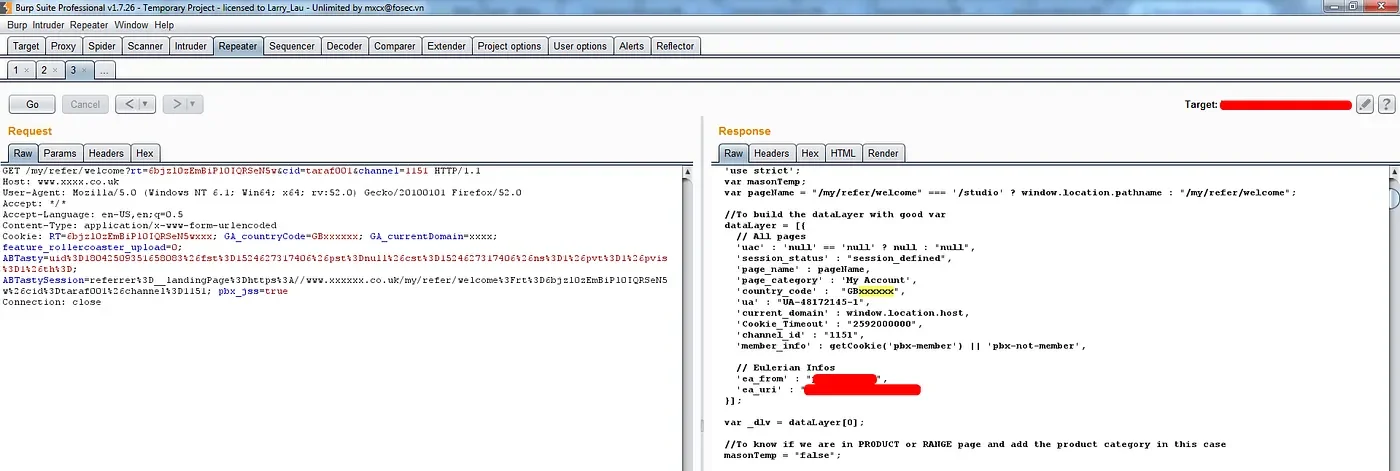
The page builds a JavaScript configuration object from these values. In the normal case the object looks like this, with the country code taken from the GA_countryCode cookie:
‘session_status’ : “session_defined”,
 ‘page_name’ : pageName,
 ‘page_category’ : ‘My Account’,
 ‘country_code’ : “GBxxxxxx”,
 ‘ua’ : “UA-48172145–1”,
 ‘current_domain’ : window.location.host,
 ‘Cookie_Timeout’ : “2592000000”,
 ‘channel_id’ : “1151”,
Setup
The only tool named in the report is Burp Repeater, used to replay and edit the request. The browser named in the request is Firefox 52.0 on Windows NT 6.1 (Windows 7), 64-bit. No account details, roles or versions of the server-side stack are given. The precondition is simply that the tester can reach the welcome page with a valid rt token and can set the GA_countryCode cookie, which in a real attack would mean getting the victim's browser to carry a crafted cookie value.
Finding it
The researcher's routine was to put a marker value such as xxxx into each parameter and watch for it coming back. In Burp Repeater, the cookie GA_countryCode=xxx was reflected inside the JavaScript configuration object in the response body. The request that showed this was:
GET /my/refer/welcome?rt=6bjzl0zEmBiPl0IQRSeN&cid=111&channel=1151 HTTP/1.1
Host: www.vuln.com
User-Agent: Mozilla/5.0 (Windows NT 6.1; Win64; x64; rv:52.0) Gecko/20100101 Firefox/52.0
Accept: */*
Accept-Language: en-US,en;q=0.5
Content-Type: application/x-www-form-urlencoded
Cookie: RT=6bjzl0zEmBiPl0IQRSeN5wxxx; GA_countryCode=GBxxxxxx”; GA_currentDomain=www.vuln.co.uk; feature_rollercoaster_upload=0; ABTasty=uid%3D18042509351658083%26fst%3D1524627317406%26pst%3Dnull%26cst%3D1524627317406%26ns%3D1%26pvt%3D1%26pvis%3D1%26th%3D;
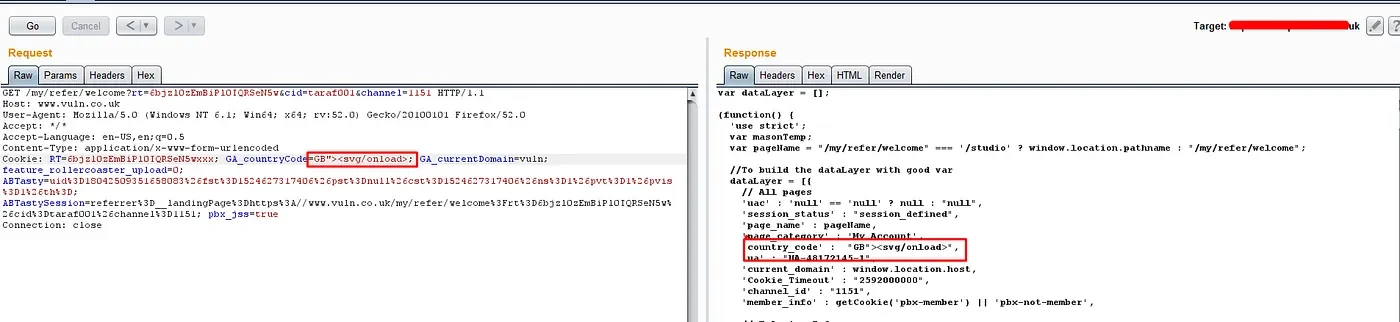
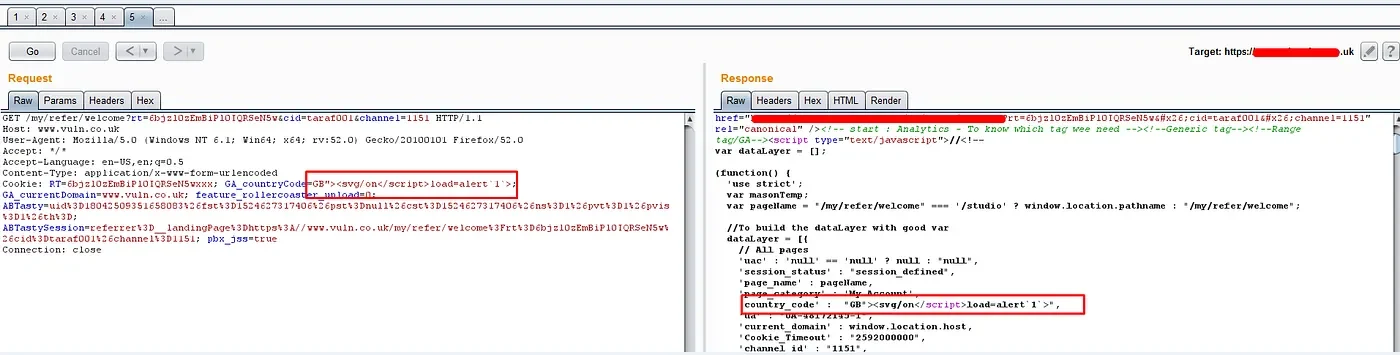
The interesting part is the GA_countryCode cookie: its value is written straight into the country_code property of the configuration object, inside double quotes. Because the value is placed inside a quoted JavaScript string, a value containing a double quote can close the string and inject syntax. The researcher confirmed this by sending "><svg/onload> and seeing it reflected unencoded:
page_name’ : pageName,
 ‘page_category’ : ‘My Account’,
 ‘country_code’ : “GB”><svg/onload>”,
 ‘ua’ : “UA-48172145–1”,
 ‘current_domain’ : window.location.host,
 ‘Cookie_Timeout’ : “2592000000”,
 ‘channel_id’ : “1151”
Exploitation
Step 1: confirm reflection and break out of the string
The "> sequence closes the country_code string, and <svg/onload> follows it in the reflected output. The reflection above shows the payload surviving intact in the response, which is the first sign that the value is not being HTML-encoded or JavaScript-escaped.
Step 2: discover the filter on =
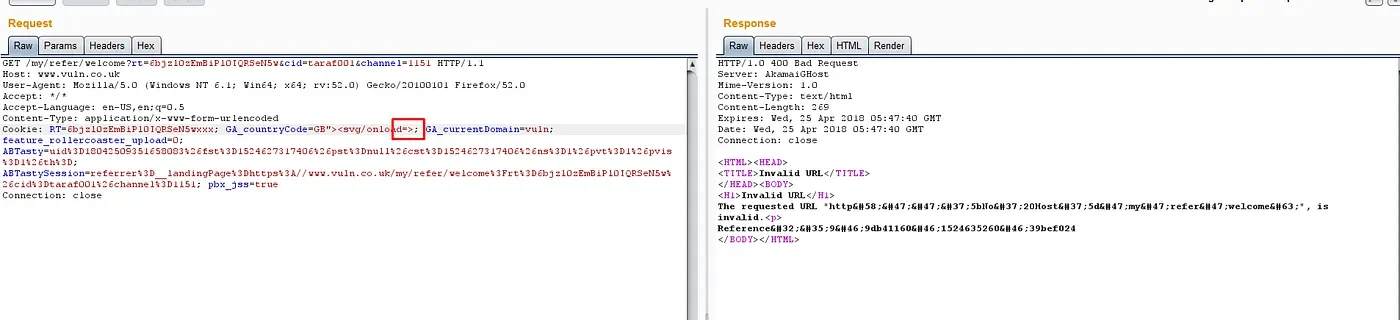
The obvious completion, "><svg/onload=>, did not work: the equals sign was blocked.
Step 3: bypass the = filter with a closing script tag
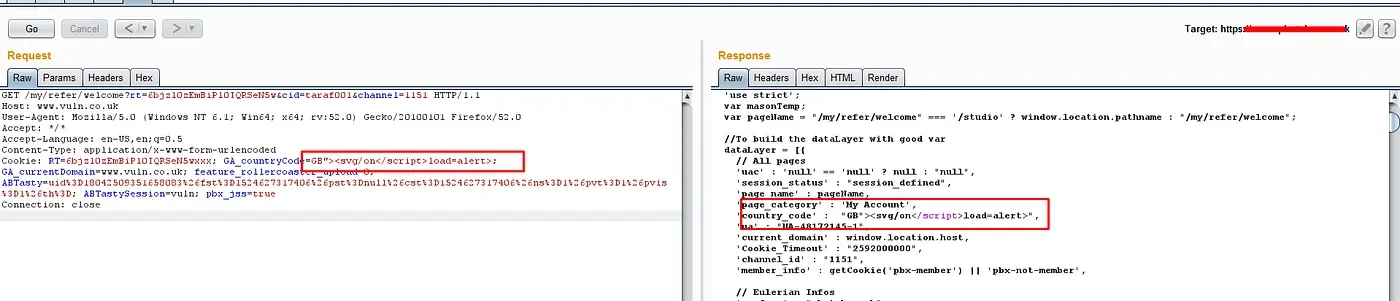
Using a technique the researcher credits to the brutelogic blog, and after noticing that alert itself was not blocked and that only = was filtered, the payload was changed to insert a </script> between on and load:
"><svg/on</script>laod=alert>
This was reflected and the filter was bypassed. The report does not explain why the split payload bypassed the filter. Note the spelling laod in the payload as written in the report.
Step 4: deal with the blocked brackets
Calling alert(1) failed because the parentheses were blocked. The researcher switched to template-literal style backticks:
"><svg/on</script>load=alert`1`>
This was accepted and reflected. However, no pop-up appeared, so although every individual character class needed for the payload had been smuggled through, the payload still did not execute.
Step 5: work around the 403 and IP block
Further attempts to get a pop-up failed. The researcher reports that the site applied many restrictions, returning Access Denied HTTP/1.1 403 Forbidden and blocking the IP. The final payload was shortened to:
"-prompt`1`-//
This worked and produced the pop-up.

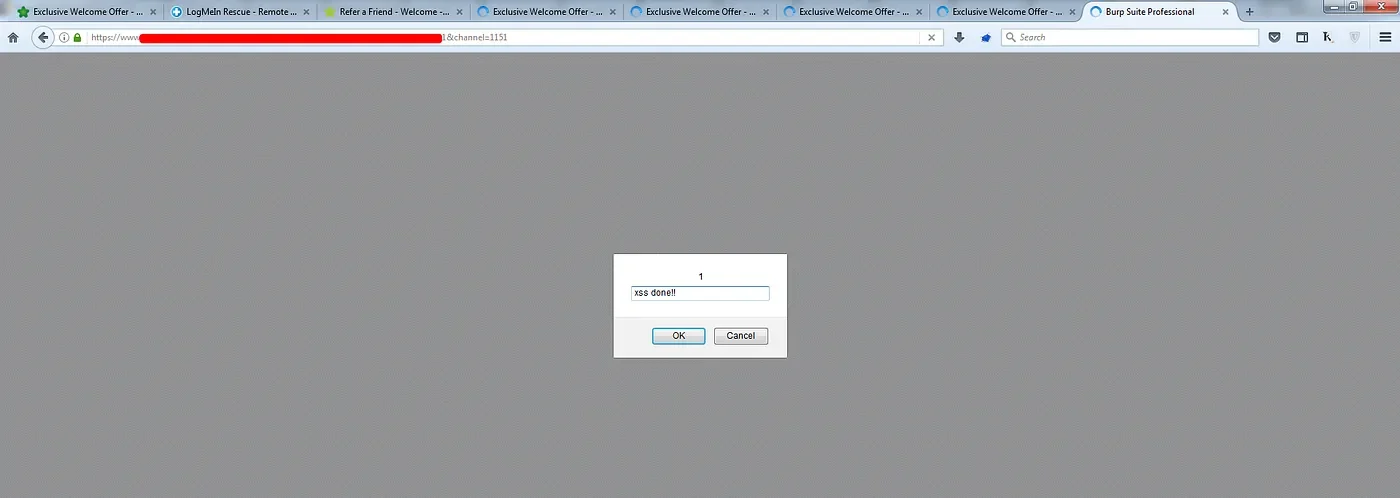
The researcher notes that this simple payload took a long time to find, and that a more knowledgeable tester would probably have found a way to bypass with a normal payload. The report does not explain why the shorter payload succeeded where the longer ones did not, nor which specific request or response produced the 403.
Root cause
The GA_countryCode cookie value is interpolated directly into a JavaScript string inside the page's configuration object without encoding or escaping. Because the value is placed between double quotes, an attacker who controls the cookie can close the string and inject markup and script. The filtering blocked = and the parentheses, while alert was not blocked; the payloads above were reflected.
Impact
It shows that the cookie value is reflected unencoded into the page's script. The researcher does not demonstrate cookie theft, account takeover or any other concrete outcome, and the report gives no severity or bounty information.
Fix
The appropriate fix is to stop interpolating the cookie value into a JavaScript string literal and instead emit it as properly encoded data, for example by JSON-encoding the value server-side and HTML-encoding it for the surrounding script context, or by reading the value from a data attribute rather than building script source from it. Character blacklists of the kind bypassed here should be replaced with context-aware output encoding.
Variants to test
- Other cookies in the same object.
GA_currentDomain,RT,feature_rollercoaster_uploadandABTastyall appear in the same request. Set each to a marker and look for it in the response body; a positive result is the marker appearing unencoded inside the configuration object. - A positive result is any of them appearing unencoded in a script block or attribute.
- Filter probing with split tokens. Send
on</script>loadstyle values and check whether the response still contains the attribute reconstructed by the parser. A positive result is a reflected payload that fires in a browser. - Parenthesis alternatives. Where
(and)are blocked, try backtick template literals as in this report, and alsoalert\u00281\u0029style escapes if the context allows them. A positive result is a pop-up with no blocked characters in the request. - Cookie delivery. Confirm whether the vulnerable cookie can be set from a subdomain or via a response header, which would let an attacker plant the payload without direct access to the victim's browser settings. A positive result is the crafted cookie being accepted and reflected on the next page load.
What happened, in plain words
A security researcher was testing a website to see whether it handled user-supplied values safely. They found that a value stored in a cookie (a small piece of text a website asks your browser to keep and send back on every visit) was being copied straight into a piece of JavaScript that the page builds. Because the value was dropped in without any cleaning, the researcher could put special characters into the cookie and make the page run their own JavaScript. That class of bug is called cross-site scripting, or XSS: the site ends up executing code that an attacker chose, as if the site itself had written it.
This is a learning write-up. The author says it is their second blog post and their first XSS write-up, and points readers to the "akita" and "rahul-maini" blogs for deeper material. The target is a private site, called www.vuln.com throughout, with a related www.vuln.co.uk domain appearing inside one of the cookie values. The feature involved is a welcome/referral landing page at /my/refer/welcome. It takes a referral token (rt), a cid and a channel parameter, and it reads several cookies, including GA_countryCode, GA_currentDomain, RT, feature_rollercoaster_upload and ABTasty.
The page builds a JavaScript configuration object from these values. Think of a configuration object as a settings sheet the page fills in before it starts working: a list of labelled values such as which country you are in and which channel brought you here. In the normal case the sheet looks like this, with the country code taken from the GA_countryCode cookie:
‘session_status’ : “session_defined”,
 ‘page_name’ : pageName,
 ‘page_category’ : ‘My Account’,
 ‘country_code’ : “GBxxxxxx”,
 ‘ua’ : “UA-48172145–1”,
 ‘current_domain’ : window.location.host,
 ‘Cookie_Timeout’ : “2592000000”,
 ‘channel_id’ : “1151”,
Line by line:
‘session_status’ : “session_defined”,sets a label called session status to the textsession_defined. A session is the period during which a site remembers who you are between page loads.‘page_name’ : pageName,stores the name of the current page.pageNameis a variable, meaning a named box that holds a value the script works out elsewhere.‘page_category’ : ‘My Account’,says the page belongs to the account area.‘country_code’ : “GBxxxxxx”,is the interesting one. The two lettersGBare the country code, and the rest is a placeholder for whatever the cookie held. This value came from theGA_countryCodecookie, and it sits inside double quotes, which is what makes the bug possible.‘ua’ : “UA-48172145–1”,looks like an analytics account identifier.‘current_domain’ : window.location.host,records the domain the browser is on.window.location.hostis a built-in browser value meaning "the host name in the address bar".‘Cookie_Timeout’ : “2592000000”,is a number, probably a lifetime for a cookie in milliseconds.‘channel_id’ : “1151”,records the marketing channel.
Setting up
The only tool the report names is Burp Repeater. Burp is a tool that sits between your browser and a website so you can look at the requests going out and the responses coming back. Repeater is the part that lets you take one captured request, edit it by hand, and send it again as many times as you like. That is exactly what you need when you are trying out different values and watching how the page reacts.
The browser named in the captured request is Firefox 52.0 on Windows NT 6.1 (that is Windows 7), 64-bit. The report gives no account details, no user roles and no versions of the software running on the server.
The only precondition is that the tester can reach the welcome page with a valid rt token and can set the GA_countryCode cookie. In a real attack, that would mean getting a victim's browser to carry a cookie value the attacker chose. How that would be done is not described in the report.
Finding it
The researcher's routine was simple: put a marker value such as xxxx into each parameter and watch for it coming back in the response. If your marker appears in the page, the page is echoing your input, and that is the first thing to check before wondering whether the echo is dangerous.
In Burp Repeater, the cookie GA_countryCode=xxx came back inside the JavaScript configuration object in the response body. The request that showed this was:
GET /my/refer/welcome?rt=6bjzl0zEmBiPl0IQRSeN&cid=111&channel=1151 HTTP/1.1
Host: www.vuln.com
User-Agent: Mozilla/5.0 (Windows NT 6.1; Win64; x64; rv:52.0) Gecko/20100101 Firefox/52.0
Accept: */*
Accept-Language: en-US,en;q=0.5
Content-Type: application/x-www-form-urlencoded
Cookie: RT=6bjzl0zEmBiPl0IQRSeN5wxxx; GA_countryCode=GBxxxxxx”; GA_currentDomain=www.vuln.co.uk; feature_rollercoaster_upload=0; ABTasty=uid%3D18042509351658083%26fst%3D1524627317406%26pst%3Dnull%26cst%3D1524627317406%26ns%3D1%26pvt%3D1%26pvis%3D1%26th%3D;
Line by line:
GET /my/refer/welcome?rt=6bjzl0zEmBiPl0IQRSeN&cid=111&channel=1151 HTTP/1.1is the request line.GETmeans "give me this page". The path is/my/refer/welcome, and everything after the?is the query string: a set of name and value pairs separated by&. Herertis the referral token,cidis111andchannelis1151.HTTP/1.1is the version of the language the browser and server speak.Host: www.vuln.comtells the server which site the request is for. One server can host many sites, so it needs to know which one you meant.User-Agent: Mozilla/5.0 (Windows NT 6.1; Win64; x64; rv:52.0) Gecko/20100101 Firefox/52.0is the browser introducing itself: Firefox 52.0 on 64-bit Windows 7.Accept: */*says the browser will accept any kind of response.Accept-Language: en-US,en;q=0.5says the browser prefers US English, with a fallback to any English.Content-Type: application/x-www-form-urlencodeddescribes the format of any body sent with the request. This request has no body, but the header is present.Cookie: ...is the line that matters. It carries every cookie the browser holds for this site, separated by semicolons.RTis the referral token,GA_countryCode=GBxxxxxx”is the country code cookie (note the stray double quote at the end of the value),GA_currentDomain=www.vuln.co.ukis the domain cookie,feature_rollercoaster_upload=0looks like a feature flag (a switch that turns a feature on or off), andABTastyis a long encoded value that looks like an analytics or A/B testing identifier. The%3Dsequences inside it are just encoded equals signs.
The interesting part is the GA_countryCode cookie. Its value is written straight into the country_code property of the configuration object, inside double quotes. Because the value sits inside a quoted JavaScript string, a value containing a double quote can close the string early and inject new syntax after it. The researcher confirmed this by sending "><svg/onload> and seeing it come back unencoded:
page_name’ : pageName,
 ‘page_category’ : ‘My Account’,
 ‘country_code’ : “GB”><svg/onload>”,
 ‘ua’ : “UA-48172145–1”,
 ‘current_domain’ : window.location.host,
 ‘Cookie_Timeout’ : “2592000000”,
 ‘channel_id’ : “1151”
Line by line:
page_name’ : pageName,and‘page_category’ : ‘My Account’,are the same settings as before.‘country_code’ : “GB”><svg/onload>”,is the key line. TheGBis the normal start of the value. Then the"closes the JavaScript string. The>closes whatever tag or attribute the script was sitting in. Then<svg/onload>opens an SVG element. SVG is a format for drawing pictures in a web page, and like many HTML elements it can carry an event handler: an attribute that names a piece of JavaScript to run when something happens.onloadmeans "when this element has finished loading". In this first test the code afteronloadis empty; the point was to see whether the characters survived.- The remaining lines are the rest of the settings, unchanged.
Exploitation
Step 1: confirm the reflection and break out of the string
The "> sequence closes the country_code string, and <svg/onload> follows it in the reflected output. The reflection above shows the payload surviving intact in the response, which is the first sign that the value is not being HTML-encoded or JavaScript-escaped. HTML encoding means replacing characters like < and > with safe stand-ins so the browser shows them as text instead of treating them as markup. JavaScript escaping means doing the same inside a script, so a quote cannot end a string early. Neither was happening here.
Step 2: discover the filter on =
The obvious completion, "><svg/onload=>, did not work: the equals sign was blocked. A filter is a check on the server that inspects input and refuses or strips parts it does not like. This one was rejecting the = character.
Step 3: bypass the = filter with a closing script tag
Using a technique the researcher credits to the brutelogic blog, and after noticing that alert itself was not blocked and that only = was filtered, the payload was changed to insert a </script> between on and load:
"><svg/on</script>laod=alert>
This was reflected and the filter was bypassed. The report does not explain why the split payload bypassed the filter. Note the spelling laod in the payload as written in the report.
Step 4: deal with the blocked brackets
Calling alert(1) failed because the parentheses were blocked. alert is a built-in browser function that shows a small pop-up box with a message; security testers use it because a pop-up appearing is easy proof that their code ran. The brackets around the 1 are how you pass a value to a function. The researcher switched to template-literal style backticks:
"><svg/on</script>load=alert`1`>
This was accepted and reflected. However, no pop-up appeared, so although every individual character class needed for the payload had been smuggled through, the payload still did not execute.
Step 5: work around the 403 and IP block
Further attempts to get a pop-up failed. The researcher reports that the site applied many restrictions, returning Access Denied HTTP/1.1 403 Forbidden and blocking the IP. A 403 is the status code a server sends when it understands your request but refuses to serve it. Blocking the IP means the server stopped answering requests from the tester's network address altogether. The final payload was shortened to:
"-prompt`1`-//
This worked and produced the pop-up. prompt is another built-in browser function that shows a box asking you to type something; like alert, it is used as visible proof that code ran. The // at the end starts a comment in JavaScript, which tells the browser to ignore the rest of the line.
The researcher notes that this simple payload took a long time to find, and that a more knowledgeable tester would probably have found a way to bypass with a normal payload. The report does not explain why the shorter payload succeeded where the longer ones did not, nor which specific request or response produced the 403.
Root cause
The GA_countryCode cookie value is inserted directly into a JavaScript string inside the page's configuration object without encoding or escaping. Because the value is placed between double quotes, an attacker who controls the cookie can close the string and inject markup and script. The filtering blocked = and the parentheses, while alert was not blocked; the payloads above were reflected. A blacklist is a list of things to forbid; it fails whenever there is a way to write the same thing that is not on the list. Context-aware output encoding means encoding a value according to exactly where it will appear (inside a script string, inside an HTML attribute, inside a URL), so the value can never break out of its slot.
Impact
It shows that the cookie value is reflected unencoded into the page's script. Running in the site's origin means the code is treated as coming from the site itself, so it can read the site's cookies and act as the logged-in user. The researcher does not demonstrate cookie theft, account takeover or any other concrete outcome, and the report gives no severity or bounty information.
Fix
The appropriate fix is to stop inserting the cookie value into a JavaScript string literal and instead emit it as properly encoded data, for example by JSON-encoding the value server-side and HTML-encoding it for the surrounding script context, or by reading the value from a data attribute rather than building script source from it. JSON is a text format for structured data, and JSON-encoding a value makes sure quotes and other special characters inside it are escaped so they cannot end the surrounding string. Character blacklists of the kind bypassed here should be replaced with context-aware output encoding.
Variants to test
- Other cookies in the same object.
GA_currentDomain,RT,feature_rollercoaster_uploadandABTastyall appear in the same request. Set each to a marker and look for it in the response body; a positive result is the marker appearing unencoded inside the configuration object. - A positive result is any of them appearing unencoded in a script block or attribute.
- Filter probing with split tokens. Send
on</script>loadstyle values and check whether the response still contains the attribute reconstructed by the parser. A positive result is a reflected payload that fires in a browser. - Parenthesis alternatives. Where
(and)are blocked, try backtick template literals as in this report, and alsoalert\u00281\u0029style escapes if the context allows them. A positive result is a pop-up with no blocked characters in the request. - Cookie delivery. Confirm whether the vulnerable cookie can be set from a subdomain or via a response header, which would let an attacker plant the payload without direct access to the victim's browser settings. A positive result is the crafted cookie being accepted and reflected on the next page load.
Glossary
- XSS (cross-site scripting): a bug where a site runs JavaScript that an attacker supplied, as if the site had written it itself.
- Cookie: a small piece of text a website asks your browser to store and send back with every request to that site.
- Configuration object: a set of labelled values a page fills in before its scripts start working.
- Variable: a named box in a program that holds a value.
- Session: the period during which a site remembers who you are between page loads.
- Burp Repeater: the part of the Burp tool that lets you edit a captured request by hand and resend it as often as you like.
- Query string: the part of a URL after the
?, made of name and value pairs separated by&. - User-Agent: the header in which a browser introduces itself, including its name and version.
- Feature flag: a switch that turns a feature on or off for a given user or page.
- SVG: a format for drawing pictures inside a web page; SVG elements can carry event handlers.
- Event handler: an attribute on an element that names JavaScript to run when something happens, such as
onloadwhen the element finishes loading. - HTML encoding: replacing characters like
<and>with safe stand-ins so the browser shows them as text rather than markup. - JavaScript escaping: making quotes and other special characters inside a script harmless so they cannot end a string early.
- Filter: a server-side check that inspects input and refuses or strips parts it does not like.
- Blacklist: a list of things to forbid; it fails whenever the same effect can be achieved in a way not on the list.
- Context-aware output encoding: encoding a value according to exactly where it will appear, so it can never break out of its slot.
alert: a built-in browser function that shows a pop-up with a message, used as visible proof that code ran.prompt: a built-in browser function that shows a pop-up asking you to type something, also used as proof that code ran.- Template literal: a JavaScript string written with backticks instead of quotes, which can contain expressions.
- Comment (
//): text in JavaScript that the browser ignores until the end of the line. - 403 Forbidden: the status code a server sends when it understands your request but refuses to serve it.
- IP block: the server refusing to answer requests from a particular network address.
- Origin: the combination of scheme, host and port that a browser uses to decide which code belongs to which site; code running in a site's origin can act as that site.
- JSON: a text format for structured data; JSON-encoding a value escapes quotes and other special characters inside it.
- Reflection: when a page echoes back a value you sent, without storing it.