Unique Rate limit bypass worth 1800$
The application used a captcha token and a security token to prevent rate limit attacks, but a header could disable the captcha check, and the security token endpoint had no rate limit and did not invalidate old tokens. An attacker could generate many valid security tokens and reuse them to bypass rate limiting on all endpoints.
 Published on infosecwriteups.com
While this is my first writeup on one of my finding of bypassing Rate limit to which I was awarded 1800$. Keeping it straight and simple, Here it goes.
The full write-up lives on its author's site
It belongs to its author, so we link to it rather than copy it. The other two tabs are our own rewrites, checked against it.
Context
This is a write-up of a rate limit bypass that earned a 1800 USD bounty. The target is described only as a company that had declared rate limiting out of scope, with a note claiming they were completely secured from any type of rate limit attack on any endpoint. The researcher decided to test that claim anyway, specifically to prove the statement wrong.
The feature under test is the anti-automation layer that sits in front of the company's endpoints. It is not a classic per-IP counter: it is a pair of per-request tokens that the client must present, and the server rejects requests that do not carry fresh values. The report does not name the product, the endpoints or the application's business function.
Setup
The researcher had been studying rate limit mechanisms for a few months and had built a checklist of bypass methodologies from other write-ups. The tools used were a Burp project file containing the captured traffic, Burp Intruder for the final attack, and a simple custom script to generate tokens. No accounts, roles or versions are described in the report.
Finding it
The researcher's starting point was the company's own claim that rate limiting was out of scope because it was fully secured. Looking at requests to any of their endpoints, two headers were responsible for preventing rate limit attacks:
X-Recaptcha-TokenX-Security-Token
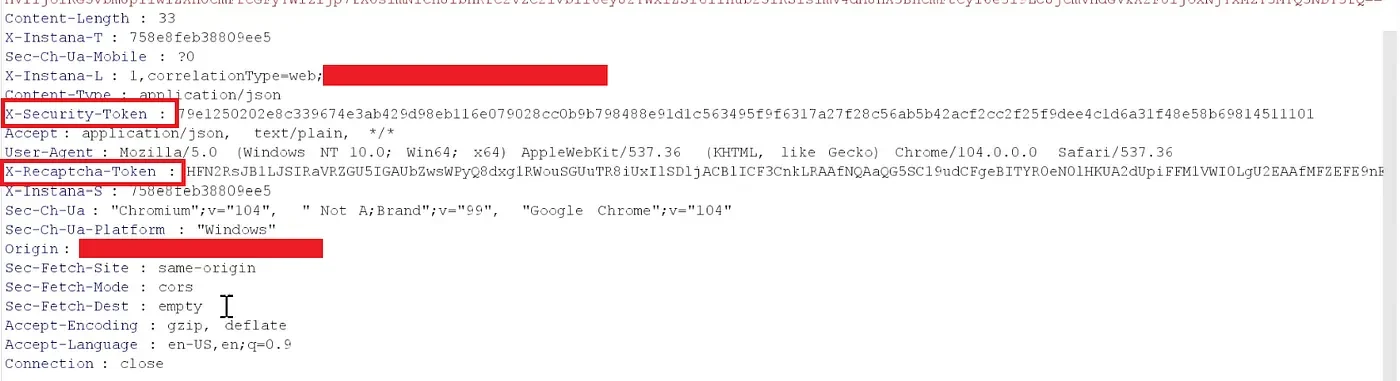
The X-Recaptcha-Token header carries the captcha token, and X-Security-Token carries a long value. On every new request, the value of both changes, so in principle the same request cannot be sent more than once. Removing X-Recaptcha-Token produced the error "captcha token invalid or not found". This is the mechanism the company considered strong.
Exploitation
Step 1: Disable the captcha check with a header
While reviewing responses, the researcher noticed a header named X-Disbaled-Recaptcha: 0 (spelling as it appears in the report). The previous header was removed from the request and this header was added with the value 1:
X-Disabled-Recaptcha: 1
Instead of the captcha error, the response changed to a different error: "Security token is invalid or alread used." The captcha token mechanism was bypassed, but the security token check still blocked the request. The researcher tried every method to get past the security token check and nothing worked, so the conclusion at that point was that the target was not vulnerable.
Step 2: Find the token generation endpoint
Some days later the researcher reopened the Burp file and went through all the endpoints again. One endpoint turned out to be responsible for generating the security token, and that endpoint alone had no rate limit mechanism. The expected behaviour of a security token is that as soon as a new one is generated, the old one expires immediately, even if it was never used.
Step 3: Confirm that old tokens stay valid
To test that expectation, the researcher manually copied 10 security tokens and sent requests carrying the header X-Disabled-Recaptcha: 1. All of the requests succeeded. The old tokens had not been invalidated when new ones were issued, so a stock of valid tokens could be accumulated and used one per request.
Step 4: Generate tokens at scale
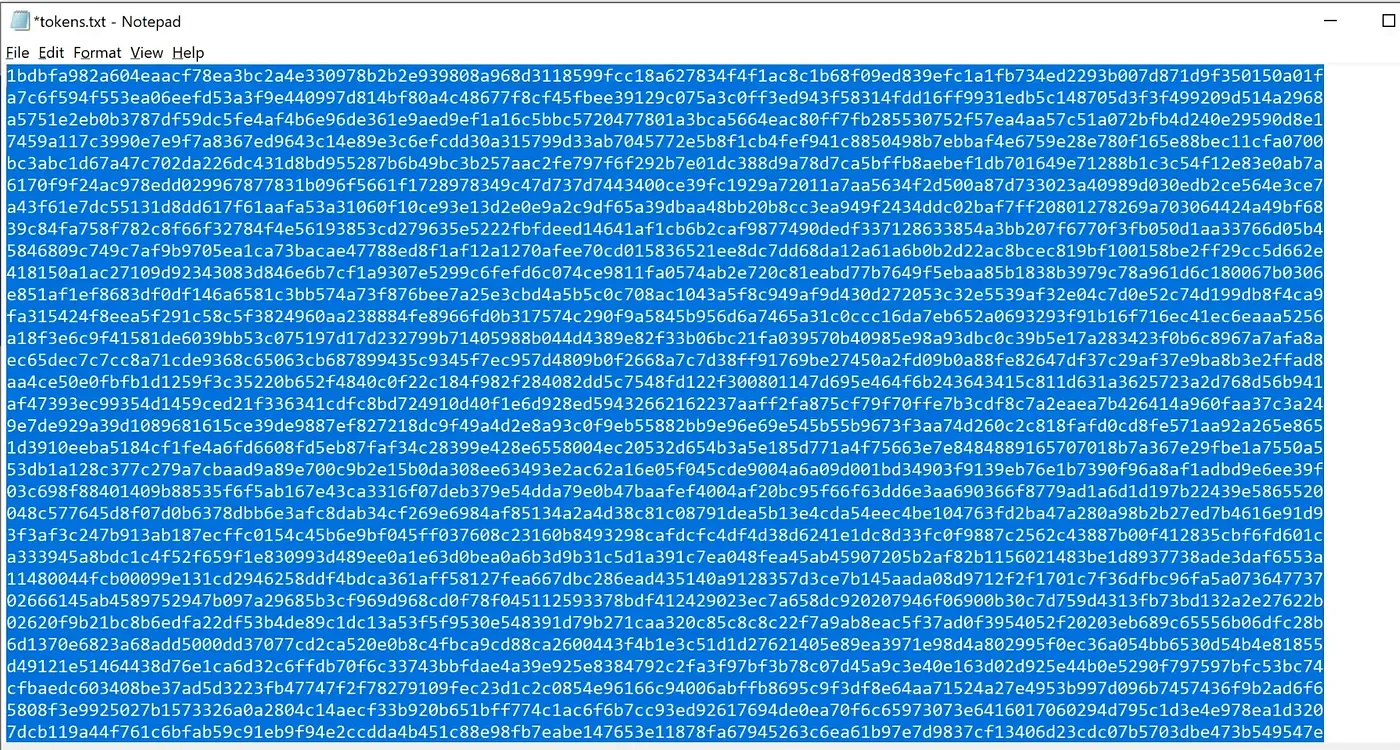
A simple script was written to create 1000 unique security tokens using the token generation endpoint found in step 2.
Step 5: Run the attack in Intruder
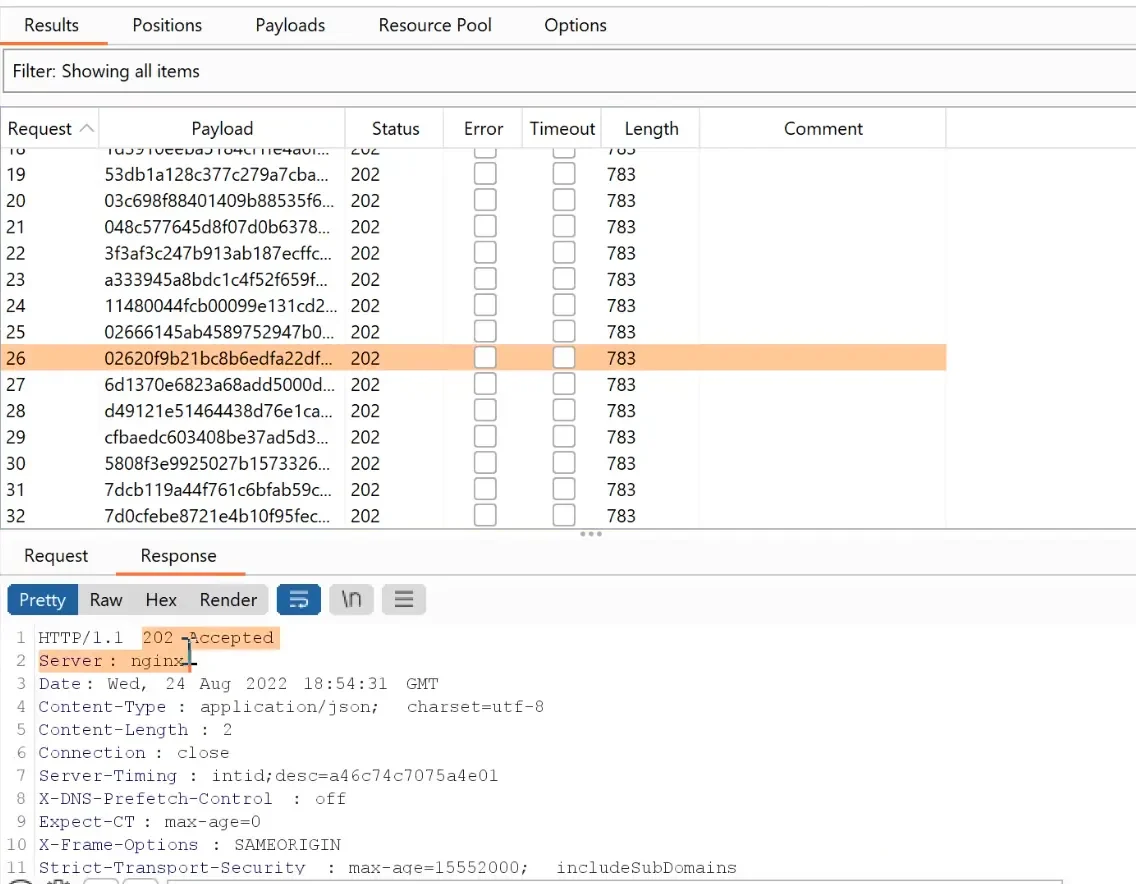
The result, in the researcher's words, was that the mechanism was bypassed on each and every endpoint. The company was told that its bold statement was wrong, and the report was rewarded with 1800 USD even though rate limiting had been declared out of scope.
Root cause
The protection relied on two per-request header values. The first weakness is that the captcha requirement could be switched off by a client-supplied header: sending X-Disabled-Recaptcha: 1 replaced the captcha error with a security token error, so the captcha check no longer blocked the request.
The second weakness is in the security token lifecycle. The token generation endpoint had no rate limit, so tokens could be minted in bulk, and previously issued tokens were not invalidated when new ones were generated. That removed the one-request-per-token property the scheme depended on: an attacker only needs as many tokens as requests, and the generation endpoint had no rate limit. The report does not describe the server-side implementation, so the exact reason old tokens remained valid (for example, no expiry record or no invalidation on issue) is not stated.
Impact
With a stock of valid security tokens and the captcha check disabled by header, the researcher was able to send repeated requests to every endpoint that used this mechanism, defeating the protection the company had claimed was complete. The report does not quantify what those repeated requests could achieve on the affected endpoints (for example credential stuffing, enumeration or resource exhaustion); it only establishes that the rate limit control itself could be bypassed everywhere it was applied. The bounty was paid even though rate limiting was out of scope.
Fix
Based on the mechanism described, the fixes would be: stop honouring a client-controlled header such as X-Disabled-Recaptcha to skip captcha validation, validate the captcha token server-side on every protected request, rate limit the security token generation endpoint, and invalidate a security token as soon as a new one is issued, including tokens that were never used.
Variants to test
- Look for debug or feature-flag headers in responses (names like
X-Disabled-*,X-Debug,X-Internal) and try flipping their values. A positive result is a change in validation behaviour, such as a different error message or a request that succeeds without the expected token. - Search the captured traffic for the endpoint that issues anti-automation tokens and test it without a rate limit. A positive result is a large number of tokens returned in a short time.
- Request several tokens in sequence and then use the oldest one. A positive result is that the old token is still accepted after newer ones were issued.
- Replay a single token across many requests. A positive result is more than one successful use of the same token.
- Remove the captcha header entirely and compare error messages with and without the bypass header. A positive result is that the captcha error disappears while the request proceeds to the next validation stage.
- Apply the same token-stock technique to other endpoints that share the mechanism. A positive result is that the bypass works beyond the endpoint where it was first found.
What happened, in plain words
A security researcher found a way to get around a protection that a company had put on its website to stop people from sending the same request over and over again very quickly. That protection is called a rate limit. Think of it like a bouncer at a club who only lets you in once: if you try to come back a second time, you are turned away. The company told everyone that this protection was so strong that nobody could get past it, and they even said that testing it was out of scope, meaning they did not want researchers to look at it.
The researcher looked anyway, because they wanted to prove the company's confident claim wrong. They found two weaknesses that, combined, let them bypass the protection on every endpoint that used it. The company paid them 1800 US dollars for the finding, even though the area had been declared out of scope.
This article walks through exactly what the researcher did, step by step, explaining every technical idea from scratch along the way. You do not need any security background to follow it. You only need to know how to use a browser and a computer.
Background ideas you will need
Before we start, here are a few everyday ideas that come up again and again in this story.
What is an API endpoint? A website is not just pages you look at. Behind the scenes, the page in your browser talks to a server (a computer somewhere else) by sending small messages back and forth. Each of those messages goes to a specific address called an endpoint. Think of an endpoint as a service window at a train station: you walk up to the window, ask for a ticket, and the clerk behind it handles your request. Different windows do different things: one sells tickets, one handles refunds, one gives information. A website can have many endpoints, each responsible for one job.
What is a request and a response? When your browser asks the server for something, that message is a request. The server's reply is a response. A request is made of several parts, and one of the most important parts is the header. Headers are like the label on an envelope: they carry extra information about the message, such as what type of content it contains or who is sending it. Some headers are added automatically by your browser; others are added by the website's own code.
What is a token? A token is a short piece of text that acts like a temporary pass. Imagine a theme park where you buy a wristband at the gate. You show the wristband at every ride, and the staff let you on. The wristband is your token. In web security, a token is often a long string of random-looking characters that the server gives you and expects you to show back on your next request. If you do not show a valid token, the server refuses to help you.
What is a captcha? A captcha is that little puzzle you sometimes have to solve, like ticking a box that says "I am not a robot" or picking out all the traffic lights in a grid of pictures. Its purpose is to prove that a human, not an automated program, is making the request. When you solve it, the website gives your browser a captcha token, a special pass that says "this person solved the puzzle." Your browser then includes that token in its requests so the server knows a human is behind them.
What is rate limiting? Rate limiting is a rule that says "you can only do this a certain number of times in a certain period." For example, a login page might allow only five attempts per minute. If you try a sixth time within that minute, the server blocks you. The purpose is to stop automated attacks, where a program tries thousands of passwords or floods the site with requests. Without rate limiting, a program can hammer a server as fast as its internet connection allows.
What is a rate limit bypass? A bypass is a way around the protection. If the rate limit is a locked door, a bypass is finding that the window is open. The researcher in this story found that the window was open in two places at once.
What is Burp? Burp Suite is a tool that security researchers use to look at and change the messages that go between a browser and a server. Think of it as a pair of glasses that lets you see the envelopes being passed back and forth, and also lets you rewrite what is inside them before they are delivered. Burp can save all the traffic it captures into a project file, which is like a recording of everything that went past. Later, you can open that recording and study it at your leisure.
What is Burp Intruder? Intruder is a part of Burp that automates sending many requests, each one slightly different. You give it a list of values (for example, a list of tokens) and tell it where in the request to put each value. Intruder then sends one request per value, automatically. It is like a machine that fills in a form and presses submit over and over, changing one field each time.
The setup
The researcher had spent a few months studying rate limits and how people get around them. They had read many other write-ups (public reports of security findings) and collected all the methods into a personal checklist. This is a common practice: you build a list of things to try, and when you get a new target, you work through the list.
The tools used were:
- A Burp project file containing captured traffic from the target.
- Burp Intruder for the final automated attack.
- A simple custom script to generate tokens.
The report does not describe any user accounts, roles or software versions.
Finding it
The researcher's starting point was the company's own claim: rate limiting was out of scope because they were fully secured. When you hear a claim like that, the natural response is to test it. The researcher looked at requests going to any of the company's endpoints and noticed that two headers were responsible for preventing rate limit attacks:
X-Recaptcha-TokenX-Security-Token
Let us unpack what each header does.
X-Recaptcha-Tokencarries the captcha token. This is the proof that a human solved the puzzle. The server checks it and, if it is missing or wrong, refuses the request.X-Security-Tokencarries a long value. This is a second pass, separate from the captcha. The server expects a fresh value on every request.
On every new request, the value of both headers changes. This means that in principle you cannot send the same request twice: the second time, the tokens would be stale and the server would reject it. The researcher tested this by removing X-Recaptcha-Token from a request. The server replied with the error "captcha token invalid or not found". This is the mechanism the company considered strong: two independent passes, both changing every time, so an automated tool cannot keep up.
How the researcher bypassed it
Step 1: Turn off the captcha check with a header
While reviewing the responses, the researcher noticed something interesting: a header named X-Disbaled-Recaptcha: 0 appeared in the traffic. Note the spelling: "Disbaled" instead of "Disabled". That is how it appears in the report, and it matters because header names must match exactly.
The researcher removed the previous captcha header from the request and added this new header with the value 1:
X-Disabled-Recaptcha: 1
Here is what this line means, piece by piece:
X-Disabled-Recaptchais the name of the header. TheX-prefix is a convention for custom headers that are not part of the official web standards. The name suggests it controls whether the recaptcha check is disabled.- The colon
:separates the header name from its value. 1is the value. In many systems,1means "true" or "on", and0means "false" or "off". So sending1is like flipping a switch to the "on" position.
The result was striking. Instead of the captcha error, the server replied with a different error: "Security token is invalid or alread used." (The spelling "alread" is as it appears in the report.) This told the researcher two things. First, the captcha check had been skipped entirely: the server no longer complained about the missing captcha token. Second, the security token check was still active and was now the only thing standing in the way.
The researcher tried every method they could think of to get past the security token check, and nothing worked. At that point, the reasonable conclusion was that the target was not vulnerable after all. The security token seemed to be doing its job.
Why did this step matter? Because it revealed that the captcha protection was not a real barrier. A client could simply tell the server "do not check the captcha" by sending a header, and the server obeyed. That is like a nightclub where the bouncer asks for ID, but if you hand him a note saying "do not check my ID," he waves you through. The captcha was supposed to be a security control, but it was controlled by the very client it was meant to protect against.
Step 2: Find the endpoint that creates security tokens
Some days later, the researcher reopened the Burp project file and went through all the endpoints again, one by one. This is a common technique: you look at the same traffic with fresh eyes and notice things you missed the first time.
One endpoint turned out to be responsible for generating the security token. In other words, when the website needs a new security token, it asks this endpoint, and the endpoint hands one back. Crucially, this endpoint had no rate limit mechanism at all. You could ask it for tokens as often as you liked.
The researcher also thought about how security tokens should behave. The normal, safe behaviour is that as soon as a new token is generated, the old one should expire immediately, even if it was never used. Think of a hotel key card: when you check out and a new guest checks in, your old card stops working. If old cards kept working forever, anyone who found a discarded card could still get into the room. The researcher suspected that this target's tokens might not expire properly, and decided to test it.
Step 3: Confirm that old tokens stay valid
To test the suspicion, the researcher manually copied 10 security tokens from the token generation endpoint. Then they sent requests carrying the header X-Disabled-Recaptcha: 1 (the same switch that turns off the captcha check). All of the requests succeeded.
This was the key finding. The old tokens had not been invalidated when new ones were issued. In hotel terms, every key card ever printed still opened the door. That meant a person could collect a stock of valid tokens ahead of time and then use one token per request, sending as many requests as they had tokens.
Why does this break the protection? The whole scheme depended on the idea that each token could be used only once. If tokens never expire, then the supply of tokens is limited only by how fast you can generate them, and the token generation endpoint had no rate limit. So the supply was effectively unlimited.
Step 4: Generate tokens at scale
A simple script was written to create 1000 unique security tokens using the token generation endpoint found in step 2.
Here is what this step means in plain words. Instead of copying tokens by hand, the researcher automated the process. The script repeatedly asked the token generation endpoint for a new token, 1000 times, and saved each one. Because the endpoint had no rate limit, the script could create 1000 tokens. The result was a list of 1000 valid security tokens, ready to be used.
Why 1000? Because the researcher wanted to demonstrate that the attack could be done at scale. The number itself is not magic; it is just a demonstration that the supply is not constrained.
Step 5: Run the attack in Intruder
The generated tokens were imported into Burp Intruder. The header X-Disabled-Recaptcha: 0 was added and the attack was started.
Let us walk through what Intruder did here.
- The researcher took the list of 1000 tokens and loaded it into Intruder. Intruder treats this list as a set of values to try, one per request.
- In other words, request number one uses token number one, request number two uses token number two, and so on.
- The header
X-Disabled-Recaptcha: 0was added. Note that this is the value0, not1. The report shows this value in the final attack step. - Intruder then sent all 1000 requests automatically, each with a fresh security token from the list.
The result, in the researcher's words, was that the mechanism was bypassed on each and every endpoint. The company was told that its bold statement was wrong, and the report was rewarded with 1800 US dollars even though rate limiting had been declared out of scope.
Why did this work? Because the two weaknesses combined. The captcha check could be switched off by a header, so it was never a real barrier. The security token check could be satisfied by any token that had ever been issued, and tokens could be generated in unlimited quantities. So the attacker only needed as many tokens as requests, and tokens were free.
Why it worked: the root cause
The design relied on two per-request values rather than on server-side counting. Let us break that down.
A server-side counter is a classic rate limit: the server keeps track of how many requests have been made and blocks further ones when the count gets too high. The client cannot influence the count; the server owns it. Instead, the server relied on the client presenting fresh tokens. The security depended on the tokens being single-use.
The first weakness is that the captcha requirement could be switched off by a client-supplied header. Sending X-Disabled-Recaptcha: 1 replaced the captcha error with a security token error. So the X-Recaptcha-Token check was never a real barrier: the client could simply ask the server not to check it.
The second weakness is in the security token lifecycle. The token generation endpoint had no rate limit, so tokens could be minted in bulk. And previously issued tokens were not invalidated when new ones were generated. That removed the one-request-per-token property the scheme depended on. An attacker only needs as many tokens as requests, and the generation endpoint had no rate limit.
The report does not describe the server-side implementation, so the exact reason old tokens remained valid (for example, no expiry record or no invalidation on issue) is not stated.
What the impact was
With a stock of valid security tokens and the captcha check disabled by header, the researcher was able to send repeated requests to every endpoint that used this mechanism, defeating the protection the company had claimed was complete.
The report does not quantify what those repeated requests could achieve on the affected endpoints (for example credential stuffing, enumeration or resource exhaustion). It only establishes that the rate limit control itself could be bypassed everywhere it was applied. The bounty was paid even though rate limiting was out of scope.
How to fix it
Based on the mechanism described, the fixes would be:
- Stop honouring a client-controlled header such as
X-Disabled-Recaptchato skip captcha validation. A security control should never be switchable off by the party it is meant to protect against. - Validate the captcha token server-side on every protected request.
- Rate limit the security token generation endpoint, so tokens cannot be minted in bulk.
- Invalidate a security token as soon as a new one is issued, including tokens that were never used.
Things to try on other targets
If you are learning security and want to practise, here are the same ideas turned into things you can look for. Each one describes what to do and what a positive result looks like.
- Look for debug or feature-flag headers in responses (names like
X-Disabled-*,X-Debug,X-Internal) and try flipping their values. A positive result is a change in validation behaviour, such as a different error message or a request that succeeds without the expected token. - Search the captured traffic for the endpoint that issues anti-automation tokens and test it without a rate limit. A positive result is a large number of tokens returned in a short time.
- Request several tokens in sequence and then use the oldest one. A positive result is that the old token is still accepted after newer ones were issued.
- Replay a single token across many requests. A positive result is more than one successful use of the same token.
- Remove the captcha header entirely and compare error messages with and without the bypass header. A positive result is that the captcha error disappears while the request proceeds to the next validation stage.
- Apply the same token-stock technique to other endpoints that share the mechanism. A positive result is that the bypass works beyond the endpoint where it was first found.
Glossary
- API: A set of rules that lets one piece of software talk to another. In a website, the API is the collection of endpoints the browser sends requests to.
- Endpoint: A specific address on a server that handles one kind of request, like a service window at a train station.
- Request: A message sent from a browser (or a tool) to a server asking for something.
- Response: The server's reply to a request.
- Header: Extra information attached to a request or response, like the label on an envelope. Headers carry things like content type, tokens and custom flags.
- Token: A short piece of text that acts as a temporary pass, proving you are allowed to do something.
- Captcha: A puzzle designed to prove a human, not a program, is making a request.
- Captcha token: A pass issued after solving a captcha, which the browser includes in later requests.
- Rate limit: A rule that restricts how many times an action can be performed in a given period.
- Rate limit bypass: A way to get around a rate limit, for example by making the server think each request is fresh when it is not.
- Burp Suite: A tool used by security researchers to capture, inspect and modify traffic between a browser and a server.
- Burp project file: A saved recording of captured traffic that can be reopened and studied later.
- Burp Intruder: A part of Burp that automates sending many requests, each with a different value in a chosen position.
- Security token: A second pass, separate from the captcha, that the server expects on each request. In this story it was supposed to be single-use.
- Token generation endpoint: The endpoint responsible for creating new security tokens.
- Token lifecycle: The rules for how long a token lives and when it stops being valid.
- Invalidation: Marking a token as no longer usable, for example when a new one is issued.
- Server-side: Happening on the server, under the server's control, as opposed to on the client.
- Client-side: Happening in the browser or tool that the user controls.
- Credential stuffing: An attack where stolen username and password pairs are tried on many accounts automatically.
- Enumeration: Systematically trying many values (such as usernames or IDs) to discover which ones exist.
- Resource exhaustion: Overloading a server with so many requests that it slows down or stops working.
- Out of scope: A part of a target that the company has declared off-limits for security testing, often because they believe it is already secure.
- Bounty: A reward paid by a company to a researcher who reports a valid security problem.




