[VDP] How I made United Nations Hall of Fame in 3 minutes! | by s ml xl
A GitLab instance at a United Nations subdomain was accessible without authentication, exposing source code, Drupal configurations, projects, and credentials. An attacker could view and potentially download this sensitive information.

medium.com
Published on medium.com
Bug Bounty
The full write-up lives on its author's site
It belongs to its author, so we link to it rather than copy it. The other two tabs are our own rewrites, checked against it.
Context
The target was the United Nations (UN), which the author describes as running a vulnerability reporting program. The asset involved was a subdomain of un.org, specifically git.unite.un.org. The report does not describe what the service was intended to expose publicly; the finding is simply that the host was reachable and served content without any authentication prompt.
Setup
The author did not use a dedicated enumeration toolchain. They were away from home, in a restaurant, and worked from a phone. The only tool named in the report is VirusTotal, used for subdomain enumeration rather than for scanning. No accounts, roles, versions or special preconditions are described.
Finding it
The starting point was the decision to enumerate subdomains of un.org using VirusTotal's data rather than a conventional brute-force or passive DNS tool. The author notes this choice with a degree of apology ("Yes, Sorry :("), but the report does not explain why VirusTotal was preferred beyond the mobile context.

While glancing through the resulting list of subdomains, one entry stood out: git.unite.un.org. The author clicked through to it. The unexpected part, as described, was that the page loaded with no authentication at all.

Exploitation
Step 1: Reach the Git host directly
The author clicked through to the host:
git.unite.un.org
No request headers, paths or response bodies are reproduced in the report. What the author states is that the site responded without requiring any login, so the site was reachable without authentication.
Step 2: Browse exposed content
Once inside, the author says they were able to access:
- many source code repositories,
- Drupal configurations,
- their projects, which the author notes were not open source,
- and credentials.
The report does not list individual repository names, file paths, configuration contents or the nature of the credentials. It also does not show any specific request or response for this step.
Step 3: Report to the security team
The author reported the exposure immediately by email to [redacted]. The report does not include the text of that email.
Root cause
The report does not analyse the underlying configuration. What it establishes is that the Git service on git.unite.un.org was serving repository content to unauthenticated visitors, so access control was either absent or not applied to the paths the author reached. Whether this was a misconfigured web server, a Git front end left in public mode, or an access rule that failed to cover the host is not stated. The report gives no detail on why any existing defence did not apply.
Impact
Under the conditions the author observed, anyone who found the host could read the exposed material without credentials. The author characterises the material as source code, Drupal configurations, non-open-source projects and credentials. The report does not quantify how many repositories were exposed, who owned them, or whether the credentials were live. The author does not discuss the practical consequences beyond listing what was accessible.
Fix
The report states that the bug was resolved on 13 January 2021 and that an authentication page was added. No further detail on the implementation is given.
Timeline
| Date | Event |
|---|---|
| 4 Dec 2020 | Reported to [redacted] |
| 5 Dec 2020 | Case number assigned (auto-generated email) |
| 13 Jan 2021 | Bug resolved; authentication page added; author asked how their name should appear for credit |
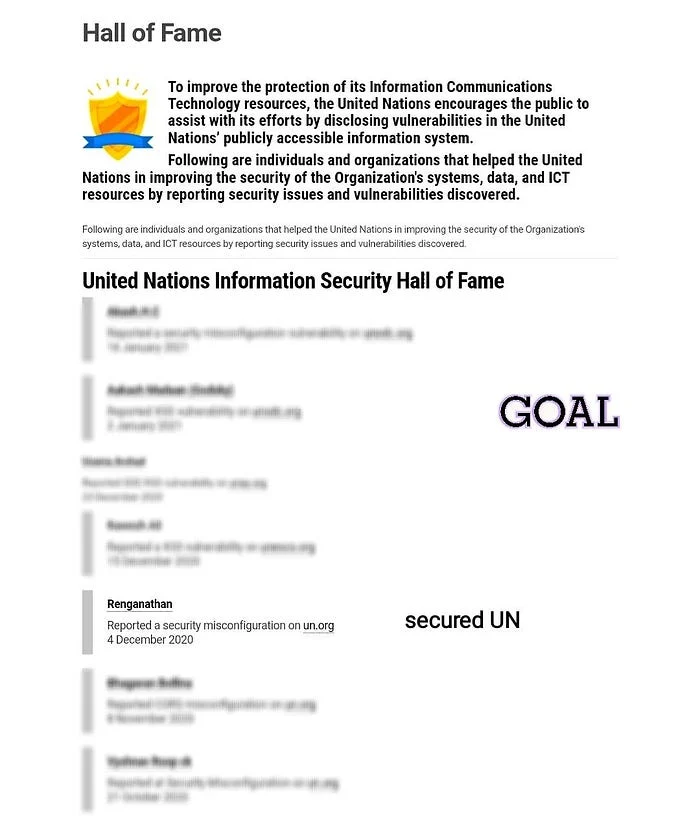
| 19 Jan 2021 | Name updated in the hall of fame |
Between 5 December and 13 January the author records no update. The author adds that the whole exercise took three minutes because of a poor internet connection, and estimates it would take about thirty seconds otherwise.
Variants to test
These are generalisations from the pattern in the report, not steps the author performed.
- Enumerate Git hosts on other large organisations. Use passive sources such as VirusTotal, certificate transparency or passive DNS to collect subdomains, then look for names containing
git,gitlab,gitea,bitbucketor similar. A positive result is a host that returns a repository listing or project dashboard without a login redirect. - Check for partial authentication. Some deployments protect the web UI but leave API or archive endpoints open. Try fetching a known repository path and its archive or raw file equivalents. A positive result is content returned with a 200 where the UI would have redirected to a login.
- Look for configuration and secret files in exposed repositories. Where a Git host is reachable, check whether settings files, CI configuration or environment files are present. A positive result is any file containing credentials or connection strings, which is what the author reports finding here.
- Test the same host over different schemes and hostnames. A service may be protected on one name and open on another, for example a direct IP or an alternate subdomain. A positive result is the same content served without authentication on the alternate name.
What happened, in plain words
A security researcher found that a United Nations website at git.unite.un.org was open to anyone on the internet with no login required. Git is a system that programmers use to store and track the history of their code. A Git server is the online place where those code projects live so a team can share them. Normally such a server is private: you have to sign in before you can see anything. Here, there was no sign-in at all. The researcher could browse source code, configuration files and even credentials (usernames and passwords used to connect to other systems). They reported it by email, the UN fixed it by adding a login page, and the researcher was added to a public list of people who have reported security problems, called a hall of fame.
The whole thing took the author three minutes, because they were on a phone with a poor internet connection in a restaurant. They estimate it would take about thirty seconds otherwise.
Finding the target
The author saw that the United Nations runs a vulnerability reporting program. A vulnerability reporting program (sometimes called a VDP, vulnerability disclosure program) is a public invitation: an organisation says "if you find a security problem in our systems, tell us here, and we will not be angry with you for looking". This matters because, without such a program, someone poking at a website could be treated as an intruder.
The first job in any such test is to find out which websites the organisation actually runs. A large organisation owns one main domain name, such as un.org, and then many subdomains underneath it, such as mail.un.org or careers.un.org. A subdomain is simply a name that sits in front of the main name, separated by a dot, and points to a separate service. Think of the main domain as a company's street address and the subdomains as the different departments inside the building.
To collect a list of subdomains, the author used VirusTotal. VirusTotal is a website where people upload files and links to be checked by many antivirus engines at once. As a side effect, it keeps a record of every domain and subdomain that anyone has ever submitted, so you can search it and see names that belong to an organisation. The author notes this choice with a small apology ("Yes, Sorry :("). The report does not explain the preference beyond the fact that the author was working from a phone.
Spotting the open server
While scrolling through the list of subdomains, one name caught the author's eye: git.unite.un.org. The word git in a hostname often hints that the machine runs a Git service, the kind of place where an organisation keeps its code projects. The author clicked on it.
The surprise was that the page loaded with no login prompt. In a browser, a protected site normally either shows you a sign-in form or sends you to a separate login page. Here, neither happened: the content was simply there.
What was exposed
Once inside, the author says they could reach:
- many source code repositories (a repository is a project folder that Git tracks, including its full history of changes),
- Drupal configurations (Drupal is a system for building websites; its configuration files describe how the site is set up and can contain sensitive settings),
- their projects, which the author notes were not open source (open source means the code is meant to be public; these were private),
- and credentials.
The report does not name individual repositories, file paths, configuration contents or the nature of the credentials. It also does not show any specific request or response for this step. What it establishes is that the Git service was handing out its content to anyone who asked, with no check of who was asking.
Reporting it
The author emailed the UN security team straight away at [redacted]. The report does not include the text of that email.
Why it happened
A server decides who may see what through access control: rules that say "this person is allowed, that person is not". When a page loads with no login at all, either there is no rule, or the rule does not cover the paths that were reached. It gives no detail on why any existing defence did not apply.
What it meant
Under the conditions the author observed, anyone who found the host could read the exposed material without credentials. The author describes that material as source code, Drupal configurations, non-open-source projects and credentials. The author does not discuss the practical consequences beyond listing what was accessible.
The fix
The report states that the bug was resolved on 13 January 2021 and that an authentication page was added. Authentication is the process of proving who you are, usually with a username and password. No further detail on the implementation is given.
Timeline
| Date | Event |
|---|---|
| 4 Dec 2020 | Reported to [redacted] |
| 5 Dec 2020 | Case number assigned (auto-generated email) |
| 13 Jan 2021 | Bug resolved; authentication page added; author asked how their name should appear for credit |
| 19 Jan 2021 | Name updated in the hall of fame |
Between 5 December and 13 January the author records no update. The author adds that the whole exercise took three minutes because of a poor internet connection, and estimates it would take about thirty seconds otherwise.
Things worth trying elsewhere
These are generalisations from the pattern in the report, not steps the author performed.
- Look for Git hosts on other large organisations. Use passive sources such as VirusTotal, certificate transparency or passive DNS to collect subdomains, then look for names containing
git,gitlab,gitea,bitbucketor similar. Certificate transparency is a public log of every security certificate issued for a website, which reveals hostnames; passive DNS is a record of which names have resolved to which addresses. A positive result is a host that returns a repository listing or project dashboard without a login redirect. - Check for partial authentication. Some deployments protect the web interface but leave API or archive endpoints open. An API (application programming interface) is a way for one program to talk to another, often returning raw data rather than a web page. Try fetching a known repository path and its archive or raw file equivalents. A positive result is content returned with a 200 where the interface would have redirected to a login. A 200 is the standard HTTP status code meaning "here is the page you asked for".
- Look for configuration and secret files in exposed repositories. Where a Git host is reachable, check whether settings files, CI configuration or environment files are present. CI stands for continuous integration, an automated build system; its configuration files can contain secrets. A positive result is any file containing credentials or connection strings, which is what the author reports finding here.
- Test the same host over different schemes and hostnames. A service may be protected on one name and open on another, for example a direct IP or an alternate subdomain. A scheme is the
httporhttpspart at the start of a web address. A positive result is the same content served without authentication on the alternate name.
Glossary
- Subdomain: a name in front of a main domain, such as
gitingit.unite.un.org, pointing to a separate service. - Domain: the main name of a website, such as
un.org. - Vulnerability reporting program (VDP): a public invitation from an organisation to report security problems to it safely.
- VirusTotal: a website that checks files and links with many antivirus engines and keeps a searchable record of domains and subdomains.
- Enumeration: the process of listing things, here the subdomains that belong to an organisation.
- Git: a system for storing and tracking the history of code projects.
- Git server: an online host where Git repositories live so a team can share them.
- Repository: a project folder tracked by Git, including its full history of changes.
- Drupal: a system for building websites; its configuration files describe how a site is set up.
- Open source: code that is meant to be public.
- Credentials: usernames and passwords, or similar secrets, used to connect to a system.
- Authentication: the process of proving who you are, usually with a username and password.
- Access control: rules that decide who is allowed to see or do what.
- Confidentiality: the property that only the right people can read something.
- Hall of fame: a public list of people who have reported security problems to an organisation.
- API: a way for one program to talk to another, often returning raw data rather than a web page.
- HTTP status code 200: the standard response meaning "here is the page you asked for".
- CI (continuous integration): an automated build system; its configuration files can contain secrets.
- Scheme: the
httporhttpspart at the start of a web address. - Passive DNS: a record of which domain names have resolved to which addresses.
- Certificate transparency: a public log of every security certificate issued for a website, which reveals hostnames.

