The Journey
The Vimeo upload function fetched a user-supplied URL and followed redirects, allowing an attacker to redirect the request to the Google Cloud metadata endpoint and obtain an API access token. The attacker could then use that token to access the cloud instance.
 Published on medium.com
I have found an SSRF vulnerability by exploiting content partial flow which the Vimeo upload function implements in the uploading process.
The full write-up lives on its author's site
It belongs to its author, so we link to it rather than copy it. The other two tabs are our own rewrites, checked against it.
Context
Vimeo's upload flow lets a user import a video from Google Drive instead of uploading a local file. The user picks a video in Google Drive, and the front end sends the file URL together with a Google authorisation header to Vimeo's backend. The backend then fetches the file from that URL, passing the authorisation header along so Google Drive will serve the content. In other words, the server makes an outbound HTTP request to a URL that the user supplies, which is exactly the shape of a server-side request forgery (SSRF) sink.
This write-up describes how the partial-download behaviour of that fetch was abused to turn the upload feature into a full SSRF, and how it was used to reach the Google Cloud instance metadata service.
Setup
The researcher worked against Vimeo on HackerOne. The tools used were:
- A MacBook with Burp Suite, to intercept the upload request.
- A VPS running WireShark, to observe what the Vimeo backend requested from a server controlled by the researcher.
- A Python web server, later rewritten as a pure HTTP server, to serve the attacker-controlled content and log the backend's requests.
No account details, roles or software versions are given in the report. The precondition for the attack is simply access to the Google Drive upload feature and the ability to host content on a server the Vimeo backend can reach.
Finding it
The researcher went straight to the upload function and chose the Google Drive upload feature, selected a video file, and caught the request in Burp Suite.
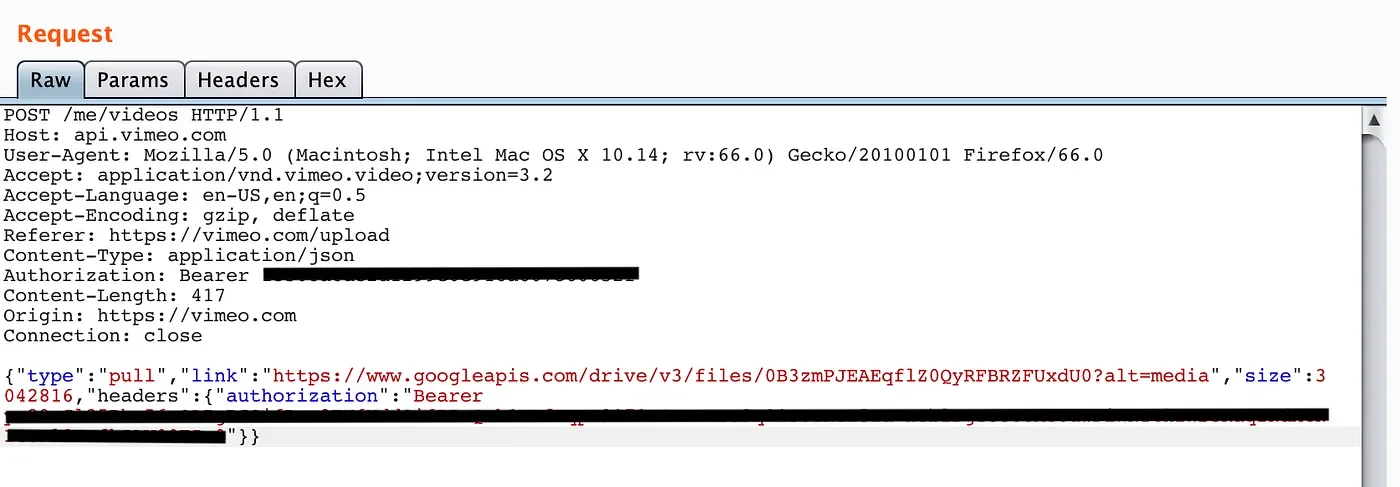
The request sends the file URL together with the Google authorisation, so that the backend can fetch the file from that URL and pass the authorisation on the header to access the file from Google Drive.
To see what the backend actually does, the researcher set up WireShark on a VPS and made the backend request a video file from that server.
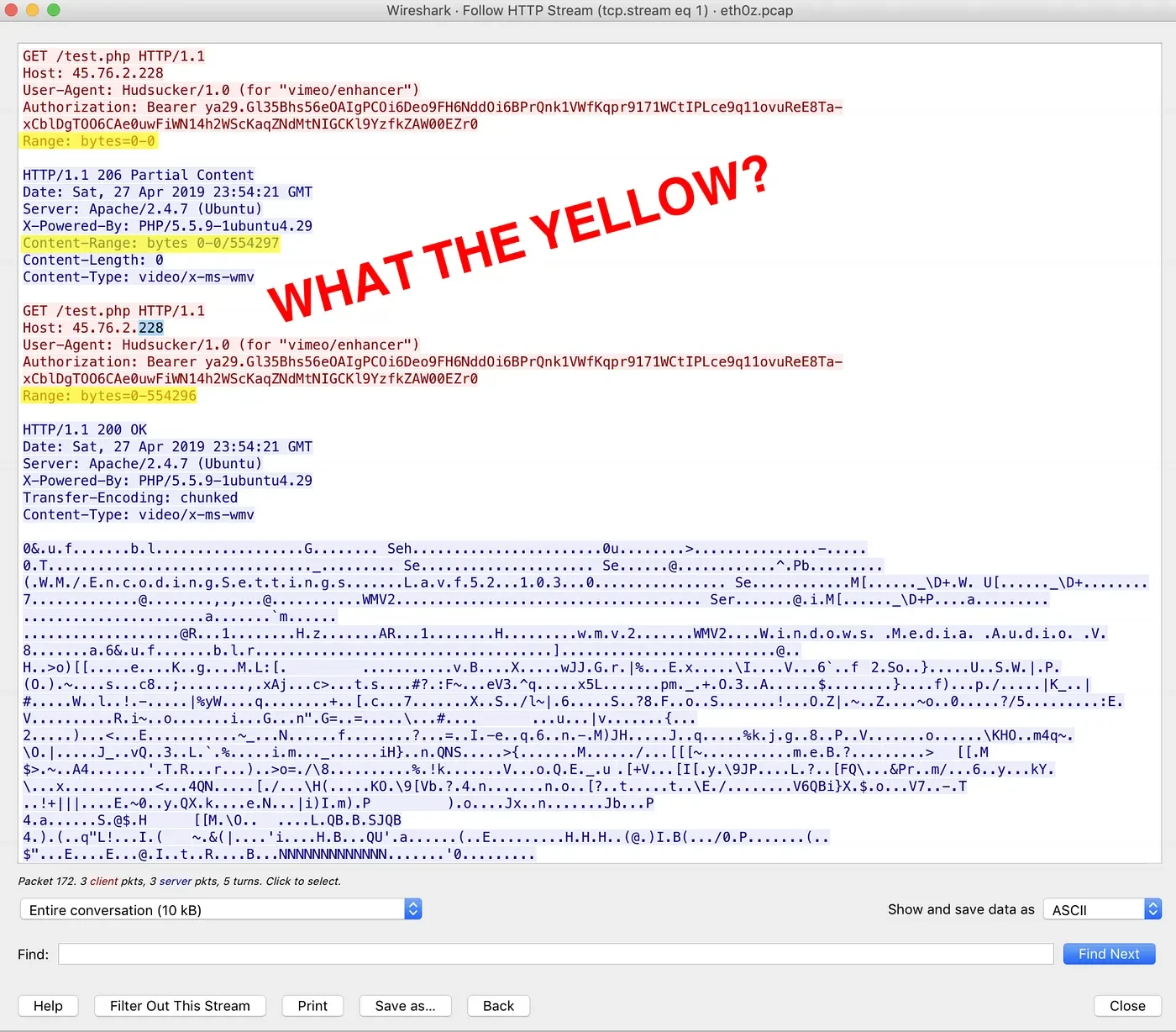
The capture showed unusual headers, notably Range and Content-Range. Their names were enough to explain the behaviour: video files are usually large, so Vimeo does not request the full file in a single request when the size is big. If the file is small, it requests the full file; if not, it requests the file partially until it has collected the whole thing.
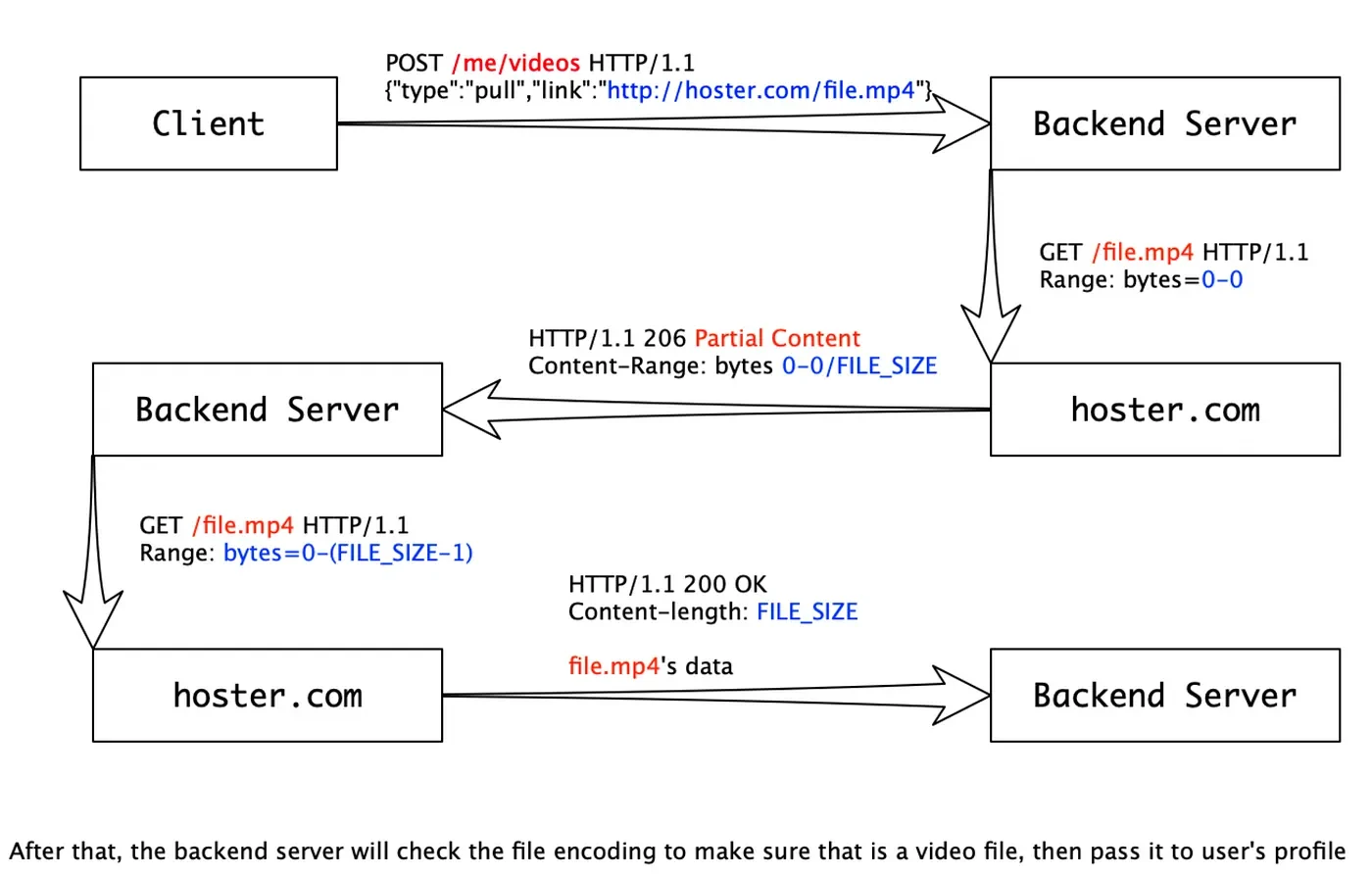
The server first sends a request to check the file size. If the file is small enough to be transferred over a single connection, it requests the full file.
The idea that followed was: what if the server does not send the full file? If the attacker's server tells the backend that the file length is 500B, the backend will request 500B. What happens if the server then responds with only 200B of data?
Exploitation
Step 1: Confirm the partial-fetch behaviour
The researcher wrote a Python web server to test the idea. The full file length was 554231B. When Vimeo requested the full file, the server responded with 8228B only, and logged the Range header Vimeo sent.
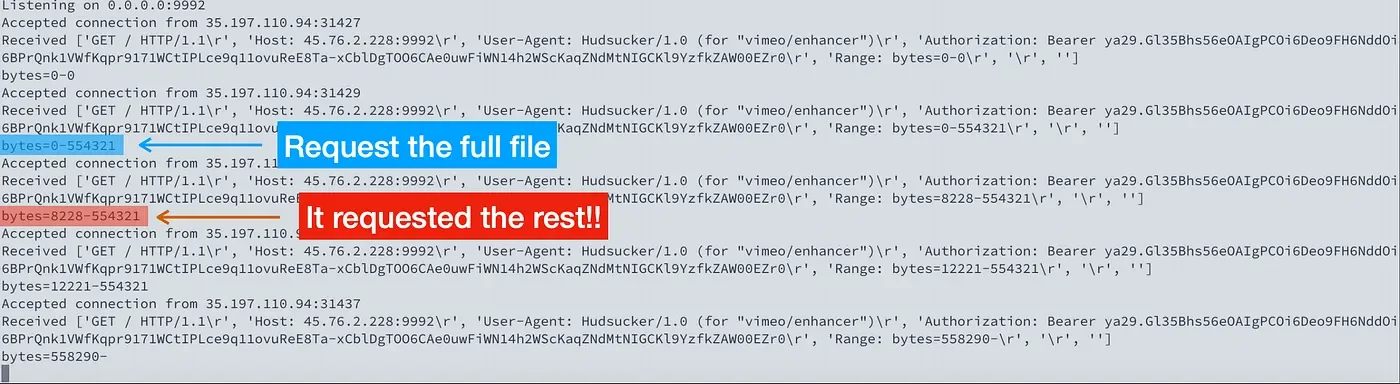
The backend stored the 8228B and then requested the rest of the file. That confirmed a scenario that can lead to SSRF: the backend keeps issuing follow-up requests based on what the attacker's server returns.
Step 2: Test redirects
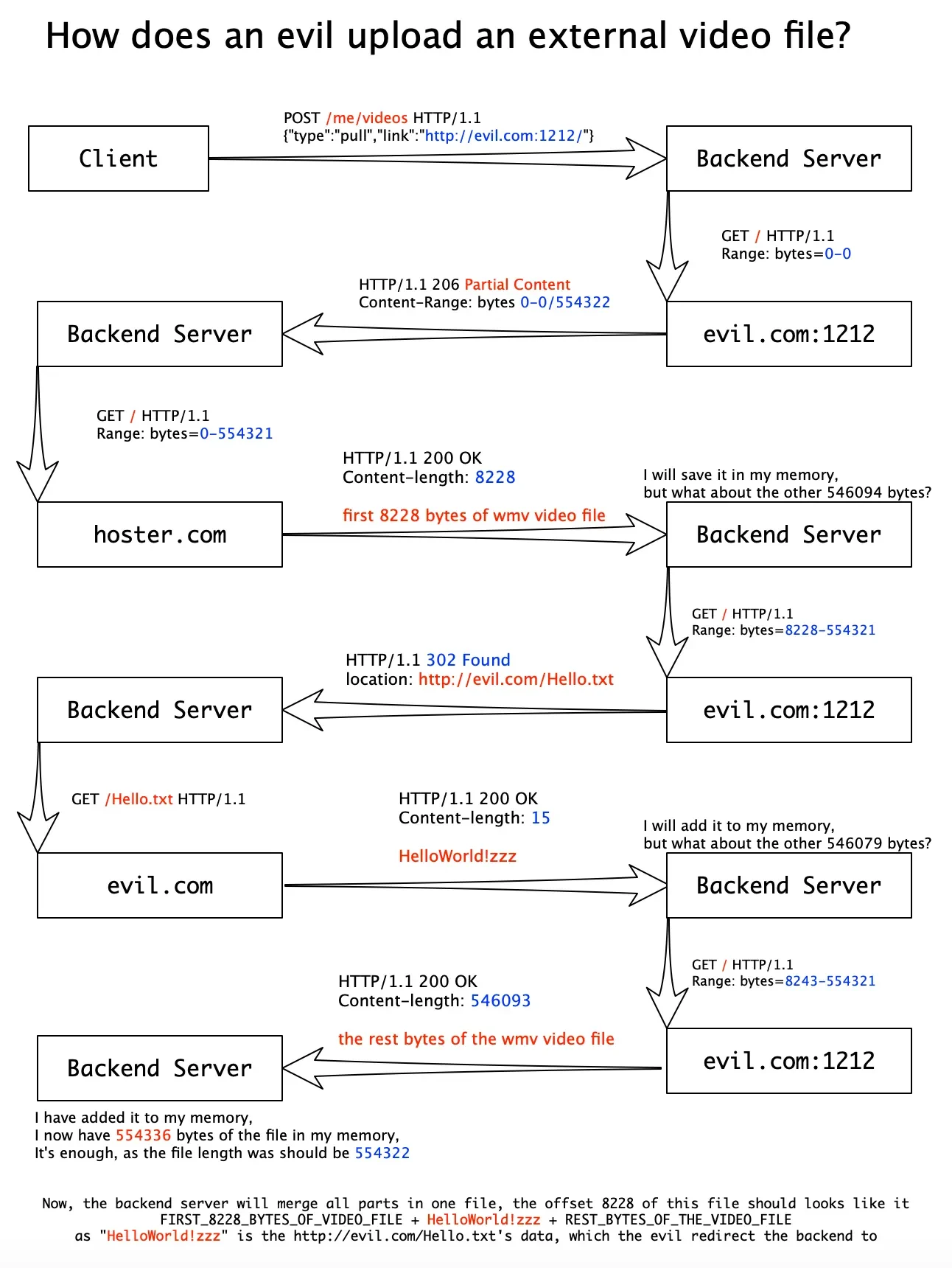
The next question was what happens if the attacker's server responds with a redirect. Would Vimeo follow the redirect, store the response, and request the rest from the new location? The report presents this as an open question, illustrated by a diagram.
Step 3: Build a pure HTTP server and reproduce
Some web servers restricted the researcher from reproducing the attack, so a pure HTTP server was coded to perform it. The researcher ran it, passed the attacker host to the upload function, and the attack worked.
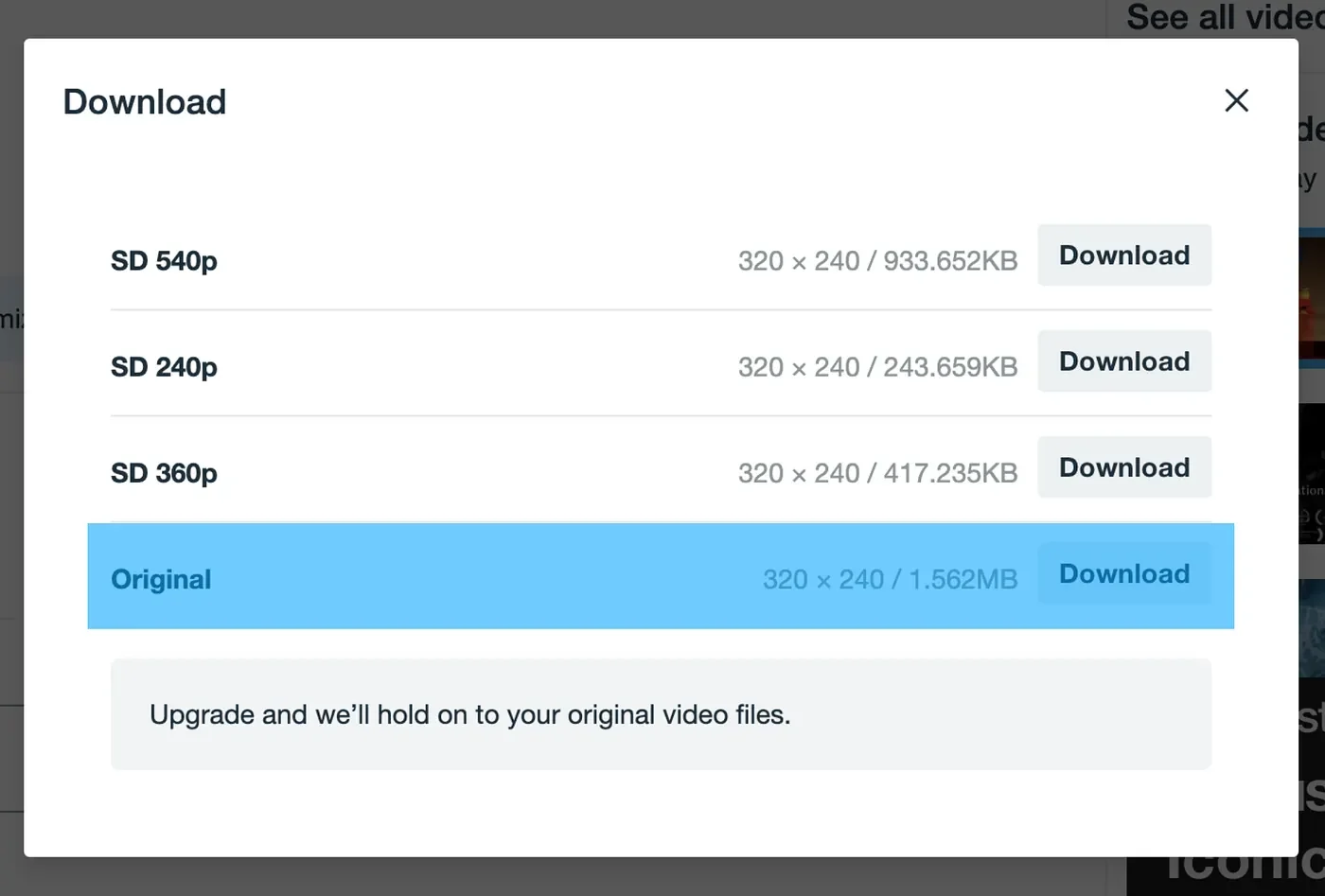
A useful detail for verification: in Vimeo you can download your original video file, so the response of the request forgery can be retrieved easily.
Step 4: Reach the metadata service
Information gathered about the backend showed it was a Google Cloud instance. The redirect target was changed to the instance metadata endpoint:
http://metadata.[redacted]/computeMetadata/v1beta1/instance/service-accounts/default/token
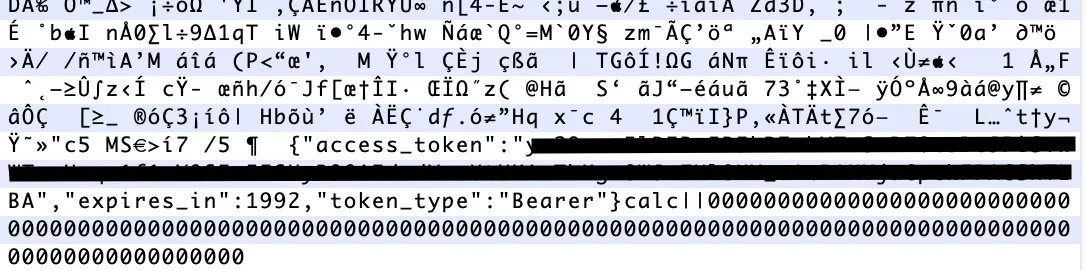
The attack was reproduced and the researcher was able to obtain the compute engine API access token.
Root cause
The upload feature fetches a user-supplied URL server-side and follows redirects. The partial-download logic makes this worse: because the backend keeps requesting the remainder of the file from wherever it is redirected, the attacker controls a multi-step fetch rather than a single request. In Vimeo you can download your original video file, so the request forgery response can be retrieved easily.
Impact
An attacker who can use the Google Drive upload feature can make the Vimeo backend issue requests to arbitrary hosts, follow redirects, and read the responses back through the downloaded original video file. In this case that was enough to retrieve the Google Compute Engine service account access token from the instance metadata service. The report does not describe what permissions that token carried or what was done with it beyond retrieving it.
Fix
The report states that the vulnerability was fixed by Vimeo on May 1st, but does not describe the change. What should be done on a fetch like this is to restrict outbound requests to an allowlist of expected hosts, block link-local and metadata addresses such as metadata.[redacted], and avoid following redirects to hosts outside that allowlist.
Variants to test
- Redirect to metadata endpoints. Point the upload URL at an attacker server that redirects to
http://metadata.[redacted]/computeMetadata/v1beta1/instance/service-accounts/default/token(or the equivalent on other clouds). A positive result is the token appearing in the stored or downloadable file. - Partial responses with a
Rangefollow-up. Serve a small body with a larger declared length and log the follow-up request. A positive result is the backend issuing a second request with aRangeheader to the attacker's server. - Redirect chains. Redirect several times before reaching the internal target. A positive result is the backend following the chain and storing the final response.
- Non-HTTP schemes. Try
file://,gopher://ordict://where the HTTP client supports them. A positive result is content from the local filesystem or an internal service appearing in the stored file. - Internal hostnames and ports. Redirect to internal service names or loopback addresses on common ports. A positive result is a response body or a distinguishable error that reveals the internal service.
Timeline
- Apr 29th: Triaged by the HackerOne team.
- Apr 29th: Vimeo rewarded the researcher initially.
- May 1st: The vulnerability was fixed.
- May 1st: Vimeo rewarded the researcher with the rest of the bounty.
What happened, in plain words
Vimeo is a website where people upload and watch videos. Besides uploading a file from your own computer, Vimeo lets you import a video that already lives in your Google Drive (Google's online file storage). When you do that, your browser tells Vimeo's servers the web address (URL) of the video in Google Drive, plus a special pass that proves you are allowed to read it. Vimeo's server then goes out to that address, fetches the video, and saves it as your upload.
That last part is the interesting bit. A Vimeo server is making a request to an address that the user chose. If the server does not check carefully where it is allowed to go, a user can point it at places on Vimeo's own internal network instead of at Google Drive. This kind of problem is called server-side request forgery, or SSRF: you trick a server into making requests on your behalf, to places you could never reach from your own computer.
This write-up shows how the researcher turned that upload feature into a full SSRF, and used it to reach a Google Cloud service that hands out secret access tokens. The report was submitted to Vimeo through HackerOne, a platform where companies pay people for finding security bugs.
A quick word on the pieces involved before we start:
- HTTP request: the message a browser (or a server) sends to ask another computer for something, like "please give me this file".
- Header: an extra line of information attached to a request, such as "I only want the first part of the file" or "here is my pass".
- Token / authorisation header: a long string of characters that acts like a temporary pass. Instead of sending your password every time, your browser sends this pass to prove who you are and what you may access.
- API: a way for one program to talk to another, usually over HTTP. Think of it as a service counter: you hand over a request in a fixed format and get an answer back.
- Metadata service: a special internal address that cloud servers (like Google Cloud) provide so a server can ask about itself, for example "what is my identity and what secret token can I use?". It is meant to be reachable only from inside the cloud, never from the internet.
The journey
The researcher was studying a subject they disliked, took a break, and decided to hunt on Vimeo on HackerOne. They opened the upload function, chose the Google Drive import, picked a video file, and switched to Burp Suite to catch the request.
Burp Suite is a tool that sits between your browser and the website and lets you pause, read and change the traffic. It is like a post office clerk who shows you every letter before it is delivered, and lets you rewrite it.
The screenshot shows the upload request as it was captured. The request sends the file URL together with the Google authorisation, so that the backend can fetch the file from that URL and pass the authorisation on the header to access the file from Google Drive.
In plain words: your browser tells Vimeo "the video is at this Google Drive address, and here is the pass that lets you read it". Vimeo's backend (the part of the site that does the actual work, behind the pages you see) then uses that address and that pass to download the video.
Why does this matter? Because the address comes from the user. If Vimeo's backend will fetch any address it is given, then a user can give it an address that is not Google Drive at all.
To see exactly what the backend does, the researcher set up WireShark on a VPS and made the backend request a video file from that server. A VPS is a rented computer on the internet that you control. WireShark is a program that records network traffic, like a tape recorder for everything that travels over a network connection. The idea was simple: put a video on a server the researcher controls, ask Vimeo to import it, and watch what Vimeo's server actually sends.
The capture showed unusual headers, notably Range and Content-Range. Their names were enough to explain the behaviour: video files are usually large, so Vimeo does not request the full file in a single request when the size is big. If the file is small, it requests the full file; if not, it requests the file partially until it has collected the whole thing.
Let us unpack those two headers, because they are the heart of the trick:
Range: a request header that says "please send me only this part of the file", for example bytes 0 to 8227. It is how a download can be split into pieces.Content-Range: a response header that says "this piece is bytes X to Y out of a total of Z". It tells the receiver where the piece fits in the whole file.
Think of a very long book. Instead of asking a friend to read the whole thing to you over the phone, you ask for chapter one, then chapter two, and so on. Range is how you ask for a chapter, and Content-Range is how your friend tells you which chapter they just read and how many chapters there are in total.
The diagram shows the normal flow. The server first sends a request to check the file size. If the file is small enough to be transferred over a single connection, it requests the full file. If it is large, it asks for pieces until it has them all.
Now the researcher's idea: what if the server does not send the full file? If the attacker's server tells the backend that the file length is 500B, the backend will request 500B. What happens if the server then responds with only 200B of data?
In everyday terms: you tell a courier "the parcel weighs 500 grams", the courier prepares for 500 grams, and you hand over only 200 grams. What does the courier do? Does it ask for the rest? Does it give up? Does it go somewhere else to look for the missing part? That question is what the rest of the report answers.
Exploitation
Step 1: Confirm the partial-fetch behaviour
The researcher wrote a Python web server to test the idea. The full file length was 554231B. When Vimeo requested the full file, the server responded with 8228B only, and logged the Range header Vimeo sent.
The screenshot shows that small server script. In plain words, the script does three things:
- It pretends to have a video file of
554231B(about half a megabyte). - When Vimeo asks for the file, it sends back only
8228B(about eight kilobytes) instead of the whole thing. - It writes down the
Rangeheader that Vimeo sent, so the researcher can see what Vimeo asked for.
The result: the backend stored the 8228B and then requested the rest of the file. That confirmed a scenario that can lead to SSRF: the backend keeps issuing follow-up requests based on what the attacker's server returns.
Why is that important? Because if the attacker's server can make the backend ask again, the attacker can decide where that next request goes. The backend is no longer just fetching one fixed address; it is following instructions from the attacker's server.
Step 2: Test redirects
The next question was what happens if the attacker's server responds with a redirect. A redirect is an HTTP answer that says "I do not have what you want here, go and ask this other address instead". It is like a shop assistant saying "we do not stock that, try the shop across the street".
Would Vimeo follow the redirect, store the response, and request the rest from the new location? The report presents this as an open question, illustrated by a diagram.
The diagram lays out the possibilities the researcher was thinking about: if the server redirects, does Vimeo follow it, does it save what it finds there, and does it come back to ask for the remaining bytes? If the answer to all three is yes, then the attacker can make Vimeo fetch any address on the internet, or inside its own network, and save the result as a video file.
Step 3: Build a pure HTTP server and reproduce
Some web servers restricted the researcher from reproducing the attack, so a pure HTTP server was coded to perform it. The researcher ran it, passed the attacker host to the upload function, and the attack worked.
A useful detail for verification: in Vimeo you can download your original video file, so the response of the request forgery can be retrieved easily.
That last point is what makes this a readable SSRF rather than a blind one. A blind SSRF is when you can make the server send a request but you never see the answer, like sending a letter and never getting a reply. A readable SSRF is when the answer comes back to you, here because Vimeo lets you download the file you uploaded. The attacker can therefore read whatever the internal address returned.
Step 4: Reach the metadata service
Information gathered about the backend showed it was a Google Cloud instance. The redirect target was changed to the instance metadata endpoint:
http://metadata.[redacted]/computeMetadata/v1beta1/instance/service-accounts/default/token
Let us read that address piece by piece:
http://is the protocol, the language used to ask for a web page or file.metadata.[redacted]is a special internal name that only resolves inside Google Cloud. From the public internet it means nothing; from inside a Google Cloud server it points at the metadata service./computeMetadata/v1beta1/is the path to the metadata API, versionv1beta1./instance/service-accounts/default/tokenasks for the access token of the default service account.
A service account is a kind of robot identity that a cloud server uses to talk to other Google services. Its access token is the temporary pass that proves that identity. Anyone who holds that token can act as the server towards Google's APIs, within whatever permissions the account has.
The attack was reproduced and the researcher was able to obtain the compute engine API access token.
The screenshot shows the token coming back. The researcher reproduced the attack and was able to get the compute engine API access token.
Root cause
The upload feature fetches a user-supplied URL server-side and follows redirects. The partial-download logic makes this worse: because the backend keeps requesting the remainder of the file from wherever it is redirected, the attacker controls a multi-step fetch rather than a single request. In Vimeo you can download your original video file, so the request forgery response can be retrieved easily.
An allowlist is a list of addresses a system is permitted to contact; anything not on the list is refused. It is the opposite of a blocklist, which lists what is forbidden and lets everything else through. Allowlists are safer because you only have to think about what should be allowed, not about every bad thing that exists.
Impact
An attacker who can use the Google Drive upload feature can make the Vimeo backend issue requests to arbitrary hosts, follow redirects, and read the responses back through the downloaded original video file. In this case that was enough to retrieve the Google Compute Engine service account access token from the instance metadata service. The report does not describe what permissions that token carried or what was done with it beyond retrieving it.
In everyday terms: the attacker got hold of a key that belongs to one of Vimeo's cloud servers. What doors that key opens depends on the permissions attached to it, which the report does not say. The researcher reported it and stopped there.
Fix
The report states that the vulnerability was fixed by Vimeo on May 1st, but does not describe the change. What should be done on a fetch like this is to restrict outbound requests to an allowlist of expected hosts, block link-local and metadata addresses such as metadata.[redacted], and avoid following redirects to hosts outside that allowlist.
A link-local address is an address that is only meaningful on the local network of a machine, not on the public internet. The metadata service lives at such an address, which is why blocking it matters.
Variants to test
These are the same ideas applied in slightly different ways, useful if you want to look for similar bugs yourself:
- Redirect to metadata endpoints. Point the upload URL at an attacker server that redirects to
http://metadata.[redacted]/computeMetadata/v1beta1/instance/service-accounts/default/token(or the equivalent on other clouds). A positive result is the token appearing in the stored or downloadable file. - Partial responses with a
Rangefollow-up. Serve a small body with a larger declared length and log the follow-up request. A positive result is the backend issuing a second request with aRangeheader to the attacker's server. - Redirect chains. Redirect several times before reaching the internal target. A positive result is the backend following the chain and storing the final response.
- Non-HTTP schemes. Try
file://,gopher://ordict://where the HTTP client supports them. A positive result is content from the local filesystem or an internal service appearing in the stored file. - Internal hostnames and ports. Redirect to internal service names or loopback addresses on common ports. A positive result is a response body or a distinguishable error that reveals the internal service.
A scheme is the first part of a URL, such as http:// or file://, that says how to interpret the rest. file:// means "read a file from this computer's disk", which is why it is interesting to an attacker.
Timeline
- Apr 29th: Triaged by the HackerOne team.
- Apr 29th: Vimeo rewarded the researcher initially.
- May 1st: The vulnerability was fixed.
- May 1st: Vimeo rewarded the researcher with the rest of the bounty.
Triaged means the platform's security team looked at the report, confirmed it was a real issue, and passed it to the company.
Glossary
- API: a fixed way for one program to ask another program for something, usually over HTTP.
- Access token: a temporary pass, a long string of characters, that proves an identity to a service.
- Allowlist: a list of things that are permitted; anything not on the list is refused.
- Authorisation header: an HTTP header that carries a pass, such as a token, so the receiver knows who is asking.
- Backend: the part of a website that does the real work behind the pages you see.
- Blind SSRF: an SSRF where the attacker cannot see the response to the forged request.
- Blocklist: a list of things that are forbidden; everything else is allowed.
- Burp Suite: a tool that sits between a browser and a website so you can read and change the traffic.
- Content-Range: a response header saying which part of a file this piece is, and how big the whole file is.
- Google Cloud instance: a rented virtual computer running inside Google's cloud.
- Google Drive: Google's online file storage service.
- HackerOne: a platform where companies receive security reports and pay bounties.
- Header: an extra line of information attached to an HTTP request or response.
- HTTP: the language browsers and servers use to ask for and send web content.
- Link-local address: an address that only works on a machine's local network, not on the public internet.
- Metadata service: an internal address in a cloud that tells a server about itself, including its identity and tokens.
- Range: a request header asking for only part of a file, for example bytes 0 to 8227.
- Readable SSRF: an SSRF where the attacker can read the response to the forged request.
- Redirect: an HTTP answer telling the requester to go and ask a different address instead.
- Scheme: the first part of a URL, such as
http://orfile://, that says how to interpret it. - Service account: a robot identity used by a server to talk to other services.
- SSRF (server-side request forgery): tricking a server into making requests to addresses the attacker chooses.
- Token: see access token.
- Triaged: reviewed and confirmed as a real issue by the receiving security team.
- URL: a web address, such as
http://example.com/file. - VPS: a rented computer on the internet that you control.
- WireShark: a program that records network traffic so you can inspect it later.