VoIP Spoofing (Intigriti) 1,250€
A SIP service on port 5060 was exposed and accepted unauthenticated requests, letting the author enumerate usernames and send spoofed INVITE calls to internal agents. The author claims they could also listen, register, delete or cancel calls, though only the spoofed invite is demonstrated.

Hello Folks, i just want to explain a misconfiguration that affect an asset on Intigriti. So, let’s start!!
The full write-up lives on its author's site
It belongs to its author, so we link to it rather than copy it. The other two tabs are our own rewrites, checked against it.
Context
This write-up covers a misconfiguration found on an asset in an Intigriti programme. The affected service is a VoIP deployment that exposes SIP signalling on the default port, 5060. The author opens with a short primer on what VoIP and SIP are, because the whole finding lives in that protocol rather than in a web application.
VoIP lets audio calls be carried over an Internet connection instead of a conventional phone line. Some VoIP gateway partners allow calls to ordinary phone numbers, including local, long distance, mobile and international numbers. VoIP uses 5060 as the SIP signalling port by default, and that port is used to register phones such as Cisco or Polycom devices. The features the author lists as central to VoIP are multiple lines, voicemail, voice recording, call log and modular configurations.
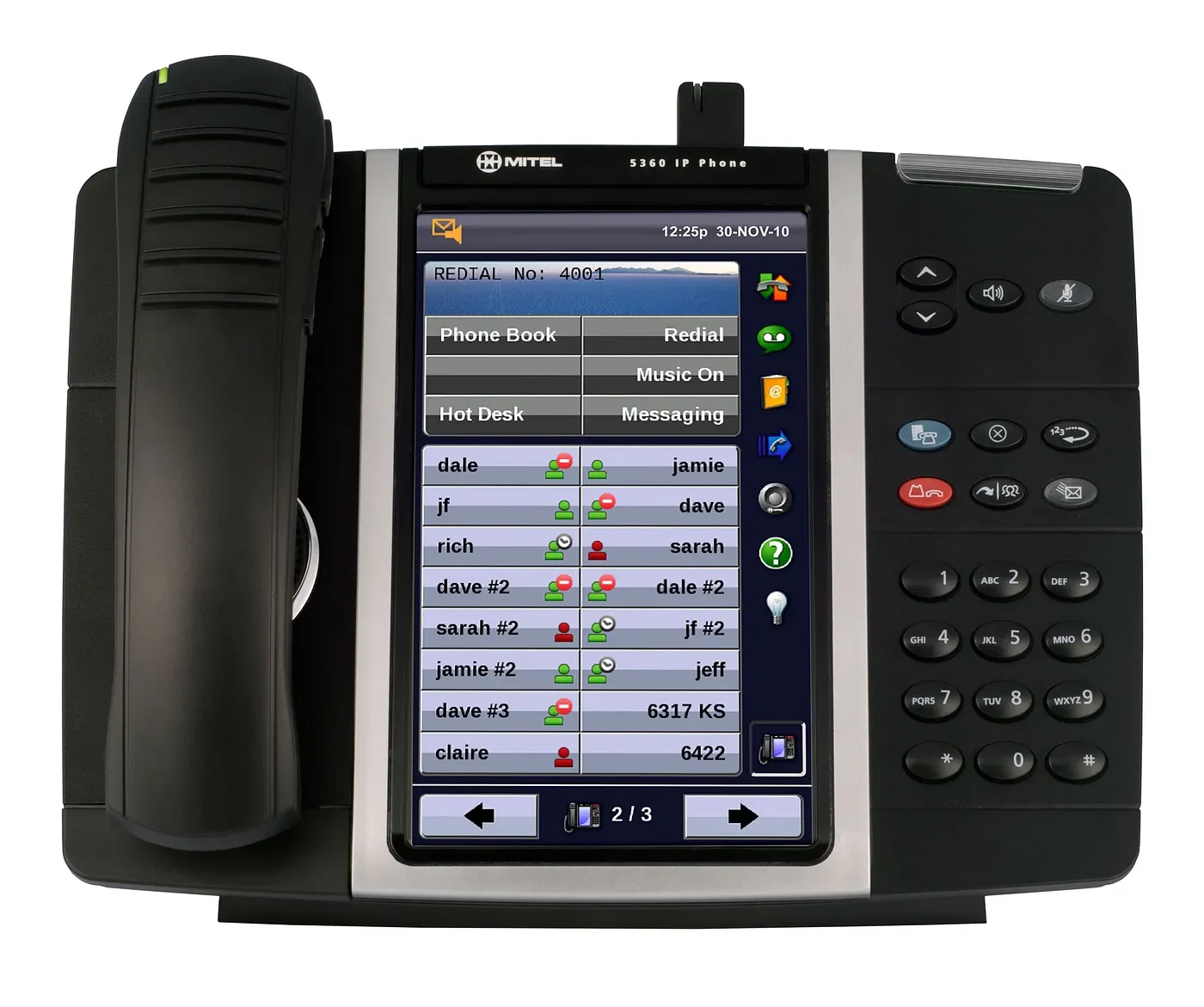
SIP, the Session Initiation Protocol, is what lets users establish, terminate or modify voice or video calls. The voice or video traffic itself is carried over the Real-Time Protocol (RTP). SIP is an application layer protocol that runs over UDP or TCP, and by default it uses UDP/TCP port 5060.
Setup
The researcher worked from a target range given as 182.x.x.x/27. The tools used were nmap for scanning, Wireshark for capturing and inspecting traffic on port 5060, and inviteflood for sending SIP INVITE traffic. No credentials, accounts or roles are described: the whole point of the finding is that none were needed.
Finding it
The starting observation was simply that a host inside the target range answered on port 5060. The researcher scanned the subnet with nmap and found one interesting IP with that port open:
nmap -sC -sV -A -p- -T4 182.x.x.xStarting Nmap 7.92 ( https://nmap.org ) at 2022-11-05 06:18 CDTNmap scan report for 182.x.x.x (194.x.x.x)Host is up (0.038s latency).Not shown: 65531 filtered tcp ports (no-response)PORT STATE SERVICE VERSION443/tcp closed https5060/tcp open sip?
The scan reports the host up with 0.038s latency, 443/tcp closed, and 5060/tcp open with the service fingerprinted only as sip?. That open signalling port was the entry point.
Next the researcher listened on that port with Wireshark and found usernames in the traffic:

Username Enumeration
The SIP traffic exposed usernames, which the researcher collected while listening on port 5060.
Exploitation
Step 1: enumerate usernames from captured SIP traffic
By capturing traffic on port 5060, the researcher collected many usernames. The report does not list them; it only states that many were obtained. With those usernames in hand, the researcher notes that listening, registering, deleting or spoofing a call all looked possible, and asks how.
Step 2: send an INVITE with a forged From identity
The answer was to send an INVITE request with a made-up username, Test, using inviteflood:
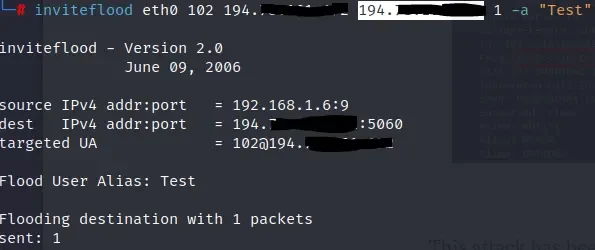
Spoofing
The researcher sent a call to the user 102 with Test as the username, then filtered Wireshark for SIP to see the result:
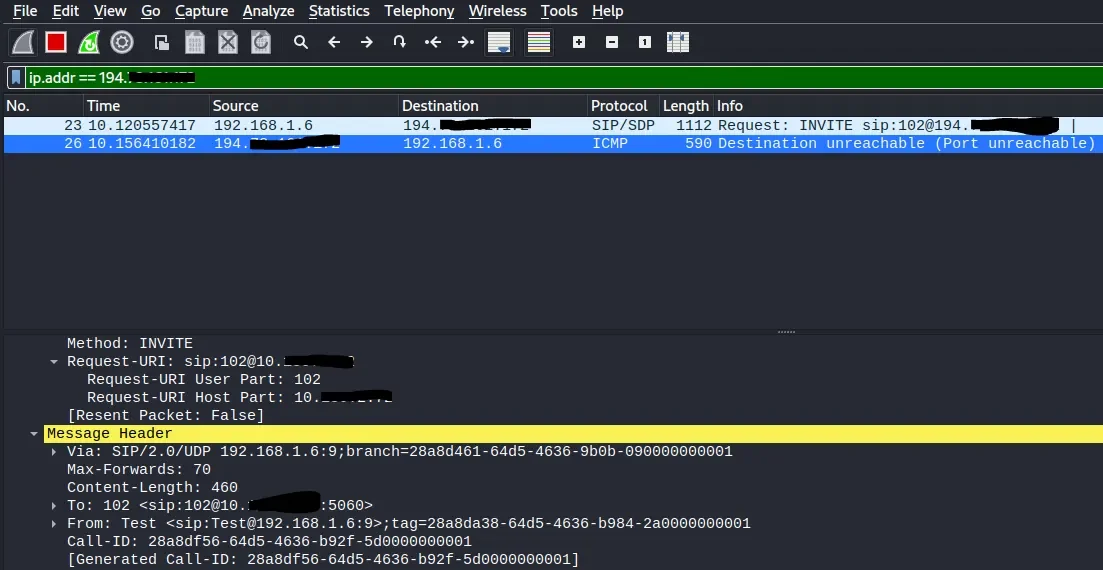
Invite Call
The captured INVITE shows the call being delivered to an internal extension. The researcher notes that a phone was ringing and that the invite reached an internal network address starting with 10.x.x.x. The full INVITE as shown in the report:
Session Initiation Protocol (INVITE) Request-Line: INVITE sip:[redacted] SIP/2.0 Method: INVITE Request-URI: sip:[redacted] Request-URI User Part: 102 Request-URI Host Part: 194.x.x.x [Resent Packet: False] Message Header Via: SIP/2.0/UDP [redacted]:9;branch=28a8d461-64d5-4636-9b0b-090000000001 Transport: UDP Sent-by Address: [redacted] Sent-by port: 9 Branch: 28a8d461-64d5-4636-9b0b-090000000001 Max-Forwards: 70 Content-Length: 460 To: 102 <sip:[redacted]:5060> SIP to display info: 102 SIP to address: sip:[redacted]:5060 From: Test <sip:[redacted]:9>;tag=28a8da38-64d5-4636-b984-2a0000000001 SIP from display info: Test SIP from address: sip:[redacted]:9 SIP from address User Part: Test SIP from address Host Part: [redacted] SIP from tag: 28a8da38-64d5-4636-b984-2a0000000001 Call-ID: 28a8df56-64d5-4636-b92f-5d0000000001 [Generated Call-ID: 28a8df56-64d5-4636-b92f-5d0000000001] CSeq: 0000000001 INVITE Sequence Number: 1 Method: INVITE Supported: timer Allow: NOTIFY Allow: REFER Allow: OPTIONS Allow: INVITE Allow: ACK Allow: CANCEL Allow: BYE Content-Type: application/sdp Contact: <sip:[redacted]:9> Contact URI: sip:[redacted]:9 Supported: replaces User-Agent: Elite 1.0 Brcm Callctrl/[redacted] MxSF/v.3.2.6.26 Message Body
The important parts:
- The Request-URI targets extension
102at the target host, so the call is aimed at a real internal user. - The
Fromheader carries the display nameTestand the URIsip:[redacted]:9. Nothing in the request ties that identity to an authenticated registration, so the caller identity is whatever the sender writes. - The
Allowheader advertisesNOTIFY,REFER,OPTIONS,INVITE,ACK,CANCELandBYE, which tells the researcher which SIP methods the endpoint will accept. - The
User-Agentidentifies the endpoint software asElite 1.0 Brcm Callctrl/[redacted] MxSF/v.3.2.6.26.
Step 3: assess what the accepted methods allow
Because the endpoint accepts NOTIFY, REFER, INVITE, ACK, CANCEL and BYE, the researcher concludes that outgoing calls can be cancelled, and that a call can be listened to, registered into, or spoofed. The report states these capabilities as the consequence of the misconfiguration rather than showing a separate capture for each one.
Root cause
The SIP service on port 5060 accepted an INVITE whose From header carried a made-up identity. Combined with the fact that usernames leak in the traffic, an outsider can enumerate extensions and then place calls that appear to come from an arbitrary name. The report does not describe the device configuration itself, so the exact setting that permits anonymous INVITEs is not stated; the observable cause is that no authentication or authorisation check stands between the sender and the internal extension.
Impact
An attacker who can reach port 5060 can enumerate internal usernames, place calls to internal agents with a forged caller identity, and, per the researcher's analysis of the accepted methods, cancel outgoing calls, listen in, register into a call or spoof it. The calls reach internal addresses in the 10.x.x.x range. The company rated the misconfiguration HIGH and awarded 1,250 EUR.
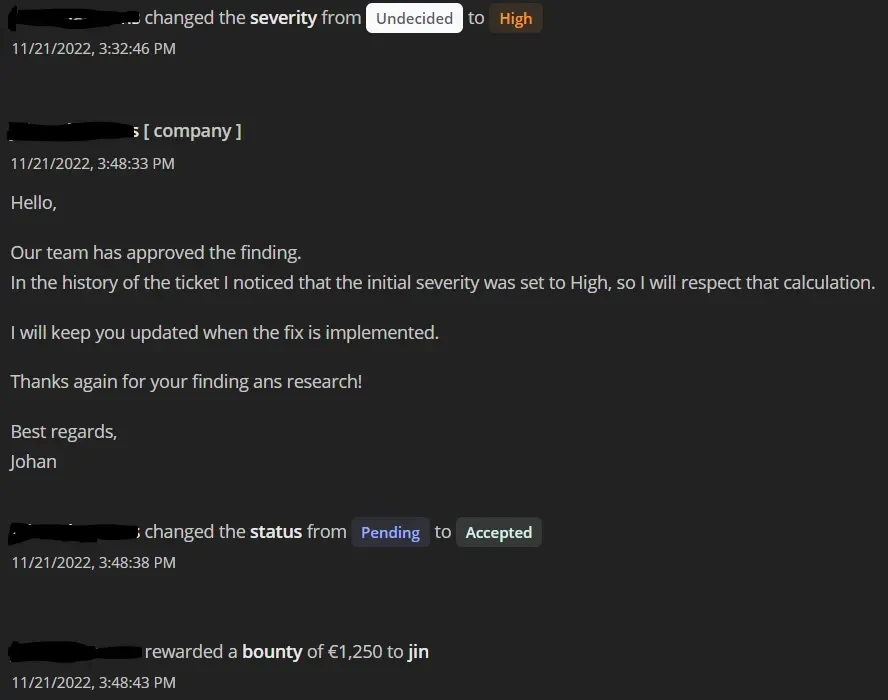
Rewarded
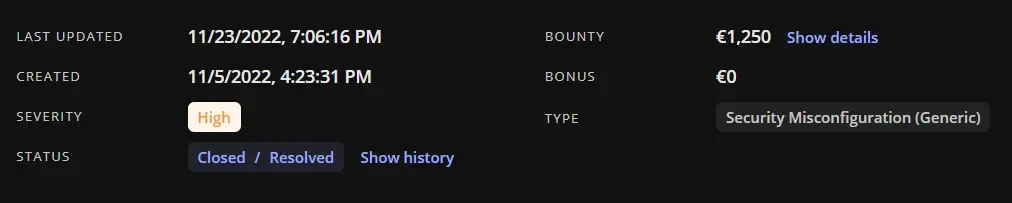
Resolved
Fix
The report records that the issue was marked High and resolved, but it does not describe the change that was made.
Variants to test
- Scan target ranges for UDP/TCP 5060 and fingerprint the service. A positive result is an open
sipport on a host that should not be publicly reachable. - Capture traffic on 5060 and look for usernames or extension numbers in headers. A positive result is a list of internal identities obtained passively.
- Send an INVITE to an enumerated extension with a
Fromvalue that does not correspond to any registration. A positive result is a ringing phone or a100 Trying/180 Ringingresponse to the forged identity. - Inspect the
Allowheader of a response. A positive result lists methods such asREFER,CANCELorBYEthat let you redirect or tear down calls you did not place. - Try
REGISTERagainst the service without credentials. A positive result is a registration accepted for an extension you do not own.
What happened, in plain words
A security researcher was looking at a company's systems through a bug bounty programme on Intigriti. A bug bounty programme is an arrangement where a company invites outside researchers to look for security problems in its systems and pays them for reporting what they find, instead of the researcher being punished. The researcher found a phone system reachable from the internet that accepted a call to an internal extension with a made-up caller name. The company rated the problem HIGH and paid 1,250 EUR.
The rest of this article walks through how that was found, step by step, assuming you have never touched a phone system or a network scanner before. Every tool and term is explained where it first appears.
What is VoIP?
VoIP stands for Voice over IP. It means making ordinary telephone calls over an internet connection instead of over the traditional telephone network. A useful comparison: sending a letter by post versus sending the same words as an email. The content is the same, but the delivery mechanism is completely different. VoIP is the email version of a phone call.
The author explains that VoIP lets audio calls be made using an Internet connection instead of a conventional phone. Some VoIP gateway partners may allow you to call others who have a phone number, including local, long distance, mobile, and international numbers. A gateway is simply a piece of equipment that connects one kind of network to another, in this case the internet to the ordinary phone network.
VoIP uses 5060 as a SIP signalling port by default. Used to register the phone (for example, Cisco, Polycom, etc.). A port is a numbered doorway on a computer. One computer can run many services at once, and each service listens on its own numbered doorway, so the network knows which program an incoming message is meant for. Port 5060 is the doorway that phone equipment traditionally uses to talk to the phone system. Cisco and Polycom are brands of office telephone.
Among the most important features of VoIP are:
- Use of multiple lines
- Voicemail service
- Voice recording
- Call log
- Modular configurations
These are the everyday things you would expect from an office phone system: several calls at once, a voicemail box, recordings, a history of calls, and settings that can be changed piece by piece.
What is SIP?
SIP stands for Session Initiation Protocol. If VoIP is the idea of making calls over the internet, SIP is the language the equipment speaks to set those calls up. A comparison: when you phone a restaurant, you first talk to the person who takes the booking, and only later do you actually speak to the table. SIP is the booking conversation; the actual voice travels separately.
The author explains that Session Initiation Protocol (SIP) allows users to establish communications, terminate, or modify voice or video calls. According to pentesting experts, voice or video traffic is transmitted via Real-Time Protocol (RTP). SIP is an application layer protocol that uses UDP or TCP for traffic. By default, SIP uses UDP/TCP port 5060.
Two more terms from that paragraph. RTP, the Real-Time Protocol, is the part that carries the actual sound. UDP and TCP are the two common ways computers send messages to each other: TCP checks that everything arrives in order, like a tracked parcel, while UDP just fires messages off quickly without checking, like shouting across a room. Phone systems favour UDP because a slightly late word in a live call is worse than a missing one. An application layer protocol simply means a set of rules for how two programs format their messages, as opposed to rules about cables and routers.
Proof of Concept
A proof of concept is a demonstration that a problem is real, rather than a theoretical worry. The researcher's demonstration had three stages: find the phone system, listen to it, and then send it a call.
Stage 1: finding the phone system
The target range was written as 182.x.x.x/27. A range like this is a block of consecutive internet addresses that belong to the same organisation. The /27 is shorthand for how big the block is. The exact addresses are hidden here, which is normal in public write-ups so that the company is not exposed again.
To look through that block, the researcher used nmap. Nmap is a free program that knocks on the doorways of computers and reports which ones answer and what seems to be behind them. Think of it as walking down a street trying every doorbell to see which houses are occupied and who lives there.
The command and its output, exactly as the report shows them:
nmap -sC -sV -A -p- -T4 182.x.x.xStarting Nmap 7.92 ( https://nmap.org ) at 2022-11-05 06:18 CDTNmap scan report for 182.x.x.x (194.x.x.x)Host is up (0.038s latency).Not shown: 65531 filtered tcp ports (no-response)PORT STATE SERVICE VERSION443/tcp closed https5060/tcp open sip?
Line by line, in plain words:
nmapis the program being run.-sCtells it to run a set of default checks against whatever it finds.-sVtells it to try to work out which software and version is behind each open doorway.-Aturns on extra detection, including guessing the operating system.-p-means check every possible port, not just the common ones. The dash stands for the full range.-T4sets the speed. Higher numbers are faster and noisier.182.x.x.xis the address being scanned.- The output begins with the program's version and the date and time of the scan.
Host is up (0.038s latency)means the computer answered, and it took 0.038 seconds for the reply to come back.Not shown: 65531 filtered tcp ports (no-response)means most doorways gave no answer at all, which usually means a firewall is silently dropping the knocks. A firewall is a filter that decides which traffic is allowed in and out.443/tcp closed httpsmeans the doorway normally used for secure websites is closed on this machine.5060/tcp open sip?is the interesting line. Doorway 5060 is open, and nmap guesses it is SIP but is not sure, hence the question mark.
That single open doorway was the starting point.
Stage 2: listening to the traffic
Next the researcher used Wireshark to listen on that port. Wireshark is a free program that records the messages travelling across a network and lets you read them. The comparison is a recording device on a phone line: it does not make calls, it just captures what passes by.
Listening this way produced usernames:
Username Enumeration
Username enumeration means collecting a list of valid account names. It matters because a list of real names is the starting point for almost everything else: you cannot call a specific person unless you know what they are called inside the system. Here the names were not guessed; they were visible in the traffic captured on port 5060. The researcher describes this as getting so many usernames, and notes that with them it looked possible to listen, register, delete, or spoof their call.
Stage 3: sending a call with a fake identity
Spoofing means pretending to be someone or something you are not. In a phone context it means making a call appear to come from a name or number that is not yours. The researcher decided to test this by sending a call request with a made-up username, Test, using a tool called inviteflood. Inviteflood is a program that sends SIP call invitations, the messages that ask a phone to start ringing.
Spoofing
The researcher sent a call to the user 102 with Test as the username. User 102 is an internal extension, which is the short number you dial to reach a colleague inside an office. The name Test is not a real person; it is whatever the researcher chose to type. The point of the test is whether the system cares.
To see what actually happened on the wire, the researcher then opened Wireshark and filtered for SIP, so that only the call setup messages were shown:
Invite Call
The result was that a phone rang. The researcher notes that someone's cell phone was ringing, and that the invitation reached an internal network address starting with 10.x.x.x. Addresses beginning with 10 are private addresses, meaning they are used inside an organisation's own network and are not directly reachable from the public internet. The researcher notes that a phone was ringing and that the invitation reached an internal address starting with 10.x.x.x.
The full captured invitation, exactly as the report shows it:
Session Initiation Protocol (INVITE) Request-Line: INVITE sip:[redacted] SIP/2.0 Method: INVITE Request-URI: sip:[redacted] Request-URI User Part: 102 Request-URI Host Part: 194.x.x.x [Resent Packet: False] Message Header Via: SIP/2.0/UDP [redacted]:9;branch=28a8d461-64d5-4636-9b0b-090000000001 Transport: UDP Sent-by Address: [redacted] Sent-by port: 9 Branch: 28a8d461-64d5-4636-9b0b-090000000001 Max-Forwards: 70 Content-Length: 460 To: 102 <sip:[redacted]:5060> SIP to display info: 102 SIP to address: sip:[redacted]:5060 From: Test <sip:[redacted]:9>;tag=28a8da38-64d5-4636-b984-2a0000000001 SIP from display info: Test SIP from address: sip:[redacted]:9 SIP from address User Part: Test SIP from address Host Part: [redacted] SIP from tag: 28a8da38-64d5-4636-b984-2a0000000001 Call-ID: 28a8df56-64d5-4636-b92f-5d0000000001 [Generated Call-ID: 28a8df56-64d5-4636-b92f-5d0000000001] CSeq: 0000000001 INVITE Sequence Number: 1 Method: INVITE Supported: timer Allow: NOTIFY Allow: REFER Allow: OPTIONS Allow: INVITE Allow: ACK Allow: CANCEL Allow: BYE Content-Type: application/sdp Contact: <sip:[redacted]:9> Contact URI: sip:[redacted]:9 Supported: replaces User-Agent: Elite 1.0 Brcm Callctrl/[redacted] MxSF/v.3.2.6.26 Message Body
This is a lot of text, but it is just a message with a header and a body, much like an email. Wireshark has helpfully broken it into labelled parts. The important ones:
Request-Line: INVITE sip:[redacted] SIP/2.0is the opening line.INVITEis the type of request: it means please start a call.sip:[redacted]is who the call is for, andSIP/2.0is the version of the language being spoken.Request-URI User Part: 102andRequest-URI Host Part: 194.x.x.xsplit that destination into the person (102) and the machine (194.x.x.x). So the call is aimed at a real internal extension on the company's own equipment.Via: SIP/2.0/UDP [redacted]:9records the path the message took, so replies know where to go back to. Thebranchvalue is a label used to match a reply to its request.Max-Forwards: 70is a limit on how many times the message may be passed along before it is dropped, so it cannot loop forever.Content-Length: 460says how long the body is.To: 102 <sip:[redacted]:5060>is the recipient, the person being called.From: Test <sip:[redacted]:9>;tag=28a8da38-64d5-4636-b984-2a0000000001is the caller identity. This is the heart of the finding. The name shown isTest, and the address issip:[redacted]:9. Nothing in the message proves that the sender really isTest. Thetagis just a random label used to keep this call separate from others.Call-IDis a unique identifier for this particular call, so all the messages belonging to it can be grouped together.CSeq: 0000000001 INVITEis a counter that keeps the messages of one call in the right order.- The
Allowlines list the types of request the endpoint says it will accept:NOTIFY,REFER,OPTIONS,INVITE,ACK,CANCELandBYE. This is like a shop sign listing which services it offers, and it tells the researcher what else might be possible. Content-Type: application/sdpsays the body is written in SDP, a format that describes the audio details of the call.Contact: <sip:[redacted]:9>gives the address to use for future messages about this call.User-Agent: Elite 1.0 Brcm Callctrl/[redacted] MxSF/v.3.2.6.26identifies the software on the receiving end, in the same way a web browser tells a website which browser it is.
Stage 4: what the accepted requests allow
The researcher then looked at that list of accepted request types and reasoned about what each one means. NOTIFY sends information about an event. REFER asks one party to contact someone else, which is how a call gets transferred. OPTIONS asks what the other side can do. INVITE starts a call. ACK confirms that a reply was received. CANCEL stops a call that has been requested but not yet answered. BYE ends a call that is already in progress.
Because the endpoint accepts NOTIFY, REFER, INVITE, ACK, CANCEL and BYE, the researcher concluded that outgoing calls can be cancelled, and that a call can be listened to, registered into, or spoofed. In other words, an outsider could hang up calls they did not make, join or eavesdrop on a call, or place calls under a false name. The report presents these as the consequence of the misconfiguration rather than showing a separate capture for each one.
Why it worked
The technical name for this kind of problem is a misconfiguration, meaning the software was set up in a way that leaves a door open, rather than the software itself containing a coding flaw. The comparison is a building with a perfectly good lock that was never turned.
The SIP service on port 5060 accepted an INVITE from an unauthenticated sender whose From header carried a made-up name. In SIP, the From header is simply a field the sender fills in, like the return address on an envelope: you can write anything you like there, and the postal service does not verify it. Combined with the fact that usernames leaked in the traffic, an outsider could first collect a list of internal extensions and then place calls that appeared to come from any name they chose.
The report does not describe the device configuration itself, so the exact setting that permits anonymous invitations is not stated. What can be observed is that no authentication or authorisation check stood between the sender and the internal extension. Authentication means proving who you are; authorisation means being allowed to do what you are trying to do.
Impact
Someone who can reach port 5060 could collect internal usernames, call internal staff while displaying a false caller identity, and, based on the accepted request types, cancel outgoing calls, listen in, register into a call or spoof it. The invitation reached an internal address in the 10.x.x.x range, and the researcher notes that a phone was ringing.
The company rated the misconfiguration HIGH and awarded 1,250 EUR.
Rewarded
Resolved
The fix
The report records that the issue was marked High and resolved, but it does not describe the change that was made. In everyday terms: check who is calling before connecting the call, and do not believe the name they give at the door.
What to look for in your own systems
These are the checks the finding suggests, written so that someone new to this can follow the reasoning:
- Scan target ranges for UDP/TCP 5060 and identify the service. A positive result is an open
sipport on a host that should not be publicly reachable. In plain terms: is the phone system's front door visible from the street when it should only be visible from inside the building? - Capture traffic on 5060 and look for usernames or extension numbers in the headers. A positive result is a list of internal identities obtained passively, without sending anything. In plain terms: does the system announce its staff names to anyone listening?
- Send an invitation to an enumerated extension with a
Fromvalue that does not correspond to any registration. A positive result is a ringing phone or a100 Tryingor180 Ringingresponse to the forged identity. Those two responses are SIP's way of saying "working on it" and "the phone is ringing". In plain terms: can a stranger make a desk phone ring while claiming to be someone else? - Inspect the
Allowheader of a response. A positive result lists methods such asREFER,CANCELorBYEthat let you redirect or tear down calls you did not place. In plain terms: does the system advertise abilities that a stranger should not be offered? - Try
REGISTERagainst the service without credentials. A positive result is a registration accepted for an extension you do not own.REGISTERis the request a phone sends to announce itself to the phone system. In plain terms: can anyone claim a desk that is not theirs?
Glossary
- VoIP (Voice over IP): making telephone calls over an internet connection instead of the traditional telephone network.
- SIP (Session Initiation Protocol): the language phone equipment uses to set up, change and end calls.
- RTP (Real-Time Protocol): the protocol that carries the actual sound of a call.
- UDP: a way of sending network messages quickly without confirming that each one arrived.
- TCP: a way of sending network messages that checks everything arrives, in order.
- Port: a numbered doorway on a computer that a particular service listens on; 5060 is the traditional SIP doorway.
- Application layer protocol: a set of rules for how two programs format their messages, as opposed to rules about the network hardware.
- Gateway: equipment that connects one kind of network to another, such as the internet to the ordinary phone network.
- Extension: the short internal number used to reach a colleague inside an office phone system.
- Private address: an address such as one starting with 10, used inside an organisation's own network and not directly reachable from the public internet.
- Firewall: a filter that decides which network traffic is allowed in and out.
- Nmap: a free program that scans computers to see which doorways are open and what software is behind them.
- Wireshark: a free program that records and displays the messages travelling across a network.
- Inviteflood: a program that sends SIP call invitations.
- INVITE: the SIP request that asks a phone to start ringing.
- REGISTER: the SIP request a phone sends to announce itself to the phone system.
- NOTIFY, REFER, OPTIONS, ACK, CANCEL, BYE: other SIP request types; they send event information, transfer a call, ask what is supported, confirm a reply, stop a call that has not been answered, and end a call in progress.
- Header: a labelled field at the top of a network message, like the address block on an envelope.
Fromheader: the field in a SIP message that states who the caller claims to be; it is filled in by the sender and is not proof of identity.Allowheader: the field that lists which request types an endpoint will accept.User-Agentheader: the field that identifies the software on the other end.- SDP: the format used inside a SIP message to describe the audio details of a call.
- Username enumeration: collecting a list of valid account names, here by reading them from network traffic.
- Spoofing: pretending to be someone or something you are not, such as displaying a false caller name.
- Misconfiguration: a security problem caused by how software was set up, rather than by a flaw in the software itself.
- Authentication: proving who you are.
- Authorisation: being permitted to do what you are trying to do.
- Proof of concept: a demonstration that a security problem is real.
- Bug bounty programme: an arrangement where a company pays outside researchers for reporting security problems.
- Intigriti: the bug bounty platform on which this finding was reported.



