Web Cache Deception Attack on a private bug bounty program

I’m about to tell you the story of one of the coolest bugs I’ve found on a private program which got duplicate, unfortunately.
The full write-up lives on its author's site
It belongs to its author, so we link to it rather than copy it. The other two tabs are our own rewrites, checked against it.
Context
The target was a private bug bounty program with a deliberately small scope: the main website at www.target.tld and the API subdomain at api.target.tld. The feature involved is the user profile page on the main website. When the researcher loaded their own profile, the page fetched the profile data from an API endpoint on the same host, and the response carried a CDN cache status header. That combination, a personalised API response served through a cache, is what made the report possible.
The bug class is web cache deception: the cache is tricked into storing a response that belongs to one user and serving it to another. The researcher also considered cache poisoning but found the site was not vulnerable to it.
Setup
The researcher used Burp Suite to inspect traffic, with the browser proxy history showing the requests made by the profile page. Two browsers were used for the proof of concept: Chrome acted as the victim and Firefox as the attacker. The scenario required the victim to visit the attacker's website, which then sent requests to the endpoint on the victim's behalf.
Finding it
While looking at their own profile page on the main website, the researcher refreshed the page and reviewed Burp's proxy history. The profile information was being returned by an API endpoint rather than being rendered server-side into the page.
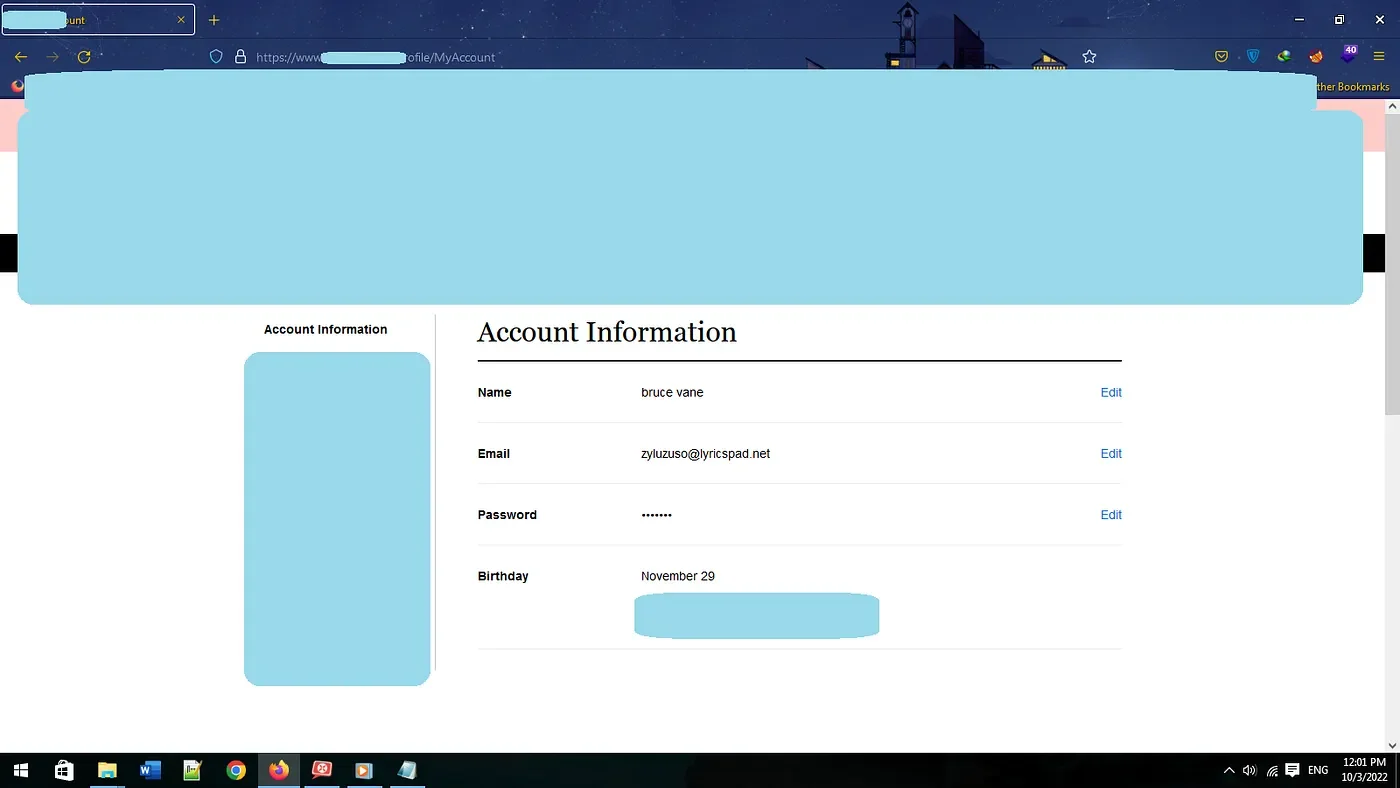
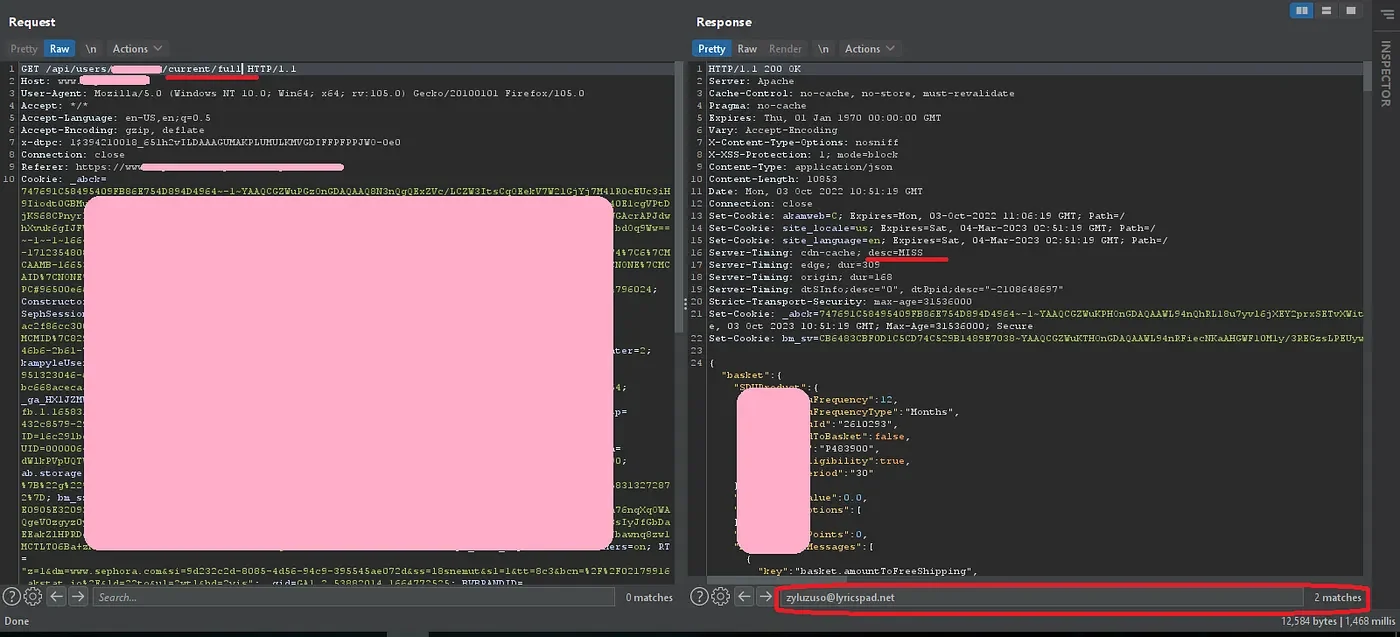
The response was a cache miss, visible in the response header:
Server-Timing: cdn-cache; desc=MISS
That header told the researcher a CDN sat in front of the API and was making caching decisions per request. Two candidate bugs followed from that observation: cache poisoning and cache deception. The researcher tried extensively to poison the cache and concluded the site was not vulnerable to it, so the work moved to deception.
Exploitation
Step 1: Confirm the response is cacheable under a static extension
The researcher appended .css to the end of the URL. The response still contained the user's own profile information, so the personalised content was not being blocked by the extension. Checking the Server-Timing header again showed the cache had stored the response:
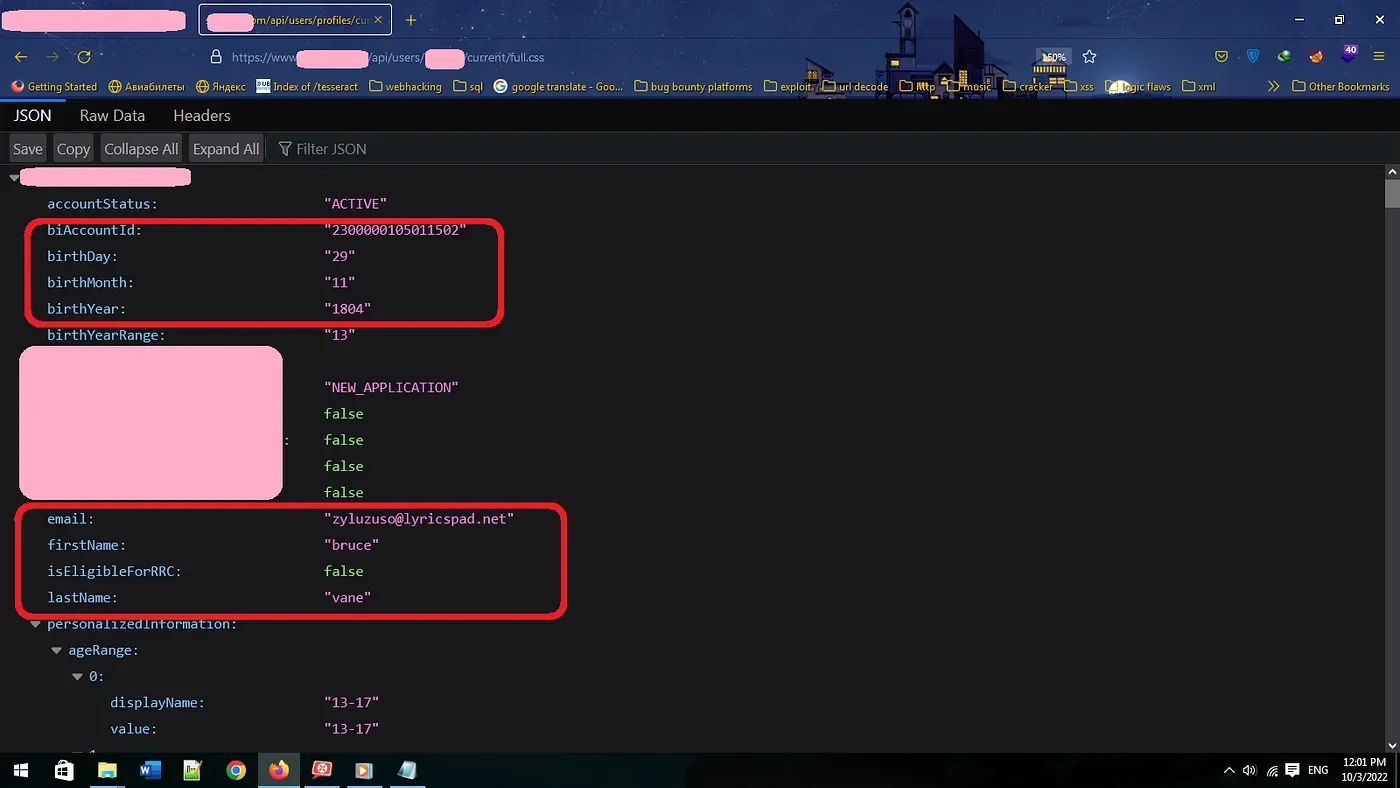
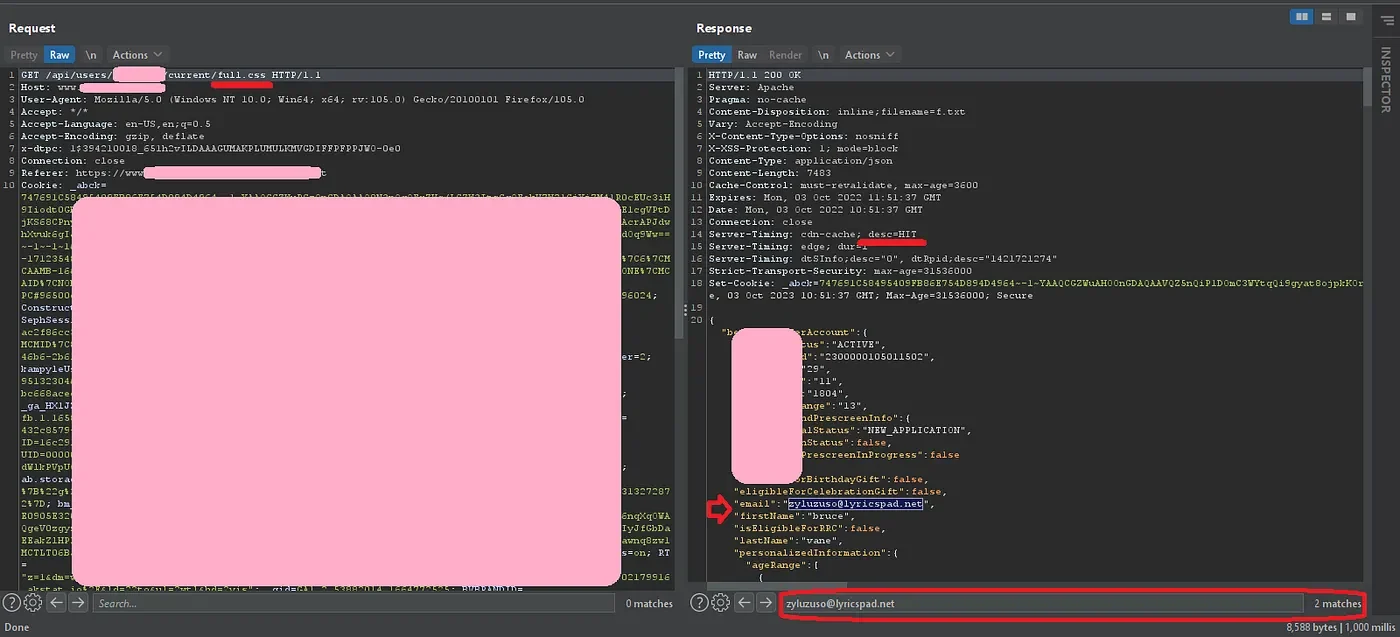
The header now read HIT, meaning the CDN had cached the personalised API response under the .css URL. The endpoint shape was:
https://www.target.tld/api/users/WHATEVER/current/full.css
The endpoint shape was: The .css suffix was appended to the URL, and the response still contained the user's information.
Step 2: Deliver the URL to the victim
The plan was to send the crafted URL to the victim so their authenticated request would populate the cache, then open the same URL in the attacker's browser before the entry expired. The attacker would then see the victim's profile information.
Step 3: Deal with the short cache lifetime
The straightforward version failed. The cache entry expired so quickly that by the time the attacker opened the link, the stored response was gone. The researcher needed a way to make the victim issue many requests to the endpoint in a short window, keeping the entry fresh.
Step 4: The scenario
- The victim visits the attacker's website.
- The attacker's website sends several requests to
https://www.target.tld/api/users/WHATEVER/current/full.cssin order to poison the cache. - The attacker opens the link in their browser and the victim's information is shown.
Step 5: Proof of concept
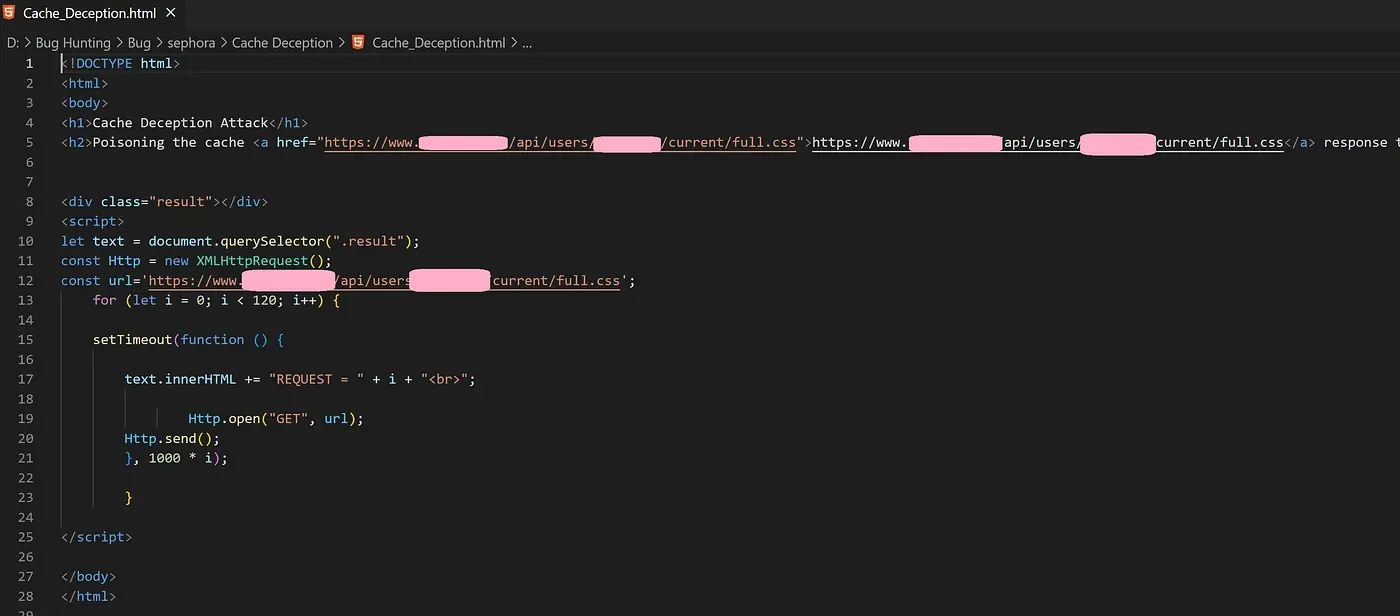
The screenshot shows numerous requests being sent with JavaScript from the attacker's website. In the demonstration, Chrome is the victim and Firefox is the attacker.
Root cause
The CDN decided whether to cache a response based on the URL's extension, treating anything ending in .css as a static asset, while the origin application ignored the suffix and routed the request to the profile API. The cache stored the personalised response under the .css URL. The Server-Timing header exposed the cache state at each step, which is how the researcher confirmed the miss, then the hit. The report does not describe the origin's routing or the exact cache configuration.
Impact
An attacker who can get a logged-in victim to load a page they control can have that page request the crafted URL repeatedly, populating the cache with the victim's profile data. The attacker then retrieves the cached response and reads the victim's information. The attack depends on the victim being authenticated and visiting the attacker's site, and on the attacker reading the cache before it expires, which is why the repeated requests were necessary. The report does not enumerate which fields the profile response contained. The researcher notes the submission was closed as a duplicate.
Fix
The report does not state what change was made.
Variants to test
- Append static extensions such as
.css,.js,.pngor.icoto authenticated API paths and check theServer-TimingorAge/X-Cacheheaders for a transition from miss to hit. A positive result is aHITon a response that still contains your own account data. - Try path tricks such as a trailing slash,
;parameters or encoded characters after the extension, to see whether the cache and the origin disagree about which resource is being requested. A positive result is a cached response containing personalised data under a URL the origin still resolves to the API. - Test whether the cache key ignores query strings or headers, by varying them between the victim's request and the attacker's retrieval. A positive result is the attacker receiving the victim's data despite a different query string or header set.
- Measure how long entries survive, then build a page that re-requests the URL on a timer to keep the entry warm, as in the proof of concept. A positive result is a stable
HITwhile the victim's session is active. - Check other authenticated endpoints that return JSON, such as account settings or order history, for the same extension-based caching behaviour. A positive result is any personalised response stored and retrievable by an unauthenticated or different user.
What happened, in plain words
A security researcher found a way to make a website's caching system hand one person's private profile information to somebody else. The trick relied on a small detail: when the researcher appended .css to the profile address, the cache stored a copy of the profile data. The researcher could then get a victim to load a page they controlled, have that page quietly request the profile address many times, and read the stored copy before it disappeared. The submission was later closed as a duplicate, meaning somebody else had reported the same issue first.
To follow the story you only need a browser and a bit of curiosity. Everything below explains the pieces from scratch.
The pieces you need to know
Before the story makes sense, here are the ideas it uses.
- Website and API. A website is what you see in the browser: pages, buttons, your name in the corner. An API (Application Programming Interface) is the behind-the-scenes counter where the page asks for data. Think of a restaurant: the menu and the table are the website, the kitchen is the API. Your browser asks the kitchen for your profile, and the kitchen sends it back as raw data rather than as a finished page.
- Subdomain. A name like
api.target.tldis a subdomain oftarget.tld. It is the same company, but a separate address, often used for the data service rather than the visible pages. - Cookie or session token. When you log in, the site gives your browser a small piece of text that proves who you are. Your browser sends it with every request, so the site knows the request is yours. If somebody else gets a response generated with your cookie, that response can contain your data.
- CDN and cache. A CDN (Content Delivery Network) is a network of servers placed around the world that keep copies of web content so it can be delivered faster. Keeping a copy is called caching. A cache is like a photocopier by the front door: instead of walking to the back office for the same document every time, the staff hand out the photocopy. That is great for a logo or a stylesheet, which is the same for everybody. It is dangerous for a page that contains your personal data, because the photocopy is then handed to whoever asks next.
- Cache hit and cache miss. When the cache already has a copy, that is a hit. When it does not and has to fetch fresh content, that is a miss. Websites often report this in a response header, a small line of metadata sent alongside the content.
- Web cache deception. This is the bug class in this report. The attacker tricks the cache into storing a response that belongs to one user and then retrieves it. The word deception is the point: the cache is fooled into thinking a private response is a public file.
- Cache poisoning. A related but different bug. Instead of stealing somebody's stored response, the attacker tries to plant a harmful response in the cache so other users receive it. The researcher tested for this too and found the site was not vulnerable.
- Burp Suite. A tool that sits between your browser and the internet and records every request and response. It is like a notebook that logs every conversation your browser has, so you can read them afterwards.
- JavaScript. The programming language that runs inside web pages. It can make your browser send requests without you clicking anything, which is what made the attack possible.
The target
The program was private, with a deliberately small scope: the main website at www.target.tld and the API subdomain at api.target.tld. The feature involved was the user profile page on the main website.
Finding the interesting endpoint
The researcher opened their own profile page on the main website, refreshed it, and then looked at Burp's history to see what the page had fetched. The profile information was not baked into the page by the server. Instead, the page asked an API endpoint for it, and the data came back as a separate response.
The second image is labelled MISS, which refers to the cache status described next.
Looking at that response, one line stood out:
Server-Timing: cdn-cache; desc=MISS
Line by line, in plain words:
Server-Timingis a response header, a small note the server attaches to the content. It is meant to report timing information, but here it also carries cache details.cdn-cachenames the thing being reported on: the CDN's cache.desc=MISSsays the cache did not have a copy of this response and had to fetch it fresh.
That single line told the researcher two useful things. A CDN was sitting in front of the API, and it was making a caching decision for each request. From there, two possible bugs followed: cache poisoning and cache deception. The researcher tried hard to poison the cache and concluded the site was not vulnerable to it, so the work moved on to deception.
Step 1: Making the private response look like a public file
The idea behind cache deception is to make a private response look like something the cache is happy to store. Caches are usually configured to store static files, the kind that are identical for every visitor, such as images and stylesheets. A common way to spot a static file is its extension: .css for a stylesheet, .js for a script, .png for an image.
So the researcher appended .css to the end of the URL. The response still contained the researcher's own profile information, which meant the personalised content was not being blocked by the extension. Checking the Server-Timing header again showed the cache had now stored the response.
The second image is captioned Yay! It says HIT baby, meaning the cache now had a copy.
The header now read HIT, so the CDN had cached the personalised API response under the .css URL. The endpoint shape was:
https://www.target.tld/api/users/WHATEVER/current/full.css
Line by line, in plain words:
https://www.target.tldis the main website's address./api/users/is the path that leads to the user data service./full.cssis the part the researcher added, and the response still contained the profile data.
Step 2: Getting the victim to fill the cache
The plan was simple in principle. Send the crafted URL to the victim, so that their logged-in request would put their own profile data into the cache. Then open the same URL in the attacker's browser before the stored copy expired. The attacker would then see the victim's profile information.
Step 3: The cache expired too quickly
The straightforward version failed. The cache entry expired so fast that by the time the attacker opened the link, the stored response was gone. The researcher needed a way to make the victim issue many requests to the endpoint in a short window, keeping the entry fresh.
Step 4: The scenario
- The victim visits the attacker's website.
- The attacker's website sends several requests to
https://www.target.tld/api/users/WHATEVER/current/full.cssin order to poison the cache. - The attacker opens the link in their browser and the victim's information is shown.
Step 2 is the clever part. Because the victim's browser is on the attacker's page, JavaScript on that page can send requests on the victim's behalf. Each request refreshes the stored copy, so the cache stays warm long enough for the attacker to read it.
Step 5: Proof of concept
The screenshot shows numerous requests being sent with JavaScript from the attacker's website. In the demonstration, Chrome is the victim and Firefox is the attacker.
Why it worked
The response under the .css URL was stored by the cache and still contained the profile data. The Server-Timing header exposed the cache state at each step, which is how the researcher confirmed the miss and then the hit.
What an attacker could do with it
An attacker who can get a logged-in victim to load a page they control can have that page request the crafted URL repeatedly, filling the cache with the victim's profile data. The attacker then retrieves the stored copy and reads the victim's information. The attack depends on the victim visiting the attacker's site and on the attacker reading the cache before it expires, which is why the repeated requests were necessary. The report does not list which fields the profile response contained. The researcher notes the submission was closed as a duplicate.
How it should be fixed
The report does not state what change was made.
Other places to look
- Append static extensions such as
.css,.js,.pngor.icoto authenticated API paths and check theServer-TimingorAge/X-Cacheheaders for a change from miss to hit. A positive result is aHITon a response that still contains your own account data. - Try path tricks such as a trailing slash,
;parameters or encoded characters after the extension, to see whether the cache and the application disagree about which resource is being requested. A positive result is a cached response containing personalised data under a URL the application still resolves to the API. - Test whether the cache ignores query strings or headers, by varying them between the victim's request and the attacker's retrieval. A positive result is the attacker receiving the victim's data despite a different query string or header set.
- Measure how long entries survive, then build a page that re-requests the URL on a timer to keep the entry warm, as in the proof of concept. A positive result is a stable
HITwhile the victim's session is active. - Check other authenticated endpoints that return JSON, such as account settings or order history, for the same extension-based caching behaviour. A positive result is any personalised response stored and retrievable by an unauthenticated or different user.
Glossary
- API: the data service behind a website, which returns raw information rather than finished pages.
- Bug bounty program: a scheme where a company invites researchers to report security problems, sometimes for a reward.
- Burp Suite: a tool that records and lets you inspect the requests and responses between your browser and a website.
- Cache: a store of copies of web content, kept so that repeated requests can be answered faster.
- Cache deception: tricking a cache into storing a private response and then retrieving it.
- Cache hit: the cache already has a copy of the requested content.
- Cache key: the information the cache uses to decide whether two requests are for the same thing.
- Cache miss: the cache does not have a copy and has to fetch fresh content.
- Cache poisoning: planting a harmful response in a cache so that other users receive it.
- CDN: a network of servers that keeps copies of content close to users for speed.
- Cookie / session token: a small piece of text your browser sends to prove who you are after logging in.
- Duplicate: a report closed because the same issue had already been submitted.
- Extension: the part of a file name after the dot, such as
.css, which hints at the file type. - Header: a small line of metadata sent alongside a request or response.
- JavaScript: the language that runs inside web pages and can make the browser send requests.
- JSON: a common text format for sending structured data between a website and its API.
- Private program: a bug bounty program that is not open to the public and is shared with selected researchers.
- Response: what a server sends back when your browser asks for something.
- Scope: the list of systems a researcher is allowed to test.
- Static asset: a file that is the same for every visitor, such as an image or a stylesheet.
- Subdomain: a separate address under a main domain, such as
api.target.tldundertarget.tld. - Web cache deception: the bug class in this report, where a cache is fooled into storing and serving one user's private response to another.



