How I hacked hackers in Voorivex Hunt Event
The WordPress xmlrpc.php pingback feature was used to perform a blind SSRF, revealing the origin IP behind Cloudflare. An exposed MongoDB server on that IP contained user emails, tokens, and OAuth state codes, allowing account takeover.

Hey wonderful people. The story begins when I heard “Voorivex”, my hacker idol is gonna hold a hunt event.
The full write-up lives on its author's site
It belongs to its author, so we link to it rather than copy it. The other two tabs are our own rewrites, checked against it.
Context
Voorivex ran a hunt event on the notsafe.shop domain, and this write-up follows the path from a Cloudflare-walled web target to an exposed MongoDB instance that held the event's user data. The main domain was a WordPress site, and the researcher began by looking around the subdomains. The researcher's goal at the start was modest: get past Cloudflare so that normal testing of the web application could continue.
Setup
The tools used were:
- SecurityTrails API, queried with
curlfor historical DNS A records. ping,nslookupanddigagainst the subdomains.- Burp Collaborator, to receive an out-of-band request.
nmapfor a full port scan of the discovered origin IP.- A MongoDB client, following the HackTricks guidance for connecting to an exposed
mongod.
No account on the target is described as a precondition for the steps below. The WordPress installation on the main domain had to have xmlrpc.php active, which is the condition the pingback technique depends on.
Finding it
Almost every request to the subdomains was answered by a Cloudflare block page, which made ordinary testing impractical.
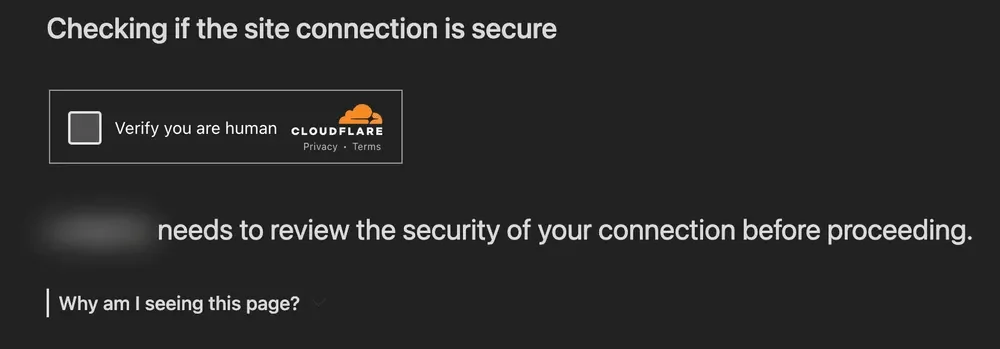
The decision was to find at least one origin IP so that Cloudflare could be bypassed entirely. The first attempt queried SecurityTrails for the DNS history of notsafe.shop and filtered the response down to unique IPv4 addresses:
curl --request GET --url https://api.securitytrails.com/v1/history/notsafe.shop/dns/a --header 'apikey: MY-API-KEY' >> security-trails-IPs.txtcat security-trails-IPs.txt | grep -oE "(25[0-5]|2[0-4][0-9]|[01]?[0-9][0-9]?)\.(25[0-5]|2[0-4][0-9]|[01]?[0-9][0-9]?)\.(25[0-5]|2[0-4][0-9]|[01]?[0-9][0-9]?)\.(25[0-5]|2[0-4][0-9]|[01]?[0-9][0-9]?)" | sort -u >> unique-ips.txt
The curl call pulls the historical A records for the apex domain and appends the JSON to a file; the grep extracts dotted-quad addresses and sort -u deduplicates them. Every address returned belonged to Cloudflare, so this route gave nothing usable. ping, nslookup and dig against all the subdomains likewise produced no origin IP.
The opening came from remembering that the main domain was WordPress. If xmlrpc.php is active, its pingback feature can be abused as a blind SSRF: the server is told to fetch a URL, and the request it makes arrives at an address the attacker controls, revealing the server's own egress address. The researcher sent a pingback request:
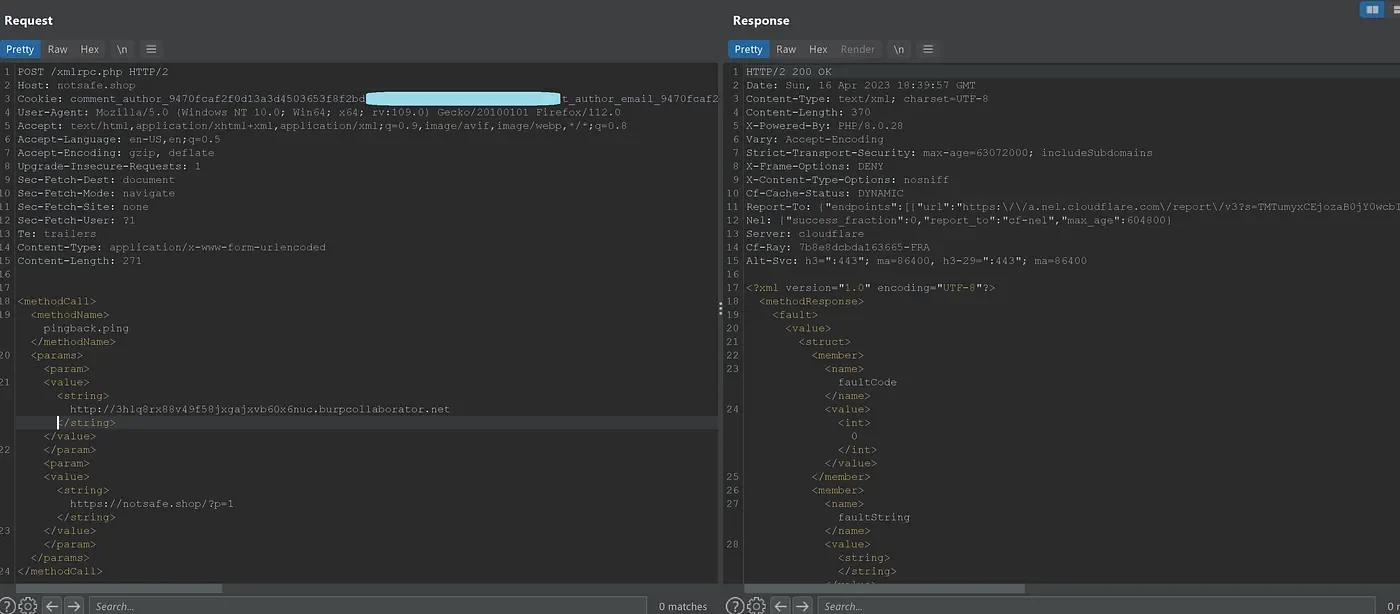
The callback landed in Burp Collaborator, which gave the origin IP.
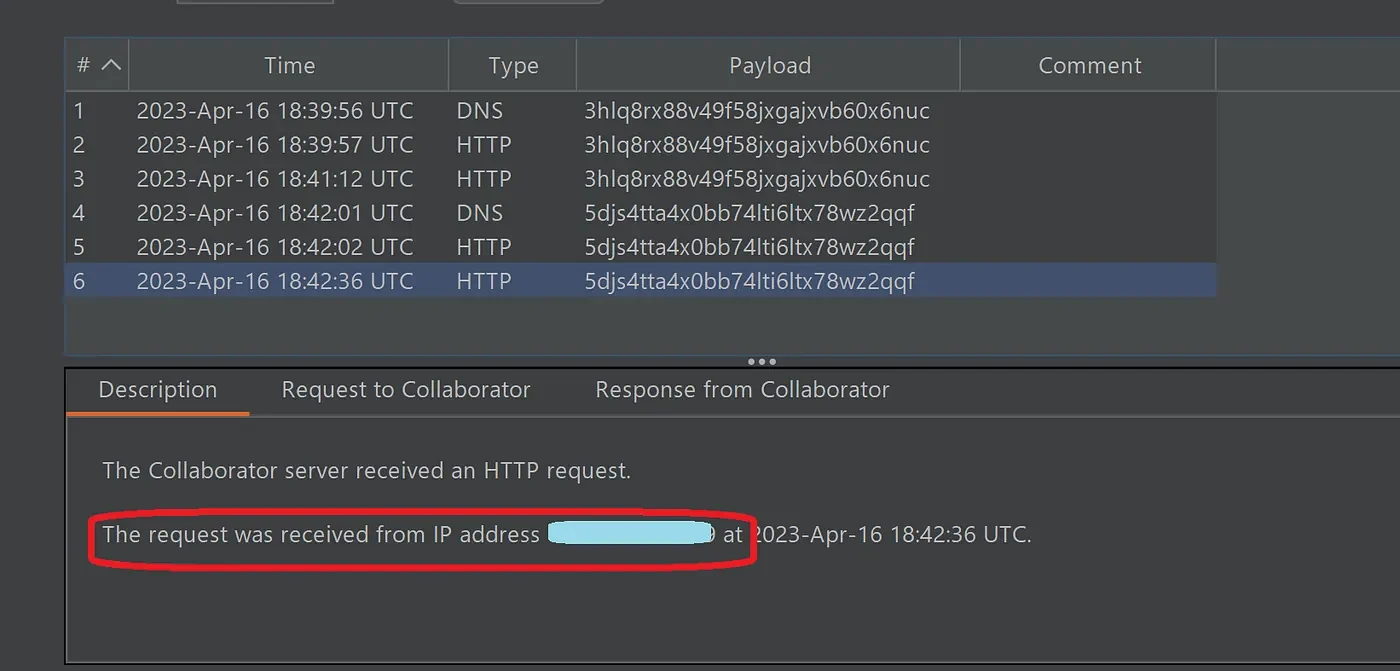
Exploitation
Step 1: scan the origin
With the origin IP in hand, a full TCP scan was run:
nmap -p- -T4 {IP}
The intent at this point was still only to use the IP to bypass Cloudflare, but the scan returned more than a web server:
PORT STATE SERVICE53/tcp open domain3031/tcp open eppc 8089/tcp open unknown23847/tcp open unknown27017/tcp open mongod
Port 27017, the default MongoDB port, stood out. The researcher had not worked with it before and looked it up.
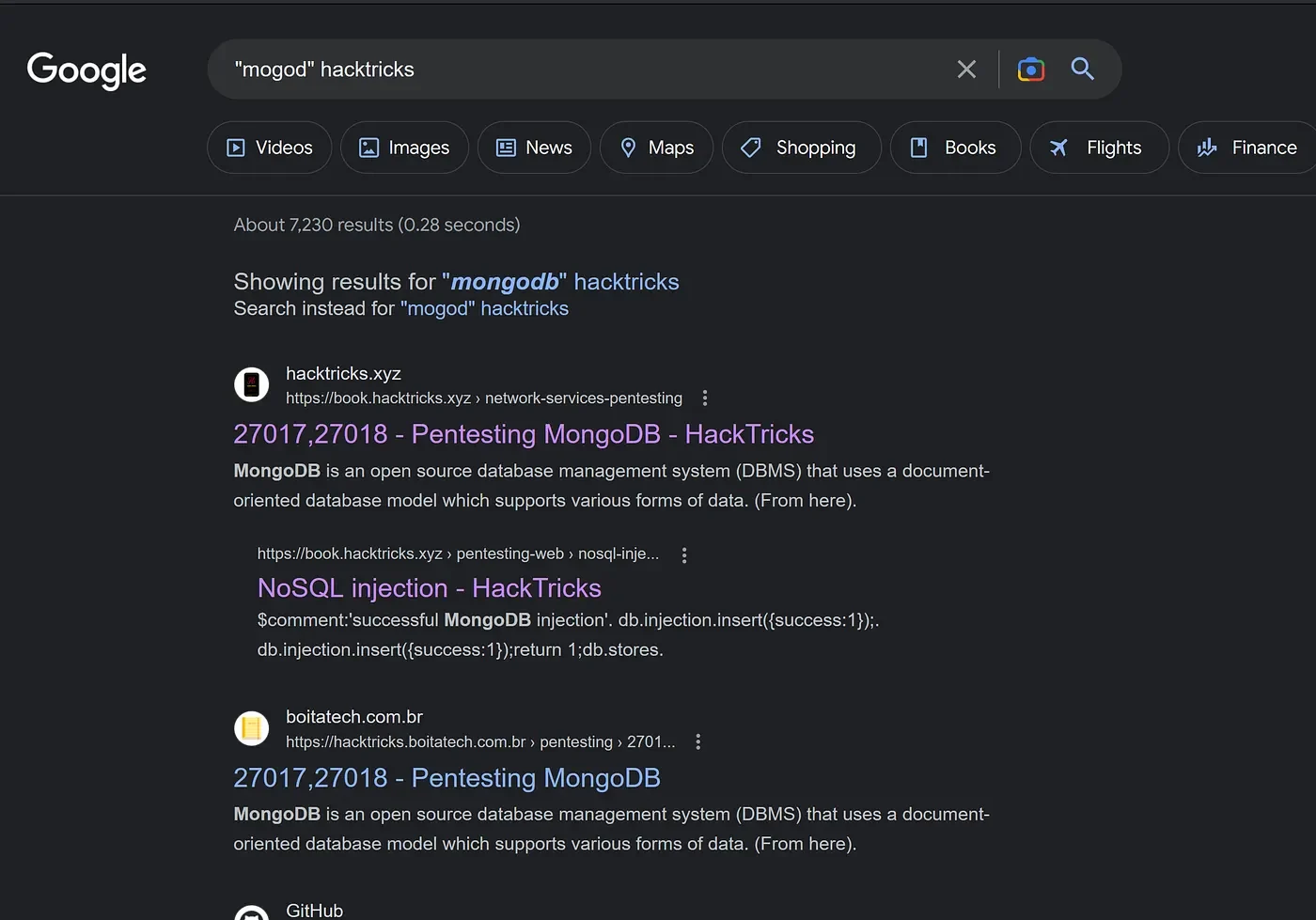
Step 2: connect to MongoDB
Following the HackTricks guide for exposed MongoDB instances, the researcher connected to the server and got in.

Step 3: enumerate databases
The next step was to list the databases and move between them:
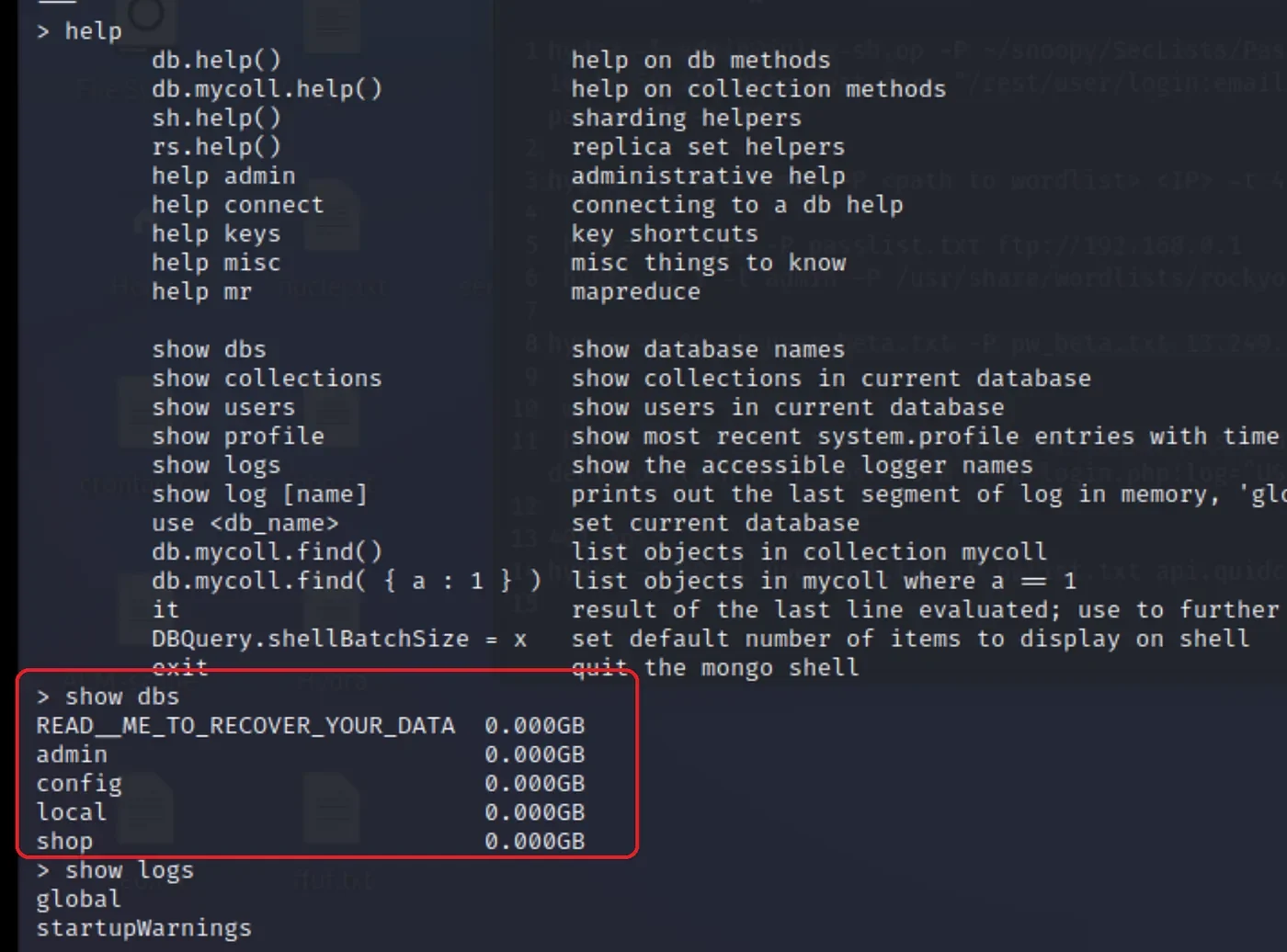
show dbs
Step 4: read the startup log
The startup log held a large amount of information:
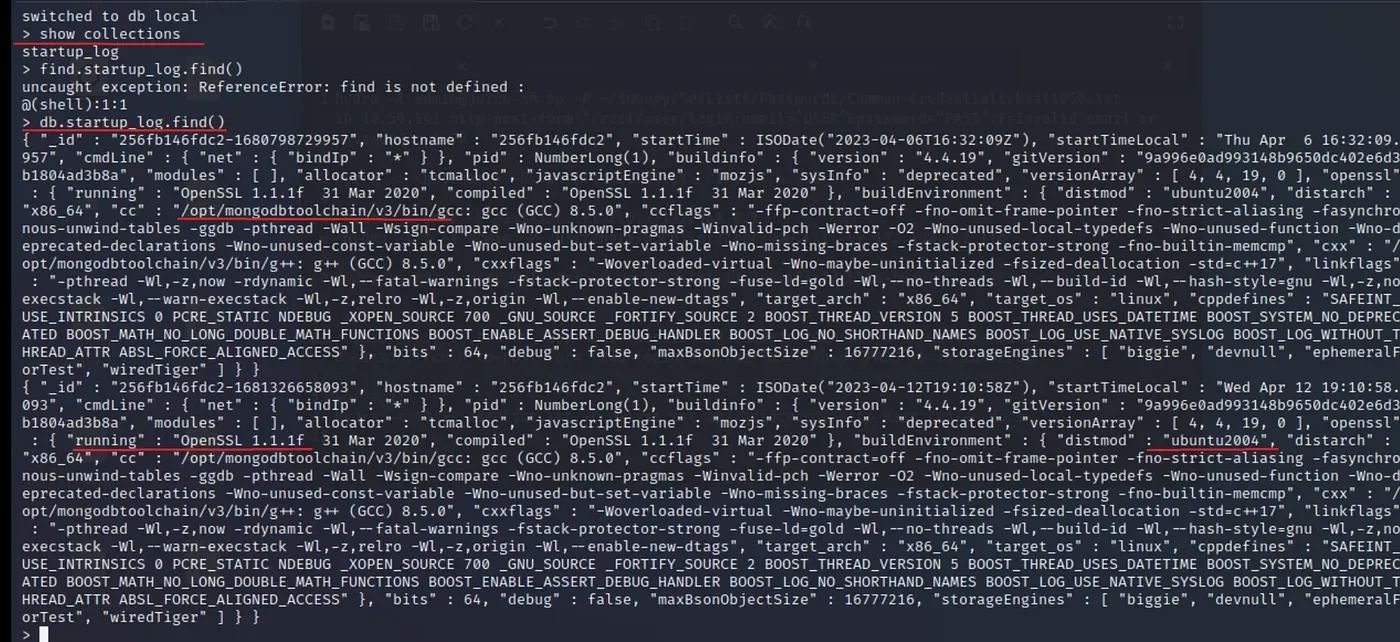
db.startup_log.find()

Step 5: read the shop database
Switching to the shop database exposed the emails and tokens of the other participants in the event:
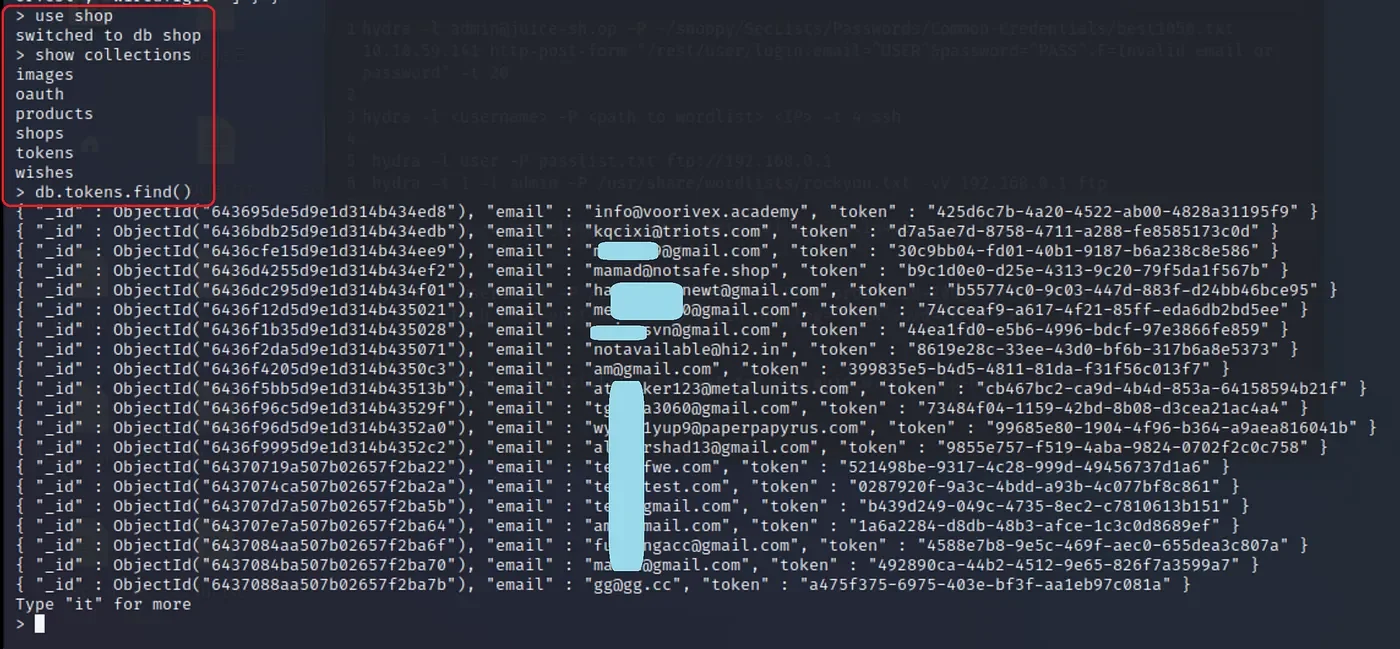
OAuth state codes were present as well:
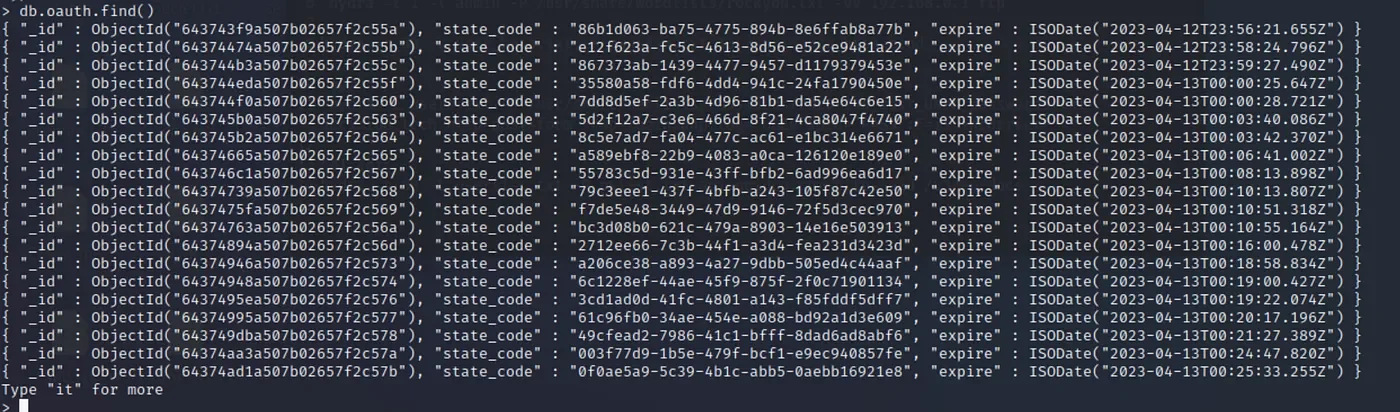
Step 6: review stored images
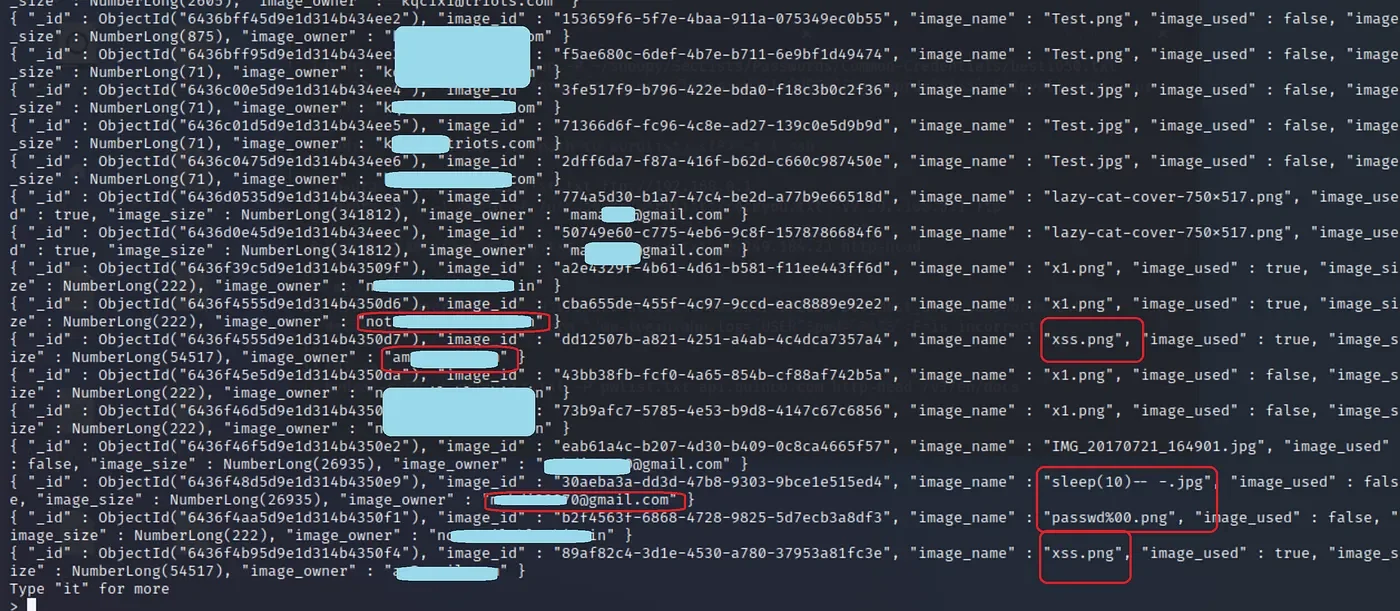
The stored images belonging to other hackers were also readable, including names that contained XSS and SQL injection payloads and other fuzzing strings:
At this point the researcher judged that any account could be taken over, and sent the report immediately.
Root cause
The MongoDB service on port 27017 was reachable from the internet on the origin host. Because the origin IP was discoverable, Cloudflare provided no protection for that port at all: the WAF sat in front of the web traffic, not in front of the database. The pingback SSRF in WordPress xmlrpc.php is a standard way to make the server reveal its own address, and nothing in the setup prevented it. The data that made account takeover possible, emails, tokens and OAuth state codes, was stored in that database.
Impact
Anyone who found the origin IP could read the event's user data directly: participant emails, tokens and OAuth state codes, plus uploaded images. With the tokens and state codes, the researcher states that any account could be taken over. The exposure depended on the origin IP being discoverable and the MongoDB service being reachable on it.
Fix
The report does not describe any remediation. The measures that follow from the findings are to bind MongoDB to localhost or a private interface, require authentication, and firewall port 27017 so that it is never reachable from the internet. Restricting or disabling xmlrpc.php pingbacks removes the easy origin-IP disclosure, and keeping the origin host from answering directly on non-web ports limits what a bypass of the CDN can reach.
Variants to test
- Pingback SSRF for origin discovery. On any WordPress target behind a CDN, POST a pingback to
xmlrpc.phppointing at a Collaborator URL. A positive result is an inbound HTTP request from the target's real address. - Historical DNS lookups. Query SecurityTrails or similar sources for A records of the apex and subdomains. A positive result is any address that does not belong to the CDN provider.
- Full-port scan of the origin. Run
nmap -p-against a discovered origin IP. A positive result is any service that the CDN was supposed to shield, especially database ports such as 27017. - Unauthenticated MongoDB access. Attempt a connection to port 27017 without credentials and run
show dbs. A positive result is a list of databases rather than an authentication error. - Sensitive collections. In any reachable database, check collections for tokens, OAuth state codes and user records. A positive result is credential material that maps to live sessions or accounts.
LeaderBoard and Bounty

The report was triaged as Critical/P1 along with the highest reputation.
What happened, in plain words
A security researcher took part in a hacking event run by Voorivex on a website called notsafe.shop. The website was hidden behind Cloudflare, a service that sits in front of a site and blocks suspicious traffic. That made normal testing impossible, so the researcher first worked out the real address of the server behind Cloudflare. The trick used was a feature of WordPress, the software the main site ran on, which can be told to fetch a web address and will do so from the server itself. That revealed the server's real IP address.
A scan of that address found a database service, MongoDB, open to the internet on port 27017. Inside it were the emails, login tokens and OAuth state codes of everyone taking part in the event, plus uploaded images. With those tokens, the researcher was able to take over any participant's account. The report was accepted as Critical/P1.
This article walks through the same steps for someone who has never done security testing before. Every tool and term is explained the first time it appears.
The setting
Voorivex ran a hunt event on the notsafe.shop domain. A domain is the name you type in a browser, like example.com. A site usually has many subdomains, which are names that sit in front of the main one, like shop.example.com or blog.example.com. The event ran across those subdomains, and the main domain was a WordPress site.
WordPress is a popular program for building websites. It has a feature called xmlrpc.php, a file that lets other programs talk to the site, for example to publish a post automatically. One of the things it can do is called a pingback: when another blog links to your post, your site can be told to visit that blog to confirm the link. That means the site makes an outgoing request to an address someone else chooses. Keep that in mind, it becomes the key to the whole story.
The researcher's goal at the start was modest: get past Cloudflare so that normal testing of the web application could continue.
The tools
These are the tools used, each explained in plain words:
- SecurityTrails API, queried with
curlfor historical DNS records. SecurityTrails is a service that keeps a history of which IP addresses a domain name pointed to in the past. An API is a way for one program to ask another program for data over the internet, instead of a person clicking buttons in a browser.curlis a command-line program that sends web requests and prints the answer. ping,nslookupanddigagainst the subdomains. These are small command-line tools that ask the internet's address book, called DNS, what IP address belongs to a name. DNS is the system that turnsnotsafe.shopinto a number like[redacted]so computers can find each other.- Burp Collaborator, to receive an out-of-band request. Burp Collaborator is a service that gives you a unique web address and records every request that arrives at it. "Out-of-band" means the request comes to you by a different path than the one you sent, which is how you prove that a server really made a request on your behalf.
nmapfor a full port scan of the discovered origin IP. A port is a numbered door on a computer; a server can have many open at once, one for web traffic, one for email, one for a database.nmapis a program that knocks on every door of a machine and reports which ones answer.- A MongoDB client, following the HackTricks guidance for connecting to an exposed
mongod. MongoDB is a database program, a place where a website stores its data in an organised way.mongodis the name of the MongoDB server process. A client is the program you use to talk to it. HackTricks is a public collection of notes on security techniques.
No account on the target is described as a precondition for the steps below. The WordPress installation on the main domain had to have xmlrpc.php active, which is the condition the pingback technique depends on.
Finding it
Almost every request to the subdomains was answered by a Cloudflare block page, which made ordinary testing impractical.
Cloudflare is a service many sites use as a shield. All visitors talk to Cloudflare first, and Cloudflare decides whether to pass the request on to the real server. If it thinks the traffic looks like an attack, it shows a block page instead. The real server, called the origin, is supposed to stay hidden behind that shield. If you can find the origin's IP address, you can talk to it directly and skip the shield entirely.
The decision was to find at least one origin IP so that Cloudflare could be bypassed. The first attempt queried SecurityTrails for the DNS history of notsafe.shop and filtered the response down to unique IPv4 addresses:
curl --request GET --url https://api.securitytrails.com/v1/history/notsafe.shop/dns/a --header 'apikey: MY-API-KEY' >> security-trails-IPs.txtcat security-trails-IPs.txt | grep -oE "(25[0-5]|2[0-4][0-9]|[01]?[0-9][0-9]?)\.(25[0-5]|2[0-4][0-9]|[01]?[0-9][0-9]?)\.(25[0-5]|2[0-4][0-9]|[01]?[0-9][0-9]?)\.(25[0-5]|2[0-4][0-9]|[01]?[0-9][0-9]?)" | sort -u >> unique-ips.txt
Line by line:
curl --request GET --url https://api.securitytrails.com/v1/history/notsafe.shop/dns/a --header 'apikey: MY-API-KEY'sends a request to SecurityTrails asking for the history of DNS "A records" fornotsafe.shop. An A record is the entry in DNS that maps a name to an IP address. The--header 'apikey: ...'part is how the service knows who is asking; the key is a secret, like a password for a program, and here it is shown as a placeholder.>> security-trails-IPs.txtappends the answer to a file instead of printing it on screen.>>means "add to the end of this file".cat security-trails-IPs.txtprints the file's contents.| grep -oE "..."passes that text togrep, a program that searches text for a pattern. The long pattern is a way of describing an IPv4 address: four numbers separated by dots, each between 0 and 255.-omeans "print only the matching part",-Emeans "use the extended pattern syntax".| sort -usorts the addresses and removes duplicates, so each address appears once.>> unique-ips.txtappends the result to a second file.
Every address returned belonged to Cloudflare, so this route gave nothing usable. ping, nslookup and dig against all the subdomains likewise produced no origin IP.
The opening came from remembering that the main domain was WordPress. If xmlrpc.php is active, its pingback feature can be abused as a blind SSRF. SSRF stands for Server-Side Request Forgery: the attacker makes the server send a request to an address the attacker chooses. "Blind" means the attacker never sees the response, only the fact that the request happened. The server is told to fetch a URL, and the request it makes arrives at an address the attacker controls, revealing the server's own egress address, the address it uses when it talks to the outside world. The researcher sent a pingback request:
The callback landed in Burp Collaborator, which gave the origin IP.
Why this works: the pingback feature needs to visit the address you give it, so the server itself makes the connection. Because the connection comes from the real server and not from Cloudflare, the address that shows up in the Collaborator log is the origin's own IP. The shield is bypassed without breaking it.
Exploitation
Step 1: scan the origin
With the origin IP in hand, a full TCP scan was run:
nmap -p- -T4 {IP}
Line by line:
nmapis the scanning program.-p-means "scan every port", from 1 to 65535, not just the common ones. A port is a numbered door on a machine; each network service listens on one.-T4sets the speed to a faster preset. Higher numbers mean faster and noisier.{IP}is a placeholder for the origin address found in the previous step.
The intent at this point was still only to use the IP to bypass Cloudflare, but the scan returned more than a web server:
PORT STATE SERVICE53/tcp open domain3031/tcp open eppc 8089/tcp open unknown23847/tcp open unknown27017/tcp open mongod
Reading the output: each line is one port. PORT is the number, STATE says whether it is open, and SERVICE is nmap's guess at what runs there. Port 53 is normally DNS, port 3031 is guessed as eppc, ports 8089 and 23847 are unknown, and port 27017 is guessed as mongod.
Port 27017, the default MongoDB port, stood out. The researcher had not worked with it before and looked it up.
Step 2: connect to MongoDB
Following the HackTricks guide for exposed MongoDB instances, the researcher connected to the server and got in.
Why this matters: a database is where a website keeps its data, users, orders, messages, and so on. It is meant to be reachable only by the website's own code, not by anyone on the internet. Finding one open to the world is like finding the back door of a shop unlocked, with the stockroom visible from the street.
Step 3: enumerate databases
The next step was to list the databases and move between them:
show dbs
show dbs is a MongoDB command that lists every database on the server. A database is a named container of data, like a folder. Moving between them is how you look at what the site actually stores.
Step 4: read the startup log
The startup log held a large amount of information:
db.startup_log.find()
db.startup_log.find() asks MongoDB to return every record in a collection called startup_log. A collection is like a table in a spreadsheet, and find() with no filter returns all rows. A startup log records what the server did when it started, which can include configuration details and paths.
Step 5: read the shop database
Switching to the shop database exposed the emails and tokens of the other participants in the event:
A token here is a piece of text that a website gives you after you log in, and that it accepts later as proof that you are you. It works like a wristband at an event: show it and you get in without showing your ID again. If someone else copies your wristband, they can walk in as you. That is why tokens are secrets.
OAuth state codes were present as well:
OAuth is a way for one website to let you log in with another account, for example "sign in with Google". A state code is a short random value the site creates at the start of that login and checks when the login comes back, to make sure the answer belongs to the request it started. If an attacker knows or can guess the state code, they can interfere with that login flow. Seeing these values in a readable database is serious.
Step 6: review stored images
The stored images belonging to other hackers were also readable, including names that contained XSS and SQL injection payloads and other fuzzing strings:
XSS, cross-site scripting, is an attack where someone slips code into a page so that another visitor's browser runs it. SQL injection is an attack where someone slips database commands into a form field so the database runs them. Fuzzing is sending lots of odd inputs to see how a program reacts. Seeing these strings in other people's image names is a reminder of the payloads the other participants used.
At this point the researcher judged that any account could be taken over, and sent the report immediately.
Root cause
The MongoDB service on port 27017 was reachable from the internet on the origin host. Because the origin IP was discoverable, Cloudflare provided no protection for that port at all: the shield sat in front of the web traffic, not in front of the database. The pingback SSRF in WordPress xmlrpc.php is a standard way to make the server reveal its own address, and nothing in the setup prevented it. The data that made account takeover possible, emails, tokens and OAuth state codes, was stored in that database.
Impact
Anyone who found the origin IP could read the event's user data directly: participant emails, tokens and OAuth state codes, plus uploaded images. With the tokens and state codes, the researcher states that any account could be taken over. The exposure depended on the origin IP being discoverable and the MongoDB service being reachable on it.
Fix
The report does not describe any remediation. The measures that follow from the findings are to bind MongoDB to localhost or a private interface, require authentication, and firewall port 27017 so that it is never reachable from the internet. Restricting or disabling xmlrpc.php pingbacks removes the easy origin-IP disclosure, and keeping the origin host from answering directly on non-web ports limits what a bypass of the CDN can reach.
Variants to test
These are the same checks, written so you can try them on a target you are allowed to test:
- Pingback SSRF for origin discovery. On any WordPress target behind a CDN, POST a pingback to
xmlrpc.phppointing at a Collaborator URL. A positive result is an inbound HTTP request from the target's real address. - Historical DNS lookups. Query SecurityTrails or similar sources for A records of the apex and subdomains. A positive result is any address that does not belong to the CDN provider.
- Full-port scan of the origin. Run
nmap -p-against a discovered origin IP. A positive result is any service that the CDN was supposed to shield, especially database ports such as 27017. - Unauthenticated MongoDB access. Attempt a connection to port 27017 without credentials and run
show dbs. A positive result is a list of databases rather than an authentication error. - Sensitive collections. In any reachable database, check collections for tokens, OAuth state codes and user records. A positive result is credential material that maps to live sessions or accounts.
LeaderBoard and Bounty
The report was triaged as Critical/P1 along with the highest reputation. Triaged means the event's organisers reviewed the report and confirmed it was real. Critical and P1 are severity labels, with P1 usually meaning the highest priority. Reputation is a score some platforms give researchers for good reports.
Glossary
- API: a way for one program to ask another program for data over the internet, instead of a person using a browser.
- Authentication: proving who you are, usually with a username and password.
- Blind SSRF: a server-side request forgery where the attacker never sees the response, only evidence that the request happened.
- Burp Collaborator: a service that gives you a unique address and records every request that arrives at it, used to catch out-of-band requests.
- Cloudflare: a service that sits in front of a website, filters traffic and hides the real server.
- Collection: in MongoDB, a group of records, like a table in a spreadsheet.
- Critical/P1: severity labels meaning the most serious kind of issue and the highest priority.
curl: a command-line program that sends web requests and prints the answer.- Database: an organised store of a website's data, such as users, orders and messages.
dig: a command-line tool that asks DNS what IP address belongs to a name.- DNS: the internet's address book, turning names like
notsafe.shopinto IP addresses. - Domain: the name you type in a browser, like
example.com. - Fuzzing: sending lots of odd or random inputs to see how a program reacts.
grep: a program that searches text for a pattern.- HackTricks: a public collection of notes on security techniques.
- IP address: the number that identifies a computer on the internet, like
[redacted]. - IPv4: the common form of IP address, four numbers between 0 and 255 separated by dots.
- MongoDB: a database program that stores data in collections of records.
mongod: the name of the MongoDB server process.nmap: a program that scans a machine's ports and reports which are open and what might be running on them.- OAuth: a way to log in to one site using an account from another, such as "sign in with Google".
- Origin: the real server behind a shield like Cloudflare.
- Out-of-band: a request that reaches you by a different path than the one you sent, proving the server made it.
- Pingback: a WordPress feature where one site asks another to confirm a link, which makes the site fetch a URL.
ping: a command-line tool that checks whether a machine answers.- Port: a numbered door on a computer that a network service listens on.
- Reputation: a score some platforms give researchers for good reports.
- SecurityTrails: a service that keeps a history of which IP addresses a domain pointed to.
show dbs: a MongoDB command that lists every database on the server.- SQL injection: an attack where database commands are slipped into a form field so the database runs them.
- SSRF: server-side request forgery, making a server send a request to an address the attacker chooses.
- State code: a short random value created at the start of an OAuth login and checked when it returns, to tie the answer to the request.
- Subdomain: a name in front of a domain, like
shop.example.com. - Token: a piece of text a site gives you after login and accepts later as proof of who you are.
- Triaged: reviewed and confirmed as real by the people running the programme.
- WordPress: a popular program for building websites.
- XSS: cross-site scripting, an attack where code is slipped into a page so another visitor's browser runs it.
xmlrpc.php: a WordPress file that lets other programs talk to the site, including the pingback feature.




