Weird LFI and escalating the impact from High to Critical
A file-reading endpoint accepted a path parameter that allowed directory traversal, letting the author read system files such as the hosts file and an SSH host key. By using a wildcard character, the author also retrieved database credentials and source code, which they used to log into the database.

Hey wonderful hackers. I was hacking on a VDP program and after a light recon I picked one subdomain to hunt.
The full write-up lives on its author's site
It belongs to its author, so we link to it rather than copy it. The other two tabs are our own rewrites, checked against it.
Context
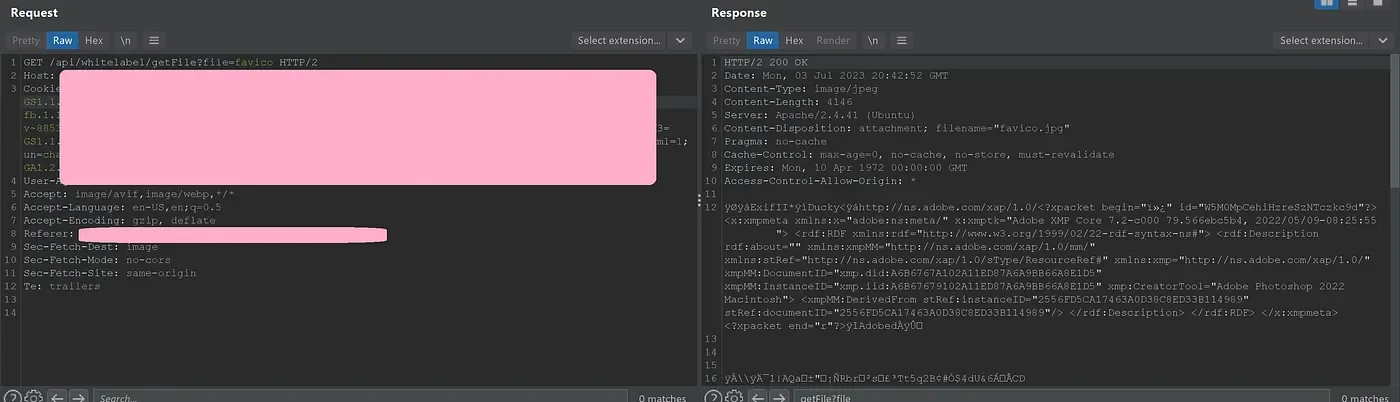
This is a write-up from a VDP (vulnerability disclosure programme) engagement. After a light recon pass the author picked one subdomain of the target and used the site as an ordinary user would, watching the traffic in Burp Suite. The feature in question is an API endpoint that serves a file by name:
https://target.tld/api/whitelabel/getFile?file=favico
The file parameter takes a bare name (favico) and the endpoint returns the corresponding file. That design, a filename passed straight into a file read, is what drew attention.
Setup
No accounts, roles or special preconditions are described. The work was done against a live VDP target with Burp Suite as the intercepting proxy, and wordlists from the Seclists LFI collection were used for fuzzing. The report does not give software versions.
Finding it
The request above stood out because the client controls a filename that the server resolves on disk. The first test was the obvious one: try to read /etc/passwd through path traversal. The response came back empty, and every bypass the author tried failed.
Exploitation
Step 1: Traversal with known files
Instead of /etc/passwd, the author pulled endpoint and path candidates from the Seclists LFI list and tried a set of absolute paths behind a long traversal sequence:
https://target.tld/api/whitelabel/getFile?file=../../../../../../../../../../../../etc/hosts
https://target.tld/api/whitelabel/getFile?file=../../../../../../../../../../../../var/log/dmesg
https://target.tld/api/whitelabel/getFile?file=../../../../../../../../../../../../etc/ssh/ssh_host_dsa_key
https://target.tld/api/whitelabel/getFile?file=../../../../../../../../../../../../var/log/dpkg.log
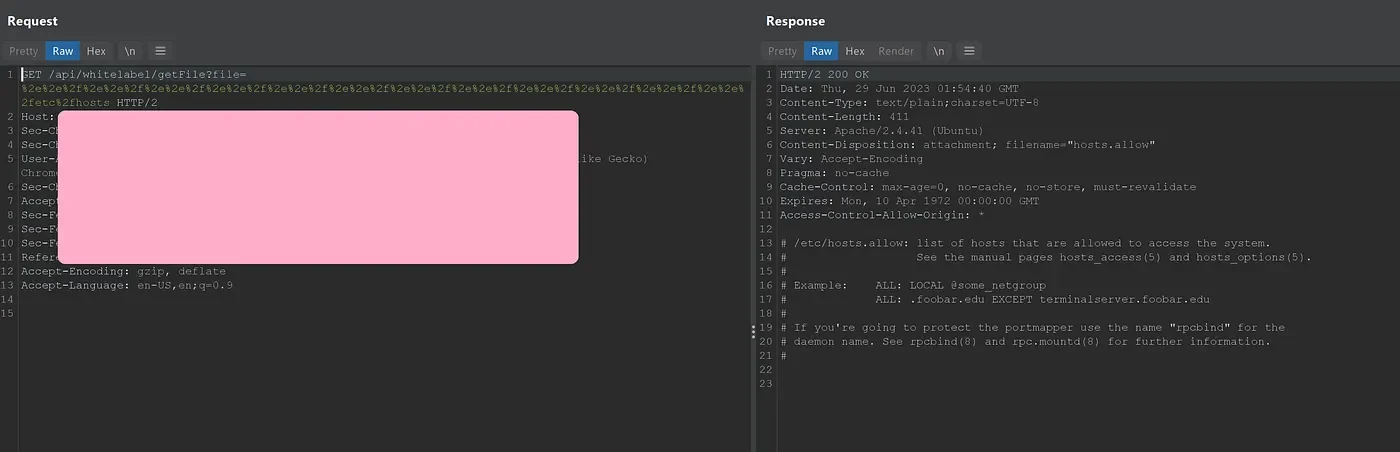
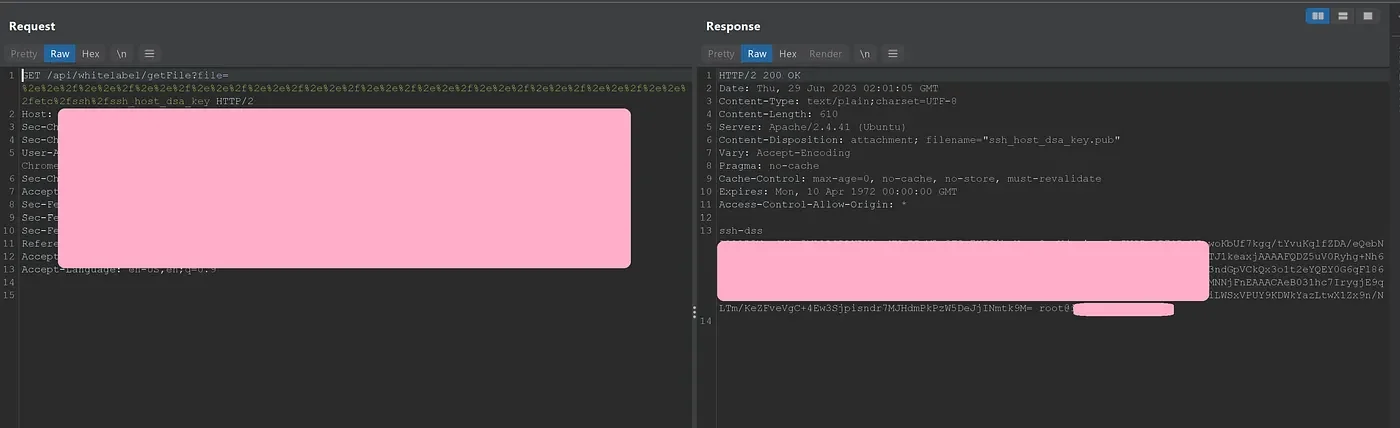
Each payload walks up fourteen directory levels and then names an absolute path. These returned content: /etc/hosts and /etc/ssh/ssh_host_dsa_key are shown in the report.
/etc/hosts
/etc/ssh/ssh_host_dsa_key
At this point the finding is a confirmed local file inclusion, but the author judges it as not particularly impactful on its own. The report argues that LFI is commonly rated High when it should be Critical, and cites three public HackerOne reports as examples of High-impact LFIs, including a U.S. Department of Defence path traversal report and a Starbucks directory traversal report.

The author notes that the same rating was applied to this report.
Step 2: Fuzzing for a wildcard behaviour
To push the impact higher, the author fuzzed internal endpoints with special characters and Unicode. Brute-forcing was described as difficult. The interesting result was the * character: it returned a file in every directory. The author guesses it was the first file in the directory but states that this is still unknown.
The request used was:
https://target.tld/api/whitelabel/getFile?file=../../../../../../../../../../../../../../../var/www/*
This traverses fifteen levels up and then asks for everything under /var/www. The response contained database credentials.
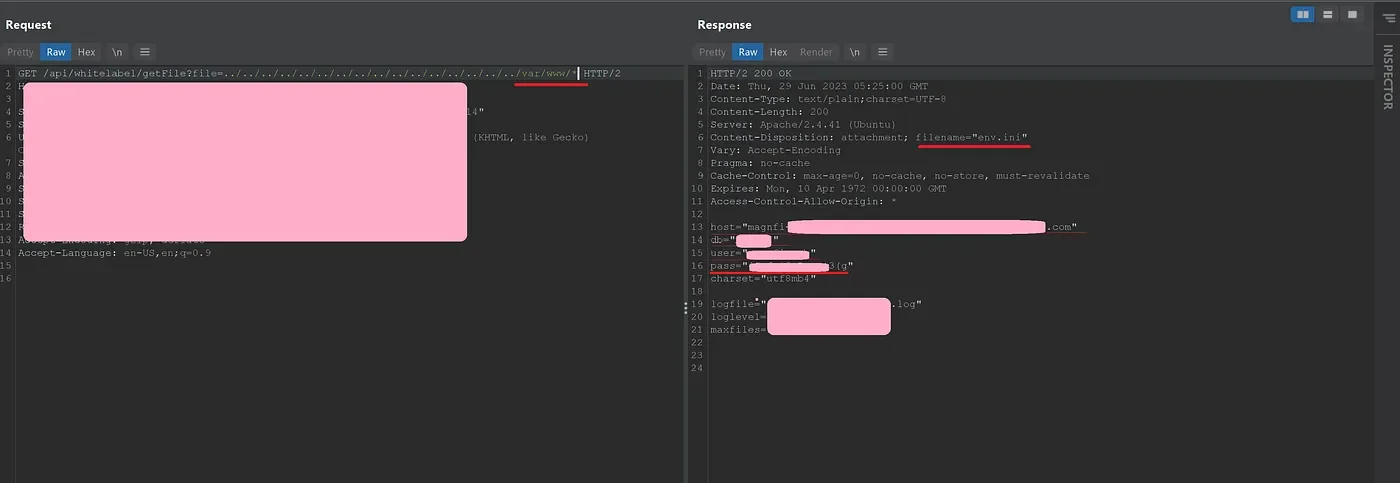
The password was too hard to guess :)
Step 3: Using the credentials
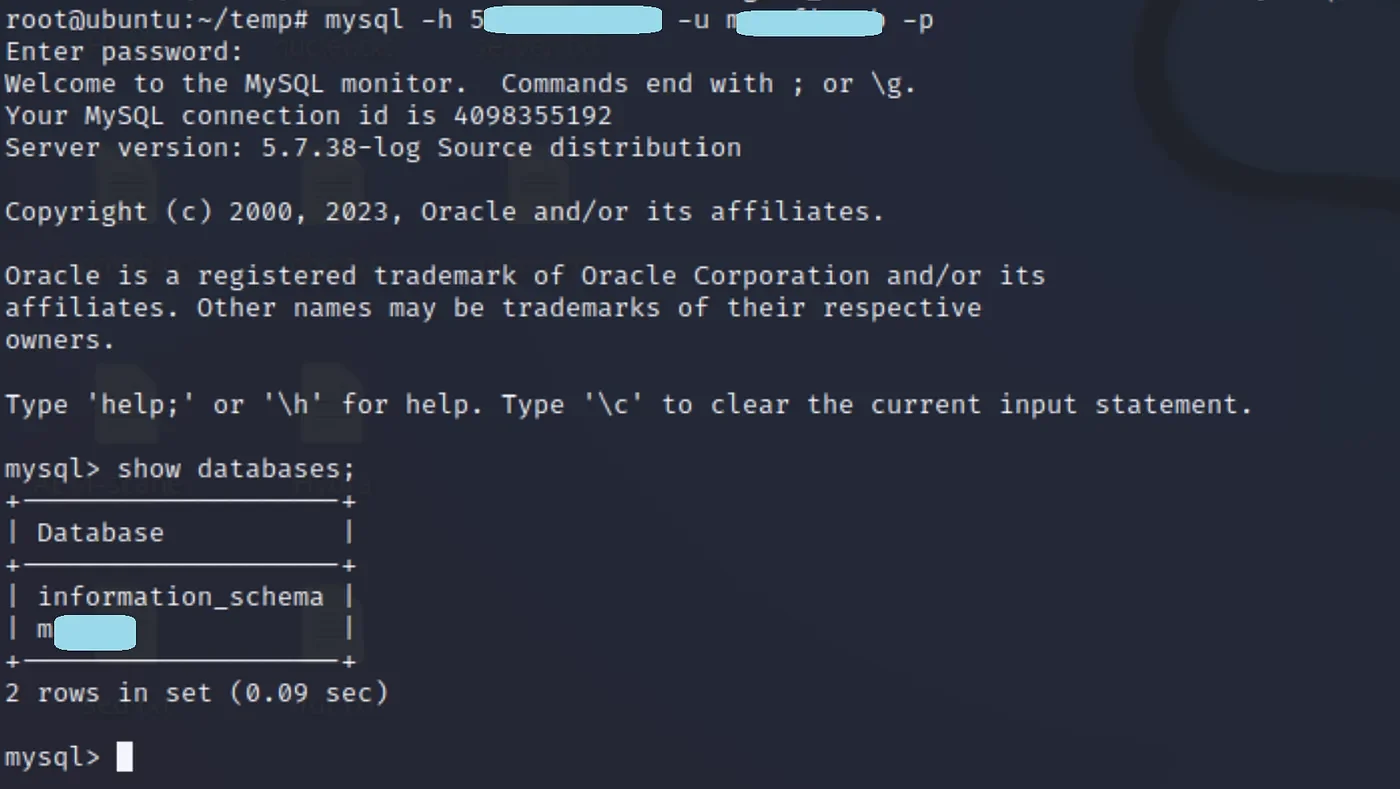
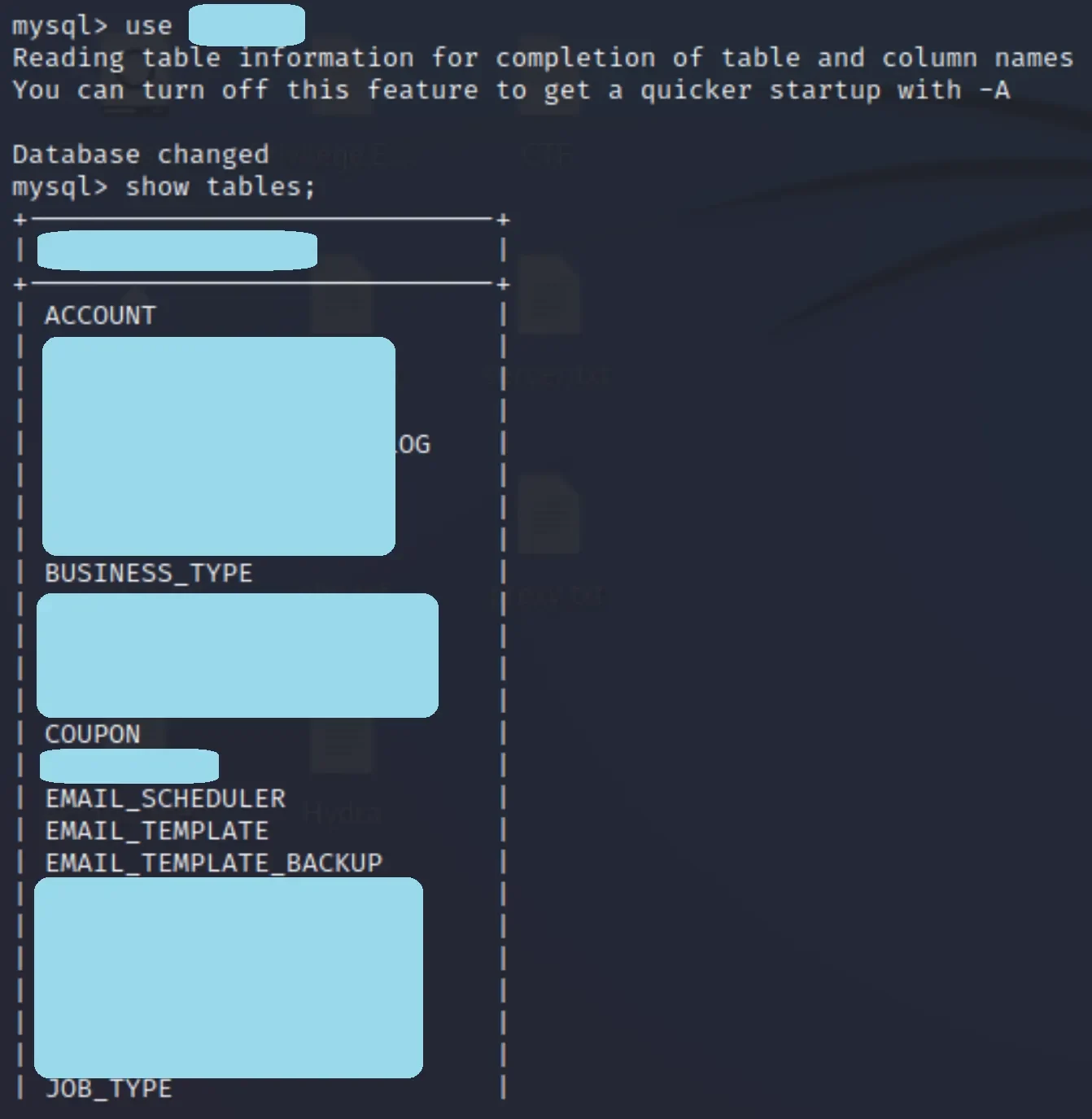
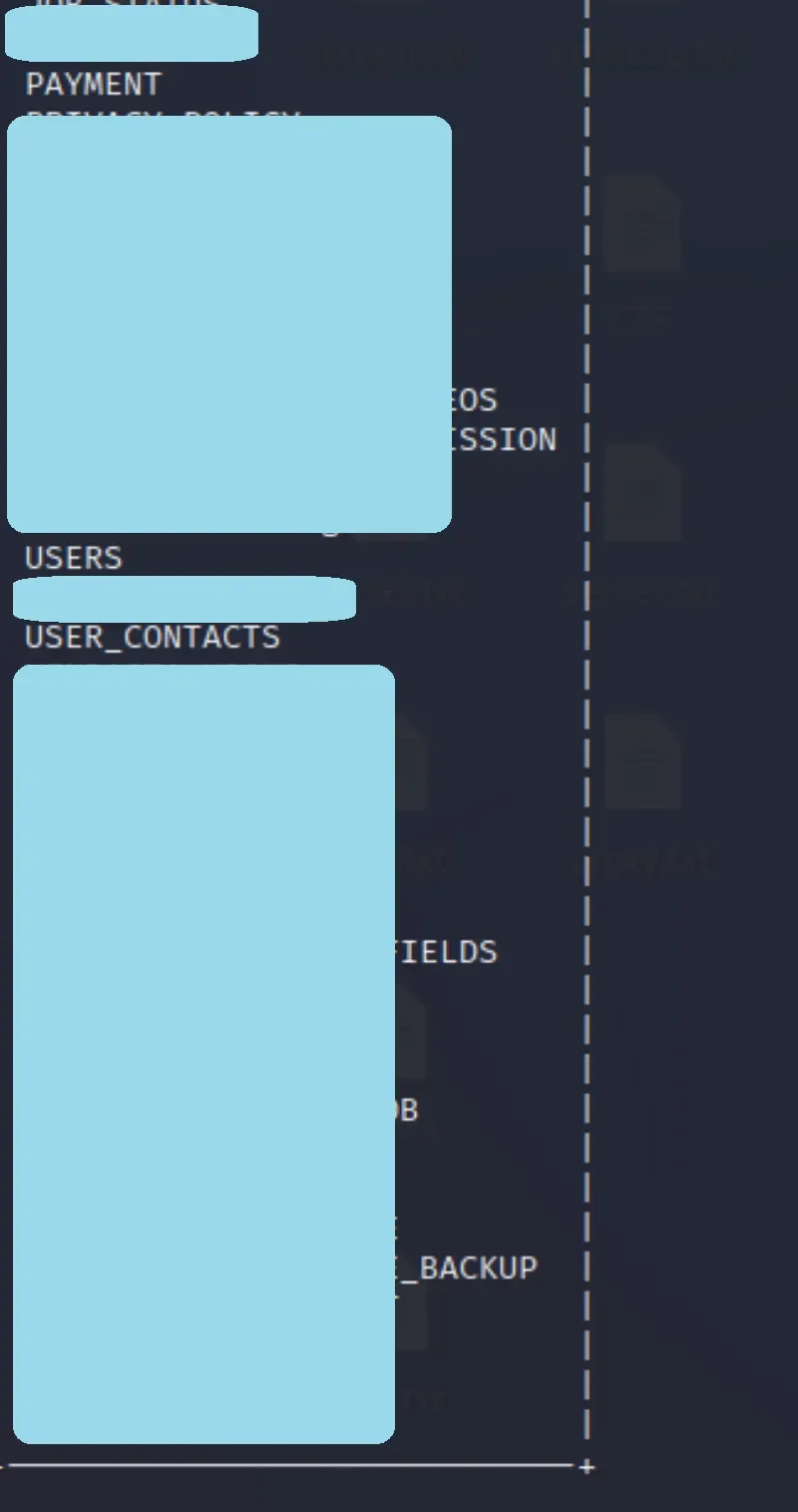
The credentials were valid and the author logged into the database.
Step 4: Source code disclosure
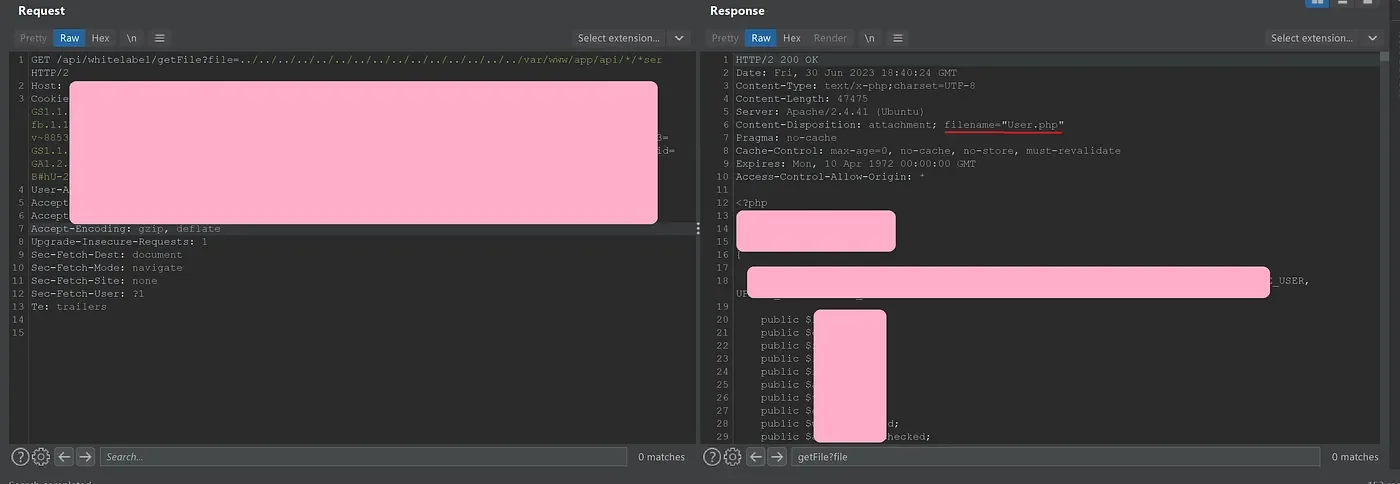
The same primitive also returned source code.
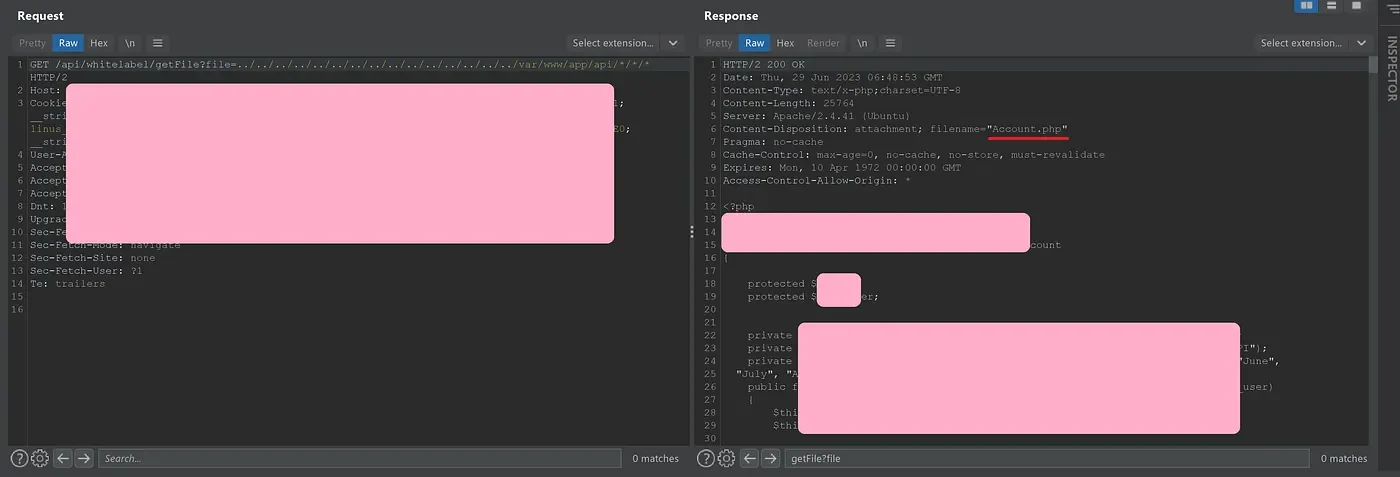
Hello white box
With source code in hand the author frames the question of whether the issue is still rated High.

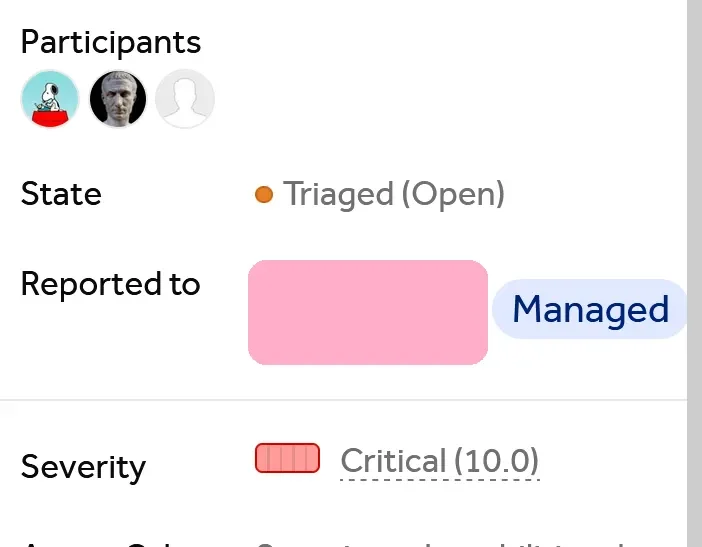
It’s a VDP, so there is no bounty :)
Step 5: Refining the wildcard behaviour
The * behaviour has a second form. A pattern such as /etc/apache2/*SOME-STRING returns a file when the string matches part of a filename in that directory. The report shows examples of this.
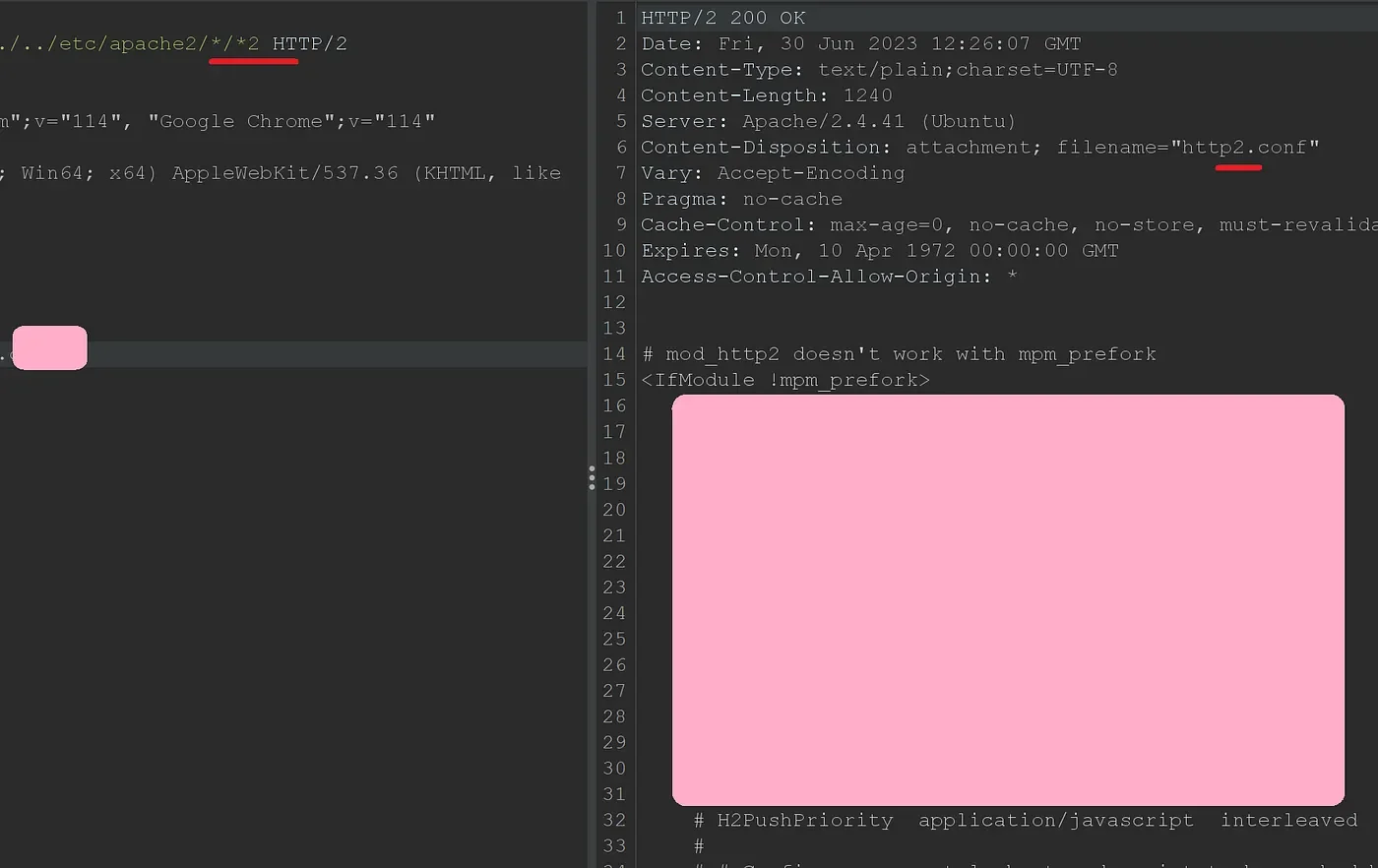
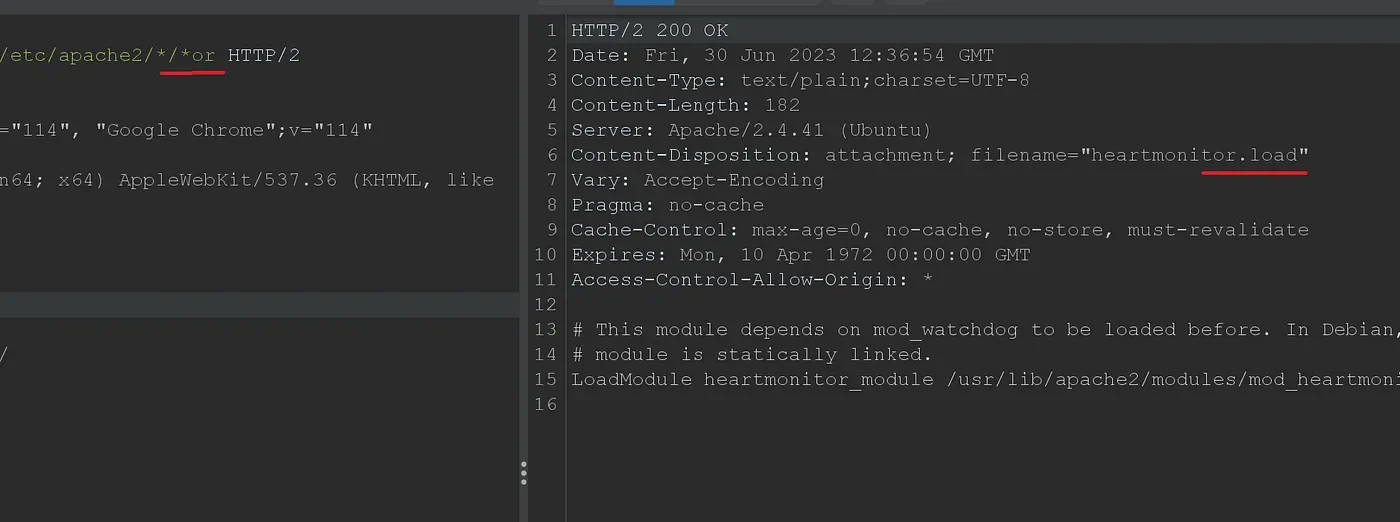
The author states that the reason for this behaviour is still unknown.
Root cause
The endpoint takes a user-supplied value in file and returns file contents, which is what allows the traversal sequences to reach files outside the web root. The * behaviour is likely a consequence of how the file path is resolved on the server, for example a shell or glob expansion, or a directory listing where the first entry is returned; the report does not establish which. The report does not describe any filtering that was bypassed, only that /etc/passwd returned empty while other absolute paths did not, so the exact defence in place is not documented.
Impact
An attacker who can reach the endpoint can read files that the web process can access. In this case that included system files, database credentials from /var/www, and application source code. The credentials were valid and gave access to the database. The author argues the impact should be Critical rather than High. The target was a VDP, so no bounty was paid.
Fix
Variants to test
- Send a bare filename to any
getFile-style parameter and then a traversal sequence to/etc/hosts; a positive result is file content in the response. - Try a long traversal chain to
/etc/passwd; an empty response does not rule out LFI, so continue with other absolute paths such as/etc/hosts,/var/log/dmesgand/var/log/dpkg.log. - Replace the filename with
*after a traversal to a directory such as/var/www/*; a positive result is any file content, especially configuration files with credentials. - Try
*SOME-STRINGagainst a directory such as/etc/apache2/*SOME-STRING; a positive result is a file whose name contains the string. - Fuzz the parameter with special characters and Unicode, as the author did, looking for characters that change how the path is resolved.
Takeaway: the author's conclusion is that the impact of an LFI vulnerability is definitely Critical.
What happened, in plain words
A security researcher was testing a website that belongs to a vulnerability disclosure programme (VDP). A VDP is a scheme where an organisation invites people to look for security problems in its systems and report them. The researcher found a way to make the website hand over files from the server it runs on, files that visitors were never meant to see. At first the problem looked modest: a few system files that were not very impactful. Then the researcher found a trick that made the same feature return database passwords and the application's own source code. That turned a finding that had been rated High into one the author argues should be Critical. No bounty was paid because the programme was a VDP.
This article walks through the same steps the researcher took, explaining every idea from scratch. You only need to know how to use a browser.
Background ideas you will need
Before the steps make sense, here are a few concepts in everyday terms.
- Server: the computer somewhere else that stores a website and sends pages to your browser. When you visit a site, your browser asks the server for things and the server answers.
- File: a named chunk of data on a computer, such as a text document, a photo, or a configuration file that tells a program how to run. Servers keep many files, and most of them are not meant to be downloadable by visitors.
- API: a way for one piece of software to talk to another, like a service counter. You hand over a request with some details, and you get an answer back. Websites often have APIs behind their pages, and those APIs can also be called directly.
- Endpoint: one specific address in an API, the equivalent of one particular counter window. Each endpoint does one job, for example "give me a file".
- Parameter: the extra piece of information you attach to a request, such as the name of the file you want. In a web address it usually comes after a question mark, in the form
name=value. - Request: the message your browser (or a tool) sends to a server asking for something. A response is the server's reply.
- Burp Suite: a tool that sits between your browser and the server, like a recording box on a phone line. It lets you see every request and response, and change them before they are sent. Security testers use it because normal browsers hide most of this traffic.
- Recon (reconnaissance): the early looking-around phase, where you map out what a target has, such as which subdomains exist, before testing anything.
- Subdomain: a named section of a larger domain. If the main site is
example.com, thenshop.example.comis a subdomain. - LFI (local file inclusion): a bug where a website lets a visitor influence which file on the server gets read. "Local" means the file is on the server itself, not somewhere else on the internet. It is like a hotel receptionist who is supposed to hand you only the brochure for your own room, but will fetch any document from any office if you ask in the right way.
- Path traversal: the usual technique for exploiting LFI. File systems use
..to mean "the folder above this one". String enough of them together and you climb out of the folder the website intended, all the way to the top of the disk, then walk down into any directory you like. - Fuzzing: sending lots of variations of a request automatically, to see which ones produce a different or interesting answer. Like trying many keys on a lock in quick succession.
- Wordlist: a prepared list of common names, paths or payloads that a fuzzing tool works through. Seclists is a well-known public collection of such lists.
- Credentials: a username and password (or similar pair) that prove who you are.
- Database: an organised store of data that an application reads and writes, for example user records. Applications connect to it using credentials kept in configuration files.
- Source code: the human-written instructions that make up a program. If an outsider can read it, they can study exactly how the application works and look for more weaknesses. Testers call this a "white box" view, as opposed to "black box" testing where you can only see the outside.
- Wildcard: a symbol that stands for "anything". In many systems
*means "any characters here". - Severity ratings: labels such as Low, Medium, High and Critical that describe how bad a security problem is. They matter because they drive how quickly an organisation fixes something.
Step 0: Picking a target and watching the traffic
The researcher was working on a VDP programme. After a light recon pass, one subdomain was chosen to hunt on. The site was then used as any ordinary visitor would: clicking around, following links, filling in whatever the site offered. The point of this is not to break anything yet. It is to see what the site normally does, so that anything unusual stands out later.
Because Burp Suite was recording the traffic, the requests behind those clicks were visible. One of them caught the researcher's eye:
https://target.tld/api/whitelabel/getFile?file=favico
Line by line:
https://is the secure web protocol, the same one your browser shows with a padlock.target.tldstands for the site's address. The real name has been replaced so the report can be public./api/whitelabel/getFileis the endpoint, the specific counter window being called. The name suggests a feature that fetches a file.?file=favicois the parameter. The valuefavicolooks like a shortened form of "favicon", the little icon a website shows in a browser tab.
Why did this matter? Because the visitor is choosing a filename. A well-built feature of this kind would only ever serve the icon, no matter what name you send. But the request shows the name travelling straight from the browser to the server, which raises an obvious question: what happens if you send a different name?
Step 1: The first attempt, and why it failed
The natural first test for this kind of feature is to ask for a well-known system file. On Linux servers, /etc/passwd is a classic: it lists user accounts and is readable by almost everything on the machine. If the endpoint hands it over, the feature is reading arbitrary files.
The researcher tried exactly that, using path traversal to climb out of the website's own folder. The response came back empty. Every bypass that was tried also failed. A bypass here means a variation designed to slip past a filter, for example different encodings of the .. sequence.
This is an important lesson for a beginner: an empty answer does not prove the feature is safe. It may mean the specific file is blocked, missing, or unreadable by the web process, while other files are still exposed.
Step 2: Trying other files from a known list
Rather than guessing, the researcher turned to a public collection of LFI test paths, the Seclists LFI list. Working through candidates from that list produced results. These requests returned file contents:
https://target.tld/api/whitelabel/getFile?file=../../../../../../../../../../../../etc/hosts
https://target.tld/api/whitelabel/getFile?file=../../../../../../../../../../../../var/log/dmesg
https://target.tld/api/whitelabel/getFile?file=../../../../../../../../../../../../etc/ssh/ssh_host_dsa_key
https://target.tld/api/whitelabel/getFile?file=../../../../../../../../../../../../var/log/dpkg.log
What each part does:
../../../../../../../../../../../../is fourteen repetitions of..followed by a slash. Each..means "go up one folder". Fourteen is far more than enough to climb from wherever the website lives to the top of the disk. Going up past the top simply stays at the top, so extra repetitions do no harm./etc/hostsis a small system file that maps names to addresses on the machine./var/log/dmesgis a log of messages produced while the machine was starting up./etc/ssh/ssh_host_dsa_keyis a key file used by the secure remote login service SSH./var/log/dpkg.logis a log of software package installations.
The report shows the contents returned for two of them.
/etc/hosts
/etc/ssh/ssh_host_dsa_key
So the feature really was reading files from anywhere on the server. That confirms an LFI. On its own, though, the researcher judged it not very impactful: these are system files, interesting but not the keys to the kingdom.
Step 3: The rating argument
Here the author makes a point about how these bugs get scored. In the author's view, LFI is often rated High when it deserves Critical. To support this, the report links three public HackerOne reports as examples of High-impact LFIs, including a U.S. Department of Defence path traversal report and a Starbucks directory traversal report.
The author notes that the same rating was applied to this report. The point of the argument is practical: a higher rating means the organisation treats the bug more seriously and fixes it sooner. The researcher therefore set out to prove the higher impact rather than just assert it.
Step 4: Finding the wildcard trick
To escalate, the researcher fuzzed internal endpoints with special characters and Unicode. Unicode is the standard way computers represent characters beyond plain English letters, so this means trying unusual symbols as well as ordinary punctuation. Brute-forcing, meaning trying huge numbers of ordinary guesses, was described as difficult, so this was a more targeted search.
The result was the * character. When it was used as the filename, the endpoint returned a file from whatever directory was named. The author guesses it was the first file in that directory but says this is still unknown.
The request sent was:
https://target.tld/api/whitelabel/getFile?file=../../../../../../../../../../../../../../../var/www/*
Breaking it down:
- The traversal chain is now fifteen
..steps, one more than before. As noted, the exact count does not matter once you are at the top. /var/wwwis the conventional place where web applications are stored on a Linux server. It is where the site's own code and configuration usually live.*is the wildcard. Instead of naming one file, the request asks for "whatever matches here".
The response contained database credentials.
The password was too hard to guess :)
The caption is the author's joke about the password being too hard to guess. This is the moment the finding changes character. A system file is one thing; a working database password is another, because it lets an outsider log in to the store of data behind the application.
Step 5: Logging in with the credentials
The credentials were valid, and the researcher logged into the database.
Why does this matter so much? Because the database is where the application's real data lives. Being able to log in means an outsider can reach the database directly, outside the application's own rules and checks.
Step 6: Reading the source code
The same trick also returned source code.
Hello white box
"White box" is testing jargon: when you can see the code, you are testing with the box open. With source code in hand, an attacker can study how the application works and look for further weaknesses. The author uses this to press the rating question again.
It's a VDP, so there is no bounty :)
The caption records the outcome: the programme was a VDP, so no money changed hands.
Step 7: A second form of the wildcard behaviour
The story is not quite over. The researcher found another way the * behaves. It can be used like this: /etc/apache2/*SOME-STRING. If that string matches part of a file name in that directory, the file is returned. The report shows examples.
In plain words: instead of asking for "anything in this folder", you can ask for "anything in this folder whose name contains this piece of text". That is useful when you do not know a file's exact name but can guess part of it, which is common with configuration files. The author states that the reason for this behaviour is still unknown.
Why the bug exists
The endpoint takes a value supplied by the visitor in the file parameter and returns file contents, which is what lets the .. sequences reach files outside the web root. That is what lets the .. sequences climb out of the web root. The * behaviour is likely a side effect of how the server resolves the path, for example a shell or wildcard expansion, or a directory listing where the first entry is returned. The report does not establish which. It also does not describe any filter that was bypassed: /etc/passwd came back empty while other absolute paths did not, so the exact defence in place is not documented.
What an attacker could do
Someone who can reach the endpoint can read files the web process can access. Here that included system files, database credentials from /var/www, and application source code. The credentials were valid and gave access to the database. The author argues the impact should be Critical rather than High. No bounty was paid because the target was a VDP.
How it should be fixed
The report does not describe a fix or a retest.
Things to try on your own targets
- Send a bare filename to any
getFile-style parameter, then a traversal sequence to/etc/hosts. A positive result is file content in the response. - Try a long traversal chain to
/etc/passwd. An empty response does not rule out LFI, so continue with other absolute paths such as/etc/hosts,/var/log/dmesgand/var/log/dpkg.log. - Replace the filename with
*after a traversal to a directory such as/var/www/*. A positive result is any file content, especially configuration files with credentials. - Try
*SOME-STRINGagainst a directory such as/etc/apache2/*SOME-STRING. A positive result is a file whose name contains the string. - Fuzz the parameter with special characters and Unicode, as the author did, looking for characters that change how the path is resolved.
Takeaway: the author's conclusion is that the impact of an LFI vulnerability is definitely Critical.
Glossary
- API: a way for software to talk to other software, like a service counter that takes a request and returns an answer.
- Bounty: a reward, usually money, paid for a valid security report.
- Brute-forcing: trying very large numbers of ordinary guesses automatically until something works.
- Burp Suite: a tool that sits between your browser and a server so you can see and change every request and response.
- Bypass: a variation of a request designed to get past a filter or protection.
- Credentials: a username and password, or similar pair, that prove identity.
- Critical: the highest common severity rating, meaning the problem should be fixed urgently.
- Database: an organised store of data that an application reads and writes.
- Endpoint: one specific address in an API that performs one job.
- File: a named chunk of data on a computer, such as a document, image or configuration file.
- Fuzzing: sending many automated variations of a request to see which produce an interesting answer.
- High: a severity rating below Critical, meaning a serious problem that should be fixed soon.
- LFI (local file inclusion): a bug where a visitor can influence which file on the server gets read.
- Parameter: the extra piece of information attached to a request, usually after a question mark as
name=value. - Path traversal: using
..sequences to climb out of the intended folder and reach other files on the disk. - Recon (reconnaissance): the early phase of mapping out what a target has before testing.
- Request: the message sent to a server asking for something; the reply is the response.
- Seclists: a well-known public collection of wordlists used for security testing.
- Server: the remote computer that stores a website and answers requests.
- Severity rating: a label such as Low, Medium, High or Critical describing how bad a problem is.
- Subdomain: a named section of a larger domain, such as
shop.example.comunderexample.com. - Unicode: the standard way computers represent characters beyond plain English letters.
- VDP (vulnerability disclosure programme): a scheme where an organisation invites people to report security problems, usually without paying a reward.
- White box: testing with access to the source code, as opposed to black box testing where you only see the outside.
- Wildcard: a symbol such as
*that stands for "any characters here". - Wordlist: a prepared list of names, paths or payloads that a fuzzing tool works through.



