Bitswift
The /bcad/credit endpoint lacked permission checks, allowing any authenticated user to mint an unlimited amount of BCAD tokens. An attacker could then trade these tokens in liquidity pools to drain them.

medium.com
Published on medium.com
Bug Bounty
The full write-up lives on its author's site
It belongs to its author, so we link to it rather than copy it. The other two tabs are our own rewrites, checked against it.
Context
BitSwift Cash is a dApp, and like many dApps its front end is an ordinary website served over the same web infrastructure as most of the internet. The bug described here lived in that website, not in a smart contract. The feature at the centre of it is the BCAD credit endpoint: the code path a logged-in user hits to have BCAD tokens credited to their account. The report calls the resulting issue the "Unlimited Mint" web bug, because the endpoint accepted a caller-supplied amount and credited it without any permission check.
The vulnerability was reported to Immunefi on 8 December by a community security researcher. As the name suggests, it could lead to an unlimited mint of BCAD tokens, which an attacker could then trade through liquidity pools into other tokens and empty those pools out. BitSwift acknowledged the bug, paid the whitehat $4,515 and patched it.
Setup
The application authenticates its API with JWTs. The researcher worked from the application's JavaScript files, in particular main.js, which listed all the endpoints. All of them appeared to require authentication, and that authentication was JWT-based. The JWT payload shown later carries "admin": false and "username": "immunefi", and the proof of concept is run with a token belonging to a non-admin account. No special tooling is described beyond reading the JavaScript and issuing HTTP requests.
Finding it
The starting point was reconnaissance. Reading through the JavaScript gives a rough idea of which endpoints exist and how the architecture is put together, which is what tells you where to pull levers. While reviewing the application JavaScript files, the researcher found that main.js contained information on all the endpoints, and that all of them looked like they needed authentication based on JWT.
JWT is commonly used where front end and back end are separated, because it fits a RESTful API and is easy to configure as an identity mechanism. The normal flow is: the user submits credentials in a POST request, the credentials are validated, and a correct combination yields a response containing a JWT token.
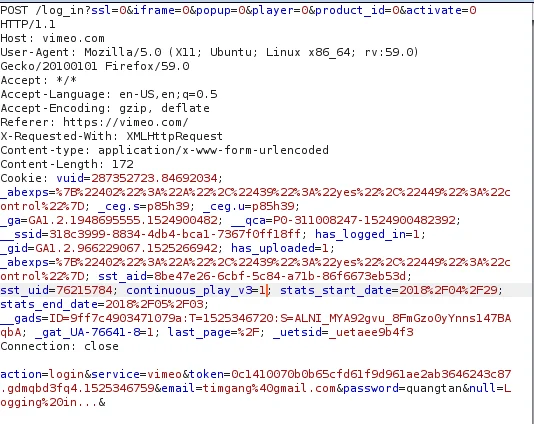
Figure 1 shows that credential POST request.

Figure 2 shows the response carrying the JWT token.
Example JWT : [redacted]
After login, subsequent requests differ from the login request by carrying a new authorization header, jwt.

Figure 3 shows that authenticated request.
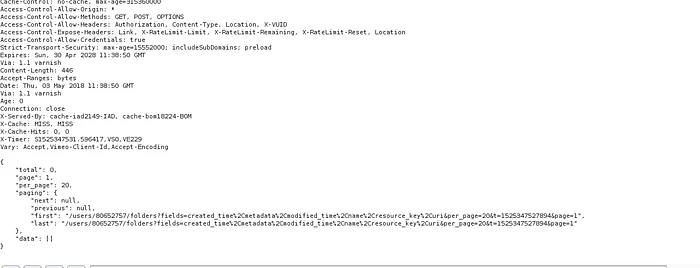
Figure 4 shows the same pattern again. The JWT is carried as authenticated information, and front-end code commonly keeps it in localStorage, the HTML5 mechanism for storing developer-specified data in the user's browser via JavaScript.
What the researcher noticed was that BitSwift had introduced a new property in the JWT payload to distinguish an admin from an ordinary user:
{ “admin”: false, “aud”: [ 2625, “bitswift.cash” ], “exp”: 1639641831, “iat”: 1639638231, “iss”: “bitswift.cash”, “jti”: “5tpR-[redacted]=”, “nbf”: 1639638231, “sub”: 2625, “username”: “immunefi”, “verified”: false}
The endpoints were protected by checking whether the user requesting the resource was an admin; a request from a non-admin would be rejected. That check is what made the missing one stand out: the /bcad/credit endpoint had no permission checks on it at all, so a non-admin could call it without incurring any errors.
Exploitation
The vulnerable client-side code that calls the endpoint is this:
async confirmCreditSubmit(e) { e.preventDefault(); const multiplier = new BigNumber(1000000); const userAmount = new BigNumber(this.state.amount).multipliedBy(multiplier); const res = await this.props.apiClient.BCADCredit({ amount: userAmount.toNumber(), unique_message: this.props.user.unique_message, }, this.user.accessToken) if (res.success === true) { this.setState({ modal: false, confirmModal: false, }); } else { this.setState({ error: `Failed to credit BCAD to the user${res.msg ? ‘: ‘ + res.msg : ‘’}` }); } }
It takes the amount from component state, multiplies it by 1,000,000, and sends it together with the user's unique_message to the credit API, authenticated with the user's access token. Nothing in this path establishes that the caller is entitled to credit tokens.
Step 1: send the credit request directly
The researcher's proof of concept issues the request straight from the browser with fetch, using a normal user's token:
let res = await fetch(‘https://bitswift.cash:8443/bcad/credit', { method: ‘POST’, mode: ‘cors’, headers: { ‘Content-Type’: ‘application/json’, ‘Authorization’: ‘Bearer ‘ + token }, body: JSON.stringify({ amount: 9999999999999999, unique_message: “[redacted]”, //use your account’s unique message }), redirect: ‘follow’, referrer: ‘no-referrer’,});res = await res.text();console.log(res); //success, despite not being an admin
The request is a POST to https://bitswift.cash:8443/bcad/credit with Content-Type: application/json and the JWT in an Authorization: Bearer header. The body carries an amount of 9999999999999999 and the caller's own unique_message, which the comment notes must be the account's unique message. The response is read as text and logged; the comment records the outcome as success, despite the caller not being an admin.
By initiating this HTTP request, any attacker could mint an unspecified amount of tokens into their own account. They could then clean out any open liquidity pools holding the token by trading against them until no value is left.
Root cause
The endpoints were protected by checking whether the requesting user is an admin and rejecting non-admins. The /bcad/credit endpoint simply did not implement that check, so authorisation rested entirely on the client: the front-end code in confirmCreditSubmit decided what amount to send, and the server accepted it. Because the amount is attacker-controlled and the only identity material required is the caller's own valid JWT plus their own unique_message, a non-admin account is enough. The JWT's admin claim was present, but the endpoint had no permission checks on it.
Impact
An attacker with an ordinary account could mint an arbitrary amount of BCAD into that account and then trade the minted tokens through liquidity pools for other tokens, draining the pools until no value is left. The report describes the minted quantity as unspecified in general terms while the proof of concept uses 9999999999999999. The exposure is to the project and to the holders of the pools the attacker trades against.
Fix
The report states that BitSwift released the fix as soon as they were aware of the submission and that the bug is now patched; it does not describe the change itself.
Timeline
| Event | Time |
|---|---|
| Submission created | 8 December, 8:28 pm |
| Submission escalated | 9 December, 8:37 am |
| BitSwift initial reply | 9 December, 10:00 am |
| BitSwift acknowledgement | 9 December, 10:30 pm |
| Bounty awarded | 10 December, 5:33 am |
The report notes that acknowledgement came 30 minutes after the project was notified and that the bounty was paid in less than 8 hours. The payout was $4,515.
Variants to test
- Enumerate endpoints from bundled JavaScript (
main.jsand similar) and compare which ones enforce the admin claim. A positive result is an endpoint that returns success for a token whose payload has"admin": false. - Look for any endpoint that accepts a numeric
amount,quantityor similar field from the client. A positive result is a balance change that matches a value you chose rather than one the server computed. - Check whether authorisation decisions exist only in the front-end code that builds the request. A positive result is a request replayed outside the UI, with the same token, that the server still honours.
- Test endpoints that take an identifier such as
unique_messagealongside a value. A positive result is a credit applied to your account for an amount you supplied. - Where a JWT carries role or privilege claims, try each endpoint with a token that lacks the privileged claim. A positive result is a privileged action completing without the claim.
What happened, in plain words
BitSwift Cash is a dApp. A dApp is an application that runs partly on a blockchain (a shared, tamper-resistant ledger) and partly on an ordinary website that you open in your browser. The important point here is that the website part is built on the same web technology as almost everything else on the internet. Bugs can live there just as easily as in the blockchain code.
The bug in this story lived in the website, not in a smart contract (a program stored on the blockchain). It was in a feature called the BCAD credit endpoint. An endpoint is a specific address on a server that a program can send a request to, a bit like a service counter in a large building: you go to the counter that handles the thing you want. The BCAD credit endpoint is the counter you go to when you want BCAD tokens added to your account. Tokens here are digital units of value, similar in spirit to a currency inside the project.
The report calls the bug the "Unlimited Mint" web bug. "Mint" means creating new tokens out of nothing. The endpoint accepted an amount value that the caller supplied, and it credited that amount without checking whether the caller was allowed to do so. So anyone with a normal account could ask for a huge number of tokens and get them.
The vulnerability was reported to Immunefi on 8 December by a community security researcher. Immunefi is a bug bounty platform: a place where projects offer rewards to people who find and responsibly report security problems. As the name suggests, the bug could lead to an unlimited mint of BCAD tokens. An attacker could then trade those freshly created tokens through liquidity pools into other tokens and empty those pools out. A liquidity pool is a shared pot of two tokens that people trade against; if you can pour in unlimited fake tokens on one side, you can take out the real tokens on the other side until the pot is empty.
BitSwift acknowledged the bug, paid the whitehat $4,515 and patched it. A whitehat is a security researcher who reports problems to the owner instead of abusing them.
Setup
The application authenticates its API with JWTs. An API (application programming interface) is the set of endpoints a website's front end talks to in order to read and change data. Authentication means proving who you are. A JWT, short for JSON Web Token, is a small piece of text that the server gives you after you log in, and that you show on later requests to prove you are still you. Think of it like a wristband you get at an event: you show it once at the entrance, and after that the staff glance at the wristband instead of asking for your ID again.
The researcher worked from the application's JavaScript files. JavaScript is the programming language that runs in your browser and makes web pages interactive; the files that make up a site are downloaded to your browser and can be read by anyone. In particular, the researcher looked at main.js, which listed all the endpoints. All of them appeared to require authentication, and that authentication was JWT-based.
The JWT payload shown later carries "admin": false and "username": "immunefi", and the proof of concept is run with a token belonging to a non-admin account. A payload here means the part of the token that carries the actual information about the user. No special tooling is described beyond reading the JavaScript and issuing HTTP requests. The browser console is a built-in panel in every browser where you can type commands and see messages; it is a normal part of the browser, not a hacking tool.
Finding it
The starting point was reconnaissance. Reconnaissance means gathering information about a target before attacking it, the way a burglar might first walk past a house to note the windows and the locks. Reading through the JavaScript gives a rough idea of which endpoints exist and how the architecture is put together, which is what tells you where to pull levers. The report quotes John Marsden: "Time spent in reconnaissance is seldom wasted."
While reviewing the application JavaScript files, the researcher found that main.js contained information on all the endpoints, and that all of them looked like they needed authentication based on JWT.
JWT is commonly used where front end and back end are separated. The front end is the part you see and click in the browser; the back end is the server that holds the data and does the real work. JWT fits a RESTful API (an API organised around simple requests to addresses, each doing one job) and is easy to configure as an identity mechanism. The normal flow is: the user submits credentials in a POST request, the credentials are validated, and a correct combination yields a response containing a JWT token. Credentials are your username and password. A POST request is one of the standard ways a browser talks to a server: it sends data to be processed, as opposed to simply asking for a page.
Figure 1 shows that credential POST request: the browser sending the login details to the server.
Figure 2 shows the response carrying the JWT token: the server's reply, with the wristband inside.
Example JWT : [redacted]
This is an example JWT as the report presents it. It is one long string made of three parts separated by dots. The first part describes how the token is signed (a signature lets the server check the token was not altered). The middle part is the payload, the actual information about the user. The last part is the signature itself. You do not need to read it; the point is that it is a compact piece of text that the browser can store and send back.
After login, subsequent requests differ from the login request by carrying a new authorization header, jwt. A header is a small labelled line attached to a request, like the label on a parcel saying what is inside and who sent it. The authorization header is the one that carries proof of who you are.
Figure 3 shows that authenticated request: the same kind of request as before, now with the token attached.
Figure 4 shows the same pattern again. The JWT is carried as authenticated information, and front-end code commonly keeps it in localStorage. localStorage is the HTML5 mechanism for storing developer-specified data in the user's browser via JavaScript. HTML5 is the current generation of the web's standard language. In everyday terms, localStorage is a small drawer inside your browser where a website can leave notes for itself, and it stays there between visits.
What the researcher noticed was that BitSwift had introduced a new property in the JWT payload to distinguish an admin from an ordinary user. A property is simply a named field inside the payload, like a line on a form.
{ “admin”: false, “aud”: [ 2625, “bitswift.cash” ], “exp”: 1639641831, “iat”: 1639638231, “iss”: “bitswift.cash”, “jti”: “5tpR-[redacted]=”, “nbf”: 1639638231, “sub”: 2625, “username”: “immunefi”, “verified”: false}
This is the payload of a JWT, written in JSON (a simple text format for structured data, using names and values in curly braces). Line by line:
"admin": falsesays this user is not an administrator. This is the field the whole story turns on."aud"lists who the token is meant for: a number and the site namebitswift.cash."exp"is the expiry time, a timestamp after which the token should no longer be accepted."iat"is the time the token was issued."iss"is the issuer, the site that created the token."jti"is a unique identifier for this particular token."nbf"means "not before": the time from which the token becomes valid."sub"is the subject, an identifier for the user."username"is the account name, hereimmunefi."verified"says whether the account has been verified.
The endpoints were protected by checking whether the user requesting the resource was an admin; a request from a non-admin would be rejected. That check is what made the missing one stand out: the /bcad/credit endpoint had no permission checks on it at all, so a non-admin could call it without incurring any errors. In other words, every counter in the building asked to see your admin badge before serving you, except this one counter, which served anyone who walked up.
Exploitation
The vulnerable client-side code that calls the endpoint is this. "Client-side" means it runs in your browser, on your machine, rather than on the server.
async confirmCreditSubmit(e) { e.preventDefault(); const multiplier = new BigNumber(1000000); const userAmount = new BigNumber(this.state.amount).multipliedBy(multiplier); const res = await this.props.apiClient.BCADCredit({ amount: userAmount.toNumber(), unique_message: this.props.user.unique_message, }, this.user.accessToken) if (res.success === true) { this.setState({ modal: false, confirmModal: false, }); } else { this.setState({ error: `Failed to credit BCAD to the user${res.msg ? ‘: ‘ + res.msg : ‘’}` }); } }
Line by line, in plain words:
async confirmCreditSubmit(e) {starts a function calledconfirmCreditSubmit, which runs when the user confirms a credit action.asyncmeans it can wait for slow things such as a network reply.e.preventDefault();stops the browser's default behaviour for the click or form submission, so the page does not reload.const multiplier = new BigNumber(1000000);creates a number equal to one million.BigNumberis a helper for handling large numbers precisely.const userAmount = new BigNumber(this.state.amount).multipliedBy(multiplier);takes the amount the user typed (kept inthis.state.amount) and multiplies it by one million.const res = await this.props.apiClient.BCADCredit({starts the call to the credit API and waits for the answer.amount: userAmount.toNumber(),sends the multiplied amount as the value to credit.unique_message: this.props.user.unique_message,sends the user's own unique message, a per-account string used to identify the credit.}, this.user.accessToken)passes the user's access token, the JWT, so the server knows who is asking.if (res.success === true) {checks whether the server said it worked.this.setState({ modal: false, confirmModal: false, });closes the pop-up windows on success.} else {handles failure.this.setState({ error: ... })shows an error message, including the server's message if there is one.
It takes the amount from component state, multiplies it by 1,000,000, and sends it together with the user's unique_message to the credit API, authenticated with the user's access token. Nothing in this path establishes that the caller is entitled to credit tokens. The browser decides the amount; the server just accepts it.
Step 1: send the credit request directly
The researcher's proof of concept issues the request straight from the browser with fetch, using a normal user's token. A proof of concept is a small demonstration that the bug is real. fetch is the browser's built-in way of sending a request to a server from JavaScript.
let res = await fetch(‘https://bitswift.cash:8443/bcad/credit', { method: ‘POST’, mode: ‘cors’, headers: { ‘Content-Type’: ‘application/json’, ‘Authorization’: ‘Bearer ‘ + token }, body: JSON.stringify({ amount: 9999999999999999, unique_message: “[redacted]”, //use your account’s unique message }), redirect: ‘follow’, referrer: ‘no-referrer’,});res = await res.text();console.log(res); //success, despite not being an admin
Line by line:
let res = await fetch(‘https://bitswift.cash:8443/bcad/credit', {sends a request to that address and waits for the reply. The:8443is a port number, a numbered door on the server; the address points at the credit endpoint.method: ‘POST’,says this request sends data to be processed, rather than just asking for a page.mode: ‘cors’,sets the browser's cross-origin rules. CORS is a browser safety mechanism that controls whether a page from one site may talk to another site; here it is set to allow the request.headers: {begins the labelled lines attached to the request.‘Content-Type’: ‘application/json’,tells the server the body is JSON.‘Authorization’: ‘Bearer ‘ + tokenattaches the JWT, prefixed with the wordBearer, which is the standard way of presenting a token.body: JSON.stringify({turns a JavaScript object into JSON text to send as the request body.amount: 9999999999999999,is the number of tokens to credit: a very large value chosen by the caller.unique_message: “[redacted]”,is the caller's own unique message. The comment says to use your account's unique message.redirect: ‘follow’,tells the browser to follow any redirect the server sends.referrer: ‘no-referrer’,tells the browser not to send the page address you came from.});closes the request options.res = await res.text();reads the server's reply as plain text.console.log(res);prints the reply in the browser console. The comment records the outcome as success, despite the caller not being an admin.
The request is a POST to https://bitswift.cash:8443/bcad/credit with Content-Type: application/json and the JWT in an Authorization: Bearer header. The body carries an amount of 9999999999999999 and the caller's own unique_message, which the comment notes must be the account's unique message. The response is read as text and logged; the comment records the outcome as success, despite the caller not being an admin.
By initiating this HTTP request, any attacker could mint an unspecified amount of tokens into their own account. HTTP is the standard language browsers and servers use to exchange requests and replies. They could then clean out any open liquidity pools holding the token by trading against them until no value is left.
Root cause
The endpoints were protected by checking whether the requesting user is an admin and rejecting non-admins. The /bcad/credit endpoint simply did not implement that check, so authorisation rested entirely on the client. Authorisation means deciding what a logged-in user is allowed to do, as opposed to authentication, which is only about who they are. The front-end code in confirmCreditSubmit decided what amount to send, and the server accepted it. Because the amount is attacker-controlled and the only identity material required is the caller's own valid JWT plus their own unique_message, a non-admin account is enough. The JWT's admin claim was present, but the endpoint had no permission checks on it. A claim is a statement inside the token, such as admin: false.
Impact
An attacker with an ordinary account could mint an arbitrary amount of BCAD into that account and then trade the minted tokens through liquidity pools for other tokens, draining the pools until no value is left. The report describes the minted quantity as unspecified in general terms while the proof of concept uses 9999999999999999. The exposure is to the project and to the holders of the pools the attacker trades against.
Fix
The report states that BitSwift released the fix as soon as they were aware of the submission and that the bug is now patched; it does not describe the change itself. In plain terms: the counter that served anyone should start asking for the admin badge like the others.
Timeline
| Event | Time |
|---|---|
| Submission created | 8 December, 8:28 pm |
| Submission escalated | 9 December, 8:37 am |
| BitSwift initial reply | 9 December, 10:00 am |
| BitSwift acknowledgement | 9 December, 10:30 pm |
| Bounty awarded | 10 December, 5:33 am |
The report notes that acknowledgement came 30 minutes after the project was notified and that the bounty was paid in less than 8 hours. The payout was $4,515.
Variants to test
- Enumerate endpoints from bundled JavaScript (
main.jsand similar) and compare which ones enforce the admin claim. Enumerate means list them out. A positive result is an endpoint that returns success for a token whose payload has"admin": false. - Look for any endpoint that accepts a numeric
amount,quantityor similar field from the client. A positive result is a balance change that matches a value you chose rather than one the server computed. - Check whether authorisation decisions exist only in the front-end code that builds the request. A positive result is a request replayed outside the UI, with the same token, that the server still honours. The UI is the user interface, the buttons and forms you see on screen.
- Test endpoints that take an identifier such as
unique_messagealongside a value. A positive result is a credit applied to your account for an amount you supplied. - Where a JWT carries role or privilege claims, try each endpoint with a token that lacks the privileged claim. A positive result is a privileged action completing without the claim.
Glossary
- API: the set of endpoints a website's front end talks to in order to read and change data.
- Authentication: proving who you are, for example by logging in.
- Authorisation: deciding what a logged-in user is allowed to do.
- Back end: the server that holds the data and does the real work.
- BigNumber: a helper for handling large numbers precisely in JavaScript.
- Bounty: a reward paid for a valid security report.
- Browser console: a built-in panel in a browser where you can type commands and see messages.
- Claim: a statement inside a token, such as
admin: false. - Client-side: code that runs in your browser rather than on the server.
- CORS: a browser safety mechanism controlling whether a page from one site may talk to another site.
- Credentials: your username and password.
- dApp: an application that runs partly on a blockchain and partly on an ordinary website.
- Endpoint: a specific address on a server that a program can send a request to.
- Enumerate: to list out, for example all endpoints found in a file.
- fetch: the browser's built-in way of sending a request to a server from JavaScript.
- Front end: the part of a site you see and click in the browser.
- Header: a small labelled line attached to a request or reply.
- HTML5: the current generation of the web's standard language.
- HTTP: the standard language browsers and servers use to exchange requests and replies.
- JSON: a simple text format for structured data, using names and values in curly braces.
- JWT (JSON Web Token): a small piece of text given after login and shown on later requests to prove who you are.
- Liquidity pool: a shared pot of two tokens that people trade against.
- localStorage: a small storage area inside your browser where a website can keep data between visits.
- Mint: to create new tokens.
- Payload: the part of a token that carries the actual information about the user.
- Port: a numbered door on a server that a request is addressed to.
- POST request: a request that sends data to a server to be processed.
- Proof of concept: a small demonstration that a bug is real.
- Property: a named field inside a data structure, like a line on a form.
- Reconnaissance: gathering information about a target before attacking it.
- RESTful API: an API organised around simple requests to addresses, each doing one job.
- Signature: a cryptographic value that lets a server check a token was not altered.
- Smart contract: a program stored on a blockchain.
- Token: here, a digital unit of value inside the project; also used for the JWT text itself.
- UI (user interface): the buttons and forms you see on screen.
- Whitehat: a security researcher who reports problems to the owner instead of abusing them.

