‘Websocket Hijacking’ to steal Session_ID of victim users
The target's WebSocket endpoint did not validate the Origin header, so a third-party site could open a connection and receive the victim's WebSocket messages. When the victim changed their password, the session ID was disclosed to the attacker's page.
 Published on sunilyedla.medium.com
Hello everyone, I hope you all are healthy and safe. Today’s writeup is about one of my find in a gaming website.
The full write-up lives on its author's site
It belongs to its author, so we link to it rather than copy it. The other two tabs are our own rewrites, checked against it.
Context
This write-up describes a Cross-Site WebSocket Hijacking (CSWH) finding on a private HackerOne program for a gaming website, <redacted>.com. The feature involved is the site's WebSocket service, which the browser uses to open a two-way interactive session with the server so that messages and event-driven responses can flow without polling. The researcher's interest was in whether a third-party page could open a WebSocket to that service in the victim's browser and read the responses.
Setup
The work was done against a private HackerOne program. The researcher's normal starting habit is to intercept the site's traffic in Burp Suite and look at the requests, and that is where the WebSocket traffic was first seen. No account roles, versions or other preconditions are described beyond that.
Finding it
While intercepting requests in Burp Suite, the researcher noticed several WebSocket requests carrying messages. That raised the question of whether the endpoint was vulnerable to WebSocket hijacking. To test it, the researcher used the echo page at http://websocket.org/echo.html, described in the report as a vulnerable website created for connecting to WebSockets: you enter a WebSocket URL in the location input and check whether you can send and receive messages.
Exploitation
Step 1: connect to the target's WebSocket from a third-party page
The target's WebSocket URL was entered in the echo page's location input in this form:
wss://www.<redacted>.com/xns-service/secure/client/desktop/000/xxxxxxxx/websocket
The connection succeeded and a response came back in the third-party page.
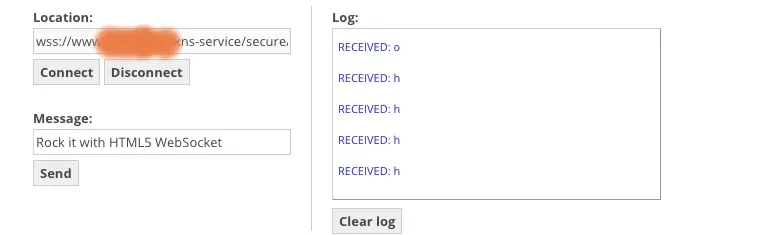
The report notes that the 000 segment is an alphanumeric value in the real URL, and that the endpoint accepted any value there; the same applied to the xxxxxxxx segment.
Step 2: confirm that responses carry user data
Exploring the site further, the researcher found that when a user updates their profile, a message is received that discloses the username of the user.
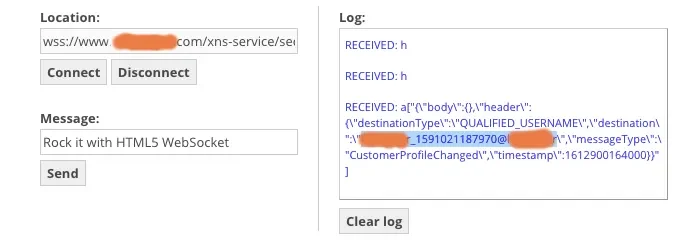
This confirmed the model: while the victim performs an action, the WebSocket connection established from the third-party page receives the WebSocket responses, including sensitive content.
Step 3: perform sensitive actions and look for a stronger disclosure
The researcher then performed sensitive actions. All of them returned the same kind of response. The password change action was different: this time the Session_Id was disclosed.
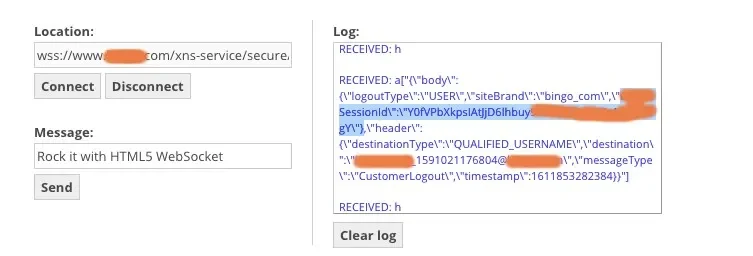
Root cause
The report does not analyse the server-side code. What the behaviour shows is that the WebSocket handshake does not verify that the request originates from the target's own origin, so a page on another site can open the connection in the victim's browser and receive the messages sent back over it. The report does not state which defence, if any, was present and failed.
Impact
An attacker hosts a website containing the vulnerable code. When the victim opens that site, the connection is established immediately, and the attacker can see the WebSocket messages whenever the victim performs an action. The most impactful action is a password update: the attacker can then see the Session_Id of the victim's account. The report does not describe what an attacker can do with that Session_Id beyond seeing it.

Fix
Variants to test
- Open a WebSocket endpoint from a page on a different origin and see whether the handshake completes and messages arrive. A positive result is a response in the third-party page, as in step 1.
- Vary path segments that look like identifiers, as the researcher did with
000andxxxxxxxx, and see whether the endpoint accepts arbitrary values. A positive result is a successful connection with substituted values. - Trigger ordinary account actions while the third-party connection is open and watch for personal data such as usernames. A positive result is a message disclosing user data, as in step 2.
- Trigger sensitive actions, especially password change, and watch for session identifiers or other credentials in the responses. A positive result is a
Session_Idor equivalent appearing in the third-party page, as in step 3.
What happened, in plain words
A security researcher was looking at a gaming website and noticed that the site keeps a live, always-open conversation with the visitor's browser. That kind of live connection is called a WebSocket. He then checked whether a completely different website could open that same live connection in the victim's browser and quietly read everything the gaming site sent back. It could. When the victim changed their password, the gaming site sent back the victim's session identifier, the secret value that proves who is logged in. The researcher reported it and the report was accepted.
This article walks through the same steps in beginner language. You only need to know how to use a browser and a computer.
Background: what a WebSocket is
Normally, when you load a web page, your browser asks the server for something and the server answers once. That is like sending a letter and getting one reply. If the page wants updates, it has to keep asking again and again: "anything new? anything new?" That repeated asking is called polling, and it is wasteful.
A WebSocket is different. The browser and the server open a two-way channel and keep it open. Both sides can send messages at any moment, and the other side receives them as events, without asking. Think of it as a phone call that stays connected instead of a series of letters. Chat apps, games and live notifications commonly use WebSockets for exactly this reason.
The researcher links to a longer explanation of how WebSockets work, at https://sookocheff.com/post/networking/how-do-websockets-work/, for anyone who wants the details.
The setup: how the researcher works
He was testing a private program on HackerOne, a platform where companies invite researchers to test their systems and report problems. The target is a gaming website, written in the report as <redacted>.com.
His habit before attacking anything is to run the site's traffic through Burp Suite. Burp Suite is a tool that sits between your browser and the website and lets you see every request and response, like a recording device on the phone line. While doing that, he saw several WebSocket requests carrying messages. That made him ask a specific question: is this WebSocket endpoint vulnerable to hijacking?
What "WebSocket hijacking" means
When your browser opens a WebSocket to a site, it may attach your cookies or other credentials automatically, the same way it does for ordinary page requests. Cookies are small pieces of data the site stored in your browser earlier, often including a value that identifies your logged-in session.
Cross-Site WebSocket Hijacking (CSWH) is when a page on a different website can open a WebSocket to the target site, your browser attaches your credentials, and that other page can then read the messages coming back. The attacker's page is the hijacker: it rides on your logged-in session without ever seeing your password.
A useful comparison: imagine a members-only phone line. The guard checks whether the caller has a membership card, but never checks which building the call is coming from. Anyone who can make your phone dial that line, from anywhere, gets through as you.
Step 1: connect to the target's WebSocket from a third-party page
To test the idea, the researcher used a public test page at http://websocket.org/echo.html. The report describes it as a vulnerable website created for connecting to WebSockets. An echo page is simply a page that lets you type in a WebSocket address, connect, and see what comes back. It is a sandbox for experiments.
All you do there is enter the WebSocket URL in the location input and check whether you can send and receive messages. He entered the target's WebSocket URL in this form:
wss://www.<redacted>.com/xns-service/secure/client/desktop/000/xxxxxxxx/websocket
Line by line, in plain words:
wss://is the secure version of a WebSocket address, the same wayhttps://is the secure version ofhttp://. Thesstands for secure, meaning the traffic is encrypted.www.<redacted>.comis the gaming site's host name./xns-service/secure/client/desktop/000/xxxxxxxx/websocketis the path on that server. It looks like it identifies a particular service, a client type, and two identifier-like segments,000andxxxxxxxx.- The whole string is the address of the live channel he wanted to test.
The connection succeeded, and a response came back in the third-party page. That is the key observation: a page that is not the gaming site was able to open the channel and receive messages.
The screenshot shows the echo page with the target's WebSocket URL entered and a response arriving in that third-party page.
The report adds an important note: in the real URL, 000 is an alphanumeric value, but the endpoint accepted any value there, and the same was true of the xxxxxxxx segment. In other words, those parts of the address were not checked, so they could be replaced freely. That matters because those parts of the address could be replaced freely.
Step 2: confirm that responses carry user data
Connecting is interesting, but the real question is impact: what can the hijacker actually see? So he explored the site further. He found that when a user updates their profile, a message is received that discloses the username of the user.
The screenshot shows the message that arrives when a user updates their profile, with the username visible in it.
That confirmed the model. While the victim performs an action on the gaming site, the WebSocket connection that was opened from the third-party page receives the WebSocket responses, and those responses contain sensitive content. The victim does nothing unusual; they just use the site as normal, and the other page watches.
Step 3: perform sensitive actions and look for a stronger disclosure
Having seen a username leak, he went further and performed sensitive actions. All of them returned the same kind of response. Then he performed the password change action, and this time the Session_Id was disclosed.
The screenshot shows the password change action producing a response that contains the Session_Id.
A session identifier is the value that proves to the server that a request comes from a logged-in user. If someone else has it, they can often act as that user without knowing the password. That is why this step is the serious one: a username is personal data, but a session identifier is a key.
Why it works
The report does not analyse the server-side code, so the exact cause inside the application is not described. What the behaviour shows is that the WebSocket handshake does not verify that the request originates from the target's own origin. Origin is the combination of scheme, host and port that a page comes from; it is how a browser tells sites apart. If the server does not check it, a page on another site can open the connection in the victim's browser and receive the messages sent back over it. The report does not state which defence, if any, was present and failed.
Impact
An attacker hosts a website containing the vulnerable code. When the victim opens that site, the connection is established immediately, and the attacker can see the WebSocket messages whenever the victim performs an action. The most impactful action is a password update: the attacker can then see the Session_Id of the victim's account. The report does not describe what an attacker can do with that Session_Id beyond seeing it.
The screenshot relates to the report being accepted, with the researcher noting the lower severity and bounty.
Fix
Variants to test
If you want to try the same idea on a system you are allowed to test, these are the same checks in checklist form:
- Open a WebSocket endpoint from a page on a different origin and see whether the handshake completes and messages arrive. A positive result is a response in the third-party page, as in step 1.
- Vary path segments that look like identifiers, as the researcher did with
000andxxxxxxxx, and see whether the endpoint accepts arbitrary values. A positive result is a successful connection with substituted values. - Trigger ordinary account actions while the third-party connection is open and watch for personal data such as usernames. A positive result is a message disclosing user data, as in step 2.
- Trigger sensitive actions, especially password change, and watch for session identifiers or other credentials in the responses. A positive result is a
Session_Idor equivalent appearing in the third-party page, as in step 3.
Glossary
- WebSocket: a connection between browser and server that stays open so both sides can send messages at any time, instead of the browser asking repeatedly.
- Polling: repeatedly asking the server whether there is anything new, instead of being told automatically.
- Event-driven response: a message the server sends on its own when something happens, rather than as a reply to a question.
- HackerOne: a platform where companies invite researchers to test their systems and report problems.
- Burp Suite: a tool that sits between browser and website so you can inspect every request and response.
- Request: a message your browser sends to a server, for example asking for a page.
- Response: the message the server sends back.
- Cookie: a small piece of data a site stores in your browser, often used to remember that you are logged in.
- Session: the period during which a site remembers who you are after you log in.
- Session identifier (Session_Id): the secret value that proves to the server which logged-in user a request belongs to.
- Cross-Site WebSocket Hijacking (CSWH): a page on another website opening a WebSocket to the target site in your browser and reading the messages, using your logged-in session.
- Origin: the combination of scheme, host and port a page comes from; browsers use it to tell sites apart.
- Handshake: the opening exchange where browser and server agree to set up a WebSocket connection.
- Endpoint: a specific address on a server that accepts connections or requests.
- Echo page: a test page that connects to a WebSocket address you give it and shows you what comes back.
wss://: the secure, encrypted form of a WebSocket address, likehttps://for ordinary web pages.- Username: the name that identifies a user account.
- Severity: how serious a vulnerability is judged to be.
- Bounty: the money a program pays a researcher for a valid report.