When a Security Fix Misses an Extraction Path: Investigating a PowerShell Windows CAB Path Traversal Vulnerability
The report concerns a path traversal in PowerShell's CAB extraction during help-content processing, where archive entry names may be used to build destination paths.
 Published on medium.com
Vulnerability
The full write-up lives on its author's site
It belongs to its author, so we link to it rather than copy it. The other two tabs are our own rewrites, checked against it.
Context
PowerShell ships a help system that downloads, stores and extracts help content. Update-Help and Save-Help fetch help packages, and the help content is delivered as archives that PowerShell extracts into a temporary directory before validating and copying the content into place. Two extraction mechanisms exist in the codebase: a managed ZIP path (UnzipHelpContent, ExpandArchive) built on .NET archive APIs, and a Windows-native Cabinet (CAB) path implemented in System.Management.Automation/help/CabinetNativeApi.cs, which drives the Windows File Decompression Interface (FDI) through callbacks.
The managed ZIP path benefits from built-in protections against archive path traversal. The question this research set out to answer was whether the native CAB path enforces the same containment guarantees, given that both paths feed the same help-content pipeline and the same post-extraction validation, ValidateAndCopyHelpContent().
The work was reported to Microsoft as a potential incomplete remediation of CVE-2022-41076, a PowerShell Remote Code Execution vulnerability disclosed in December 2022 with a CVSS 3.1 score of 8.5 (High). The original vulnerability involved help-content processing. Microsoft shipped fixes for PowerShell 7.2.8 and 7.3.1. The new report was filed as CWE-22, Improper Limitation of a Pathname to a Restricted Directory.
Setup
The research was source-level. The environment was Linux-based, and no full end-to-end Windows reproduction was completed: there was no crafted ANSI-FDI CAB archive run through the real Update-Help workflow. The investigation therefore separates source-level behaviour from the final Windows exploitation chain, and a Windows-based reproduction would be needed to demonstrate every stage independently.
The report was submitted to the Microsoft Security Response Center through the researcher portal on 2 September 2026 and tracked as:
| Field | Value |
|---|---|
| Submission | VULN-219264 |
| MSRC case | 142705 |
| External tracking reference | VULN-001 |
| CWE | CWE-22 |
The relevant attack surface is the help-content pipeline: Update-Help, Save-Help, help-content archive processing, CAB extraction, and local and remote help-content sources. The precondition for any real-world impact is that an attacker can supply or influence the archive that reaches the vulnerable extraction implementation, for example through a compromised help-content distribution source, an attacker-controlled local archive supplied through a configured source path, or a compromised distribution or update infrastructure.
Finding it
The starting point was the original CVE-2022-41076 context: which functionality was affected, which extraction mechanisms were involved, what protections were introduced, and whether different extraction implementations followed equivalent security assumptions. Tracing the help-content extraction functionality showed two code paths that perform logically similar operations while relying on entirely different security controls.
The managed ZIP path uses .NET archive processing and inherits protections against certain archive path traversal scenarios, so archive entry paths are not treated as unrestricted filesystem destinations. The native CAB path is different: it interacts with the Windows FDI API through callbacks, and the callback of interest is FdiNotify, which receives notifications from the extraction process and handles operations such as creating files and closing extracted files.
Two notification operations were examined:
FdintCOPY_FILEFdintCLOSE_FILE_INFO
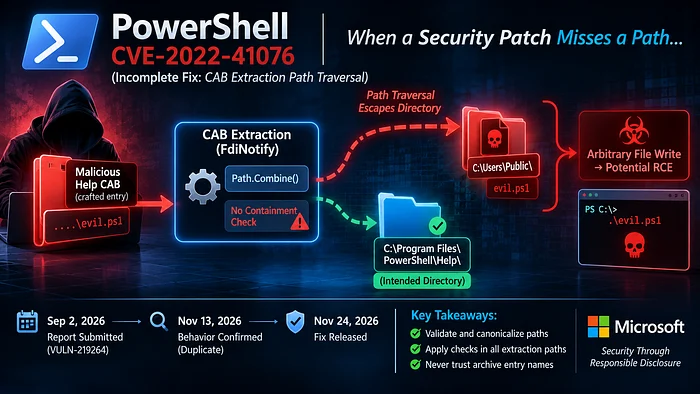
In FdintCOPY_FILE, the archive entry name is used to derive filesystem path components. The operations involved are obtaining the filename with Path.GetFileName, obtaining the directory portion with Path.GetDirectoryName, combining that directory portion with the extraction destination using Path.Combine, creating the resulting directory, constructing the final filename, and opening the destination through the native file-opening operation. The concern is that the archive-provided path influences the destination directory, and path combination alone does not establish that the result stays inside the intended extraction directory.
In FdintCLOSE_FILE_INFO, which handles file metadata and closing-related processing after extraction, the destination is reconstructed from the extraction destination and the archive entry path. That is a second construction site: even if an earlier stage validates a path, rebuilding it later without equivalent validation creates another opportunity for an unsafe destination to be used.
The second half of the finding is about ordering. ValidateAndCopyHelpContent() runs after extraction and inspects files within the expected temporary extraction directory. If extraction has already written a file outside that directory, inspecting only what remains inside cannot establish that all extracted files were safe. Pre-extraction validation can prevent an unsafe destination from being used; post-extraction validation can only inspect what is still in the inspected location, and cannot reliably undo or detect every filesystem side effect that already happened outside it.
Exploitation
The report describes a potential arbitrary file write with possible code-execution consequences, but the Windows chain was not reproduced. What follows is the reasoning chain as documented, with the conceptual operations the report uses to illustrate it.
Step 1: Establish the intended boundary
An application intends to extract files into:
C:\Application\Help\
A normal archive entry might be:
en-US\about_Command.help.txt
This should resolve to a location inside the intended extraction directory. An attacker-controlled entry containing parent-directory traversal components attempts to escape it:
..\..\outside.txt
If the application combines this entry with the extraction directory without validating the final resolved destination, the resulting path may point outside the authorised directory. The security principle is that the application must validate the final resolved filesystem destination, not simply trust the path supplied by an archive entry.
Step 2: Follow the entry name into FdintCOPY_FILE
The callback takes the archive entry name, splits it with Path.GetFileName and Path.GetDirectoryName, and combines the directory portion with the extraction destination. The conceptual operation is:
string destination = Path.Combine( extractionDirectory, archiveEntryDirectory);
This constructs a path. It does not independently establish a security boundary. If the second argument contains traversal components, the resulting path can escape the intended directory after filesystem path resolution. The report frames this as the fundamental distinction between path construction and path validation.
Step 3: Note the second construction site in FdintCLOSE_FILE_INFO
The destination is reconstructed in this callback from the extraction destination and the archive entry path. Any validation applied earlier is not automatically carried over to this reconstruction, so the same untrusted entry data reaches a filesystem operation a second time.
Step 4: Check what the post-extraction validation can see
ValidateAndCopyHelpContent() inspects files within the expected temporary extraction directory after extraction. A file written outside that directory is not in the inspected set, so the validation cannot establish that all extracted files were safe. The report's model is that unauthorised writes must be prevented before they happen, not detected afterwards.
Step 5: Reason about the resulting write
If the destination path can be influenced, the extracting process may write data outside its intended directory. The report describes this as a potential arbitrary file write, with code execution as a conditional follow-on rather than an automatic consequence. The conditions listed are:
- The attacker must be able to influence the archive content.
- The vulnerable extraction operation must process that content.
- The extracting process must have permission to write to the selected destination.
- The destination must be consumed by a relevant loading or execution mechanism.
- Any additional application-specific security controls must not prevent execution.
Root cause
The mistake is the absence of an effective filesystem containment check in the Windows-native CAB extraction path. The code distinguishes between two operations:
Path construction:
Path.Combine(baseDirectory, archiveEntryName);
Path containment validation:
Path.GetFullPath(candidatePath);
followed by a comparison against the canonical extraction directory. The first combines components; the second helps determine where the result resolves. Canonicalisation alone is also insufficient: the application must verify that the resolved destination is actually contained within the authorised extraction directory.
With an intended directory of C:\Temp\HelpExtraction, a safe destination resolves beneath it, while an unsafe destination might resolve to C:\Temp\Outside.txt. The boundary is violated even though the path was built with Path.Combine. The missing property is directory containment.
Path.Combine is not an authorisation mechanism. An attacker-controlled path may contain parent-directory traversal components, rooted paths, drive-qualified paths, platform-specific path separators, or alternative path representations, and applications must account for the filesystem's actual path semantics. Extraction code should validate the canonical destination before creating directories or opening files.
The protection lived in the managed ZIP path, and a fix applied to one implementation does not automatically protect another. The post-extraction validation in ValidateAndCopyHelpContent() operates on the wrong side of the side effect: it inspects the temporary extraction directory after files have already been written, so it cannot cover writes that landed elsewhere. The report treats the post-extraction validation as a separate gap: it inspects the temporary extraction directory after files have already been written, so it cannot cover writes that landed elsewhere.
Impact
The direct impact is a potential arbitrary file write outside the intended extraction directory, violating the filesystem boundary the extraction process is expected to enforce. Depending on process permissions, the consequences could include writing files into user-writable application directories, modifying files used by PowerShell modules, placing content in locations that influence later script execution, and modifying files in other writable locations accessible to the extracting process. An arbitrary file write is particularly serious when the destination is a location that another application or component automatically loads.
Code execution is conditional. A malicious file placed where PowerShell subsequently loads it as a script or module component could result in execution when the loading mechanism is triggered, subject to the five conditions above. The privilege level of the extracting process matters: if an administrator or another privileged process performs the vulnerable extraction, an attacker-controlled write may have greater consequences than the same operation performed by an unprivileged user. The impact of a filesystem path traversal is strongly influenced by the permissions of the process performing the operation.
The report does not establish that every PowerShell remoting configuration exposed the issue to unauthenticated network attackers. A remote attacker would need an applicable way to make the vulnerable operation process attacker-controlled archive content; an authenticated remoting session, an exposed management interface, or a privileged automation workflow could change the practical attack surface. The report also states that the research had not been publicly released or weaponised.
Fix
Microsoft confirmed the reported behaviour, investigated, released a fix, and published an acknowledgement on the associated CVE. The report does not describe the contents of that fix.
The remediation argued for in the report is to resolve and validate every archive entry against the intended extraction directory before any filesystem operation is performed:
- Establish a trusted extraction root.
- Canonicalise the extraction root.
- Resolve the archive entry against that root.
- Canonicalise the resulting destination.
- Verify that the destination remains inside the extraction root.
- Reject rooted paths and drive-qualified paths where they are not permitted.
- Apply the validation consistently to all extraction callbacks.
- Account for filesystem reparse points and symbolic links where relevant.
Canonicalisation looks like this:
string extractionRoot = Path.GetFullPath(destinationDirectory);
string candidatePath = Path.GetFullPath( Path.Combine(extractionRoot, entryName) );
At that point the application has a canonical candidate path, but canonicalisation alone does not guarantee safety; the candidate must still be verified as contained within the root. A naive string prefix comparison is itself a vulnerability: with a root of C:\Temp\Help, a candidate such as C:\Temp\Help-Evil\file.txt shares the character sequence but is not inside the intended directory. Containment checks must be directory-boundary-aware:
string root = Path.GetFullPath(destinationDirectory);
string candidate = Path.GetFullPath( Path.Combine(root, entryName));string rootPrefix = Path.EndsInDirectorySeparator(root) ? root : root + Path.DirectorySeparatorChar;if (!candidate.StartsWith( rootPrefix, StringComparison.OrdinalIgnoreCase ) && !string.Equals( candidate, root, StringComparison.OrdinalIgnoreCase )){ throw new SecurityException( "Archive entry escapes extraction directory." );}
The report labels this illustrative defensive logic, not a complete cross-platform or race-free extraction implementation. A production implementation must also account for Windows path comparison semantics, alternate separators, drive-relative and rooted paths, UNC paths, filesystem reparse points, symbolic links, and time-of-check-to-time-of-use races.
Validation must not be limited to a single callback: both FdintCOPY_FILE and FdintCLOSE_FILE_INFO require equivalent protection, and every filesystem operation must use a destination validated against the trusted extraction root. Post-extraction inspection can be a useful additional measure but must never replace validation at the point where the destination path is selected. The overall principle: do not allow untrusted archive metadata to determine a filesystem destination without enforcing containment at the point of use.
Variants to test
- Other native extraction callbacks in the same component. Enumerate every FDI notification that touches a path, not just the two named here, and check whether each one resolves the entry against the trusted root. A positive result is a callback that builds a destination from the archive entry without a containment check.
- Managed versus native parity. For any product with two extraction implementations, feed the same crafted entry name to both and compare where the file lands. A positive result is the managed path rejecting the entry while the native path writes outside the extraction directory.
- Second construction sites. Look for code that validates a path once and later rebuilds it from the same untrusted input, as with
FdintCLOSE_FILE_INFO. A positive result is a later filesystem operation whose destination was never re-validated. - Post-extraction validation ordering. Identify validation routines that run after extraction and inspect only the temporary directory. A positive result is a write that lands outside the inspected location and is never seen by the validator.
- Prefix comparison weaknesses. Where containment is checked with a string prefix, try sibling directories that share the prefix, such as
C:\Temp\Help-Evilagainst a root ofC:\Temp\Help. A positive result is acceptance of a path outside the root. - Path representation variants. Try rooted paths, drive-qualified paths, UNC paths, alternate separators and mixed separators in archive entry names. A positive result is any representation that survives validation and resolves outside the extraction root.
- Privileged extraction contexts. Test the same archive under an elevated extracting process. A positive result is a write into a location that a later loading mechanism consumes, which is where the conditional code-execution impact becomes reachable.
What happened, in plain words
PowerShell is a tool built into Windows for running commands and small scripts, and it also has a help system: when you ask it for documentation about a command, it can download that documentation from Microsoft and store it on your machine. The help arrives as a compressed bundle of files, an archive, and PowerShell unpacks it into a temporary folder before copying the useful parts into place.
An archive is like a box of files. Each file inside has a name, and that name can include folder information, for example en-US\about_Command.help.txt means "a file called about_Command.help.txt inside a folder called en-US". The unpacking program reads those names and decides where to put each file on disk. If a name is written cleverly, it can point somewhere the program did not intend, for example outside the temporary folder and into a system folder. That trick is called path traversal, and it is the subject of this research.
PowerShell has two different unpacking mechanisms. One handles ZIP files using the .NET programming library, and that one already refuses to write outside its folder. The other handles Cabinet files (.cab), a Microsoft archive format, and it talks to a Windows system component called the File Decompression Interface, or FDI. The researcher read the source code of the Cabinet path and found that it built destination paths from the names inside the archive without an effective check that the final result stayed inside the intended folder. He reported this to Microsoft as a possible incomplete fix for an older PowerShell vulnerability, CVE-2022-41076. Microsoft confirmed the behaviour, released a fix, and published an acknowledgement on the CVE, but closed his report as a duplicate because someone else had reported the same underlying issue first. No bounty was paid.
The rest of this article walks through the same material in the same order, explaining each idea from scratch.
1. Introduction
Not every security bug comes from a brand new feature or an obvious programming mistake. Sometimes a bug survives because a protection was added to one way of doing something, while a second way of doing the same thing was left unprotected. Think of a building where the front door gets a new lock but the side door is forgotten: the lock is real, but the building is still open.
That was the idea behind this investigation into how PowerShell unpacks help content.
In September 2026 the researcher sent a vulnerability report to the Microsoft Security Response Center, usually shortened to MSRC. MSRC is the team at Microsoft that receives security reports from outside researchers. The report described a possible path traversal problem in the Windows-native Cabinet extraction code that PowerShell uses.
The investigation focused on one source file:
System.Management.Automation/help/CabinetNativeApi.cs
A source file is one of the text files that programmers write to build a program; the path above is its location inside the PowerShell project. System.Management.Automation is the name of the main PowerShell library, and help is the folder that deals with documentation.
More specifically, the researcher looked at a callback called FdiNotify and at how it handled the names of files inside the archive during Cabinet extraction. A callback is a function you hand to another piece of software and say "call this when something happens". It is like leaving your phone number with a repair shop: they call you when the job reaches a certain point.
The investigation found a possible gap between two extraction mechanisms:
- The managed ZIP extraction path, which relies on archive extraction protections. "Managed" here means code written in .NET and run by the .NET runtime, as opposed to code that calls directly into Windows.
- The Windows-native Cabinet extraction path, which processes archive entry names through native FDI callbacks. "Native" means it uses Windows system functions directly.
The concern was that the safety check applied to one mechanism was not applied in the same way to the other.
If a name inside an archive can influence where a file is written, and nobody checks that the final location stays inside the intended folder, the extraction could write files outside that folder. This matters because unpacking archives is a security-sensitive operation: an archive should never be allowed to decide where files go outside the folder the application chose.
The researcher reported the issue as a possible incomplete fix for the historical PowerShell Remote Code Execution vulnerability CVE-2022-41076. "Remote Code Execution" means an attacker can make a program run code of their choosing; "CVE" stands for Common Vulnerabilities and Exposures, a public catalogue where each known vulnerability gets an identifier such as CVE-2022-41076.
Microsoft confirmed the reported behaviour, investigated it, released a fix, and published an acknowledgement on the associated CVE. The submission was closed as a duplicate because the same underlying issue had already been reported by another researcher. A duplicate means the vendor already had the same problem in its queue from someone else; it does not mean the report was wrong.
This article documents the technical reasoning, the investigation, the security implications and the disclosure process behind the research.
2. Background: understanding CVE-2022-41076
Before looking at the new finding, it helps to understand the earlier one.
CVE-2022-41076 is a PowerShell Remote Code Execution vulnerability that Microsoft disclosed in December 2022. It involved PowerShell's help-content processing, and it was given a CVSS 3.1 score of 8.5, rated High. CVSS is a standard scoring system for the severity of a vulnerability; scores run from 0 to 10, and 8.5 is high.
Microsoft released security fixes for affected PowerShell versions, including:
- PowerShell 7.2.8
- PowerShell 7.3.1
Those numbers are version numbers: the first number is the major version, the second the minor version, and the third the patch level. A higher patch level means a later release with fixes included.
The original vulnerability showed that processing untrusted help content can be risky when archive contents are not handled safely. "Untrusted" means data that might have been created or altered by an attacker.
For any application that downloads, processes and unpacks archives, checking paths is a critical requirement. Here is a simple example.
Suppose an application intends to unpack files into:
C:\Application\Help\
A normal archive entry might be:
en-US\about_Command.help.txt
The application should turn this entry into a location inside the intended folder. On Windows, a backslash \ separates folder names in a path, so this entry means the file about_Command.help.txt inside the folder en-US.
However, an archive entry controlled by an attacker can contain parent-directory traversal components, which are pieces of a path that mean "go up one folder". In Windows paths, .. means the parent folder. Conceptually:
..\..\outside.txt
Read this as: go up one folder, go up another folder, then write a file called outside.txt. If the application glues this entry onto the extraction folder without checking where the result lands, the final path may point outside the authorised folder. "Authorised" here simply means the folder the application decided files may go into.
This class of bug is called Path Traversal, classified under CWE-22. CWE stands for Common Weakness Enumeration, a catalogue of bug types; CWE-22 is the entry for "Improper Limitation of a Pathname to a Restricted Directory", which is the formal name for path traversal.
The important security principle is:
An application must validate the final resolved filesystem destination, not simply trust the path supplied by an archive entry.
"Resolved" means worked out completely: if a path contains .., the operating system turns it into a final, absolute location, and that final location is what must be checked.
The original CVE gave the context for this investigation. The question was whether the protections added around help-content extraction were applied consistently across all the ways PowerShell unpacks archives.
Reference: https://nvd.nist.gov/vuln/detail/CVE-2022-41076
3. The investigation: looking beyond the ZIP extraction mechanism
One of the most important steps in vulnerability research is understanding how a security-sensitive operation is actually implemented. "Implemented" means how the programmers actually wrote it, as opposed to how the documentation says it works.
Rather than treating archive extraction as a single operation, the researcher examined the different mechanisms PowerShell uses.
The investigation focused on two distinct extraction paths.
3.1 Managed ZIP extraction
The first path uses the managed archive extraction functionality.
The relevant implementation was associated with:
UnzipHelpContent and: ExpandArchive
These are the names of functions in the PowerShell code. UnzipHelpContent unpacks help content, and ExpandArchive is the general-purpose PowerShell command for expanding archives.
This path uses .NET archive-processing functionality. .NET is Microsoft's software platform for building and running programs; its library includes ready-made code for reading ZIP files.
The important observation was that the managed ZIP extraction mechanism benefits from built-in protections against certain archive path traversal scenarios. In other words, the library itself refuses to write outside the target folder in some cases, so archive entry paths are not treated as unrestricted filesystem destinations.
3.2 Windows-native CAB extraction
The second path was more interesting.
Windows supports Cabinet archive files, commonly identified by the .cab extension. A file extension is the part after the last dot in a filename, such as .cab or .zip, and it hints at the file's format. Cabinet files are frequently used by Windows components and software distribution mechanisms.
PowerShell supports Cabinet processing through Windows-native functionality, including the File Decompression Interface (FDI). FDI is a Windows programming interface for unpacking Cabinet files; an interface here means a defined set of functions a program can call.
The implementation investigated was:
Unlike the managed ZIP mechanism, this implementation interacts with the Windows-native FDI API through callback functions. An API, short for Application Programming Interface, is a defined way for one piece of software to ask another piece of software to do something, like a menu of services with rules about how to order them.
The relevant callback was:
FdiNotify
This callback receives notifications from the FDI extraction process and handles operations such as creating files and closing extracted files. In other words, Windows does the unpacking and calls back into PowerShell at each important moment, and PowerShell decides what to do.
The important question was:
Does the Cabinet extraction implementation enforce the same filesystem containment guarantees as the ZIP extraction implementation?
"Containment" means keeping every written file inside the allowed folder.
The investigation suggested that it did not.
4. Understanding Windows FDI and FdiNotify
To understand the reported issue, it helps to understand what FDI does.
The File Decompression Interface is a Windows API used to decompress files from Cabinet archives. It lets an application provide callback functions that handle different extraction events. Instead of treating extraction as a simple managed operation, the application takes part in the extraction process through callbacks.
The PowerShell implementation uses a notification callback to process these events.
Two notification operations were particularly relevant:
FdintCOPY_FILEFdintCLOSE_FILE_INFO
These are names of specific events that FDI reports. FdintCOPY_FILE is about creating or opening a file during extraction, and FdintCLOSE_FILE_INFO is about finishing a file and handling its metadata. Metadata is data about a file rather than its contents, such as its timestamp or attributes.
4.1 FdintCOPY_FILE
This notification is associated with creating or opening an extracted file.
In the implementation examined, the archive entry name was used to derive filesystem path components. "Derive" means to calculate one value from another; here, pieces of the destination path were calculated from the name stored in the archive.
The relevant operations included:
- Obtaining the filename using
Path.GetFileName. - Obtaining the directory portion using
Path.GetDirectoryName. - Combining the directory portion with the extraction destination using
Path.Combine. - Creating the resulting directory.
- Constructing the final filename.
- Opening the destination through the native file-opening operation.
Path.GetFileName is a .NET function that returns just the file part of a path, dropping the folders. Path.GetDirectoryName returns just the folder part. Path.Combine glues two path pieces together with the correct separator. These are ordinary helper functions, not security checks.
The security concern was that the archive-provided path influenced the destination directory. Combining paths does not prove that the result stays inside the intended extraction folder.
For example, consider the following conceptual operation:
string destination = Path.Combine( extractionDirectory, archiveEntryDirectory);
Line by line:
string destination =declares a variable calleddestinationthat will hold text. A variable is a named box that stores a value.Path.Combine(starts the call to the .NET function that joins path pieces.extractionDirectory,is the first piece: the folder the application chose for extraction.archiveEntryDirectoryis the second piece: the folder part taken from the name inside the archive.);closes the call and stores the joined result indestination.
This operation constructs a path. It does not by itself establish a security boundary. If the second argument contains traversal components, the resulting path can escape the intended directory once the filesystem resolves it. This is the fundamental difference between building a path and checking a path.
4.2 FdintCLOSE_FILE_INFO
The second relevant notification was:
FdintCLOSE_FILE_INFO
This callback handles file metadata and closing-related processing after extraction.
The investigation also found another place where a path was constructed, in this callback. The destination was rebuilt using the extraction destination and the archive entry path.
This raised an additional concern. Even if an earlier stage checks a path, rebuilding it later without the same check creates a second chance for an unsafe destination to be used. It is like checking a parcel at the front desk and then letting someone repack it in the back room without looking again.
That is why security checks must be applied at every filesystem operation that relies on untrusted path data. It is not enough to check a path once and assume everything afterwards is safe.
5. Root cause: missing filesystem containment validation
The central issue in the report was the absence of an effective containment check in the Windows-native Cabinet extraction path.
The relevant distinction is between two operations:
Path construction:
Path.Combine(baseDirectory, archiveEntryName);
Line by line:
Path.Combine(calls the .NET function that joins path pieces.baseDirectory,is the trusted starting folder.archiveEntryNameis the name taken from the archive, which may be attacker-controlled.);finishes the call. The result is a new path string, but nothing has been checked.
Path containment validation:
Path.GetFullPath(candidatePath);
Line by line:
Path.GetFullPath(calls the .NET function that turns a path into its full, absolute form, resolving things like..and relative pieces.candidatePathis the path to resolve.);finishes the call. The result is the final location the operating system would use.
The first operation combines path pieces. The second helps determine where the result actually points. But turning a path into its full form is not enough on its own: the application must also verify that the resolved destination is inside the authorised extraction folder.
For example, suppose the intended extraction folder is:
C:\Temp\HelpExtraction
A safe destination should resolve to a location beneath that folder. An unsafe destination might resolve to:
C:\Temp\Outside.txt
The security boundary has been crossed even though the path was built with Path.Combine. The missing property is directory containment.
5.1 Why Path.Combine is not a security control
Developers sometimes assume that combining a trusted base folder with an untrusted filename automatically keeps the result inside. That assumption is wrong.
Path-combination functions are not authorisation mechanisms. Authorisation means deciding whether an action is allowed; a function that glues text together makes no such decision.
An attacker-controlled path may contain:
- Parent-directory traversal components, such as
... - Rooted paths, which start at the root of a drive, such as
\Windows. - Drive-qualified paths, which name a drive explicitly, such as
C:\Windows. - Platform-specific path separators, such as
\on Windows and/on Linux. - Alternative path representations, which are different spellings of the same location.
Applications must account for how the filesystem actually interprets paths. For this reason, archive extraction code should check the final destination before creating folders or opening files.
5.2 Why validating only after extraction is insufficient
Another important part of the investigation concerned the check performed after extraction.
The relevant PowerShell functionality included:
ValidateAndCopyHelpContent()
This is a function whose name says what it does: validate the help content and copy it into place. The concern was that this check happened after extraction and looked at files inside the expected temporary extraction folder.
That creates a blind spot. If extraction has already written a file outside that folder, looking only at the files still inside cannot prove that everything extracted was safe.
The distinction matters:
- Checking before extraction can prevent an unsafe destination from being used.
- Checking after extraction can inspect what remains in the inspected location.
- Checking after extraction cannot reliably undo or detect every filesystem side effect that already happened outside that location.
The correct model is to prevent unauthorised writes before they happen.
6. Why the issue mattered: potential arbitrary file write
A path traversal bug in an archive extraction mechanism can have consequences beyond writing an unexpected file.
If an attacker can control the destination path, the application may write data outside its intended extraction folder. The potential impact depends on several conditions:
- Whether an attacker can supply or influence the archive.
- Whether the extraction operation processes the archive.
- Which folders are writable by the extracting process.
- Whether the resulting file is later loaded or executed.
- Whether the process runs with elevated privileges.
"Elevated privileges" means running with more rights than a normal user, for example as an administrator.
In the report, the issue was described as a potential arbitrary file write with possible code-execution consequences. "Arbitrary file write" means writing a file of the attacker's choosing to a location of the attacker's choosing.
6.1 Arbitrary file write
The most direct impact is the ability to cause a file to be written outside the intended extraction folder. This breaks the filesystem boundary the extraction process is supposed to enforce.
Depending on the process permissions, the consequences could include:
- Writing files into user-writable application folders.
- Modifying files used by PowerShell modules. A module is a package of PowerShell code that adds commands.
- Placing content in locations that influence later script execution.
- Modifying files in other writable locations the extracting process can reach.
An arbitrary file write is particularly serious when the destination is a location that another application or component loads automatically.
6.2 Potential code execution
The next stage of impact depends on where the attacker-controlled file can be written. For example, a malicious file placed where PowerShell later loads it as a script or module component could result in code execution when the loading mechanism is triggered.
This is a conditional impact, not an automatic result of every successful file write. The conditions are:
- The attacker must be able to influence the archive content.
- The vulnerable extraction operation must process that content.
- The extracting process must have permission to write to the selected destination.
- The destination must be consumed by a relevant loading or execution mechanism.
- Any additional application-specific security controls must not prevent execution.
The severity therefore depends on the actual execution context.
6.3 Elevated execution context
Another important consideration is the privilege level of the extracting process. If an administrator or another privileged process performs the vulnerable extraction, an attacker-controlled write may have greater consequences than the same operation performed by an unprivileged user.
This is a general principle:
The impact of a filesystem path traversal vulnerability is strongly influenced by the permissions of the process performing the operation.
7. Attack surface and security assumptions
The research also raised questions about how PowerShell help-content processing should be treated from a security point of view.
The relevant functionality includes:
Update-HelpSave-Help- Help-content archive processing.
- Cabinet extraction.
- Local and remote help-content sources.
Update-Help is the PowerShell command that downloads and installs help content. Save-Help downloads help content and saves it to a folder without installing it. "Local" sources are files on the same machine; "remote" sources are reached over a network.
The security concern is not that every use of these commands is automatically vulnerable. The relevant condition is whether an attacker-controlled or compromised archive can reach the vulnerable extraction code. "Compromised" means an attacker has gained control of something that should be trusted.
Possible sources of untrusted input include:
- A compromised help-content distribution source.
- An attacker-controlled local archive supplied through a configured source path.
- A compromised distribution or update infrastructure.
- Other situations where an attacker can influence the archive being processed.
The remote-execution implications need additional conditions. For example, a remote attacker would need a way to make the vulnerable operation process attacker-controlled archive content. An authenticated remoting session, an exposed management interface, or a privileged automation workflow could change the practical attack surface. "Authenticated" means the attacker has valid credentials; "remoting" means controlling a machine over a network.
The researcher did not establish that every PowerShell remoting configuration exposed the issue to unauthenticated network attackers. That distinction matters when judging how exploitable a vulnerability really is.
8. Investigation methodology
This research involved reading the implementation rather than relying only on the existence of an earlier security advisory. An advisory is an official notice about a vulnerability.
The investigation followed several stages.
Stage 1: Reviewing the original vulnerability
The starting point was the original CVE-2022-41076 context. The aim was to understand:
- What functionality had originally been affected.
- Which extraction mechanisms were involved.
- What security protections had been introduced.
- Whether different extraction implementations followed equivalent security assumptions.
This gave the basis for investigating a possible incomplete fix.
Stage 2: Identifying separate extraction paths
The next step was to trace the help-content extraction functionality. "Trace" means following the flow of data and calls through the code.
The managed ZIP implementation was compared with the Windows-native Cabinet implementation. This comparison mattered because two code paths can do logically similar things while relying on completely different security controls. A fix applied to one does not automatically protect the other.
Stage 3: Reviewing the FDI callback implementation
Attention then moved to:
CabinetNativeApi.cs
The relevant code paths were:
FdiNotifyFdintCOPY_FILEFdintCLOSE_FILE_INFO
The researcher examined how archive entry names were turned into destination paths and how those paths were used in filesystem operations. The main question was whether the final destination was kept inside the intended extraction folder.
Stage 4: Evaluating path traversal behaviour
The analysis focused on the relationship between:
- Archive-provided entry names.
Path.GetFileName.Path.GetDirectoryName.Path.Combine.- Folder creation.
- Native file-opening operations.
The path-resolution and containment assumptions were evaluated deterministically.
One important limitation must be stated clearly: the research environment was Linux-based. The researcher did not complete a full end-to-end Windows reproduction using a crafted ANSI-FDI Cabinet archive and the real PowerShell Update-Help workflow. "ANSI-FDI" refers to a particular variant of Cabinet archive handled by FDI. A reproduction means actually triggering the bug to see it happen.
The investigation therefore separated source-level behaviour from the final Windows exploitation chain. A Windows-based reproduction would be needed to demonstrate every stage of the complete attack chain independently.
Stage 5: Preparing the security report
After identifying the issue, the report was prepared with:
- The affected source-code component.
- The relevant callback operations.
- The suspected missing validation.
- The security implications.
- The relationship to the earlier CVE.
- Suggested remediation. Remediation means the fix.
- Reproduction limitations and outstanding validation requirements.
It was also made clear that the research had not been publicly released or weaponised. "Weaponised" means turned into a ready-to-use attack tool.
Stage 6: Responsible disclosure
The report was submitted to Microsoft through the MSRC researcher portal on September 2, 2026. A portal here is a website where researchers submit reports. "Responsible disclosure" means telling the vendor privately and giving them time to fix the issue before details become public.
The report was tracked under:
- Submission:
VULN-219264 - MSRC case:
142705 - External tracking reference:
VULN-001
These are identifiers used to follow the report through Microsoft's process.
The investigation continued through Microsoft's coordinated vulnerability disclosure process. "Coordinated" means the vendor and the researcher work together on timing.
9. Suggested remediation
The main fix is to make sure every archive entry is resolved and checked against the intended extraction folder before any filesystem operation happens.
A robust implementation should:
- Establish a trusted extraction root. The root is the folder everything must stay inside.
- Canonicalise the extraction root. Canonicalise means turn into a single standard, absolute form.
- Resolve the archive entry against that root.
- Canonicalise the resulting destination.
- Verify that the destination remains inside the extraction root.
- Reject rooted paths and drive-qualified paths where they are not permitted.
- Apply the validation consistently to all extraction callbacks.
- Account for filesystem reparse points and symbolic links where relevant. A symbolic link is a file that points to another file or folder, and a reparse point is a Windows mechanism for redirecting a path; both can make a path lead somewhere unexpected.
9.1 Canonicalisation
A simplified conceptual example is:
string extractionRoot = Path.GetFullPath(destinationDirectory);
Line by line:
string extractionRoot =declares a variable to hold the trusted root path.Path.GetFullPath(calls the .NET function that produces the full, absolute form of a path.destinationDirectoryis the folder the application intends to extract into.);finishes the call and stores the canonical root inextractionRoot.
string candidatePath = Path.GetFullPath( Path.Combine(extractionRoot, entryName) );
Line by line:
string candidatePath =declares a variable for the proposed destination.Path.GetFullPath(starts the call that will produce the absolute form.Path.Combine(extractionRoot, entryName)first joins the trusted root with the name from the archive.)closes the outer call, so the joined path is turned into its absolute form.;ends the statement.
At this point the application has a canonical candidate path. But canonicalisation alone does not guarantee safety: the application must still verify that the candidate is inside the root.
9.2 Boundary-aware containment
A naive string comparison can introduce another vulnerability. For example, if the extraction root is:
C:\Temp\Help
A candidate path such as:
C:\Temp\Help-Evil\file.txt
starts with the same characters but is not inside the intended folder. A simple "does it start with the root text" check would wrongly accept it.
Therefore containment checks must be aware of folder boundaries:
string root = Path.GetFullPath(destinationDirectory);
Line by line:
string root =declares a variable for the canonical root.Path.GetFullPath(destinationDirectory)turns the intended folder into its absolute form.;ends the statement.
string candidate = Path.GetFullPath( Path.Combine(root, entryName));string rootPrefix = Path.EndsInDirectorySeparator(root) ? root : root + Path.DirectorySeparatorChar;if (!candidate.StartsWith( rootPrefix, StringComparison.OrdinalIgnoreCase ) && !string.Equals( candidate, root, StringComparison.OrdinalIgnoreCase )){ throw new SecurityException( "Archive entry escapes extraction directory." );}
Line by line:
string candidate = Path.GetFullPath(declares the candidate and starts turning it into absolute form.Path.Combine(root, entryName));joins the root with the archive entry name, then closes both calls.string rootPrefix =declares the text the candidate must start with.Path.EndsInDirectorySeparator(root)asks whether the root already ends with a folder separator such as\.? rootmeans: if it does, use the root as is.: root + Path.DirectorySeparatorChar;means: otherwise add a separator, soC:\Temp\HelpbecomesC:\Temp\Help\andC:\Temp\Help-Evilno longer matches.if (!candidate.StartsWith(starts a condition that is true when the candidate does not start with the root prefix.rootPrefix,is the prefix to compare against.StringComparison.OrdinalIgnoreCasesays to compare characters exactly but ignore upper and lower case, which suits Windows paths.) &&requires the second condition as well.!string.Equals(checks that the candidate is not exactly equal to the root itself.candidate,androot,are the two values compared.StringComparison.OrdinalIgnoreCaseagain ignores case.))closes the equality check and theifcondition.{opens the block that runs when the check fails.throw new SecurityException(raises an error to stop processing."Archive entry escapes extraction directory."is the error message.);closes the throw.}closes the block.
The report labels this illustrative defensive logic, not a complete cross-platform or race-free extraction implementation. A production implementation must also account for:
- Windows path comparison rules.
- Alternate separators.
- Drive-relative and rooted paths.
- UNC paths, which are network paths beginning with
\\. - Filesystem reparse points.
- Symbolic links.
- Time-of-check-to-time-of-use races, usually shortened to TOCTOU: a race where something changes between the moment a path is checked and the moment it is used.
9.3 Validate both callback paths
One of the most important recommendations was that validation must not be limited to a single callback. Both of these operations need equivalent protection:
FdintCOPY_FILEFdintCLOSE_FILE_INFO
Every filesystem operation must use a destination that has been checked against the trusted extraction root.
9.4 Avoid trusting post-extraction validation
Validation should happen before a file is created or opened. A check after extraction can be a useful extra measure, but it should never replace validation at the point where the destination path is chosen.
The overall principle is simple:
Do not allow untrusted archive metadata to determine a filesystem destination without enforcing containment at the point of use.
10. Responsible disclosure timeline
The disclosure process was an important part of this research. Below is the timeline based on the MSRC activity feed.
| Date | Event |
|---|---|
| September 2, 2026 | Vulnerability submitted to Microsoft MSRC. |
| September 2, 2026 | MSRC created case 142705. |
| September 2, 2026 | Initial research archive uploaded. |
| September 2, 2026 | Additional research material uploaded. |
| November 13, 2026 | Microsoft confirmed the reported behaviour. |
| November 13, 2026 | Microsoft informed the researcher that the underlying issue had already been reported by another researcher. |
| November 13, 2026 | The researcher acknowledged the duplicate determination and expressed appreciation for the recognition. |
| November 24, 2026 | Microsoft confirmed that the fix had been released and the acknowledgement had been published on the CVE. |
| November 24, 2026 | Case closed as Complete, Duplicate. |
10.1 Microsoft confirmed the behaviour
On November 13, 2026, MSRC provided an important update: Microsoft confirmed the behaviour described in the report and said its investigation would continue to determine how to address the issue.
This was an important milestone. It established that the behaviour was not simply a theoretical concern.
10.2 Duplicate classification
Microsoft then informed the researcher that the same underlying issue had already been reported by another researcher. As a result, the submission was not eligible for a bounty under Microsoft's Bounty Program terms. A bounty is a cash reward some vendors pay for security reports.
The case was therefore classified as:
Complete, Duplicate
This does not mean the reported behaviour was invalid. It means the underlying vulnerability had already entered Microsoft's reporting process through another submission.
10.3 Fix released and acknowledgement published
On November 24, 2026, Microsoft sent the final update: the fix for the report had been released, and the researcher's acknowledgement had been published on the CVE.
This was the most important outcome. Although the report did not qualify for a bounty, the issue was addressed and the research was acknowledged through Microsoft's coordinated disclosure process.
11. What I learned from this research
This investigation reinforced several lessons for vulnerability researchers and software developers.
11.1 Security fixes must cover every implementation
A security patch should not be judged only by looking at the code that changed. Researchers should also find other implementations that perform the same security-sensitive operation. A vulnerability can survive when one code path gets a security improvement but another keeps the original unsafe assumptions.
11.2 Archive extraction is a security boundary
Archive extraction should never be treated as simple file management. Archive entry names are untrusted input, and the application must ensure extracted files stay inside their intended destination folder.
11.3 Path construction is different from path authorisation
Using a path-combination function does not make a destination safe. Security needs canonicalisation, containment validation and correct handling of filesystem behaviour.
11.4 Validation must happen before side effects
Checking files after extraction is not an adequate substitute for preventing unauthorised writes. Security validation should happen before creating or opening the destination file. A side effect is any change made to the system, such as writing a file.
11.5 Native and managed APIs require separate security reviews
Managed APIs may provide protections that developers do not automatically get when using native interfaces. When applications mix managed .NET code with Windows-native APIs, the security assumptions of each layer must be examined separately.
11.6 A duplicate report can still represent meaningful research
One of the more important professional lessons was the difference between a valid vulnerability report and bounty eligibility. A report can be technically meaningful, independently investigated and confirmed by a vendor while still being classified as a duplicate. Vulnerability research is not only about getting a CVE or a bounty; it is also about finding weaknesses, communicating them responsibly and helping vendors improve their products.
12. Conclusion
This investigation began with a simple question:
If PowerShell had introduced security protections for archive extraction, were all of its extraction mechanisms actually enforcing the same security boundary?
Examining the Windows-native Cabinet extraction implementation led to the FDI callback mechanism, particularly FdiNotify, and to the way archive entry names influenced filesystem destinations.
The resulting report described a possible path traversal issue involving missing destination containment validation in the Cabinet extraction path.
The findings were submitted to Microsoft on September 2, 2026. Microsoft confirmed the reported behaviour on November 13, 2026, later released a fix, and published the researcher's acknowledgement on the CVE on November 24, 2026.
The report was closed as a duplicate, so it did not qualify for a bounty. Even so, it was an important research experience: investigating a security boundary in a widely used development and automation environment, reporting it responsibly, and receiving vendor confirmation and acknowledgement.
The broader lesson goes beyond PowerShell. Whenever software extracts untrusted archives, processes external file metadata, or turns user-controlled paths into filesystem operations, every execution path must enforce the same security guarantees. A security fix is only as strong as the least-protected path that reaches the sensitive operation.
References and further reading
- NIST National Vulnerability Database, CVE-2022-41076 https://nvd.nist.gov/vuln/detail/CVE-2022-41076
- Microsoft Security Response Center, CVE-2022-41076 https://msrc.microsoft.com/update-guide/vulnerability/CVE-2022-41076
- Microsoft Security Update Guide https://msrc.microsoft.com/update-guide/
- MITRE CWE-22, Improper Limitation of a Pathname to a Restricted Directory https://cwe.mitre.org/data/definitions/22.html
- Microsoft .NET, Path.GetFullPath documentation https://learn.microsoft.com/en-us/dotnet/api/system.io.path.getfullpath
- Microsoft .NET, Path.Combine documentation https://learn.microsoft.com/en-us/dotnet/api/system.io.path.combine
- Microsoft Learn, File Decompression Interface (FDI) https://learn.microsoft.com/en-us/windows/win32/devnotes/file-decompression-interface
Disclosure note: This article documents independent research and the information made available through Microsoft's MSRC disclosure process. The report was closed as a duplicate, and the researcher does not claim to be the first to report the underlying issue. The complete Windows end-to-end exploitation chain was not independently reproduced in a Linux-only research environment. Technical descriptions of potential exploitation should therefore be distinguished from the behaviour Microsoft confirmed and the fix Microsoft released.
Glossary
- API (Application Programming Interface): a defined set of functions one piece of software offers so another can ask it to do things, like a menu of services with rules.
- Archive: a single file that contains other files, often compressed, such as a ZIP or Cabinet file.
- Arbitrary file write: a bug that lets an attacker write a file of their choosing to a location of their choosing.
- Attack surface: all the ways an attacker could try to reach and influence a system.
- Authenticated: having valid credentials, such as a username and password or a session.
- Authorised: officially allowed by the application's own rules.
- Bounty: a cash reward some vendors pay for security reports.
- CAB (Cabinet): a Microsoft archive file format, usually with the
.cabextension. - Callback: a function you give to another piece of software so it can call you back when an event happens.
- Canonicalise: turn a path into one standard, absolute form with all relative pieces resolved.
- Code execution: making a computer run code chosen by an attacker.
- Compromised: taken over or influenced by an attacker.
- Containment: keeping every written file inside the allowed folder.
- CVE (Common Vulnerabilities and Exposures): a public catalogue where each known vulnerability gets an identifier such as CVE-2022-41076.
- CVSS: a standard scoring system for vulnerability severity, from 0 to 10.
- CWE (Common Weakness Enumeration): a catalogue of bug types; CWE-22 is path traversal.
- Deterministic evaluation: reasoning through code by hand rather than running an exploit.
- Directory: another word for folder.
- Drive-qualified path: a path that names a drive explicitly, such as
C:\Windows. - Elevated privileges: running with more rights than a normal user, for example as an administrator.
- Exploit: a concrete technique or tool that actually triggers a vulnerability.
- FDI (File Decompression Interface): a Windows API for unpacking Cabinet archives, which reports events to the calling program through callbacks.
- FdintCOPY_FILE: an FDI notification about creating or opening a file during extraction.
- FdintCLOSE_FILE_INFO: an FDI notification about finishing a file and handling its metadata.
- FdiNotify: the PowerShell callback that receives FDI notifications during Cabinet extraction.
- File extension: the part of a filename after the last dot, such as
.cab, hinting at the format. - Managed code: code written in .NET and run by the .NET runtime, as opposed to calling Windows directly.
- Metadata: data about a file rather than its contents, such as timestamps or attributes.
- Module: a package of PowerShell code that adds commands.
- MSRC (Microsoft Security Response Center): the Microsoft team that receives and handles security reports.
- Native code: code that calls Windows system functions directly.
- Path: the text that describes where a file or folder sits on disk.
- Path traversal: a bug where a crafted path escapes the intended folder by using pieces such as
... - Privilege level: how much a process is allowed to do, for example a normal user versus an administrator.
- Remediation: the fix for a vulnerability.
- Remote Code Execution: a vulnerability that lets an attacker run their own code on a machine.
- Remoting: controlling a machine over a network.
- Reparse point: a Windows mechanism that redirects a path to another location.
- Reproduction: actually triggering a bug to observe it happen.
- Responsible disclosure: telling a vendor privately and giving them time to fix the issue before details become public.
- Rooted path: a path that starts at the root of a drive, such as
\Windows. - Side effect: any change made to the system, such as writing a file.
- Symbolic link: a file that points to another file or folder.
- TOCTOU (time-of-check-to-time-of-use) race: a race where something changes between the moment a path is checked and the moment it is used.
- UNC path: a network path beginning with
\\. - Untrusted input: data that might have been created or altered by an attacker.
- Variable: a named box in a program that stores a value.
- Weaponised: turned into a ready-to-use attack tool.
- ZIP: a common archive file format, usually with the
.zipextension.



