When a Single Text File Breaks a Trust Boundary (Bug Bounty writeup)
A tool read a special file in the repository to relocate its source directory, but joined the file's contents to the original path without checking that the result stayed inside the repository. An attacker who could place that file could make the tool read and write files in arbitrary local directories.

infosecwriteups.com
Published on infosecwriteups.com
Cybersecurity
The full write-up lives on its author's site
It belongs to its author, so we link to it rather than copy it. The other two tabs are our own rewrites, checked against it.
Context
During a security review of an open-source tool, I found a vulnerability in a feature that, at first glance, looked completely legitimate. The tool lets users place the application's working directory inside a subdirectory of a larger repository. To support that, it reads a special text file that relocates the effective source directory.
Tracing the code path that resolves that directory showed that a single text file could redefine where the application believed its source data lived. The result was a path traversal condition that let the application operate on arbitrary locations outside the intended repository boundary.
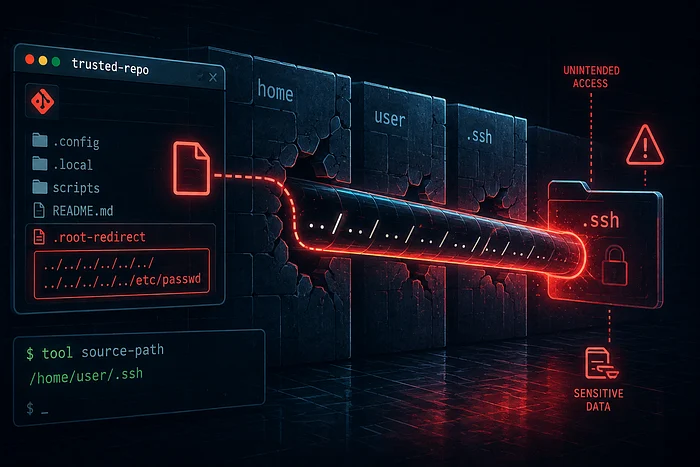
Certain technical details, repository information, identifiers, timelines and program-specific context were intentionally omitted or generalised in line with the disclosure requirements of the vulnerability disclosure program under which the research was performed.
Setup
The proof of concept was built in an isolated test environment. I prepared a directory outside the application's normal working tree and placed a file containing sensitive-looking data in it, then configured the special root file to point at that external directory.
Finding it
The feature is implemented conceptually like this:
switch data, err := readFile(".special-root-file"); {
case fileNotFound:
    sourceDir = originalSourceDir
default:
    sourceDir = originalSourceDir.Join(
        trimSpace(data),
    )
}
If the file is missing, the application keeps its original source directory. Otherwise it reads the file's contents, trims whitespace and joins the value onto the original directory.
At first glance this seems harmless. The problem is that the value read from the file is joined directly to the original directory without any validation that the resulting path stays inside the repository. Path joining functions typically normalise sequences such as:
so the final path can end up pointing somewhere entirely different from what the developer intended.
Exploitation
Step 1: Prepare an external directory and a sensitive-looking file
mkdir -p /tmp/source
mkdir -p /tmp/outside
echo "TOP-SECRET-CONTENT" > /tmp/outside/dot_leaked-secret
This creates the application's source directory and a separate directory outside the working tree, holding a file whose contents stand in for sensitive data.
Step 2: Write the relocation file
printf '../outside' > /tmp/source/.special-root-file
The special root file contains a relative path that climbs out of the source directory and into the external one. Because the value is joined onto the original directory and then normalised, the traversal sequence is resolved rather than rejected.
Step 3: Observe the source directory takeover
When querying the effective source path, the application reported:
/tmp/outside
instead of:
/tmp/source
At that point control of the source directory had effectively been transferred.
Step 4: Enumerate files
Files located exclusively in the external directory became visible through the application's normal management commands. The repository itself did not contain those files, yet the application considered them legitimate managed content.
Step 5: Read arbitrary files
Using standard functionality, it was possible to read the contents of files in the external directory. The retrieved data matched the original content exactly, which demonstrated a local file disclosure primitive.
Step 6: Write files
The application's synchronisation features could then copy that content into locations under the user's profile. The vulnerability therefore extended beyond information disclosure and enabled unintended file creation based on attacker-controlled input.
Root cause
The implementation performs path resolution but not path containment verification. The workflow is:
Repository
    │
    ▼
Read relocation file
    │
    ▼
Normalize path
    │
    ▼
Trust result
A secure implementation requires one additional step:
Repository
    │
    ▼
Read relocation file
    │
    ▼
Normalize path
    │
    ▼
Verify containment
    │
    ▼
Accept or reject
The crucial issue is not the traversal itself but the absence of validation after the path is resolved. The application trusts the final path without checking whether it remains inside the expected boundary. The code correctly handled path resolution and correctly supported nested directories; what it did not do was verify that the resolved destination still belonged to the place it was expected to trust.
Many tools rely on an implicit trust model: if content comes from this repository, it is safe to process. That assumption breaks down when repository-controlled data can redefine where the repository itself lives. Once that trust boundary disappears, legitimate functionality begins operating on attacker-selected locations.
Impact
Depending on the environment, the traversal can expose:
- SSH keys
- API tokens
- Cloud credentials
- Browser data
- Development secrets
- Configuration files
The exact impact depends on the victim's system and the application's available features, but the underlying issue is the same: repository content should never be able to escape its intended scope without explicit validation. In the demonstrated case the application could enumerate and read files from the external directory and copy content into locations under the user's profile.
Fix
After computing the final path, the application should verify that it remains within the original repository hierarchy. A common approach is to calculate the relative path between the original directory and the candidate directory and reject any result that escapes the boundary through .. components. This preserves the legitimate use case while preventing traversal outside the intended scope.
- Other relocation or configuration files. Look for any file inside a repository that the tool reads to set a path, such as a root marker, workspace descriptor or include list. A positive result is the tool reporting or operating on a directory outside the repository after you write a
../value into that file. - Absolute paths in the same field. Try a value such as
/tmp/outsideinstead of a relative traversal. A positive result is the application accepting an absolute path that lies outside the repository. - Symlinked directories. Point the relocation value at a path that resolves through a symlink leaving the repository. A positive result is the containment check passing on the textual path while the real path escapes.
- Nested or repeated traversal. Use deeper sequences such as
../../../../../../some/other/locationand mixed forms likefoo/../../... A positive result is normalisation landing outside the boundary while the application still trusts the result. - Write paths as well as read paths. Exercise synchronisation, export or copy features after a successful relocation. A positive result is file creation outside the repository or under unexpected locations in the user's profile.
- Whitespace and encoding tricks. Since the implementation trims whitespace, try values with leading or trailing whitespace, URL-encoded dots or Unicode lookalikes. A positive result is a value that survives trimming and normalisation and still escapes containment.
What happened, in plain words
During a security review of an open-source tool, meaning a program whose code is published for anyone to read and use, a vulnerability was found in a feature that looked completely normal. The tool has a feature that looks completely normal: it lets you keep the program's working folder inside a subfolder of a bigger project folder. To make that work, the tool reads a small text file that tells it where its source data really lives.
The reviewer followed the part of the code that works out that folder, and found that one text file could change where the program thought its data was. The program could then be pointed at any folder on the computer, not just the project folder. This kind of bug is called path traversal: a way of writing a folder location that sneaks out of the place you were supposed to stay in.
The author notes that certain technical details, repository information, identifiers, timelines and program-specific context have been intentionally omitted or generalised, in line with the disclosure requirements of the vulnerability disclosure program under which the research was performed. In plain terms: some specifics were left out on purpose, so the write-up describes the shape of the bug without naming everything.
The feature
The tool supports a special file that lets users move the effective source folder somewhere else. The code that does this looks roughly like this:
switch data, err := readFile(".special-root-file"); {
case fileNotFound:
    sourceDir = originalSourceDir
default:
    sourceDir = originalSourceDir.Join(
        trimSpace(data),
    )
}
Line by line, in plain words:
switch data, err := readFile(".special-root-file"); {tries to read a file called.special-root-fileand keeps two things:data, the text inside the file, anderr, whether anything went wrong. The leading dot in the name is a convention for hidden files on Unix-like systems; it does not make the file secret, just less visible in a folder listing.case fileNotFound:is the branch taken when the file does not exist.- This is the safe, expected case.
default:is the branch taken in every other case, that is, when the file exists and was read.sourceDir = originalSourceDir.Join(starts building a new folder location by taking the original folder and attaching something to the end of it.trimSpace(data),is the something: the text from the file, with spaces and line breaks at the start and end removed.- The closing
)finishes the join, and the closing}ends the switch.
At first glance this seems harmless. The problem is that the value read from the file is joined directly onto the original folder with no check that the result still sits inside the project. Folder-joining functions usually tidy up sequences such as:
so the final location can end up somewhere completely different from what the developer intended.
What .. means
Every folder on a computer has a parent folder, the one that contains it. In a folder path, .. is shorthand for "go up one level". So if you are in /home/ana/projects/tool and you write .., you mean /home/ana/projects. Write ../.. and you mean /home/ana. Each extra ../ climbs one more level. A program that joins .. onto a folder and then tidies the result will happily produce a location far above where it started. That tidying is called normalisation: turning a messy path into a clean, single, unambiguous one.
A missing validation step
Imagine a file containing:
../../../../../../some/other/location
After normalisation, the program is no longer working inside its project. Instead, it treats the location chosen by whoever wrote that file as the new source folder.
The crucial issue is not the climbing itself. The issue is that nothing checks the result after the path is worked out. The program trusts the final location without asking whether it is still inside the expected boundary.
A useful comparison: a building receptionist who lets visitors into the lobby is doing their job. If a visitor writes "floor 12" on the sign-in sheet and the receptionist hands over a key to floor 12 without checking that the visitor is allowed there, the problem is not the sign-in sheet. The problem is the missing check.
Building a proof of concept
To confirm the behaviour, the reviewer built an isolated test environment. The point of a proof of concept (often shortened to PoC) is to show that a suspected bug really happens, in a controlled place, before claiming it matters.
First, they prepared a folder outside the program's normal working area and put a file in it containing data that stands in for something sensitive:
mkdir -p /tmp/source
mkdir -p /tmp/outside
Line by line:
mkdirmeans "make directory", that is, create a folder.-ptells it to create any missing parent folders along the way, and not to complain if the folder already exists./tmp/sourceis the folder the program will treat as its normal working area. On Unix-like systems,/tmpis a scratch area for temporary files./tmp/outsideis a second folder, deliberately outside the first one. It stands in for somewhere the program should never reach.
echo "TOP-SECRET-CONTENT" > /tmp/outside/dot_leaked-secret
Line by line:
echo "TOP-SECRET-CONTENT"prints that piece of text.>redirects the printed text into a file instead of the screen./tmp/outside/dot_leaked-secretis the file being created, inside the outside folder. The text stands in for sensitive data so that any leak is obvious.
Next, they set up the special root file:
printf '../outside' > /tmp/source/.special-root-file
Line by line:
printfwrites text exactly as given, without adding a newline at the end.'../outside'is the value being written: go up one level from the source folder, then into a folder calledoutside.>sends that text into the file./tmp/source/.special-root-fileis the special file the program reads. It sits inside the source folder, exactly where the feature expects it.
Why this step matters: the value is a relative path, meaning a location described in relation to where you already are, rather than a full address from the root of the disk. Relative paths are what make .. useful, and they are what the program joins onto its original folder.
Source directory takeover
When asked for the effective source path, the program reported:
/tmp/outside
instead of:
/tmp/source
At that point, control of the source folder had effectively been handed over. Only the location had changed, and the location was chosen by the file.
File enumeration
Files that existed only in the outside folder became visible through the program's normal management commands. The project itself did not contain those files, yet the program treated them as legitimate content it was supposed to manage.
Enumeration simply means listing things: asking a system what files, folders or records exist. Listing is often the first step of a leak, because you cannot read what you do not know is there.
Arbitrary file read
Using standard functionality, it was possible to read the contents of files in the outside folder. The data retrieved matched the original content exactly. That demonstrated a local file disclosure primitive: a reliable, repeatable way to make the program show you files on the same machine that it was never meant to show.
"Primitive" here means a basic building block. On its own it reads one file; combined with other features, it can become something bigger.
Arbitrary file write
The program's synchronisation features could then copy that content into locations under the user's profile. Synchronisation means keeping two places in step, so that what is in one is copied to the other. Because the program now treated the outside folder as its source, its synchronisation features could copy content from there into the user's own area.
The bug therefore went beyond disclosure: it also allowed unintended file creation based on input the attacker controlled.
Why this matters
Many tools rely on an unspoken trust rule: if content comes from this project, it is safe to process. That rule falls apart when data inside the project can redefine where the project itself lives.
Once that trust boundary disappears, ordinary features start working on locations the attacker picked. A trust boundary is simply the line between "stuff I vetted" and "stuff I did not"; here the line was drawn around the project folder, and the relocation file let content step over it.
Depending on the environment, this can expose:
- SSH keys
- API tokens
- Cloud credentials
- Browser data
- Development secrets
- Configuration files
A quick word on those terms, since they are the usual targets:
- An SSH key is a file that proves your identity to another computer so you can log in without a password. Anyone holding it can often act as you.
- An API token is a short secret string a program presents to a service to prove it is allowed to act. Think of it as a temporary ID badge for software.
- Cloud credentials are the keys and tokens that let you control resources in a cloud provider, such as servers and storage.
- Browser data includes saved logins, cookies and history stored by your browser on your machine.
- Development secrets are passwords, keys and connection strings developers keep in files while building software.
- Configuration files tell programs how to behave and often contain connection details and secrets.
The exact impact depends on the victim's system and on which features the program offers, but the underlying issue is the same: content from a project should never be able to escape its intended scope without an explicit check.
Root cause analysis
The bug exists because the code works out a path but never verifies that the path stays inside the allowed area. In diagram form, the flow is:
Repository
    │
    ▼
Read relocation file
    │
    ▼
Normalize path
    │
    ▼
Trust result
Reading the diagram top to bottom: start at the project folder, read the file that says where to relocate, tidy the resulting path, then trust it. There is no step that asks "is this still inside the project?".
A safe version needs one more step:
Repository
    │
    ▼
Read relocation file
    │
    ▼
Normalize path
    │
    ▼
Verify containment
    │
    ▼
Accept or reject
Containment means checking that one location sits inside another. Here it would mean: after tidying the path, confirm it is still under the original project folder, and refuse it if not.
Without that check, any folder reachable by climbing with .. can become the program's new source of truth. The code handled path resolution correctly and supported nested folders correctly. What it did not do was verify that the resolved destination still belonged to the place it was supposed to trust.
Recommended fix
After computing the final path, the program should verify that it remains inside the original project folder. A common approach is to work out the relative path between the original folder and the candidate folder, and reject any result that escapes the boundary through .. components. That keeps the legitimate use case working while blocking travel outside the intended area.
Final thoughts
Security problems do not always come from complicated chains of exploits. Sometimes they come from small assumptions hidden inside convenience features.
In this case, one text file was enough to redefine the program's trust boundary and send its work to arbitrary places on the local disk. The code resolved paths correctly. The code supported nested folders correctly. What it did not do was check that the resolved destination still belonged to the place it was meant to trust.
As is often the case, the bug was not caused by what the code did, but by what it failed to verify.
Glossary
- Open-source tool: a program whose source code is published so anyone can read, use and modify it.
- Path: the address of a file or folder on a computer, such as
/tmp/source. - Relative path: a location described from where you already are, rather than from the root of the disk.
- Absolute path: a full location starting from the root of the disk, such as
/tmp/outside. ..(dot dot): in a path, shorthand for the parent folder, that is, one level up.- Path traversal: a bug where a crafted path climbs out of the folder a program was supposed to stay in.
- Normalisation: turning a messy path into a clean, single, unambiguous one, resolving
..along the way. - Path resolution: the process of turning a written path into the actual location it refers to.
- Containment check: verifying that one location sits inside another before using it.
- Validation: checking that a value is acceptable before acting on it.
- Trust boundary: the line between data a program has vetted and data it has not; crossing it means untrusted input influences trusted behaviour.
- Proof of concept (PoC): a controlled demonstration that a suspected bug really happens.
- Isolated test environment: a throwaway setup used for testing, with nothing real at risk.
- Enumeration: listing what exists, such as files or folders, often as a first step before reading them.
- Local file disclosure: making a program reveal files on the same machine that it was not meant to reveal.
- Primitive: a basic, repeatable building block of an attack, such as the ability to read one file.
- Arbitrary file read: the ability to read files of the attacker's choosing.
- Arbitrary file write: the ability to create or copy files to locations of the attacker's choosing.
- Synchronisation: keeping two locations in step by copying content between them.
- SSH key: a file that proves your identity to another computer so you can log in without a password.
- API token: a secret string software presents to a service to prove it is allowed to act.
- Cloud credentials: keys and tokens that give control over resources in a cloud provider.
- Configuration file: a file that tells a program how to behave, often containing connection details and secrets.
mkdir: a command that creates a folder;-palso creates missing parent folders and does not complain if the folder exists.echo: a command that prints text.printf: a command that writes text exactly as given, without adding a newline.>(redirection): sends a command's output into a file instead of the screen./tmp: a scratch area on Unix-like systems for temporary files.- Repository: a project folder, often one tracked by a version control system, containing the project's files.



