When an Invitation Isn’t Really an Invitation , A real world bug Finding
The contact invitation flow did not verify that the account accepting an invitation matched the email address the invitation was sent to. An attacker with any account could accept an invitation meant for someone else and be added to the inviter's contact list.

Cybersecurity
The full write-up lives on its author's site
It belongs to its author, so we link to it rather than copy it. The other two tabs are our own rewrites, checked against it.
Context
The target was the main web application, and the feature under test was contact invitations: a user can invite another person by email address, and once the invitation is accepted the two accounts become contacts. The researcher describes the expected flow as straightforward:
User A ↓Invites [redacted] ↓[redacted] receives invitation ↓[redacted] accepts ↓Both users become contacts
The key assumption behind that flow is that the invitation belongs to the person it was sent to. The whole finding rests on testing that assumption.
Setup
Before reaching the invitation feature, the researcher spent a significant amount of time on reconnaissance. That recon produced a dangling S3 bucket which looked like a takeover candidate, but the attempt failed because the bucket was reported as already taken. Other subdomains revealed internal endpoints, but the researcher did not have the right credentials for them, so those were noted and left untested. The testing then moved directly to the main application.

For the invitation test itself, two accounts controlled by the researcher were needed:
[redacted], the intended recipient of the invitation[redacted], the unintended account
No special tooling is described beyond the ability to send an invitation from one account and complete the acceptance flow from another.
Finding it
While testing the contact invitation functionality, the researcher focused on a single question: what happens if the recipient is not the person who accepts? The researcher framed the invitation flow as an authorization decision in disguise, because accepting an invitation writes to another user's contact data. If the application does not bind the invitation to the identity it was created for, that write can be performed by the wrong account.
Exploitation
Step 1: create two controlled accounts
The researcher created two controlled accounts, [redacted] as the intended recipient and [redacted] as the unintended account.
Step 2: send the invitation
From the inviting user's account, a contact invitation was sent to:
[redacted]
The invitation arrived normally.
Step 3: accept with the wrong account
Instead of accepting the invitation while authenticated as [redacted], the researcher completed the invitation flow using [redacted]. The flow succeeded: the second account was added to the original user's contact list.
The application was not enforcing the relationship between the email address the invitation was sent to and the account that actually accepted it.
Step 4: confirm persistence
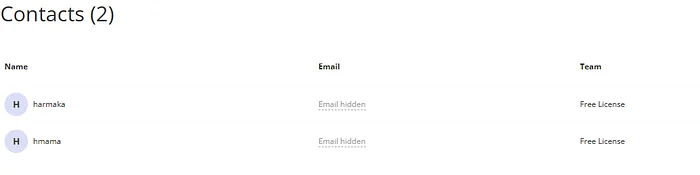
The unintended account genuinely appeared in the owner's contact list. This was not a UI or display artefact: the owner's contact data had been modified.
Root cause
The invitation was not tied to the identity it was created for. The application treated possession or use of the invitation flow as sufficient, rather than verifying who the invitation was intended for. In the researcher's framing, the intended logic is:
Invited identity = [redacted] ↓Accepted by = [redacted] ↓ ALLOW
but the observed behaviour was closer to:
Invited identity = [redacted] ↓Accepted by = anyone ↓ ALLOW
The report does not describe the server-side implementation, so the exact missing check is inferred from behaviour.
Impact
- An unintended account could be added to another user's contacts.
- The owner's contact data was modified without their approval.
- The account that received the invitation was not necessarily the account that received the resulting access.
The researcher reported the issue as Broken Access Control rather than a business-logic bug, because the impact is concrete: an unauthorized account can modify another user's contact data. That framing matters for programs that exclude business-logic issues without demonstrated impact. At the time of writing the researcher was waiting for the team's response.
Fix
The invitation should be tied to the identity it was created for. On acceptance, the server should verify something equivalent to:
invitation.recipient == authenticated_user
If the invitation was created for [redacted], another account should not be able to redeem it and modify the owner's contacts. The check must happen server-side; the frontend should never be relied on to enforce who an invitation belongs to. The report does not say whether a fix was applied.
Variants to test
- Cross-account invitation acceptance. Send an invitation to one controlled address and accept it while authenticated as a different controlled account. A positive result is the second account appearing in the inviter's contacts.
- Invitation token reuse. Accept the same invitation from more than one account. A positive result is multiple accounts being added from a single invitation.
- Invitation to an unregistered address. Invite an address with no account, then register a different address and try to redeem the invitation. A positive result is the new account being linked to the inviter.
- Team or organisation invitations. Apply the same swap to workspace, project or company invitations. A positive result is an unintended account gaining membership or access.
- Password reset and email verification flows. These are also identity-bound tokens; try redeeming them from a different session or account. A positive result is a state change applied to the wrong identity.
Whenever invitation, identity, permission and data modification are connected in one flow, the question worth asking is: what identity does the application think I am supposed to be, and what happens if I change that assumption?
What happened, in plain words
A security researcher was testing a website that lets people invite other people to become their contacts. The website sent an invitation to one email address. The researcher then accepted that invitation while logged in as a completely different account, and the website allowed it. The wrong account ended up in the original user's contact list, and it stayed there.
That is the whole bug in one sentence: the website checked that someone was accepting the invitation, but not that the person accepting was the person the invitation was meant for.
This article walks through the same story step by step, explaining every term along the way. You only need to know how to use a browser.
Some words you will meet first
Before the story, a few everyday ideas. Each one is explained again in the Glossary at the end.
- Web application: a program that runs on a company's computer (the server) and that you use through your browser. When you log in to a shop or a social site, you are using a web application.
- Server: the computer that stores the data and makes the decisions. Your browser shows you buttons and pages, but the server is the part that says yes or no to an action.
- Frontend: everything that happens inside your browser, the pages and buttons you see. It is easy for a determined person to change what the frontend does, so security decisions should never live only there.
- Account: your identity on a website, usually an email address plus a password.
- Authentication: proving who you are, normally by logging in. Think of it as showing your passport at the door.
- Authorization: what you are allowed to do once you are inside. Think of it as which rooms your key card opens. Authentication is who you are; authorization is what you may do.
- Broken Access Control: the name for bugs where the website lets someone do something they should not be allowed to do, because it does not check permissions properly. It is not about guessing passwords; it is about the website trusting the wrong thing.
- Reconnaissance (recon): the early exploring phase of a security test, looking around at what the site is made of before trying anything clever.
- Subdomain: a smaller address under a main website address, for example
shop.example.comis a subdomain ofexample.com. Companies often have many, and some are forgotten. - Endpoint: a specific address inside an application that does one job, such as "send an invitation" or "list contacts". You can think of it as a particular counter in a large building.
- Credentials: the username and password (or similar) that let you log in.
- S3 bucket: a storage space offered by Amazon Web Services, used by many companies to hold files. If a company leaves one misconfigured, outsiders may be able to read or even take it over.
- Bug bounty program: a scheme where a company invites outside researchers to look for security problems and report them, often paying a reward.
- Payload: the specific data or request a tester sends to try to trigger a bug.
- UI: short for user interface, the visible part of the app, the screens and buttons.
- Persistence: whether a change is really saved in the database, or only appears on screen until you refresh.
The expected flow
The feature under test was contact invitations. A user can invite another person by typing their email address, and once the invitation is accepted, the two accounts become contacts of each other.
The researcher drew the normal sequence like this:
User A ↓Invites [redacted] ↓[redacted] receives invitation ↓[redacted] accepts ↓Both users become contacts
Line by line, in plain words:
User Ais the person doing the inviting.Invites [redacted]means User A types that email address into the invitation form and sends it.[redacted] receives invitationmeans an email (or in-app message) arrives at that address.[redacted] acceptsmeans the person who controls that email address clicks the accept link or button.Both users become contactsmeans the website now records the two accounts as connected.
Nothing here looks strange. But there is a hidden assumption in the middle: that the invitation belongs to the person it was sent to. The entire bug lives in testing that assumption.
Before the invitation: looking around
Before reaching the invitation feature, the researcher spent a lot of time on reconnaissance. This is the part of a security test where you look at what the company has exposed, rather than attacking anything yet. It is like walking around a building and noting which doors exist before trying any handles.
That exploring turned up a dangling S3 bucket. A dangling bucket is a storage space that a company once used but no longer controls properly, so in theory an outsider could claim it and serve their own files from the company's name. The researcher thought a takeover was possible, but when the attempt was made, the bucket was reported as already taken. So that lead went nowhere.
Other subdomains revealed internal endpoints, addresses meant for internal use. The researcher did not have the right credentials for them, so those were written down and left untested. Testing then moved directly to the main application.
This is a useful lesson in itself: not every interesting-looking lead becomes a bug. The researcher kept notes and moved on to the main app, which is where the real finding was.
Setting up the test
To test the invitation feature, the researcher needed two accounts that they controlled. Controlling both is essential: you cannot safely test whether account B can accept account A's invitation unless you own both A and B.
The two accounts were:
[redacted], the intended recipient, the person the invitation is meant for.[redacted], the unintended account, the one that should not be able to accept.
No special tools are described. All that was needed was the ability to send an invitation from one account and to complete the acceptance from another.
Finding it
While testing the contact invitation feature, the researcher focused on one question: what happens if the recipient is not the person who accepts?
Why is that question worth asking? Because accepting an invitation is not just a display action. It changes data: it writes a new contact into another user's list. In security terms, that is an authorization decision in disguise. The website is deciding who is allowed to modify whose data. If the invitation is not tied to the identity it was created for, the wrong account can perform that change.
Exploitation, step by step
Step 1: create two controlled accounts
The researcher created two controlled accounts, [redacted] as the intended recipient and [redacted] as the unintended account. Two accounts, both owned by the tester, so that any result can be observed safely from both sides.
Step 2: send the invitation
From the inviting user's account, a contact invitation was sent to:
[redacted]
This is just the email address typed into the invitation form. The invitation arrived normally, which tells the researcher the feature works as designed in the happy path.
Step 3: accept with the wrong account
Here is the twist. Instead of accepting the invitation while logged in as [redacted], the researcher completed the invitation flow while logged in as [redacted]. The flow succeeded: the second account was added to the original user's contact list.
In other words, the website was not checking the relationship between two things:
- the email address the invitation was sent to, and
- the account that actually accepted it.
A simple comparison: imagine a hotel gives you a key card for room 204, and the door opens for anyone holding any key card at all, not just the one issued for that room. The card exists, so the door trusts it. That is roughly what happened here.
Step 4: confirm it is real
The unintended account genuinely appeared in the owner's contact list. This matters because a bug that only changes what you see on screen is much less serious than one that changes stored data. Here the owner's contact data had really been modified.
The image is captioned as a user being added to the company contacts without the admin's consent. The point is not the contact itself. The point is who is allowed to modify another user's data. The owner explicitly invited one account, and a different account became the contact instead.
Why this matters
At first glance, someone might think: it is only a contact, what is the big deal?
The answer is that the problem is not the contact. The problem is that an account was able to change another user's data without permission. The owner made a clear choice about who to invite, and the website let a different account take that place.
And the result was persistent: the unintended account really was in the owner's contact list, not merely shown there by a display glitch. So this was not just odd invitation behaviour. It was an authorization failure.
The security boundary
A helpful way to think about invitation systems is that an invitation contains an authorization decision. By inviting someone, the owner is saying: this person may become my contact. The website should enforce that decision.
The intended logic looks like this:
Invited identity = [redacted] ↓Accepted by = [redacted] ↓ ALLOW
Reading it line by line:
Invited identity = [redacted]means the invitation was created for that address.Accepted by = [redacted]means the same address is the one accepting.ALLOWmeans the website should permit the action, because the two match.
But the behaviour that was actually observed was closer to this:
Invited identity = [redacted] ↓Accepted by = anyone ↓ ALLOW
Line by line again:
Invited identity = [redacted]is still the address the invitation was made for.Accepted by = anyonemeans any account at all could complete the flow.ALLOWmeans the website still permitted it.
That is the important distinction. The application was treating possession or use of the invitation flow as enough, instead of verifying who the invitation was actually intended for.
The report does not describe how the server is built, so the exact missing check is inferred from behaviour.
Reporting the finding
The researcher reported it as a Broken Access Control issue rather than simply calling it a business-logic bug. The difference matters. A business-logic bug is a flaw in how a feature is designed to work; some bug bounty programs exclude those unless real impact is shown. Broken Access Control is about permissions, and here the impact is concrete:
- An unintended account could be added to another user's contacts.
- The owner's contact data was modified without their approval.
- The account that received the invitation was not necessarily the account that received the resulting access.
That last point is especially important for programs that exclude business-logic issues without demonstrated impact. The bug was not simply that the invitation behaves strangely. It was that an unauthorized account can modify another user's contact data. That is a much clearer security impact.
At the time of writing the researcher was waiting for the team's response.
How to fix it
The invitation should be tied to the identity it was created for. When the invitation is accepted, the server should verify something equivalent to:
invitation.recipient == authenticated_user
This line is a comparison. invitation.recipient is the address the invitation was made for. authenticated_user is the account that is currently logged in and accepting. The == means "must be the same". If the two do not match, the acceptance should be refused.
If the invitation was created for [redacted], another account should not be able to redeem it and modify the owner's contacts. And importantly, this check should happen server-side. Never rely on the frontend to enforce who an invitation belongs to, because the frontend runs on the visitor's machine and can be changed.
The report does not say whether a fix was applied.
Other places to try the same idea
Once you understand the pattern, you can look for it elsewhere. These are variations worth testing:
- Cross-account invitation acceptance. Send an invitation to one controlled address and accept it while logged in as a different controlled account. A positive result is the second account appearing in the inviter's contacts.
- Invitation token reuse. Accept the same invitation from more than one account. A positive result is multiple accounts being added from a single invitation.
- Invitation to an unregistered address. Invite an address with no account, then register a different address and try to redeem the invitation. A positive result is the new account being linked to the inviter.
- Team or organisation invitations. Apply the same swap to workspace, project or company invitations. A positive result is an unintended account gaining membership or access.
- Password reset and email verification flows. These are also identity-bound tokens; try redeeming them from a different session or account. A positive result is a state change applied to the wrong identity.
Whenever invitation, identity, permission and data modification are connected in one flow, the question worth asking is: what identity does the application think I am supposed to be, and what happens if I change that assumption?
A small lesson from a small bug
This finding is a reminder that access-control testing does not always need complicated techniques. Sometimes the best question is simply: what identity does the application think I am supposed to be? Then try changing that assumption.
Invitation flows are particularly interesting because they sit directly on an authorization boundary:
Invitation ↓Identity ↓Permission ↓Data modification
Line by line:
Invitationis the starting point, a link or code sent to someone.Identityis the question of who is using it.Permissionis the question of what that identity is allowed to do.Data modificationis the result, a change saved in someone's account.
Whenever those four things are connected, there is usually something worth testing. And sometimes the bug is hiding in the assumption that the person holding the invitation must be the person it was intended for.
Glossary
- Authorization: what you are allowed to do once you are logged in.
- Broken Access Control: a bug where the website lets someone do something they should not be allowed to do, because permissions are not checked properly.
- Bug bounty program: a scheme where a company invites outside researchers to find and report security problems, often for a reward.
- Business-logic bug: a flaw in how a feature is designed to work, rather than a technical permission failure.
- Credentials: the username and password (or similar) used to log in.
- Cross-account: involving two different accounts, for example accepting one account's invitation while logged in as another.
- CVSS: a standard scoring system for the severity of a security issue.
- Dangling S3 bucket: a cloud storage space that a company no longer controls properly, which an outsider might be able to claim.
- Endpoint: a specific address inside an application that performs one job, such as sending an invitation.
- Frontend: the part of an application that runs in your browser, the pages and buttons you see.
- Identity: the account or email address that a system believes is acting.
- Invitation token: the unique code or link inside an invitation that lets someone accept it.
- Persistence: whether a change is really saved in the database, rather than only shown on screen.
- Reconnaissance (recon): the early exploring phase of a security test, looking at what a site is made of.
- Server: the computer that stores data and makes the decisions behind a website.
- Server-side: happening on the server, where the user cannot change it.
- Subdomain: a smaller address under a main website address, such as
shop.example.comunderexample.com. - UI: short for user interface, the visible screens and buttons of an app.
- Web application: a program that runs on a company's server and that you use through your browser.

