When **Google** Becomes Attacker-Controlled: Finding an SSO Validation Flaw
An SSO verification email endpoint accepted requests without authentication and did not validate the issuer parameter, allowing arbitrary values. An attacker could trigger unsolicited verification emails to any address with a misleading issuer.
 Published on 1yz02.medium.com
Cybersecurity
The full write-up lives on its author's site
It belongs to its author, so we link to it rather than copy it. The other two tabs are our own rewrites, checked against it.
Context
This write-up covers an SSO verification flow in a web application. The feature involved is the endpoint that sends SSO verification emails: when a user is meant to verify an SSO identity, the application sends an email to the address supplied in the request. The endpoint takes two path parameters, an issuer and an email address, and its job is to trigger that verification email.
The researcher, Yahya Hammam, was testing authentication-related functionality and looking specifically for endpoints reachable without logging in, then checking whether the server validated the parameters those endpoints received. The report does not name the target application or the host; the requests use <target-host> as a placeholder.
Setup
No accounts, roles, tools or versions are described. The testing was done unauthenticated: the whole point of the first request was to see whether a valid session was required. The only precondition stated is that the tester had an email address to receive the verification message, shown in the report as <test-email>.
Finding it
While exploring the authentication flow, the researcher came across the endpoint responsible for sending SSO verification emails. It followed this structure:
GET /send-verify-sso/:issuer/:email
Because the endpoint sits in the authentication flow, the first question was whether the application required a valid session before processing the request. The second question, which turned out to matter more, was whether the issuer parameter was actually validated or whether the server would accept any value supplied by the requester.
Exploitation
Step 1: unauthenticated request with a legitimate issuer
Without being authenticated, the researcher sent a request using google as the issuer:
GET /send-verify-sso/google/<test-email> HTTP/2Host: <target-host>
The server responded with:
HTTP/2 204 No Content
A 204 No Content here showed that the endpoint accepted the request without authentication. The issuer in this request is a real SSO provider, so nothing about it is unusual yet.
Step 2: replace the issuer with an arbitrary value
To test whether the issuer parameter was validated, the researcher replaced google with an arbitrary issuer value and sent the following request:
GET /send-verify-sso/attacker-evil/<test-email> HTTP/2Host: <target-host>
The same request was also issued from the browser:

To the researcher's surprise, the server returned the same response:
HTTP/2 204 No Content
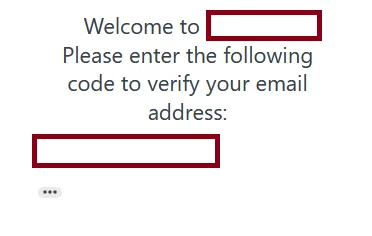
The request was accepted even though attacker-evil is not a legitimate SSO provider. The verification email actually arrived in the researcher's inbox, so the endpoint did not merely return a success status: it went on to send the message.
At this point two behaviours had been identified:
- The endpoint could be accessed without authentication.
- The issuer parameter was not restricted to a predefined list of trusted providers at the tested endpoint.
The researcher notes that the application appeared to accept arbitrary issuer values without rejecting them before processing the email-send request.
Root cause
The endpoint accepted the request without authentication, and it appeared to accept arbitrary issuer values without rejecting them before processing the email-send request. The tested endpoint accepted unauthenticated requests and arbitrary issuer values, so any caller could ask the application to send a verification email with an issuer of their choosing. The report describes the behaviour as observed; the underlying code is not shown, so the exact implementation is not stated.
Impact
An unauthenticated attacker could abuse the endpoint to trigger SSO verification emails to arbitrary email addresses while supplying an attacker-controlled issuer value. The researcher confirmed during testing that the verification email was actually delivered, which shows the issue is not limited to the endpoint accepting the request.
The report lists the following consequences:
- Trigger unsolicited SSO verification emails to other users without authentication.
- Abuse the application's email-sending infrastructure to send unwanted authentication-related emails.
- Use arbitrary issuer values in the verification flow, potentially making the resulting emails confusing or misleading to recipients.
Taken together, this could lead to email abuse and user confusion, and the lack of issuer validation creates an additional trust issue in the SSO verification flow. The report does not assign a severity or CVSS score.
Fix
The report does not describe a fix or say what the application changed. Based on the two behaviours identified, the endpoint should require an authenticated session before sending a verification email, and the issuer parameter should be checked against a predefined list of trusted SSO providers, rejecting anything else before the email-send request is processed.
Variants to test
- Other email-sending endpoints in the authentication flow. Look for routes such as verification resend, password reset or magic-link senders and call them without a session. A positive result is a success status plus an email actually arriving at an address you control.
- Issuer or provider parameters on SSO callbacks and initiation routes. Replace a known provider name with an arbitrary string. A positive result is the server accepting the value and continuing the flow rather than rejecting it.
- Case and encoding variations of a legitimate issuer. Try values such as
Google,google%00, orgoogle/../attacker-evil. A positive result is the server treating a variant as valid or passing it through unnormalised into the email content. - Rate and recipient controls. Send repeated requests to the same and to different addresses. A positive result is many emails delivered with no throttling or per-address limit.
- Reflection of the issuer into the email body or links. Use a distinctive issuer string and inspect the delivered message. A positive result is the attacker-controlled value appearing in the email, which supports the confusion angle described in the report.
The researcher's conclusion is a useful reminder for this kind of testing: authentication-related endpoints deserve attention even when they appear to perform a simple operation such as sending a verification email, and a small parameter can reveal a much bigger question about how an application handles trust. The finding was reported and accepted.
What happened, in plain words
A security researcher, Yahya Hammam, was testing a website's login system. He found a web address (an endpoint) that the site uses to send verification emails when someone tries to log in with an external account, such as Google. He discovered two problems: the endpoint did not require you to be logged in, and it did not check whether the external provider name (the "issuer") was real. He could put a made-up name in the request, and the site still sent a verification email to the address he supplied. He reported it, and the report was accepted.
This article explains that finding from scratch, for someone who has never done security testing. It covers the same steps, the same requests, and the same evidence, but explains every term and every line along the way.
Background: what SSO and verification emails are
Many websites let you log in with an account you already have elsewhere, such as Google. This is called single sign-on, or SSO. Instead of creating a new password on every site, you click "Log in with Google", and Google confirms who you are.
Before the site trusts that external account, it often sends a verification email to the address you claim. You click a link in that email to prove the address is yours. The part of the site that sends this email is the feature under test here.
A web endpoint is simply a URL that a program (or a browser) can call to make the site do something. For example, https://example.com/send-verify-sso/google/[redacted] is an endpoint. The parts after the domain are called path parameters: here, google and [redacted]. They are values the caller supplies, and the server is supposed to check them.
An API (application programming interface) is the set of endpoints a site exposes so that software can talk to it. When you use a browser, the browser is the software calling those endpoints. When you use a tool like curl, you are calling them directly. Either way, the server receives a request and returns a response.
A session is how a website remembers that you are logged in. After you log in, the server gives your browser a cookie (a small piece of data stored in the browser) or a token (a string your browser sends with each request). The server checks that cookie or token on each request to decide whether you are allowed in. An unauthenticated request is one sent without a valid session, as if you were a stranger.
The endpoint that caught his attention
While exploring the authentication flow, the researcher found an endpoint responsible for sending SSO verification emails. Its structure was:
GET /send-verify-sso/:issuer/:email
This line describes the shape of the URL, not a real request. GET is the HTTP method used when a browser asks to retrieve something. /send-verify-sso/ is the fixed part of the path. :issuer and :email are placeholders: the colon means "put a value here". So a real request would replace :issuer with something like google and :email with an address.
Because this endpoint is part of the login flow, the researcher asked two questions:
- Does the site require you to be logged in before it will process this request?
- Does the site check that the issuer is a real SSO provider, or does it accept any text?
The second question turned out to be the more important one.
Step 1: sending the request without being logged in
He started with a simple test. Without logging in, he sent a request using google as the issuer:
GET /send-verify-sso/google/<test-email> HTTP/2Host: <target-host>
Line by line:
GET /send-verify-sso/google/<test-email> HTTP/2is the request line.GETis the method./send-verify-sso/google/<test-email>is the path, withgoogleas the issuer and<test-email>as the email address (the report uses a placeholder for the real address).HTTP/2is the version of the HTTP protocol used.Host: <target-host>is a header. Headers are extra pieces of information sent with a request. TheHostheader tells the server which website you are asking for, which matters when one server hosts many sites.<target-host>is a placeholder for the real domain, which the report does not name.
The server replied:
HTTP/2 204 No Content
HTTP/2is the protocol version of the response.204is the status code. Status codes are three-digit numbers that summarise what happened.204means "No Content": the server accepted the request but has nothing to send back in the body.No Contentis the human-readable reason phrase for that code.
A 204 here told the researcher that the endpoint accepted the request even though he was not logged in. That answers question 1: no session was required. The issuer google is a real provider, so nothing about this request was unusual yet.
Step 2: replacing the issuer with a made-up value
Now he tested question 2. If the server checks the issuer against a list of trusted providers, then a made-up name should be rejected. He replaced google with attacker-evil and sent:
GET /send-verify-sso/attacker-evil/<test-email> HTTP/2Host: <target-host>
- The path is now
/send-verify-sso/attacker-evil/<test-email>. The only change is the issuer:attacker-evilinstead ofgoogle. - The rest of the request is the same:
GET,HTTP/2, and theHostheader with the placeholder.
He also sent the same request from the browser:
The image shows the request being made from the browser, as the report notes just before it.
To his surprise, the server returned the same response:
HTTP/2 204 No Content
Again, 204 No Content means the server accepted the request. It did not reject attacker-evil even though that is not a legitimate SSO provider. That answers question 2: the issuer parameter was not validated against a list of trusted providers at this endpoint.
And the verification email actually arrived in his inbox:
The image shows the verification email that arrived, as the report says just before it. This is important: the server did not merely return a success status; it went on to send the message.
At this point, two behaviours had been identified:
- The endpoint could be accessed without authentication.
- The issuer parameter was not restricted to a predefined list of trusted providers at the tested endpoint.
The researcher notes that the application appeared to accept arbitrary issuer values without rejecting them before processing the email-send request.
Why this happens (root cause)
The endpoint accepted the request without authentication, and it appeared to accept arbitrary issuer values without rejecting them before processing the email-send request. At the tested endpoint, no session was required and arbitrary issuer values were accepted. So any caller can ask the application to send a verification email and can choose the issuer string that appears in that flow. The report describes the behaviour as observed; the underlying code is not shown, so the exact implementation is not stated.
What an attacker could do (impact)
An unauthenticated attacker could abuse the endpoint to trigger SSO verification emails to arbitrary email addresses while supplying an attacker-controlled issuer value. The researcher confirmed during testing that the verification email was actually delivered, which shows the issue is not limited to the endpoint accepting the request.
The report lists the following consequences:
- Trigger unsolicited SSO verification emails to other users without authentication.
- Abuse the application's email-sending infrastructure to send unwanted authentication-related emails.
- Use arbitrary issuer values in the verification flow, potentially making the resulting emails confusing or misleading to recipients.
Taken together, this could lead to email abuse and user confusion, and the lack of issuer validation creates an additional trust issue in the SSO verification flow. The report does not assign a severity or CVSS score.
How to fix it
The report does not describe a fix or say what the application changed. Based on the two behaviours identified, the endpoint should require an authenticated session before sending a verification email, and the issuer parameter should be checked against a predefined list of trusted SSO providers, rejecting anything else before the email-send request is processed.
Other things to test (variants)
- Other email-sending endpoints in the authentication flow. Look for routes such as verification resend, password reset or magic-link senders and call them without a session. A positive result is a success status plus an email actually arriving at an address you control.
- Issuer or provider parameters on SSO callbacks and initiation routes. Replace a known provider name with an arbitrary string. A positive result is the server accepting the value and continuing the flow rather than rejecting it.
- Case and encoding variations of a legitimate issuer. Try values such as
Google,google%00, orgoogle/../attacker-evil. A positive result is the server treating a variant as valid or passing it through unnormalised into the email content. - Rate and recipient controls. Send repeated requests to the same and to different addresses. A positive result is many emails delivered with no throttling or per-address limit.
- Reflection of the issuer into the email body or links. Use a distinctive issuer string and inspect the delivered message. A positive result is the attacker-controlled value appearing in the email, which supports the confusion angle described in the report.
The researcher's conclusion is a useful reminder for this kind of testing: authentication-related endpoints deserve attention even when they appear to perform a simple operation such as sending a verification email, and a small parameter can reveal a much bigger question about how an application handles trust. The finding was reported and accepted.
Glossary
- API: the set of endpoints a site exposes so that software can talk to it.
- Authentication: the process of proving who you are, usually by logging in.
- Cookie: a small piece of data a website stores in your browser and asks your browser to send back with each request, often used to remember that you are logged in.
- CVSS: a scoring system for the severity of a security vulnerability. The report does not assign a score.
- Endpoint: a URL that a program or browser can call to make a site do something.
- GET: the HTTP method used when a browser asks to retrieve something.
- Header: extra information sent with an HTTP request or response, such as the
Hostheader. - HTTP/2: a version of the HTTP protocol used between browsers and servers.
- Issuer: in this context, the name of the external SSO provider (for example,
google). - Path parameter: a value placed inside the path of a URL, such as
googlein/send-verify-sso/google/.... - Session: how a website remembers that you are logged in, usually via a cookie or token.
- Single sign-on (SSO): a way to log in to one site using an account from another, such as Google.
- Status code: a three-digit number in an HTTP response that summarises what happened, such as
204. - Token: a string your browser sends with each request to prove your session, similar to a cookie.
- Unauthenticated: without a valid session, as if you were a stranger.
- Verification email: an email sent to an address to prove that the address belongs to you, often containing a link to click.
- Vulnerability: a weakness in a system that an attacker could use to do something harmful.



