When verified: false Still Got a Valid JWT
An account with an unverified email address was still issued a valid JWT, and a protected API accepted that token and returned company data. An attacker could therefore use an unverified account to reach protected endpoints that should require a verified email.
 Published on medium.com
Hacking
The full write-up lives on its author's site
It belongs to its author, so we link to it rather than copy it. The other two tabs are our own rewrites, checked against it.
Context
This is a short account of testing how a web application handled email verification on the backend. The researcher was working against a web application with user accounts, a company or tenant concept, JWT-based authentication, and at least one protected API endpoint that returns data belonging to the caller's company. The report does not name the application, the company, the endpoint or the JWT library.
The feature under test is the ordinary one: a new account is created, an email verification step is expected, and only verified accounts should be treated as fully trusted. The question the researcher set out to answer was whether that verification state was actually enforced by the backend, or only displayed by the frontend.
Setup
The preconditions were deliberately minimal:
- A newly created test account, with the email address left unverified.
- The ability to log in normally with that account.
- Burp Suite, used to capture the login request and response and to replay requests with Burp Repeater.
- A protected company endpoint that the researcher could call with the issued token.
All testing was performed using the researcher's own test account. No versions of the application, framework or Burp Suite are given.
Finding it
The researcher started from a simple question: what happens if I log in without verifying my email?
After creating the account and not verifying the email address, the account was still marked as:
{ "verified": false}
Logging in normally nevertheless returned a valid JWT. On its own that was notable but not conclusive, because a token being issued does not prove the backend will honour it. The researcher therefore took the token to a protected API to see whether the server would accept it.
Exploitation
Step 1: create an account and skip verification
A new test account was created and the email address was deliberately left unverified. The account state remained verified: false.
Step 2: log in and capture the token
The researcher logged in normally with the unverified account. The login succeeded and the application returned a valid JWT. The login request and response were captured in Burp Suite so the token could be reused.
Step 3: call a protected endpoint with the token
The JWT was placed in the Authorization header and a request was sent to a protected company endpoint using Burp Suite Repeater. The server responded with:
HTTP/2 200 OK
and returned data belonging to the researcher's own test account's company. The token issued to an unverified account was accepted by the protected API.
The overall flow was:
Create Account ↓Email NOT Verified ↓Login Successfully ↓Valid JWT Issued ↓Protected API Request ↓HTTP 200 OK ❗
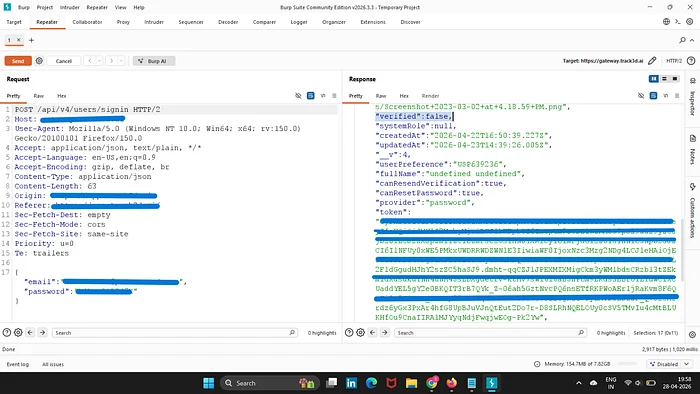
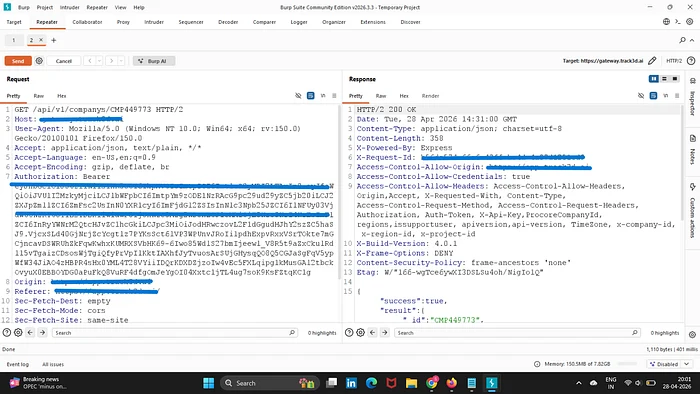
The two screenshots above accompany the flow diagram.
Step 4: replay to confirm
Using Burp Suite the researcher:
- Captured the login request and response.
- Observed the JWT returned for the unverified account.
- Used that JWT in a protected API request.
- Replayed the request using Burp Repeater.
- Observed the successful
200 OKresponse.
Root cause
The report does not show the server-side code, so the exact mistake is not established. What the behaviour implies is that the backend did not check the account's verification status when it issued the token, when it validated the token on the protected endpoint, or at both points. The application clearly knew the account was unverified, because it represented the account as:
verified: false
but the tested protected API still accepted the authentication token. In other words, the verification state existed in the data model but was not enforced as an authorisation condition on the API path that was tested.
Impact
The demonstrated impact is limited to what was shown: an account whose email was never verified could obtain a valid JWT and use it to read data belonging to its own company through a protected endpoint. The researcher's framing is that the interesting question is not whether an unverified account can log in, but whether the backend enforces the verification status when the token is used, and in this case it did not.
The report does not demonstrate access to another user's or another company's data, privilege escalation, or any action beyond reading the researcher's own company data. The wider impact therefore depends on what else the protected API allows and on what verification is meant to gate, neither of which the report establishes.
Fix
It says only that the issue was already known and being tracked, and that the report was classified as a duplicate. Remediation suggestions were included in the report sent to the security team, but their content is not reproduced.
- Other protected endpoints with an unverified token. Repeat the request against every endpoint reachable by the account, not just the one tested. A positive result is any endpoint that returns data or performs an action for an account still marked
verified: false. - Other account states. Try accounts in states other than unverified, such as suspended, invited but not accepted, or pending deletion, and check whether tokens issued in those states are still accepted. A positive result is a
200 OKwhere the state should have blocked access. - Token issued before a state change. Obtain a token while verified, then have the account moved to an unverified or restricted state, and replay the old token. A positive result is continued access after the state change.
- Verification enforced only in the UI. Compare what the frontend hides for an unverified account with what the API returns when called directly. A positive result is API data or actions that the interface does not offer.
- Claims in the token. Decode the JWT issued to the unverified account and check whether any claim reflects verification status.
What I learned
The researcher draws three lessons from the exercise. Authentication and authorisation are different: getting a JWT does not automatically mean a user should have access to every protected resource, so the question to ask is what the token can actually access. Backend logic must be tested, because a restriction shown by the frontend does not necessarily mean the backend enforces it. And application states must be tested: if an account is verified: false, do not assume the application handles that state correctly.
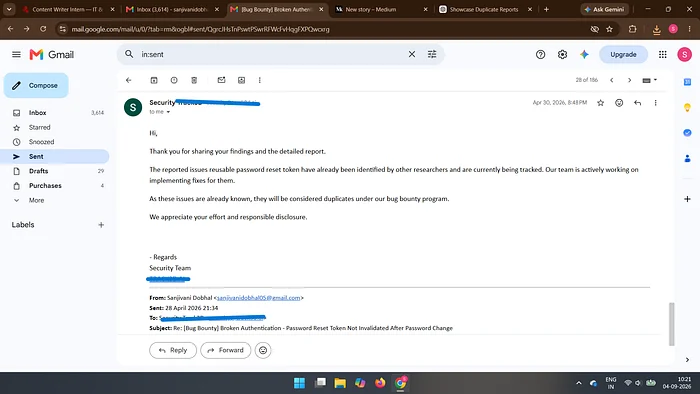
This was the researcher's second real-world security research report. It was another duplicate, but it improved their understanding of authentication, JWTs, API testing, Burp Suite and responsible disclosure. The report was submitted with reproduction steps, Burp Suite evidence, request and response details, impact analysis and remediation suggestions; the security team replied that the issue was already known and being tracked, so it was classified as a duplicate.
What happened, in plain words
A security researcher was testing a website that lets people create accounts. Like most such sites, it asks you to confirm your email address after you sign up: it sends you a link, you click it, and only then is your account supposed to be fully trusted.
The researcher asked a simple question: what happens if I never click that link, but log in anyway? The answer was that the site let them log in and handed them a valid key to its back end, even though the account was still marked as not verified. The researcher then used that key to ask a protected part of the site for data, and the site answered with a normal success response and returned the data.
That is the whole finding. The site knew the account was unverified, but the part of the system that actually serves data did not care. The researcher reported it, and the security team said the problem was already known and being worked on, so the report was closed as a duplicate. It was the researcher's second real-world report, and they wrote it up as a learning exercise.
To follow the rest of this article you only need to know how to use a browser. Every technical idea is explained where it first appears, and there is a glossary at the end.
The pieces involved
Before the steps, here is what the researcher was working with, in everyday terms.
- A web application with user accounts. A site where you register, log in, and then see things that belong to you. Think of a building where everyone gets their own locker.
- A company or tenant concept. Accounts are grouped under a company. Data belongs to a company, not just to one person. Think of an office floor shared by colleagues: each person has a desk, but the floor belongs to the company.
- Email verification. After sign-up, the site sends a message to your address with a link. Clicking it proves the address is really yours. Until you do, the site is supposed to treat your account as less trustworthy.
- JWT-based authentication. JWT stands for JSON Web Token. It is a small piece of text that the server gives you after you log in, and that you show on later requests to prove who you are. Think of a wristband at an event: the staff at the door give it to you once, and every other member of staff checks the wristband instead of asking for your ID again.
- A protected API endpoint. An API (Application Programming Interface) is the part of a website that serves data rather than web pages. When a page in your browser loads a list of items, it usually asks the API for that list behind the scenes. A protected endpoint is one that should only answer if you present a valid wristband. Think of a staff-only door: it opens only for people wearing the right band.
- Burp Suite. A tool used by security testers that sits between your browser and the website. It records every request and response, and it lets you edit a request and send it again. Think of it as a recording machine plus a photocopier for messages.
- Burp Repeater. The part of Burp Suite that takes one captured request and lets you send it again, as many times as you like, with small changes. Think of re-sending the same letter with a different stamp to see what happens.
The report does not name the application, the company, the endpoint or the JWT library. All testing was done with the researcher's own test account, so no real user's data was touched.
The question being tested
The feature under test is the ordinary sign-up flow: create an account, receive a verification email, click the link, and only then be treated as a fully trusted user. The researcher wanted to know whether that verification state was actually enforced by the back end, or only displayed by the front end.
This distinction matters. The front end is what you see in the browser: buttons, pages, messages. The back end is the server that holds the data and decides what to return. A front end can hide a button, but hiding a button is not the same as locking a door. If the back end does not check something, anyone who can talk to the back end directly can skip the front end entirely.
Setting up
The preconditions were deliberately minimal:
- A newly created test account, with the email address left unverified.
- The ability to log in normally with that account.
- Burp Suite, used to capture the login request and response and to replay requests with Burp Repeater.
- A protected company endpoint that the researcher could call with the issued token.
Why each one: the unverified account is the subject of the test. Being able to log in normally means the test does not depend on any trickery at the login step. Burp Suite is needed because a browser hides the raw messages, and the researcher needs to see and re-send them. The protected endpoint is where the real question is answered: does the server accept the token or not?
No versions of the application, framework or Burp Suite are given.
Finding it
The researcher started from a simple question: what happens if I log in without verifying my email?
After creating the account and not verifying the email address, the account was still marked as:
{ "verified": false}
Line by line: this is a small piece of JSON, a text format that computers use to exchange structured data. The curly braces mark an object, which is a collection of named values. "verified" is the name of the field, and false is its value, meaning no. So the account record says plainly: this account has not been verified. The application knows the truth about the account's state.
Logging in normally nevertheless returned a valid JWT. On its own that was notable but not conclusive, because a token being issued does not prove the back end will honour it. A wristband handed out at the door is only useful if the staff inside actually check it. The researcher therefore took the token to a protected API to see whether the server would accept it.
Exploitation
Step 1: create an account and skip verification
A new test account was created and the email address was deliberately left unverified. The account state remained verified: false.
Why: the whole test depends on the account being in the unverified state. If the researcher had clicked the link in the email, the account would be verified and the test would prove nothing.
Step 2: log in and capture the token
The researcher logged in normally with the unverified account. The login succeeded and the application returned a valid JWT. The login request and response were captured in Burp Suite so the token could be reused.
Why capture it: the token is a long string of characters that the browser stores and sends automatically. To use it by hand in a different request, the researcher needs to copy it out, and Burp Suite shows it in the raw response.
Step 3: call a protected endpoint with the token
The JWT was placed in the Authorization header and a request was sent to a protected company endpoint using Burp Suite Repeater. The server responded with:
HTTP/2 200 OK
Line by line: HTTP/2 is the version of the language that browsers and servers use to talk to each other. 200 OK is the status code, a three-digit number where 200 means the request succeeded. So the server did not refuse the request; it answered it normally.
A header is a small labelled line attached to a request, like the address block on an envelope. Authorization is the standard header used to carry proof of who you are. Putting the JWT there is the normal way to present the wristband.
The server returned data belonging to the researcher's own test account's company. The token issued to an unverified account was accepted by the protected API.
The overall flow was:
Create Account ↓Email NOT Verified ↓Login Successfully ↓Valid JWT Issued ↓Protected API Request ↓HTTP 200 OK ❗
Line by line: the arrows read top to bottom. First an account is created. Then the email is left unverified. Then login succeeds anyway. Then a valid JWT is issued. Then that token is used on a protected API request. Then the server answers 200 OK, which is the surprising part, marked with an exclamation sign.
The two screenshots above accompany the flow diagram.
Step 4: replay to confirm
Using Burp Suite the researcher:
- Captured the login request and response.
- Observed the JWT returned for the unverified account.
- Used that JWT in a protected API request.
- Replayed the request using Burp Repeater.
- Observed the successful
200 OKresponse.
Sending the same request again from a tool that shows the raw answer confirms the result is repeatable. This is the difference between "it looked like it worked" and "I can show you exactly what I sent and exactly what came back".
Why this was interesting
The interesting part was not simply that an unverified account could log in.
The important question was whether the back end actually enforced the verification status when the JWT was used. The application knew the account was:
verified: false
Line by line: this is the same fact as before, written as plain text rather than JSON. The field is named verified and its value is false. The application stores this state; the question is whether anything acts on it.
But the tested protected API still accepted the authentication token. In other words, the verification state existed in the data but was not enforced as a condition on the API path that was tested.
Root cause
The report does not show the server-side code, so the exact mistake is not established. What the behaviour implies is that the back end did not check the account's verification status when it issued the token, when it validated the token on the protected endpoint, or at both points.
In plain terms: the site kept a note saying "this account is unverified", but the door that serves data never read the note.
Impact
The demonstrated impact is limited to what was shown: an account whose email was never verified could obtain a valid JWT and use it to read data belonging to its own company through a protected endpoint.
The report does not demonstrate access to another user's or another company's data, privilege escalation, or any action beyond reading the researcher's own company data. The wider impact therefore depends on what else the protected API allows and on what verification is meant to gate, neither of which the report establishes.
Why verification exists at all: it is a way to slow down fake accounts. If someone can sign up with an address they do not own and still get full access, the check is decorative. How much that matters depends on what the site does with unverified accounts, which this report does not explore.
Fix
It says only that the issue was already known and being tracked, and that the report was classified as a duplicate. Remediation suggestions were included in the report sent to the security team, but their content is not reproduced.
A duplicate, in bug bounty terms, means someone else reported the same issue first, or the team already knew about it internally. It is not a rejection of the finding; it means the finding was real but not new.
Variants to test
Each one is a way of asking the same thing in a different place: does the back end actually check?
- Other protected endpoints with an unverified token. Repeat the request against every endpoint reachable by the account, not just the one tested. A positive result is any endpoint that returns data or performs an action for an account still marked
verified: false. - Other account states. Try accounts in states other than unverified, such as suspended, invited but not accepted, or pending deletion, and check whether tokens issued in those states are still accepted. A positive result is a
200 OKwhere the state should have blocked access. - Token issued before a state change. Obtain a token while verified, then have the account moved to an unverified or restricted state, and replay the old token. A positive result is continued access after the state change. The everyday version: a cancelled key card that still opens the door.
- Verification enforced only in the interface. Compare what the front end hides for an unverified account with what the API returns when called directly. A positive result is API data or actions that the interface does not offer.
- Claims in the token. Decode the JWT issued to the unverified account and check whether any claim reflects verification status. If it does, test whether the server trusts that claim without rechecking the account. A positive result is access granted on the basis of a stale or client-influenced claim.
A claim, in JWT language, is a named piece of information inside the token, such as who the user is or when the token expires. Decoding a JWT is just reading its contents; it does not require any special access.
What I learned
The researcher draws three lessons from the exercise.
- Authentication and authorisation are different. Authentication is proving who you are; authorisation is deciding what you are allowed to do. Getting a JWT proves the first, not the second. So the question to ask is what the token can actually access.
- Test back-end logic. A restriction shown by the front end does not necessarily mean the back end enforces it. Hiding a button is not locking a door.
- Test application states. If an account is
verified: false, do not assume the application handles that state correctly. Test what actually happens.
This was the researcher's second real-world security research report. It was another duplicate, but it improved their understanding of authentication, JWTs, API testing, Burp Suite and responsible disclosure.
Responsible disclosure means telling the owner of a system about a problem privately, with enough detail to reproduce it, instead of using it or publishing it first. The report was submitted with reproduction steps, Burp Suite evidence, request and response details, impact analysis and remediation suggestions. The security team replied that the issue was already known and being tracked, so it was classified as a duplicate.
Glossary
- API (Application Programming Interface): the part of a website that serves data to the browser or to other programs, rather than serving web pages.
- Authentication: proving who you are, usually by logging in.
- Authorisation: deciding what a proven user is allowed to do or see.
- Authorization header: a standard line attached to a request that carries proof of identity, such as a token.
- Back end: the server side of an application, where data is stored and decisions are made.
- Burp Repeater: a Burp Suite tool that lets you send a captured request again, with or without changes.
- Burp Suite: a tool that sits between your browser and a website, recording requests and responses and letting you edit and resend them.
- Claim: a named piece of information inside a JWT, such as an identity or an expiry time.
- Duplicate: a bug report that describes an issue the team already knows about, either from an earlier report or internally.
- Endpoint: a specific address on a server that accepts requests, for example one that returns a list of items.
- Front end: what you see and interact with in the browser.
- Header: a labelled line attached to a request or response, carrying extra information such as the type of content or proof of identity.
- HTTP/2: a version of the protocol that browsers and servers use to exchange requests and responses.
- JSON: a text format for structured data, built from names and values inside curly braces.
- JWT (JSON Web Token): a piece of text issued after login that a user presents on later requests to prove who they are.
- Protected endpoint: an endpoint that should only answer requests carrying valid proof of identity.
- Responsible disclosure: reporting a security problem privately to the owner, with enough detail to reproduce it, rather than exploiting or publishing it first.
- Root cause: the underlying mistake in the system that produces the visible behaviour.
- Status code: a three-digit number in a response saying how the request went, such as
200 OKfor success. - Tenant: a group of accounts, such as a company, that shares data separately from other groups.
- Token: a piece of text that stands in for your identity on later requests, like a wristband at an event.
- Verification (email verification): the step where a user proves they own an email address by following a link sent to it.
verified: false: the account state meaning the email address has not been confirmed.

