When Your AI Assistant Has More Permissions Than You Do: An Access Control Bypass Story
A view-only workspace member could use the platform's AI agent to modify a shared task, despite direct edits being blocked. The agent failed to re-check the invoking user's permissions, especially when actions came from automated triggers.
 Published on medium.com
Bugbounty Writeup
The full write-up lives on its author's site
It belongs to its author, so we link to it rather than copy it. The other two tabs are our own rewrites, checked against it.
Context
The target was a popular cloud-based project management platform that had recently introduced AI-powered "agents": assistants that can be configured to monitor tasks, respond to mentions, run on a schedule, and take actions such as updating status, tagging assignees or posting comments. The platform markets them as productivity tools: point an agent at a workspace, tell it what to watch for, and let it handle the busywork.
The platform's normal sharing model is granular. A workspace owner can share an individual task with a member and assign a permission level: view, comment or full edit. A view-only member who tries to rename a task or change its priority through the normal UI is denied immediately. That part of the permission model works.
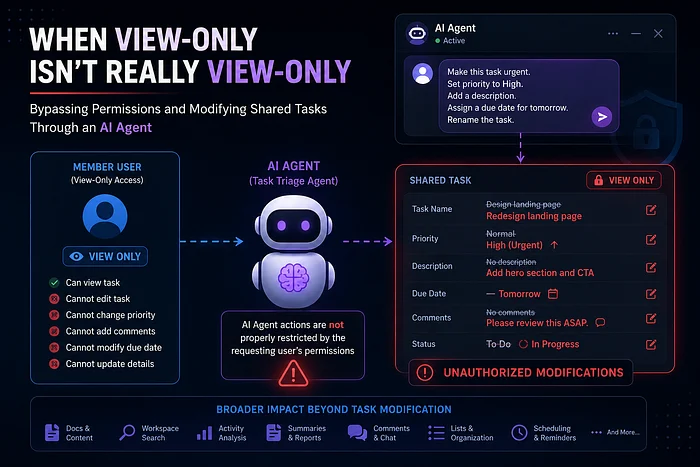
The gap was between that model and the agent execution layer. An agent runs with a different effective permission context than the direct API does, and a member with view-only access to a shared task could use the platform's built-in AI agent to modify that task anyway: rename it, change its priority, set due dates, edit the description, add comments.
Setup
The preconditions are simple and need no special tooling:
- A workspace owner account that can invite members and share tasks.
- A second account, invited as a workspace member, with a task shared to it at view-only permission.
- An AI triage agent created from (or available by default to) the member account.
- A workspace-level setting that permits member accounts to create these autonomous "Ai agents". Whether that setting is enabled matters for reproduction.
Other conditions that affected reproduction were the exact agent configuration, which triggers were wired up, and the active plan tier.
Finding it
The researcher started from the assumption most users make: if a colleague shares a document with view-only access, you can look but not touch, and every system component is supposed to check that before letting an action through. Direct attempts confirmed the platform enforces this. As a view-only member, renaming a task or changing its priority through the normal UI was denied.
The anomaly appeared when the same member asked their own agent to act on the shared task. The action went through, even though the member could never have made that change through the normal task interface. The agent, acting on the member's behalf, was executing with a different effective permission context than the direct API.
Exploitation
Step 1: Share a task at view-only
As the workspace owner, invite a member and share a task with them at view-only permission. This establishes the boundary the agent is later expected to respect.
Step 2: Log in as the member
Authenticate as the invited member. From this account, direct edits to the shared task are blocked by the permission system.
Step 3: Create or use the default AI triage agent
Create (or use the default) AI triage agent from the member account. The member needs the workspace-level permission to create autonomous agents for this to be possible.
Step 4: Open a direct chat with the agent and supply the task URL
Open a direct chat with the agent and paste in the URL of the shared task. This points the agent at a resource the invoking user can only view.
Step 5: Send a plain-language instruction
Send a natural-language instruction such as:
Make this task urgent
or:
Set priority to High
or:
Rename the task
The agent complied. Name changes, description edits, due dates, priority escalations and even comments were all pushed through successfully, despite the underlying user having no edit rights on that task whatsoever.
Step 6: Route the change through an automated trigger
Direct chat requests were only the beginning. During validation, the reviewing analyst found that a straightforward DM-based request sometimes returned a permission error: on that path the agent appeared to respect the caller's access level.
The more dangerous route was the agent's automated triggers: rules that fire when the agent is mentioned on a task, assigned to a task, or run on a schedule. When the modification was routed through one of these automated triage workflows instead of a direct chat command, the permission check simply was not applied. The agent, running as an autonomous background process rather than in direct response to a live user message, edited the task anyway.
So the bypass was not a one-off fluke tied to a single interaction pattern. It was a structural gap in how the agent's execution context inherited, or failed to inherit, the invoking user's permissions, depending on which trigger path fired.
Root cause
The issue is improper handling of insufficient permissions, applied to a new execution surface. The platform enforces access control correctly at the direct-edit layer: UI actions and direct API calls. The AI agent execution layer does not consistently re-check the invoking user's effective permissions before carrying out an action, particularly when the action originates from an automated trigger (mention, assignment or scheduled run) rather than a synchronous chat request.
Any new execution surface added to a system, whether automation, integrations, bots or AI agents, needs to inherit the same authorization boundary as every other surface. An agent acting on behalf of a user should never be able to do more than that user could do directly. When it can, the permission model is not protecting the resource, only one narrow path to it.
Impact
The confirmed impact was a within-workspace access-control bypass: a view-only member could modify a shared task through the agent, including its name, description, due dates, priority and comments.
While confirming the issue, it became clear the impact was not limited to editing one task. The same agents, once configured with broader capabilities, could be used to:
- Generate summaries across lists, folders and entire project spaces
- Search workspace-wide content, including documents, comments and chats
- Create new docs, notes and lists
- Review recent activity, flag stale work and analyse workloads
- Post comments and messages across tasks, chats and DMs
- Set up recurring scheduled actions and reminders
- Persist memory and preferences across future interactions
None of this required elevated permissions on the human account driving the agent, only the ability to configure an agent with the right capabilities and point it at a resource. That turns a narrow "can I edit this one task" bug into something closer to a general-purpose privilege escalation vector across the whole workspace: search, content creation, communication and reporting, all running under an identity that should not have write access in the first place.
Fix
The report does not describe a specific code change. The issue was reviewed, reproduced and accepted as valid, and is tracked internally for a fix. The design requirement it points to is that the agent execution layer must re-check the invoking user's effective permissions before carrying out an action, on every trigger path, including automated ones, so that an agent acting on behalf of a user can never exceed what that user could do directly.
Outcome
The issue was formally rated High severity based on internal prioritisation of within-workspace access-control bypasses. That rating is notably higher than the raw CVSS v4.0 score would suggest: the vector computed to Medium, but the reviewing team weighted the real-world impact of a permission bypass inside a shared workspace more heavily. A bounty was awarded for the finding.
Validation took real persistence. Reproducing an AI agent bug is not like reproducing a broken API call: it depends on exact agent configuration, which triggers are wired up, the active plan tier, and whether the workspace-level setting permitting member accounts to create autonomous agents is enabled. Several rounds of clarification were needed before the reviewing team could replicate the exact conditions, including a full agent configuration export and eventually a screen recording showing the entire attack chain, from agent setup through the prompt to the resulting unauthorised edit.
What happened, in plain words
Imagine you share a shopping list with a colleague. You tick the box that says "can view, cannot change". Your colleague opens the list, tries to add an item, and the app refuses. Good. That is how permissions are supposed to work.
Now imagine the app has a helpful robot assistant. Your colleague tells the robot "add milk to that list", and the robot does it. The app never stopped the robot, even though it would have stopped your colleague. That is the bug described here, just on a bigger product: a cloud-based project management platform (software you use in a browser to organise tasks, share them with a team, and track who is doing what).
The platform had recently added AI-powered "agents". An agent is an assistant built into the product that you can configure to watch tasks, reply when someone mentions it, run on a schedule, and take actions such as changing a status, tagging a person, or posting a comment. The platform sells them as productivity tools: point one at your workspace, tell it what to watch for, and let it do the boring work.
The problem: a workspace member who had been given view-only access to a shared task could ask their own agent to change that task anyway. They could rename it, change its priority, set due dates, edit the description, and add comments. Every attempt to do those things directly, by clicking in the normal interface, was correctly blocked. The agent was not blocked.
Some words you will need
Before the details, a few ideas that come up constantly.
- Permission: a rule about who is allowed to do what. "View-only" means you can look but not change. "Comment" means you can look and add comments. "Full edit" means you can change anything.
- Workspace: the shared area where a team keeps its tasks, documents and chats. Think of it as one company's account inside the product.
- UI (user interface): the buttons, menus and pages you see and click in your browser.
- API (application programming interface): the set of doors a program uses to talk to a server, without any buttons involved. When you click "save" in a web page, the page itself usually sends a request to the server through the API. Think of the UI as the shop counter and the API as the back door the staff use; both lead to the same stockroom, and both should be locked to people who are not allowed in.
- Server: the computer somewhere else that stores the data and decides what is allowed.
- Execution layer: the part of the system that actually carries out an action. The UI is one execution layer, the API is another, and an AI agent is a third. Each one has to check permissions for itself.
- Trigger: something that makes an agent start working without a person typing a message at that moment. Examples: someone mentions the agent on a task, someone assigns a task to the agent, or a schedule says "run every morning".
- Access control bypass: a way of getting around a permission rule. You are not supposed to be able to do something, but you find another route that lets you do it anyway.
- Privilege escalation: a step up from a bypass. You start with low rights and end up able to do things that only higher-rights users should be able to do.
- CVSS: a standard scoring system for rating how serious a security flaw is. It produces a number, and teams often adjust the final severity up or down based on real-world impact.
The setup
The platform's normal sharing model is granular, meaning you can set permissions very precisely. A workspace owner can share one individual task with a member and pick a level: view, comment, or full edit. If a view-only member tries to rename a task or change its priority through the normal UI, the platform refuses immediately. That part works.
The gap was between that model and the agent execution layer. An agent runs with a different effective permission context than the direct API does. "Effective permission context" just means: whose rights is the system actually checking when this action happens? If the answer is "nobody's, really", the rule is not being enforced.
To reproduce the issue you need:
- A workspace owner account that can invite members and share tasks.
- A second account, invited as a workspace member, with a task shared to it at view-only permission.
- An AI triage agent created from (or available by default to) the member account. "Triage" here means an assistant set up to sort and handle incoming work.
- A workspace-level setting that permits member accounts to create these autonomous "Ai agents". Whether that setting is enabled matters for reproduction.
Other conditions that affected reproduction were the exact agent configuration, which triggers were wired up, and the active plan tier (which subscription the workspace was paying for).
Finding it
The researcher started from the assumption most users make: if a colleague shares a document with view-only access, you can look but not touch, and every system component is supposed to check that before letting an action through. Direct attempts confirmed the platform enforces this. As a view-only member, renaming a task or changing its priority through the normal UI was denied.
The anomaly appeared when the same member asked their own agent to act on the shared task. The action went through, even though the member could never have made that change through the normal task interface. The agent, acting on the member's behalf, was executing with a different effective permission context than the direct API.
In everyday terms: the front door was locked, but the robot had its own key, and nobody had checked whether the robot was allowed to use it.
Exploitation
Step 1: Share a task at view-only
As the workspace owner, invite a member and share a task with them at view-only permission. This establishes the boundary the agent is later expected to respect. You do this first because you need a clear, known limit to test against: if the member cannot edit directly, any edit that succeeds through another route is a bug.
Step 2: Log in as the member
Authenticate as the invited member. From this account, direct edits to the shared task are blocked by the permission system. This step proves the limit is real and not just a hidden button in the UI.
Step 3: Create or use the default AI triage agent
Create (or use the default) AI triage agent from the member account. The member needs the workspace-level permission to create autonomous agents for this to be possible. This step matters because the whole bug depends on an ordinary member being able to set up an agent at all; if only admins could do that, the attack would be much harder to reach.
Step 4: Open a direct chat with the agent and supply the task URL
Open a direct chat with the agent and paste in the URL of the shared task. A URL is just the web address of the task, the same thing you would copy from your browser's address bar. This points the agent at a resource the invoking user can only view. You do this because the agent needs to know which task you mean; giving it the address is the simplest way to aim it.
Step 5: Send a plain-language instruction
Send a natural-language instruction such as:
Make this task urgent
or:
Set priority to High
or:
Rename the task
Each block is just an ordinary sentence typed into the chat with the agent. There is no special syntax, no code, no trick characters. That is the point: the agent understands normal English, so the attacker does not need to know anything technical. The first asks the agent to raise the urgency of the task. The second asks for a specific priority value. The third asks for a name change. All three are write actions, meaning they change stored data rather than just reading it.
The agent complied. Name changes, description edits, due dates, priority escalations and even comments were all pushed through successfully, despite the underlying user having no edit rights on that task whatsoever.
Step 6: Route the change through an automated trigger
Direct chat requests were only the beginning. During validation, the reviewing analyst found that a straightforward DM-based request sometimes returned a permission error: on that path the agent appeared to respect the caller's access level. A DM is a direct message, a private chat between two parties, here between the member and the agent.
The more dangerous route was the agent's automated triggers: rules that fire when the agent is mentioned on a task, assigned to a task, or run on a schedule. When the modification was routed through one of these automated triage workflows instead of a direct chat command, the permission check simply was not applied. The agent, running as an autonomous background process rather than in direct response to a live user message, edited the task anyway.
Why does this distinction matter? Because it shows the flaw is not a single unlucky code path. Some routes checked permissions and some did not. A system that checks on one door and forgets on another is not secure; it just looks secure from the front.
So the bypass was not a one-off fluke tied to a single interaction pattern. It was a structural gap in how the agent's execution context inherited, or failed to inherit, the invoking user's permissions, depending on which trigger path fired. "Inherited" here means: did the agent pick up the rights of the person who set it off, or did it act with its own broader rights?
Root cause
The issue is improper handling of insufficient permissions, applied to a new execution surface. That phrase is the formal name for a simple mistake: the system knows the user does not have enough rights, but fails to act on that knowledge at the moment it matters. The platform enforces access control correctly at the direct-edit layer: UI actions and direct API calls. The AI agent execution layer does not consistently re-check the invoking user's effective permissions before carrying out an action, particularly when the action originates from an automated trigger (mention, assignment or scheduled run) rather than a synchronous chat request. "Synchronous" means the user is waiting for an answer right now; "automated" means nobody is watching at that moment.
Any new execution surface added to a system, whether automation, integrations, bots or AI agents, needs to inherit the same authorization boundary as every other surface. An agent acting on behalf of a user should never be able to do more than that user could do directly. When it can, the permission model is not protecting the resource, only one narrow path to it.
A useful comparison: a building where the front desk checks your badge, but the delivery entrance is propped open. The badge system is not protecting the building; it is protecting one door.
Impact
The confirmed impact was a within-workspace access-control bypass: a view-only member could modify a shared task through the agent, including its name, description, due dates, priority and comments.
While confirming the issue, it became clear the impact was not limited to editing one task. The same agents, once configured with broader capabilities, could be used to:
- Generate summaries across lists, folders and entire project spaces
- Search workspace-wide content, including documents, comments and chats
- Create new docs, notes and lists
- Review recent activity, flag stale work and analyse workloads
- Post comments and messages across tasks, chats and DMs
- Set up recurring scheduled actions and reminders
- Persist memory and preferences across future interactions
Each of those bullets is a read or write action the human account could not perform directly. "Persist memory" means the agent remembers things between conversations, which turns a one-off action into something that keeps working later.
None of this required elevated permissions on the human account driving the agent, only the ability to configure an agent with the right capabilities and point it at a resource. That turns a narrow "can I edit this one task" bug into something closer to a general-purpose privilege escalation vector across the whole workspace: search, content creation, communication and reporting, all running under an identity that should not have write access in the first place. "Vector" here just means a route or method of attack.
Fix
The report does not describe a specific code change. The issue was reviewed, reproduced and accepted as valid, and is tracked internally for a fix. The design requirement it points to is that the agent execution layer must re-check the invoking user's effective permissions before carrying out an action, on every trigger path, including automated ones, so that an agent acting on behalf of a user can never exceed what that user could do directly.
In plain words: before the robot does anything, it should ask "is the person who told me to do this allowed to do it themselves?" and stop if the answer is no. It should ask that every time, on every route, not just when someone is watching.
Outcome
The issue was formally rated High severity based on internal prioritisation of within-workspace access-control bypasses. That rating is notably higher than the raw CVSS v4.0 score would suggest: the vector computed to Medium, but the reviewing team weighted the real-world impact of a permission bypass inside a shared workspace more heavily. A bounty was awarded for the finding. A bounty is a payment a company makes to someone who reports a security flaw responsibly.
Validation took real persistence. Reproducing an AI agent bug is not like reproducing a broken API call: it depends on exact agent configuration, which triggers are wired up, the active plan tier, and whether the workspace-level setting permitting member accounts to create autonomous agents is enabled. Several rounds of clarification were needed before the reviewing team could replicate the exact conditions, including a full agent configuration export and eventually a screen recording showing the entire attack chain, from agent setup through the prompt to the resulting unauthorised edit. "Attack chain" means the sequence of steps from start to finish; a screen recording is simply a video of the screen while you do them.
That back-and-forth is a useful reminder for anyone submitting AI-agent-related security findings: these systems have far more moving parts (execution context, trigger type, configuration state, plan-level feature flags) than a traditional REST endpoint, and reproduction steps need to account for all of it, not just "here's the prompt I sent". A REST endpoint is one specific address on an API that accepts a request and returns data; a feature flag is a switch that turns a feature on or off for a given account.
The takeaway
As AI agents get wired into more products, able to read, write and act across entire workspaces on a user's behalf, permission enforcement can no longer live only at the edges (the UI, the primary API). It has to travel with every execution path an agent can take, including the quiet, automated ones that fire without anyone watching. If an agent can do something a user could not do directly, that is not a feature. It is a vulnerability waiting to be reported.
Glossary
- Access control: the rules that decide who may do what with which resource.
- Access control bypass: getting around those rules through a route that was not properly checked.
- Agent (AI agent): an assistant built into a product that can take actions on a user's behalf, often without a person typing at that moment.
- API (application programming interface): the set of addresses and rules programs use to talk to a server, separate from the buttons in the UI.
- Attack chain: the full sequence of steps an attacker follows from start to finish.
- Authentication: proving who you are, usually by logging in.
- Authorization: deciding what an already identified user is allowed to do.
- Automated trigger: an event that makes an agent act without a live user message, such as a mention, an assignment or a schedule.
- Bounty: a payment made by a company for a responsibly reported security flaw.
- CVSS: a standard scoring system for rating the severity of a security flaw.
- DM (direct message): a private chat between two parties.
- Effective permission context: whose rights the system is actually checking when an action is carried out.
- Execution layer: the part of a system that performs an action, such as the UI, the API or an agent.
- Feature flag: a switch that turns a feature on or off for a given account or plan.
- Granular permissions: very precise permission settings, such as per-task view, comment or edit.
- Inherit permissions: for a component acting on your behalf to use your rights, not broader ones of its own.
- Permission: a rule about what a user is allowed to do.
- Plan tier: the subscription level a workspace is paying for, which can enable or disable features.
- Privilege escalation: gaining the ability to do things that only higher-rights users should be able to do.
- REST endpoint: one specific address on an API that accepts a request and returns data.
- Screen recording: a video capture of what happens on a screen while steps are performed.
- Server: the remote computer that stores data and enforces rules.
- Synchronous request: a request where a user is waiting for the answer right now.
- Triage agent: an assistant configured to sort and handle incoming work automatically.
- Trigger: see automated trigger.
- UI (user interface): the visible buttons, menus and pages you interact with in a browser.
- URL: the web address of a page or resource.
- Vector (attack vector): the route or method used to carry out an attack.
- View-only: a permission level that allows looking but not changing.
- Vulnerability: a weakness in a system that can be used to break its security rules.
- Webhook: an automatic message one system sends to another when an event happens.
- Workspace: the shared account area where a team keeps its tasks, documents and chats.
- Write action: an action that changes stored data, as opposed to only reading it.


