Write up of two HTTP Requests Smuggling
Two shopping sites were vulnerable to HTTP request smuggling, specifically CL.TE desync, at the shipping address and invoice title functions. An attacker could control other users' requests and, in the second case, capture their responses including cookies.

My information here is not enough for you to understand this vulnerability, be sure to read the below article and complete their challenge
The full write-up lives on its author's site
It belongs to its author, so we link to it rather than copy it. The other two tabs are our own rewrites, checked against it.
HTTP request smuggling is easy to read about and harder to spot in the wild. This is a short account of two findings on separate sites, both reached through the same detection idea: hunt for POST endpoints, send an ambiguous request, and watch what comes back. The first bug let me control user requests, though I did not exploit it further at the time. The second let me read the victim's response, including cookies.
Context
The first target exposed a function that saves a shipping address. That function point was vulnerable to HTTP request smuggling, specifically CL.TE. Through it I could control user requests, and the path /configs/web/switches/list could return the user's sensitive information. The test I sent was just a GET request.
The second target is a shopping website. I used the same idea and again found the vulnerability at the shipping address. From there I moved on from redirecting users to a 404 page and went looking for a place where I could store data and read it back.
Setup
My approach was to find all the function points and run HTTP request smuggling detection against them. The tools were:
- the PortSwigger HTTP Request Smuggler extension, https://github.com/PortSwigger/http-request-smuggler, for scanning and discovery;
- Turbo Intruder for the attack itself.
At the time of the first bug I had not learned how to exploit the vulnerability further, so I only controlled the user request. The second bug is where I got the user response.
Finding it
Before I used the extension, I simply searched for POST requests and added a simple payload for detection. That is how I first discovered the vulnerability, but I did not successfully exploit it to control user requests at that stage.
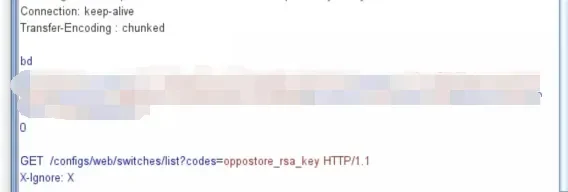
The screenshot is the proof of concept from that first detection attempt.
In my search I found the function that saves the shipping address. That function point exists HTTP Request Smuggling. This is a CL.TE. I use it to control user requests. Here /configs/web/switches/list can return the user's sensitive information. I am just doing a GET request to send the test.
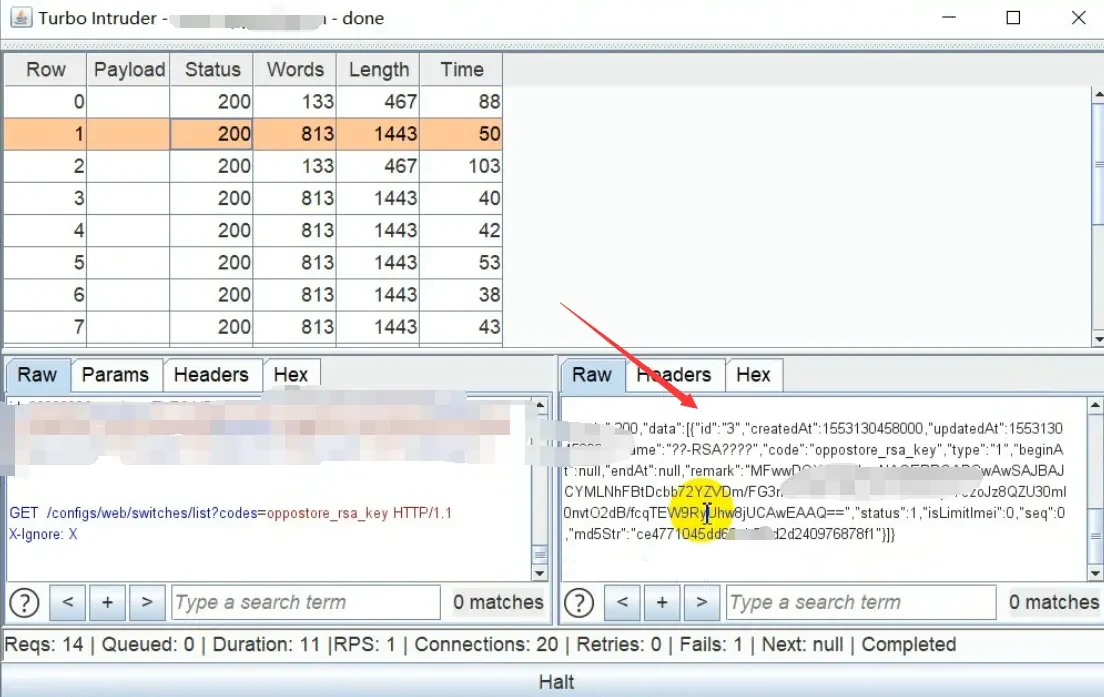
I used Turbo Intruder to verify this bug, and it successfully returned the user's information, which proves that the user's request is controlled.
Exploitation
Step 1: confirm the smuggling primitive on the first target
The detection payload was sent against the shipping address function. The report classifies this as CL.TE.
Step 2: turn control into disclosure
The path /configs/web/switches/list can return the user's sensitive information, and the test was a plain GET request. The test was a plain GET request. Turbo Intruder was used to verify the bug, and the user's information came back, confirming control of the user's request.
Step 3: find the second target
After the first vulnerability I understood how to detect this class of bug, and a few days later I found the next one. The target is a shopping website. I used the same idea, and found the vulnerability at the shipping address.
At this point I let the user redirect to the 404 page.
Step 4: look for a reflection point
Controlling user requests was no longer enough, so I decided to find reflection points. At first I wanted XSS, even self XSS, but I did not find it. So I chose to save data to a location I could view. I picked the address field, but found a limit of 50 bytes. I tried to bypass the limit and did not succeed.
I started looking again. Because this is a shopping site, I looked at the profile, but failed again. I tried various functions, and finally found an invoice title at the point of printing the invoice.
Step 5: prepare the stored value
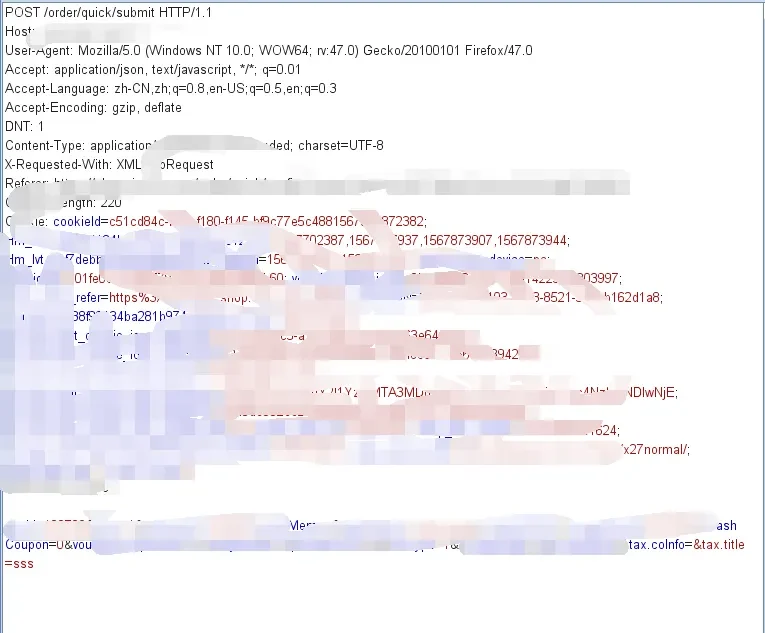
I decided to start using it. First I need to create an order and create an invoice, and write the invoice title to the location of the last parameter, like this:
Step 6: run the attack
Then I need to run the attack. This is my Turbo Intruder configuration. I use my own cookie to send a request packet to save the invoice title as the victim's response.
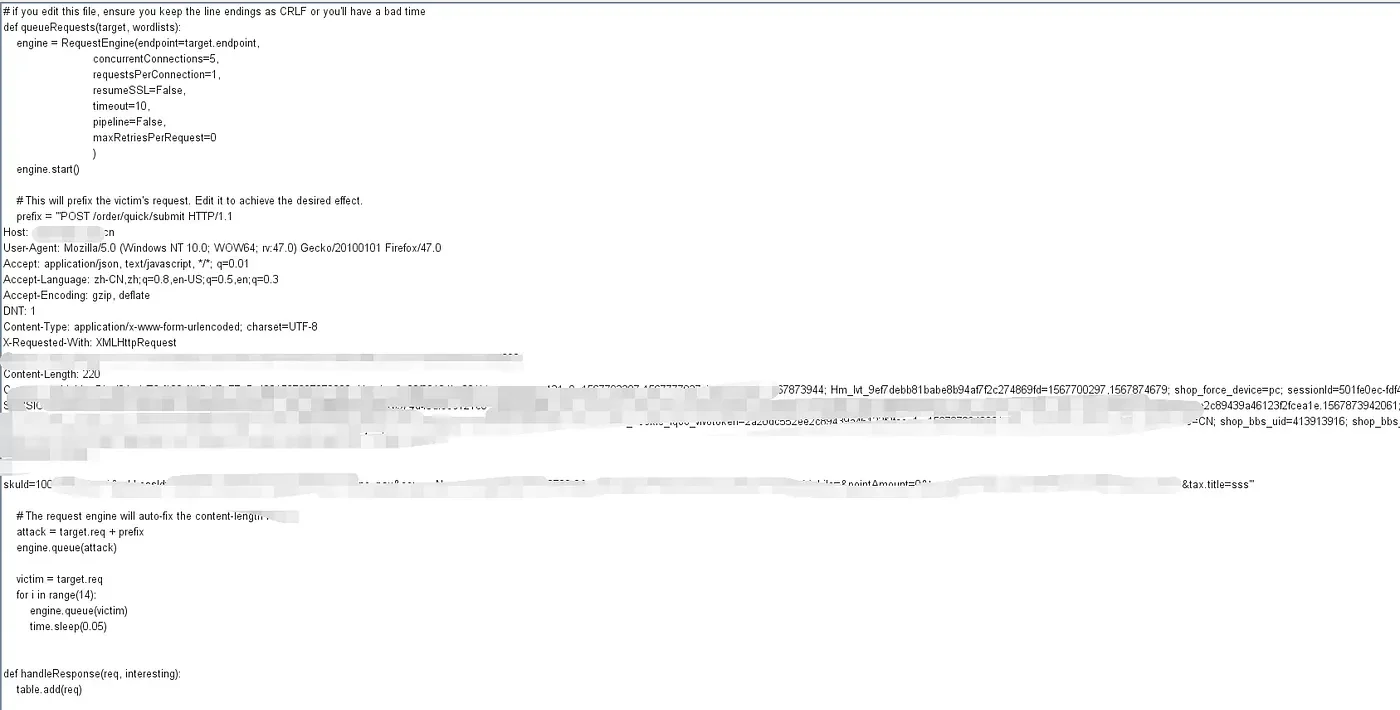
Pay attention to the Content-length setting. I did not add Content-length in the first test, so I did not get the victim's response successfully.
Step 7: read the victim's response
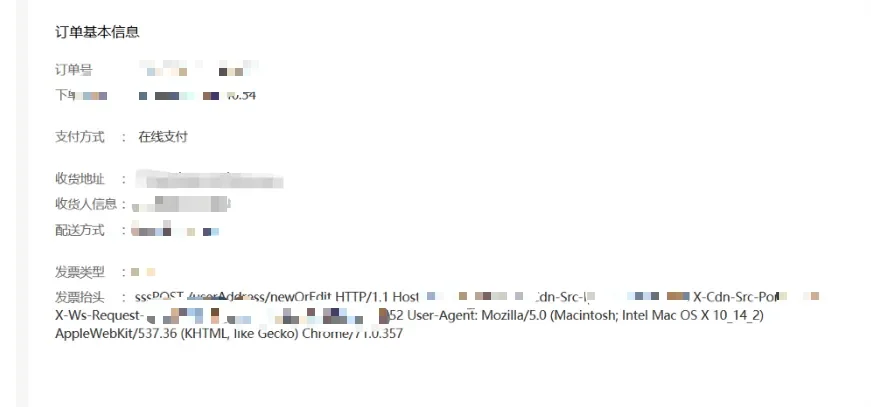
Boom. The user response was successfully obtained by me, and I can get information such as cookies.
Root cause
Both findings are HTTP request smuggling: an ambiguous request is parsed into two different HTTP requests because the front end and the back end disagree on message boundaries. The first is CL.TE, where the front end uses Content-Length and the back end uses Transfer-Encoding. The report does not describe the parsing mismatch on the second target. The report does not describe the server or proxy versions involved, so the exact parsing mismatch on the second target is not stated.
Impact
On the first target, an attacker could control user requests and reach /configs/web/switches/list, which returns the user's sensitive information. On the second target, the attacker could obtain the victim's response, including cookies.
Fix
Variants to test
Check out my Twitter @C1h2e11.
./Logout
What happened, in plain words
A security researcher found a class of bug called HTTP request smuggling on two different websites. On the first site, the bug let him control user requests. On the second site, the bug let him read another user's response, including their cookies. He found both by doing the same simple thing: look for forms or features that send data to the server (POST requests), send a slightly confusing request, and watch what comes back.
This article walks through both findings from the beginning. You only need to know how to use a browser. Every technical word is explained the first time it appears, and there is a glossary at the end.
Background: what is HTTP request smuggling?
When you load a web page, your browser talks to a server using a set of rules called HTTP. Each message your browser sends is an HTTP request, and each message the server sends back is an HTTP response. A request looks roughly like this:
The first line says what you want (GET means "give me this page") and which version of HTTP you speak. The lines below are headers: small labels that carry extra information, such as which website you are asking for.
A POST request is a request that carries data to the server, for example the contents of a form you filled in. A GET request just asks for something and carries no body.
Here is the important part. Modern websites usually have two layers:
- A front end, which sits in front of the site. It might be a proxy or a load balancer: a machine that receives every visitor's request first and passes it on. Think of it as a receptionist who takes all the post and forwards it to the right desk.
- A back end, the actual application server that does the work.
The front end and the back end are often made by different companies and may read requests slightly differently. When a request arrives, both need to know where that request ends and the next one begins. HTTP/1.1 allows several requests to travel one after another over the same connection, like letters placed back to back in one envelope. Each side works out the boundaries by reading the headers.
HTTP request smuggling is what happens when the front end and the back end disagree about where a request ends. The attacker sends one request that is deliberately ambiguous. The front end thinks it is one request. The back end reads it as one and a half requests, so the leftover half gets glued onto the front of the next request that arrives on the same connection. That next request usually belongs to an innocent visitor, the victim.
The researcher points readers to the PortSwigger article on HTTP desync attacks for the full theory:
https://portswigger.net/blog/http-desync-attacks-request-smuggling-reborn
He quotes it directly:
Since HTTP/1.1 there’s been widespread support for sending multiple HTTP requests over a single underlying TCP or SSL/TLS socket. The protocol is extremely simple, HTTP requests are simply placed back to back, and the server parses headers to work out where each one ends and the next one starts. This is often confused with HTTP pipelining, which is a rarer subtype that’s not required for the attacks described in this paper.
The end of our message must be consistent with the request sent by the front end. If the attacker sends an ambiguous request, it may be parsed into two different HTTP requests.
The obvious approach to detecting request smuggling vulnerabilities is to issue an ambiguous request followed by a normal ‘victim’ request, then observe whether the latter gets an unexpected response. However, this is extremely prone to interference; if another user’s request hits the poisoned socket before our victim request, they’ll get the corrupted response and we won’t spot the vulnerability. This means that on a live site with a high volume of traffic it can be hard to prove request smuggling exists without exploiting numerous genuine users in the process. Even on a site with no other traffic, you’ll risk false negatives caused by application-level quirks terminating connections.
In plain words, that quote says three things:
- Several requests can share one connection, and the boundaries are found by reading headers.
- If a request is ambiguous, the two layers can split it differently, producing two requests out of one.
- Detecting this on a busy site is messy, because a random visitor's request may land on the poisoned connection before your test request does.
Two headers matter for the rest of this article:
- Content-Length tells the receiver how many bytes long the body is. It is like writing "this parcel weighs 2 kg" on a box.
- Transfer-Encoding: chunked tells the receiver that the body arrives in pieces (chunks), each piece prefixed with its size, and that a zero-size chunk marks the end. It is like sending a parcel as several smaller boxes, each labelled with its size, and a final empty box meaning "that's all".
When a request carries both headers, the two layers may pick different ones. CL.TE is the shorthand for the case where the front end uses Content-Length and the back end uses Transfer-Encoding. The first finding is of this kind.
The tools
The researcher's plan was to find every place on a site where data is submitted (he calls these function points) and test each one for smuggling. He used two tools:
- The PortSwigger HTTP Request Smuggler extension, https://github.com/PortSwigger/http-request-smuggler, which scans for the bug automatically. An extension here is an add-on for a security testing tool, the way a browser extension adds features to your browser.
- Turbo Intruder, a tool for sending many crafted requests quickly and inspecting the replies. Think of it as a very fast, scriptable way of pressing "send" over and over with small variations.
At the time of the first bug he had not yet learned how to go beyond controlling where a request goes, so on that site he only controlled the user request. The second bug is where he learned to capture the user response.
First bug
Finding it
Before he used the extension, he did something simpler: he searched the site for POST requests and added a simple payload to each one to see what happened. A payload is the piece of data you deliberately put into a request to test how the server reacts. That is how he first spotted the vulnerability, but at that stage he did not manage to exploit it to control user requests.
The screenshot is the proof of concept from that first detection attempt, labelled POC (short for proof of concept: evidence that the bug is real).
In his search he found the feature that saves a shipping address. A shipping address is the place where an online shop sends your order, so the site has to store it for you. That function point was vulnerable to HTTP request smuggling, specifically CL.TE. Through it he could control user requests. The path /configs/web/switches/list could return the user's sensitive information, and the test he sent was just a GET request.
Step 1: confirm the smuggling primitive on the first target
The detection payload was sent against the shipping address feature. The request is ambiguous: the front end and the back end disagree about where it ends, so part of it is treated as the start of the next request on the connection. The report classifies this as CL.TE.
Step 2: turn control into disclosure
With the request controlled, the smuggled prefix was used to reach /configs/web/switches/list, a path that returns the user's sensitive information. The test was a plain GET request. Turbo Intruder was used to verify the bug, and the user's information came back, confirming control of the user's request.
That is what "controlling the user request" means here: the victim's request is redirected to a different place than the victim intended.
Second bug
Step 3: find the second target
After the first vulnerability he understood how to detect this class of bug, and a few days later he found the next one. The target is a shopping website. He used the same idea and found the vulnerability at the shipping address again.
At this point he let the user redirect to the 404 page. A 404 page is the "page not found" screen a site shows when the address you asked for does not exist. Redirecting a victim there demonstrates control of their request.
Step 4: look for a reflection point
Controlling user requests was no longer enough, so he decided to look for reflection points. A reflection point is a place where something you typed is shown back to you, or to someone else, on a page. If you can store text and see it later, you may be able to store something more dangerous.
At first he wanted XSS (cross-site scripting), a bug where an attacker gets their own code to run inside another user's browser. Even self XSS, where the code only runs in your own browser, would have been a start, but he did not find it. So he chose a different goal: save data to a location he could view. He picked the address field, but found a limit of 50 bytes. A byte is a single character of storage for simple text, so 50 bytes is roughly 50 letters. He tried to bypass the limit and did not succeed.
He started looking again. Because this is a shopping site, he looked at the profile page, but failed again. He tried various features, and finally found an invoice title at the point of printing the invoice. An invoice is the bill a shop issues for an order, and the invoice title is the name printed at the top of it, for example a company name. That field is stored and later shown, which makes it a candidate reflection point.
Step 5: prepare the stored value
He decided to start using it. First he needed to create an order and create an invoice, and write the invoice title to the location of the last parameter, like this:
A parameter is a named value attached to a request, for example ?title=hello. Putting the value in the last parameter means it sits at the very end of the request, which is exactly where a smuggled request needs its payload to land so that it becomes the beginning of the next request on the connection.
Step 6: run the attack
Then he needed to run the attack. This is his Turbo Intruder configuration. He used his own cookie to send a request packet to save the invoice title as the victim's response.
A cookie is a small piece of data a website asks your browser to keep and send back with every request, so the site can recognise you between page loads. It is like a wristband at an event: show it and staff know you already checked in. His own cookie identifies his own session, which is why he could send the request as himself while aiming the effect at someone else.
He adds a warning: pay attention to the Content-length setting. He did not add Content-length in the first test, so he did not get the victim's response successfully. Without that header he did not get the victim's response successfully.
Step 7: read the victim's response
Boom. The user response was successfully obtained, and he could get information such as cookies.
The response contained information such as cookies.
Root cause
Both findings are HTTP request smuggling: an ambiguous request is parsed into two different HTTP requests because the front end and the back end disagree on message boundaries. The first is CL.TE, where the front end uses Content-Length and the back end uses Transfer-Encoding. The report does not describe the parsing mismatch on the second target. The report does not describe the server or proxy versions involved, so the exact parsing mismatch on the second target is not stated.
Impact
On the first target, an attacker could control user requests and reach /configs/web/switches/list, which returns the user's sensitive information. On the second target, the attacker could obtain the victim's response, including cookies.
Fix
Variants to test
Check out my Twitter @C1h2e11.
./Logout
Glossary
- HTTP: the set of rules browsers and servers use to exchange requests and responses.
- HTTP request: a message a browser (or tool) sends to a server asking for something or submitting data.
- HTTP response: the message a server sends back.
- Header: a labelled line in a request or response carrying extra information, such as the body length or the target host.
- GET request: a request that asks for something and carries no body.
- POST request: a request that carries data to the server, such as a filled-in form.
- Front end: the first server a request reaches, often a proxy or load balancer, which forwards it to the application.
- Back end: the application server that actually processes the request.
- Proxy / load balancer: a machine that receives traffic first and passes it on to one or more servers behind it.
- HTTP request smuggling: a bug where the front end and back end disagree about where a request ends, so one request is split into two and part of it is glued onto the next visitor's request.
- CL.TE: a smuggling case where the front end uses Content-Length and the back end uses Transfer-Encoding to find the end of the body.
- Content-Length: a header stating how many bytes long the body is.
- Transfer-Encoding: chunked: a header stating the body arrives in sized pieces, ending with a zero-size piece.
- Victim: the innocent user whose request lands on the poisoned connection.
- Function point: the researcher's term for a feature on a site that accepts data, such as saving an address.
- Payload: the deliberately crafted piece of data placed in a request to test the server.
- POC (proof of concept): evidence, often a screenshot, that a bug is real.
- Extension: an add-on that adds features to a security testing tool.
- Shipping address: the place an online shop sends your order.
- 404 page: the "page not found" screen shown when an address does not exist.
- Reflection point: a place where text you entered is shown back on a page.
- XSS (cross-site scripting): a bug where an attacker gets their own code to run inside another user's browser.
- Self XSS: XSS that only affects the person who entered the code, not other users.
- Byte: a unit of storage; for plain text, roughly one character.
- Invoice / invoice title: the bill a shop issues for an order, and the name printed at the top of it.
- Parameter: a named value attached to a request, such as
?title=hello. - Cookie: a small piece of data a site asks your browser to store and send back with each request, used to recognise you.
- Session: the period during which a site recognises you as the same logged-in user, usually tracked by a cookie.