XSS - The LocalStorage Robbery
An import feature allowed uploading an SVG file containing a script, which was stored and executed when the file path was visited, enabling theft of an authentication token from localStorage. The attacker could steal any user's token and potentially perform CSRF, session attacks, or account takeover.
 Published on shahjerry33.medium.com
In brief, stored (persistent) cross-site scripting (XSS) happens when an attacker injects malicious code into the target application and this content is permanently stored. Later, when victims visit a page with the stored malicious code, their browsers execute this code.
The full write-up lives on its author's site
It belongs to its author, so we link to it rather than copy it. The other two tabs are our own rewrites, checked against it.
Context
This write-up covers a stored cross-site scripting (XSS) issue found in a private bug bounty program. The feature involved is an import function that lets a user upload document files such as .csv or .docx. The upload dialog showed only document types as supported, and the file was uploaded and later served back from a path found in the response.
Stored XSS, as the report puts it, happens when an attacker injects malicious code into the target application and that content is permanently stored. When a victim later visits the page holding the stored code, the browser executes it.
The interesting part of this case is what the payload targets: the application keeps an authentication token in localStorage, and that same token also protects the site against CSRF. Reading it from JavaScript therefore hands an attacker both the session material and the anti-CSRF protection.
Setup
The work was done by the author together with ethicalbughunter on a private program. No account roles, application versions or server details are given in the report. The only tool named is Burp, used to intercept the upload request and its response. The precondition for the attack is that a victim opens the uploaded file's path. The vector below carries UI:R (user interaction required).
Finding it
The starting point was the import feature. When the file picker was opened, it showed All Supported Types, because only document files were meant to be importable. Changing that filter on the desktop to All Files allowed a file with an .svg extension to be selected, and that file contained an XSS payload inside an XML script.
On the first attempt the file uploaded without any visible effect, and the team could not find where it had been stored. They repeated the upload and this time intercepted the response of the upload request, which revealed the path. Visiting that path executed the payload: a stored XSS.
Looking at the authentication flow, they noticed that a token is generated on every login and is unique for every account. The token was stored in localStorage and was also what protected the website from CSRF attacks. That raised the question of how to read the token out of localStorage, since doing so would open the door to further attacks. The answer was to add a line to the .svg that reads the item from localStorage and shows it, then upload the file again and visit the path.
Exploitation
Step 1: locate the import feature
The program had an import function for document files.
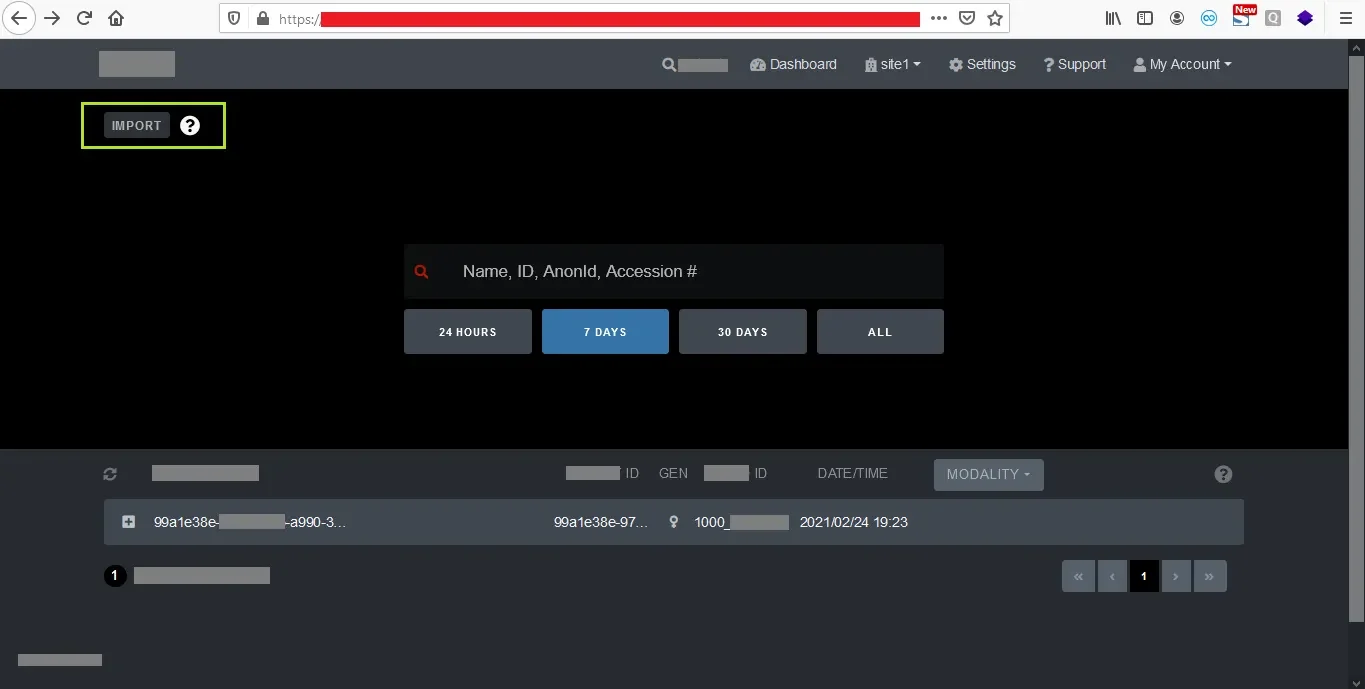
Import feature
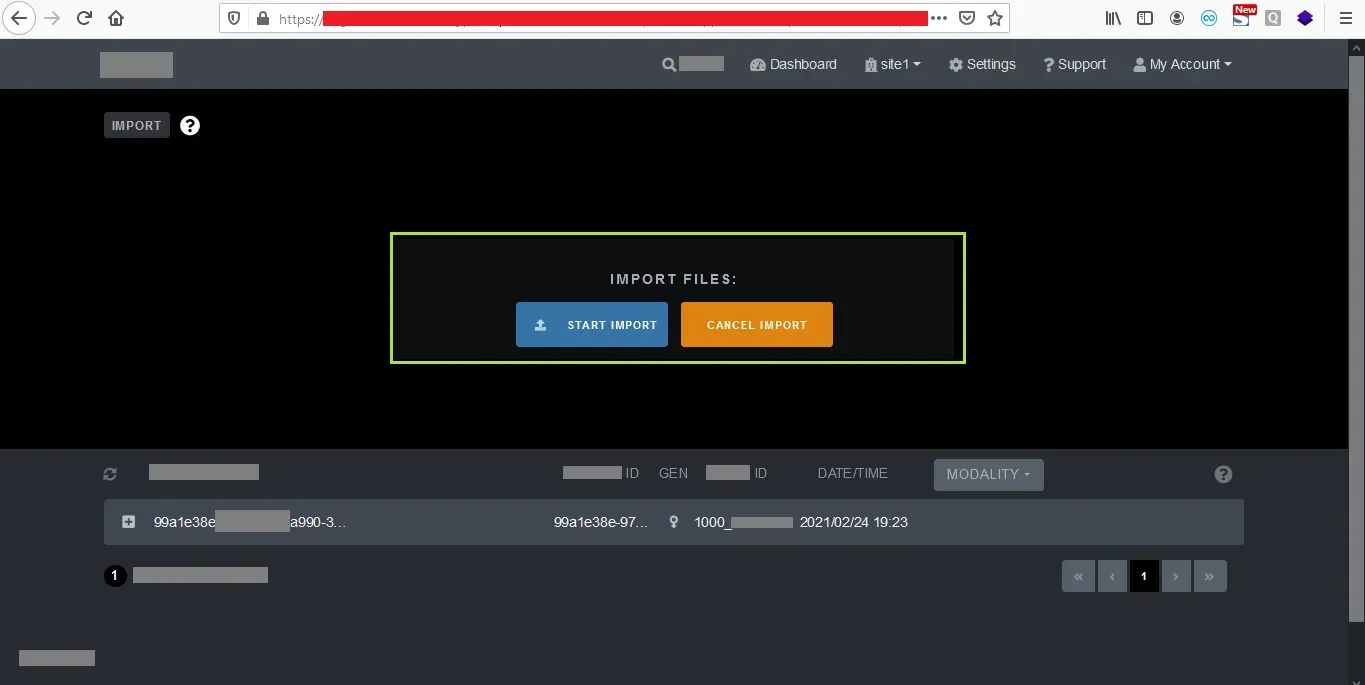
Import feature
Step 2: open the upload dialog
Clicking the Start Import button opened a file picker limited to All Supported Types.
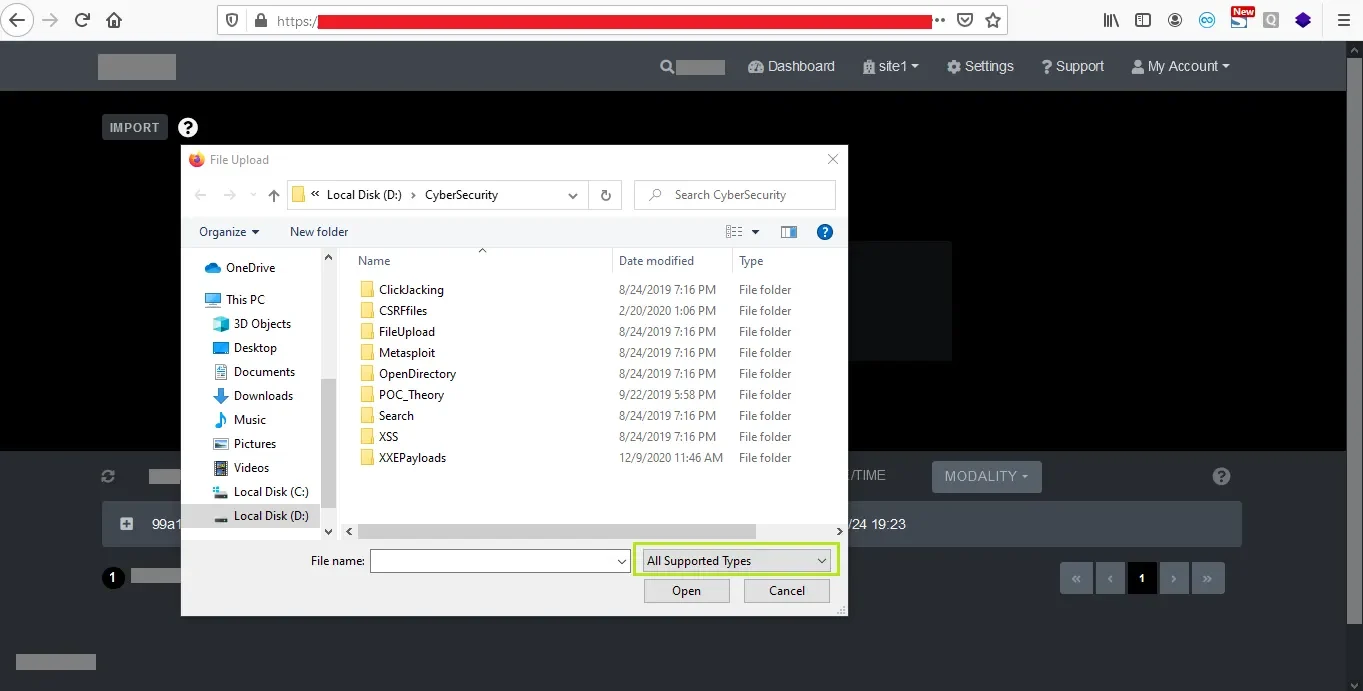
All Supported Types
Step 3: widen the file filter
The restriction lived in the desktop file picker, so it was changed from All Supported Types to All File, which made it possible to select an .svg file.
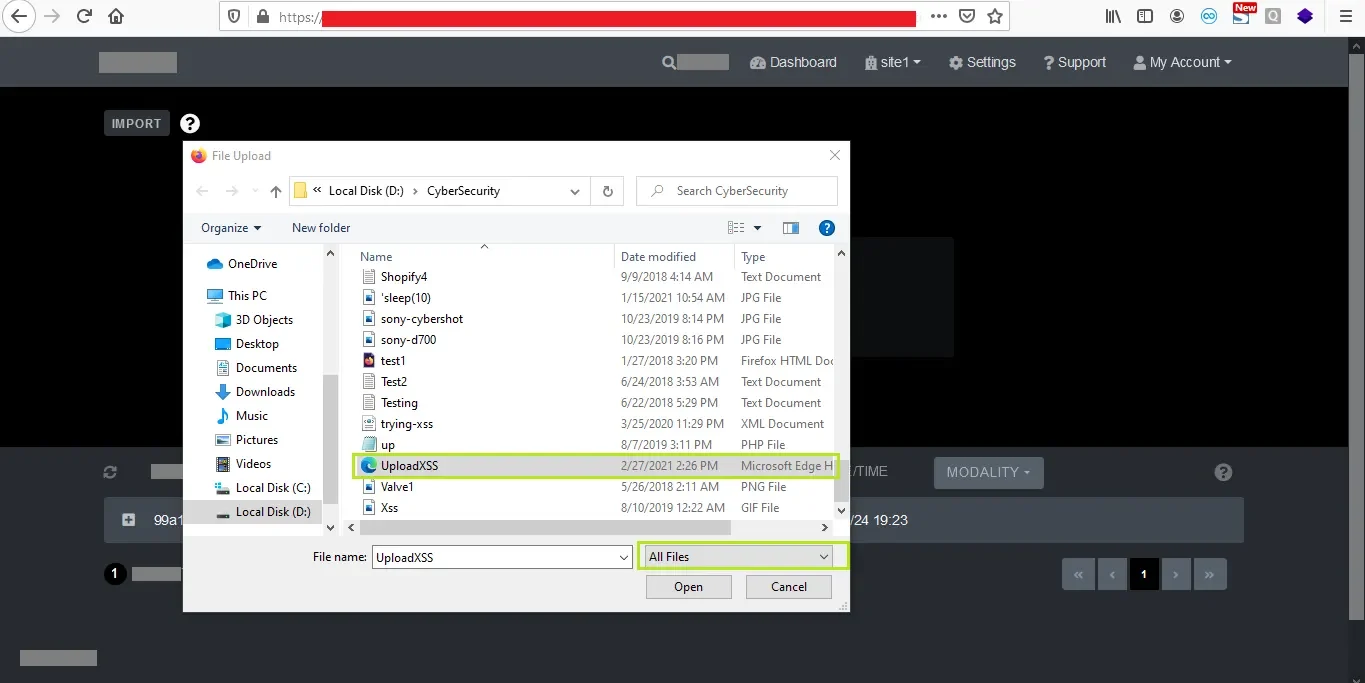
All Files
Step 4: upload and intercept the request
The .svg file was uploaded and the request was intercepted with Burp.
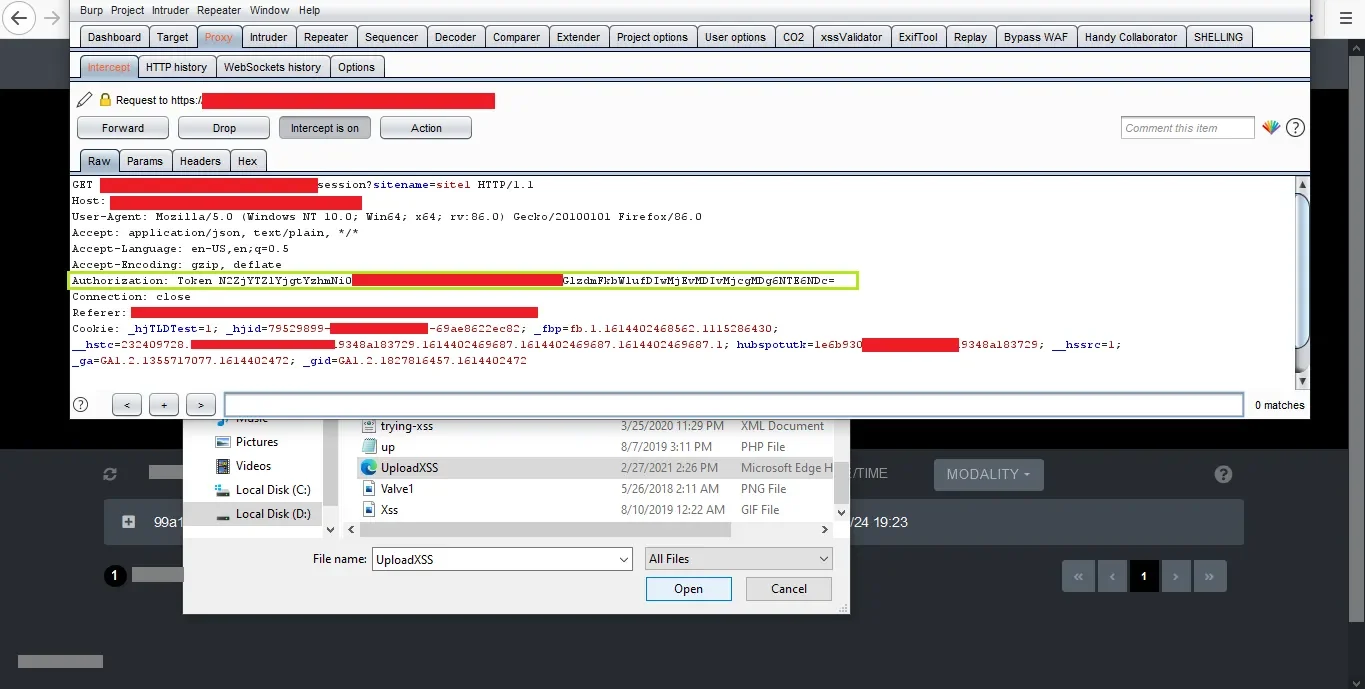
Intercepted Request
Step 5: intercept the response to learn the storage path
The first upload gave no clue where the file landed. On the repeat, the option Do intercept > Response to this request was used to see where the file was being uploaded.
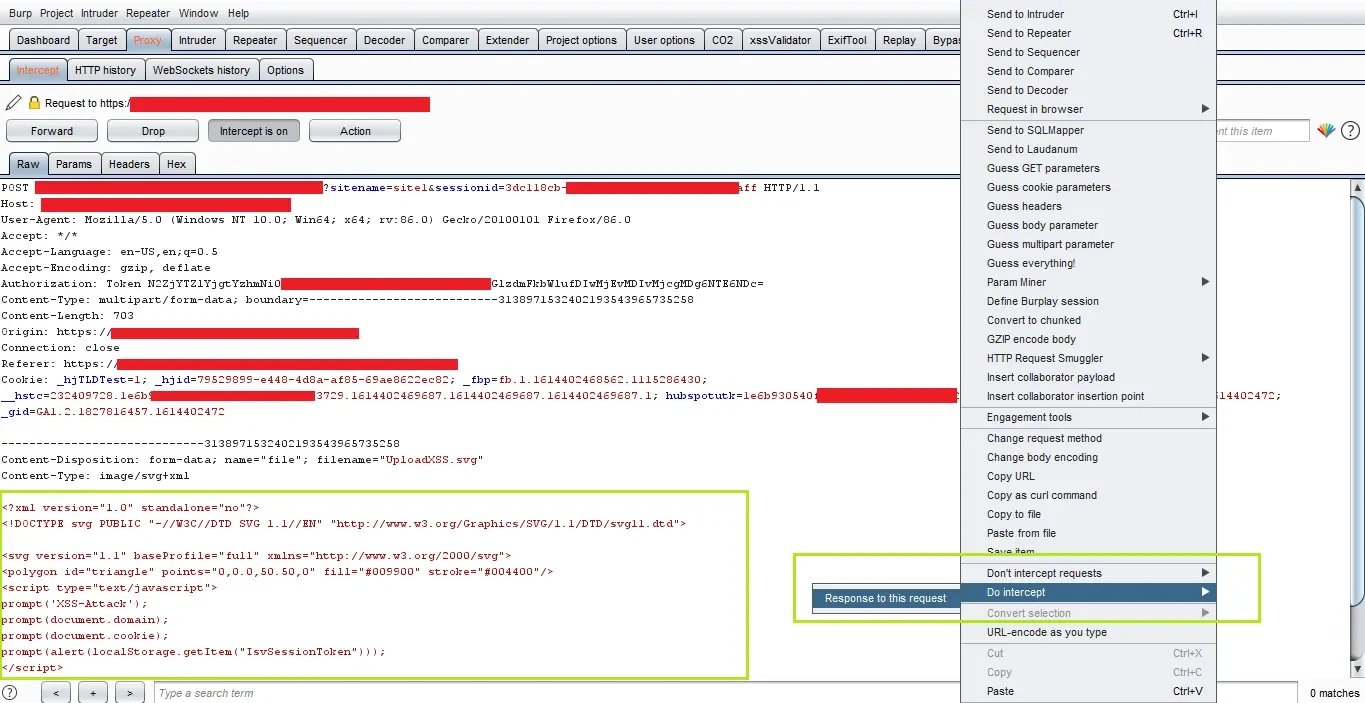
Intercepting the Response
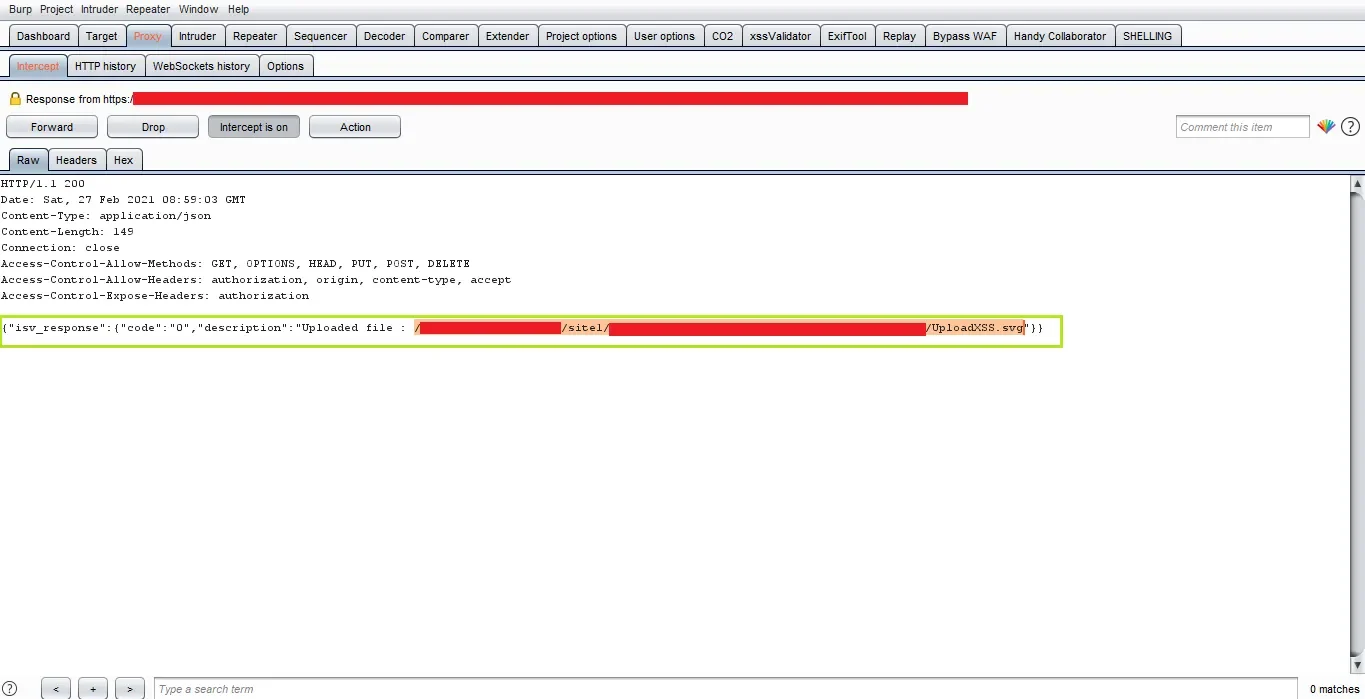
File Path
Step 6: visit the path and execute the payload
Visiting the path returned by the response triggered the stored XSS. The payload used was:
<?xml version=”1.0" standalone=”no”?>
<!DOCTYPE svg PUBLIC “-//W3C//DTD SVG 1.1//EN” “[http://www.w3.org/Graphics/SVG/1.1/DTD/svg11.dtd](http://www.w3.org/Graphics/SVG/1.1/DTD/svg11.dtd)">

<svg version=”1.1" baseProfile=”full” xmlns=”[http://www.w3.org/2000/svg](http://www.w3.org/2000/svg)">
<polygon id=”triangle” points=”0,0.0,50.50,0" fill=”#009900" stroke=”#004400"/>
<script type=”text/javascript”>
prompt(‘XSS-Attack’);
prompt(document.domain);
prompt(document.cookie);
prompt(alert(localStorage.getItem(“IsvSessionToken”)));
</script>
</svg>
The SVG document declares itself as XML, defines an SVG root with a polygon shape, and embeds a script element. The four prompt calls demonstrate, in order, that script runs at all, the domain it runs on, the cookies visible to it, and the value of the IsvSessionToken item read from localStorage. The report notes that the item name in localStorage has to be changed to match the target.
The screenshots show each of those prompts firing from the uploaded file's path.
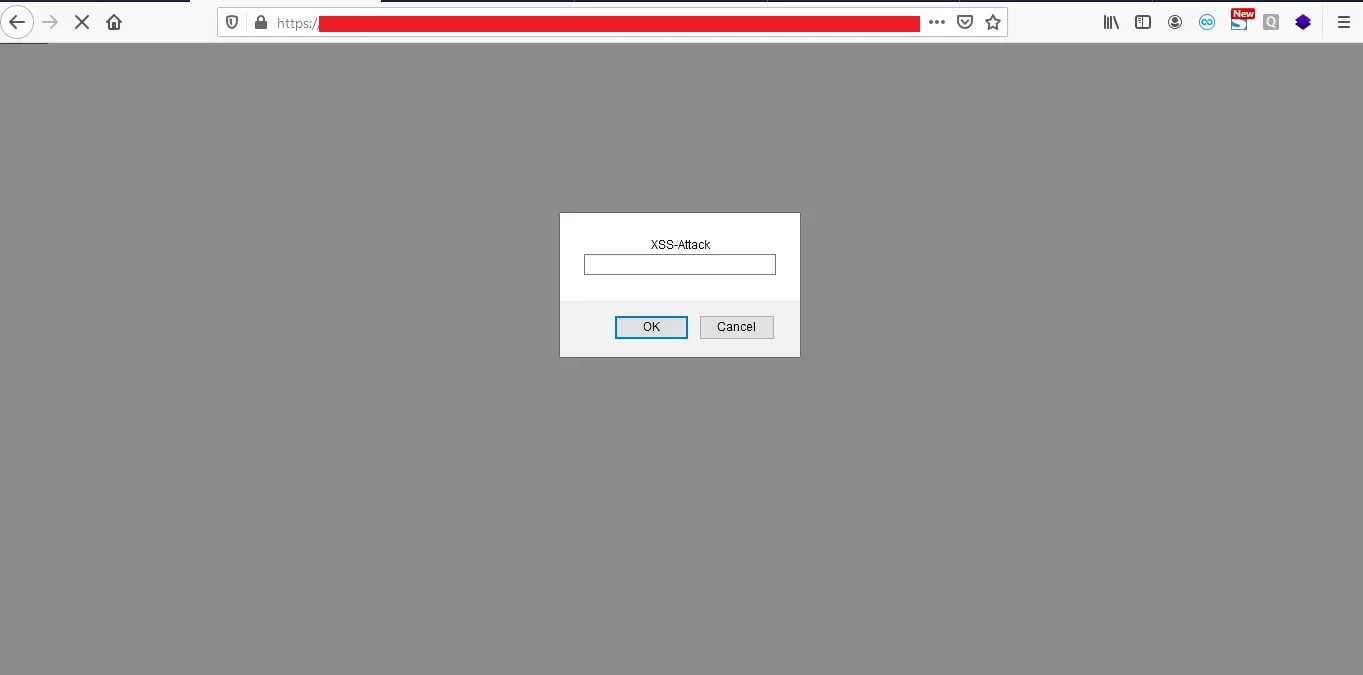
prompt(‘XSS-Attack’);
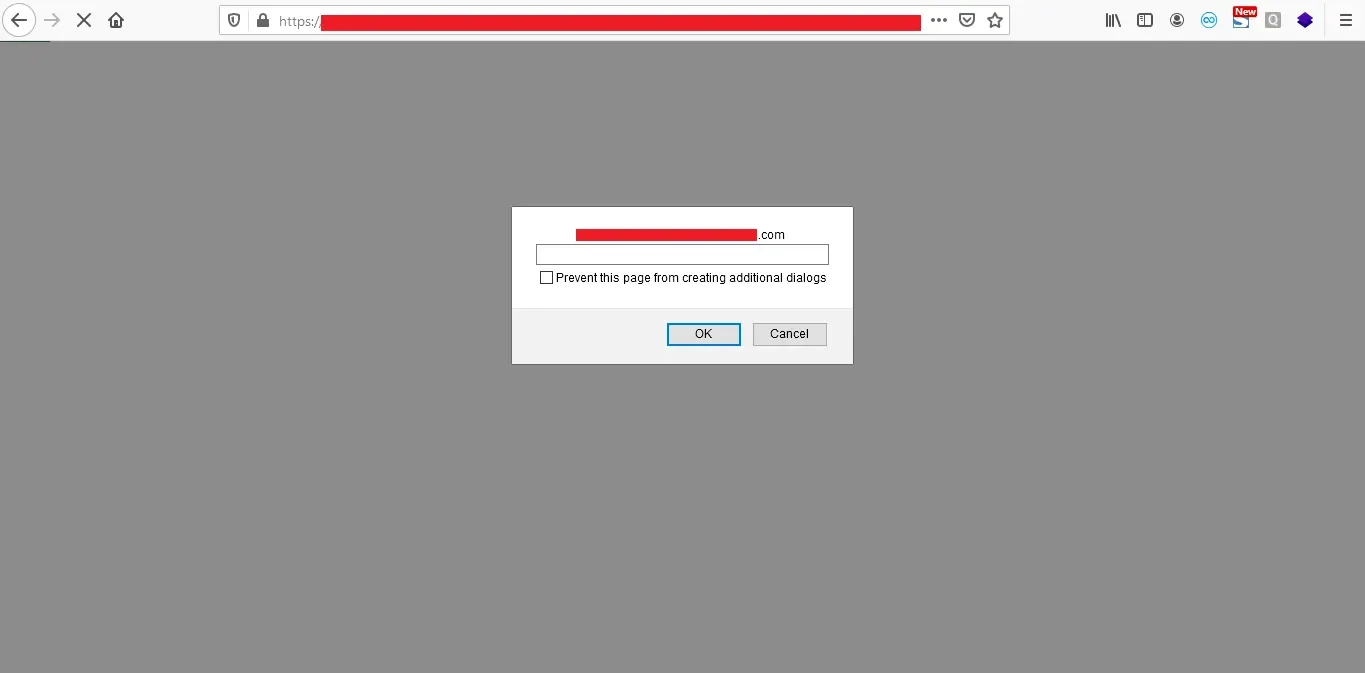
prompt(document.domain);
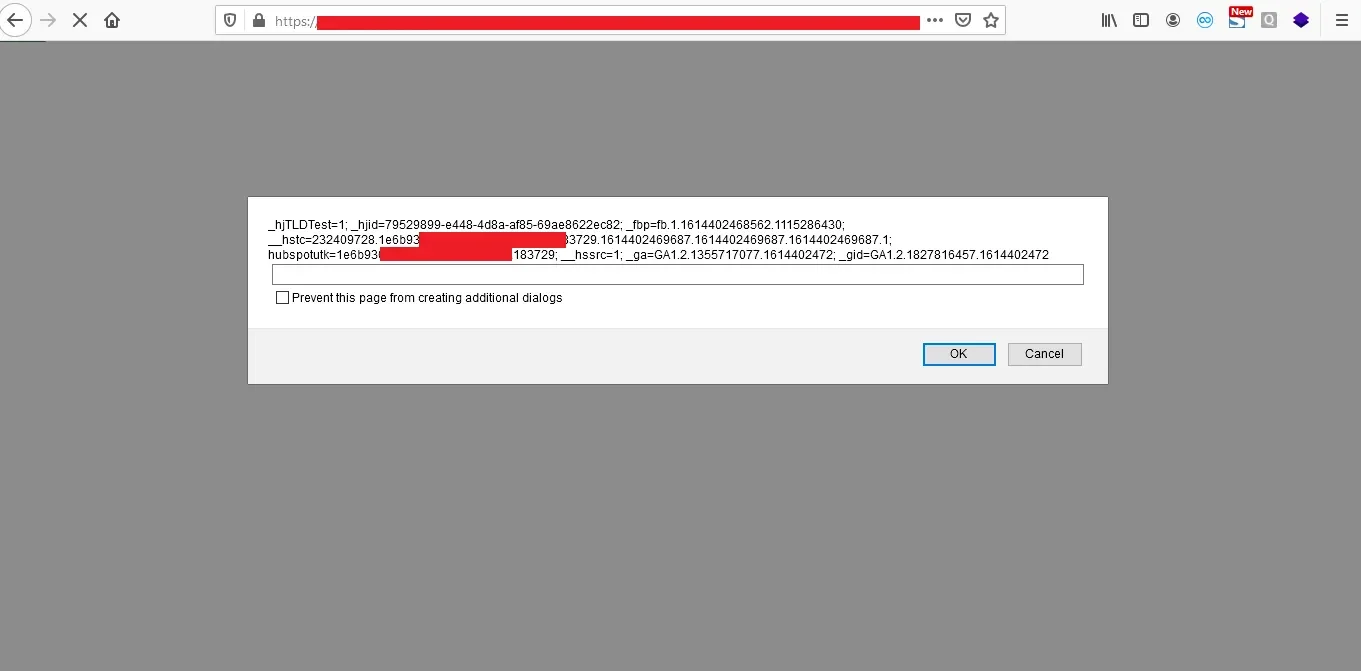
prompt(document.cookie);
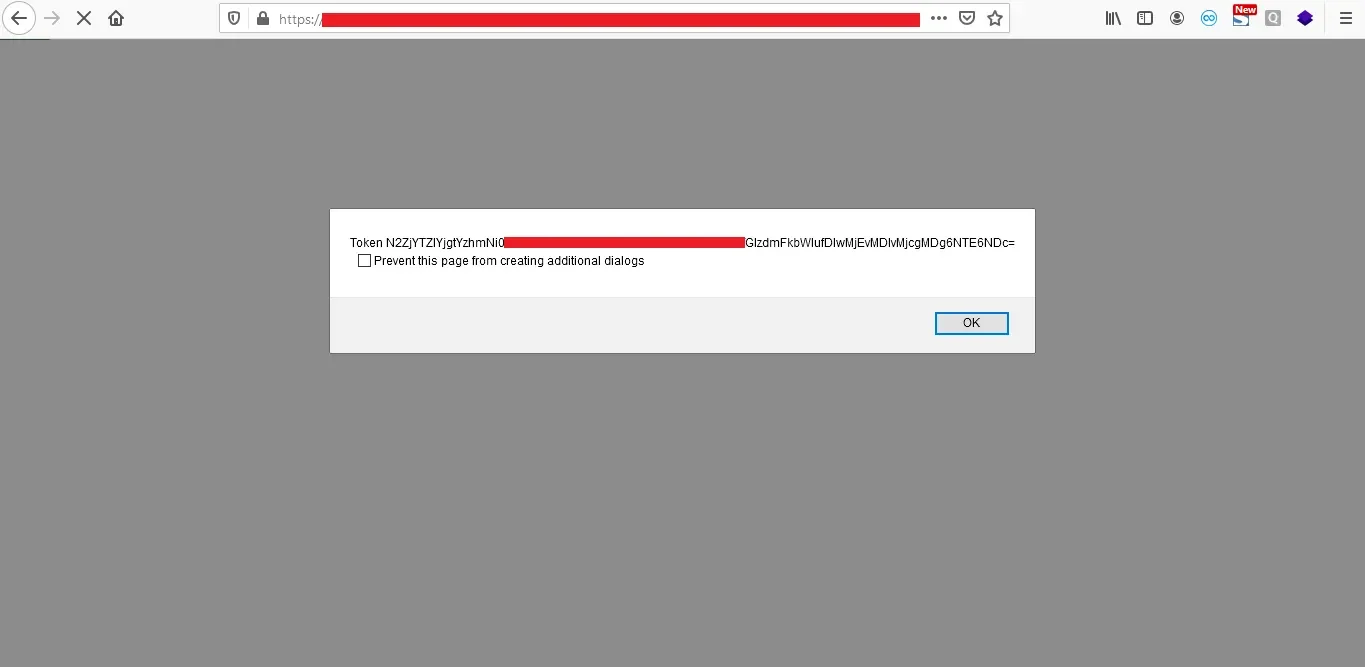
prompt(alert(localStorage.getItem(“IsvSessionToken”)));
With that, the token was read out of localStorage from the uploaded file.
Root cause
In the author's opinion there were three reasons:
- The file extension was not checked during upload.
- After upload, Content-Type validation was not performed.
- Once the file reached the server, it was not validated server side.
In other words, the file-type filter in the picker was bypassed by switching the picker to all files, and the extension, Content-Type and server-side checks were missing. Because the stored SVG was served back, the embedded script executed when the path was visited, and localStorage was readable from it. The report does not describe any response headers or other controls that would have prevented execution.
Impact
An attacker can steal the authentication token of any user who opens the uploaded file's path, and from there craft other attacks such as CSRF, session attacks and account takeover. The report hedges the impact on what kind of information is stored in localStorage: the token is only as valuable as what the application keeps there and what it trusts it for. In this application the token was stored in localStorage and also protected the site against CSRF.
The author calculated the following CVSS 3.0 vector:
CVSS:3.0/AV:N/AC:L/PR:N/UI:R/S:C/C:H/I:L/A:N
That is a score of 8.2 (High). The vector carries UI:R and S:C.
Fix
The recommendation is to allow only non-executable extensions, to perform Content-Type validation, and to add a server-side check, so that this kind of issue is mitigated. The report does not say which of these the program actually implemented.
Variants to test
- Upload an SVG with a script element to any import or attachment feature. A positive result is the file being stored and, when its path is opened, the script running in the application's origin.
- Switch the file picker to all files where the only restriction is the picker's type filter. A positive result is the server accepting an extension it was not meant to accept.
- Intercept the upload response when the storage path is not obvious. A positive result is a path in the response that serves the uploaded file back.
- Read
localStoragefrom the executed script withprompt(alert(localStorage.getItem("<item-name>"))), substituting the item name used by the target. A positive result is a token or other sensitive value appearing in the prompt. - Try other script-capable formats that a document import might accept, checking whether the extension, the Content-Type and the server-side validation each hold independently.
Bounty reward: 1250 USD. Collaboration was done with ethicalbughuntr.

What happened, in plain words
Two researchers, Jerry Shah and his friend ethicalbughunter, were testing a private bug bounty program. A bug bounty program is a scheme where a company invites independent testers to look for security problems in its systems and pays them for the ones they find. "Private" means only invited testers can take part.
The company's website had an import feature: a button that lets you upload a document file, such as a spreadsheet (.csv) or a Word document (.docx), so the site can read its contents. In the author's opinion the website did not check the file extension, did not validate the Content-Type and did not validate the file server side. They uploaded a file of a different type, an .svg image, that contained a small piece of JavaScript code. JavaScript is the programming language that web pages run inside your browser. The file was uploaded, and the path where it was stored was found in the upload response. When anyone opened that address, the browser ran the hidden code.
That kind of problem is called stored cross-site scripting, or stored XSS. "Cross-site scripting" means getting your own code to run inside someone else's website, in the browser of whoever views it. "Stored" means the malicious content is saved on the server first and handed out to every later visitor, rather than being slipped in once.
The code they hid did something specific: it read a value out of the browser's localStorage and displayed it. localStorage is a small storage box that a website can use inside your browser to keep data between visits. In this application the box held an authentication token: a long secret string the site gives you when you log in, which proves on later requests that you are you. The same token was also what protected the site against CSRF, which stands for cross-site request forgery: an attack where another website quietly makes your browser send a request to the vulnerable site while you are logged in. The token was stored in localStorage and also protected the site against CSRF, so reading it opened the door to further attacks.
So the whole story is: a file upload with missing extension, Content-Type and server-side checks, a stored file that ran code, and a secret sitting in a place that code could read. The rest of this article walks through it slowly, in the order the researchers did it.
The background you need first
What a browser, a server and a request are
When you type an address into your browser, the browser sends a request over the internet to a server, which is just a computer somewhere that holds the website. The server sends back a response: the page, an image, a file, or a short note saying "done". Every button you press on a website usually causes one of these request/response pairs. Most of the time you never see them; they happen in the background.
What a file upload is, and what the file picker does
A file upload is a form on a web page that lets you send a file from your computer to the server. When you click the upload button, your operating system opens a file picker: the familiar window where you browse your folders and choose a file. That window can be told to show only certain kinds of files, for example only .csv and .docx. This filter is a convenience for the user. It is not a security control, because it lives on your own computer, and your own computer is under your control, not the website's.
What an extension and a Content-Type are
A file's extension is the part after the last dot in its name, like .csv or .svg. It is a label, nothing more; renaming a file does not change what is inside it. The Content-Type is a label the browser or server attaches to a file when it is sent, saying what kind of content it is, for example text/csv for a spreadsheet or image/svg+xml for an SVG image. Both labels can be wrong or missing, which is why a careful server checks the actual content as well.
What SVG is, and why it matters here
SVG stands for Scalable Vector Graphics. It is a way to describe drawings (lines, shapes, colours) in a text format, and browsers can display SVG files as images. The important detail for us is that an SVG file is written in XML, a text format built from tags in angle brackets, and it is allowed to contain a <script> tag. A <script> tag holds JavaScript, and the browser runs it. So an SVG is not just a picture: it can be a small program. That is why uploading one to a site that later serves it back is dangerous.
What XSS is
XSS, cross-site scripting, is when an attacker manages to get their own JavaScript to run in another user's browser as if it came from the trusted website. The browser has no way to tell the difference: code that arrives from the site's own address is treated as the site's own code. That means it can read anything the site has stored in the browser for that address, including localStorage, and it can make requests to the site as the logged-in user.
What localStorage is
localStorage is one of two storage boxes a website can use inside your browser. The report explains both:
window.localStoragestores data with no expiration date. It survives closing the browser and is still there next day, next week or next year.window.sessionStoragestores data for one session only. The data is deleted when you close that browser tab.
Compared with cookies (the older way of keeping small pieces of data in the browser), the storage limit is far larger, at least 5MB, and the information is never transferred to the server automatically. Web storage is per origin, meaning per domain and protocol: all pages from one origin can store and access the same data, and pages from a different origin cannot.
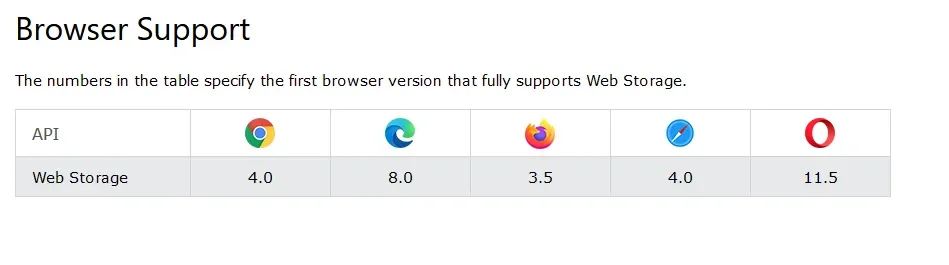
Browser Support
What a token is, and what CSRF is
A token here is a secret string the site creates when you log in. It is unique for every account. Your browser keeps it, and the site used it to protect against CSRF. The report says the token also protected the website from CSRF attacks. If an attacker can read the token, they can craft other attacks such as CSRF, session attacks and account takeover.
How the vulnerability was found
The researchers were working on a private program. No account roles, application versions or server details are given in the report. The only tool named is Burp, short for Burp Suite, a program that sits between your browser and the website and lets you look at, pause and change the requests and responses going past. Think of it as a transparent envelope you can open in the post.
Step 1: find the import feature
The starting point was an import function on the site, meant for document files.
Import feature
Import feature
Step 2: open the upload dialog
They clicked the Start Import button. The file picker that opened was limited to All Supported Types, because only document files were supposed to be importable.
All Supported Types
Step 3: widen the file filter
The restriction lived in the file picker on their own desktop, so they changed the filter from All Supported Types to All File. That made it possible to select a file with an .svg extension, which they had prepared with an XSS payload inside an XML script. The reason for this step is simple: if the only thing stopping an SVG is a dropdown on your own machine, then there is no real restriction at all.
All Files
Step 4: upload and intercept the request
They uploaded the .svg file and paused the outgoing request with Burp, so they could see exactly what the browser was sending.
Intercepted Request
Step 5: intercept the response to learn where the file went
On the first attempt the file uploaded with no visible effect, and they could not find where it had been stored. So they repeated the upload and this time used the option Do intercept > Response to this request, which pauses the server's reply instead of the outgoing request. The reply revealed the path where the file was being uploaded. The lesson: when you cannot see where something landed, look at what the server says back.
Intercepting the Response
File Path
Step 6: visit the path and run the payload
Visiting the path returned by the response triggered the stored XSS. The payload used was:
<?xml version=”1.0" standalone=”no”?>
<!DOCTYPE svg PUBLIC “-//W3C//DTD SVG 1.1//EN” “[http://www.w3.org/Graphics/SVG/1.1/DTD/svg11.dtd](http://www.w3.org/Graphics/SVG/1.1/DTD/svg11.dtd)">

<svg version=”1.1" baseProfile=”full” xmlns=”[http://www.w3.org/2000/svg](http://www.w3.org/2000/svg)">
<polygon id=”triangle” points=”0,0.0,50.50,0" fill=”#009900" stroke=”#004400"/>
<script type=”text/javascript”>
prompt(‘XSS-Attack’);
prompt(document.domain);
prompt(document.cookie);
prompt(alert(localStorage.getItem(“IsvSessionToken”)));
</script>
</svg>
Line by line, in plain words:
<?xml version=”1.0" standalone=”no”?>tells the browser this file is XML, version 1.0. It is the standard opening line of an XML document.<!DOCTYPE svg PUBLIC ...>says which official definition of SVG the file follows. It is bookkeeping, so the browser knows how to read the rest.<svg version=”1.1" baseProfile=”full" xmlns=”...">opens the drawing itself. Everything until the closing</svg>is part of the picture.<polygon id=”triangle” points=”0,0.0,50.50,0" fill=”#009900" stroke=”#004400"/>draws a green triangle. It is there so the file is a valid, ordinary-looking image; the interesting part is what comes next.<script type=”text/javascript”>opens a block of JavaScript. This is the part that turns a picture into a program.prompt(‘XSS-Attack’);makes a small pop-up box appear with the textXSS-Attack. It is the simplest proof that code is running at all.prompt(document.domain);shows the domain the code is running on. If it shows the vulnerable site's domain, the code is running as that site, which is exactly what XSS means.prompt(document.cookie);shows the cookies the page can see. Cookies are the older way sites keep small pieces of data in your browser.prompt(alert(localStorage.getItem(“IsvSessionToken”)));reads the item namedIsvSessionTokenout oflocalStorageand shows it.getItemis the instruction "give me the value stored under this name". This is the line that steals the token.</script>and</svg>close the script block and the drawing.
The report adds a note: you need to change the item name of the localStorage to match whatever the target site actually uses. IsvSessionToken was the name in this application.
The screenshots show each of those prompts firing from the uploaded file's path.
prompt(‘XSS-Attack’);
prompt(document.domain);
prompt(document.cookie);
prompt(alert(localStorage.getItem(“IsvSessionToken”)));
With that, the token was read out of localStorage from the uploaded file.
Why this happened
In the author's opinion there were three reasons:
- While uploading the file, the extension was not being checked.
- After the file was uploaded, Content-Type validation was not done.
- After the file was sent to the server, it was not being validated by the server.
Put simply, the file-type filter in the picker on the user's own computer was bypassed by switching the picker to all files, and the extension, Content-Type and server-side checks were missing. Because the stored SVG was served back, the embedded script ran when the path was visited, and localStorage was readable from it. The report does not describe any response headers or other controls that would have prevented execution.
What an attacker could do with it
An attacker can steal the authentication token of any user who opens the uploaded file's path, and from there craft other attacks such as CSRF, session attacks and account takeover. Account takeover means logging in as the victim and doing anything they could do. The report is careful to say the impact depends on what kind of information is being stored in localStorage: the token is only as valuable as what the application keeps there and what it trusts it for. In this application the token was stored in localStorage and also protected the site against CSRF.
The author calculated the following CVSS 3.0 vector. CVSS is a standard scoring system for rating how serious a vulnerability is; the vector is the shorthand that produces the score.
CVSS:3.0/AV:N/AC:L/PR:N/UI:R/S:C/C:H/I:L/A:N
That is a score of 8.2 (High). The vector carries UI:R and S:C.
How to fix it
The recommendation is to allow only non-executable extensions, to perform Content-Type validation, and to add a server-side check, so that this kind of issue is mitigated. In everyday terms: decide on the server, not in the user's file picker, which file types are acceptable; check the label that comes with the file; and check the file's actual contents before storing it. The report does not say which of these the program actually implemented.
Other places to look for the same pattern
- Upload an SVG with a script element to any import or attachment feature. A positive result is the file being stored and, when its path is opened, the script running in the application's origin.
- Switch the file picker to all files where the only restriction is the picker's type filter. A positive result is the server accepting an extension it was not meant to accept.
- Intercept the upload response when the storage path is not obvious. A positive result is a path in the response that serves the uploaded file back.
- Read
localStoragefrom the executed script withprompt(alert(localStorage.getItem("<item-name>"))), substituting the item name used by the target. A positive result is a token or other sensitive value appearing in the prompt. - Try other script-capable formats that a document import might accept, checking whether the extension, the Content-Type and the server-side validation each hold independently.
The bounty reward was 1250 USD. Collaboration was done with ethicalbughuntr.
Glossary
- Bug bounty program: a scheme where a company invites independent testers to find security problems in its systems and pays them for the ones they find.
- Private program: a bug bounty program open only to invited testers.
- Server: a computer on the internet that holds a website and answers requests for it.
- Request: a message your browser sends to a server, for example asking for a page or sending an uploaded file.
- Response: the server's reply to a request, such as a page, a file, or a short confirmation.
- File upload: a form on a web page that sends a file from your computer to the server.
- File picker: the window your operating system opens so you can browse folders and choose a file; it can be filtered to show only certain file types.
- Extension: the part of a file name after the last dot, such as
.csvor.svg; a label, not a guarantee of content. - Content-Type: a label attached to a file saying what kind of content it is, such as
text/csvorimage/svg+xml. - XML: a text format built from tags in angle brackets, used to describe structured documents.
- SVG: Scalable Vector Graphics, a text-based format for drawings that browsers can display and that may contain a
<script>tag. - JavaScript: the programming language that web pages run inside your browser.
<script>tag: the part of an HTML or XML document that holds JavaScript for the browser to run.- XSS (cross-site scripting): getting an attacker's JavaScript to run in another user's browser as if it came from the trusted website.
- Stored XSS: XSS where the malicious content is saved on the server and served to every later visitor.
- Payload: the piece of code or data an attacker uses to carry out an attack.
localStorage: a storage box inside your browser that a website can use to keep data with no expiration date, per origin.sessionStorage: a similar storage box whose data is deleted when the browser tab is closed.- Origin: a combination of domain and protocol; pages from one origin can share storage, pages from another cannot.
- Cookie: an older way for a site to keep small pieces of data in your browser, sent to the server with requests.
- Token: a secret string, often created at login and unique per account, used to prove who you are on later requests.
- CSRF (cross-site request forgery): an attack where another website makes your browser send a request to a site you are logged in to.
- Account takeover: logging in as another user and doing anything they could do.
- Burp (Burp Suite): a tool that sits between your browser and a website so you can look at, pause and change requests and responses.
- Intercept: to pause a request or response in a tool such as Burp so you can inspect or modify it before it continues.
prompt(): a JavaScript instruction that shows a small pop-up box with a message.document.domain: a JavaScript property holding the domain of the page the code is running on.document.cookie: a JavaScript property holding the cookies the page can see.localStorage.getItem(name): the JavaScript instruction that returns the value stored under a given name inlocalStorage.- CVSS: a standard scoring system for rating the severity of a vulnerability; the vector is the shorthand that produces the score.
- UI:R: a CVSS component meaning user interaction is required for the attack to work.
- S:C: a CVSS component meaning the vulnerable component and the impacted component are different, here that the script runs in the context of the application.
- Mitigation: a change that reduces or removes the risk of a vulnerability.
- Server-side validation: checking data on the server, where the user cannot tamper with the check, rather than in the browser.