You’re Not Supposed To ShareFile With Everyone (Progress ShareFile Pre-Auth RCE Chain CVE-2026-2699 & CVE-2026-2701)
Progress ShareFile Storage Zone Controller 5.12.3 contained an authentication bypass where the admin configuration page redirected unauthenticated users but did not stop executing the page, and a post-authentication remote code execution flaw where the storage location could be pointed at the webroot and a file uploaded there. An attacker could chain these to run code on a fully patched, internet-facing controller without credentials.

This research is a glimpse into the capability powering the watchTowr Platform, a Preemptive Exposure Management solution. We enable organizations to autonomously validate and mitigate their exposure to emerging threats, ahead of in-the-wild exploitation.
The full write-up lives on its author's site
It belongs to its author, so we link to it rather than copy it. The other two tabs are our own rewrites, checked against it.
Context
Progress ShareFile is a file sharing and collaboration product that was previously owned by Citrix and acquired by Progress in 2024. In ShareFile's own words, it "gives you a structured, secure space to work with clients - share files, collect signatures, request data, and manage to-dos in one place".
Most of the product is SaaS, but ShareFile also ships an on-premises component called the Storage Zone Controller. It is a customer-managed gateway that keeps files in the customer's own storage (on-premises or cloud) while the ShareFile SaaS interface handles access and sharing. It handles secure file transfers, authentication and policy enforcement, and the storage repository can be a local file system, SMB servers, SharePoint, or AWS S3 and Azure Storage containers. Organisations use it for data sovereignty, regulatory requirements and general security hygiene.
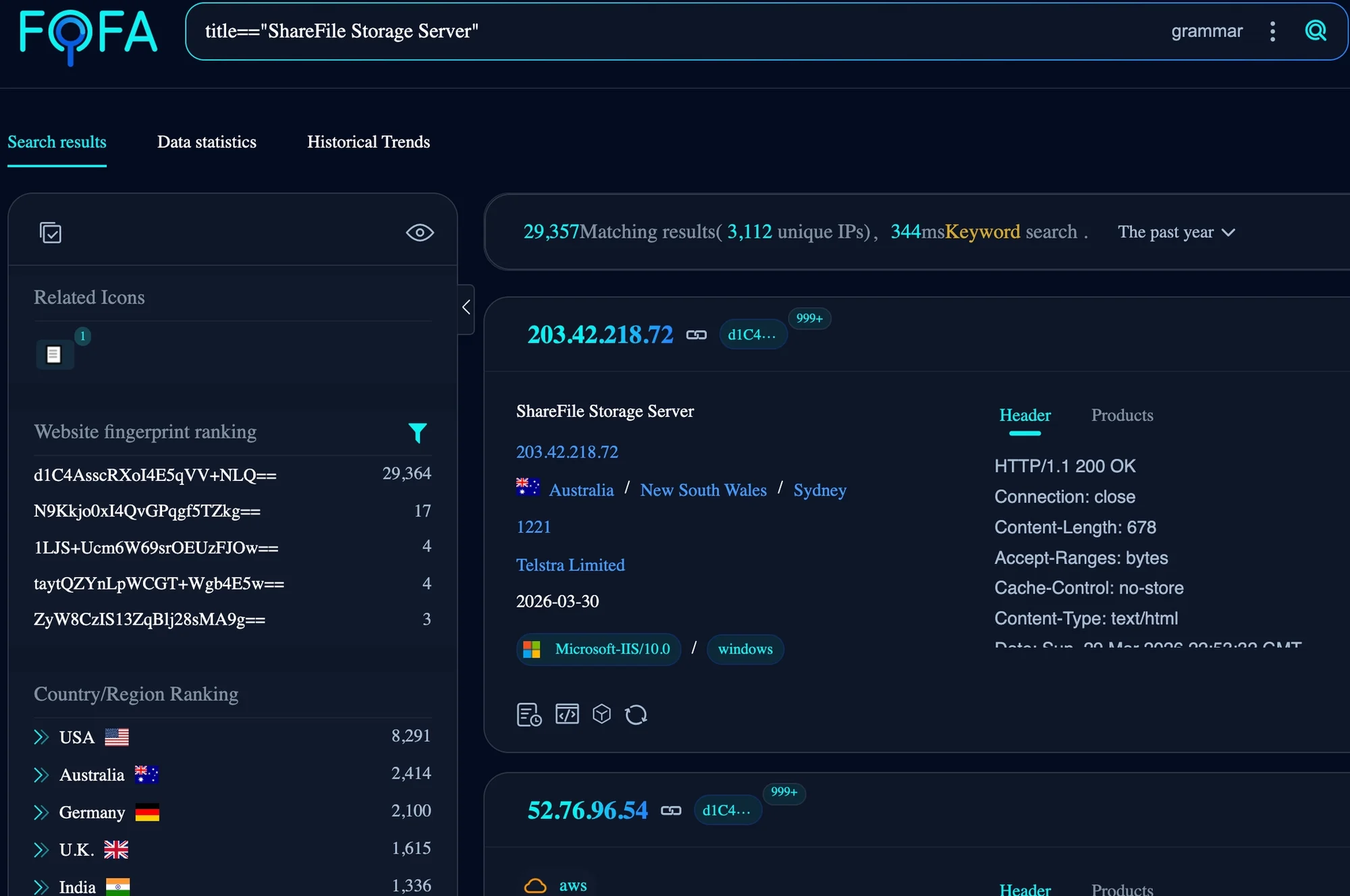
A quick Internet search for the Storage Zone Controller reveals circa 30,000 instances.
ShareFile has two major branches for applications hosted in IIS:
- Branch 6.x, built on .NET Core
- Branch 5.x, built on ASP.NET
The research touched both branches, but both vulnerabilities described here are specific to branch 5.x. They were identified in StorageCenter_5.12.3, the latest version at the time of writing, and resolved in 5.12.4, released to branch 5.x customers on 10 March 2026.
The two issues chain into pre-authenticated remote code execution:
- CVE-2026-2699 / WT-2026-0006: authentication bypass
- CVE-2026-2701 / WT-2026-0007: remote code execution
Setup
The installation places files in the IIS directory C:\inetpub\wwwroot\ShareFile and registers the application under the IIS "Default Web Site". All of the application's .dll files were extracted and decompiled into their respective C# code.
After installation, a configuration page is launched from localhost to authenticate the instance against the connected SaaS user. ShareFile's cloud offering is Progress's main interface and infrastructure for managing files, and accounts can be created through the website without a sales approval process.
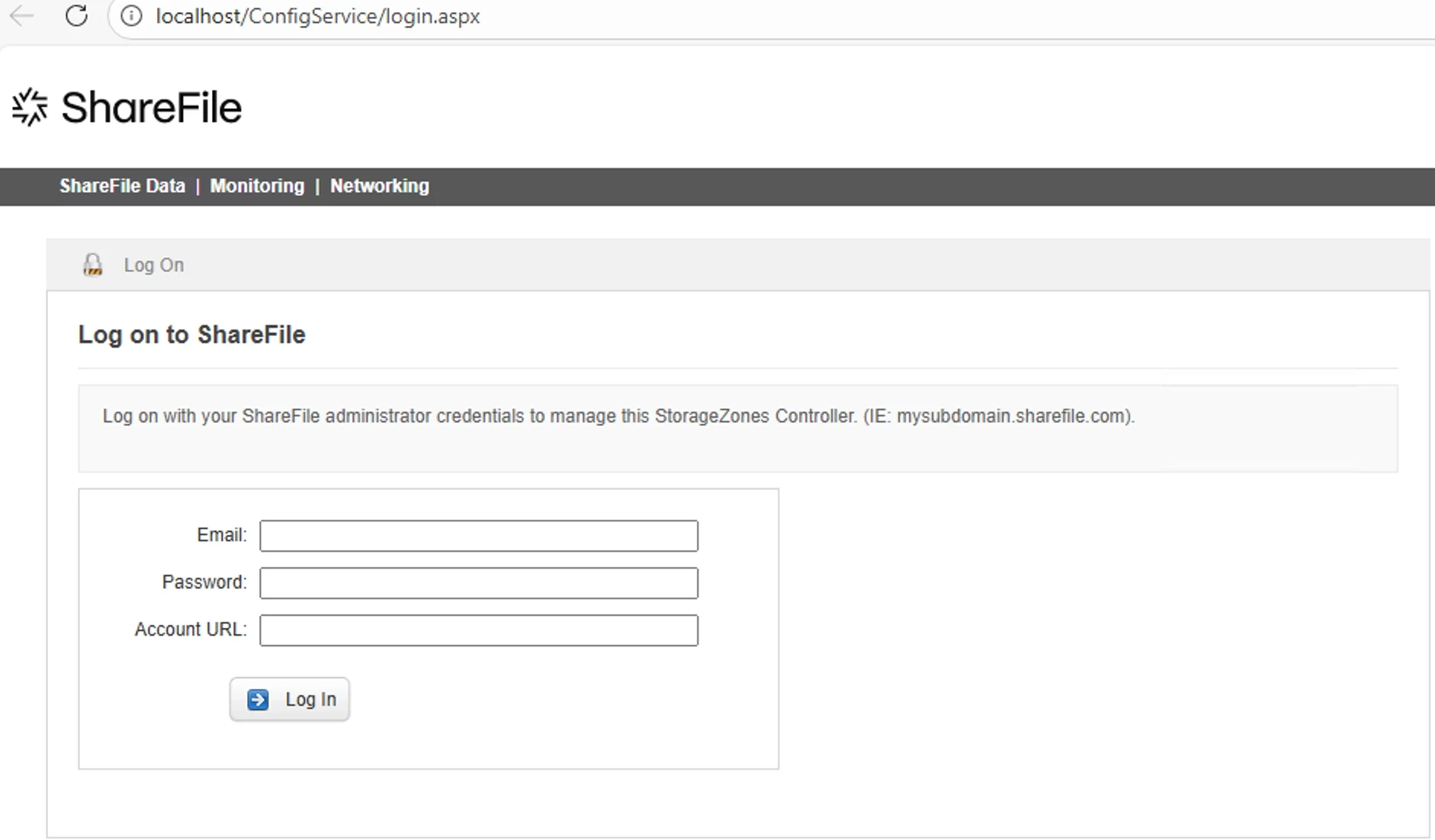
The lab was configured to behave like a production deployment:
- Authenticate and connect the Zone Controller to the Progress SaaS.
- Create a Primary Zone that hosts files on a local file server rather than in Progress's SaaS environment.
For a .NET application like this, external pre-authenticated interaction happens through two main surfaces:
- ASHX, ASMX and ASPX files that execute scripted code, which can also reference compiled DLLs.
- Routes such as REST endpoints defined in
web.configand backed by DLL code.
The methodology was to read the easier script files first, then the large DLLs containing the REST API. Before reading code, each script file and endpoint was requested to observe status code, content length and content type, because the running application can reveal traits that are not obvious in the source.
Finding it
All .aspx files in the application were listed and requested. The list is:
/AdvancedStatus.aspx
/cifs/upload-streaming-2.aspx
/cifs/upload.aspx
/ConfigService/Admin.aspx
/ConfigService/Login.aspx
/ConfigService/Networking.aspx
/ConfigService/PreFlightCheck.aspx
/ConfigService/SMTPConfig.aspx
/ConfigService/UpdatePassphrase.aspx
/documentum/upload-streaming-2.aspx
/documentum/upload.aspx
/heartbeat.aspx
/ProxyService/rest/storagecenter.aspx
/rest/queue.aspx
/sp/upload-streaming-2.aspx
/sp/upload.aspx
/thumbnail.aspx
/upload-resumable-1.aspx
/upload-resumable-2.aspx
/upload-resumable-3.aspx
/upload-singlechunk.aspx
/upload-streaming-1.aspx
/upload-streaming-2.aspx
/upload-threaded-1.aspx
/upload-threaded-2.aspx
/upload-threaded-3.aspx
/upload.aspx
The goal was to find differentials: endpoints that do not redirect to authentication and do not return 401 or 403. The configuration endpoints used during setup, such as /ConfigService/Login.aspx, return HTTP 403 (Forbidden) because they are only accessible from the host itself (localhost, [redacted]).
One endpoint stood out: /ConfigService/Admin.aspx. Its response was:
HTTP/1.1 302 Found
Cache-Control: private,no-store
Pragma: no-cache
Content-Type: text/html; charset=utf-8
Location: /ConfigService/Login.aspx?callerpage=Admin
Server: Microsoft-IIS/10.0
Access-Control-Allow-Origin: *
Access-Control-Max-Age: 540
Access-Control-Allow-Headers: Content-Type
Access-Control-Allow-Methods: GET, POST, PATCH, DELETE, OPTIONS, HEAD
Strict-Transport-Security: max-age=31536000
X-Content-Type-Options: nosniff
X-XSS-Protection: 1; mode=block
X-Frame-Options: DENY
Date: Mon, 23 Mar 2026 01:59:44 GMT
Content-Length: 22448

<html><head><title>Object moved</title></head><body>
<h2>Object moved to <a href="/ConfigService/Login.aspx?callerpage=Admin">here</a>.</h2>
</body></html>

<!DOCTYPE html PUBLIC "-//W3C//DTD XHTML 1.0 Transitional//EN" "<http://www.w3.org/TR/xhtml1/DTD/xhtml1-transitional.dtd>">

<html xmlns="<http://www.w3.org/1999/xhtml>">
<head id="ctl00_Head1"><title>
	ShareFile - Where Companies Connect
</title>
[... Truncated ...]
In a browser, the Location header redirects to Login.aspx, which returns 403 because it is localhost-only. What was anomalous was the large Content-Length and the content in the body: the admin page markup was being returned alongside the redirect.
This pattern is familiar from PHP applications, where a developer checks authentication and redirects but forgets to die(), so the rest of the script executes. It is catalogued as CWE-698: Execution After Redirect (EAR). In a .NET application it was unexpected.
Exploitation
Step 1: render the admin panel
To confirm the bypass in a browser, modify the HTTP response with any tool, drop the Location header, and the admin panel renders.
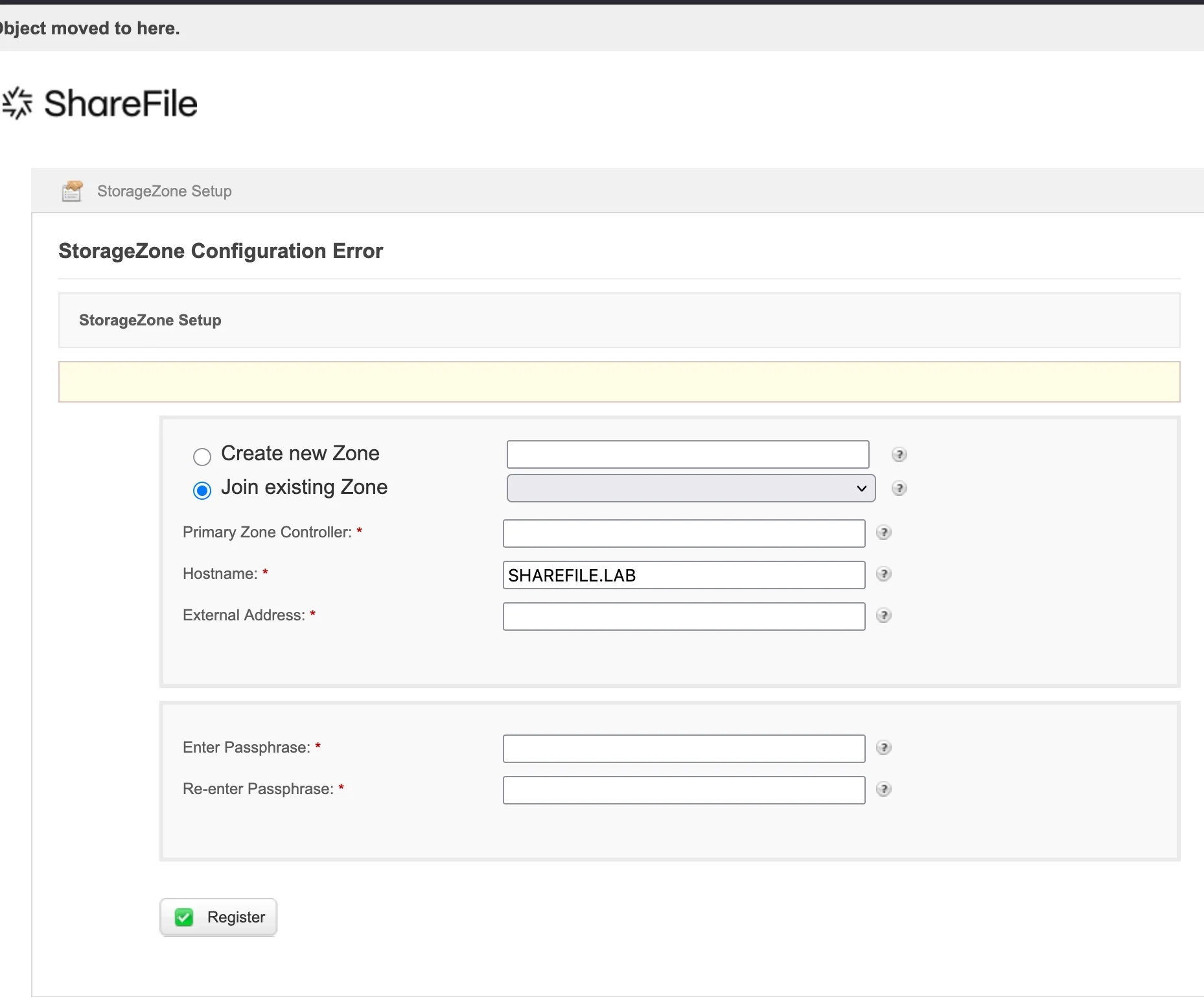
The screenshot shows what is visible after removing the redirecting Location header, allowing the rest of the body to render. Functionality is presented that can be interacted with without authentication.
Step 2: understand the code path
The source of Admin.aspx references a class ConfigService.Admin, whose code lives in the decompiled DLLs. Its Page_Load method checks authentication and then redirects:
protected void Page_Load(object sender, EventArgs e)
		{
			this._logger.LogDebug("Page_Load Enter", Array.Empty<object>());
			this.Master.ActionHeader = "Select ShareFile " + (Admin.isMultiTenant ? "Multi-Tenant " : string.Empty) + "StorageZone";
			this.Master.HeaderTitle = "<span class=\"ico24 icoAdmin\"></span>" + (Admin.isMultiTenant ? "Multi-Tenant " : string.Empty) + "StorageZone Setup";
			if (!this._sessionHelper.IsSessionAuthenticated(HttpContext.Current.Session))
			{
				this._logger.LogDebug("Not authenticated", Array.Empty<object>());
				string redirectPathWithCallerInfo = this._redirectionHelper.GetRedirectPathWithCallerInfo(WebPage.Login, WebPage.Admin);
				this._redirectionHelper.RedirectAndCompleteRequest(new HttpContextWrapper(HttpContext.Current), redirectPathWithCallerInfo);
				return;
			}
The redirect goes through RedirectAndCompleteRequest():
		public void RedirectAndCompleteRequest(HttpContextBase httpContext, string redirectPath)
		{
			httpContext.Response.Redirect(redirectPath, false);
			HttpApplication applicationInstance = httpContext.ApplicationInstance;
			if (applicationInstance == null)
			{
				return;
			}
			applicationInstance.CompleteRequest();
		}
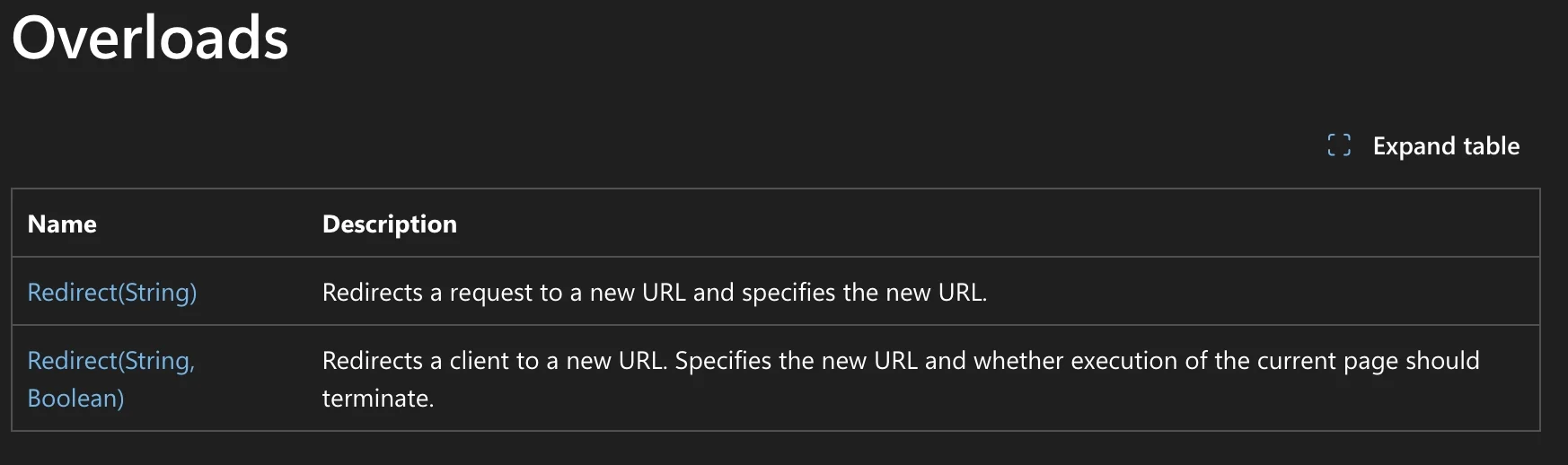
The response is redirected with the native httpContext.Response.Redirect. Two arguments are passed: a string and a Boolean. Most common uses pass only the string, for example Redirect('/ConfigService/Login.aspx?callerpage=Admin'). Here the Boolean false is additionally supplied: Redirect('/ConfigService/Login.aspx?callerpage=Admin', false).
The Microsoft documentation for this overload explains what the Boolean controls: whether execution of the current page should terminate.
Because ShareFile supplies false:
- The response is a 302 redirecting to
/ConfigService/Login.aspx?callerpage=Admin, which is fine. - The remaining functionality in the
ConfigService.Adminclass is executed rather than terminated, which is not fine.
Step 3: reach the Zone configuration
On /ConfigService/Admin.aspx there are two options:
- Create new Zone
- Join existing Zone
A Zone configuration determines how the instance's files and data are stored. This is the key feature of the on-premises Zone Controller: enterprises store their files on their own infrastructure via the Storage Repository field, which can be SharePoint, AWS S3 buckets or Azure Storage Containers, SMB servers, or the local file system.

From an external perspective, "Create new Zone" produced errors that could not be overcome, so the research moved to "Join existing Zone", which will be present in most, if not all, exposed Storage Zone Controllers on the Internet, since a Zone Controller without a configured Zone would be pointless.
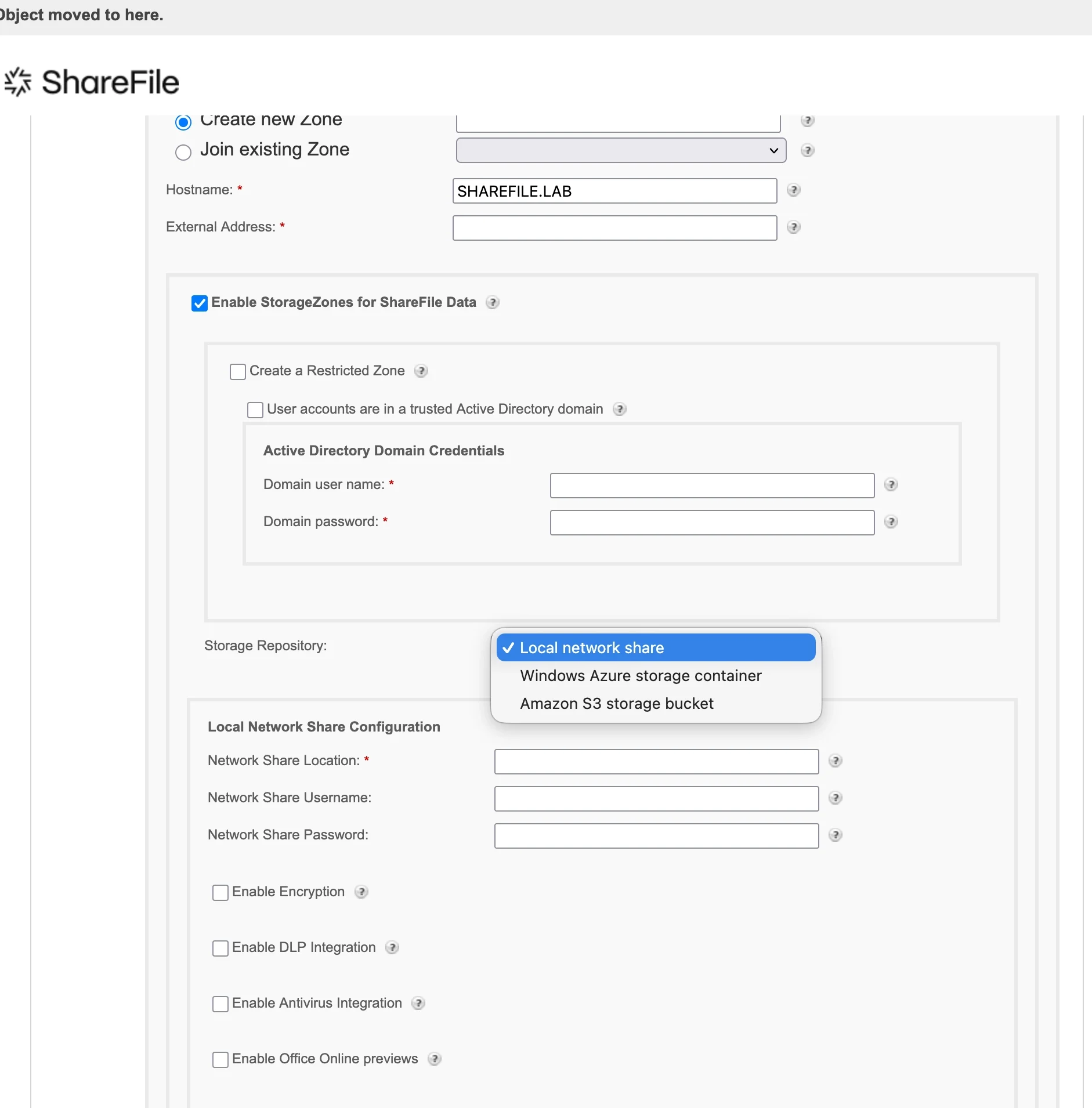
To test whether the functionality is accessible and actionable pre-authentication, the Zone was configured to connect to a local network share, with the hope of making a slight modification as a litmus test.
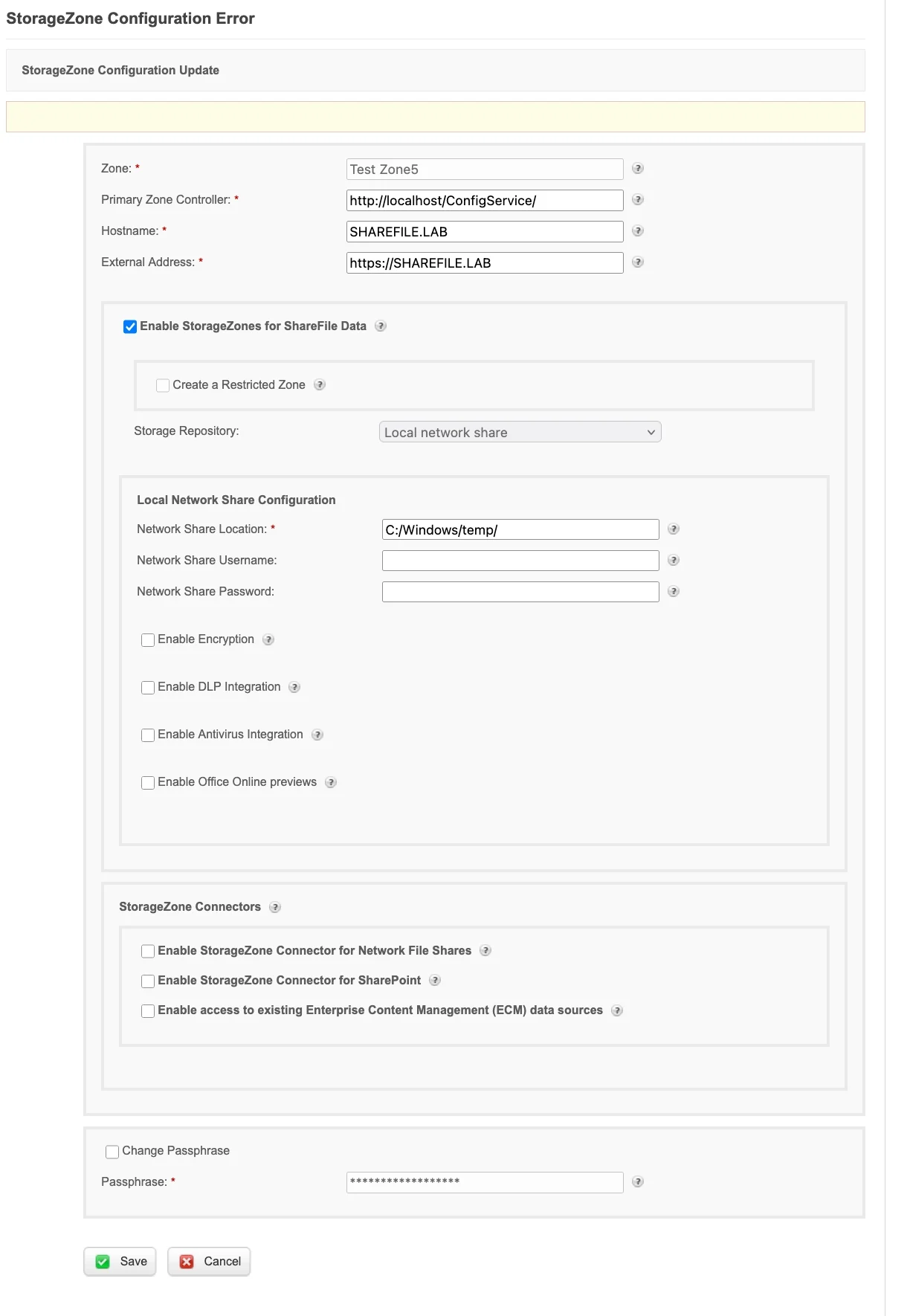
The modifiable fields and their purposes are:
| Field | Purpose |
|---|---|
| Zone | Zone name |
| Primary Zone Controller | URL of the Primary Zone; an array of zone controllers can get their configuration from a Primary Zone |
| Hostname | Hostname of the installation |
| External Address | Internet-facing URL through which the ShareFile SaaS reaches the instance to sync configs, data, etc. |
| Storage Repository | The method in which the files for the ShareFile account are stored |
| Passphrase | The password used to encrypt API/REST endpoints of the current Zone Controller |
When a Zone is created, a Passphrase is needed, and it encrypts all API interactions with that Primary Zone Controller. A pre-authenticated attacker would not know this value. However, when modifying fields such as Storage Repository or External Address, the server auto-populates the Passphrase, so knowing it is not required.
Step 4: abuse the Storage Repository
Each field was analysed for its security impact if modified by a threat actor. For example, changing the victim's Storage Repository to an AWS S3 bucket under attacker control means files synced or uploaded to the instance are sent to a repository the attacker controls, effectively exfiltrating sensitive files.
The reasoning then moved to the primary/subordinate model: in architectures where a primary server controls subordinate hosts, the primary maintains the source of truth and downstreams commands and configurations. If a victim Storage Zone Controller could be coerced into joining a malicious zone, downstreaming might expose additional functionality.
An independent malicious Storage Zone Controller was configured, and the victim Controller was pointed at it via the Primary Zone Controller field. Zone Controllers communicate over an encrypted, signed API, so in a real attack the attacker's Passphrase would need to differ from the victim's. Changing the Passphrase normally requires a frontend request supplying the "Old Passphrase", which an attacker does not know.
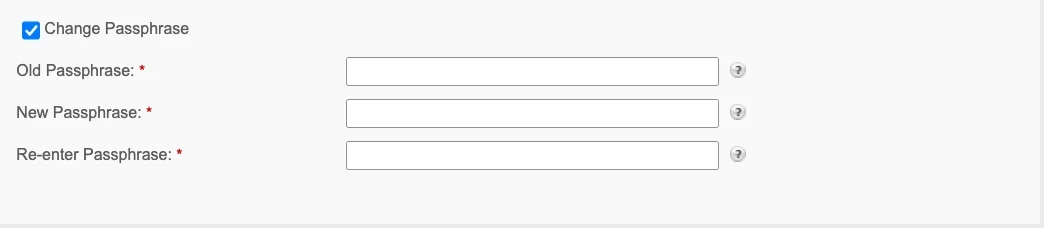
That "Old Passphrase" is not validated when changing the Primary Zone Controller field, so a victim's Storage Zone Controller can be connected to a malicious one without authentication.

One caveat: this functionality can only be executed if the server side is authenticated with the ShareFile SaaS, which is common because it is required for the Storage Zone Controller to work as intended.
Step 5: from admin to code execution
With authentication bypassed and the passphrase modifiable, the next step is code execution.

A file storage solution with admin access logically offers its built-in upload functionality. Such products typically let you specify the storage location, so ShareFile could be reconfigured to store uploaded files in a dangerous location such as the webroot. The imagined steps were:
- Set the upload path to a location within the webroot.
- Upload an ASPX webshell.
- Profit.
It did work that way, but it was more tricky and complicated than expected.
Step 6: control the upload path
ShareFile supports various kinds of file storage and uploads, and the candidate to abuse was Local Network Share.
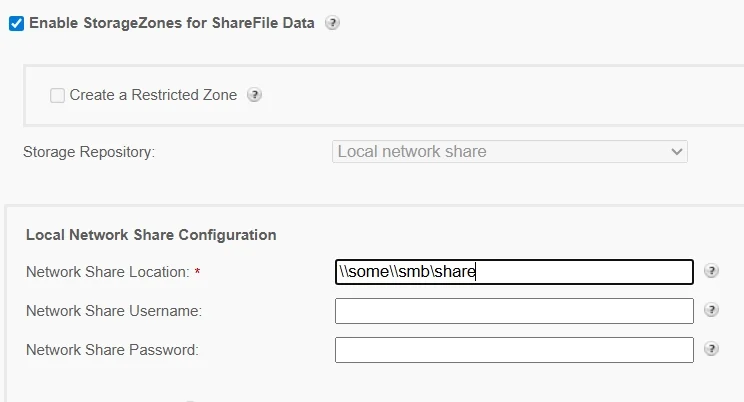
ShareFile lets you define SMB-based storage for files. The Network Share Location parameter suggests a UNC path to an SMB share. The supplied path is validated, through ShareFile.StorageCenter.ConfigService.BusinessLogic.Services.AdminService.ValidateStorageLocation:
private BaseActionResult ValidateStorageLocation(string filePath, string storageLocationType)
{
    BaseActionResult baseActionResult = new BaseActionResult
    {
        IsSuccess = true,
        Message = string.Empty
    };
    try
    {
        using (StreamWriter streamWriter = new StreamWriter(filePath, false))
        {
            streamWriter.Write("SCTest");
            streamWriter.Flush();
        }
    }
    catch (Exception ex)
    {
        this._logger.LogError(ex, "An error occurred validating storage location: writing to " + filePath, Array.Empty<object>());
        baseActionResult.IsSuccess = false;
        baseActionResult.Message = string.Concat(new string[] { "Problem accessing ", storageLocationType, " Location. Check if the ", storageLocationType, " Location is correct and the user has write permission." });
        return baseActionResult;
    }
    try
    {
        if (File.Exists(filePath))
        {
            File.Delete(filePath);
        }
    }
    catch (Exception ex2)
    {
        this._logger.LogError(ex2, "An error occurred validating storage location: deleting " + filePath, Array.Empty<object>());
        baseActionResult.IsSuccess = false;
        baseActionResult.Message = string.Concat(new string[] { "Problem accessing ", storageLocationType, " Location. Check if the ", storageLocationType, " Location is correct and the user has delete permission." });
        return baseActionResult;
    }
    return baseActionResult;
}
Here filePath is a temporary file supposed to exist in the supplied network share location. The code creates the file, checks it exists, and deletes it. If any step fails, the configuration fails and the error is shown to the user. It is a good functional check, but it delivers no real security: any upload path can be specified, and as long as the application can write to it, the configuration succeeds.
Nothing stops a path such as:
C:\\inetpub\\wwwroot\\ShareFile\\StorageCenter\\documentum
which is a webroot directory for one of the ShareFile applications. The application can be pointed at its own webroot instead of a network share, and the configuration page then looks as follows.
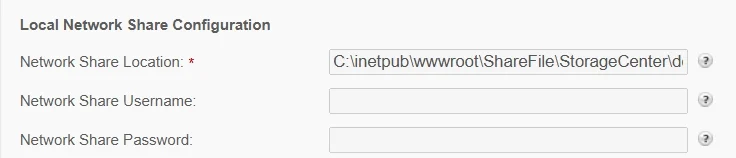
This is a root cause for the post-authentication RCE, but a webshell still has to be uploaded.
Step 7: find an upload that keeps the extension
The file upload endpoints using Network Share Location as the destination turned out to be unsuitable for webshells because:
- The uploaded file is renamed to a "random" key, such as a GUID.
- The file extension is removed.
This is a common model for applications with some security awareness: the file is renamed to a key and the key to filename mapping is stored, for example in a database, so the user retrieves the file by key rather than filename. Implemented properly, it protects against things like path traversal.
A sample upload method, ProcessFileControl, shows the behaviour:
private static int ProcessFileControl(InputFile fileControl, ShareFileUploadNotification sfun, string uploadId, Hashtable files, Hashtable fileHashes, string basePath, string accountId)
{
	if (!fileControl.HasFile)
	{
		return 0;
	}
	if (fileControl.ContentLength == 0L)
	{
		return Upload.ProcessZeroByteFile(fileControl.FileName, sfun, uploadId, files);
	}
	string text = ShareFile.StorageCenter.BusinessLogic.Configuration.TempDir + "ul-" + uploadId + Path.DirectorySeparatorChar.ToString();
	if (!Directory.Exists(text))
	{
		Directory.CreateDirectory(text);
	}
	Upload._logger.LogDebug(string.Format("upload.aspx.cs: fileControl.FileName={0}, fileControl.ShareFileFileId={1}, fileControl.ContentLength={2}, fileControl.FileHash={3}, fileControl.IsEncrypted={4}", new object[] { fileControl.FileName, fileControl.ShareFileFileId, fileControl.ContentLength, fileControl.FinalHash, fileControl.IsEncrypted }), Array.Empty<object>());
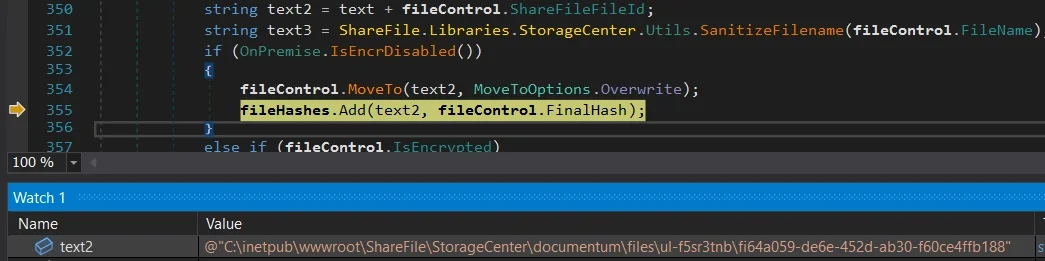
	string text2 = text + fileControl.ShareFileFileId;
	string text3 = ShareFile.Libraries.StorageCenter.Utils.SanitizeFilename(fileControl.FileName);
	if (OnPremise.IsEncrDisabled())
	{
		fileControl.MoveTo(text2, MoveToOptions.Overwrite);
		fileHashes.Add(text2, fileControl.FinalHash);
	}

}
The upload path is prepared, then the file name is appended. ShareFileFileId is an auto-generated UUID, and the file extension is not preserved. In the debugger it looks like this:
On the filesystem, the uploaded file has no extension and a randomised name:
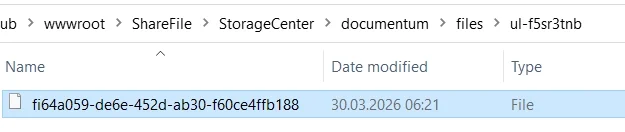
A different functionality was needed. Digging into the StorageCenter.Upload page, reachable through /StorageCenter/Upload.aspx, revealed an interesting detail:
protected void Page_Load(object sender, EventArgs e)
{
    string text = "";
    string text2 = "";
    long num = 0L;
    if (this.Page.Request.HttpMethod == "OPTIONS")
    {
        base.Response.End();
    }
    try
    {
        NameValueCollection requestKeys = SCWebUtils.GetRequestKeys(HttpContext.Current, "filename");
        text = requestKeys["uploadid"];
        if (string.IsNullOrEmpty(text))
        {
            text = Guid.NewGuid().ToString("n");
        }
        UploadLogic.CheckForAvailableDiskSpace((requestKeys["filesize"] == null) ? (-1L) : long.Parse(requestKeys["filesize"]));
        this.ValidateIsPost(text);
        string text3;
        string text4;
        string text5;
        string text6;
        UploadLogic.GetBasePath(requestKeys, out text3, out text4, out text5, out text6);
        this.ValidateParameters(text, text3, text4);
        string onFinishUrl = this.GetOnFinishUrl(text, requestKeys);
        ShareFileUploadNotification shareFileUploadNotification = new ShareFileUploadNotification();
        Hashtable hashtable = new Hashtable();
        Hashtable hashtable2 = new Hashtable();
        Hashtable hashtable3 = new Hashtable();
        int num2 = 0;
        bool flag = false;
        if (requestKeys["unzip"] != null && (requestKeys["unzip"] == "true" || requestKeys["unzip"] == "on"))
        {
            flag = true;
        }
        if (flag)
        {
            num2 += Upload.UnzipFiles(new InputFile[]
            {
                this.File1, this.File2, this.File3, this.File4, this.File5, this.File6, this.File7, this.File8, this.File9, this.File10,
                this.Filedata
            }, shareFileUploadNotification, text, hashtable, hashtable3, text3, text4);
        }

}
The flag is set from the unzip input argument. If unzip is true, Upload.UnzipFiles is called. In short:
- A ZIP file can be uploaded.
- With
unzipset totrue, the ZIP content is extracted into a directory under the already modifiedNetwork Share Location, which the attacker controls. - Extracted files are not renamed afterwards, so an
.aspxfile can be uploaded.
The endpoint could not be driven from the UI, so the HTTP request had to be crafted from scratch. Parsing upload requests is based on unusual code, and getting it right took time. A sample request that exploits the vulnerability:
POST /upload.aspx?id=803436333&uploadid=jtrazo53&bp=test&accountid=1&exp=1970804033&h=[redacted]= HTTP/1.1
Host: sharefile.[redacted]
User-Agent: python-requests/2.31.0
Accept-Encoding: gzip, deflate, br
Accept: */*
Connection: keep-alive
Content-Type: multipart/form-data; boundary=----[redacted]
Content-Length: 1873

------[redacted]
Content-Disposition: form-data; name="bp"

testz\\a
------[redacted]
Content-Disposition: form-data; name="accountid"

1
------[redacted]
Content-Disposition: form-data; name="bm"

2
------[redacted]
Content-Disposition: form-data; name="bo"

3
------[redacted]
Content-Disposition: form-data; name="uploadid"

123
------[redacted]
Content-Disposition: form-data; name="rsu"

12345
------[redacted]
Content-Disposition: form-data; name="NeatUpload_PostBackID"

12345
------[redacted]
Content-Disposition: form-data; name="onfinishurl"

<http://sharefile.com/test>
------[redacted]
Content-Disposition: form-data; name="unzip"

true
------[redacted]
Content-Disposition: form-data; name="File1"; filename="test.zip"; UniqueID="File1"
Content-Type: text/plain

zip-file-with-webshell-here
The unzip field set to true triggers extraction, and File1 carries the ZIP. The request also contains an h parameter, called the "upload secret", which acts as a checksum. If it is not calculated correctly, the request is dropped.
Step 8: compute the upload secret
a) Leak TempData2
The internal TempData2 parameter can be leaked with the following request (the typo is not the researchers'):
GET /ConfigService/api/StroageZoneConfig?&h=<hmac>
The request needs a valid signature: HMAC-SHA256 over the string /configservice/api/stroagezoneconfig using the current ShareFile passphrase. Since the authentication bypass allows setting a new passphrase, this is easy. The response contains TempData2:
{
    "ZoneConfig":
    {
        "TempData2":"[redacted]/gOtQ6aySFgH7FU+21BiEZ5ZGw0WwMne",
		    "...":"..."
		}
}
b) Decrypt the Zone Secret
The leaked TempData2 is a base64-encoded, AES-encrypted Zone Secret. It can be decrypted with:
- A hard-coded salt equal to
p3510060xfZ2s9. - A passphrase, which is an encryption secret.
The decrypted Zone Secret is used in the final step.
c) Calculate the upload HMAC
The decrypted Zone Secret is used to calculate the HMAC-SHA256 for the upload request. The signed part is:
/upload.aspx?id=<id>&uploadid=<uploadid>&bp=test&accountid=1&exp=<timestamp>
When calculated correctly, it is appended to the URL as the h query string parameter, as in the request above.
Step 9: webshell lands in the webroot
The webshell is uploaded and extracted to:
<Network-Storage-Location>/files/ul-<query-string-uploadid>/1/
In the sample case, Network-Storage-Location was set to C:\inetpub\wwwroot\ShareFile\StorageCenter\documentum and the uploadid in the query string was jtrazo53. The webshell and its upload path in action:
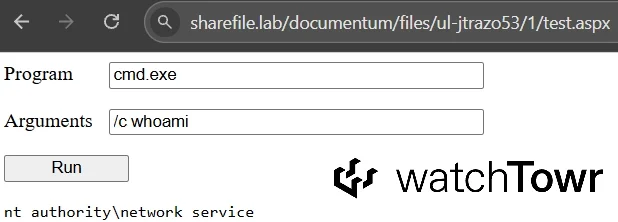
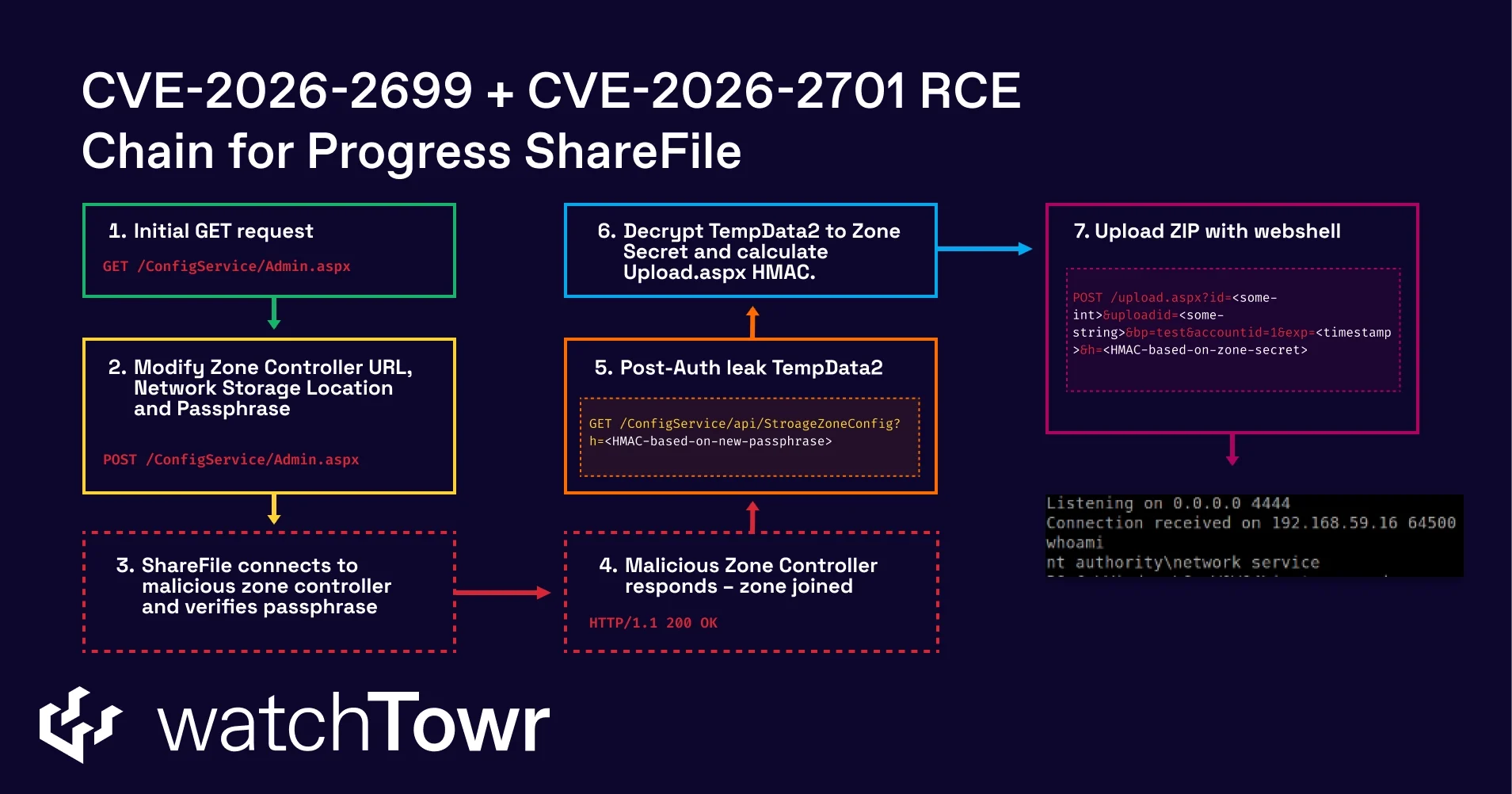
At this stage the full pre-authenticated RCE chain is complete:
Root cause
The authentication bypass is CWE-698, Execution After Redirect. ConfigService.Admin.Page_Load detects an unauthenticated session and calls RedirectAndCompleteRequest, which calls httpContext.Response.Redirect(redirectPath, false). The false argument tells ASP.NET not to terminate execution of the current page, so the remaining functionality in the ConfigService.Admin class runs after the 302. A browser follows the redirect and never sees it, but a client that ignores or strips the Location header gets the admin panel. The redirect was treated as the end of the request, and the framework was explicitly told not to enforce that.
The path to code execution rests on two design weaknesses. First, the Network Share Location validation only checks that the application can write and delete a temporary file at the supplied path. It does not constrain the path to a network share, so the webroot is accepted. Second, the upload endpoint's unzip option extracts archive contents into that location without renaming the extracted files, so the extension survives. The upload secret is an HMAC-SHA256 computed with the decrypted Zone Secret, which is recoverable from TempData2 using a hard-coded salt.
Impact
An unauthenticated attacker can reach the Zone configuration of an exposed Storage Zone Controller and modify fields such as Storage Repository, External Address and Primary Zone Controller. Pointing the repository at attacker-controlled storage exfiltrates files synced or uploaded to the instance. Pointing Primary Zone Controller at a malicious controller connects the victim to it without knowing the old passphrase, potentially exposing further functionality through downstreaming. With the upload path set to the webroot and a crafted upload request, the attacker achieves remote code execution.
The Primary Zone Controller change only works if the server side is authenticated with the ShareFile SaaS, which is the normal operating state. The research was performed against StorageCenter_5.12.3, fully patched at the time, and the affected branch is 5.x.
Fix
The vulnerabilities were resolved in Storage Zone Controller 5.12.4, released to branch 5.x customers on 10 March 2026. The report does not describe the code changes. Conceptually, the redirect should terminate execution (pass true, or end the response after redirecting), the storage location should be constrained to the intended share types rather than any writable path, and archive extraction should not preserve executable extensions in a web-accessible directory.
Detection
A Detection Artifact Generator is available at https://github.com/watchtowrlabs/watchTowr-vs-Progress-ShareFile-CVE-2026-2699. It attempts to access Admin.aspx and verifies that the response:
- Contains a 302 response code.
- Has more than 10000 characters in the response body.
That is enough to confirm exposure to CVE-2026-2699. A DAG covering CVE-2026-2701 was not provided because boilerplate validation of it impacts the availability of targeted systems.
Timeline
| Date | Detail |
|---|---|
| 6 February 2026 | watchTowr discloses Authentication Bypass WT-2026-0006 to Progress Security Team. |
| 6 February 2026 | watchTowr hunts across client attack surfaces for exposure. |
| 6 February 2026 | Progress Security Team acknowledges receipt of disclosure for WT-2026-0006. |
| 13 February 2026 | watchTowr discloses Remote Code Execution Vulnerability WT-2026-0007 to Progress Security Team. |
| 14 February 2026 | Progress Security Team confirms the vulnerability (WT-2026-0006) and begins working on remediation. |
| 14 February 2026 | Progress Security Team confirms WT-2026-0006 is a CWE-698 / EAR vulnerability but requires more information to accurately assess severity and impact. |
| 16 February 2026 | watchTowr provides a Python PoC that chains the Authentication Bypass (WT-2026-0006) and the Remote Code Execution (WT-2026-0007) to achieve Pre-Authenticated Remote Code Execution. |
| 18 February 2026 | Progress Security Team confirms successful replication of the vulnerability chain. |
| 26 February 2026 | Progress Security Team assigns the Authentication Bypass (WT-2026-0006) the tracker CVE-2026-2699 and requests an embargo until April 02 2026. |
| 26 February 2026 | Progress Security Team assigns the Remote Code Execution (WT-2026-0007) the tracker CVE-2026-2701 and requests an embargo until April 02 2026. |
| 10 March 2026 | watchTowr observes the release of Storage Zone Controller 5.12.4 and confirms it remediates the disclosed vulnerabilities. |
| 2 April 2026 | ShareFile embargo lifts and watchTowr publishes research. |
Variants to test
- Other .NET pages that redirect on failed auth. Request each script endpoint and look for a 302 whose body is larger than the redirect stub. A positive result is a
Locationheader plus page markup and aContent-Lengthfar above the size of the redirect HTML. RemovingLocationand rendering the body confirms it. - Other
Response.Redirectcalls withfalse. Search decompiled code forRedirect(with a Boolean second argument. A positive result is a page whose post-redirect logic performs privileged actions. - Storage location validation elsewhere. Supply a local path instead of a UNC share and see whether the configuration is accepted. A positive result is a successful save with a path inside the webroot.
- Archive extraction options on upload endpoints. Look for parameters such as
unzipand test whether extracted files keep their names and extensions. A positive result is an extracted.aspxfile under a web-accessible directory. - HMAC-protected endpoints with recoverable secrets. Check whether configuration responses leak encrypted secrets and whether the decryption uses a hard-coded salt. A positive result is a decryptable value that signs requests to protected endpoints.
What happened, in plain words
Progress ShareFile is a product that companies use to share files with clients and colleagues. Think of it as a private, company-branded version of a file-sharing website: you upload documents, other people download them, and everything is managed in one place. ShareFile used to belong to Citrix and was bought by Progress in 2024. In ShareFile's own words, it "gives you a structured, secure space to work with clients - share files, collect signatures, request data, and manage to-dos in one place".
Most of ShareFile runs in Progress's own data centres. That style of delivery is called SaaS, short for Software as a Service: you do not install the software, you just log in to someone else's servers through your browser, the same way you use webmail. But ShareFile also ships a piece of software that customers install on their own machines, called the Storage Zone Controller. It is a gateway: the ShareFile website in the cloud still handles logins and sharing, but the actual files sit on the customer's own disks or cloud storage. The Storage Zone Controller can keep files on a local disk, on an SMB server (a shared folder on a Windows network), on SharePoint, or in AWS S3 and Azure Storage containers. Companies choose this for data sovereignty (the law says the data must stay in a certain country), for regulatory requirements, or simply because it feels safer to keep your own files on your own hardware.
A quick Internet search for the Storage Zone Controller reveals circa 30,000 instances. That number matters: every one of those is a machine reachable from the Internet that runs this software.
ShareFile has two major branches for applications hosted in IIS. IIS is Microsoft's web server, the program on a Windows machine that answers browser requests. The two branches are:
- Branch 6.x, built on .NET Core
- Branch 5.x, built on ASP.NET
Both are frameworks for writing web applications in C# on Windows. The research touched both branches, but both vulnerabilities described here are specific to branch 5.x. They were identified in StorageCenter_5.12.3, the latest version at the time of writing, and resolved in 5.12.4, released to branch 5.x customers on 10 March 2026.
The two issues chain into pre-authenticated remote code execution. Let us unpack that phrase, because it is the heart of the story:
- Authentication is the act of proving who you are, normally with a username and password. A page that requires authentication asks you to log in first.
- An authentication bypass is a flaw that lets you use a page or feature without logging in at all.
- Remote code execution, or RCE, means an attacker can make the server run commands or programs of their choosing, from a distance, through the web. It is the worst kind of web vulnerability because the attacker is no longer limited to what the website's buttons offer; they can run anything the server's operating system can run.
- Pre-authenticated means all of this happens before any login.
The two issues are:
- CVE-2026-2699 / WT-2026-0006: authentication bypass
- CVE-2026-2701 / WT-2026-0007: remote code execution
A CVE is a public catalogue number for a known security flaw, so that everyone in the world can refer to the same bug unambiguously. WT-2026-0006 and WT-2026-0007 are the researchers' own internal tracking names for the same two issues.
Setting up a test lab
The installation places files in the IIS directory C:\inetpub\wwwroot\ShareFile and registers the application under the IIS "Default Web Site". In plain terms: a web server has a folder on disk whose contents it serves to browsers, called the webroot. Anything placed in that folder can potentially be requested by anyone on the Internet. Here the webroot is C:\inetpub\wwwroot, and ShareFile lives in a subfolder called ShareFile.
All of the application's .dll files were extracted and decompiled into their respective C# code. A DLL is a compiled library: a file full of machine code that the web pages call into. Decompiling means running a tool that turns that machine code back into readable C# source, roughly like translating a finished cake back into a recipe. The researchers did this so they could read exactly what the server does, line by line, instead of guessing from the outside.
After installation, a configuration page is launched from localhost to authenticate the instance against the connected SaaS user. localhost means "this same machine": when a program on the server talks to localhost, the traffic never leaves the computer. ShareFile's cloud offering is Progress's main interface and infrastructure for managing files, and accounts can be created through the website without a sales approval process. That last detail is practical: anyone can sign up and get a working cloud account to pair with a test installation.
The lab was configured to behave like a production deployment:
- Authenticate and connect the Zone Controller to the Progress SaaS.
- Create a Primary Zone that hosts files on a local file server rather than in Progress's SaaS environment.
A Zone is simply a storage configuration: it says where this installation keeps its files. A Primary Zone is the master configuration that other controllers can copy from. Setting the lab up this way means any flaw found applies to a real customer's setup, not just to a toy install.
For a .NET application like this, external pre-authenticated interaction happens through two main surfaces:
- ASHX, ASMX and ASPX files that execute scripted code, which can also reference compiled DLLs.
- Routes such as REST endpoints defined in
web.configand backed by DLL code.
Let us translate that. ASPX, ASHX and ASMX are file types that a .NET web server treats as pages or handlers: when a browser requests one, the server runs code and sends back a result. A REST endpoint is a URL that behaves like a function call over HTTP: you send a request to a specific address and get data back, usually in a machine-readable format. An API (Application Programming Interface) is the general name for this: a set of addresses and rules that programs use to talk to each other, the way a restaurant menu is the agreed list of things you can order. web.config is the configuration file that tells IIS which URLs map to which code.
The methodology was to read the easier script files first, then the large DLLs containing the REST API. Before reading code, each script file and endpoint was requested to observe status code, content length and content type, because the running application can reveal traits that are not obvious in the source. In other words: knock on every door first and note how it answers, then go read the blueprints. A status code is the three-digit number a server sends with every reply: 200 means OK, 302 means "look somewhere else", 401 means "you are not logged in", 403 means "you are not allowed", 404 means "no such page". Content length is how many bytes came back, and content type says what kind of thing it is (HTML page, image, JSON data).
Finding it
All .aspx files in the application were listed and requested. The list is:
/AdvancedStatus.aspx
/cifs/upload-streaming-2.aspx
/cifs/upload.aspx
/ConfigService/Admin.aspx
/ConfigService/Login.aspx
/ConfigService/Networking.aspx
/ConfigService/PreFlightCheck.aspx
/ConfigService/SMTPConfig.aspx
/ConfigService/UpdatePassphrase.aspx
/documentum/upload-streaming-2.aspx
/documentum/upload.aspx
/heartbeat.aspx
/ProxyService/rest/storagecenter.aspx
/rest/queue.aspx
/sp/upload-streaming-2.aspx
/sp/upload.aspx
/thumbnail.aspx
/upload-resumable-1.aspx
/upload-resumable-2.aspx
/upload-resumable-3.aspx
/upload-singlechunk.aspx
/upload-streaming-1.aspx
/upload-streaming-2.aspx
/upload-threaded-1.aspx
/upload-threaded-2.aspx
/upload-threaded-3.aspx
/upload.aspx
Each line is one page on the server. The names hint at their jobs: upload pages receive files, ConfigService pages handle configuration, heartbeat is a health check. The researchers requested every one of them and compared the answers.
The goal was to find differentials: endpoints that do not redirect to authentication and do not return 401 or 403. A differential here means an endpoint that behaves differently from its neighbours. If every door says "log in first" except one, that one deserves a closer look. The configuration endpoints used during setup, such as /ConfigService/Login.aspx, return HTTP 403 (Forbidden) because they are only accessible from the host itself (localhost, [redacted]). That is a sensible protection: the login page for the setup wizard should only be usable by someone sitting at the machine, not by a stranger on the Internet.
One endpoint stood out: /ConfigService/Admin.aspx. Its response was:
HTTP/1.1 302 Found
Cache-Control: private,no-store
Pragma: no-cache
Content-Type: text/html; charset=utf-8
Location: /ConfigService/Login.aspx?callerpage=Admin
Server: Microsoft-IIS/10.0
Access-Control-Allow-Origin: *
Access-Control-Max-Age: 540
Access-Control-Allow-Headers: Content-Type
Access-Control-Allow-Methods: GET, POST, PATCH, DELETE, OPTIONS, HEAD
Strict-Transport-Security: max-age=31536000
X-Content-Type-Options: nosniff
X-XSS-Protection: 1; mode=block
X-Frame-Options: DENY
Date: Mon, 23 Mar 2026 01:59:44 GMT
Content-Length: 22448

<html><head><title>Object moved</title></head><body>
<h2>Object moved to <a href="/ConfigService/Login.aspx?callerpage=Admin">here</a>.</h2>
</body></html>

<!DOCTYPE html PUBLIC "-//W3C//DTD XHTML 1.0 Transitional//EN" "<http://www.w3.org/TR/xhtml1/DTD/xhtml1-transitional.dtd>">

<html xmlns="<http://www.w3.org/1999/xhtml>">
<head id="ctl00_Head1"><title>
	ShareFile - Where Companies Connect
</title>
[... Truncated ...]
Line by line, in plain words:
HTTP/1.1 302 Foundis the status line. 302 is the web's way of saying "the page you asked for is not here, go to this other address instead". It is called a redirect.- The
Cache-Control,PragmaandDatelines are housekeeping: they tell browsers and proxies not to store this response and when it was produced. Content-Type: text/html; charset=utf-8says the body is an HTML web page.Location: /ConfigService/Login.aspx?callerpage=Adminis the address the browser is told to go to. This is the redirect target: the login page.Server: Microsoft-IIS/10.0reveals which web server software produced the reply.- The
Access-Control-*lines are rules for cross-origin requests, that is, which other websites may call this one from a browser and with which methods. Strict-Transport-Security,X-Content-Type-Options,X-XSS-ProtectionandX-Frame-Optionsare security headers: small instructions that harden the browser's behaviour.Content-Length: 22448says the body is 22,448 bytes long. Remember this number.- After the blank line comes the body. The first part is the standard "Object moved" stub that IIS writes for a redirect: a tiny page with a link.
- Then, unexpectedly, comes a full HTML document starting with
<!DOCTYPE html ...and a<title>readingShareFile - Where Companies Connect. That is the admin page itself, truncated in the report.
In a browser, the Location header redirects to Login.aspx, which returns 403 because it is localhost-only. So a normal visitor sees nothing interesting. What was anomalous was the large Content-Length and the content in the body: the admin page markup was being returned alongside the redirect. A redirect stub is a few hundred bytes; 22,448 bytes means a whole page was sent too.
This pattern is familiar from PHP applications, where a developer checks authentication and redirects but forgets to die(), so the rest of the script executes. PHP is another programming language for websites, and die() is the instruction that stops a script immediately. If you tell the browser "go to the login page" but forget to stop the program, the program carries on and finishes its work anyway, sending the results along with the redirect. It is catalogued as CWE-698: Execution After Redirect (EAR). CWE is a catalogue of weakness types, the way CVE is a catalogue of individual bugs. In a .NET application it was unexpected.
Exploitation
Step 1: render the admin panel
To confirm the bypass in a browser, modify the HTTP response with any tool, drop the Location header, and the admin panel renders.
Why does that work? A browser obeys the Location header: it follows the redirect and never shows you the body. But the body is still there. If you intercept the response with a tool that lets you edit it, delete the Location line, and let the browser have the rest, the browser has no instruction to go elsewhere, so it displays the HTML it received. That HTML is the admin panel.
The screenshot shows what is visible after removing the redirecting Location header, allowing the rest of the body to render. Functionality is presented that can be interacted with without authentication.
Step 2: understand the code path
The source of Admin.aspx references a class ConfigService.Admin, whose code lives in the decompiled DLLs. A class is a named bundle of code and data in an object-oriented program; think of it as a labelled drawer in a filing cabinet. Its Page_Load method checks authentication and then redirects. Page_Load is the routine that runs automatically when a page is requested, before anything is shown.
protected void Page_Load(object sender, EventArgs e)
		{
			this._logger.LogDebug("Page_Load Enter", Array.Empty<object>());
			this.Master.ActionHeader = "Select ShareFile " + (Admin.isMultiTenant ? "Multi-Tenant " : string.Empty) + "StorageZone";
			this.Master.HeaderTitle = "<span class=\"ico24 icoAdmin\"></span>" + (Admin.isMultiTenant ? "Multi-Tenant " : string.Empty) + "StorageZone Setup";
			if (!this._sessionHelper.IsSessionAuthenticated(HttpContext.Current.Session))
			{
				this._logger.LogDebug("Not authenticated", Array.Empty<object>());
				string redirectPathWithCallerInfo = this._redirectionHelper.GetRedirectPathWithCallerInfo(WebPage.Login, WebPage.Admin);
				this._redirectionHelper.RedirectAndCompleteRequest(new HttpContextWrapper(HttpContext.Current), redirectPathWithCallerInfo);
				return;
			}
Line by line:
protected void Page_Load(object sender, EventArgs e)declares the routine that runs when the page loads.senderandeare standard event arguments that this code does not use.this._logger.LogDebug("Page_Load Enter", ...)writes a debug message to the log saying the page started.- The two
this.Master.ActionHeaderandthis.Master.HeaderTitlelines set the visible headings of the page, including a small icon and the words "StorageZone Setup". if (!this._sessionHelper.IsSessionAuthenticated(HttpContext.Current.Session))is the security check. A session is the server's memory of who you are across several requests; when you log in, the server gives your browser a session cookie, a small piece of data the browser sends back with every request so the server can recognise you.IsSessionAuthenticatedasks: does this session belong to a logged-in user? The!means "if not".- Inside the
if, the code logs "Not authenticated". GetRedirectPathWithCallerInfo(WebPage.Login, WebPage.Admin)builds the address of the login page, noting that the user was trying to reach the admin page.RedirectAndCompleteRequest(...)sends the redirect.return;exits the routine early. This looks like exactly the right thing to do.
The redirect goes through RedirectAndCompleteRequest():
		public void RedirectAndCompleteRequest(HttpContextBase httpContext, string redirectPath)
		{
			httpContext.Response.Redirect(redirectPath, false);
			HttpApplication applicationInstance = httpContext.ApplicationInstance;
			if (applicationInstance == null)
			{
				return;
			}
			applicationInstance.CompleteRequest();
		}
Line by line:
- The method takes the current HTTP context (everything about this request and response) and the path to redirect to.
httpContext.Response.Redirect(redirectPath, false);is the key line. It tells the response to redirect toredirectPath. The second argument,false, is the problem, as we will see.- The next lines fetch the application instance and, if it exists, call
CompleteRequest(), which tells the framework that this request has been fully handled.
The response is redirected with the native httpContext.Response.Redirect. Two arguments are passed: a string and a Boolean. A Boolean is a value that is either true or false. Most common uses pass only the string, for example Redirect('/ConfigService/Login.aspx?callerpage=Admin'). Here the Boolean false is additionally supplied: Redirect('/ConfigService/Login.aspx?callerpage=Admin', false).
The Microsoft documentation for this overload explains what the Boolean controls: whether execution of the current page should terminate.
In everyday terms: the first argument says "send the visitor to this address", and the second says "and do not stop working on the rest of the page". Passing false is like a receptionist who tells you "the meeting is in room 2" and then carries on reading out the confidential agenda to the empty lobby.
Because ShareFile supplies false:
- The response is a 302 redirecting to
/ConfigService/Login.aspx?callerpage=Admin, which is fine. - The remaining functionality in the
ConfigService.Adminclass is executed rather than terminated, which is not fine.
Step 3: reach the Zone configuration
On /ConfigService/Admin.aspx there are two options:
- Create new Zone
- Join existing Zone
A Zone configuration determines how the instance's files and data are stored. This is the key feature of the on-premises Zone Controller: enterprises store their files on their own infrastructure via the Storage Repository field, which can be SharePoint, AWS S3 buckets or Azure Storage Containers, SMB servers, or the local file system.
From an external perspective, "Create new Zone" produced errors that could not be overcome, so the research moved to "Join existing Zone", which will be present in most, if not all, exposed Storage Zone Controllers on the Internet, since a Zone Controller without a configured Zone would be pointless. That reasoning is worth spelling out: a customer installs this software precisely to attach it to a Zone, so the "join" screen is the one that will be live on real machines.
To test whether the functionality is accessible and actionable pre-authentication, the Zone was configured to connect to a local network share, with the hope of making a slight modification as a litmus test. A network share is a folder on one machine that other machines can read and write over the network; on Windows it is addressed with a UNC path, which looks like \\server\share. A litmus test here means a small, harmless change to see whether changes are accepted at all before attempting anything bigger.
The modifiable fields and their purposes are:
| Field | Purpose |
|---|---|
| Zone | Zone name |
| Primary Zone Controller | URL of the Primary Zone; an array of zone controllers can get their configuration from a Primary Zone |
| Hostname | Hostname of the installation |
| External Address | Internet-facing URL through which the ShareFile SaaS reaches the instance to sync configs, data, etc. |
| Storage Repository | The method in which the files for the ShareFile account are stored |
| Passphrase | The password used to encrypt API/REST endpoints of the current Zone Controller |
A hostname is the human-readable name of a machine on a network, like files.example.com. Encryption is scrambling data with a secret so that only someone holding the secret can unscramble it; the secret here is the passphrase.
When a Zone is created, a Passphrase is needed, and it encrypts all API interactions with that Primary Zone Controller. A pre-authenticated attacker would not know this value. However, when modifying fields such as Storage Repository or External Address, the server auto-populates the Passphrase, so knowing it is not required. In other words, the form quietly fills in the secret for you, so you can save changes without ever typing it.
Step 4: abuse the Storage Repository
Each field was analysed for its security impact if modified by a threat actor. For example, changing the victim's Storage Repository to an AWS S3 bucket under attacker control means files synced or uploaded to the instance are sent to a repository the attacker controls, effectively exfiltrating sensitive files. Exfiltration is the unauthorised copying of data out of an organisation. The comparison is a postal redirect: if you quietly change the address where a company's mail is delivered, you receive all its letters without ever breaking into its office.
The reasoning then moved to the primary/subordinate model: in architectures where a primary server controls subordinate hosts, the primary maintains the source of truth and downstreams commands and configurations. Downstreaming means the master sends instructions down to the workers. If a victim Storage Zone Controller could be coerced into joining a malicious zone, downstreaming might expose additional functionality. The everyday comparison is a branch office that takes its orders from head office: if you can convince the branch that you are head office, you can start giving it orders.
An independent malicious Storage Zone Controller was configured, and the victim Controller was pointed at it via the Primary Zone Controller field. Zone Controllers communicate over an encrypted, signed API, so in a real attack the attacker's Passphrase would need to differ from the victim's. A signed message carries a cryptographic proof of who sent it and that it was not altered in transit, like a wax seal on a letter. Changing the Passphrase normally requires a frontend request supplying the "Old Passphrase", which an attacker does not know.
That "Old Passphrase" is not validated when changing the Primary Zone Controller field, so a victim's Storage Zone Controller can be connected to a malicious one without authentication.
One caveat: this functionality can only be executed if the server side is authenticated with the ShareFile SaaS, which is common because it is required for the Storage Zone Controller to work as intended. In other words, the trick works on installations that are actually in use, which is the normal state of affairs.
Step 5: from admin to code execution
With authentication bypassed and the passphrase modifiable, the next step is code execution.
A file storage solution with admin access logically offers its built-in upload functionality. Such products typically let you specify the storage location, so ShareFile could be reconfigured to store uploaded files in a dangerous location such as the webroot. The imagined steps were:
- Set the upload path to a location within the webroot.
- Upload an ASPX webshell.
- Profit.
A webshell is a small program, written as a web page, that an attacker uploads to a server so they can send it commands through the browser afterwards. It is the difference between getting one look at a filing cabinet and leaving a radio hidden inside it. It did work that way, but it was more tricky and complicated than expected.
Step 6: control the upload path
ShareFile supports various kinds of file storage and uploads, and the candidate to abuse was Local Network Share.
ShareFile lets you define SMB-based storage for files. SMB is the protocol Windows uses to share folders over a network. The Network Share Location parameter suggests a UNC path to an SMB share. The supplied path is validated, through ShareFile.StorageCenter.ConfigService.BusinessLogic.Services.AdminService.ValidateStorageLocation:
private BaseActionResult ValidateStorageLocation(string filePath, string storageLocationType)
{
    BaseActionResult baseActionResult = new BaseActionResult
    {
        IsSuccess = true,
        Message = string.Empty
    };
    try
    {
        using (StreamWriter streamWriter = new StreamWriter(filePath, false))
        {
            streamWriter.Write("SCTest");
            streamWriter.Flush();
        }
    }
    catch (Exception ex)
    {
        this._logger.LogError(ex, "An error occurred validating storage location: writing to " + filePath, Array.Empty<object>());
        baseActionResult.IsSuccess = false;
        baseActionResult.Message = string.Concat(new string[] { "Problem accessing ", storageLocationType, " Location. Check if the ", storageLocationType, " Location is correct and the user has write permission." });
        return baseActionResult;
    }
    try
    {
        if (File.Exists(filePath))
        {
            File.Delete(filePath);
        }
    }
    catch (Exception ex2)
    {
        this._logger.LogError(ex2, "An error occurred validating storage location: deleting " + filePath, Array.Empty<object>());
        baseActionResult.IsSuccess = false;
        baseActionResult.Message = string.Concat(new string[] { "Problem accessing ", storageLocationType, " Location. Check if the ", storageLocationType, " Location is correct and the user has delete permission." });
        return baseActionResult;
    }
    return baseActionResult;
}
Line by line:
- The method receives a
filePath(the place to test) and astorageLocationType(a label such as "Network Share", used in error messages). - It creates a result object, pre-set to success with an empty message.
- The first
tryblock opens aStreamWriteronfilePathand writes the textSCTest, then flushes it. A StreamWriter is the .NET class for writing text to a file.flushforces the text out of memory and onto the disk immediately. This is the write test. - If anything goes wrong, the
catchlogs the error, marks the result as failed, and builds a message telling the user to check the location and their write permission. - The second
tryblock checks whether the file exists and deletes it. This is the cleanup test. - If deletion fails, the
catchdoes the same as before, but mentions delete permission. - Finally the result is returned.
Here filePath is a temporary file supposed to exist in the supplied network share location. The code creates the file, checks it exists, and deletes it. If any step fails, the configuration fails and the error is shown to the user. It is a good functional check, but it delivers no real security: any upload path can be specified, and as long as the application can write to it, the configuration succeeds. The check answers "can I write here?", not "should I write here?".
Nothing stops a path such as:
C:\\inetpub\\wwwroot\\ShareFile\\StorageCenter\\documentum
which is a webroot directory for one of the ShareFile applications. The application can be pointed at its own webroot instead of a network share, and the configuration page then looks as follows.
This is a root cause for the post-authentication RCE, but a webshell still has to be uploaded.
Step 7: find an upload that keeps the extension
The file upload endpoints using Network Share Location as the destination turned out to be unsuitable for webshells because:
- The uploaded file is renamed to a "random" key, such as a GUID.
- The file extension is removed.
A GUID is a long random-looking identifier, like 3f2b8c1e-..., generated so that two files never collide. A file extension is the part after the dot, such as .aspx, which tells the server how to treat the file. Removing it is like relabelling every parcel with a serial number and no contents description: the warehouse can still find it, but nobody can tell at a glance what is inside.
This is a common model for applications with some security awareness: the file is renamed to a key and the key to filename mapping is stored, for example in a database, so the user retrieves the file by key rather than filename. Implemented properly, it protects against things like path traversal. Path traversal is an attack where a crafted filename containing .. tricks the server into writing outside the intended folder.
A sample upload method, ProcessFileControl, shows the behaviour:
private static int ProcessFileControl(InputFile fileControl, ShareFileUploadNotification sfun, string uploadId, Hashtable files, Hashtable fileHashes, string basePath, string accountId)
{
	if (!fileControl.HasFile)
	{
		return 0;
	}
	if (fileControl.ContentLength == 0L)
	{
		return Upload.ProcessZeroByteFile(fileControl.FileName, sfun, uploadId, files);
	}
	string text = ShareFile.StorageCenter.BusinessLogic.Configuration.TempDir + "ul-" + uploadId + Path.DirectorySeparatorChar.ToString();
	if (!Directory.Exists(text))
	{
		Directory.CreateDirectory(text);
	}
	Upload._logger.LogDebug(string.Format("upload.aspx.cs: fileControl.FileName={0}, fileControl.ShareFileFileId={1}, fileControl.ContentLength={2}, fileControl.FileHash={3}, fileControl.IsEncrypted={4}", new object[] { fileControl.FileName, fileControl.ShareFileFileId, fileControl.ContentLength, fileControl.FinalHash, fileControl.IsEncrypted }), Array.Empty<object>());
	string text2 = text + fileControl.ShareFileFileId;
	string text3 = ShareFile.Libraries.StorageCenter.Utils.SanitizeFilename(fileControl.FileName);
	if (OnPremise.IsEncrDisabled())
	{
		fileControl.MoveTo(text2, MoveToOptions.Overwrite);
		fileHashes.Add(text2, fileControl.FinalHash);
	}

}
Line by line:
- The method receives the uploaded file (
fileControl), a notification object, an upload identifier, some hash tables for bookkeeping, a base path and an account identifier. - If there is no file, it returns 0 and does nothing.
- If the file is zero bytes long, it hands off to a special routine for empty files.
- It builds a folder path: the configured temporary directory, plus
ul-, plus the upload ID, plus a path separator. So each upload gets its own folder. - If that folder does not exist, it creates it.
- It writes a debug log line listing the original filename, the ShareFile file ID, the size, the hash and whether the file is encrypted. A hash is a short fingerprint computed from a file's contents; if the contents change, the fingerprint changes.
string text2 = text + fileControl.ShareFileFileId;builds the final destination by appending the file ID to the folder. This is where the original name is lost.SanitizeFilenamecleans the original filename, but the result is stored intext3and not used for the destination.- If encryption is disabled, the file is moved to
text2, overwriting anything there, and its hash is recorded.
The upload path is prepared, then the file name is appended. ShareFileFileId is an auto-generated UUID, and the file extension is not preserved. In the debugger it looks like this:
A debugger is a tool that lets you pause a running program and inspect its variables, like freezing a film to look at a single frame. On the filesystem, the uploaded file has no extension and a randomised name:
A different functionality was needed. Digging into the StorageCenter.Upload page, reachable through /StorageCenter/Upload.aspx, revealed an interesting detail:
protected void Page_Load(object sender, EventArgs e)
{
    string text = "";
    string text2 = "";
    long num = 0L;
    if (this.Page.Request.HttpMethod == "OPTIONS")
    {
        base.Response.End();
    }
    try
    {
        NameValueCollection requestKeys = SCWebUtils.GetRequestKeys(HttpContext.Current, "filename");
        text = requestKeys["uploadid"];
        if (string.IsNullOrEmpty(text))
        {
            text = Guid.NewGuid().ToString("n");
        }
        UploadLogic.CheckForAvailableDiskSpace((requestKeys["filesize"] == null) ? (-1L) : long.Parse(requestKeys["filesize"]));
        this.ValidateIsPost(text);
        string text3;
        string text4;
        string text5;
        string text6;
        UploadLogic.GetBasePath(requestKeys, out text3, out text4, out text5, out text6);
        this.ValidateParameters(text, text3, text4);
        string onFinishUrl = this.GetOnFinishUrl(text, requestKeys);
        ShareFileUploadNotification shareFileUploadNotification = new ShareFileUploadNotification();
        Hashtable hashtable = new Hashtable();
        Hashtable hashtable2 = new Hashtable();
        Hashtable hashtable3 = new Hashtable();
        int num2 = 0;
        bool flag = false;
        if (requestKeys["unzip"] != null && (requestKeys["unzip"] == "true" || requestKeys["unzip"] == "on"))
        {
            flag = true;
        }
        if (flag)
        {
            num2 += Upload.UnzipFiles(new InputFile[]
            {
                this.File1, this.File2, this.File3, this.File4, this.File5, this.File6, this.File7, this.File8, this.File9, this.File10,
                this.Filedata
            }, shareFileUploadNotification, text, hashtable, hashtable3, text3, text4);
        }

}
Line by line:
- The routine starts by declaring empty variables and a zero counter.
- If the request method is
OPTIONS, it ends the response immediately.OPTIONSis a standard HTTP method used by browsers to ask what a server allows before sending a real request; this line handles that pre-flight question. - Inside the
try,GetRequestKeyscollects the request's form fields into a lookup table. - It reads the
uploadidfield. If it is empty, it generates a new random GUID instead. - It checks there is enough disk space, using the
filesizefield if present, or -1 if not. ValidateIsPostchecks the request is a POST, that is, a submission of data rather than a simple page fetch.GetBasePathworks out the base path from the request fields, returning it in four output variables.ValidateParameterschecks the upload ID and paths.- It builds the URL to call when the upload finishes.
- It creates a notification object and three hash tables for bookkeeping.
bool flag = false;sets a switch to off.- The
ifchecks whether theunzipfield exists and equalstrueoron. If so, the switch is turned on. - If the switch is on, it calls
Upload.UnzipFileswith up to ten uploaded files plus aFiledatafield, the upload ID, the bookkeeping tables and the base path.
The flag is set from the unzip input argument. If unzip is true, Upload.UnzipFiles is called. In short:
- A ZIP file can be uploaded.
- With
unzipset totrue, the ZIP content is extracted into a directory under the already modifiedNetwork Share Location, which the attacker controls. - Extracted files are not renamed afterwards, so an
.aspxfile can be uploaded.
A ZIP file is an archive: one file containing many, like a box containing parcels. Extraction unpacks the box. The earlier upload path renamed each file; this one unpacks the contents as they are, names and extensions included.
The endpoint could not be driven from the UI, so the HTTP request had to be crafted from scratch. Parsing upload requests is based on unusual code, and getting it right took time. A sample request that exploits the vulnerability:
POST /upload.aspx?id=803436333&uploadid=jtrazo53&bp=test&accountid=1&exp=1970804033&h=[redacted]= HTTP/1.1
Host: sharefile.[redacted]
User-Agent: python-requests/2.31.0
Accept-Encoding: gzip, deflate, br
Accept: */*
Connection: keep-alive
Content-Type: multipart/form-data; boundary=----[redacted]
Content-Length: 1873

------[redacted]
Content-Disposition: form-data; name="bp"

testz\\a
------[redacted]
Content-Disposition: form-data; name="accountid"

1
------[redacted]
Content-Disposition: form-data; name="bm"

2
------[redacted]
Content-Disposition: form-data; name="bo"

3
------[redacted]
Content-Disposition: form-data; name="uploadid"

123
------[redacted]
Content-Disposition: form-data; name="rsu"

12345
------[redacted]
Content-Disposition: form-data; name="NeatUpload_PostBackID"

12345
------[redacted]
Content-Disposition: form-data; name="onfinishurl"

<http://sharefile.com/test>
------[redacted]
Content-Disposition: form-data; name="unzip"

true
------[redacted]
Content-Disposition: form-data; name="File1"; filename="test.zip"; UniqueID="File1"
Content-Type: text/plain

zip-file-with-webshell-here
Line by line:
POST /upload.aspx?...is the request line: send data to the upload page, with several values in the URL after the?. Those are query string parameters, the samename=valuepairs you see in a browser address bar.id,uploadid,bp,accountid,expandhare all such parameters.Host: sharefile.[redacted]names the server being contacted.User-Agent: python-requests/2.31.0says which program sent the request; here it is a Python scripting library, not a browser.Accept-EncodingandAcceptsay which compression and content types the client can handle.Connection: keep-aliveasks to keep the network connection open for further requests.Content-Type: multipart/form-data; boundary=...is important. multipart/form-data is the format browsers use to submit forms that include files. Because the body contains several parts, a boundary string separates them, like dividers in a box of chocolates.Content-Length: 1873gives the body size.- After the blank line, each part begins with the boundary line, then a
Content-Dispositionline naming the field, then a blank line, then the value. The fields here arebp,accountid,bm,bo,uploadid,rsu,NeatUpload_PostBackID,onfinishurl,unzipandFile1. - The
unzippart has the valuetrue, which turns on extraction. - The
File1part hasfilename="test.zip", so it is the ZIP archive, and its content is the placeholderzip-file-with-webshell-here.
The unzip field set to true triggers extraction, and File1 carries the ZIP. The request also contains an h parameter, called the "upload secret", which acts as a checksum. If it is not calculated correctly, the request is dropped. A checksum here is a short code computed from the request using a secret; the server recomputes it and compares. If they differ, the server assumes the request was forged or altered and ignores it.
Step 8: compute the upload secret
a) Leak TempData2
The internal TempData2 parameter can be leaked with the following request (the typo is not the researchers'):
GET /ConfigService/api/StroageZoneConfig?&h=<hmac>
Line by line: GET means "fetch this"; the path points at a configuration API; StroageZoneConfig is misspelled in the product itself, which is why the researchers kept it; h=<hmac> is the signature parameter, where <hmac> stands for the value you must compute. A GET request asks for data without changing anything, as opposed to POST, which submits data.
The request needs a valid signature: HMAC-SHA256 over the string /configservice/api/stroagezoneconfig using the current ShareFile passphrase. HMAC stands for Hash-based Message Authentication Code: a way of combining a message and a secret key to produce a code that only someone with the key could have made. SHA256 is the hashing algorithm used inside it. Since the authentication bypass allows setting a new passphrase, this is easy. The response contains TempData2:
{
    "ZoneConfig":
    {
        "TempData2":"[redacted]/gOtQ6aySFgH7FU+21BiEZ5ZGw0WwMne",
		    "...":"..."
		}
}
JSON is a text format for structured data: curly braces hold objects, names in quotes are keys, and values follow a colon. Here the outer object has a key ZoneConfig, whose value is another object containing TempData2 and other fields, abbreviated as "...":"...".
b) Decrypt the Zone Secret
The leaked TempData2 is a base64-encoded, AES-encrypted Zone Secret. Base64 is a way of writing arbitrary bytes using only ordinary letters, digits and a few symbols, so binary data can travel inside text. AES is a widely used encryption standard. It can be decrypted with:
- A hard-coded salt equal to
p3510060xfZ2s9. - A passphrase, which is an encryption secret.
A salt is extra random-looking data mixed into encryption so that the same password does not always produce the same ciphertext. "Hard-coded" means it is written directly into the program rather than generated per installation, so it is the same everywhere and can be read from the code.
The decrypted Zone Secret is used in the final step.
c) Calculate the upload HMAC
The decrypted Zone Secret is used to calculate the HMAC-SHA256 for the upload request. The signed part is:
/upload.aspx?id=<id>&uploadid=<uploadid>&bp=test&accountid=1&exp=<timestamp>
This is the portion of the URL that the signature covers. <id>, <uploadid> and <timestamp> are placeholders for the actual values used in the request. When calculated correctly, it is appended to the URL as the h query string parameter, as in the request above.
Step 9: webshell lands in the webroot
The webshell is uploaded and extracted to:
<Network-Storage-Location>/files/ul-<query-string-uploadid>/1/
This is the folder layout the extraction produces: the configured storage location, then files, then a folder named ul- plus the upload ID from the query string, then 1. In the sample case, Network-Storage-Location was set to C:\inetpub\wwwroot\ShareFile\StorageCenter\documentum and the uploadid in the query string was jtrazo53. The webshell and its upload path in action:
At this stage the full pre-authenticated RCE chain is complete:
Root cause
The authentication bypass is CWE-698, Execution After Redirect. ConfigService.Admin.Page_Load detects an unauthenticated session and calls RedirectAndCompleteRequest, which calls httpContext.Response.Redirect(redirectPath, false). The false argument tells ASP.NET not to terminate execution of the current page, so the remaining functionality in the ConfigService.Admin class runs after the 302. A browser follows the redirect and never sees it, but a client that ignores or strips the Location header gets the admin panel. The redirect was treated as the end of the request, and the framework was explicitly told not to enforce that.
The path to code execution rests on two design weaknesses. First, the Network Share Location validation only checks that the application can write and delete a temporary file at the supplied path. It does not constrain the path to a network share, so the webroot is accepted. Second, the upload endpoint's unzip option extracts archive contents into that location without renaming the extracted files, so the extension survives. The upload secret is an HMAC-SHA256 computed with the decrypted Zone Secret, which is recoverable from TempData2 using a hard-coded salt.
Impact
An unauthenticated attacker can reach the Zone configuration of an exposed Storage Zone Controller and modify fields such as Storage Repository, External Address and Primary Zone Controller. Pointing the repository at attacker-controlled storage exfiltrates files synced or uploaded to the instance. Pointing Primary Zone Controller at a malicious controller connects the victim to it without knowing the old passphrase, potentially exposing further functionality through downstreaming. With the upload path set to the webroot and a crafted upload request, the attacker achieves remote code execution.
The Primary Zone Controller change only works if the server side is authenticated with the ShareFile SaaS, which is the normal operating state. The research was performed against StorageCenter_5.12.3, fully patched at the time, and the affected branch is 5.x.
Fix
The vulnerabilities were resolved in Storage Zone Controller 5.12.4, released to branch 5.x customers on 10 March 2026. The report does not describe the code changes. Conceptually, the redirect should terminate execution (pass true, or end the response after redirecting), the storage location should be constrained to the intended share types rather than any writable path, and archive extraction should not preserve executable extensions in a web-accessible directory.
Detection
A Detection Artifact Generator is available at https://github.com/watchtowrlabs/watchTowr-vs-Progress-ShareFile-CVE-2026-2699. A Detection Artifact Generator, or DAG, is a small tool that checks whether a system shows the signs of a given vulnerability, so defenders can find exposed machines. It attempts to access Admin.aspx and verifies that the response:
- Contains a 302 response code.
- Has more than 10000 characters in the response body.
That is enough to confirm exposure to CVE-2026-2699. A DAG covering CVE-2026-2701 was not provided because boilerplate validation of it impacts the availability of targeted systems.
Timeline
| Date | Detail |
|---|---|
| 6 February 2026 | watchTowr discloses Authentication Bypass WT-2026-0006 to Progress Security Team. |
| 6 February 2026 | watchTowr hunts across client attack surfaces for exposure. |
| 6 February 2026 | Progress Security Team acknowledges receipt of disclosure for WT-2026-0006. |
| 13 February 2026 | watchTowr discloses Remote Code Execution Vulnerability WT-2026-0007 to Progress Security Team. |
| 14 February 2026 | Progress Security Team confirms the vulnerability (WT-2026-0006) and begins working on remediation. |
| 14 February 2026 | Progress Security Team confirms WT-2026-0006 is a CWE-698 / EAR vulnerability but requires more information to accurately assess severity and impact. |
| 16 February 2026 | watchTowr provides a Python PoC that chains the Authentication Bypass (WT-2026-0006) and the Remote Code Execution (WT-2026-0007) to achieve Pre-Authenticated Remote Code Execution. |
| 18 February 2026 | Progress Security Team confirms successful replication of the vulnerability chain. |
| 26 February 2026 | Progress Security Team assigns the Authentication Bypass (WT-2026-0006) the tracker CVE-2026-2699 and requests an embargo until April 02 2026. |
| 26 February 2026 | Progress Security Team assigns the Remote Code Execution (WT-2026-0007) the tracker CVE-2026-2701 and requests an embargo until April 02 2026. |
| 10 March 2026 | watchTowr observes the release of Storage Zone Controller 5.12.4 and confirms it remediates the disclosed vulnerabilities. |
| 2 April 2026 | ShareFile embargo lifts and watchTowr publishes research. |
A PoC, or proof of concept, is a small program that demonstrates a vulnerability works, so the vendor can reproduce it. An embargo is an agreed date before which the details stay private, giving the vendor time to ship a fix.
Variants to test
- Other .NET pages that redirect on failed auth. Request each script endpoint and look for a 302 whose body is larger than the redirect stub. A positive result is a
Locationheader plus page markup and aContent-Lengthfar above the size of the redirect HTML. RemovingLocationand rendering the body confirms it. - Other
Response.Redirectcalls withfalse. Search decompiled code forRedirect(with a Boolean second argument. A positive result is a page whose post-redirect logic performs privileged actions. - Storage location validation elsewhere. Supply a local path instead of a UNC share and see whether the configuration is accepted. A positive result is a successful save with a path inside the webroot.
- Archive extraction options on upload endpoints. Look for parameters such as
unzipand test whether extracted files keep their names and extensions. A positive result is an extracted.aspxfile under a web-accessible directory. - HMAC-protected endpoints with recoverable secrets. Check whether configuration responses leak encrypted secrets and whether the decryption uses a hard-coded salt. A positive result is a decryptable value that signs requests to protected endpoints.
Glossary
- API: a defined set of addresses and rules that programs use to talk to each other, like a menu of things you can order.
- ASP.NET / .NET Core: Microsoft frameworks for building web applications in C# on Windows.
- ASPX / ASHX / ASMX: file types that a .NET web server runs as pages or handlers when requested.
- Authentication: proving who you are, usually with a username and password.
- Authentication bypass: a flaw that lets someone use a protected feature without logging in.
- Base64: a way of writing binary data using ordinary text characters.
- Boolean: a value that is either true or false.
- Checksum: a short code computed from data, used to detect changes or forgery.
- Class: a named bundle of code and data in an object-oriented program.
- Content length: the size in bytes of a response or request body.
- Content type: a label saying what kind of data a response contains, such as HTML or JSON.
- CVE: a public catalogue number for a known security vulnerability.
- CWE: a catalogue of weakness types, as opposed to individual bugs.
- Debugger: a tool that pauses a running program so you can inspect its variables.
- Decompile: turn compiled machine code back into readable source code.
- Differential: a difference in behaviour between endpoints that points to something worth investigating.
- DLL: a compiled library file that applications load and call into.
- Downstreaming: a master server sending commands or configuration down to subordinate servers.
- Encryption: scrambling data with a secret so only the holder of the secret can read it.
- Exfiltration: unauthorised copying of data out of an organisation.
- File extension: the part of a filename after the dot, such as
.aspx, that tells the server how to treat the file. - GET: an HTTP request that fetches data without changing anything.
- GUID: a long random-looking identifier used to give things unique names.
- Hash: a short fingerprint computed from data; changing the data changes the fingerprint.
- HMAC: a code computed from a message and a secret key, proving the message came from someone with the key.
- Hostname: the human-readable name of a machine on a network.
- IIS: Microsoft's web server software for Windows.
- JSON: a text format for structured data using braces, keys and values.
- localhost: the name for the machine itself; traffic to it never leaves the computer.
- multipart/form-data: the format browsers use to submit forms that include files, with a boundary separating the parts.
- Network share: a folder on one machine that other machines can read and write over the network.
- Passphrase: a password-like secret used to encrypt or sign data.
- Path traversal: an attack using
..in a filename to write or read outside the intended folder. - PHP: a programming language commonly used for websites.
- PoC: proof of concept, a small program demonstrating that a vulnerability works.
- POST: an HTTP request that submits data to the server.
- Pre-authenticated: happening before any login.
- Query string parameters: the
name=valuepairs after the?in a URL. - RCE (remote code execution): making a server run commands of the attacker's choosing from a distance.
- Redirect: a server reply telling the browser to go to a different address, usually status 302.
- REST endpoint: a URL that behaves like a function call over HTTP, returning data.
- SaaS: Software as a Service; software you use through someone else's servers via a browser.
- Salt: extra data mixed into encryption so the same password does not always produce the same ciphertext.
- Session: the server's memory of who you are across several requests.
- Session cookie: a small piece of data the browser sends with each request so the server can recognise the session.
- SHA256: a widely used hashing algorithm.
- Signed: carrying a cryptographic proof of origin and integrity, like a wax seal.
- SMB: the protocol Windows uses to share folders over a network.
- Status code: the three-digit number a server sends with every reply, such as 200, 302, 401, 403.
- UNC path: a Windows network address for a shared folder, written like
\\server\share. - Webroot: the folder on disk whose contents a web server serves to browsers.
- Webshell: a small web page uploaded to a server that lets an attacker send it commands through the browser.
- ZIP file: an archive containing one or more files, which can be extracted.
- Zone: a storage configuration saying where an installation keeps its files.
- Primary Zone: the master configuration that other controllers can copy from.


