Let’s Go For Whole Company
An Apache Guacamole login panel was exposed on a virtual host and still used the default credentials, so the tester logged in as the administrator. From there they had remote access to the gateway and monitoring server and could control the whole organisation.

Hello amazing hackers, here we are with another amazing post, this time we are not going to talk about the effects of a vulnerability on users or even the database. This time we want to talk about taking over an entire organization.
The full write-up lives on its author's site
It belongs to its author, so we link to it rather than copy it. The other two tabs are our own rewrites, checked against it.
Context
This engagement was a private pentest project for a government agency. The scope was two domains together with their subdomains. The researcher notes that more than 90% of the process of finding this vulnerability is summed up in the calculation.

The initial pass on the main system produced a few XSS vulnerabilities. Time spent on the subdomain side produced nothing. The researcher then returned to the target with no bug in mind, purely to do deep reconnaissance.
Setup
The report does not list versions for any of the tools used. The toolset named in the text is:
| Tool | Role in the workflow |
|---|---|
| subfinder | Ready-made subdomain enumeration |
| DNS brute force tooling (unnamed) | Brute forcing DNS records |
| DNSgen | Generating candidate names, combined with the brute force output |
| DNSX | Resolving subdomains to IP addresses |
| Port scanner (unnamed) | Port scanning the resulting IPs |
| FFUF | Virtual host discovery |
Finding it
Subdomain enumeration
Extracting subdomains from the pair of domains produced close to 10 subdomains, some of which were available. The next step was fuzzing those subdomains for all kinds of backup files. That produced some paths but nothing that looked important.
The researcher then used ready tools such as subfinder, but suspected a subdomain had been missed. DNS brute forcing with other tools, combined with DNSgen and followed by de-duplication of the data, raised the count to 15 subdomains.
The 5 new subdomains themselves held nothing, but 3 of them resolved to an IP address that the other 12 did not. DNSX was used to pull 3 IPs out of those subdomains.
Port scanning and virtual hosts
Port scanning the IPs gave uninteresting results. The researcher's habit on a deep engagement is to always perform virtual host discovery against the target using public wordlists and the subdomains of the domain.
Using the subdomains against the IPs achieved nothing. Fuzzing the IP that had come out of the DNS brute force with a public wordlist did: it revealed a virtual host named admin.
Exploitation
Step 1: Fuzz virtual hosts on the IP
Virtual hosts can be fuzzed with FFUF as follows:
FFUF -w ~/wordlist.txt -u http://[redacted] -H "Host: FUZZ"
The wordlist is supplied with -w, the IP is the request target in -u, and -H "Host: FUZZ" substitutes each wordlist entry into the Host header. A distinct response for a given word identifies a virtual host served from that IP. Here the word admin produced such a response.
Step 2: Open the virtual host and log in with defaults
Opening the virtual host presented a Guacamole login panel. The service defaults to the username and password guacadmin. Entering that username and password logged the researcher into the admin account.
Step 3: Assess the access
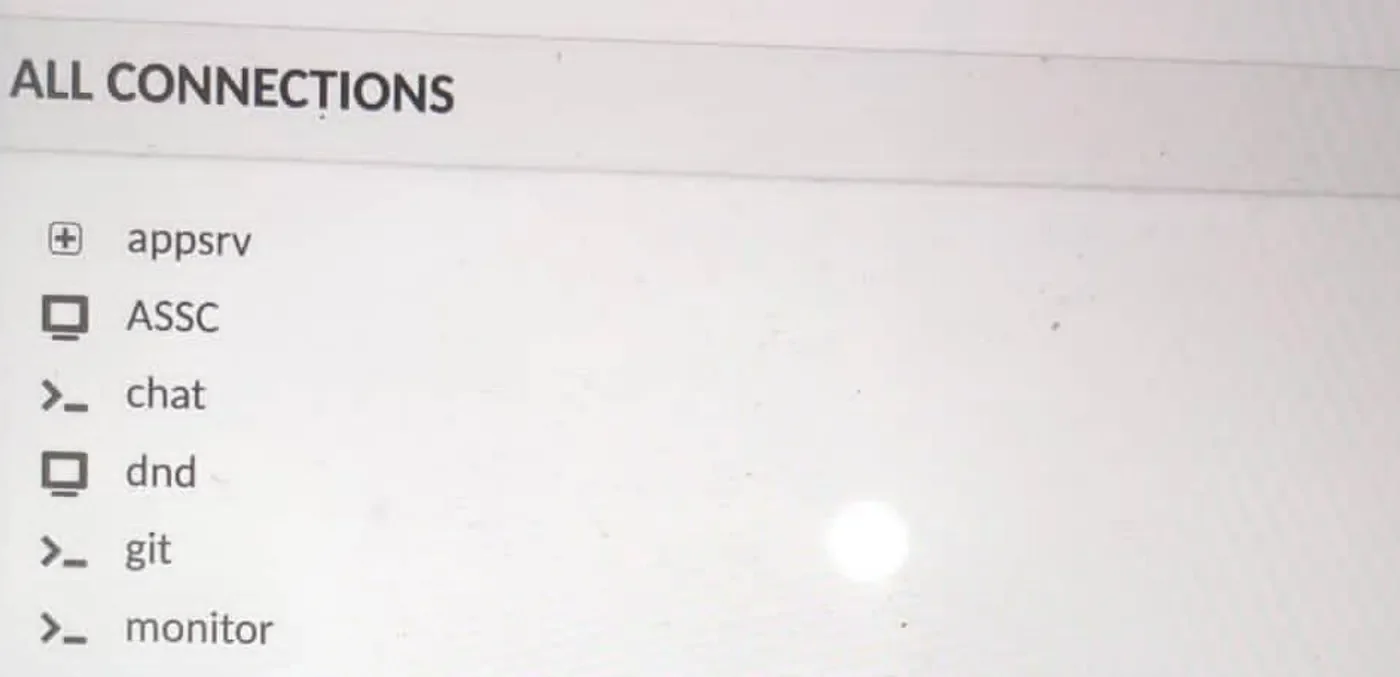
The admin account gave remote connection access to the gate and monitoring server and to many other systems. The researcher describes the level of access as incredibly high, sufficient to control the entire organisation.
Root cause
Two conditions combined. First, a service was reachable through a virtual host named admin on an IP found by DNS brute force, discovered by fuzzing the IP with a public wordlist. Second, the Guacamole instance was left with its default administrative credentials, guacadmin / guacadmin, unchanged.
Impact
With the admin account the researcher held remote connection access to the gate and monitoring server and to many other systems, and states that the access level allowed control of the entire organisation. The impact is bounded by what the Guacamole instance was configured to reach: the report describes the gate and monitoring server and other connected systems, and does not enumerate them further.
Fix
The report does not state what remediation was applied.
Variants to test
- Host header fuzzing on every in-scope IP. Run FFUF with
-H "Host: FUZZ"against each resolved IP using a public wordlist. A positive result is a response that differs in status, length or body from the baseline for a candidate name, as happened here withadmin. - DNS brute force plus generation. Combine brute force output with DNSgen and de-duplicate before resolving with DNSX. A positive result is a subdomain that resolves to an IP none of the other subdomains use, which is what pointed at the interesting host here.
- Default credentials on management panels. For any login panel reached through a discovered virtual host, try the product's documented default administrative account. A positive result is a successful login to an administrative interface, as with
guacadminon Guacamole. - Backup file fuzzing on subdomains. Fuzz each subdomain for common backup file names. A positive result is a retrievable archive or copy of application files; in this engagement the paths found were not important, but the technique is cheap to repeat.
What happened, in plain words
A security researcher was hired to test the systems of a government agency. This kind of job is called a private pentest: the organisation gives permission in advance, and the tester tries to break in the way a real attacker would, then reports what they found. The agency handed over two website addresses (domains) and everything that lives underneath them (subdomains).
The goal this time was not to find one small bug on one website. It was to see whether the whole organisation could be taken over. The researcher's own summary is that more than 90% of the work that led to the result was looking around and thinking carefully, not breaking anything. In security slang, looking around like this is called reconnaissance, or recon.
The first pass on the main system turned up a few XSS vulnerabilities. XSS, short for cross-site scripting, is a bug where a website lets an attacker slip their own little program into a page that other visitors then load in their browser. It is a real problem, but it is small compared with controlling an entire network. Time spent on the subdomain side produced nothing at all.
A few days later the researcher came back to the target with no bug in mind, purely to do deep reconnaissance. That decision is the heart of the story: instead of hunting for a specific flaw, they mapped the organisation's footprint more thoroughly than before, and the map itself revealed the way in.
Setup
The report does not list versions for any of the tools used. The toolset named in the text is:
| Tool | Role in the workflow |
|---|---|
| subfinder | Ready-made subdomain enumeration |
| DNS brute force tooling (unnamed) | Brute forcing DNS records |
| DNSgen | Generating candidate names, combined with the brute force output |
| DNSX | Resolving subdomains to IP addresses |
| Port scanner (unnamed) | Port scanning the resulting IPs |
| FFUF | Virtual host discovery |
A few of those terms deserve a plain explanation before we go further, because the whole story depends on them.
A domain is the name you type in a browser, like example.com. A subdomain is a name that hangs off it, like shop.example.com or mail.example.com. Organisations often have many subdomains, and each one can point at a different machine. Finding them all is the first job of any recon.
An IP address is the numeric address of a machine on the internet, the equivalent of a street address. A subdomain is a name that gets translated into an IP address by a system called DNS, the internet's phone book. Several subdomains can point at the same IP address, and one IP address can host many different websites.
A port is a numbered door on a machine. A single server can run many services at once, each listening on its own port, the way one building can have a front door, a delivery entrance and a fire exit. Port scanning means knocking on those doors to see which ones answer.
A virtual host is a way for one machine to serve several different websites from the same IP address. When your browser asks for a page, it sends along the name it wants in a small piece of the request called the Host header. The server reads that name and decides which website to show. If you ask for a name the server does not recognise, you get a default page. If you ask for a name it does recognise, you get that site. This is why a single IP can hide several sites, and why finding the right name matters.
Finding it
Subdomain enumeration
Extracting subdomains from the pair of domains produced close to 10 subdomains, some of which were available. The next step was fuzzing those subdomains for all kinds of backup files. Fuzzing means trying a long list of guesses automatically and watching for answers that stand out. That produced some paths but nothing that looked important.
The researcher then used ready tools such as subfinder, but suspected a subdomain had been missed. This is a reasonable suspicion: automated tools only know what has been published or seen before, and an organisation's internal names may never appear in those sources. DNS brute forcing with other tools, combined with DNSgen and followed by de-duplication of the data, raised the count to 15 subdomains.
DNS brute forcing means taking a long list of common names (admin, mail, vpn, test and so on) and asking the phone book, one by one, whether that name exists under the domain. DNSgen is a tool that generates plausible name variations, so the guesses are not just a fixed list but combinations built from what is already known. De-duplication simply means removing repeats, so the same name is not checked twice.
The 5 new subdomains themselves held nothing, but 3 of them resolved to an IP address that the other 12 did not. That is the moment worth pausing on. Out of 15 names, 12 shared one set of addresses and 3 pointed somewhere else. A different address is a different machine, and a different machine is a place the earlier, shallower recon never looked. DNSX was used to pull 3 IPs out of those subdomains.
Port scanning and virtual hosts
Port scanning the IPs gave uninteresting results. No open door led anywhere obviously useful. The researcher's habit on a deep engagement is to always perform virtual host discovery against the target using public wordlists and the subdomains of the domain. The reasoning is that a port scan only tells you which doors are open; it does not tell you which websites are hiding behind them.
Using the subdomains against the IPs achieved nothing. Fuzzing the IP that had come out of the DNS brute force with a public wordlist did: it revealed a virtual host named admin.
Exploitation
Step 1: Fuzz virtual hosts on the IP
Virtual hosts can be fuzzed with FFUF as follows:
FFUF -w ~/wordlist.txt -u http://[redacted] -H "Host: FUZZ"
Line by line, in plain words:
FFUFis the name of the program being run. It is a fuzzer: it sends many requests automatically, each one slightly different, and shows you the responses.-w ~/wordlist.txttells it where the list of guesses lives. The~is shorthand for your home folder, andwordlist.txtis a text file with one candidate name per line. Public wordlists with thousands of common names are widely available.-u http://[redacted]is the address being contacted. Here it is an IP address rather than a name, because the point is to talk to the machine directly and vary the name separately.-H "Host: FUZZ"adds a header to each request. A header is a small labelled line of extra information that travels with a web request, like the note you write on an envelope.Hostis the header that carries the website name.FUZZis a placeholder: FFUF replaces it with each word from the list, one request per word.
So the command asks the same machine, over and over, "do you know a site called admin? do you know a site called mail? do you know a site called test?" and so on down the list. Most answers look identical, because the server falls back to its default page. When one answer looks different, that word is a real virtual host. Here the word admin produced such a response.
Step 2: Open the virtual host and log in with defaults
Opening the virtual host presented a Guacamole login panel. Apache Guacamole is a piece of software that lets people reach other machines remotely through a web browser, instead of installing a separate remote desktop program. Organisations use it as a gateway: staff log in to Guacamole, and from there they open connections to the servers they are allowed to use. That makes it a very sensitive piece of software, because whoever controls it can reach everything behind it.
The service defaults to the username and password guacadmin. A default credential is a username and password that the software ships with so that it works out of the box. It is published in the documentation, which means anyone who recognises the product knows it. The only safe practice is to change it before the service is reachable by anyone else. Entering that username and password logged the researcher into the admin account.
Step 3: Assess the access
The admin account gave remote connection access to the gate and monitoring server and to many other systems. The researcher describes the level of access as incredibly high, sufficient to control the entire organisation.
Root cause
Two conditions combined. First, a service was reachable through a virtual host named admin on an IP found by DNS brute force, discovered by fuzzing the IP with a public wordlist. In other words, there was no public name pointing at it, so ordinary browsing and ordinary subdomain tools would never have found it. It was hidden, but not protected.
Second, the Guacamole instance was left with its default administrative credentials, guacadmin / guacadmin, unchanged.
Think of it as a back door to an office building that nobody lists on the directory board. It is not locked, but you have to guess that it exists and what it is called. Once you guess the name, the key is hanging next to it.
Impact
With the admin account the researcher held remote connection access to the gate and monitoring server and to many other systems, and states that the access level allowed control of the entire organisation. The impact is bounded by what the Guacamole instance was configured to reach: the report describes the gate and monitoring server and other connected systems, and does not enumerate them further.
Fix
The report does not state what remediation was applied.
Variants to test
These are the same techniques, written so that you can repeat them on a target you are authorised to test. Never run them against a system you do not have written permission to touch.
- Host header fuzzing on every in-scope IP. Run FFUF with
-H "Host: FUZZ"against each resolved IP using a public wordlist. A positive result is a response that differs in status, length or body from the baseline for a candidate name, as happened here withadmin. - DNS brute force plus generation. Combine brute force output with DNSgen and de-duplicate before resolving with DNSX. A positive result is a subdomain that resolves to an IP none of the other subdomains use, which is what pointed at the interesting host here.
- Default credentials on management panels. For any login panel reached through a discovered virtual host, try the product's documented default administrative account. A positive result is a successful login to an administrative interface, as with
guacadminon Guacamole. - Backup file fuzzing on subdomains. Fuzz each subdomain for common backup file names. A positive result is a retrievable archive or copy of application files; in this engagement the paths found were not important, but the technique is cheap to repeat.
Glossary
- Pentest: an authorised attempt to break into a system, done with permission so that the owner can fix what is found.
- Domain: the main name of a website, such as example.com.
- Subdomain: a name that sits under a domain, such as shop.example.com.
- Reconnaissance (recon): the information-gathering phase of a test, before any attempt to break in.
- XSS (cross-site scripting): a bug where a site lets an attacker insert their own code into a page that other visitors load.
- IP address: the numeric address of a machine on the internet.
- DNS: the system that translates names into IP addresses, like a phone book.
- DNS brute forcing: asking DNS whether a long list of guessed names exists under a domain.
- DNSgen: a tool that generates plausible name variations to feed into that guessing.
- De-duplication: removing repeated entries from a list.
- DNSX: a tool that takes names and looks up the IP addresses they resolve to.
- Port: a numbered door on a machine through which a service listens.
- Port scanning: checking which ports on a machine answer, to learn what services run there.
- Virtual host: a website served from a machine based on the name sent in the
Hostheader, allowing several sites to share one IP. - Host header: the part of a web request that carries the website name the browser wants.
- Fuzzing: sending many automated variations of a request and watching for responses that stand out.
- Wordlist: a text file with one candidate guess per line, used to drive a fuzzer.
- FFUF: a command-line fuzzing tool that substitutes words from a list into a request.
- Apache Guacamole: software that provides remote access to other machines through a web browser, acting as a gateway.
- Default credential: a username and password shipped with a product so it works out of the box, published in its documentation.
- Admin account: an account with the highest level of permission on a system.
- Root cause: the underlying condition that made the problem possible, as opposed to the symptom.
- Remediation: the fix applied to remove a problem.